

What is ChatbotX?
ChatbotX is an open-source chat marketing and messaging automation platform, positioned by its authors as an alternative to ManyChat, Chatfuel, Wati and Respond.io. One workspace connects WhatsApp, Facebook Messenger, Instagram, Threads, TikTok, Telegram, Zalo, email, a website chat widget and a custom API channel, then runs visual flows, AI agents, broadcasts, drip sequences and a shared live chat inbox on top of those channels. The vendor describes the product as "agentic chat marketing": the same workspace can be driven by people in the browser or by external AI agents through its MCP server, CLI and public API.
The project is published by AhaChat LLC, which lists a business address in Denver, Colorado, and operates the hosted service at app.chatbotx.io. The GitHub repository holds the full TypeScript monorepo. Self-hosters normally use the separate chatbotx-docker-compose repository, which runs prebuilt builder, worker and realtime images from ghcr.io; the compose files inside the main repository only provision local infrastructure for development. The vendor also sells managed cloud plans, a white-label reseller plan and a licensed self-hosted Enterprise Edition.
The current release is v1.20.0, published on November 7, 2026. It saves files that customers upload inside WhatsApp Flows, handles WhatsApp account disconnects with an updated connect screen, adds a public API call to switch AI Reply on or off per AI provider, and adds a Shopify store source and a product status to the ecommerce catalog. Its fixes keep AI step answers within each channel's text limit, resolve contact variables in AI step prompts, drop Zalo webhook events that carry no message, isolate the target workspace when a channel is connected, and add tool annotations to the MCP server. v1.19.0 of November 4 added an image-only filter and AI moderation to comment automation, sequence actions in triggers with a guard against trigger loops, and mobile JWT authentication with member-scoped /v1 API access, groundwork for mobile apps that the README says are still in progress. v1.18.0 added OAuth2 authorization, a consent flow and human-in-the-loop safeguards to the MCP server, and v1.17.0 brought pipeline boards for deals and tickets.
The stack is Node.js 24 and TypeScript 5 in a pnpm and Turborepo workspace. The builder is a Next.js 16 and React 19 application that serves the UI and API; a BullMQ worker handles chat, AI, trigger, webhook, analytics and sequence jobs; a uWebSockets.js realtime gateway pushes inbox updates over Redis Streams. PostgreSQL with pgvector stores application data and AI knowledge chunks through Drizzle ORM, Redis carries queues, cache and pub/sub, and any S3-compatible store holds uploaded media. The architecture page documents how these services interact.
The Community Edition is MIT-licensed. Code under apps/builder/src/enterprise, including multi-workspace administration, audit logs, platform branding, OIDC single sign-on and in-app SMTP settings, is covered by a separate commercial license and needs a signed license key in production. Every connected channel depends on the rules and approval processes of Meta, TikTok, Telegram or Zalo.
ChatbotX screenshots
Explore the interface. Open a screenshot to view it at full size.
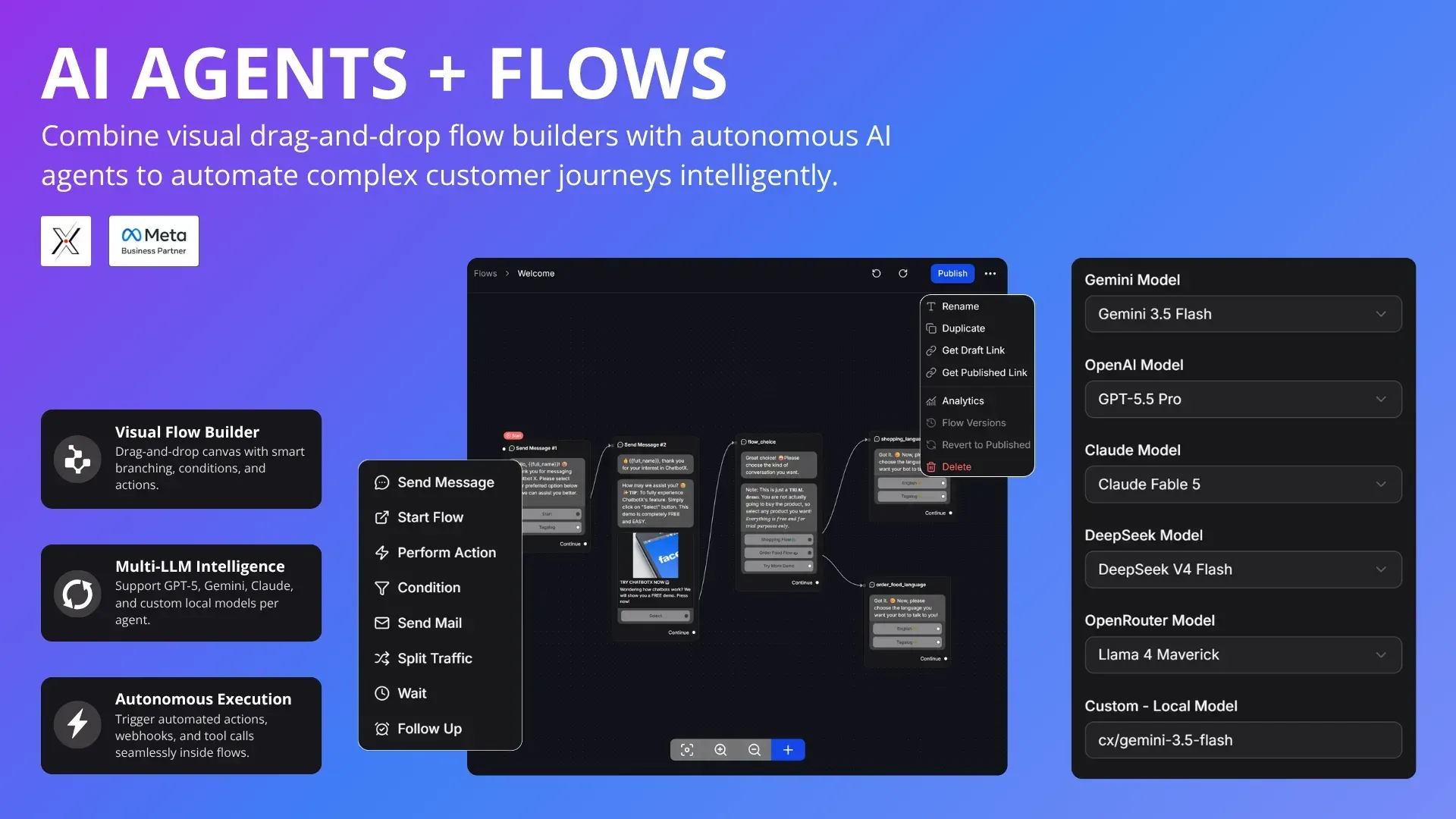
Official promotional screenshot: the visual flow canvas, its step menu and per-agent model selection fields.
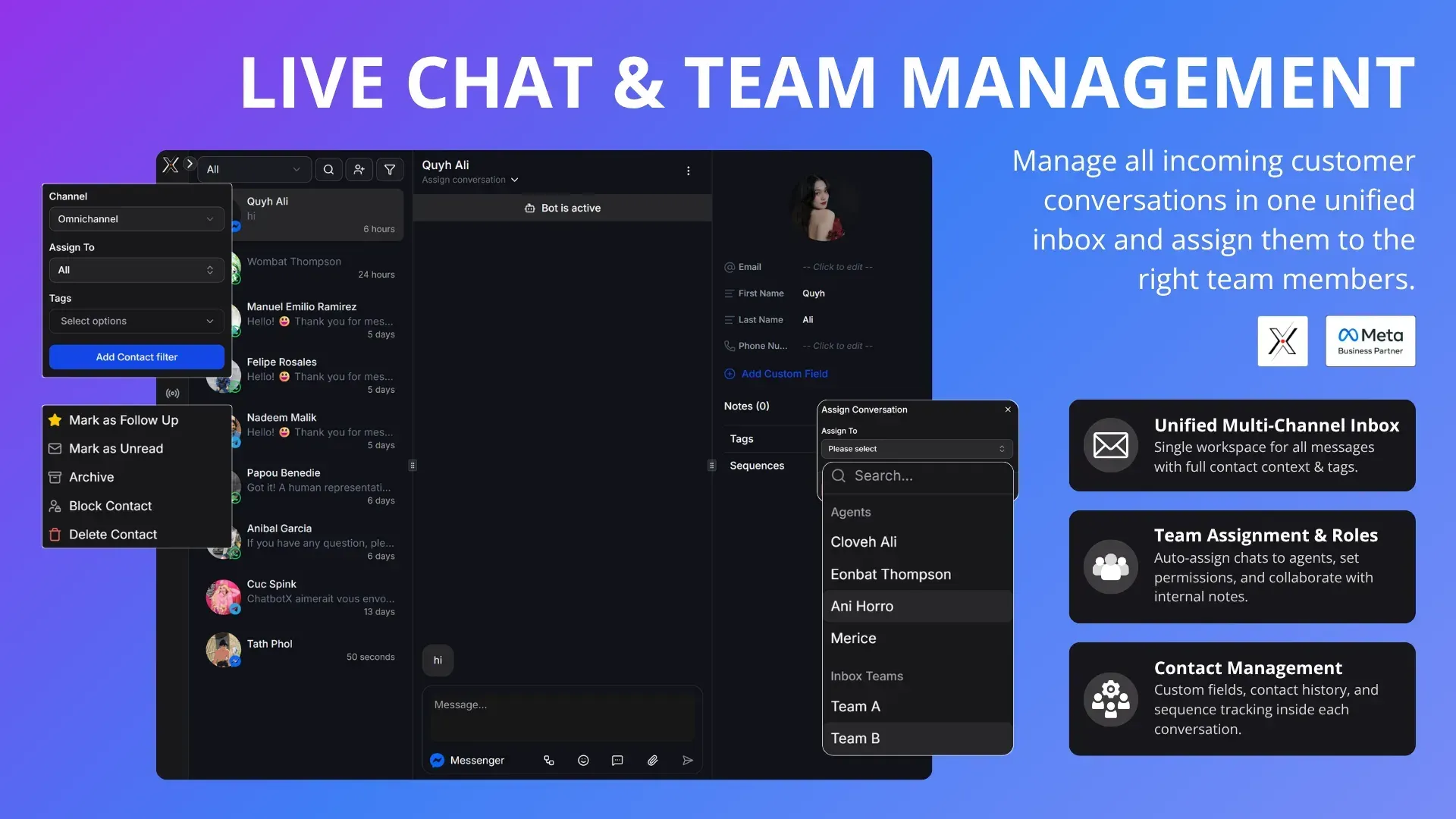
Official promotional screenshot of the shared inbox with demo contacts, filters and conversation assignment.
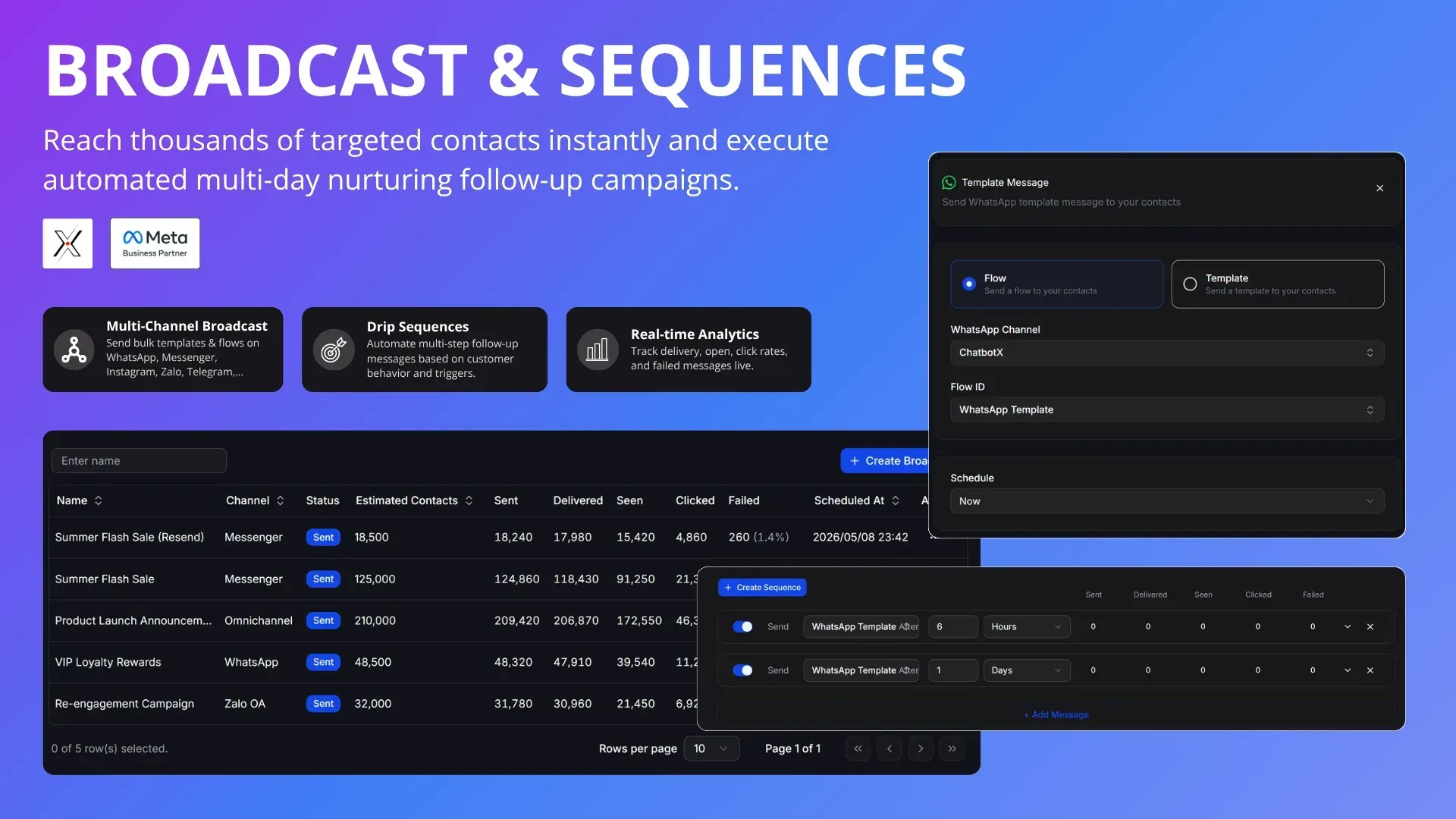
Official promotional screenshot with sample broadcast statistics; the numbers are demo data.
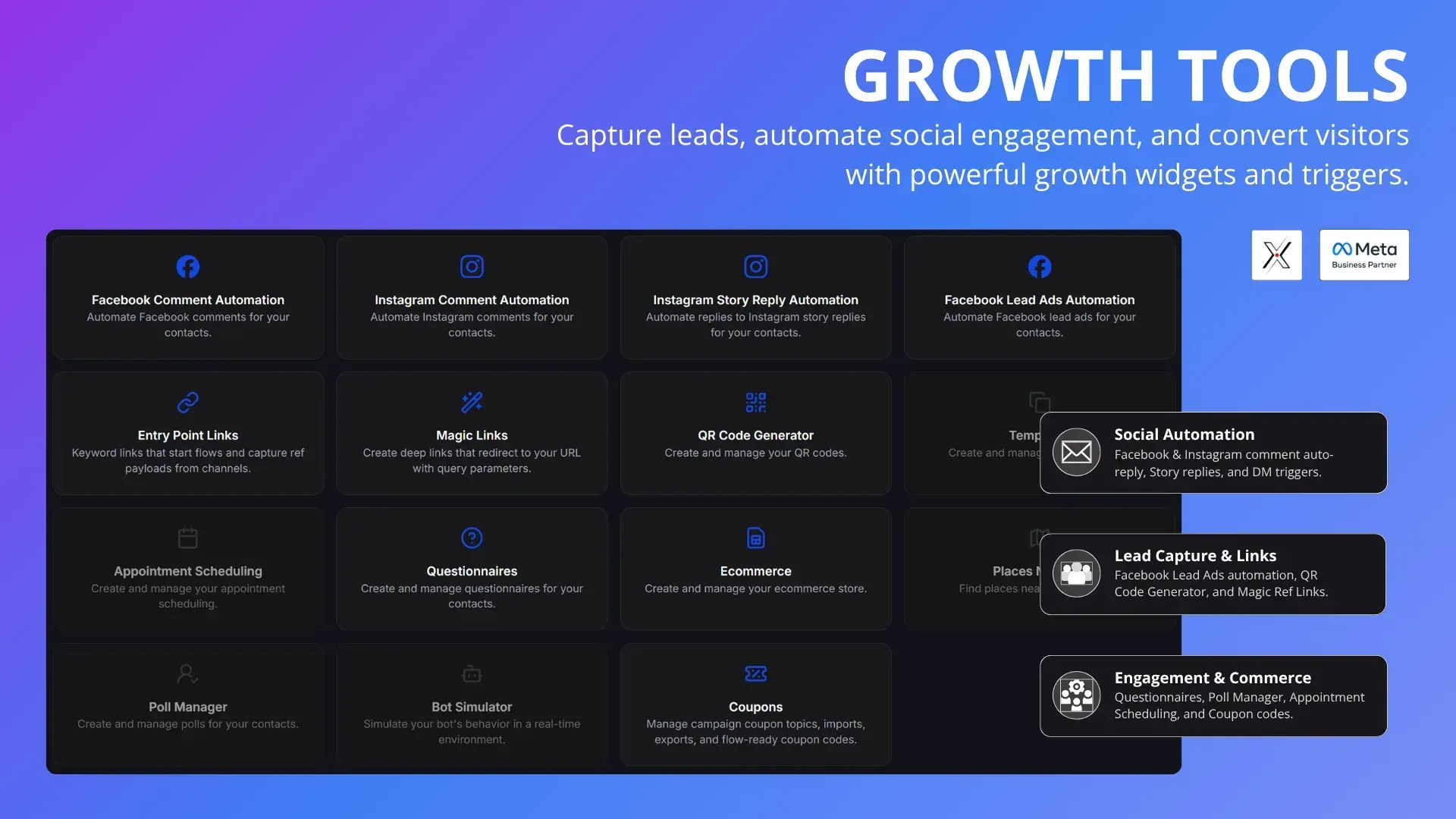
Official promotional screenshot of the growth tools page, partly overlaid by feature captions.
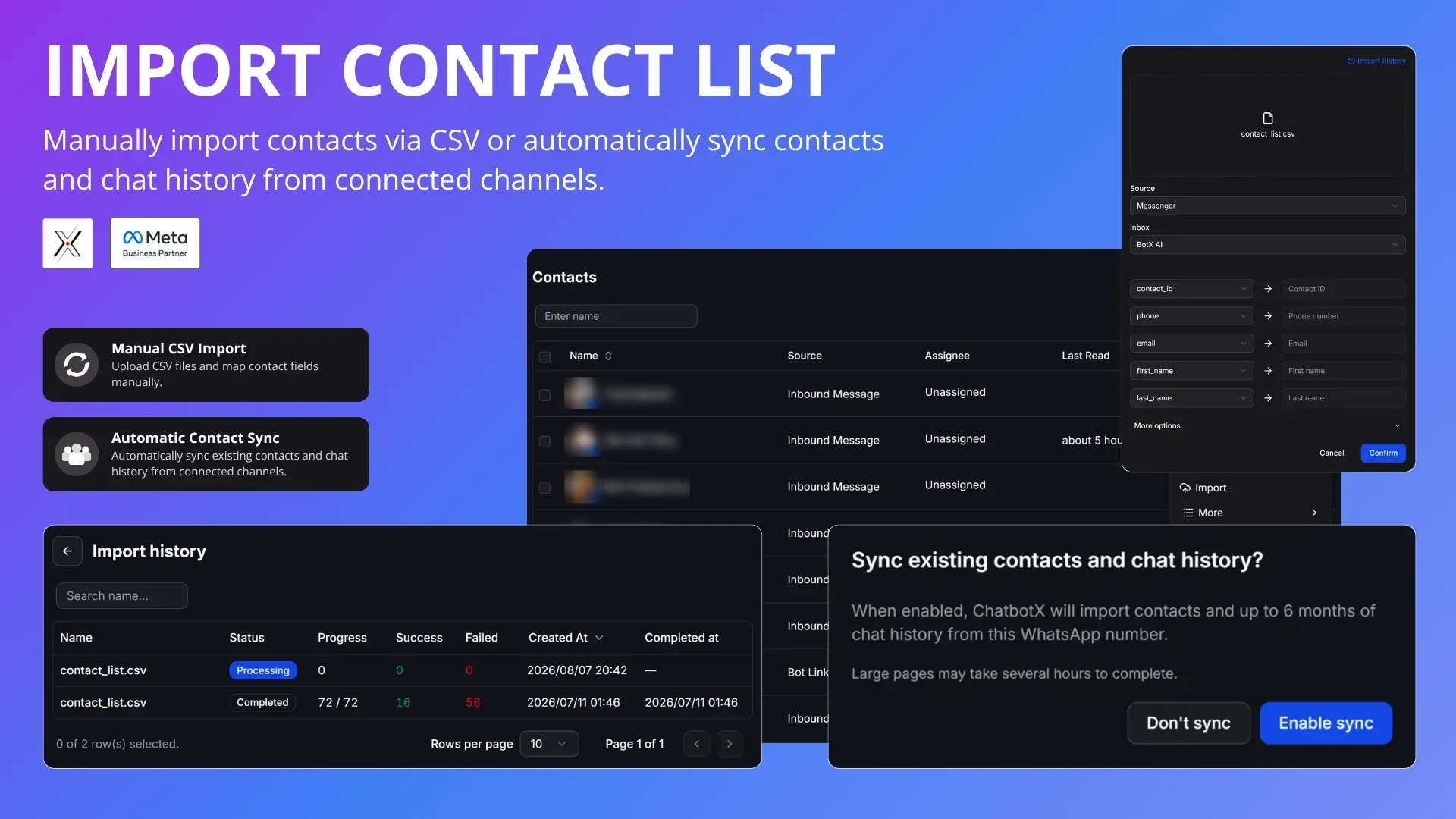
Official promotional screenshot of CSV import, import history and channel history sync.
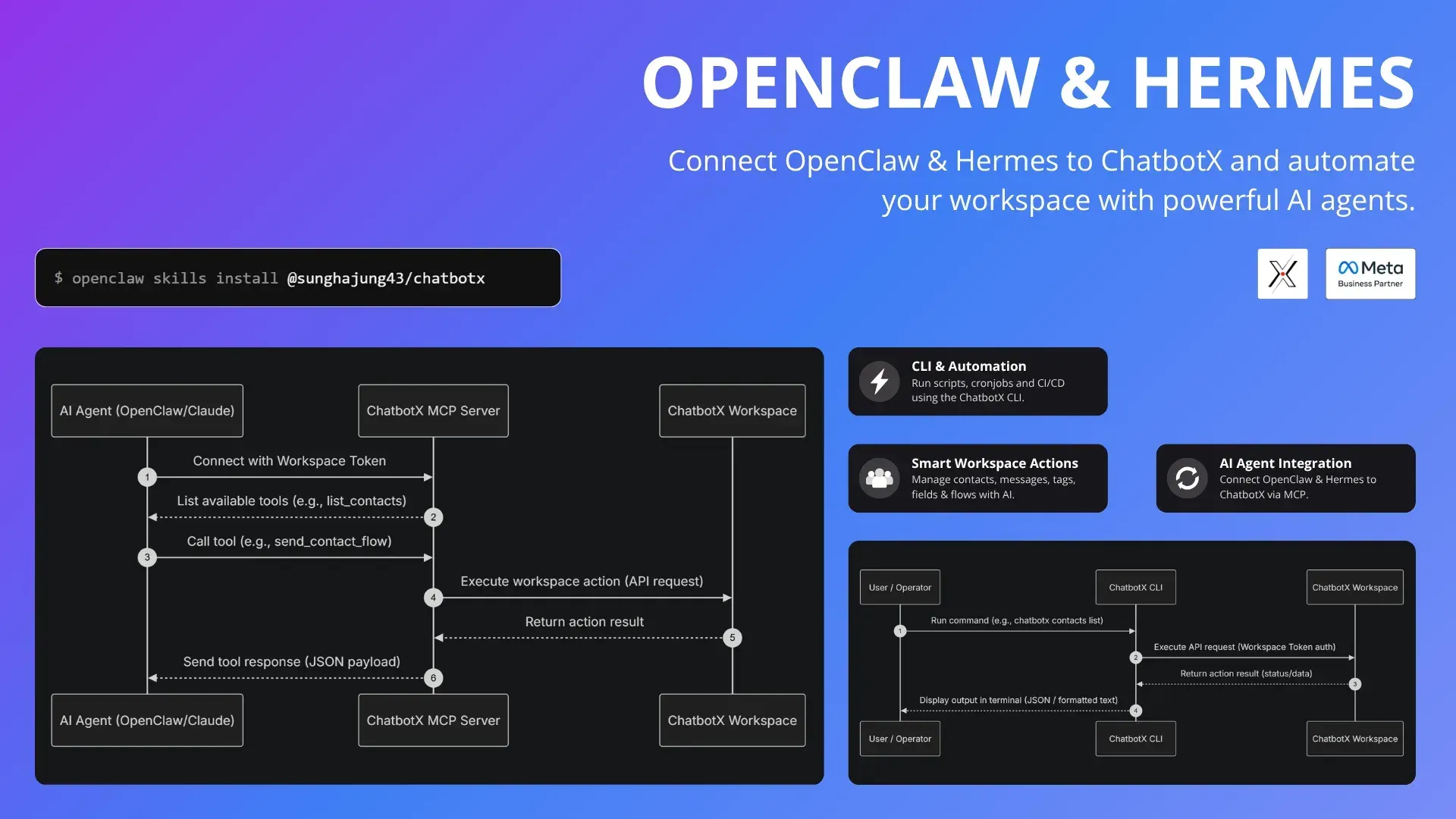
Official diagram of how agents reach a workspace through the MCP server and how the CLI calls the workspace API.
Source: official ChatbotX project page.
Key capabilities
- Self-hosting with Docker Compose The documented install clones chatbotx-docker-compose and starts it with docker compose -p chatbotx up, bringing up PostgreSQL with pgvector, Redis 8, RustFS object storage, MailHog, Adminer, the builder on port 3123, the worker and the realtime server on port 1999. Requirements are Docker 24 or later, Docker Compose v2.20 or later and at least 4 GB RAM and 4 vCPUs, tested on Ubuntu 24.04. The published images target linux/amd64. Database migrations run when the builder starts, and updates are a docker compose pull followed by up -d, as described in the Docker Compose guide.
- Managed cloud plans ChatbotX Cloud on app.chatbotx.io removes the operations work. The pricing page lists Lite at $29 per month with 10,000 bot messages, 5 channels and 2 team members, and Pro at $49 per month with 100,000 bot messages, 10 channels and 5 team members. Both include unlimited contacts and a 7-day trial. Pricing is metered on bot messages, not on contacts.
- Omnichannel connections Channels include WhatsApp Business through Meta Embedded Signup or a manual Cloud API setup, Facebook Messenger, Instagram through Instagram Business Login or Facebook Login, Threads, TikTok Business Messaging, Telegram bots, Zalo Official Accounts, SMTP email, an embeddable webchat widget and an API channel for custom front ends. Self-hosters create their own developer apps with Meta, TikTok, Google or Zalo; the channel guides walk through each one, including tunnels for local testing. Since v1.20.0 files that customers upload in WhatsApp Flows are saved, and a disconnected WhatsApp account is detected and shown on the connect screen.
- Visual flow builder Flows are built on a drag-and-drop canvas with more than 15 node types, including send message, start flow, perform action, condition, send mail, split traffic, wait and follow-up steps. Flows have draft and published versions, revert, per-flow analytics and shareable draft or published links. Split traffic nodes provide A/B testing between message variants.
- AI agents with your own keys AI agents can answer inside flows or take over an inbox, with providers including OpenAI, Anthropic Claude, Google Gemini, DeepSeek, OpenRouter, NVIDIA NIM, Meta's Muse model API and custom or local OpenAI-compatible endpoints. The model is bring-your-own-key, so AI usage is billed by the provider, not by ChatbotX. Knowledge files are chunked with structure-aware splitting into pgvector, and agents can call functions, connected MCP servers and live handover to a human. Since v1.20.0 AI steps are asked to keep answers within the channel text limit, and contact variables are resolved in AI step prompts.
- Live chat inbox and teams A realtime inbox collects every channel in one list, with filters by channel, assignee and tag, follow-up and unread markers, notes and a contact side panel. Conversations can be assigned to agents or inbox teams, the bot can be paused for human takeover, and working hours control routing. WhatsApp Business calling runs over browser WebRTC to the Meta Cloud API, with recording and transcription either by Meta or by the browser and OpenAI Whisper.
- Contact CRM and pipelines Contacts carry tags, custom fields, activity history, ad click sources and sequence membership, with activity-based filters for segmentation. CSV import maps columns to fields and keeps an import history, and connected channels can sync existing contacts and up to six months of WhatsApp chat history. Pipeline boards added in v1.17.0 track deals and tickets in the workspace currency.
- Broadcasts and drip sequences Broadcasts send flows or WhatsApp templates to a segment now or on a schedule, with recurring broadcasts and an audience preview before sending. Delivery, seen, clicked and failed counts are reported per broadcast. Sequences schedule multi-step follow-ups in hours or days, with automatic enrollment from triggers; the scheduler distributes work across 256 Redis hash buckets.
- Comment automation and growth tools Comment-to-DM and comment automation reply to, like or hide comments on Facebook, Instagram, Threads and TikTok posts based on keywords; on Threads only public replies and hiding are available because its API has no DM or like call. v1.19.0 added an image-only filter and AI comment moderation. Other growth tools include Instagram story reply automation, Facebook lead ads automation, entry point links, magic links with query parameters, QR codes, questionnaires, polls, appointment scheduling and a bot simulator.
- Ecommerce and payments A workspace can run its own product catalog or mirror a Shopify store, sync products to a Meta Catalog, and take orders through a hosted web shop with carts and discount codes. Payments use the store's own Stripe or PayPal account, with payment credentials stored encrypted per workspace. Orders keep a status history and copy product details at purchase time, so later catalog edits do not rewrite placed orders. v1.20.0 added a Shopify store source and a status field for products.
- Public REST API The public API exposes more than 390 endpoints across over 60 resource groups, including contacts, inboxes, broadcasts, sequences, AI agents, products, coupons, comment automation, WhatsApp calls and Google Ads conversions. Requests authenticate with a workspace Bearer token, and the documented limit is 10,000 requests per minute. v1.20.0 added an endpoint that turns AI Reply on or off for a connected AI provider. The base URL is app.chatbotx.io/api for the cloud or your own domain when self-hosted.
- MCP server for AI agents The MCP server is generated from the OpenAPI specification and can be used over stdio through npx chatbotx-mcp, or over SSE and Streamable HTTP from the instance itself. It keeps 43 default tools visible and exposes the remaining operations through search_tools and call_tool meta-tools, so a client does not load several hundred tool definitions at once. Setup guides cover Claude Code, Codex, OpenClaw, Hermes Agent and other clients; v1.18.0 added OAuth2 consent bound to workspaces, and v1.20.0 added tool annotations.
- Command line client The ChatbotX CLI installs with npm install -g chatbotx and calls the workspace API directly, and is documented for cron jobs, CI pipelines and bulk contact or tag operations. Credentials are saved with chatbotx config set or passed as CHATBOTX_API_KEY and CHATBOTX_API_URL. An agent skill wraps the CLI for Claude Code, Cursor, Codex and OpenClaw.
- Marketing and workflow integrations Built-in integrations cover Google Sheets, Google Calendar, Shopify, Meta Conversions API, Facebook Ads, Google Ads offline conversions and email platforms such as Mailchimp, Klaviyo, ActiveCampaign, Drip, GetResponse, MailerLite, Moosend and SendGrid. Flows can call any HTTP endpoint, and inbound webhooks start automations from outside systems. A custom n8n node and a Make.com integration are documented for wider workflow automation.
- Enterprise Edition for self-hosters The Enterprise Edition lifts the Community limit of one workspace and adds platform administrators with Super Admin and Support roles, OIDC single sign-on, a signup gate that closes public registration, cross-workspace audit logs, platform branding, custom system email templates and SMTP settings stored in the database. It is listed at $499 per month and activated with a signed LICENSE_KEY. Workspace allowances depend on the license terms.
- White label and reseller portal The Whitelabel cloud plan at $299 per month includes 50 workspaces and 5,000,000 bot messages. Agencies can set their own brand name, logos, colors and custom domain, create client sub-accounts, define plans with bot message limits and top-up packs, and bill clients through their own Stripe account. The white label documentation covers the portal setup and per-channel app credentials.
- Analytics and conversion tracking Workspace analytics report flow performance, user engagement and campaign results, and broadcasts show delivery funnels per send. Ad click identifiers are stored on each contact so conversions can be sent back to Meta through the Conversions API or to Google Ads as offline conversions. CSV exports were fixed in v1.19.0 to open correctly in Excel on Windows.
Where ChatbotX fits
Replacing a ManyChat-style setup
The vendor presents ChatbotX as an alternative to ManyChat, Chatfuel, Wati and Respond.io. Flows, keyword triggers, broadcasts and sequences are rebuilt in the visual builder, and contacts arrive through CSV import that maps columns to tags and custom fields, or through channel sync with up to six months of WhatsApp chat history. ChatbotX Cloud plans are metered on bot messages rather than contacts, while a self-hosted Community install has no message cap and runs on the operator's own servers and channel accounts. Related open-source tools listed on iThub include Chatwoot for a support inbox and Typebot for conversational forms, and a custom n8n node connects ChatbotX to n8n workflows.
Running WhatsApp campaigns
A WhatsApp Business number connects through Meta Embedded Signup or a manual Cloud API setup. Broadcasts send flows or approved WhatsApp templates to a segment built from tags or activity filters, now or on a schedule, with an audience preview and per-broadcast delivered, seen, clicked and failed counts. Sequences send follow-ups in hours or days, WhatsApp Flows collect structured answers and, since v1.20.0, uploaded files, and WhatsApp Business calling runs in the browser over WebRTC.
Turning social comments into conversations
Comment automation watches Facebook, Instagram, Threads and TikTok posts for keywords and replies publicly, sends a private message, likes or hides the comment. Threads supports public replies and hiding only, because its API has no DM or like call. Since v1.19.0 an image-only filter and AI moderation can screen comments before the automation runs, and Instagram story replies and Facebook lead ads have their own triggers.
Letting an AI agent operate the workspace
A workspace token created under Settings, Integrations authorizes the MCP server, the CLI and the REST API. The MCP server runs over stdio with npx chatbotx-mcp or over SSE and Streamable HTTP from the instance, with documented setups for Claude Code, Codex, OpenClaw and Hermes Agent, OAuth2 consent and human-in-the-loop safeguards since v1.18.0, and tool annotations since v1.20.0. Inside flows, AI agents use the workspace's own provider keys, a pgvector knowledge base, function calls and handover to a human.
Hosting it for clients as an agency
Agencies can use the Whitelabel cloud plan or a licensed Enterprise Edition on their own servers. Both support their own brand name, logos, colors, custom domain and SMTP, one workspace per client, plans with bot message limits and top-up packs, and client billing through the agency's own Stripe account. Client channels connect through the agency's own Meta, TikTok and Google developer apps.
Operating a self-hosted instance
The chatbotx-docker-compose repository starts the builder, worker and realtime server with PostgreSQL and pgvector, Redis 8, RustFS, MailHog and Adminer, and database migrations run when the builder starts. The documentation covers replacing the default secrets such as BETTER_AUTH_SECRET and the realtime API key, Caddy or Nginx reverse proxies with TLS, a Redis build with bloom filter commands such as Redis 8 or Dragonfly, and sizing DATABASE_POOL_MAX against PostgreSQL max_connections. Updates are a docker compose pull followed by up -d.
Install
git clone https://github.com/chatbotxio/chatbotx-docker-compose.git && cd chatbotx-docker-compose && docker compose -p chatbotx up -dReviews of ChatbotX
Be the first to share your experience with ChatbotX.
Write a review
Loading review form…
Alternatives to ChatbotX
 ChatwootChatwoot is an open-core customer support platform: a shared inbox for website chat, email, WhatsApp, Instagram, Telegram, SMS and voice, plus help center, contacts, reports and an AI agent. Self-host it with Docker, Helm or a Linux script, or use Chatwoot Cloud.
 OpenWAOpen-source WhatsApp API gateway in TypeScript and NestJS, run with Docker or Node.js. It adds a REST API, HMAC webhooks, a dashboard, scoped API keys, plugins and SDKs around unofficial WhatsApp engines.