

What is Chatwoot?
Chatwoot is an open-source customer support platform that brings conversations from a website chat widget, email, messaging apps and social networks into one shared inbox for a support team. It is developed by Chatwoot Inc., whose co-founders are Pranav, Nithin and Sojan. The company team page says the product began in 2016 as a support tool for social media and was revitalized and open-sourced in 2019. The team describes itself as distributed between the United States and India.
There are two ways to run it. Chatwoot Cloud is the hosted service, with a free Hacker plan and paid plans billed per agent. Self-hosted installations come from the same repository through an automated Linux script, a Docker Compose file, an official Helm chart, a Heroku button and guides for AWS, Azure, Google Cloud, DigitalOcean, Caprover, Cloudron and other platforms, all listed in the self-hosting guide. Native iOS and Android apps connect to Cloud or to any self-hosted URL.
The latest release is v4.19.1, published October 24, 2026. It updates Node.js to 24.22.1 for the asset build, hardens Twilio webhook verification and CSS sanitization, fixes duplicate Help Center articles and conflicting inbox bots, and removes unnecessary session cookies from public pages. Version 4.19.0 added email forwarding and subject search, WhatsApp campaign history with batch sending and delivery analytics, an expanded Companies CRM, bearer authentication for existing API tokens, account-wide two-factor enforcement and a redesigned Super Admin. It also retired Captain V1: self-hosted installations with V1 instructions must move them to V2 before upgrading, as described in the Captain V1 migration guide.
The application is a Ruby on Rails 7.2 backend on Ruby 3.4.4 with a Vue 3 dashboard built by Vite. Sidekiq runs background jobs, Redis holds queues and real-time state, and PostgreSQL stores account data. Since v4 the database must provide the pgvector extension; the production Compose file uses the pgvector/pgvector:pg16 image. Node.js 24 is needed only to precompile assets: the v4.19.1 notes state that the production application runs on Ruby without Node.js.
Licensing is split. Code outside the enterprise/ directory is MIT licensed. The enterprise/ directory is under the Chatwoot Enterprise license, which allows production use only with a valid subscription for the right number of seats, while permitting copies and changes for development and testing. Items marked [Enterprise] in release notes, such as Captain, call handling, SLA policies and SAML, belong to that layer. Community Edition images tagged latest-ce or v*-ce contain only the MIT code. Chatwoot is a conversation desk, not an ITSM suite: change management, asset inventory and a CMDB are outside its scope.
Chatwoot screenshots
Explore the interface. Open a screenshot to view it at full size.
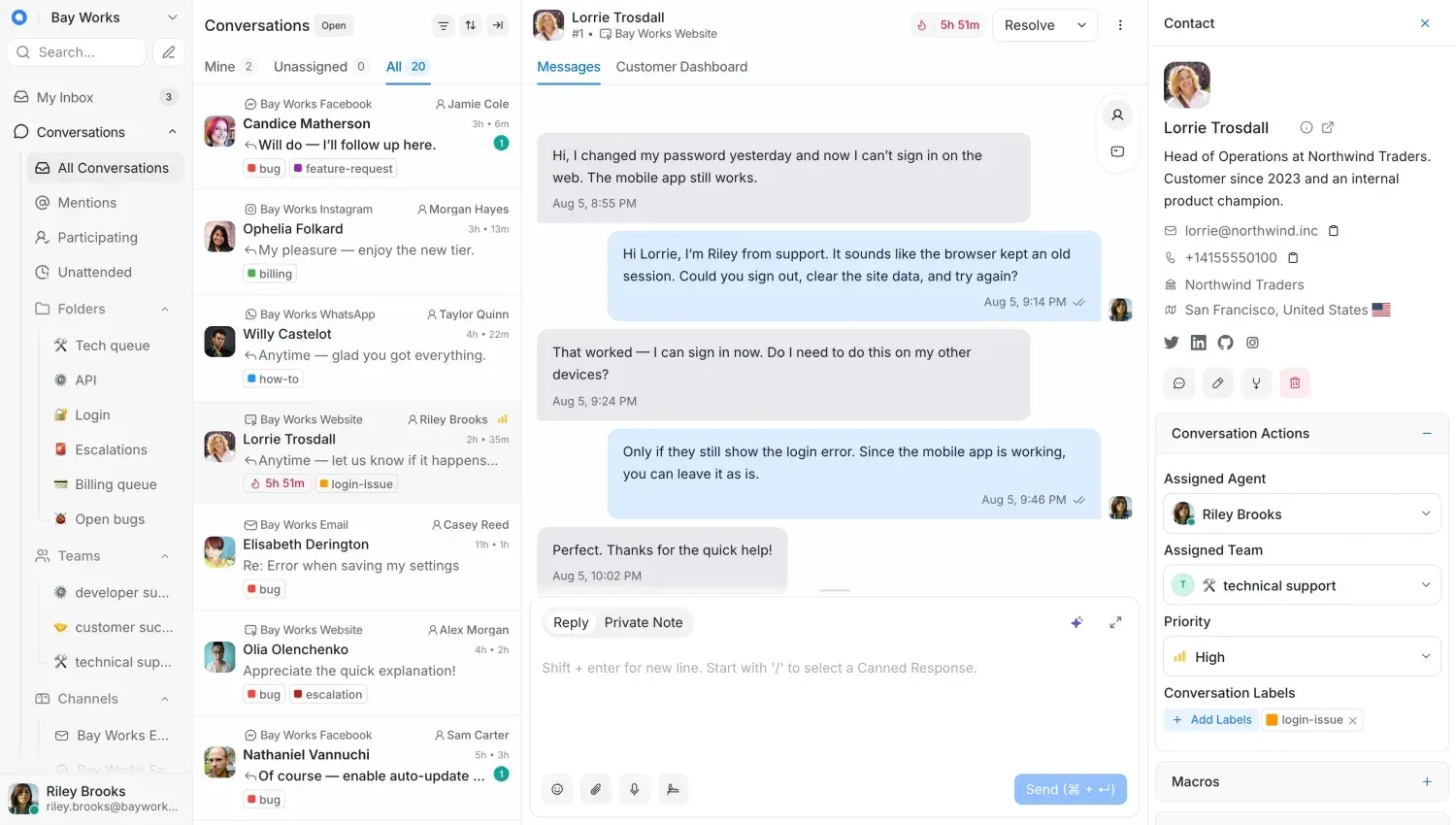
Official Chatwoot screenshot of the shared inbox with demo data: conversations from website, Facebook, Instagram, WhatsApp and email inboxes.
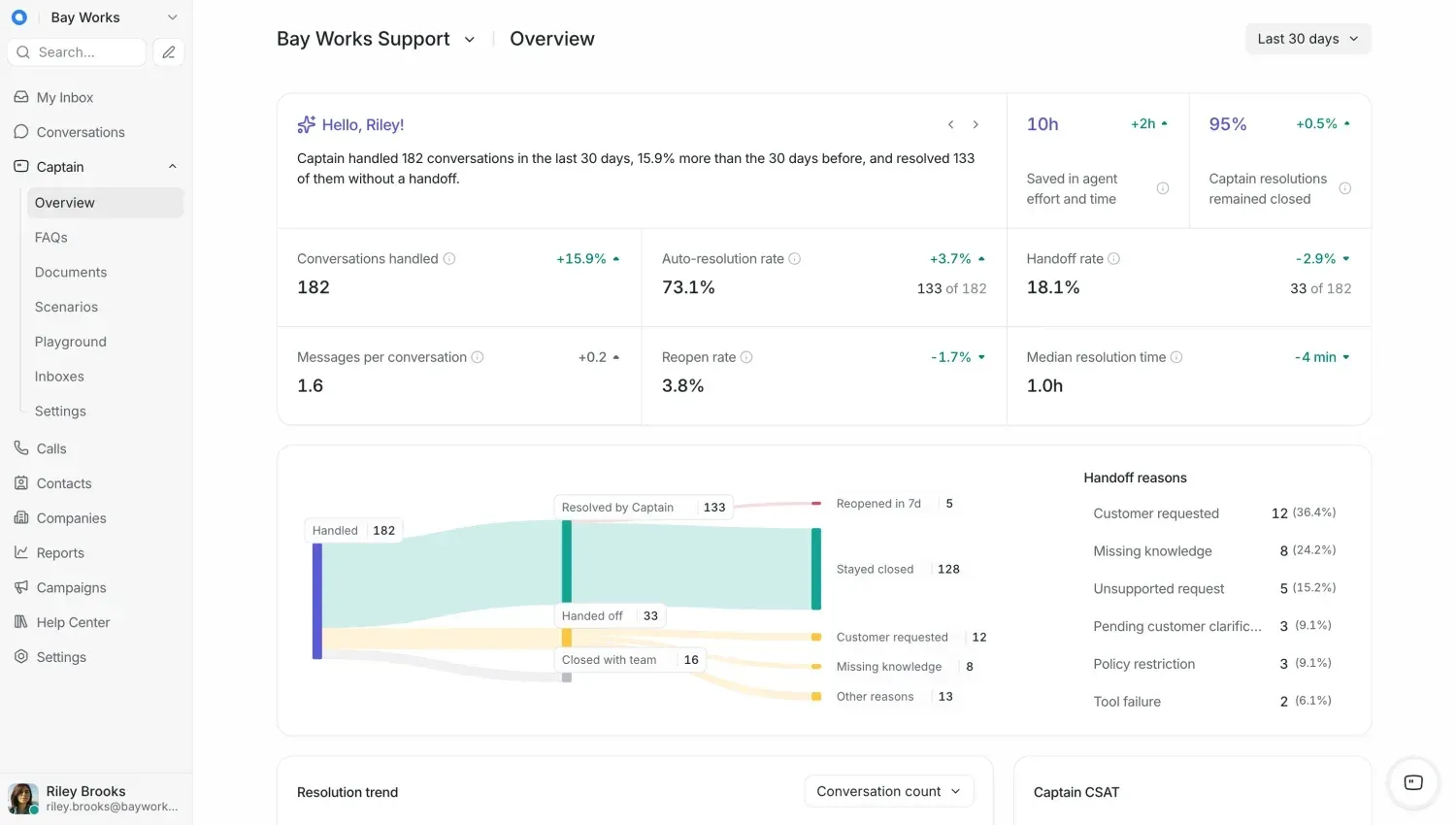
Captain overview with demo figures: handled conversations, auto-resolution and handoff rates, and handoff reasons.
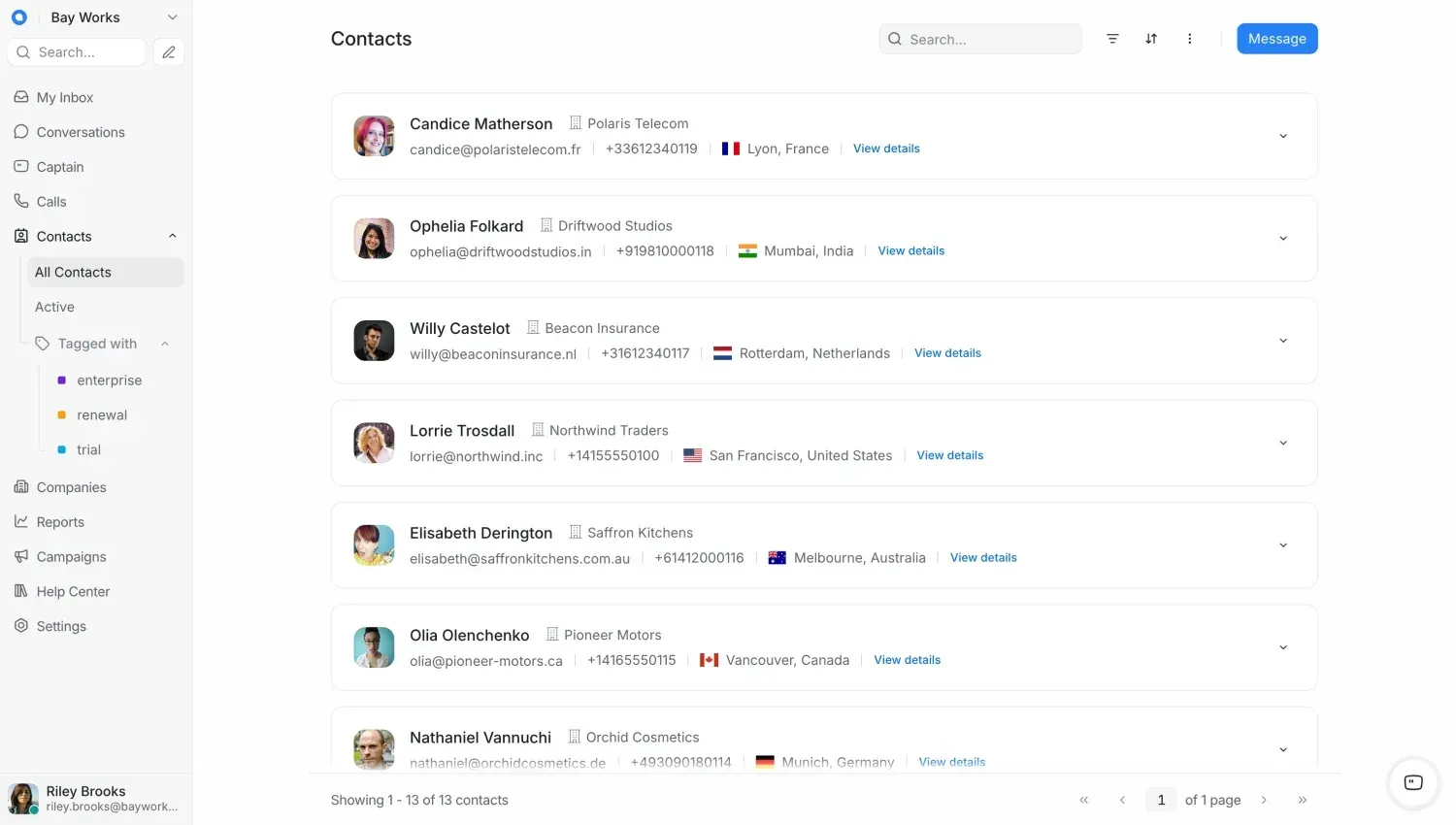
Contacts list with demo records, company names and label-based segments such as enterprise, renewal and trial.
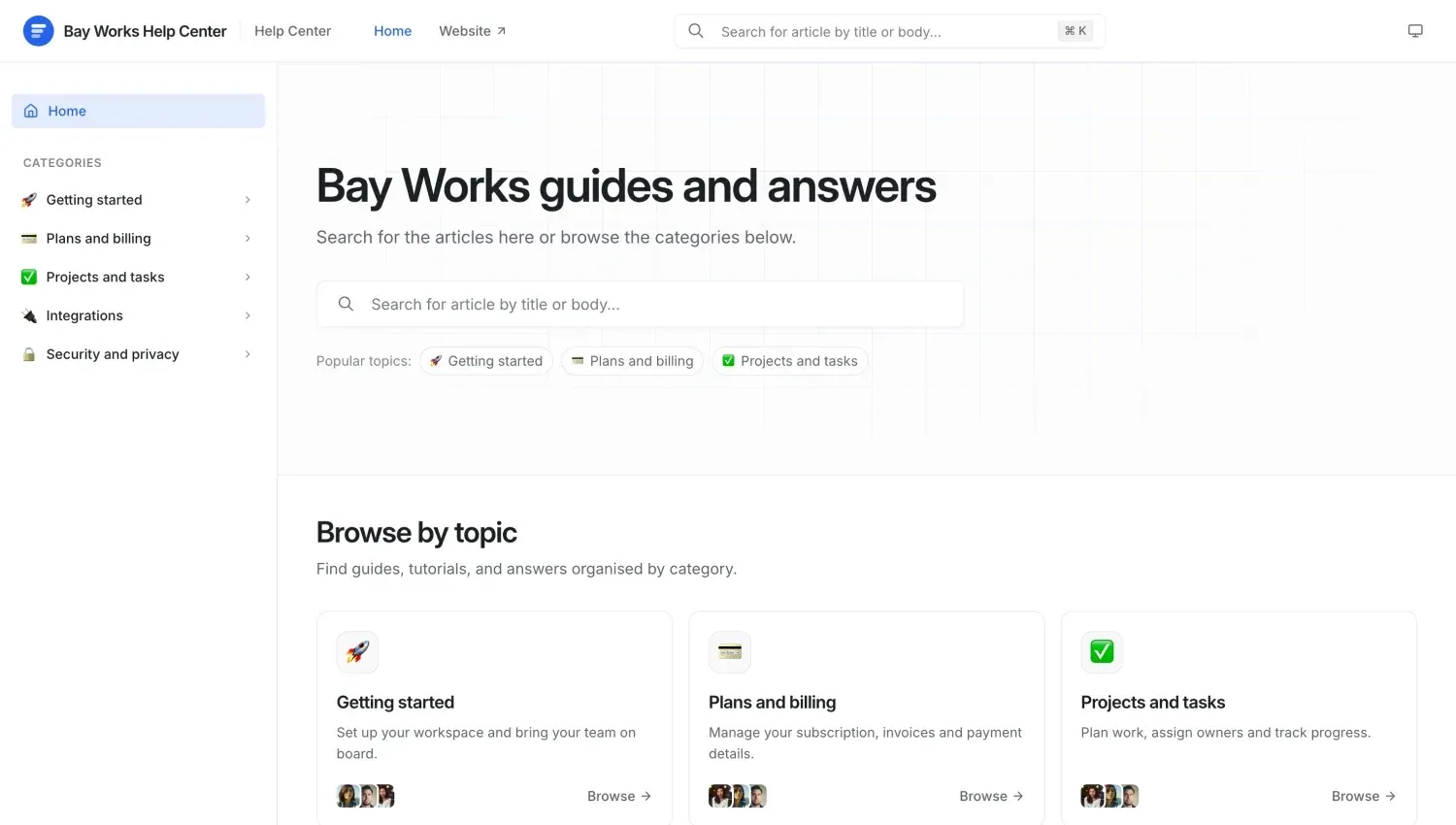
Public Help Center portal for a demo company, with search, categories and browse-by-topic cards.
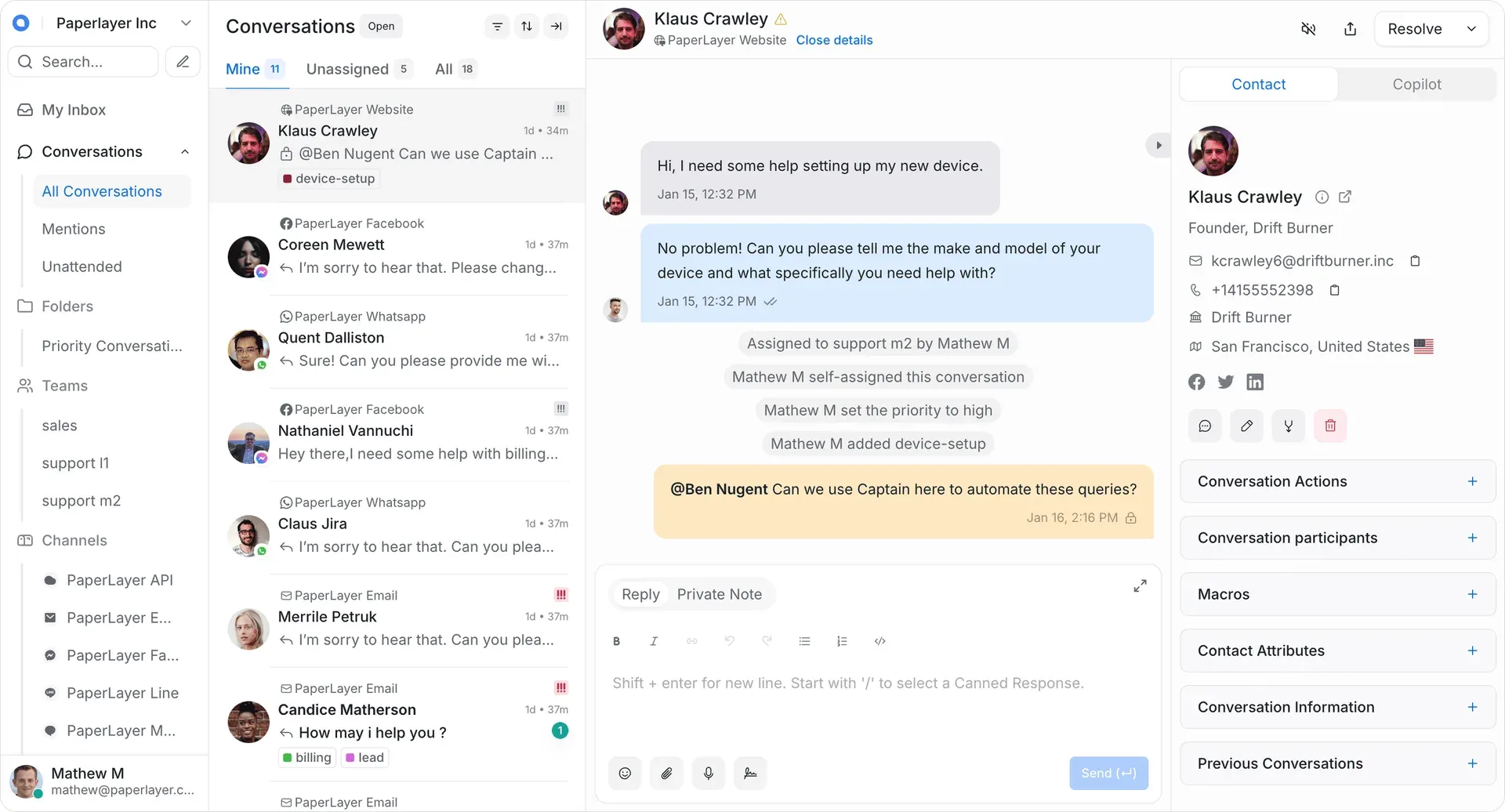
Repository screenshot with demo data: assignment and priority events in the thread, a private note with an @mention and the Copilot tab.
Source: official Chatwoot project page.
Key capabilities
- Website live chat widget A JavaScript widget adds chat to a website, with appearance settings and a pre-chat form that collects visitor details before the first message. Identity verification signs logged-in users with an inbox secret, and v4.18 added rotation of that secret. Conversation continuity lets a website chat continue over email once an inbound email provider is configured.
- Email inbox Mailboxes connect through forwarding or direct IMAP and SMTP, and self-hosted operators can register Google Workspace and Microsoft 365 OAuth apps for Gmail and Outlook. Since v4.18 SMTP can be configured independently of IMAP. Version 4.19 added forwarding from the conversation, subject search, tables and improved quoted history.
- WhatsApp Business WhatsApp connects through the WhatsApp Business API or Cloud API, with an embedded signup flow documented for self-hosted installations. Recent releases added guided setup, account health, campaigns and calls for BSUID-only contacts, campaign history, batch sending and delivery analytics. Meta's business verification, messaging rules and template approval still apply.
- Social and messaging channels Facebook Messenger, Instagram direct messages, TikTok, X, Telegram, LINE and SMS each become a separate inbox. Supported message types, attachments and delivery receipts differ by channel and are listed on the supported features page. Self-hosted Instagram access requires your own Meta app and app review.
- Voice channel Calls appear in the inbox next to text conversations, with per-inbox recording and transcription settings added in v4.18 and Twilio business hours and withheld caller ID support in v4.19.1. Voice is an Enterprise-layer feature: on Cloud it starts with the Business plan, and self-hosted installations need at least the Premium plan.
- Shared inbox and collaboration Agents work from Mine, Unassigned and All views, custom folders and saved filters. Private notes and @mentions keep internal discussion inside the conversation, and labels and priority categorize threads. Keyboard shortcuts, a command bar, a reading mode and a collapsible reply editor shorten routine handling.
- Assignment, teams and capacity Auto-assignment routes new conversations by agent availability, and teams group agents by function such as billing or technical support. Agent capacity management balances workload across agents and is a paid feature on self-hosted installations. Business hours and auto-responders set expectations outside working time.
- Automation rules, macros and canned responses Automation rules act on events such as new conversations or messages, and v4.18 added more conditions for delayed automations. Macros bundle several actions into one click, with bulk macros since v4.19. Canned responses are inserted by typing a slash in the reply box, and auto-resolution schedules became configurable in v4.19.
- Captain AI agent and Copilot Captain answers first-line questions from your help center articles, FAQs and documents, then hands off to a human with a recorded reason. Copilot drafts and translates replies for agents and keeps chat history. Scenarios, a tool catalog with customer verification for sensitive tools, and a playground control behavior. The Startups, Business and Enterprise Cloud plans include 300, 500 or 800 Captain credits, with extra credits at $20 per 1,000.
- Help Center portal A public knowledge base with categories, search and multiple languages can run on a custom domain with SSL. Articles are written in the dashboard and also serve as a Captain knowledge source. Version 4.19 made article URLs editable and improved language switching.
- Contacts, companies and segments Contact profiles keep conversation history, notes, custom attributes and social links. Segments filter contacts for targeted outreach. The Companies view groups contacts by organization and, since v4.19, adds company enrichment and Stripe billing details next to conversations.
- Campaigns Website campaigns send proactive messages to visitors through the chat widget. WhatsApp campaigns send approved templates to contact lists, with history and delivery statistics since v4.19. Duplicate-send protection for WhatsApp campaigns was improved in v4.19.1.
- Reports and CSAT Reports cover conversations, agents, inboxes, labels and teams. A live view shows ongoing activity, CSAT surveys measure satisfaction and reports can be downloaded. Captain has its own overview with auto-resolution and handoff rates.
- Integrations and Dashboard Apps Built-in integrations include Slack (with an alerts-only mode since v4.18), Dialogflow, Shopify orders, Linear issues and Google Translate. Dashboard Apps embed an internal web tool inside the Chatwoot dashboard. Automatic conversation translation with Captain or Google Translate arrived in v4.19 as an Enterprise feature.
- REST APIs and webhooks The API reference describes three families: Application APIs authenticated with a user access token, Client APIs for custom chat interfaces using inbox and contact identifiers, and Platform APIs for user and account provisioning on self-hosted installations. An API channel with webhooks lets you attach a channel Chatwoot does not support natively. Since v4.19 existing API tokens also work with bearer authentication.
- Security and administration Accounts can enforce two-factor authentication for all members since v4.19. SAML single sign-on with metadata URL refresh, SLA policies and audit logs are Enterprise features, while custom roles and permissions start with the self-hosted Premium plan. Self-hosted operators get a Super Admin console, Sidekiq monitoring and configurable rate limiting.
- Install on a Linux server The installation script targets Ubuntu 24.04 LTS: download
install.shfrom get.chatwoot.app and run it with--install. If you supply a domain with an existing A record, it configures Nginx and a Let's Encrypt certificate. Thecwctltool then handles upgrades, restarts, logs and the Rails console. - Install with Docker or Kubernetes The Docker path downloads
.env.exampleanddocker-compose.production.yaml, runsrails db:chatwoot_prepareand starts the stack, which binds port 3000 to localhost behind your reverse proxy. The Helm chart from chatwoot.github.io/charts needs Kubernetes 1.16+, Helm 3.1+ and three persistent volumes of about 8 GB each, or external PostgreSQL and Redis. - Mobile apps Official apps for iOS and Android provide push notifications, assignment, mentions, private notes, canned responses, attachments and macros. They connect to Chatwoot Cloud or to any self-hosted URL and can switch between several accounts.
Where Chatwoot fits
Replacing a shared support mailbox
Create an email inbox through forwarding or IMAP and SMTP, add the website widget, and invite agents into teams that mirror your queues. Set auto-assignment, business hours and a small set of labels before importing traffic, then write canned responses for the ten most common questions. Check that replies thread correctly in the customer's mail client, that attachments arrive in both directions and that the quoted history stays readable after several exchanges.
Handling WhatsApp and social messaging
Connect WhatsApp through the embedded signup or your Business API account, then add Instagram, Facebook, Telegram or SMS inboxes as needed. Each channel has its own rules: WhatsApp outbound campaigns use templates approved by Meta, and provider policies limit when free-form replies are possible. Review the per-channel feature table before promising attachments, read receipts or message edits, and test a campaign on a small contact segment first.
Deflecting repeat questions with Help Center and Captain
Publish the core articles in the Help Center, then connect Captain to those articles, FAQs and documents. Use the playground to test answers, set handoff rules and limit which tools Captain may call. After launch, compare the auto-resolution rate with the reopen rate and the handoff reasons in the Captain overview. On self-hosted installations Captain needs a paid plan and an OpenAI-compatible endpoint that can serve the configured model.
Self-hosting for data residency
Choose the Linux script for a single server, Docker Compose for container-based hosts or Helm for Kubernetes, and size the host from the system requirements: about 4 cores and 4 GB of RAM for up to 10,000 conversations a day. Move attachments to S3-compatible or Google Cloud storage, configure SMTP for notifications, and put PostgreSQL with pgvector and Redis under your normal backup policy. Decide early whether you run the Community Edition image or the standard image with an Enterprise license.
Building custom channels and internal tooling
Use an API channel when customers reach you through a system Chatwoot does not support, posting incoming messages through the Application API and receiving agent replies by webhook. Embed CRM or order screens with Dashboard Apps so agents can see account context without leaving Chatwoot. For multi-tenant setups, the Platform API creates accounts and users from your own provisioning code; scope each platform app to the objects it created.
Upgrading a self-hosted installation
Read the release notes for every version you skip, since some releases carry required migrations, such as the pgvector requirement from v4 and the Captain V1 retirement in v4.19.0. Back up the database first, then run cwctl --upgrade on Linux installs or pull the new image and run db:chatwoot_prepare on Docker. Very old installations should step through intermediate versions, as the upgrade guide recommends.
Install
wget https://get.chatwoot.app/linux/install.sh && chmod +x install.sh && ./install.sh --installReviews of Chatwoot
Be the first to share your experience with Chatwoot.
Write a review
Loading review form…
Alternatives to Chatwoot
 ZendeskZendesk is a customer service platform with ticketing, omnichannel routing and built-in AI, priced per agent per month with plans from $19.
 FreshworksFreshworks sells Freshdesk for customer support, Freshservice for IT service management, and CRM, chat and voice products, each with a free trial.
 TwentyTwenty is an open-source CRM with custom objects, workflows, AI agents and REST and GraphQL APIs, run on a managed cloud or self-hosted.