

What is Typebot?
Typebot is a visual builder for chatbots and conversational forms. A flow is assembled from groups of blocks (message bubbles, typed inputs, logic and integrations), published, and then answered by visitors in a web embed, on a WhatsApp number or through the chat API. Every answer is saved as a result as soon as it is entered, so partly completed conversations remain visible. Typical uses named in the official documentation are lead qualification, customer support, product launches, user onboarding and AI chats.
The project is built and run by its founder, Baptiste, who describes Typebot as a small company that he operates as a solo entrepreneur. The GitHub repository dates from November 2021. Two distribution paths exist: the managed service at app.typebot.io with Free, Starter, Pro and Enterprise plans, and self-hosting from the same code. Self-hosters receive a release roughly once a month after changes have run on the cloud service, and the documentation describes that channel as close to a long-term-support track.
The latest release is v3.19.1, published October 20, 2026. It adds a Send Chat Message action to the Blink block, multi-line placeholders on long text inputs and an option to read custom OAuth profiles from the OIDC UserInfo endpoint, keeps large results exports running in the background and slims the Builder and Viewer Docker images. It also moves the webhook relay deployment to PartyServer and Wrangler because partykit deploy stops working on October 23, 2026. Version 3.19.0 was a coordinated-upgrade release: Webhook blocks now require a shared WEBHOOK_RELAY_SECRET, the viewer must run on a different hostname from the builder, and SMTP tests and private hosts are constrained against SSRF. Version 3.18.0 added camera capture to file uploads and a long list of security fixes; 3.17.0 added an Ask Model action on the OpenAI Responses API and hashed API tokens.
Technically, Typebot is a TypeScript monorepo managed with Bun workspaces and Nx. Two Next.js applications do the work: the builder, where flows are designed, and the viewer, where visitors chat. Both use PostgreSQL through Prisma. Redis is optional and handles sign-in rate limiting and multiple media uploads on WhatsApp; S3-compatible storage is needed for file uploads; a PartyKit relay carries Webhook block responses. Embeds ship as the @typebot.io/js and @typebot.io/react packages plus a WordPress plugin, and new integration blocks are written with a framework called the Forge.
The code is published under the Functional Source License 1.1 with an Apache 2.0 future license (FSL-1.1-Apache-2.0). It allows use, modification and redistribution for any purpose except a competing use, and each version becomes Apache 2.0 after two years. The self-hosting overview states what that excludes: selling access to an instance, offering Typebot hosting, or embedding the editor in software you sell. A badge in the README still shows AGPLv3; the LICENSE file is the governing text. Typebot is not a live-chat inbox or a ticketing system: human handoff goes through integrations such as Chatwoot or Zendesk.
Typebot screenshots
Explore the interface. Open a screenshot to view it at full size.
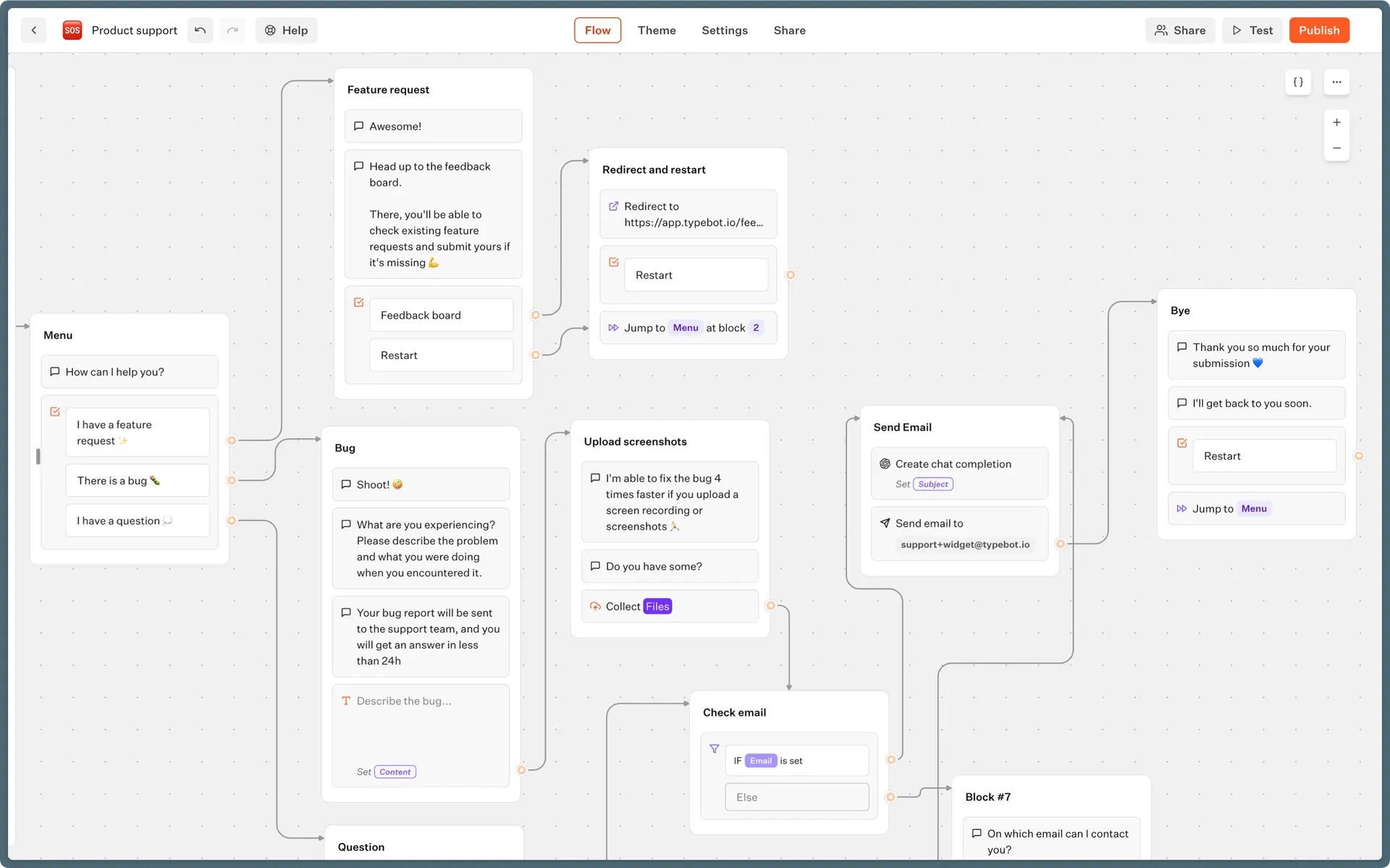
Official screenshot of the Typebot builder's Flow tab with a support bot that branches on the visitor's choice.
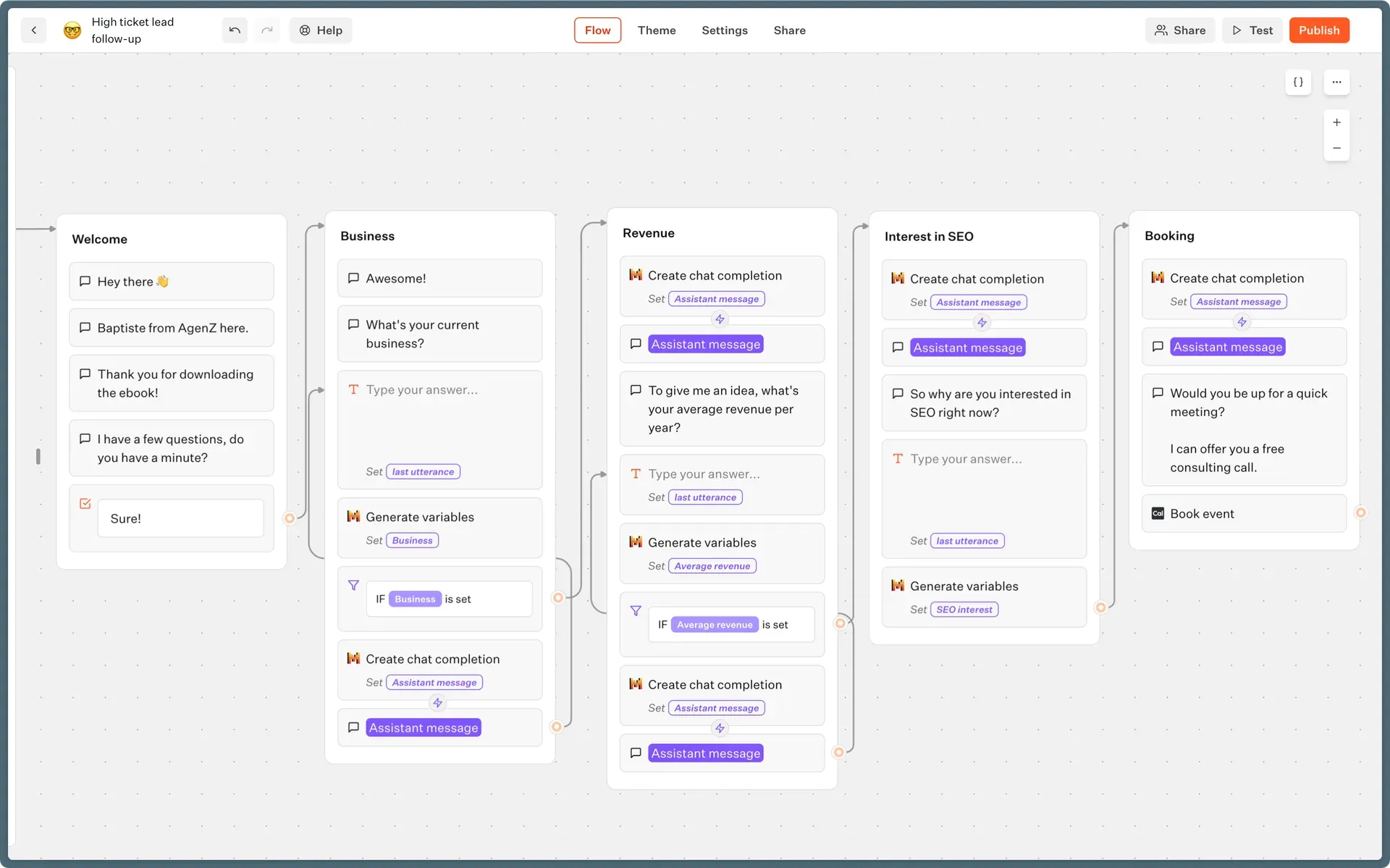
Lead follow-up flow that mixes AI chat completion and variable extraction with conditions and a Cal.com booking step.
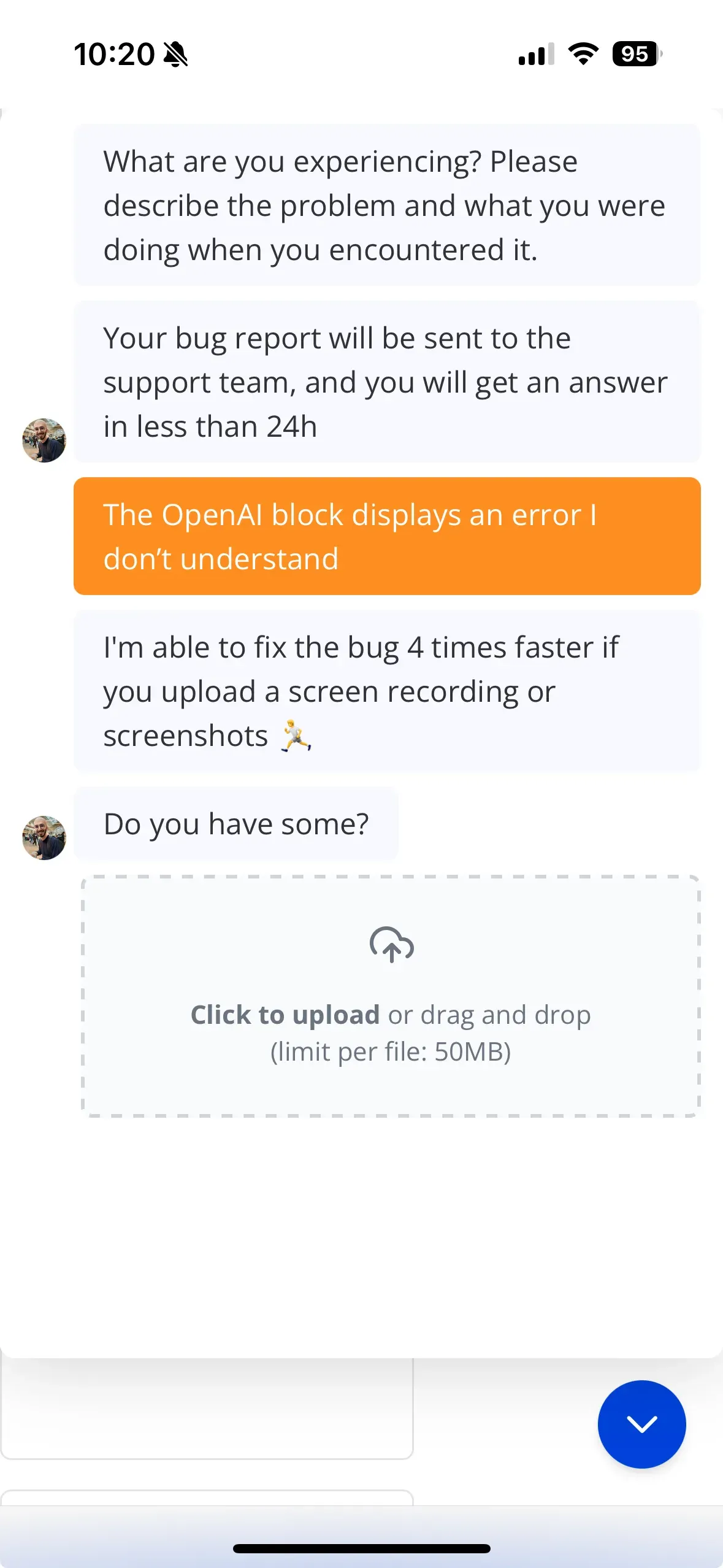
Visitor view of the support bot on a mobile phone, at the file upload step.
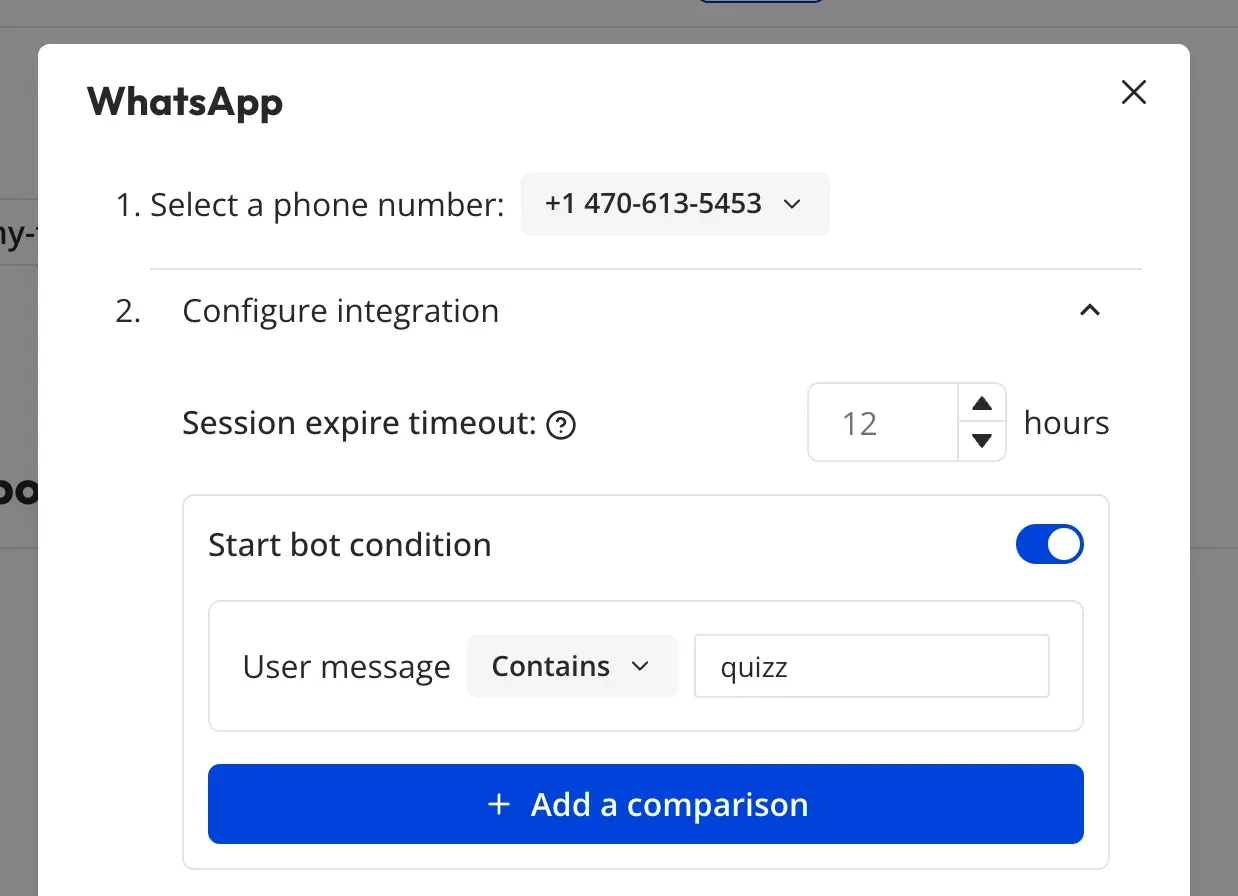
WhatsApp integration settings: phone number, session expiry timeout and a start condition matching a keyword.
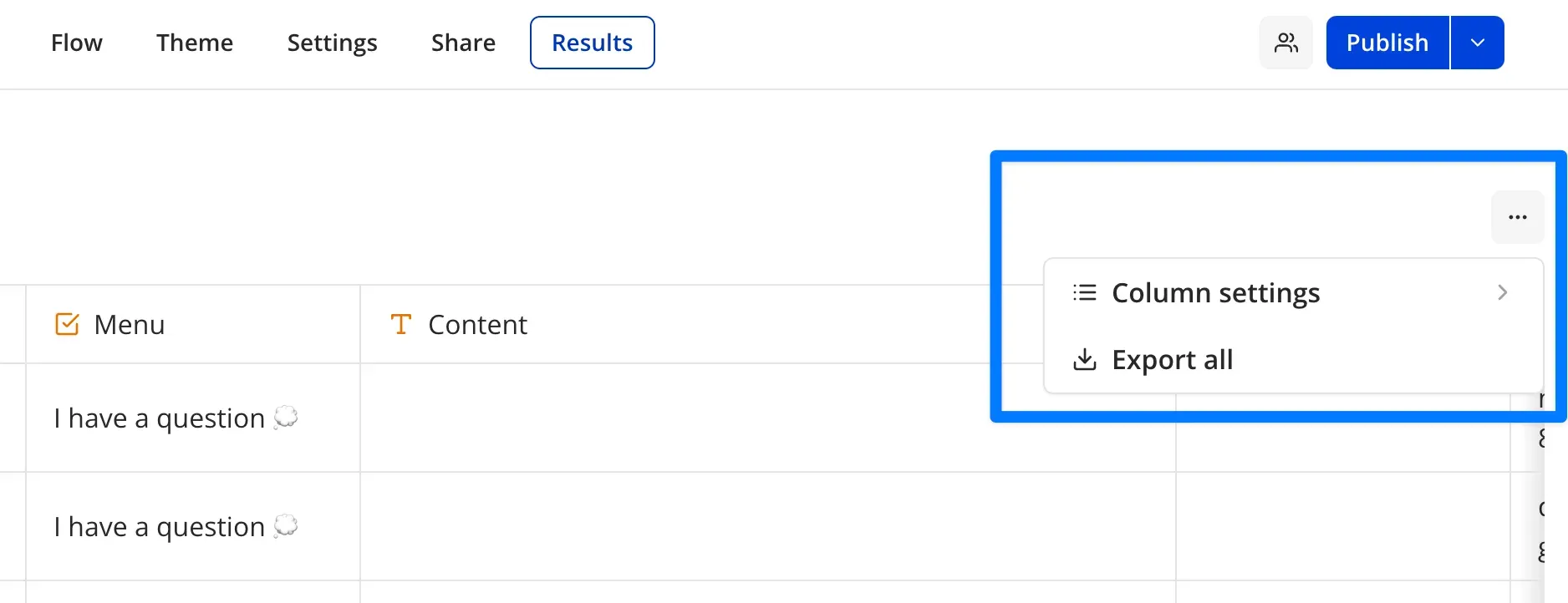
Results tab of a bot, with the menu for column settings and exporting all results to CSV.
Source: official Typebot project page.
Key capabilities
- Visual flow editor Flows are drawn on a canvas as groups of blocks connected by edges, with undo, redo, a zoomable graph and a Test button that runs the bot in a preview pane. Each bot has Flow, Theme, Settings, Share and Results tabs. Changes reach visitors only after Publish, and a theme change also requires republishing.
- Bubble blocks Text, image or GIF, video, audio and embed bubbles send content to the visitor. The media pickers can use Giphy and Unsplash for images and Pexels for video when the corresponding API keys are configured on a self-hosted instance. On WhatsApp, GIF and SVG images are not displayed and only MP4 video is supported.
- Input blocks Text, number, email, website, date, time, phone number, buttons, picture choice, cards, rating, file upload and payment inputs collect answers into variables. File upload can use camera capture since 3.18.0, and payment uses Stripe. File collection from visitors is part of the Starter plan and above on the cloud service.
- Logic blocks Set variable, condition, jump, redirect, A/B test, wait, typebot link, return and script blocks control the path through a flow. Script blocks run JavaScript in which variables are evaluated rather than parsed, and a
setVariablefunction writes results back. Typebot link calls another bot, which lets teams reuse shared sub-flows. - Built-in integrations HTTP request, Send email, Google Sheets, Gmail, Google Analytics, Meta Pixel, Zapier, Make.com, Pabbly Connect, NocoDB, Segment, PostHog, Cal.com, Chatwoot, Zendesk and Blink blocks connect a flow to external services. Credentials are stored per workspace. The README counts more than 34 building blocks across all families; the exact list is in the blocks overview.
- AI blocks OpenAI, Anthropic, Mistral, Dify AI and ElevenLabs blocks are documented, and the repository also contains Forge blocks for Groq, DeepSeek, OpenRouter, Perplexity, Together AI and ChatNode. Typical actions are chat completions, variable generation from free text, transcription and, since 3.17.0, an OpenAI Ask Model action with file search controls. Model calls use the API key the workspace supplies, so model costs are billed by that provider.
- Variables and events Answers, hidden URL parameters, prefilled values and system values are stored as variables and can be shown in later messages or sent to integrations. Reply, invalid reply and command events let a flow react to a message outside the normal path, for example a typed command. Results can include UTM parameters when they are captured as variables.
- Web embeds The Share tab generates code for a standard container, a popup or a chat bubble with an optional proactive message. The JavaScript library loads from jsDelivr as
@typebot.io/js, and the README states that it renders without an iframe; an iframe option, a React package, Next.js, WordPress and Webflow instructions also exist. Custom domains are a Pro feature on the cloud service. - WhatsApp deployment A bot can answer on a WhatsApp Business number through Meta's Cloud API, with a session expiry of 0 to 48 hours (default 4) and an optional start condition. Limits documented in the WhatsApp guide include three buttons per message, 20-character button labels, and skipped payment, Chatwoot, Cal.com, Google Analytics, Meta Pixel and client-side script blocks. On the cloud service, WhatsApp requires the Pro plan.
- Chat API A bot can run without the web client:
startChatreturns a session ID andcontinueChatsends each reply as JSON. A preview variant runs unpublished drafts with an API token. This is the route for custom front ends, other programming languages and messaging channels that Typebot does not support natively. - Management API Bearer-token endpoints create, update, import, publish and unpublish typebots, list and delete results and logs, manage folders and workspaces, read analytics statistics and, on the cloud, billing usage and invoices. Tokens are created under Settings and Members, My account. API tokens are stored hashed since 3.17.0.
- Results table, transcripts and logs The Results tab shows one row per conversation, with a date filter that defaults to the last seven days, configurable columns and a transcript view. Logs, including integration errors, are attached to individual results rather than shown in a global feed. CSV export can include answers from deleted blocks, and since 3.17.0 exported cells are sanitized against spreadsheet formula injection.
- Analytics The overview reports views, starts (at least one answer) and completions, with a precise documented definition of when a result counts as completed. Drop-off rates per input block are shown on the Pro plan. The analytics documentation lists the waiting states that do and do not block completion.
- Themes and custom CSS Fonts (including Google Fonts), background, colors, corner radius, shadows and avatars can be set per bot and saved as reusable theme templates. Custom CSS can target the bot's own class names for finer control. Removing the Typebot branding requires the Starter plan or above on the cloud service.
- Workspaces, members and Spaces Plans attach to workspaces; members get access to the whole workspace, while guests can be invited to a single bot with view or edit rights. Folders organize bots, and 3.16.0 introduced Spaces for further grouping. Flows can be exported to and imported from JSON files.
- Docker self-hosting The official compose file starts PostgreSQL 16, Redis, the builder on port 8080 and the viewer on port 8081 from the
baptistearno/typebot-builderandbaptistearno/typebot-viewerimages, which run on Debian Bookworm since 3.19.0. The containers serve plain HTTP, so TLS needs a reverse proxy; the Docker guide gives a Caddy example with streaming enabled. Vercel, manual and Alibaba Cloud guides cover other targets. - Instance configuration Required settings are
DATABASE_URLand anENCRYPTION_SECRETshared by builder and viewer.ADMIN_EMAILreceives an unlimited plan,DEFAULT_WORKSPACE_PLANsets the plan for new workspaces, andDISABLE_SIGNUPrestricts registration to invited users. Sign-in can use email over SMTP, Google, GitHub, GitLab, Facebook, Azure AD, Keycloak or a custom OAuth/OIDC provider, as listed in the configuration reference. - SSRF controls for outbound calls HTTP request, script fetch, AI provider base URLs, SMTP tests and several integrations validate their destinations. Private RFC1918 hosts must be listed in
SSRF_ALLOWED_HOSTS, while loopback, link-local and cloud metadata addresses remain blocked. This matters when a self-hosted bot needs to call an internal API. - Forge block framework New integration blocks are written in TypeScript with the Forge, which defines authentication, actions, options, fetchers and the block logo. A CLI scaffolds a block in the monorepo. Custom blocks become part of the instance you build and deploy; there is no separate plugin marketplace.
Where Typebot fits
Qualifying inbound leads on a website
Build a short flow that asks for company, need and contact details, use conditions to branch on the answers and push qualified leads to Google Sheets, a CRM through an HTTP request, or a booking step with the Cal.com block. Embed it as a bubble or popup with the JavaScript library. Check that partial results are acceptable under your privacy notice, because answers are stored as soon as each one is typed, and confirm that hidden UTM variables arrive in the results table.
Routing support requests before a human answers
Start with a menu of request types, collect a description and optional screenshots with the file upload input, then send the case by email or hand it to Chatwoot or Zendesk. A Typebot link block can reuse a shared identification sub-flow across several bots. Test the handoff on each channel you use: the Chatwoot block is skipped on WhatsApp, and file uploads require S3-compatible storage on a self-hosted instance.
Answering customers on WhatsApp
Connect a Meta app and WhatsApp Business number, set the session expiry and an optional start condition, and preview the flow with the WhatsApp runtime before publishing. Rewrite button labels to 20 characters or fewer and avoid GIF, SVG and non-MP4 media. Since 3.19.0, any Webhook block in a WhatsApp flow depends on the shared relay secret, so verify an authorized callback after each upgrade.
Adding an AI step to a structured flow
Use the OpenAI, Anthropic or Mistral blocks to generate a reply, extract variables from free text or transcribe audio, while keeping deterministic questions, conditions and integrations around them. The workspace supplies its own provider key, so token costs and data handling follow the provider's terms. Store the model output in a variable and log a sample of transcripts before relying on generated answers for customers.
Running Typebot on your own infrastructure
Download the official compose file and .env.example, generate the encryption secret, configure at least one sign-in provider and put the builder and viewer behind TLS on separate hostnames. Pin image tags instead of latest, back up PostgreSQL and the S3 bucket, and read the release notes and the breaking-changes page before each monthly upgrade; 3.19.0, for example, required coordinated deployment of builder, viewer, embeds and the PartyKit relay.
Driving bots from your own application
Generate an API token, call startChat with the bot's public ID and pass each user message to continueChat, rendering the returned messages and input requests in your own interface. The management endpoints can publish bots and pull results into a data pipeline. Set CHAT_API_TIMEOUT on self-hosted instances to stop runaway loops, and check the API authentication guide for token scope.
Reviews of Typebot
Be the first to share your experience with Typebot.
Write a review
Loading review form…
Alternatives to Typebot
 BotpressBotpress is a cloud platform for building AI chat agents in a visual Studio or in TypeScript, then deploying them to web, WhatsApp, Slack, Teams and more. Its GitHub repository holds the open-source Hub integrations, SDK, CLI and API clients.
 ChatbotXChatbotX is an MIT-licensed ManyChat alternative: visual flows, AI agents, broadcasts, sequences and a live inbox across WhatsApp, Instagram, Messenger, TikTok, Telegram, Zalo, email and webchat. Self-host with Docker or use the paid cloud.
 DifyDify by LangGenius combines a visual workflow builder, knowledge pipelines, sandboxed agents, model management and app APIs. It runs as Dify Cloud or self-hosted with Docker Compose under a modified Apache 2.0 license.