

What is Dittofeed?
Dittofeed is an open-source customer engagement platform for sending broadcasts and automated, event-driven messages to your own users. You send it user events and traits, define segments, build journeys on a visual canvas and deliver messages through email, SMS and webhook channels with providers you configure. The project positions itself as a developer-friendly alternative to Customer.io, OneSignal and Segment Engage. The main site is dittofeed.com and the documentation is at docs.dittofeed.com.
The software was published by Dittofeed, whose site carries the legal name Idea Market, Inc. The company's own site now states that Dittofeed Cloud closed on October 31, 2026, that cloud customer data is permanently deleted on November 30, 2026, and that existing self-hosted deployments can keep running independently, with the code and documentation remaining available without ongoing support. That changes how the project should be evaluated: it is now a self-hosted code base with an uncertain maintenance future rather than a vendor-backed service.
The stack is TypeScript. Dittofeed uses PostgreSQL for application state, ClickHouse for event storage and segment computation, Temporal to run journeys, and an optional Kafka buffer between the API and ClickHouse. The architecture page describes a stateless API, dashboard and worker around those stores. Packaging options are a Docker Compose file for the single-process lite image, a Helm chart for Kubernetes and a one-click Render blueprint.
The reviewed release is v0.23.0, published on December 1, 2025. It added an analysis page, an improved broadcast flow, random cohort nodes, new segmentation conditions, extra authentication options (Keycloak, AWS Cognito, GCP OAuth), a SignalWire SMS provider and CSV downloads of events and deliveries. Pre-release tags for v0.24.0 exist, the latest dated October 2026, but they are alphas. The core code is MIT licensed. A separate closed-source edition, dittofeed-ee, adds multi-tenancy, embedded components and white-labeling, and is not part of the repository.
Dittofeed screenshots
Explore the interface. Open a screenshot to view it at full size.
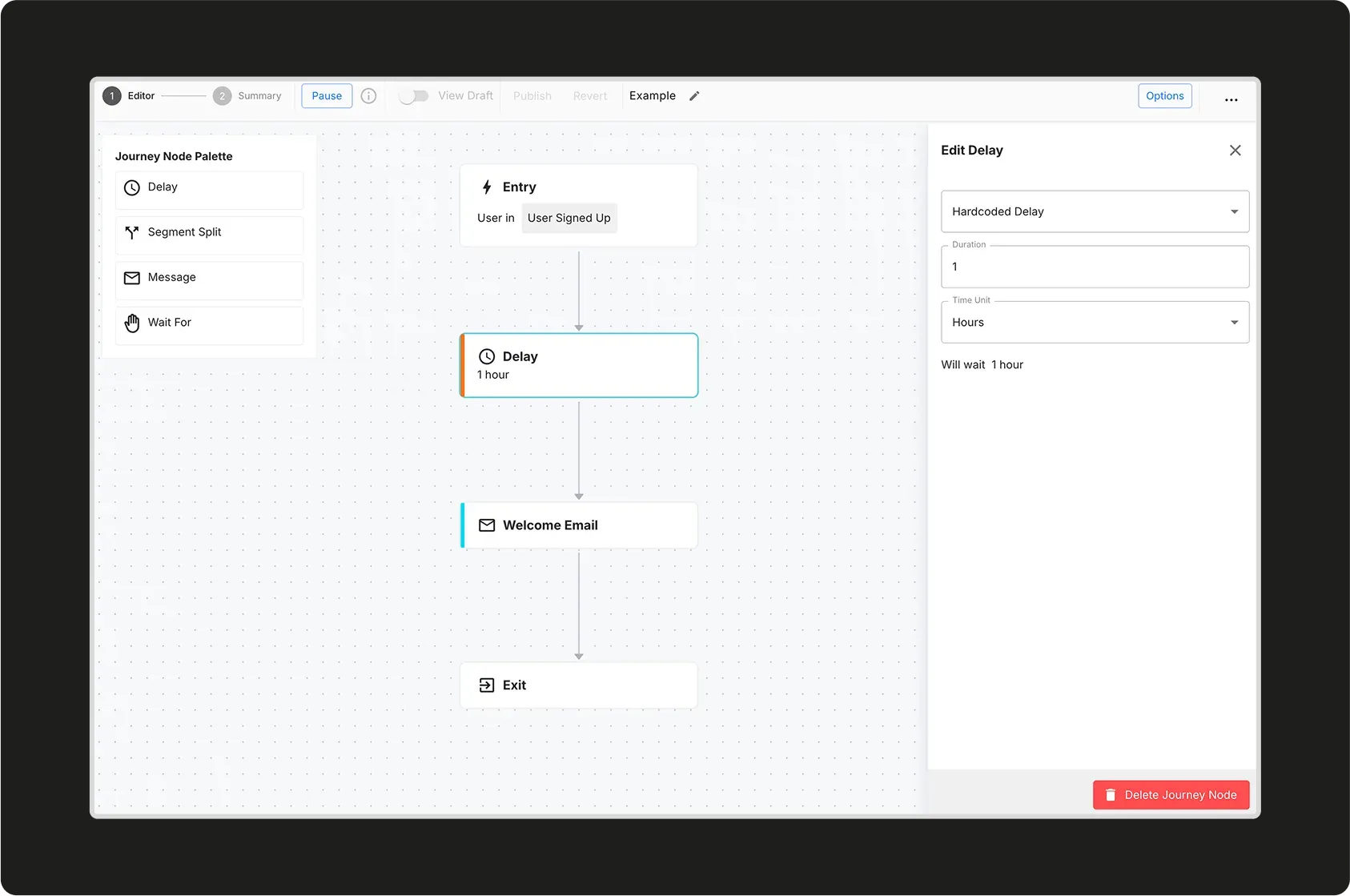
Official screenshot of the journey editor showing a one-hour delay before a welcome email.
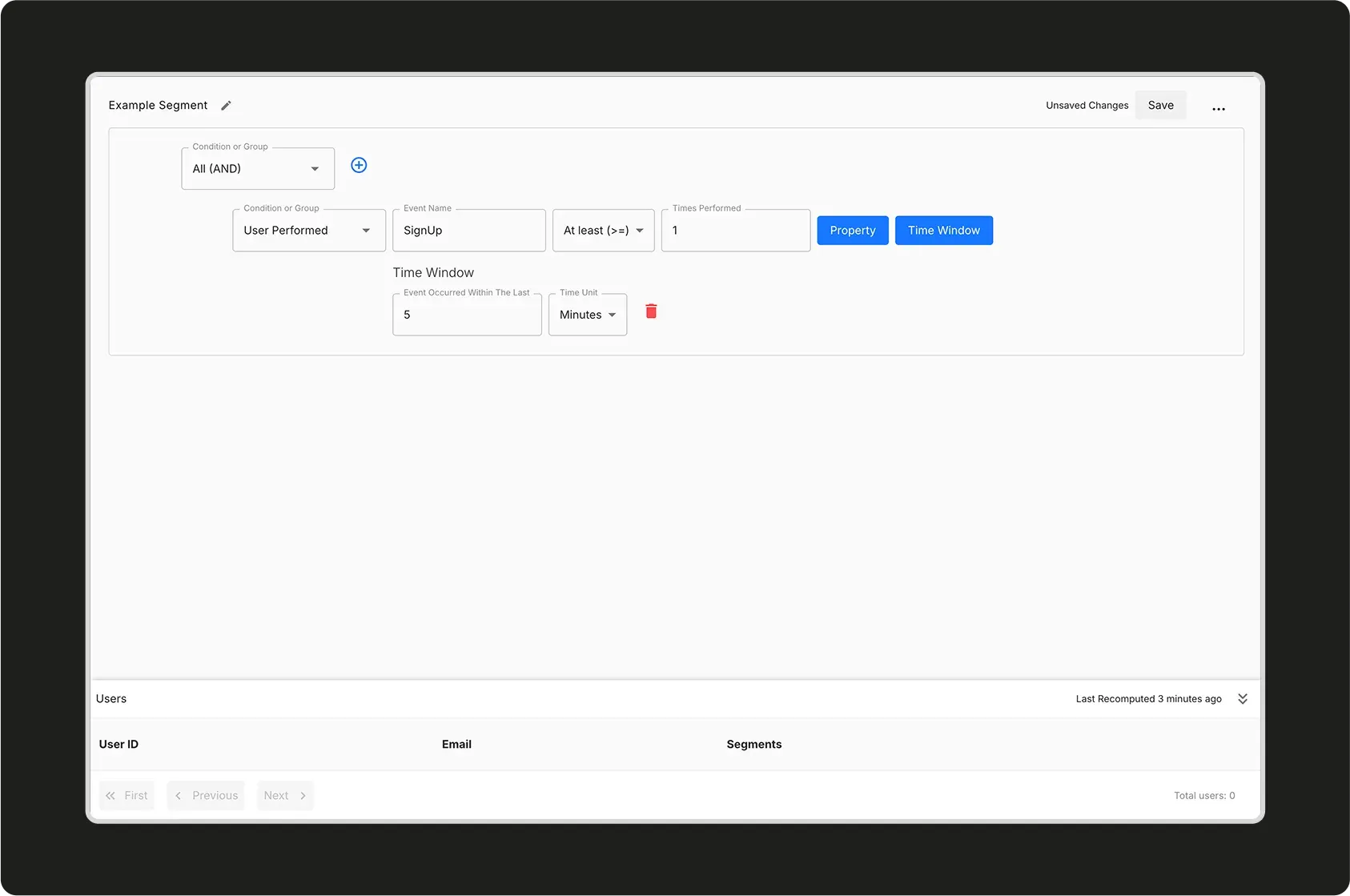
Official screenshot of the segment editor, with the condition builder above the matching users table.
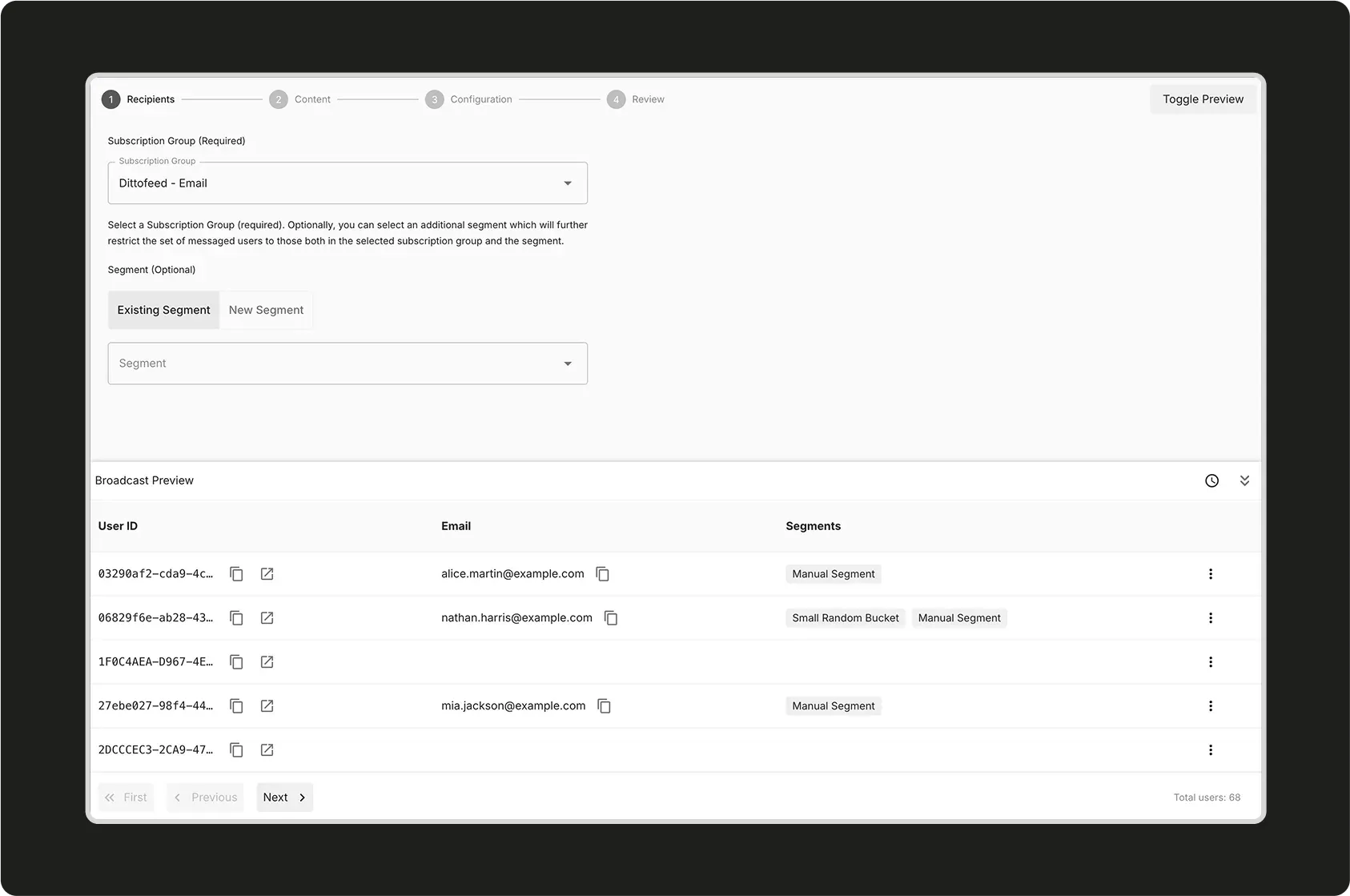
Official screenshot of the broadcast wizard. The user rows are example data with example.com addresses.
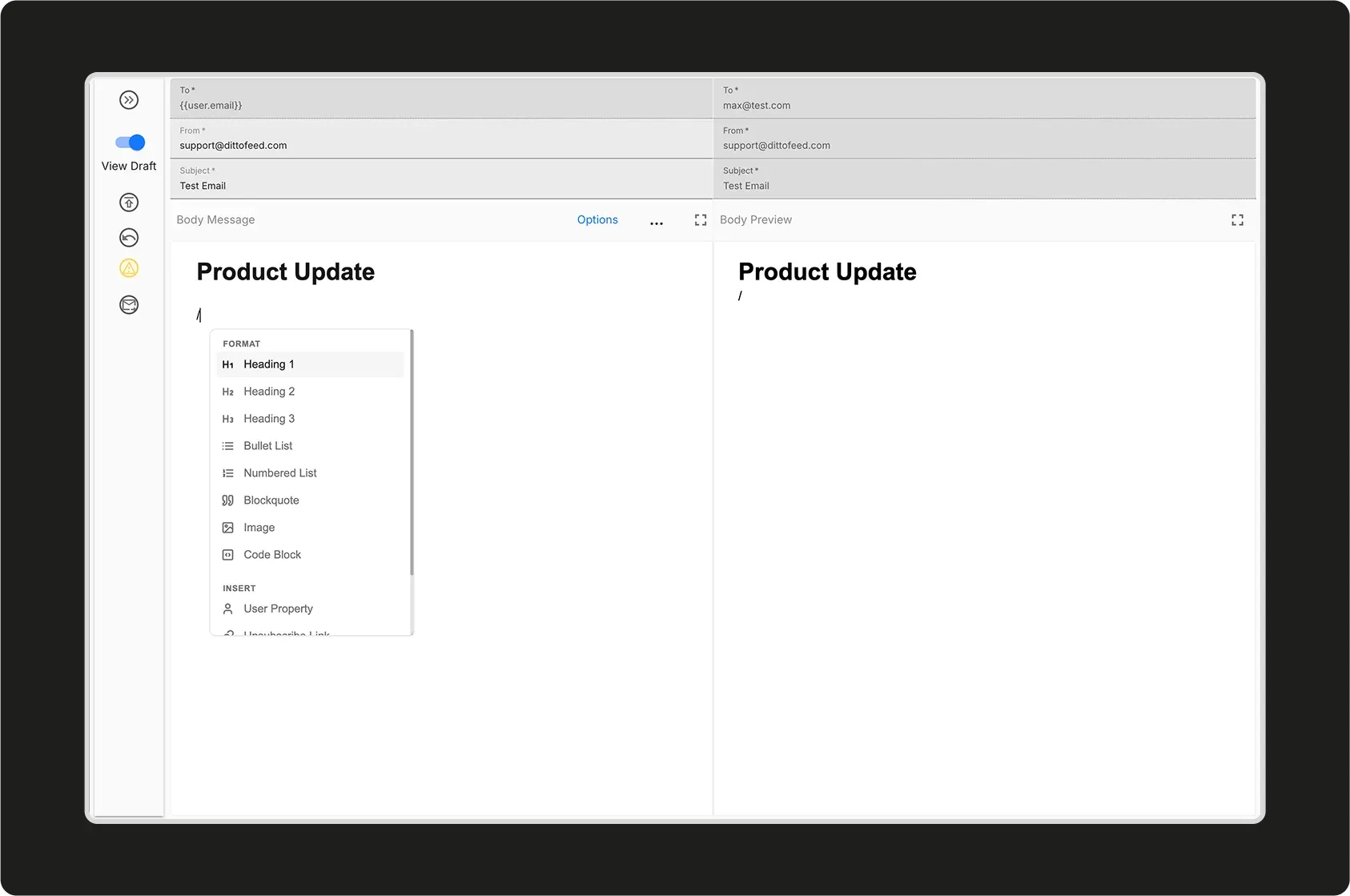
Official screenshot of the low-code email editor with its command menu and side-by-side preview.
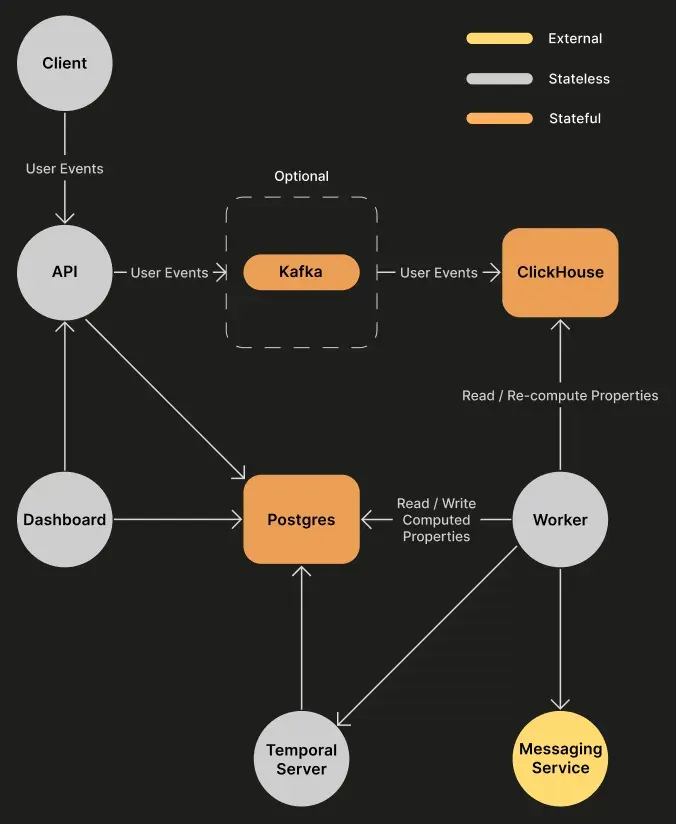
Official architecture diagram: events flow through the API into ClickHouse, with the worker and Temporal running journeys.
Source: official Dittofeed project page.
Key capabilities
- Docker Compose self-hosting The Docker Compose guide clones the repository and starts docker-compose.lite.yaml, which runs the Dittofeed lite service with Postgres, ClickHouse and Temporal. The docs say it works with default credentials but tell you to override the database, ClickHouse, password and secret key values in a .env file before exposing it.
- Kubernetes and Render deployment A Helm chart in the repository can bring up Dittofeed together with Postgres, ClickHouse and Temporal, or point at external instances through environment values. A Render guide covers one-click deployment with single-tenant authentication. The self-hosting index lists AWS CloudFormation as coming soon.
- Event ingestion API A Segment-compatible public API accepts identify, track, page, screen, group and batch calls, with an identify endpoint reference in the API docs. Segment itself and Polytomic reverse ETL are documented as data sources, so warehouse tables can feed user traits.
- Client SDKs The documentation lists Web, Node.js and React Native SDKs for sending events from an application. They post to the same API, so a server process or a plain HTTP client works as well.
- Segments A segment is a hierarchy of nodes: trait, performed, and, or, subscription group, manual CSV upload, random bucket, keyed performed and includes. Segments are computed in ClickHouse, with the status shown in the dashboard along with the time of the last recomputation. Release 0.23 added an absolute date operator and an append operation for manual segments.
- Journey builder Journeys start at an entry node and end at an exit node, with delay, segment split, message and wait-for nodes between them. Entry can be segment based or event based. Journeys can be paused, drafted, published and reverted, and Temporal carries the waiting state between steps.
- Broadcasts A broadcast is a one-off send built in four steps: recipients, content, configuration and review. Recipients are a subscription group, optionally narrowed by a segment, with a preview table of matching users. The documentation also describes submitting broadcasts through the admin API.
- Message templates Email templates can be written in HTML or MJML, or built with the low-code editor, which uses slash commands and user property insertion. A live preview and test sends are included. Templates can also be managed through admin API endpoints for create, update, render, test and batch send.
- Email channels Email is sent through a provider you configure: SendGrid, Postmark, Resend, Amazon SES, a generic SMTP server or Mailchimp through Mandrill. Dittofeed does not operate its own mail servers, so sender domains, deliverability and provider costs stay with you.
- SMS and webhook channels SMS is documented with Twilio, and release 0.23 added SignalWire. A webhook channel can call an external endpoint from a journey. The README also names mobile push, WhatsApp and Slack, but the channel pages in the docs list only email, SMS and webhooks, so confirm any other channel against the code before planning around it.
- Subscription management Subscription groups and a hosted unsubscribe page control who can be messaged. Release 0.23 improved the subscription management experience, and a guide covers a custom subscription management page. Blob storage, any S3-compatible bucket, is needed for file attachments and the view-in-browser link.
- Authentication modes Anonymous mode is the default and is for testing only. Single-tenant mode uses one shared password and a secret key, and the docs note it is available with the lite image. Multi-tenant mode connects to an OIDC identity provider and requires dittofeed-ee.
- Write modes and scaling The WRITE_MODE setting chooses how the API writes to ClickHouse: asynchronous inserts by default, or a Kafka buffer for high volume. This is the main documented lever for ingestion load, and ClickHouse capacity remains the practical limit.
- Git-based workflows A documented workflow lets you create a branch in the dashboard, edit segments, templates and journeys, commit and push to GitHub, review a pull request and have a GitHub app deploy the merged configuration. The docs describe the feature as in active development.
- Analytics and exports The dashboard shows events and deliveries with search, local time zones and CSV download. A HubSpot destination can write information back to HubSpot, and a CSV destination exports segment assignments.
Where Dittofeed fits
Lifecycle and onboarding emails
Send sign-up and product events from your application, define a segment such as users who performed a sign-up event in the last day, and attach an entry node to it. Add a delay node and a message node with a welcome template. Before publishing, check that the event names match exactly, that the subscription group is correct and that the exit node ends the journey.
Transactional messages through an API
Use the batch-send endpoint of the admin API to send a template to a list of users without building a journey. Create an API key as described in the admin API guide, render the template first and send a test. Make sure the sending provider and domain are authenticated before relying on the path for password resets or receipts.
Segmented broadcasts and newsletters
Pick a subscription group, narrow it with a segment, preview the matching users and schedule the send. Review the unsubscribe link in the preview and keep a manual CSV segment for seed addresses. Large sends are limited by your email provider's rate limits and reputation rules, not by Dittofeed.
Messaging from data in a warehouse
Use the Polytomic integration or the Segment webhook to load user traits and events from existing systems. Segments then react to those traits, such as a plan or a renewal date. Verify identity mapping first, because a user ID mismatch between sources creates duplicate users and duplicate sends.
Running it inside your own network
Self-hosting keeps user data in your own Postgres and ClickHouse, which matters for regulated or privacy-sensitive audiences. Plan for four stateful services, backups of Postgres and ClickHouse, TLS in front of the dashboard and a non-anonymous auth mode. After the vendor wind-down, also assign an owner for security updates and upgrades.
Versioned messaging configuration
Teams that treat messaging as code can use the git-based workflow so template and journey changes pass review. Pin the Docker image tag, read the upgrade guide for v0.23.0 before moving versions and test journeys against a staging workspace first.
Install
git clone https://github.com/dittofeed/dittofeed.git && cd dittofeed && docker compose -f docker-compose.lite.yaml up -dReviews of Dittofeed
Be the first to share your experience with Dittofeed.
Write a review
Loading review form…
Alternatives to Dittofeed
 NovuNovu is MIT-licensed communication infrastructure with a workflow engine, digests, an embeddable React Inbox and preferences, close to 80 provider integrations and two-way agent messaging. Run it on Novu Cloud (US or EU) or self-host with Docker.
 NotifuseNotifuse is a self-hosted email marketing and transactional email platform in Go and React with a visual MJML editor, automations, web analytics and seven sending providers. Source-available under BSL 1.1, with EU Cloud plans.
 listmonkAGPL-licensed newsletter and mailing list manager that runs as one Go binary with PostgreSQL. It handles opt-in lists, SQL segmentation, templated campaigns, a transactional mail API, bounce processing, analytics and SMS or push messengers.