

What is Notifuse?
Notifuse is a self-hosted email platform for newsletters, campaigns, automations and transactional email. It is written in Go with a React console, stores data in PostgreSQL and sends through your own provider account rather than its own delivery network. Supported providers are Amazon SES, Mailgun, Postmark, Mailjet, SparkPost, SendGrid and generic SMTP. The code is at Notifuse/notifuse, the site is notifuse.com and the documentation is at docs.notifuse.com. The README positions it against Mailchimp, Brevo, Mailjet, listmonk, MailerLite and Klaviyo.
It runs as a Docker image, notifuse/notifuse, or through a Docker Compose file that includes PostgreSQL for testing. The installation guide starts the console on port 8081 with a setup wizard, requires a SECRET_KEY that encrypts stored data, and needs PostgreSQL 17 or newer when you bring your own database. Notifuse Cloud is the managed option, hosted in the EU with plans from 16 USD per month billed yearly. The documentation describes workspaces as isolated units, each with its own database, so an agency or a group of brands can keep contacts, templates and sending reputation separate.
The latest GitHub release is v42.2, published on November 5, 2026. It makes tracked links ask for confirmation when Notifuse cannot prove the link was in the original email, lets a workspace whose creation stopped partway be created again, fixes the permission editor when no license covers granular permissions, and stops requests for unknown workspaces from opening database connections. Earlier releases added web analytics in v38.0, the Business Source License in v40.0, audit logs in v41.0 and a batch of webhook and secret-key hardening in v42.0. The project's own site reports about four releases a month.
The license changed in 2026. Versions up to v39.x are AGPL-3.0 permanently, while v40.0 and later are under the Business Source License 1.1, and each release converts to AGPL-3.0-or-later four years after it ships. The licensing document says production use, modification and hosting for third parties are allowed, and that six listed capabilities need a license key. The licensor named in the license file is Pierre Bazoge, a sole trader in France trading as Notifuse. The BSL is not an OSI open-source license.
Notifuse screenshots
Explore the interface. Open a screenshot to view it at full size.
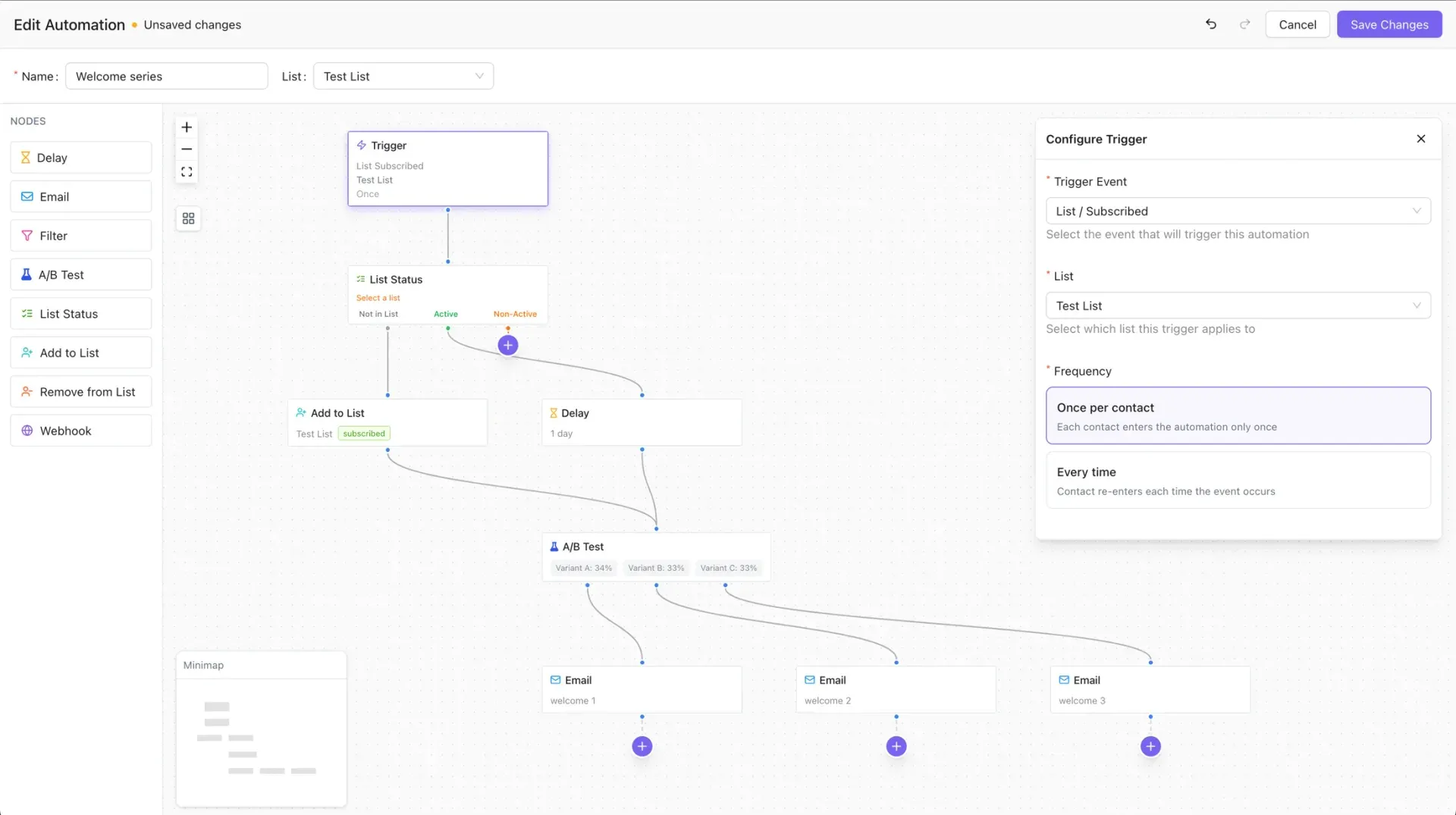
Official documentation screenshot of the automation canvas.
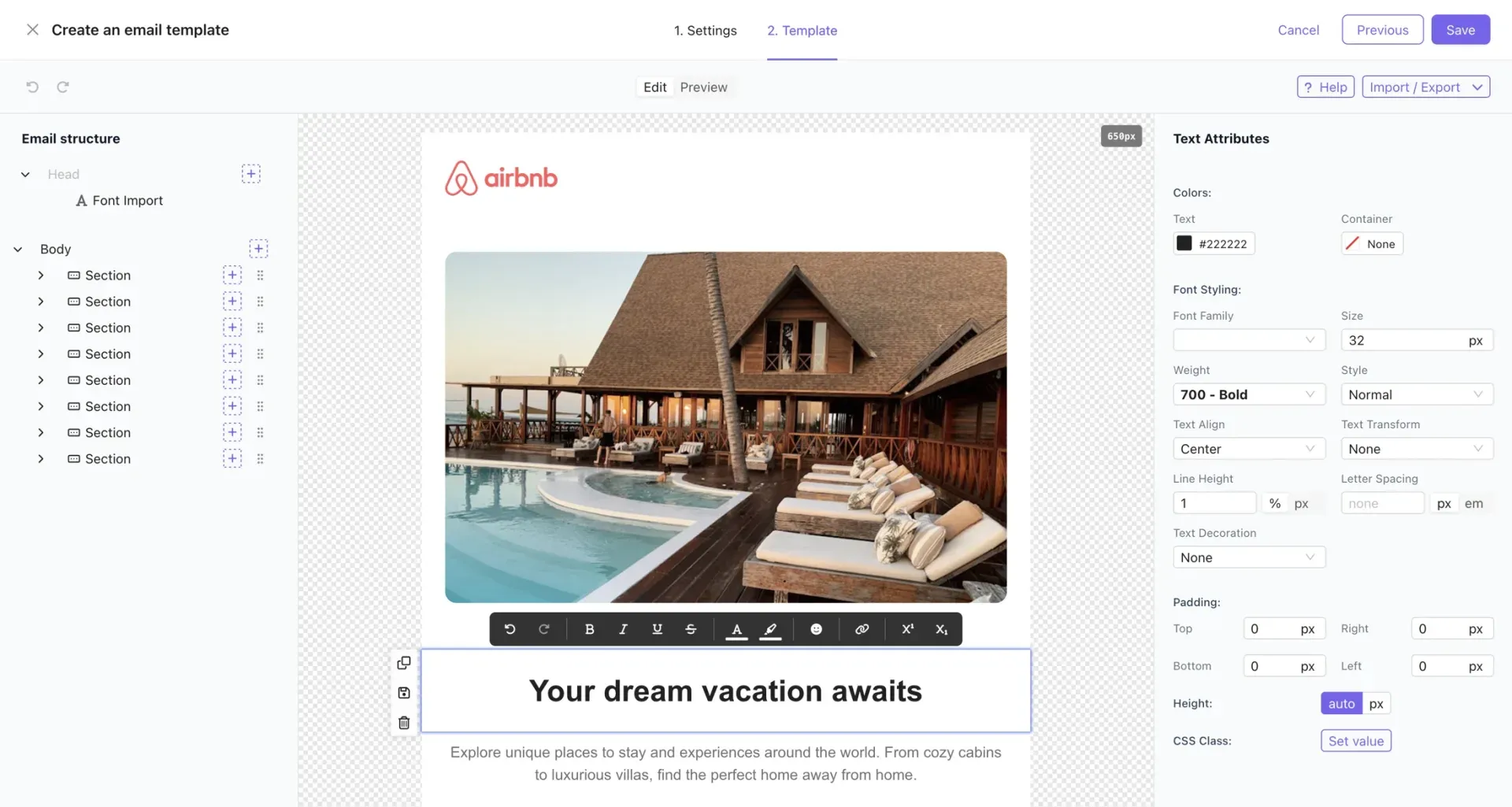
Official README screenshot of the drag-and-drop email builder with a sample template.
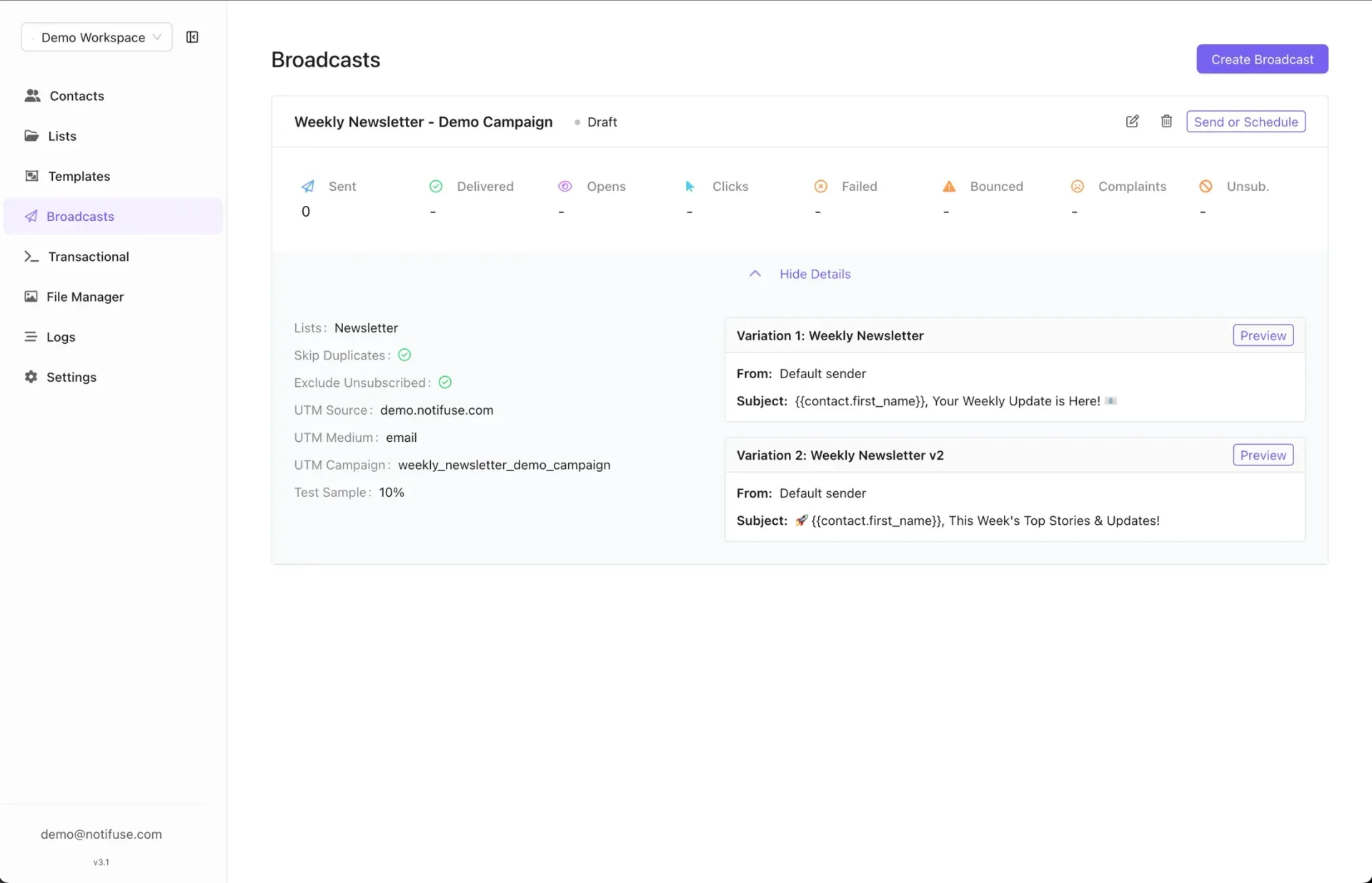
Official documentation screenshot of a draft broadcast with UTM settings, a 10 percent test sample and two variations.
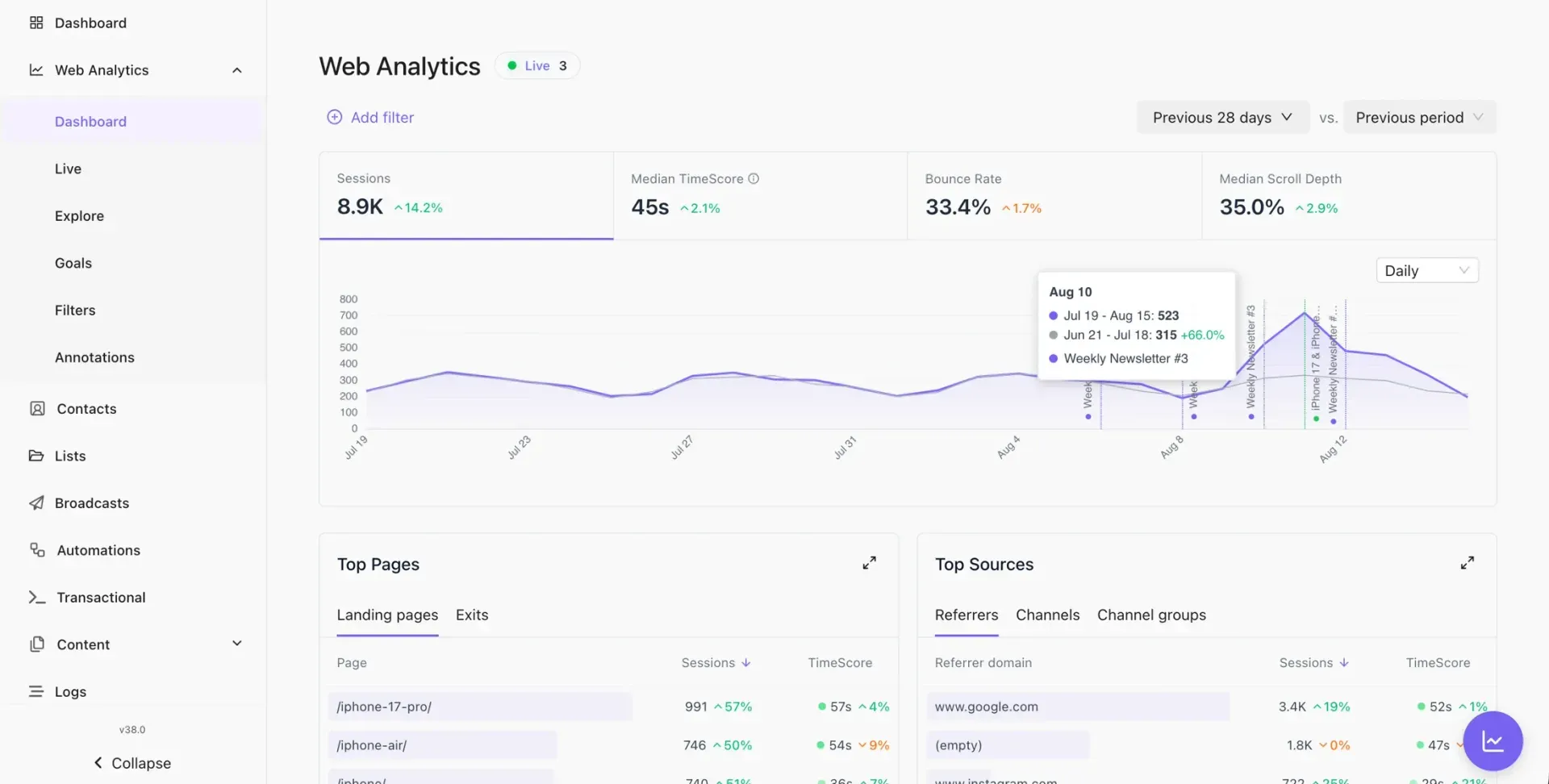
Official documentation screenshot of the web analytics dashboard; the top bar with the user account was cropped out by iThub.
Source: official Notifuse project page.
Key capabilities
- Visual email builder Build emails in a drag-and-drop editor based on MJML components with a live preview, an email structure tree and per-element styling panels. Templates use Liquid variables such as the contact's first name and custom fields, and the output is responsive HTML.
- Broadcast campaigns Send a campaign to one or more lists with segment filters, scheduling, UTM tagging and a test sample percentage. Duplicates are skipped and unsubscribed contacts excluded. A broadcast shows sent, delivered, opens, clicks, failed, bounced, complaint and unsubscribe counts.
- A/B testing Compare subject lines, content or send times on broadcasts, and use weighted variants inside an automation as well. In a broadcast you can set a test sample percentage and compare variations by what they did on your site through linked web analytics reports.
- Automation flow builder Automations are graphs on a canvas with one trigger as the root. Node types are delay, email, branch, filter, add to list, remove from list, A/B test, webhook and list status branch. Enrollment can be once per contact or every time, with optional exit on reply, and each enrollment keeps its own state and history.
- Contacts, lists and segments Contacts have custom fields, list subscriptions with statuses such as active, pending, unsubscribed, bounced and complained, and a timeline of messages, sessions, page views and profile changes. CSV import maps fields and lists, and segments filter on properties and activity.
- Transactional API A REST API sends event-driven email to a contact with a template and automatic contact creation. Authenticate with a scoped API key, and compare it against the provider's own limits. The documented API reference covers contacts, lists, custom events and web analytics endpoints as well.
- Seven sending providers Connect Amazon SES, Mailgun, Postmark, Mailjet, SparkPost, SendGrid or an SMTP server with Basic or OAuth2 authentication. Notifuse does not deliver mail itself, so sender reputation, bounces and complaints depend on the provider and your domain setup.
- Web analytics Cookieless analytics run on the same PostgreSQL database, with a script of roughly 21 KB gzipped served from your own instance. It reports engaged-time sessions, bounce rate, channel attribution with 40 editable default rules, goals, ten custom dimensions and a live view. Requires PostgreSQL 17 or newer.
- Notification center When a recipient clicks an unsubscribe link, a mobile-first page lets them manage subscriptions across public lists. The notification center widget in the repository is under the MIT license and can be embedded in your own application.
- Workspaces and multi-entity setups Each workspace is isolated with its own database, templates, domain and sending reputation. Three workspaces are free on a self-hosted install, and more need a license key. Cloud plans list 3, 10 or 20 workspaces depending on the tier.
- Permissions and API keys Invite team members and create API keys scoped to specific parts of a workspace. Granular, non-full-access permissions need a license key on self-hosted installs, while full access never does. Version 42.2 shows Full Access or No Access clearly in the members list.
- Audit logs and message logs The Logs section shows message history, incoming and outgoing webhooks and, with an Enterprise license, an append-only audit trail of administrative actions with actor, target, IP address and outcome. Reading and exporting what was recorded stays available even after a license lapses.
- Single sign-on with OpenID Connect Sign in with an identity provider such as Google Workspace, Keycloak or Okta alongside magic-code login. SSO is one of the six licensed capabilities and is part of the Enterprise tier. Login-code sign-in keeps working without a key.
- Blog and AI assistants A built-in blog with Liquid themes, categories, scheduling and SEO fields, plus an AI assistant for the email builder, blog editor and analytics that connects to Anthropic, OpenAI or Google Gemini with your own key. Review generated content before sending.
- Webhooks and integrations Subscribe to workspace events by webhook, receive provider events and connect Zapier or Supabase Auth. Since v42.0 webhooks refuse private and loopback addresses by default, so set the documented environment variable if you target an internal service.
- S3 file manager Store images and attachments for templates in an S3-compatible bucket, with an optional CDN address. Keep the bucket policy narrow and test that images load for recipients outside your network.
- Self-hosting licenses and Cloud plans Self-hosting is free with three workspaces. License keys cost 290 USD per year for Studio, 890 for Agency and 1,990 for Enterprise, verified offline. Cloud plans run from Lite at 16 USD per month billed yearly to Business at 249 USD, with unlimited emails and a 14-day trial.
Where Notifuse fits
Replacing a newsletter service
Import contacts by CSV, map custom fields and lists, build a template in the editor and send a first broadcast to a small test sample. Check consent records and the unsubscribe flow before you move a large list, and warm up the sending domain gradually. Keep the old platform's suppression list so previously unsubscribed or bounced addresses are not mailed again.
Sending transactional and marketing mail from one place
Use the transactional API for receipts and password mails, and broadcasts for campaigns, with separate templates and lists. Confirm that each class of message uses the right provider stream and that unsubscribe links appear only on marketing mail. Send a test to several mailbox providers and read the delivered headers for SPF and DKIM results.
Building welcome and nurture journeys
Create an automation triggered by a list subscription, add delays, a list status branch and an A/B test across email variants. Test it with a contact in each branch and review the per-node history for failures. Decide up front whether a contact may re-enter, since once per contact and every time behave very differently for long journeys.
Running separate brands or clients
Create one workspace per brand or client, each with its own domain and provider settings. Plan for the three-workspace limit on a free self-hosted install and check the license tiers before onboarding a fourth. Give each client workspace its own API key and domain so one client's problem does not affect another.
Connecting email to website behavior
Enable web analytics, add the script and identify visitors so browsing behavior can feed segments and broadcast reports. Review the privacy notice for your region, since the cookieless design still processes visit data.
Operating a self-hosted instance
Set a strong SECRET_KEY and back it up with the database, run PostgreSQL 17 or newer, and follow release notes because fixes ship as new versions. Test webhook targets after upgrading to v42.0 or later and restore a backup on a spare host.
Reviews of Notifuse
Be the first to share your experience with Notifuse.
Write a review
Loading review form…
Alternatives to Notifuse
 listmonkAGPL-licensed newsletter and mailing list manager that runs as one Go binary with PostgreSQL. It handles opt-in lists, SQL segmentation, templated campaigns, a transactional mail API, bounce processing, analytics and SMS or push messengers.
 PlunkPlunk is an AGPL-3.0 email platform that combines a transactional API, SMTP relay, campaigns, segments and event workflows on one contact list. Use the hosted service at $0.001 per email or self-host it with Docker and your own Amazon SES account.
 BillionMailAGPL-licensed mail server and newsletter platform for Linux. Docker Compose deploys Postfix, Dovecot, Rspamd, Roundcube and a Go console for domains, contact lists, campaign tasks, a transactional sending API and delivery analytics.