

What is BillionMail?
BillionMail is a self-hosted mail server and email marketing platform released under the AGPL-3.0 license. One installation combines a Postfix and Dovecot mail stack, Rspamd filtering, Roundcube webmail and a management console for sending domains, mailboxes, contact lists, campaign tasks and a sending API. The repository was created in February 2025 in the aaPanel GitHub organization and now lives under the Billionmail organization. Install commands in the documentation still reference aaPanel/BillionMail, which GitHub redirects to the current location.
BillionMail is distributed as source with prebuilt Docker images. The recommended route clones the repository into /opt and runs install.sh; the alternative copies env_init to .env and starts the stack with Docker Compose. aaPanel users can also deploy it from the panel as a one-click Docker application. The Compose file defines seven services: PostgreSQL 17.4, Redis 7.4, Rspamd, Dovecot, Postfix, Roundcube 1.6.11 and the core management container. The preparation guide asks for Linux on amd64 or arm64 with at least 1 CPU core, 1 GB of RAM and 20 GB of disk, free mail ports 25, 110, 143, 465, 587, 993 and 995, and port 80 for Let's Encrypt validation.
The latest tagged release is v4.9, published December 11, 2025. It added a retention setting that purges sent-mail records older than a chosen number of days, a choice between 2048-bit and 1024-bit DKIM keys, contact group selection for API sends, campaign-level and global switches that disable open and click tracking, and log rotation with gzip compression for the core service. Version 4.8 added domain and IP blacklist detection with email alerts, and 4.7 added mailbox storage quotas with usage warnings. Earlier 4.x releases introduced an AI-assisted template editor (4.0), a visual Postfix queue manager with operation logs (4.1), Spintax content variation (4.3), per-domain outbound IP binding (4.4) and tag-based audience filters (4.5). Commits have continued on the dev branch since v4.9, and its Compose file now pins the billionmail/core 4.9.3 image.
The backend is written in Go on the GoFrame framework with PostgreSQL and Redis, and the console frontend uses Vue 3, TypeScript, Pinia and Naive UI, as described in the repository's contributor notes. The interface is translated into English, Chinese and Japanese. A bm shell command wraps start, stop, status, update, password and port changes. Documentation is published on billionmail.com in English and Chinese, and the project runs a public demo instance with shared credentials.
BillionMail does not supply sending reputation: the operator provides the server IP, the DNS and PTR records, and either an open outbound port 25 or an external SMTP relay. It is not a hosted email service and there is no vendor cloud edition. The team sells an optional deployment package, listed on the support page, while the software itself carries no license fee and no built-in sending cap.
BillionMail screenshots
Explore the interface. Open a screenshot to view it at full size.
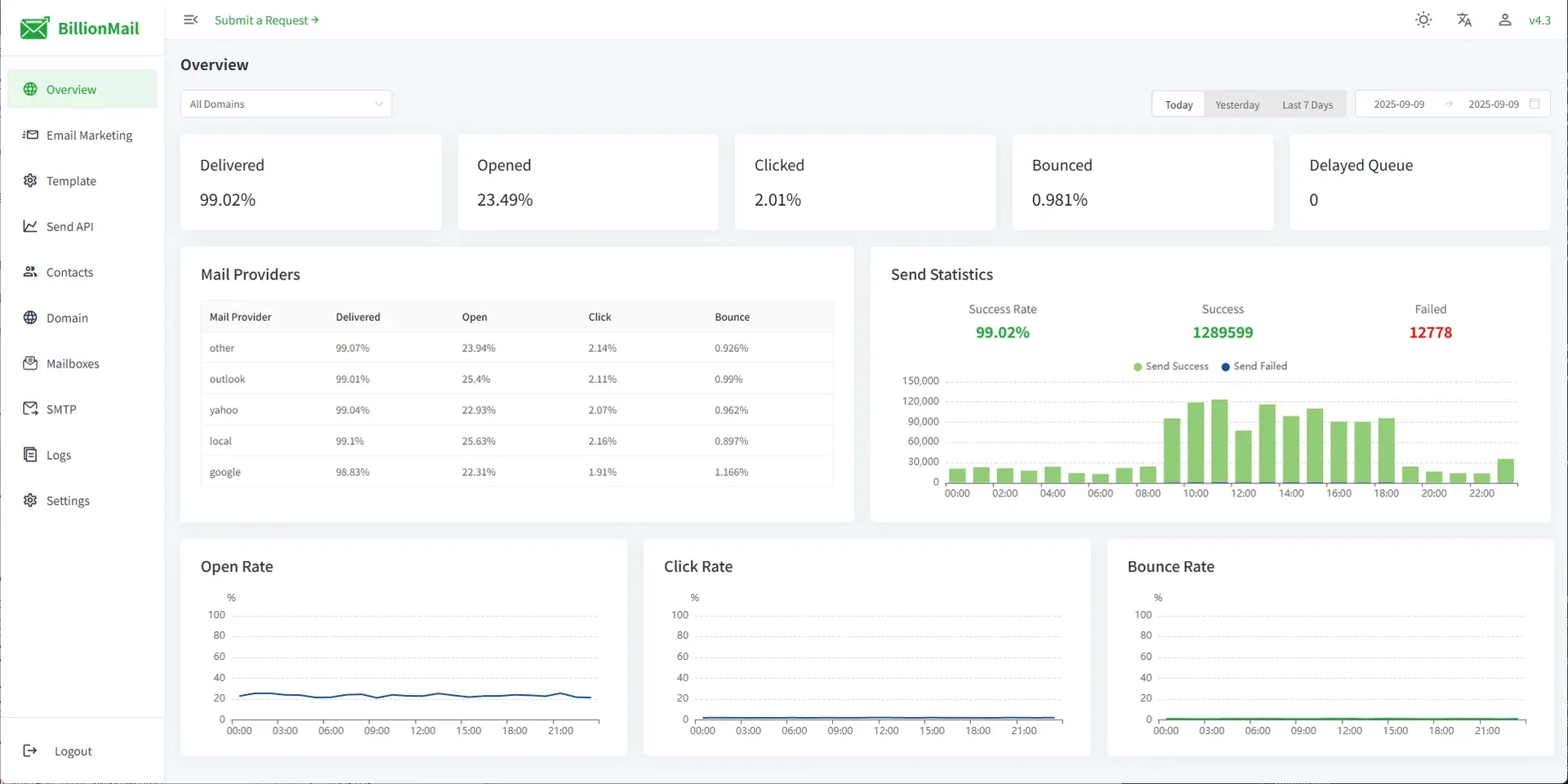
Official BillionMail dashboard screenshot from the project website, taken on version 4.3, with per-provider rates and hourly sent and failed counts.
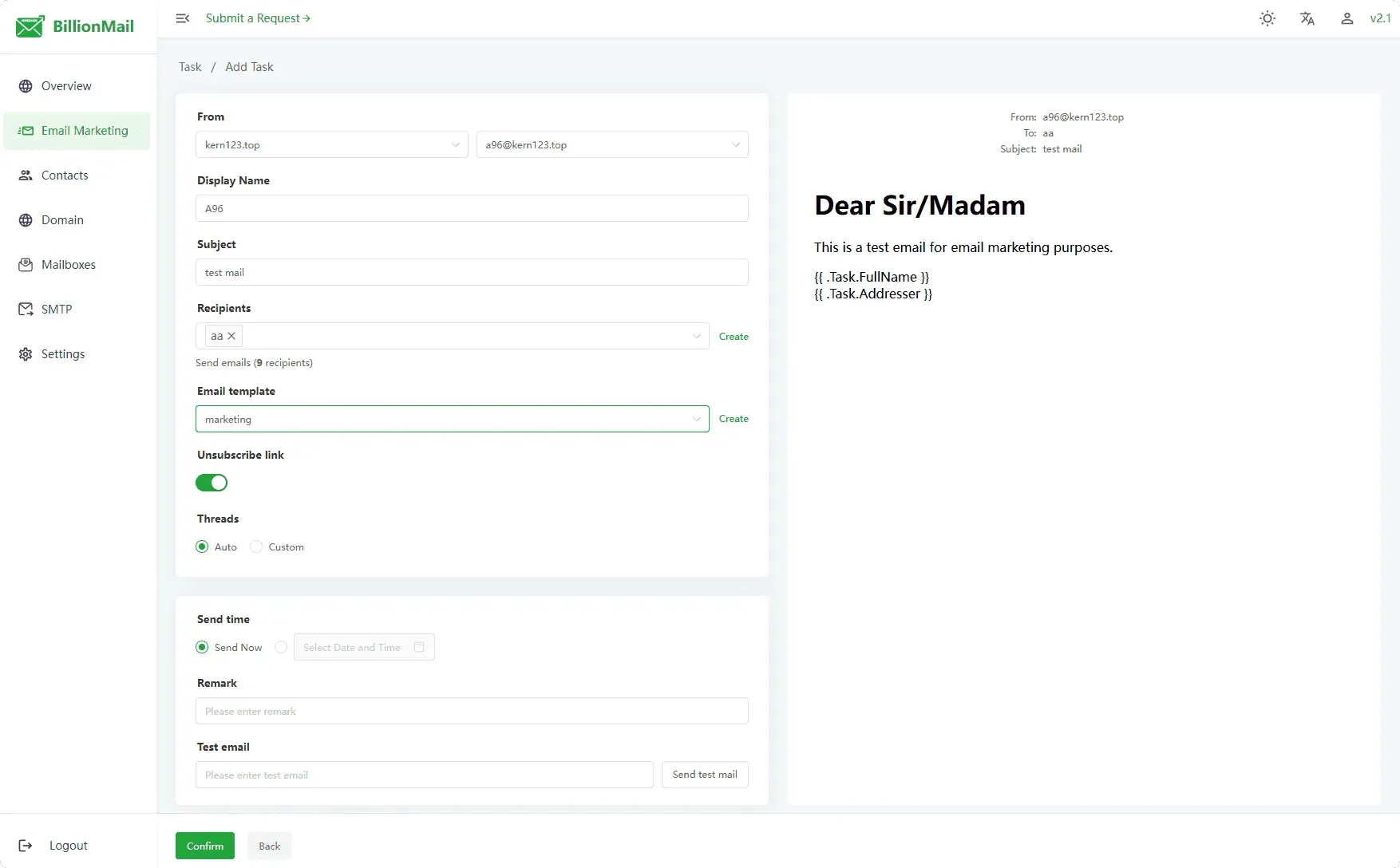
Creating an email marketing task: sender, recipients, template, unsubscribe link, threads and scheduling, with a live preview. From the official documentation.
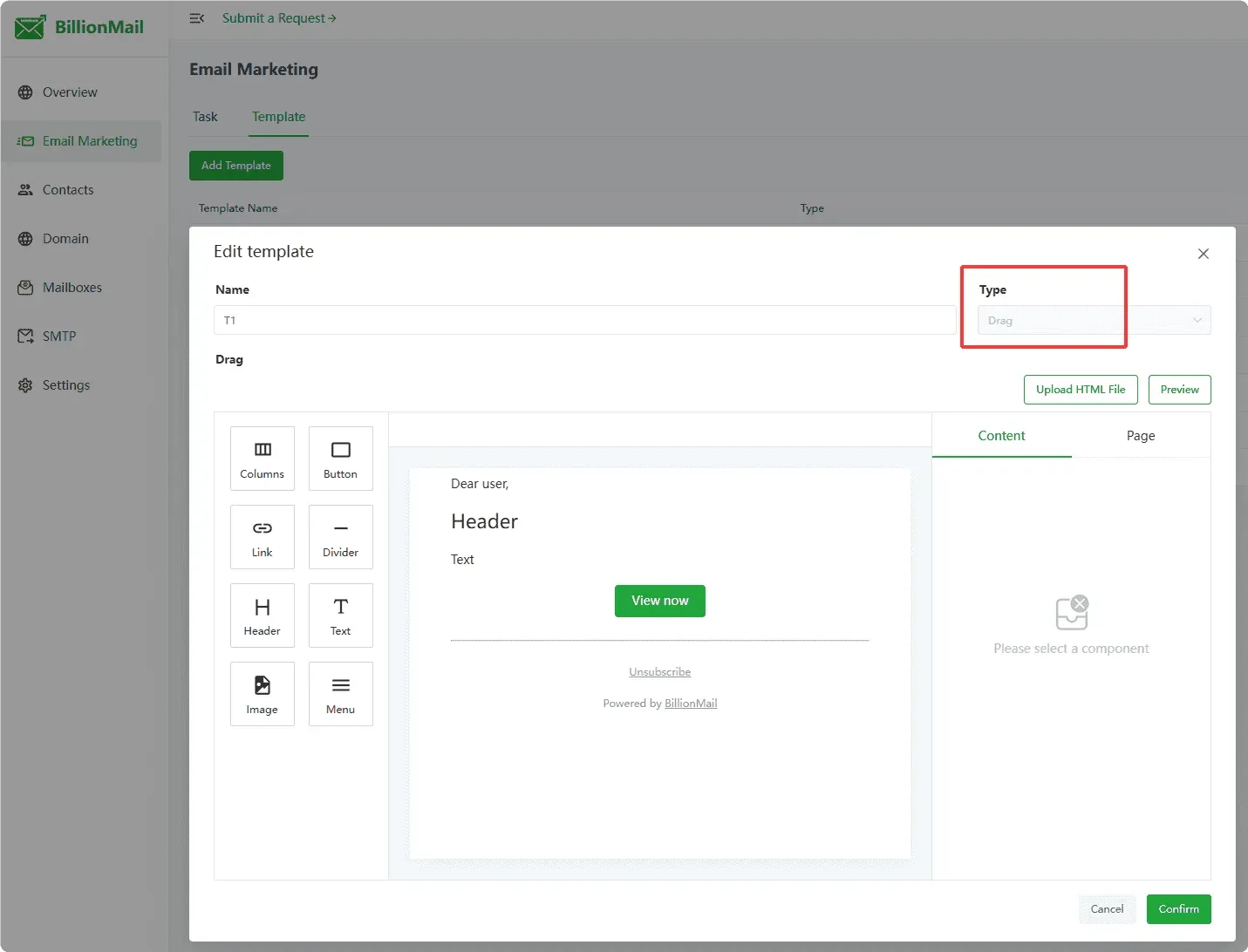
Drag-and-drop template editor with component palette, canvas and properties panel; HTML files can also be uploaded. From the official documentation.
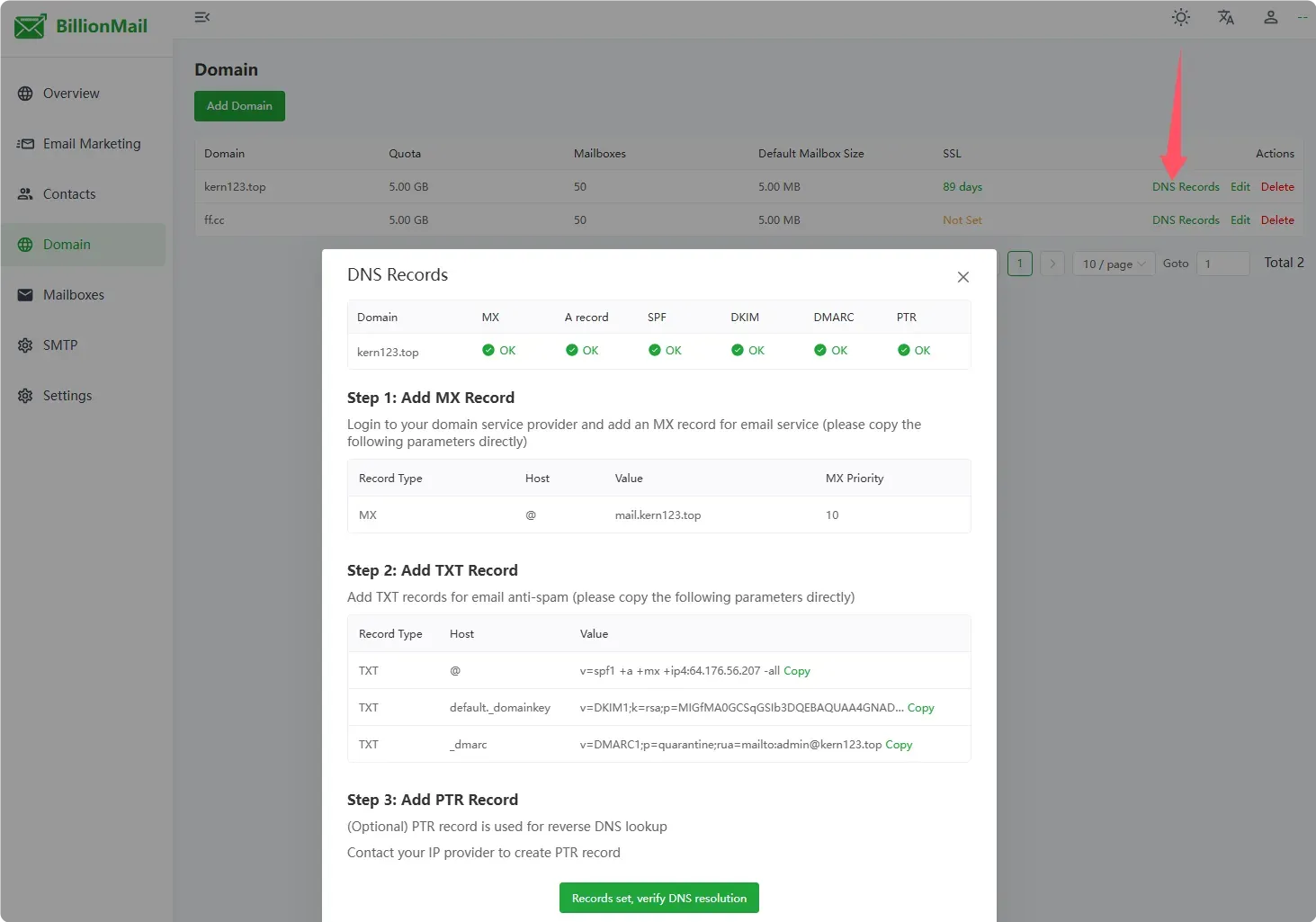
Domain DNS dialog listing the MX, SPF, DKIM and DMARC records to publish and their verification status. From the official documentation.
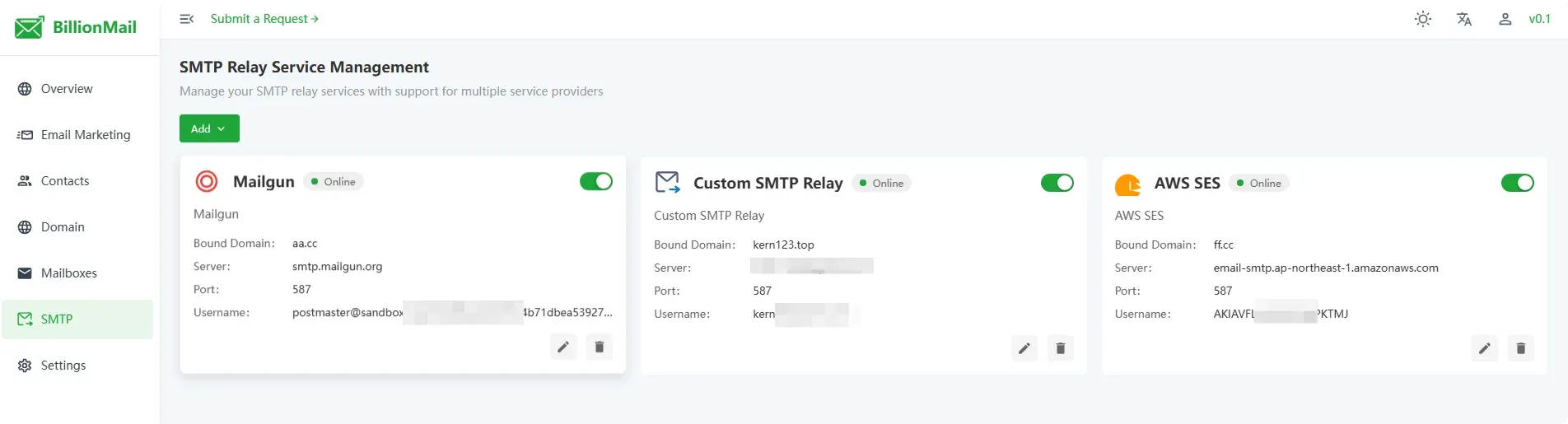
SMTP relay management with Mailgun, a custom relay and Amazon SES, each bound to one sending domain. From the official documentation.
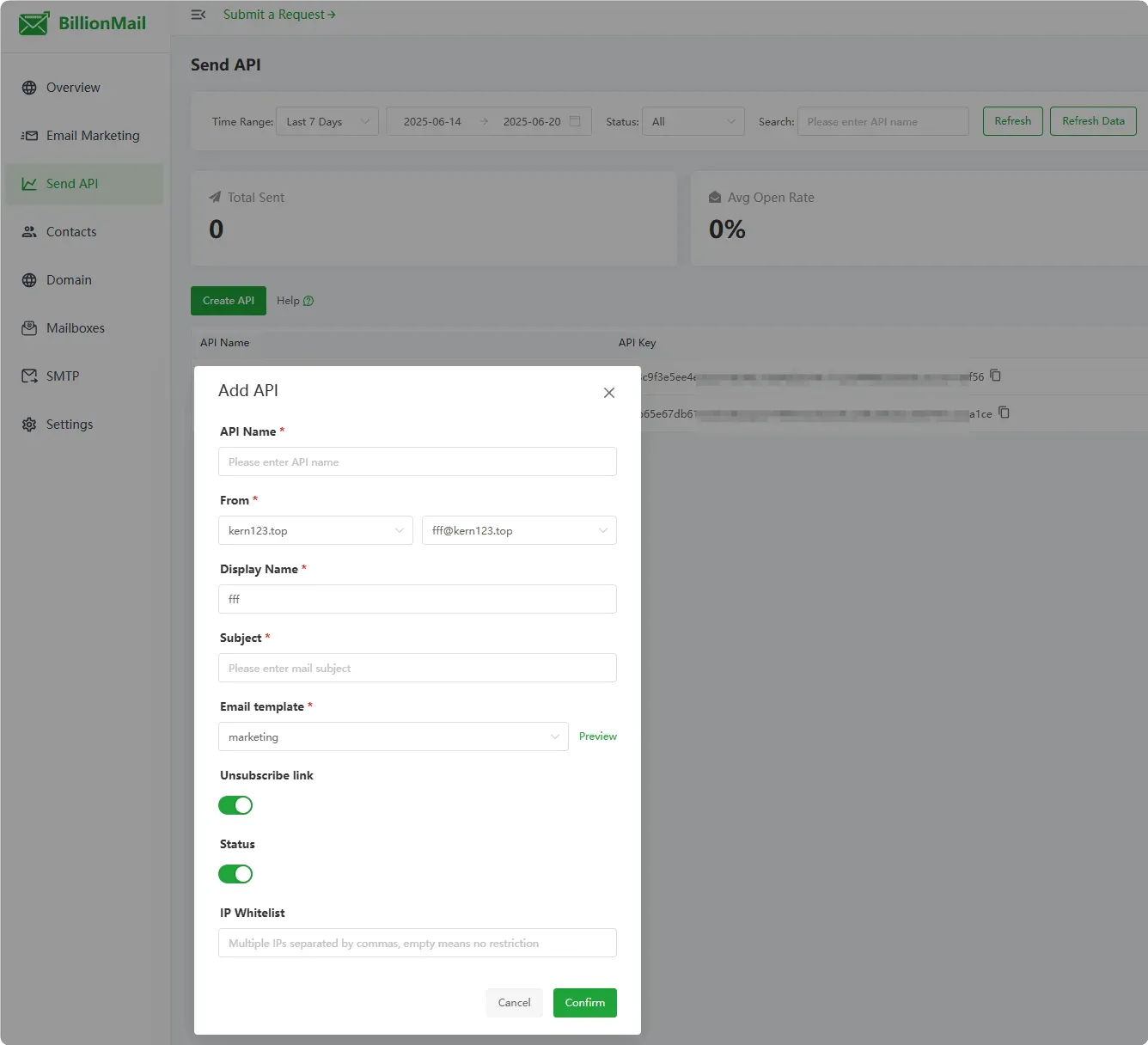
Creating a transactional sending API key tied to a sender, template and optional IP allowlist. From the official documentation.
Source: official BillionMail project page.
Key capabilities
- Install script for Linux servers The documented one-liner clones the repository into /opt and runs install.sh, which the project says takes about eight minutes from install to first sent email. Supported hosts are Linux distributions on amd64 or arm64; Windows and macOS are not install targets. After setup,
bm defaultprints the console address and login. - Docker Compose deployment For manual control, copy env_init to .env, set BILLIONMAIL_HOSTNAME to the mail host name (for example mail.example.com) and run
docker compose up -d. Data lives in bind-mounted folders such as postgresql-data, vmail-data, redis-data and rspamd-data next to the Compose file, so backups cover that directory. The env_init template ships fixed default admin, database and Redis passwords and the safe path "billion"; replace them before the first start. The Docker guide lists every variable. - One-click install on aaPanel AaPanel offers BillionMail in its Docker one-click catalog. The .env file includes WEB_BASE_PATH for serving the console under a sub-path such as /billionmail and an AAPANEL_SSO_SECRET that enables single sign-on from the panel.
- Complete mail transfer and storage stack Postfix handles SMTP on ports 25, 465 and 587, Dovecot serves IMAP and POP3 on 143, 993, 110 and 995, and Rspamd filters spam with Redis as its store. PostgreSQL holds console configuration, contacts and statistics, while mailbox contents sit in the vmail-data folder.
- Domains, DNS records and certificates Adding a domain sets a storage quota, a maximum mailbox count and a default mailbox size. A DNS dialog lists the MX, A, SPF, DKIM and DMARC values to copy into the DNS provider, checks each one, and reminds the operator that the PTR record must come from the IP provider. Since v4.9 DKIM keys can be 2048-bit or 1024-bit for DNS hosts with record length limits. Certificates come from Let's Encrypt over port 80, or a key and certificate can be pasted manually.
- Mailboxes and Roundcube webmail Mailboxes are created per domain, individually or in bulk from CSV since v4.1, and mailbox data can be exported and imported for migrations. v4.7 added storage quotas with alerts when usage approaches the limit. Roundcube is reachable at /roundcube on the console host; the mailbox guide warns against changing passwords inside Roundcube because the console does not pick up that change.
- Contacts, groups and tags Subscribers are imported from CSV or pasted lines in the form email plus a JSON attribute string, with options to overwrite existing records and set subscription status. Contacts belong to groups and, since v4.5, carry tags that campaigns can filter on, including NOT conditions added in v4.8. v4.6 added TXT export. Details are in the contacts guide.
- HTML and drag-and-drop templates Templates are either raw HTML, with an option to upload an HTML file, or built in a drag-and-drop editor with columns, buttons, headers, text, images, dividers and menus. Go template syntax inserts values such as
{{ .Subscriber.name }},{{ .Task.Subject }}and{{ .Task.FullName }}, and conditionals work inside the body. The template variables reference lists the built-in fields. - AI-assisted template editor Since v4.0 templates can be drafted from natural-language prompts, and the editor can extract information from a target website to personalise the content. The release notes describe support for mainstream model providers plus custom integrations; the frontend source contains provider entries for OpenAI, DeepSeek, Kimi and Ollama. Prompts and any fetched page content go to whichever provider is configured, so an Ollama endpoint keeps that step on local infrastructure.
- Campaign tasks A task combines a sender address, display name, subject, recipient group or tags, template, an unsubscribe link toggle and a thread setting (automatic or custom). It can send immediately or at a scheduled time, and a test address receives a preview first. Since v4.5 a paused task can have its sender, template and subject edited before resuming, and any task can be duplicated.
- Spintax content variation Since v4.3, text such as
{Hello|Hi}in the subject or body is resolved to one random option per message, and options can be nested or mixed with template variables. The Spintax guide notes that braces inside CSS, HTML attributes, link URLs and image paths are left untouched. - Transactional sending API Each API key is tied to a sender, subject and template and can carry its own IP allowlist.
POST /api/batch_mail/api/sendsends one message with an X-API-Key header and an attribs map whose values appear as{{.API.name}}variables;/api/batch_mail/api/batch_sendaccepts a recipient array with shared attributes. Documented error codes 1001 to 1005 cover invalid keys, blocked IPs, bad recipients, missing templates and send failures. The FAQ on the API mail guide still says batch sending is unsupported, so confirm the batch endpoint on your version. - Management API with Swagger UI The console exposes its own REST API, authenticated with a Bearer key shown on the Settings page. Swagger can be switched on in Settings, after which
/swaggerlists every endpoint with request and response formats and allows test calls. See the API usage guide. - Delivery analytics The overview dashboard reports delivered, opened, clicked and bounced percentages plus the delayed queue, filterable by domain and date range. A provider table splits the same figures for Gmail, Outlook, Yahoo and other destinations, and hourly charts show sent and failed counts. Open and click tracking can be disabled per campaign or globally since v4.9 when privacy rules require it.
- Deliverability controls An IP warmup system, introduced as a beta in v3.0, adjusts sending rates for new IPs. The suspend list scans imported addresses and pauses delivery to invalid ones, and v4.8 added blacklist checks for sending domains and IPs with email alerts. Servers with several public IPs can bind a sending domain to a dedicated outbound IP; the multi-IP guide also documents a manual iptables and Postfix method that must be reapplied after the Docker network is rebuilt.
- SMTP relay per domain Where port 25 is blocked or the server IP has a poor reputation, a domain can route mail through an external relay. The relay guide walks through Amazon SES and Mailgun and a custom SMTP server, and the console source also includes SendGrid and Gmail presets. Each domain binds to one relay, a connection test runs before saving, and authentication became optional in v4.5 for relays that do not require it.
- Queue manager and logs Since v4.1 the console shows the Postfix queue with retry, delete and clear actions and adjustable queue parameters. Operation logs record logins and configuration changes, and a separate view shows runtime errors. Postfix, Rspamd and Dovecot logs rotate and compress since v4.3, the core service followed in v4.9, and RETENTION_DAYS (7 by default) controls how long log backups stay.
- Access protection The console sits behind a configurable safe entrance path, fail2ban is enabled by default through FAIL2BAN_INIT, and an optional console IP allowlist can be switched on. A reverse proxy guide covers nginx, Caddy and Traefik, including the reverse proxy domain setting that keeps tracking links on the public HTTPS host. The core container mounts the Docker socket read-only and runs with NET_ADMIN to manage services and firewall rules.
- The bm command The
bmhelper (bash bm.sh) starts, stops, restarts and updates the stack, reports status, prints DNS records withbm show-record, and changes the admin user, password and console port. The commands page lists the options.
Where BillionMail fits
Moving a newsletter list off a paid service
Export the subscriber list with any custom fields, convert it to the email plus JSON attribute format and import it into a group, keeping the unsubscribed state of each address. Rebuild the main template in the HTML or drag-and-drop editor, map the old merge tags to .Subscriber variables and send test messages to Gmail and Outlook inboxes. Leave the unsubscribe link enabled, compare the first campaign's bounce and complaint figures with the previous provider, and keep the old account until the new sending IP has a track record. The email marketing guide lists the prerequisites in order.
Sending transactional mail from an application
Create one API key per message type, such as password reset or order confirmation, each with its own template and sender. Restrict every key to the application server addresses with the IP allowlist, store the key as a secret and pass per-message values through attribs. Check the error code handling for 1002 (IP not allowed) and 1005 (sending failed), and watch the Send API statistics for the first days. Keep transactional and marketing traffic on separate sender addresses or domains so a campaign complaint does not hold up receipts.
Running on a VPS that blocks port 25
Many cloud providers block outbound port 25 by default. The preparation guide shows a telnet test against a public MX host; if it hangs, either ask the provider to open the port or add an SMTP relay such as Amazon SES or Mailgun to the domain. With a relay, SPF and DKIM must also authorise the relay service, and its own sending quotas and costs apply. Test the connection in the console, then send to a verified recipient before moving the relay account out of any sandbox mode.
Hosting mailboxes for a small organisation
Add each domain, publish the generated MX, SPF, DKIM and DMARC records, ask the IP provider for a matching PTR record and request a Let's Encrypt certificate once the A record resolves. Create mailboxes in bulk from CSV, set quotas, and point users to Roundcube or to IMAP and SMTP submission in their own clients. Because people's mail now depends on this server, plan backups of vmail-data and the PostgreSQL folder, monitor disk use, and decide whether bulk campaigns should run from a different IP than staff mailboxes.
Separating sending domains across several IPs
On a server with more than one public address, bind each sending domain to its own outbound IP from domain management so the reputation of one brand or list does not affect another. Warm new addresses gradually with the warmup feature and check each IP with the blacklist scan and the reputation guide, which explains Spamhaus delisting. If you use the manual iptables method instead, script the rules, because rebuilding the Docker network can change their order.
Placing the console behind an existing web server
When ports 80 and 443 already serve other sites, move the console to different ports with bm change-port or .env, then proxy it from nginx, Caddy or Traefik with the Host, X-Real-IP, X-Forwarded-For and X-Forwarded-Proto headers. Set the reverse proxy domain in Settings so open and click tracking links use the public HTTPS name, and remember that Let's Encrypt validation by the console itself needs port 80. Mail ports stay published directly by the Postfix and Dovecot containers.
Install
cd /opt && git clone https://github.com/Billionmail/BillionMail && cd BillionMail && bash install.shReviews of BillionMail
Be the first to share your experience with BillionMail.
Write a review
Loading review form…
Alternatives to BillionMail
 GhostGhost is an open source publishing platform for building a website, sending email newsletters and selling paid memberships, self-hosted or on Ghost(Pro).
 NovuNovu is MIT-licensed communication infrastructure with a workflow engine, digests, an embeddable React Inbox and preferences, close to 80 provider integrations and two-way agent messaging. Run it on Novu Cloud (US or EU) or self-host with Docker.
 YunoHostYunoHost is an AGPL-licensed server operating system that installs and maintains self-hosted apps with a web admin and single sign-on portal.