

What is listmonk?
listmonk is a self-hosted newsletter and mailing list manager for one-way lists. It sends campaigns to subscriber lists, delivers transactional messages through an HTTP API and can hand messages to webhook-based messengers for SMS or push notifications. The backend is written in Go and ships as a single binary; PostgreSQL is the only runtime dependency and holds subscribers, lists, campaigns, templates and statistics. The project is developed by Kailash Nadh in the knadh/listmonk repository. The first commit dates from October 2018, the first alpha tag (v0.1.0) from July 2019, and the website describes the product as running since 2018.
Distribution is deliberately simple. Each GitHub release publishes tar.gz archives for Linux, macOS, Windows, FreeBSD, NetBSD and OpenBSD on amd64 and arm64, with additional armv6 and armv7 builds for Linux and the BSDs, plus a checksums file. The official image is listmonk/listmonk on Docker Hub, and the sample docker-compose.yml pairs it with postgres:17-alpine, running an idempotent install and a schema upgrade on every start. The installation guide asks for PostgreSQL 12 or newer, describes nightly builds, a community Helm chart and one-click images from third-party hosts such as PikaPods, Railway, Elestio and Cloudron, which the website states have no affiliation with the project.
GitHub currently marks v7.0.0-beta.1, published on October 20, 2026, as the latest release. It is a beta delivered through the listmonk/listmonk:beta tag. It replaces the Vue 2 and Buefy single-page admin with a server-rendered interface built on Alpine.js and the Oat UI library; the release notes cite an admin bundle almost 80% smaller, native dark mode, standalone forms, list overview pages with analytics, multiple From addresses, OIDC role mapping with PKCE and a Gmail relay preset. Breaking changes include app.from_email becoming an array, renamed language keys for custom static directories and the TinyMCE editor being replaced by Squire.
The most recent stable version is v6.2.0 from June 26, 2026. It fixed campaign and list permission checks in multi-user installations and added inline CID images, SMTP selection by From domain, template expressions in campaign headers, an Outlook compatibility mode for the visual builder and Azure bounce webhooks. v6.1.0 added a global switch to disable view and click tracking and a separate campaigns:send permission; v6.0.0 introduced TOTP two-factor authentication and transactional mail to non-subscribers.
listmonk is licensed under AGPL-3.0. The project sells no edition, support plan or hosted service of its own, and the documentation plus an OpenAPI specification are public. It is not a mail server: delivery requires an SMTP service such as a self-managed Postfix relay, Amazon SES, Postmark or SendGrid. The documentation does not describe multi-step automation journeys, a CRM or a landing-page builder, so those needs sit outside the product.
listmonk screenshots
Explore the interface. Open a screenshot to view it at full size.
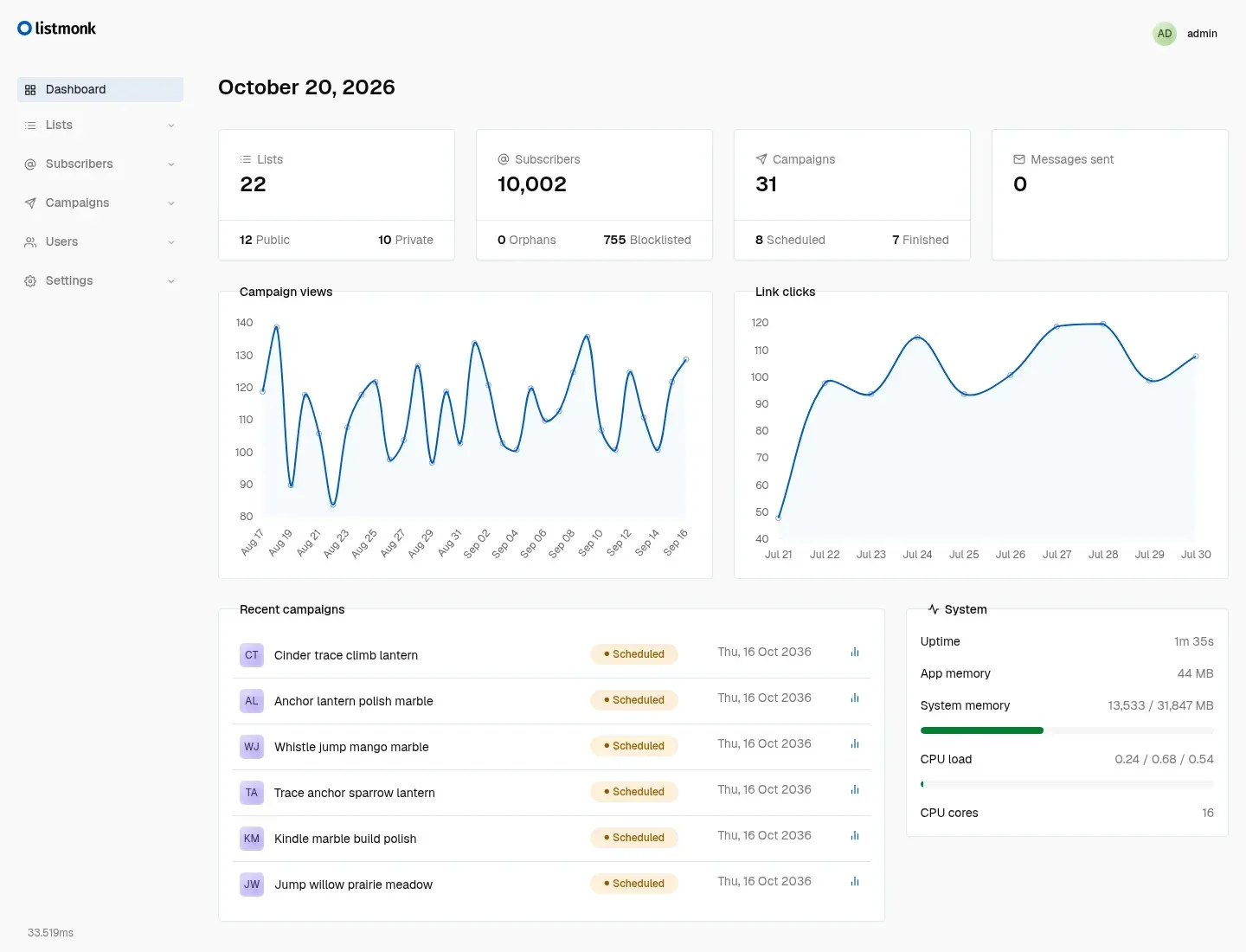
Official v7 dashboard screenshot from listmonk.app, showing 22 lists, about 10,000 demo subscribers, view and click charts and a system panel.
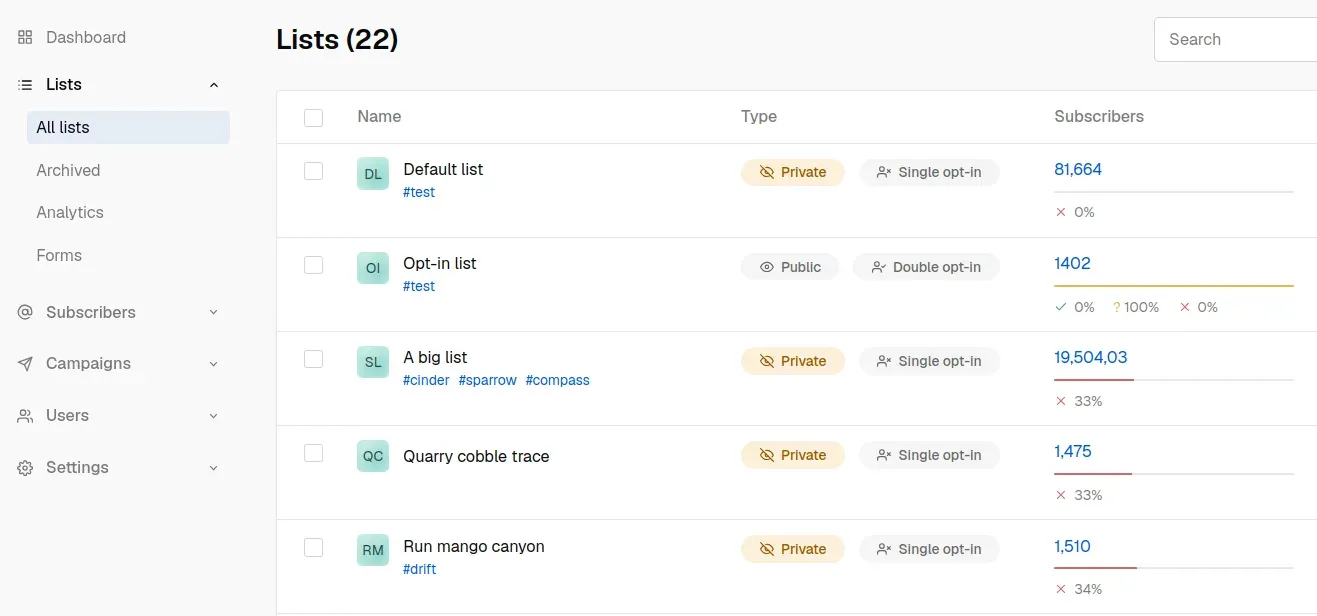
Lists view from the official website: visibility, opt-in type, tags and subscriber counts per list, with Archived, Analytics and Forms in the sidebar.
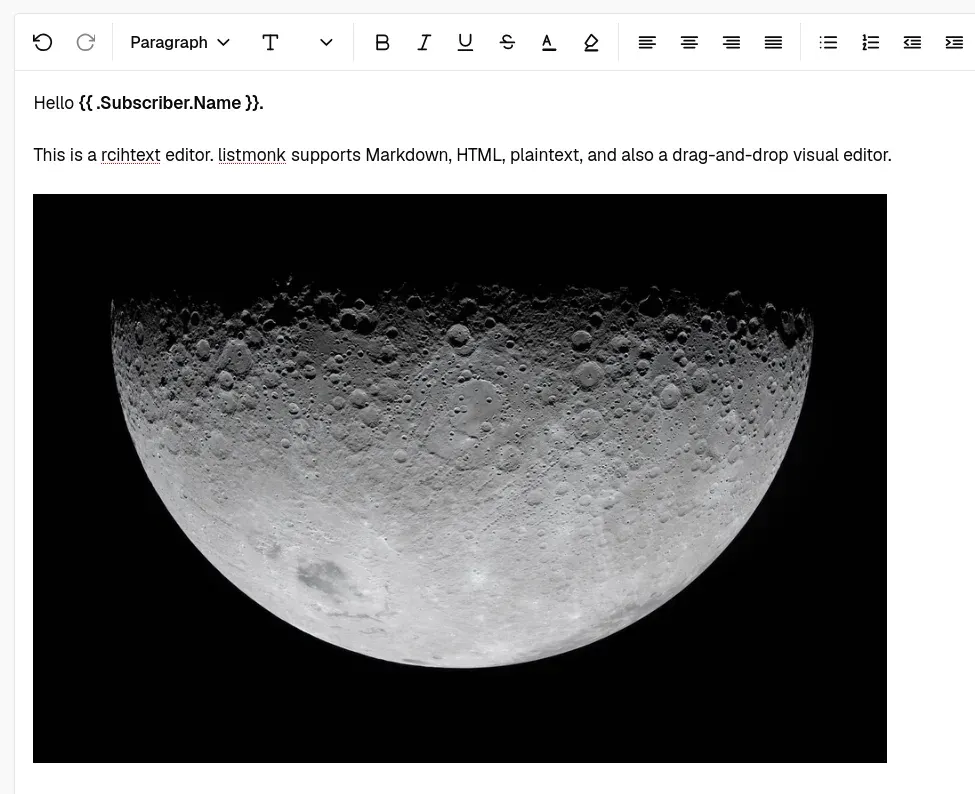
Campaign body in the rich-text editor, mixing formatting with a Go template expression for the subscriber name. Official website image.
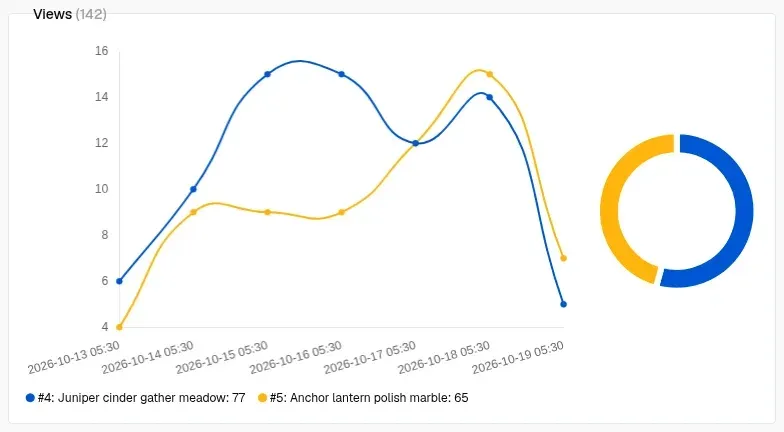
Campaign analytics comparing daily views of two campaigns, with a per-campaign share chart. Official website image.
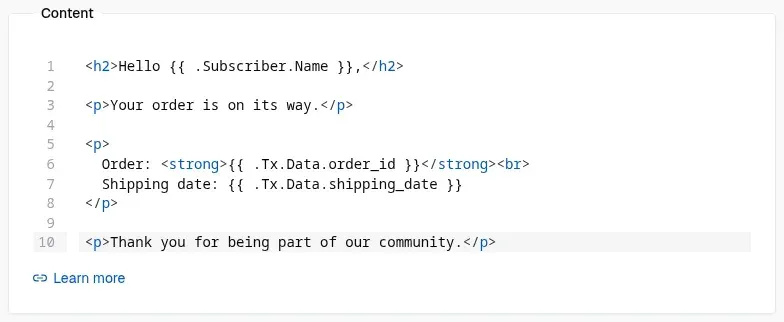
Transactional template in the HTML code editor; values passed to /api/tx appear as Tx.Data fields. Official website image.
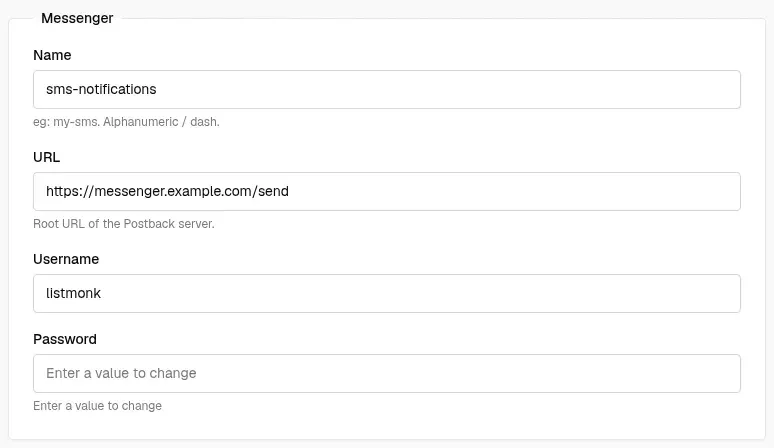
Configuring an HTTP messenger named sms-notifications that receives campaign messages as JSON. Official website image.
Source: official listmonk project page.
Key capabilities
- Single binary on PostgreSQL The application is one Go executable that serves the admin interface, the public subscription pages and the API on port 9000 by default.
./listmonk --new-configwrites a sample config.toml,--installcreates the schema and--upgradeapplies migrations idempotently. PostgreSQL 12 or newer is required, and the documentation warns that an upgraded database should not be used with an older binary. - Docker Compose deployment The official
docker-compose.ymlruns the listmonk image with PostgreSQL 17 Alpine, binds Postgres only to 127.0.0.1 and configures the app entirely throughLISTMONK_*environment variables. Every variable also accepts a_FILEvariant for Docker or Podman secrets. SettingLISTMONK_ADMIN_USERandLISTMONK_ADMIN_PASSWORDon first start creates the Super Admin; otherwise it is created in the browser. - Binaries for Linux, macOS, Windows and BSD Release archives cover Linux, macOS, Windows, FreeBSD, NetBSD and OpenBSD on amd64 and arm64, with armv6 and armv7 builds for Linux and the BSDs. The repository ships systemd unit examples (
listmonk@.serviceandlistmonk-simple.service). Compiling from source needs Go and Bun and runsmake dist. - Lists and opt-in modes Lists are public or private and single or double opt-in. Each subscription carries a status of unconfirmed, confirmed or unsubscribed, and double opt-in lists only deliver to confirmed subscribers. Lists can be archived, and v7 adds a list overview page with subscription, unsubscription and campaign-view analytics.
- JSON attributes and SQL segmentation Every subscriber has an e-mail, a name and an arbitrary JSON attribute map. The querying guide shows how partial PostgreSQL expressions filter subscribers by status, dates, nested attributes or campaign views, and results can be added to new lists. Raw SQL access sits behind the
subscribers:sql_querypermission because it reads across all lists. - Campaign editors Campaign bodies can be written in a rich-text editor, raw HTML with syntax highlighting, Markdown, plain text or a drag-and-drop visual builder. The visual builder gained an Outlook compatibility mode in v6.2.0. In v7 the rich-text editor is Squire (about 16 KB) instead of TinyMCE.
- Go templating with Sprig functions Subjects, bodies, From addresses and headers accept Go template expressions such as
{{ .Subscriber.FirstName }}and{{ .Subscriber.Attribs.city }}, conditional logic and more than 100 Sprig functions. Built-in helpers includeTrackLink,TrackView,UnsubscribeURL,MessageURLandOptinURL. The templating docs warn that these templates are Turing-complete, so template permissions belong to trusted users only. - Transactional message API
POST /api/txrenders a stored transactional template with arbitrary JSON data available as.Tx.Data. Subscriber modes aredefault(recipient must exist),fallbackandexternal(any address, no lookup). Multipart requests attach files, and analtbodyparameter adds a plain-text part. - Messengers for SMS and push Besides the SMTP backend, a messenger is any HTTP service that accepts a JSON POST with the subject, body, recipients and their attributes, optionally with BasicAuth. Phone numbers or FCM IDs are read from subscriber attributes. The messenger page lists community implementations for AWS Pinpoint SMS, Google FCM, Mailersend, Novu, Resend and Verimor.
- SMTP pools and rate control Multiple SMTP servers can be configured and used as a pooled
emailmessenger, with retries over different connections, a message rate, a sliding-window limit and a maximum error threshold that pauses a failing campaign. v6.2.0 added server selection by From domain, and v7 allows excluding servers from the default pool and setting a custom HELO hostname. Presets exist for providers such as Azure ACS, Lettermint and Gmail relay. - Bounce processing Bounces arrive from a dedicated POP3 mailbox, a generic
/webhooks/bounceendpoint or provider webhooks for Amazon SES, Azure Communication Services, SendGrid, Postmark, Forward Email and Lettermint. Soft, hard and complaint counts trigger a configurable action such as blocklisting or deletion. Mailbox classification is keyword-based and defaults to soft when no rule matches. - Campaign analytics and tracking Dashboards chart views, clicks, bounces and top links across campaigns, and v7 adds unique counts and grouping by day, week or month. Views use a tracking pixel and clicks use rewritten links. Tracking can be anonymous, tied to individual subscribers, or switched off globally since v6.1.0.
- Subscriber privacy controls Settings decide whether subscribers may export their data, wipe it, change preferences or blocklist themselves. Further options add a
List-Unsubscribeheader for one-click unsubscribe, record the opt-in IP address and restrict sign-ups with domain allow and block lists. - Public forms, archive and CAPTCHA Public subscription forms and a subscription management page are served from the same binary, and a global public archive can publish selected campaigns with JSON metadata standing in for subscriber fields. Forms can be protected with hCaptcha or the self-hosted Altcha proof-of-work challenge. Opt-in confirmation mails are throttled in v7.
- Users, roles and single sign-on Since v4, user roles group permissions per feature, while list roles grant view or manage rights per list. API users receive generated tokens. OIDC single sign-on works with standard providers, with documented setups for Keycloak, Authentik and Google Workspace, and v6.0.0 added TOTP two-factor authentication and e-mail password reset.
- REST API with OpenAPI spec According to the API documentation, every dashboard feature is also reachable over a JSON HTTP API using BasicAuth or an
Authorization: tokenheader. Endpoints cover subscribers, lists, campaigns, templates, media, imports, bounces and settings, and an auto-generated Swagger site documents them. Client libraries for Python, PHP, Go, Ruby, Node.js and other languages are community projects that the docs mark as unverified. - Media library and imports Uploaded images and files are stored on the local filesystem or in S3-compatible storage, optionally proxied through listmonk since v6.1.0, and administrators choose the allowed file types. Subscribers are imported from CSV files, optionally zipped, through the interface or the import API, with separate overwrite options for profile data and subscription status.
- Performance and maintenance settings The website shows a production instance sending more than 7 million e-mails at a fraction of one CPU core and 57 MB peak RAM. For databases with millions of subscribers, the performance guide recommends caching slow count queries on a cron schedule and running
VACUUM ANALYZEregularly, which v6.0.0 can schedule from the settings. A batch-size setting trades memory for fewer database round trips. - Languages and custom system templates The repository bundles 38 language files, and additional or modified packs load through
--i18n-dir. Public pages and system e-mails such as opt-in confirmations, data exports and import notices can be replaced by copying the static directory and starting with--static-dir. CSS and JavaScript for public pages are also editable under Settings, Appearance.
Where listmonk fits
Running a double opt-in newsletter on a small server
Deploy the Compose file behind a reverse proxy with TLS, set the root URL under Settings, General, and create a public double opt-in list. Embed the generated subscription form or link to the hosted form page, enable a CAPTCHA, and add {{ UnsubscribeURL }} and {{ TrackView }} to the campaign template footer. Before the first send, check that only the public routes listed in the configuration docs (subscription pages, link redirects, tracking pixel, uploads and provider webhooks) are reachable from the internet while /admin and /api stay restricted.
Sending transactional mail from an application
Create a transactional template under Campaigns, Templates and an API user with the tx:send permission. The application then calls POST /api/tx with the template ID, recipient and a JSON data object referenced in the template as .Tx.Data. Use external mode for recipients who are not subscribers, multipart requests for attachments and altbody for a plain-text part. The documented response is only {"data": true}, so check delivery outcomes in the SMTP provider and in the bounce records rather than in the API call.
Segmenting an audience by attributes
Import subscribers from CSV with their attributes as JSON, then filter them on the Subscribers page with expressions such as subscribers.attribs->>'city' = 'Bengaluru' or an EXISTS subquery on campaign_views. Add the result to a dedicated list and target the campaign at that list. Because the SQL runs read-only but across all data, keep subscribers:sql_query to trusted roles, and consider a restricted Postgres role as the permissions guide suggests.
Delivering through Amazon SES with automatic bounces
Add SES as an SMTP server, then follow the bounce guide: enable bounce processing and webhooks, create an SNS topic, paste its ARN into the allowed list and subscribe /webhooks/service/ses over HTTPS. The guide suggests blocklisting after one hard bounce or complaint and taking no action on soft bounces until a count of two. Test with the SES simulator addresses for soft bounces, hard bounces and complaints, and confirm that each subscriber ends in the expected state.
Sharing one instance across teams
Define user roles for campaign editors and senders, keeping campaigns:send separate from campaigns:manage, and list roles that limit each team to its own lists. Connect an OIDC provider such as Keycloak or Authentik, enable auto-creation with a default role if required, and require TOTP for local accounts. Restrict users:manage, which can create Super Admins, and review which file types media uploads accept, since the security policy treats uploaded SVG or HTML as an administrator decision.
Keeping listmonk in sync with a CRM
The integration guide offers two routes: the subscriber APIs for create, update and the newer partial PATCH, or bulk CSV uploads to the import API. Advanced setups may write directly to the subscribers, lists and subscriber_lists tables described in schema.sql. Decide which system owns consent and unsubscribe state, and verify that an unsubscribe in listmonk flows back before the CRM re-imports the contact.
Install
curl -LO https://github.com/knadh/listmonk/raw/master/docker-compose.yml && docker compose up -dReviews of listmonk
Be the first to share your experience with listmonk.
Write a review
Loading review form…
Alternatives to listmonk
 BillionMailAGPL-licensed mail server and newsletter platform for Linux. Docker Compose deploys Postfix, Dovecot, Rspamd, Roundcube and a Go console for domains, contact lists, campaign tasks, a transactional sending API and delivery analytics.
 GhostGhost is an open source publishing platform for building a website, sending email newsletters and selling paid memberships, self-hosted or on Ghost(Pro).
 NovuNovu is MIT-licensed communication infrastructure with a workflow engine, digests, an embeddable React Inbox and preferences, close to 80 provider integrations and two-way agent messaging. Run it on Novu Cloud (US or EU) or self-host with Docker.