

What is Plunk?
Plunk is an open-source email platform that puts transactional sending, marketing campaigns and event-driven workflows in one project, with one contact list behind all three. It is built by Dries Augustyns, who describes Plunk on the Made by humans page as an independent SaaS without venture funding. The code is published in the useplunk/plunk repository under AGPL-3.0, and the same code runs the hosted service at useplunk.com.
There are two ways to run it. Plunk Cloud is the hosted version, with a free tier of 1,000 emails per month and pay-as-you-go pricing of $0.001 per email after that; its contacts, templates, campaigns and email history are stored in Germany on Hetzner infrastructure. The self-hosted version is a Docker Compose stack built around the ghcr.io/useplunk/plunk image, with PostgreSQL 16, Redis 7, MinIO and ntfy alongside it. A self-hosted instance sends through your own Amazon SES account, so you bring the AWS account, the IAM user, an SNS topic for delivery events and two SES configuration sets. The self-hosting guide lists the subdomains to set up for the dashboard, API, docs, landing page and optional SMTP relay.
The current release is v0.18.0, published November 1, 2026. It adds a delivery.throttle option so a transactional email or workflow send goes to a recipient at most once per window, lets headless senders point the List-Unsubscribe header at their own one-click link, and checks the SES configuration sets when the server starts. Its fixes include origin checks on session-authenticated routes, accepting SNS messages only from topics in the instance's own AWS account, and ignoring opens that SES marks as automated. Version 0.17.0 allowed several projects under one MCP install and added an S3_PREFIX setting, 0.16.0 added automatic plain-text conversion, 0.15.0 added contact snoozing as an alternative to unsubscribing, and 0.14.0 introduced the MCP server and optional API rate limiting. The full history is in the changelog.
The repository is a TypeScript monorepo managed with Turborepo. It contains an Express API with BullMQ background workers, a Next.js dashboard, an SMTP relay built on smtp-server, the documentation site, the landing page and the @plunk/mcp server for AI agents. One container runs all of these behind nginx by default, and the SERVICE variable can split the API, worker and dashboard into separate processes.
Some things are out of scope. Plunk is not a mailbox host: inbound email is parsed into events and a sanitized body, but attachments and raw messages are not stored. Delivery always goes through Amazon SES, both on the hosted service and on self-hosted instances; there is no option to plug in another sending provider or your own MTA. Rendered email bodies are cleared after 90 days, so Plunk is not a long-term archive of sent content.
Plunk screenshots
Explore the interface. Open a screenshot to view it at full size.
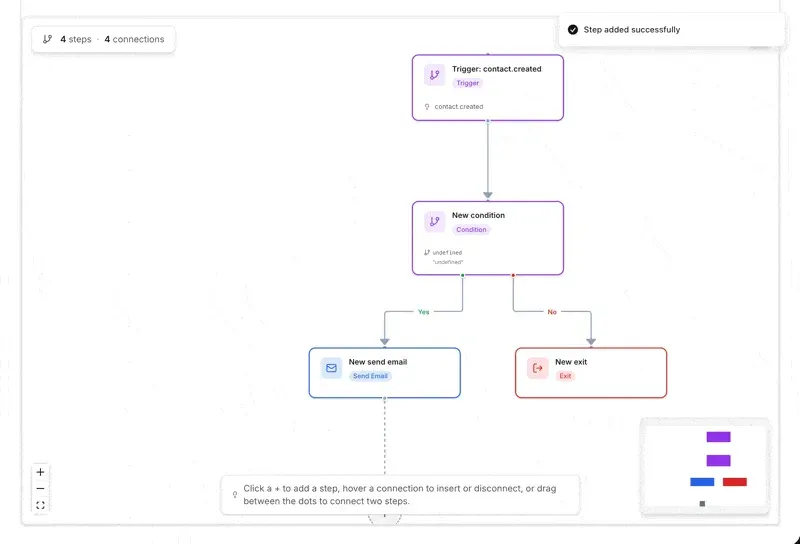
Workflow editor canvas: a contact.created trigger feeds a condition whose yes branch sends an email and whose no branch exits. Final frame of a screen recording attached to merged pull request 439 in the Plunk repository.
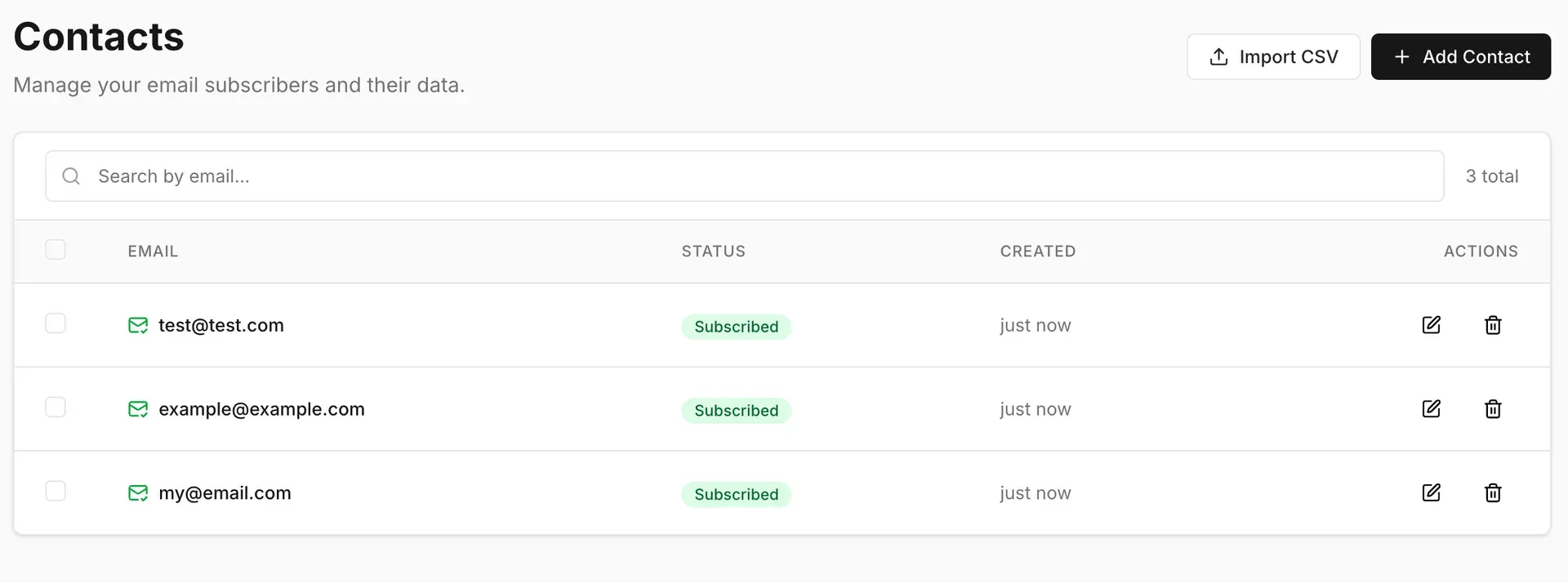
Contacts list with search, CSV import and subscription status per contact, from merged pull request 391 in the Plunk repository.
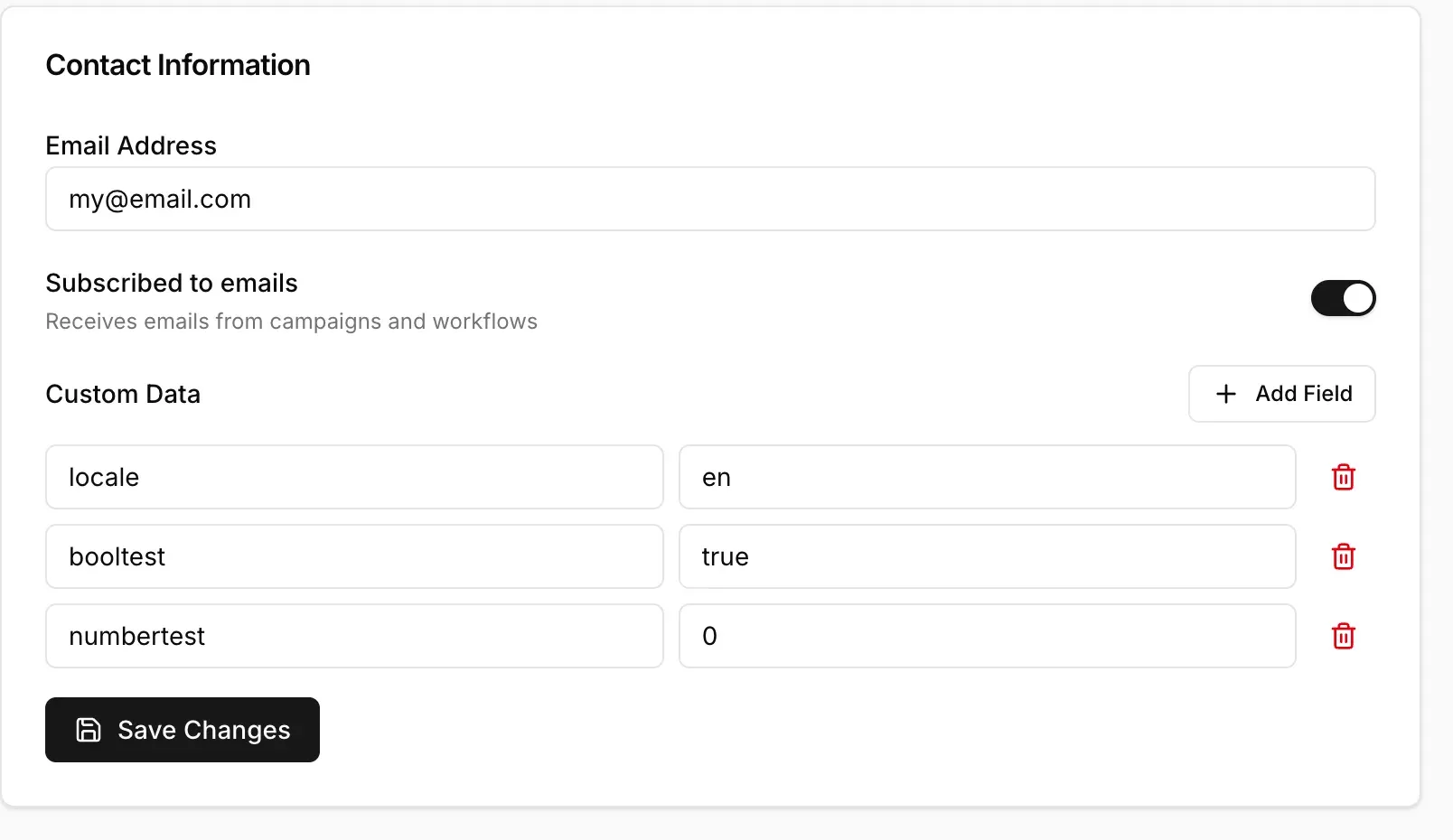
Contact detail form: subscription toggle and typed custom data fields used by templates and segments. Screenshot from merged pull request 391.
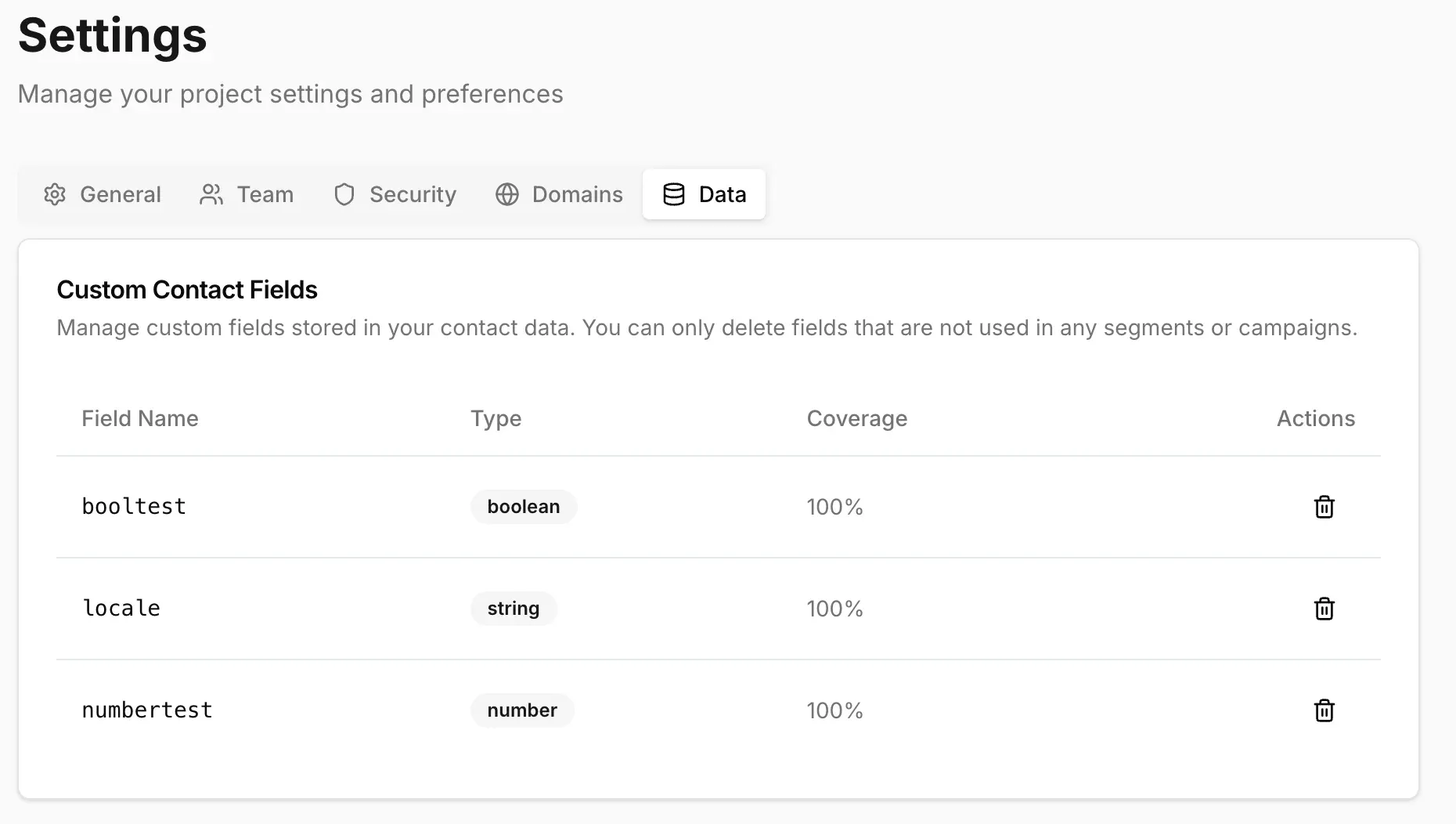
Project settings, Data tab: custom contact fields with detected type and coverage; fields used in segments or campaigns cannot be deleted. Screenshot from merged pull request 391.
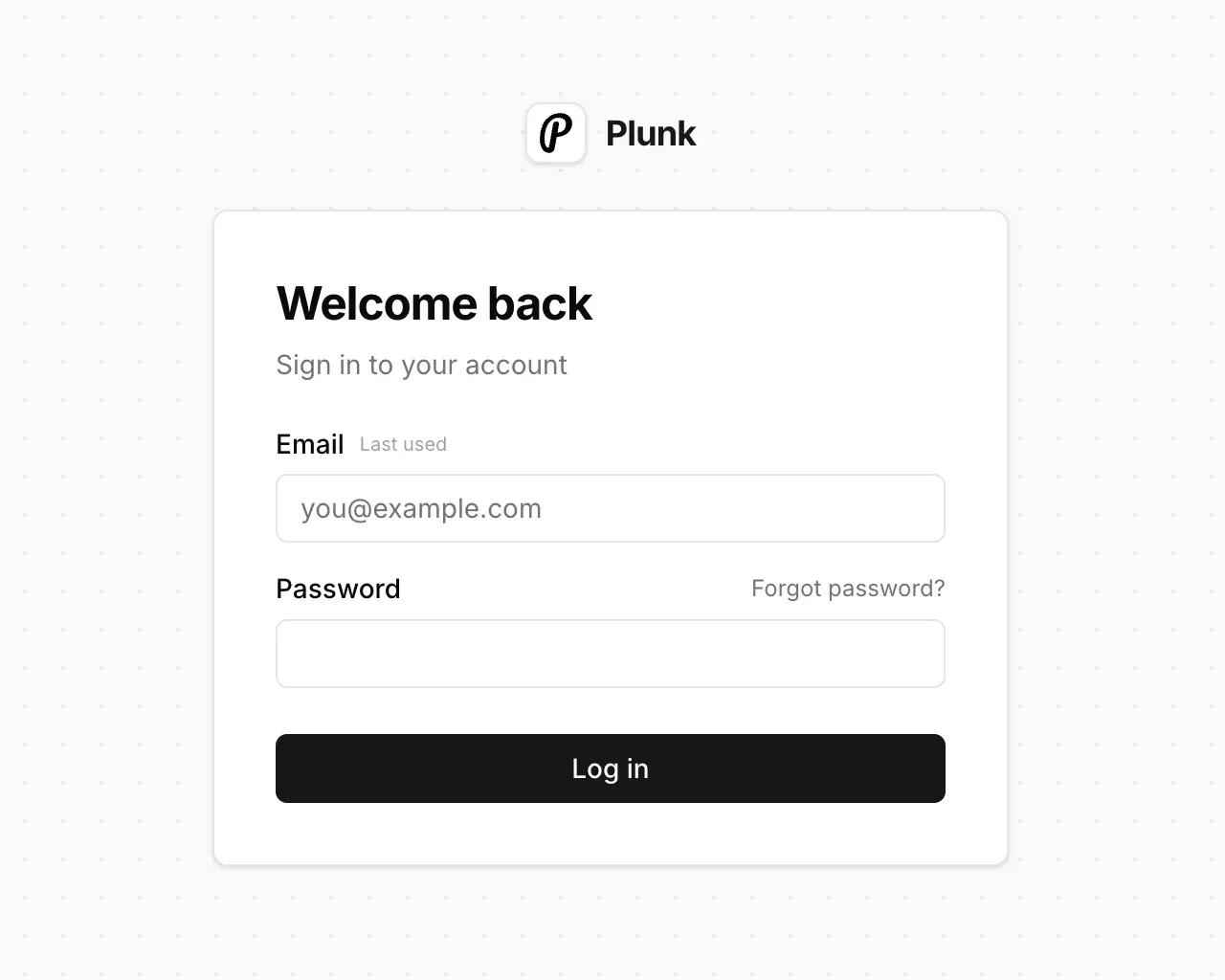
Dashboard sign-in page with the signup link hidden, as on a self-hosted instance with DISABLE_SIGNUPS set. Screenshot from merged pull request 379.
Source: official Plunk project page.
Key capabilities
- Transactional email API
POST /v1/sendsends to one or more recipients, either with an inline subject and body or with a stored template and adataobject for variables. The secret key (sk_) authorizes it, and the response returns a status per recipient:queued,scheduledorthrottled. AnIdempotency-Keyheader protects against duplicate sends for 24 hours. The API reference documents every endpoint. - Scheduling and throttling Adding
delivery.atholds an email until a set time, which must be an ISO 8601 timestamp with a timezone and no more than 30 days ahead; scheduled emails can be moved or cancelled until they go out. Since v0.18.0,delivery.throttle(for example"24h") skips the send when the same template already reached that recipient within the window. A throttled send is not billed and does not update the contact. The throttling guide explains keys and scopes. - SMTP relay Existing applications and mail clients can send through Plunk over SMTP instead of the API, on port 587 with STARTTLS or port 465 with implicit TLS. The username is
plunkand the password is the project's secret key, and only verified domains are accepted as senders. SMTP mail goes through the same pipeline, so opens, clicks and bounces are recorded, but SMTP sends cannot use Plunk templates or trigger workflows directly. - Campaigns Campaigns are one-off broadcasts to all contacts, a saved segment or an inline filter, sent immediately or at a scheduled time. Each campaign has a type (Marketing, Transactional or Headless) that decides whether unsubscribed contacts are skipped and whether an unsubscribe footer is added. Delivery, open, click, bounce and complaint counts are kept on the campaign after it sends, and campaigns can be archived.
- Workflows Workflows are graph-based automations started by an event, a manual call or a schedule. Steps include
SEND_EMAIL,DELAY,WAIT_FOR_EVENT,CONDITIONwith yes and no branches,WEBHOOK,UPDATE_CONTACTandEXIT. Workflows are created disabled, and the trigger event name cannot be changed after the first execution. Each contact runs as its own execution with a visible status such as waiting, completed, exited or failed. - Contacts, custom fields and segments Contacts carry an email address, a subscription status and any custom fields under
data, plus a history of events. Segments are either dynamic, recomputed from filters on fields, custom events and email engagement, or static lists managed through the API. Dynamic segments can emit entry and exit events that start workflows. CSV imports accept files up to 5 MB in UTF-8, and column headers are lowercased into field names. - Templates and the email editor Templates have a visual mode and an HTML mode, with preview as a specific contact at desktop, tablet and mobile widths. Subjects and bodies are rendered with Liquid, so conditionals, loops and filters work, and the Plunk-specific
{{firstName ?? there}}syntax supplies a fallback. One template can back an API send, a workflow step and a campaign at the same time. See the template language reference. - Domains and authentication Sending requires a verified domain. Plunk registers the domain in SES and shows the DNS records: three DKIM CNAME records, one SPF TXT record and an MX record for bounce feedback, with an optional custom MAIL FROM subdomain for DMARC alignment. A domain can only have one SPF record, so an existing record must be merged rather than duplicated.
- Inbound email Mail sent to any address on a verified domain can be received through SES inbound, stored as an inbound email in the activity feed and tracked as an
email.receivedevent that workflows can react to. The sender is created or updated as a contact. Plunk keeps the sanitized HTML body, selected headers and the spam and authentication verdicts, but not attachments, threading headers or the raw message. Pointing an apex domain's MX at Plunk breaks an existing mailbox, so a subdomain is the usual choice. - Tracking and analytics Open tracking uses a pixel and click tracking rewrites links through a redirect. Each project chooses Enabled, Disabled or Marketing only, in which case password resets and receipts go out without tracking. Opens that SES flags as automated, such as Gmail prefetches, are not counted, while Apple Mail Privacy Protection still records proxy opens. On a self-hosted instance the Marketing only mode needs a second, no-tracking SES configuration set.
- Bounce, complaint and unsubscribe handling Hard bounces unsubscribe the contact automatically and complaints always do; soft bounces only record an event. Marketing templates get a localized unsubscribe footer, and hosted unsubscribe, resubscribe and preference pages are linked through signed per-recipient URLs. Projects can be suspended automatically when bounce or complaint rates cross thresholds, which self-hosters control with
AUTO_PROJECT_DISABLE. - Webhooks through workflows There is no separate webhook settings page: a workflow listens for an event such as
email.bounce,email.complaint,contact.unsubscribedor a segment entry and calls your HTTPS endpoint with aWEBHOOKstep. The URL, headers and body accept template variables. The cost is one workflow per event you need. - MCP server for AI agents The official
@plunk/mcppackage exposes 45 tools for email, contacts, segments, campaigns, templates, workflows and domain checks to clients such as Claude Code, Claude Desktop and Cursor. Campaign and multi-recipient sends ask the client for confirmation, campaign test copies only go to project members, andPLUNK_READ_ONLY=trueregisters only read tools. SettingPLUNK_API_URLpoints it at a self-hosted API. The MCP guide covers multi-project setups. - Plunk Cloud The hosted service needs no AWS account and already has SES production access. The free tier covers 1,000 emails per month with a Plunk-branded footer on marketing emails; the paid plan is $0.001 per email with no monthly fee and unlimited contacts. Inbound emails count toward usage and emails with attachments count twice. Per-category caps for transactional, campaign, workflow and inbound volume return
402 BILLING_LIMIT_EXCEEDEDwhen reached. Details are on the pricing page. - Self-hosting with Docker Compose Download the published
docker-compose.yml, setJWT_SECRET,DB_PASSWORD, the four domain variables and the SES credentials, then rundocker compose up -d. Nginx listens on port 80, SMTP on 465 and 587, and PostgreSQL, Redis and MinIO stay on the internal Docker network. The API exposes/healthfor load balancer checks, andDISABLE_SIGNUPScloses registration on a private instance. The Docker deployment guide lists the services and ports. - Amazon SES setup for self-hosters The SES setup guide provides an IAM policy limited to eight SES actions, an SNS topic subscribed to
/webhooks/sns, and two configuration sets for tracked and untracked mail. New SES accounts start in the sandbox, limited to verified recipients, 200 messages per 24 hours and one message per second, until AWS grants production access. Inbound receipt rules are a separate manual setup, and not every SES region supports inbound. - Instance-level safeguards Self-hosted instances can enable rate limits for the send, track and contact endpoints, cap recipients per email (default 5) and attachments (default 10 files and 10 MB), and validate signup addresses against disposable domains and MX records. An optional phishing check sends a sample of outgoing emails, 10 percent by default, to a model through OpenRouter and can disable a project after a confident or repeated detection.
Where Plunk fits
Sending product email from a SaaS backend
Create a project, verify the sending domain and store the secret key in the backend's environment. Send password resets, receipts and notices with POST /v1/send and a transactional template, so the copy can change without a deploy. Add an Idempotency-Key to calls that can be retried, and check that the per-recipient status in the response is queued. If tracking is set to Marketing only, confirm that the transactional emails arrive without a tracking pixel or rewritten links.
Limiting repeated alerts
For alerts that fire on every request, such as a usage limit or a failing integration, call the send endpoint each time with delivery.throttle and let Plunk decide whether the recipient already had that template within the window. Add a key when one template covers several distinct alerts. Check that a throttled response returns status: throttled with nextAllowedAt, and remember that throttled calls do not update contact data, so profile changes should go through /v1/track or the contacts API.
Onboarding sequences from product events
Track events such as signed_up from the application with the public key, then build a workflow on that event: a welcome email, a delay of a few days, a condition on a contact field or event, and a follow-up or exit. Enable the workflow explicitly, because new workflows start disabled. Test with a team address first and review the execution list to see where each contact is waiting, which step failed, and whether a cancelled execution stayed cancelled.
Newsletters and product updates
Import the existing list from CSV, keeping the subscribed column so earlier opt-outs carry over, and build a segment for the audience. Write the campaign with a Marketing template so the localized unsubscribe footer is added, use Liquid conditionals for language or plan variants instead of separate campaigns, and send a test copy before scheduling. After the send, compare bounce and complaint counts with the campaign size before the next one.
Running Plunk on your own AWS account
Prepare the subdomains, an IAM user with the documented policy, the SNS topic and both SES configuration sets, then start the Compose stack and watch the /health endpoint. Request SES production access before real traffic, set DISABLE_SIGNUPS on a private instance, and keep the worker process running, because the scheduled data retention jobs run there; with SERVICE split, check that a worker container is still deployed. Back up PostgreSQL and the MinIO volume as part of normal operations.
Letting an AI agent manage email tasks
Install @plunk/mcp in the agent client with a project secret key, and start with PLUNK_READ_ONLY=true to let the agent inspect contacts, segments and campaign statistics. When write access is needed, keep the default send confirmations and leave PLUNK_ALLOW_UNCONFIRMED_SENDS unset outside headless automation. A secret key opens the whole project, so use a separate project or key for experiments.
Install
curl -O https://raw.githubusercontent.com/useplunk/plunk/next/docker-compose.yml && docker compose up -dReviews of Plunk
Be the first to share your experience with Plunk.
Write a review
Loading review form…
Alternatives to Plunk
 listmonkAGPL-licensed newsletter and mailing list manager that runs as one Go binary with PostgreSQL. It handles opt-in lists, SQL segmentation, templated campaigns, a transactional mail API, bounce processing, analytics and SMS or push messengers.
 BillionMailAGPL-licensed mail server and newsletter platform for Linux. Docker Compose deploys Postfix, Dovecot, Rspamd, Roundcube and a Go console for domains, contact lists, campaign tasks, a transactional sending API and delivery analytics.
 NovuNovu is MIT-licensed communication infrastructure with a workflow engine, digests, an embeddable React Inbox and preferences, close to 80 provider integrations and two-way agent messaging. Run it on Novu Cloud (US or EU) or self-host with Docker.