

What is Firecrawl?
Firecrawl is a web data API for AI applications and agents. It accepts a URL, a search query or a document and returns content in forms a language model can consume directly: Markdown, cleaned HTML, links, screenshots or JSON that follows a supplied schema. The core endpoints are Scrape, Search, Crawl, Map, Batch Scrape and Interact, with Parse, Agent and Monitor built on top of them. The public repository opened in April 2024 under the mendableai organization and now lives at firecrawl/firecrawl; the Node.js SDK is still published under the @mendable npm scope.
There are two ways to run it. Firecrawl Cloud at firecrawl.dev is the hosted service with API keys, a dashboard, a playground and credit-based billing. The open-source monorepo can be self-hosted with Docker Compose: the stack runs the API and workers, a Playwright service, Redis, RabbitMQ and a PostgreSQL-backed queue called NuQ, and publishes only the API on port 3002. Client libraries exist for Python, Node.js, Go, Java, Elixir, Rust, Ruby, .NET and PHP, alongside a command-line tool, agent skills and a separate MCP server.
The latest GitHub release is v2.11.0, published June 19, 2026. It added the Firecrawl Research Index (search across more than 3 million arXiv papers and the GitHub code behind them), keyless access to /scrape, /search, /interact and /parse from official clients, a redactPII option, a deterministicJson format that caches a generated extractor per site, CDP WebSocket URLs for browser sessions and LLM-judged monitor alerts. It also raised the PDF size cap from 30 MB to 50 MB and replaced the experimental pii format, which requests are now rejected for. Patch tags continue on the 2.11 line (v2.11.701 was tagged on November 6, 2026), so pin the exact tag you deploy rather than relying on the release title.
The API server is written in TypeScript, with a Go HTML-to-Markdown service and native SDKs per language. According to the README license section, the project is primarily licensed under AGPL-3.0, while the SDKs and some UI components are MIT. Teams that modify the server and offer it over a network should review the AGPL obligations; the MIT SDKs can be embedded in client code under their own terms.
Several capabilities are Cloud-only or need extra services when self-hosted. The self-hosting guide lists Fire-engine (the advanced anti-bot engine), screenshots and page actions, Agent, Browser and Interact as outside the default stack, and LLM extraction requires an OpenAI-compatible endpoint or Ollama. The default self-hosted API is unauthenticated and the Compose file defines no persistent volumes. Firecrawl respects robots.txt by default, and the README places responsibility for following each site's terms on the user.
Firecrawl screenshots
Explore the interface. Open a screenshot to view it at full size.
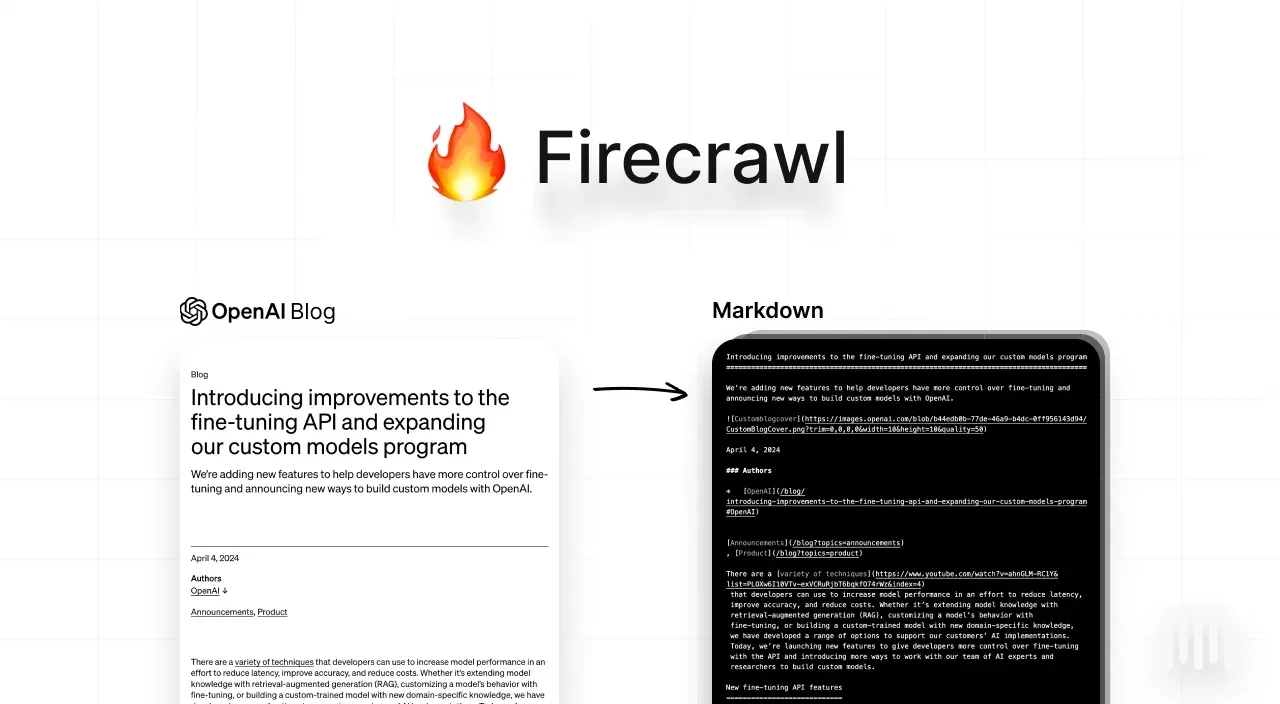
Official documentation figure: a web article and the Markdown Firecrawl returns for it.
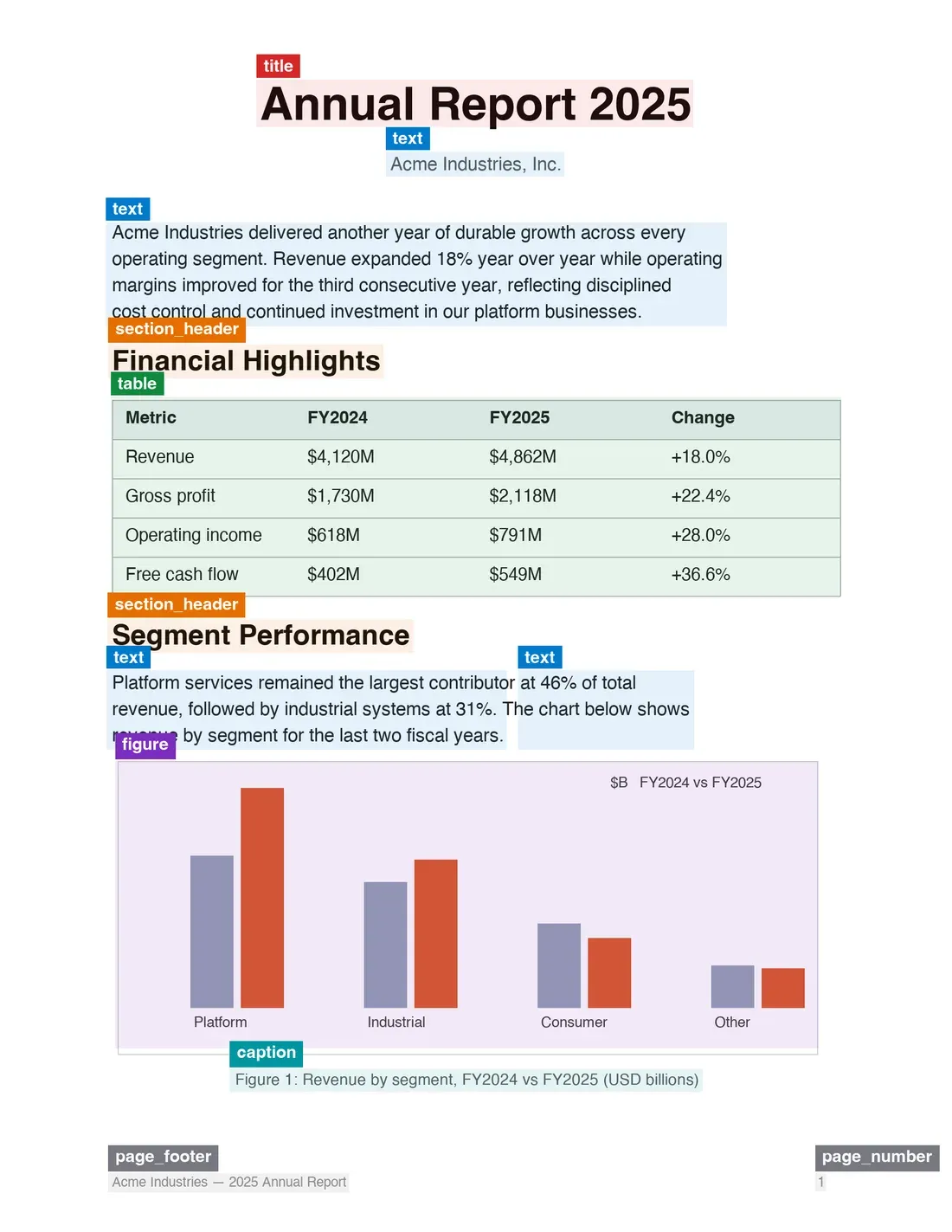
Parse layout blocks from the official Parse documentation: each region of a PDF page is typed and placed with a bounding box.
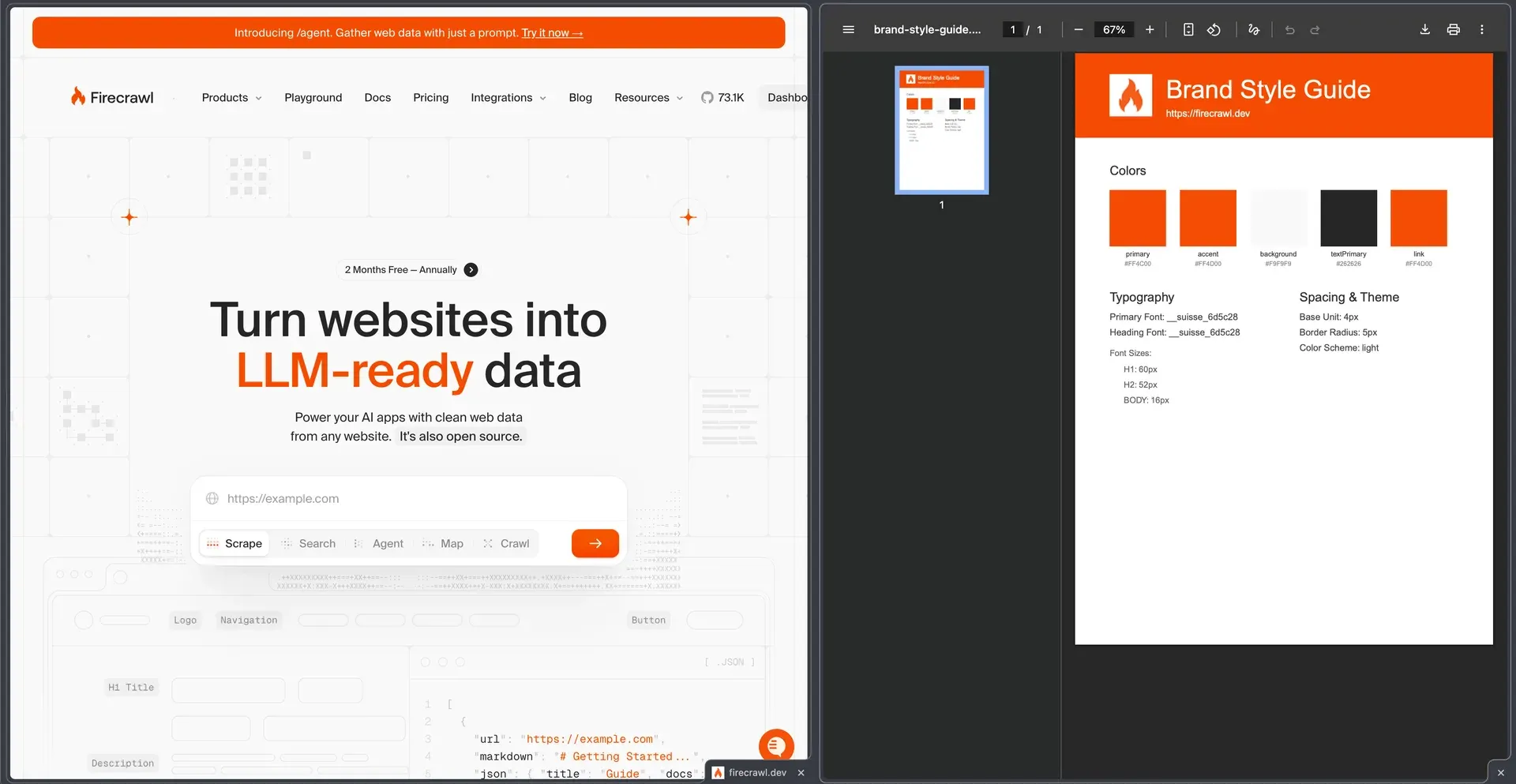
Branding format cookbook figure: a website next to the style guide generated from its branding output. The homepage shown is an earlier version.
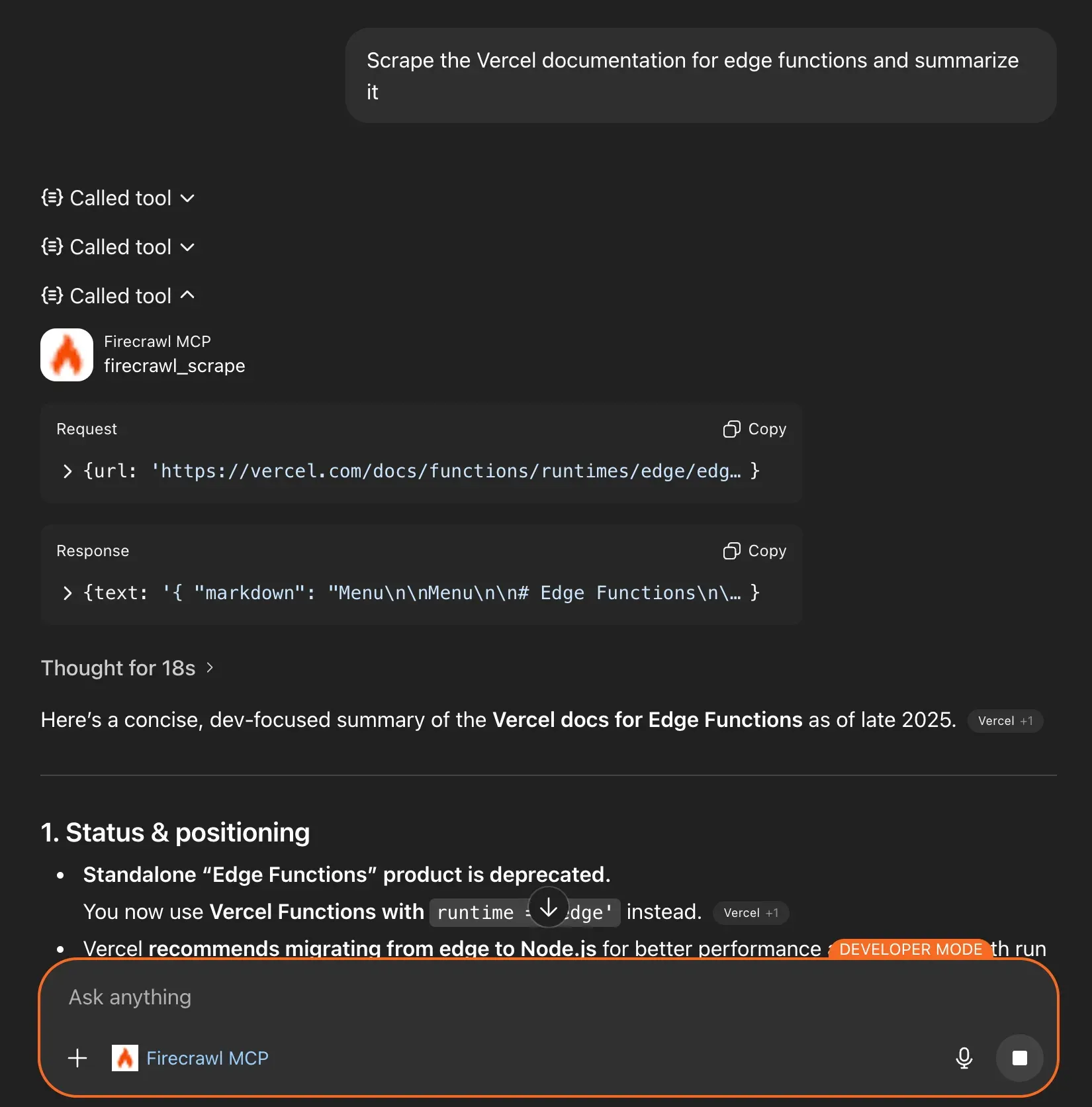
Official MCP integration screenshot: ChatGPT in developer mode calling firecrawl_scrape on a documentation page.
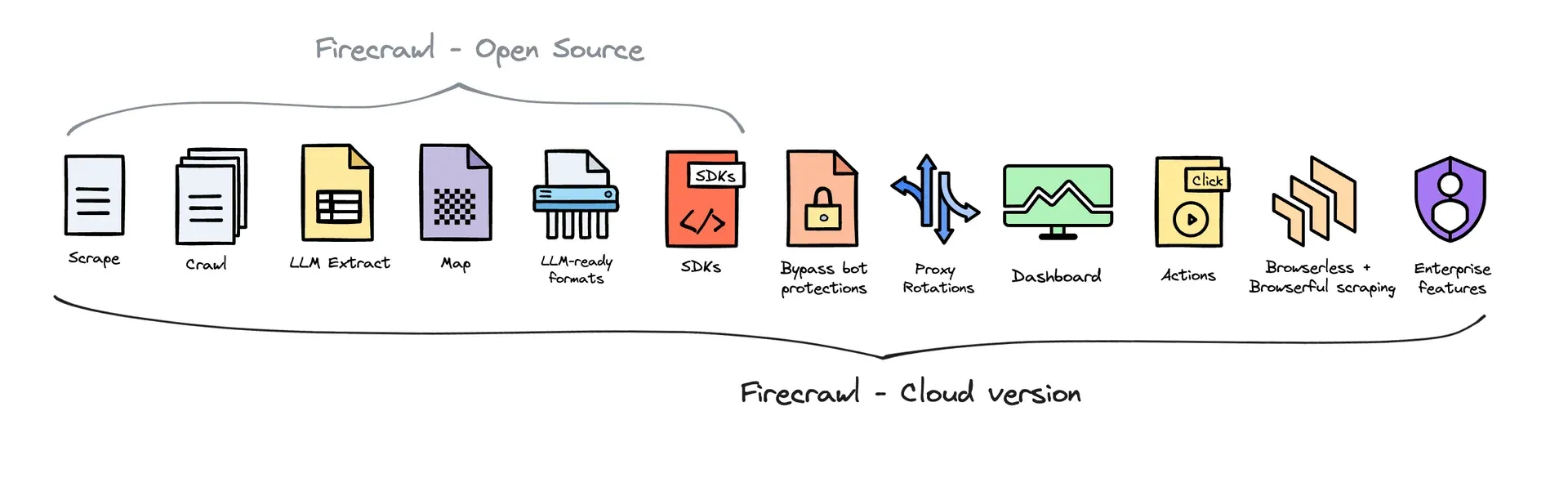
README figure comparing the open-source and Cloud feature sets. The self-hosting guide holds the more detailed current table.
Source: official Firecrawl project page.
Key capabilities
- Scrape a single URL into LLM-ready formats
POST /v2/scrapereturns Markdown, a summary, cleaned or raw HTML, Base64 of the original response, links, image URLs, screenshots or JSON, and several formats can be combined in one request. Results come from cache by default when a copy is newer thanmaxAge(two days); setmaxAge: 0for a fresh fetch orstoreInCache: falseto avoid storing the result. A basic scrape costs 1 credit, cached or not, and screenshot URLs expire after 24 hours. The scrape documentation lists every option. - Crawl an entire site Crawl discovers pages from the sitemap and by recursive link traversal, with include and exclude paths, depth limits and subdomain control. The default
limitis 10,000 pages and the API returns 402 when remaining credits cannot cover it, so set an explicit limit. Results stream through polling, WebSocket or webhooks signed with HMAC-SHA256, and stay retrievable through the API for 24 hours after completion. Failed pages are reported separately throughGET /crawl/{id}/errors. - Map a website's URLs Map returns a fast list of URLs from the sitemap, search engine results and previously crawled pages, optionally ranked against a search term. It costs 1 credit per call regardless of how many URLs come back. The documentation is explicit that Map favors speed and may miss links; use Crawl when you need auditable coverage.
- Web search with page content Search returns web, news and image results, and can scrape each hit through
scrapeOptionsin the same call. When several sources are requested,limitapplies per source type. Search costs 2 credits per 10 results, with scraping billed at Scrape rates on top. - Batch scraping Batch Scrape accepts thousands of URLs as one asynchronous job with shared format options. The SDKs poll the job until completion, and per-team concurrency limits from the plan apply. Cancelling a batch now drains queued work and reports
cancelledimmediately, a fix shipped in v2.11.0. - Interact and browser sessions After a scrape,
POST /v2/scrape/{scrapeId}/interactcontinues in the same page with a natural-language prompt or Playwright code, which covers logins, pagination and forms. Sessions expire after a 10-minute TTL or 5 minutes of inactivity by default. Code-only sessions bill 2 credits per browser minute and prompt-driven sessions 7, prorated per second with a one-minute minimum. Responses include a live-view URL and, since v2.11.0, a raw CDP WebSocket URL for Playwright or Puppeteer. - Parse documents Parse converts PDF, Word, Excel, PowerPoint, OpenDocument, EPUB, CSV and HTML files, from an upload or a public URL, into Markdown, per-page content or JSON. PDFs get native text extraction with OCR fallback for image-only pages, typed layout blocks with bounding boxes and optional
<!-- page N -->markers. PDF parsing costs 1 credit per page, and the PDF size cap is 50 MB. The Parse guide explainsmaxPagestruncation. - Structured extraction with JSON, deterministic JSON and product formats The
jsonformat runs an LLM against your schema or prompt for 4 extra credits per page. ThedeterministicJsonformat generates a reusable extractor per site and caches it, so repeat scrapes avoid an LLM call; it cannot be combined withjson. Theproductformat reads title, price, availability and variants from JSON-LD, microdata and other on-page structured data without an LLM, and needs a separate extraction service when self-hosted. - Agent for prompt-driven research
POST /v2/agenttakes a prompt, optional starting URLs and an optional schema, then searches, navigates and returns data with its sources. Every run uses thespark-2model;effortset to low, medium or high changes the reasoning budget. AmaxCreditscap stops a run withstopReason: credit_limit_reached. The pricing page lists Agent as a preview with 5 free runs per day and token-based pricing after that. - Monitoring and change detection Monitors watch known pages, crawl a site on a schedule or run a recurring web search, then notify by webhook, email or Slack. An optional plain-language
goallets an LLM judge whether a change is meaningful, and JSON-mode monitors diff field values instead of rendered text. Each check costs 1 credit per page. Schedules accept inputs likedaily at 9am, converted to UTC cron. - Branding, question, highlights and media formats The
brandingformat returns a page's colors, fonts, typography, spacing and UI component styles. Thequestionandhighlightsformats answer a question about the page or return relevant source passages, at 5 credits per page each. Audio and video formats return signed Google Cloud Storage URLs that expire after one hour. - PII redaction and Zero Data Retention
redactPIIstrips names, emails, phone numbers, addresses and secrets from returned Markdown for 4 extra credits per page. Zero Data Retention, available on Enterprise plans, keeps page content from being persisted beyond the request for 1 extra credit per page. Screenshots are refused in ZDR mode because they require persistent storage. - Firecrawl Research Index Added in v2.11.0, the index searches more than 3 million arXiv papers plus related GitHub issues, merged pull requests and READMEs, refreshed daily. Endpoints sit under
/v2/search/researchand are reachable from the API, SDKs, MCP server and CLI. The pricing page lists the paper endpoints as free; search results bill at 2 credits per 10. - SDKs for nine languages Install with
pip install firecrawl,npm install firecrawl,go get github.com/firecrawl/firecrawl/apps/go-sdk,gem install firecrawl-sdk,dotnet add package firecrawl-sdkorcomposer require firecrawl/firecrawl-sdk; Java, Elixir and Rust packages are documented in the README. The SDKs handle polling for asynchronous jobs. Python and Node clients keep deprecated V1 method aliases that emit warnings. - CLI and agent skills
npx -y firecrawl-cli@latest init --all --browserinstalls the CLI and skills for coding agents such as Claude Code and OpenCode. Without an API key, supported commands fall back to the keyless tier, which is capped per IP address per day. Point the CLI at a self-hosted instance with--api-urlorFIRECRAWL_API_URL; see the CLI reference. - MCP server MCP clients connect through
npx -y firecrawl-mcpwith aFIRECRAWL_API_KEYenvironment variable, or through the hosted endpoint. The server lives in its own repository and has a separate iThub listing. Its keyless hosted endpoint exposes only Search, Scrape and Parse. - Self-hosting with Docker Compose Requirements are Git, Docker Engine or Desktop, Docker Compose v2, curl and a free port 3002; no verified minimum host size is published. Create a root
.envwithUSE_DB_AUTHENTICATION=falseand PostgreSQL settings, rundocker compose up --build -d, checkGET /v0/health/readiness, then run a test scrape. Kubernetes manifests and a Helm chart are provided as examples, not as production architecture. - Workflow platform integrations The README lists official integrations for Zapier, n8n and Lovable, and the website catalog covers further agent and automation frameworks. These connectors call the hosted API with your key and consume the same credits.
Where Firecrawl fits
Building a retrieval index from a documentation site
Run Map first to see which URLs the site exposes, then Crawl with include paths, a maximum depth and an explicit limit so the job cannot exceed your credit budget. Request markdown with onlyMainContent to drop navigation and footers before chunking. Compare the completed count with the error list from GET /crawl/{id}/errors, because a finished crawl is not a guarantee that every page was reached. Store results within 24 hours, before they expire from the API.
Grounding an agent with live web results
Connect the agent through the MCP server, the CLI skill or an SDK, then use Search with scrapeOptions so each hit arrives with page content rather than a snippet. Keep limit small, since it applies per source when web and news are both requested. Review cached responses: the default two-day maxAge suits reference material but not prices or stock levels, where maxAge: 0 is the safer choice. The MCP documentation lists the tools each client receives.
Extracting structured records from known pages
Define a JSON schema for the fields you need and test it on a handful of representative pages with the json format. If the same sites are scraped repeatedly, try deterministicJson so a cached extractor replaces per-request LLM calls, and use the product format for shop pages that publish JSON-LD. Check nulls and wrong types before scaling up, and budget 4 extra credits per page for LLM extraction.
Converting document collections to Markdown
Send PDFs, Office files or EPUBs to Parse, from uploads or public URLs. Enable pages or pageMarkers when downstream citations need page numbers, and compare numPages with totalPages to detect truncation by maxPages. Scanned pages rely on OCR fallback, so spot-check tables and formulas in the output. Files over 50 MB are rejected.
Watching competitors, policies or prices for changes
Create a monitor for the specific pages, a scheduled site crawl or a recurring search, then add a short goal so the LLM judge separates meaningful changes from layout noise. JSON-mode monitors compare field values, which suits price or availability tracking. Verify webhook signatures, watch the delivery status reported on each check and remember that every check bills 1 credit per page. The monitoring guide covers page, website and web-scale monitors.
Running a private instance inside your network
Check out an exact release tag, create the root .env and start the Compose stack, then confirm the readiness endpoint and a Markdown scrape of a test page. Before anything leaves a trusted network, add authentication, TLS and network policy, and add persistence and backups for PostgreSQL, Redis and RabbitMQ. Connect an OpenAI-compatible endpoint or Ollama if you need LLM extraction, and expect Cloud-only features such as Agent, Interact and screenshots to be missing.
Install
npx -y firecrawl-cli@latest init --all --browserReviews of Firecrawl
Be the first to share your experience with Firecrawl.
Write a review
Loading review form…
Alternatives to Firecrawl
 ScraplingScrapling is an open-source Python framework for web scraping that combines HTTP requests, stealth browsers, adaptive parsing and concurrent spiders.CCamoufoxCamoufox is an open source anti-detect browser built for web scraping and AI agents, intended for use with rotating, preferably residential, proxies.
 MCP Fetch ServerReference MCP server in Python that fetches a URL and returns its content as Markdown or raw text, with chunked reading and a private address guard.