
What is OpenViking?
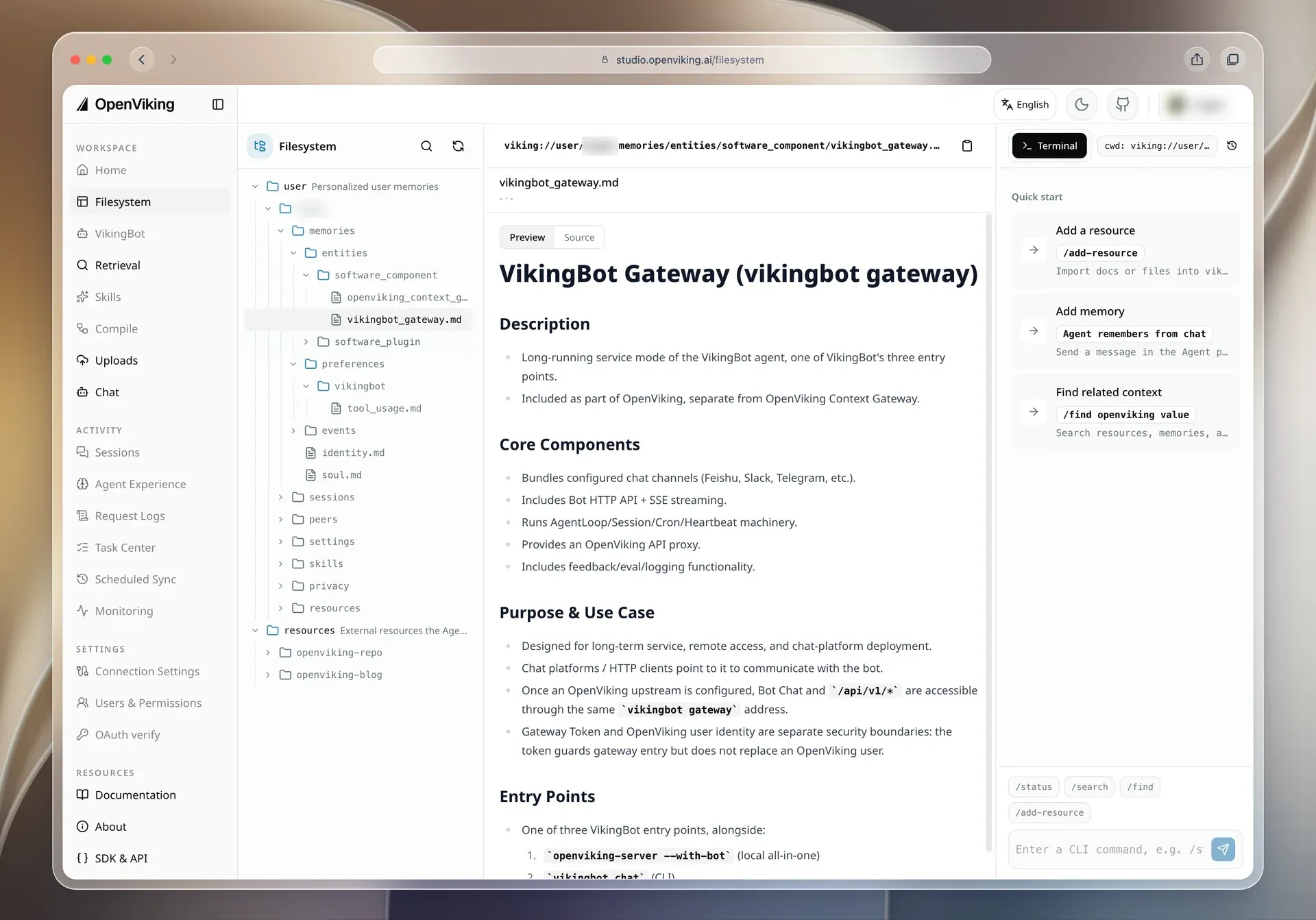
OpenViking is an open-source context database for AI agents. It stores the three kinds of context an agent works with, resources (documents, code, web pages), memories (user preferences, events, agent experience) and skills (task instructions), as files in one virtual filesystem addressed by viking:// URIs. Agents and people browse it with filesystem-style operations such as ls, tree, read, write and grep, and every semantically processed directory carries generated summaries so an agent can check relevance before opening full content (project README).
According to the official Team & Org page, OpenViking was initiated and is maintained by the Viking team at ByteDance's Volcengine (Volcano Engine). The page traces it back to VikingDB, used inside ByteDance from 2019 to 2023, and to the Viking cloud products Volcano Engine has sold since 2024. The team open-sourced MineContext in late 2025 and OpenViking in early 2026; the GitHub repository was created in January 2026. The project lists research papers written with university partners, among them VikingMem (VLDB 2026), whose mechanisms are partly integrated into the code.
OpenViking runs as an HTTP server (openviking-server, default address 127.0.0.1:1933). It is published on PyPI as openviking for Python 3.10 or later, with wheels for macOS on Apple silicon and Intel, Linux x86_64 and aarch64, and Windows x64; the package metadata lists the development status as Alpha. A prebuilt image is published at ghcr.io/volcengine/openviking, and the server bundles the Web Studio UI at /studio. Clients include the ov CLI, SDKs, an HTTP API, an MCP endpoint and agent memory plugins. Volcengine also runs the same software as a managed service, OpenViking Service (first 50 files free, Personal and Enterprise plans), and offers a Self-Managed commercial edition with distributed deployment and official support activated by a license key.
The latest GitHub release is v0.5.5, published on November 13, 2026, together with Python SDK 0.1.20 and standalone CLI 0.5.3. It adds a PostgreSQL deployment option (a pgvector vector backend with exact or HNSW search, plus a PostgreSQL path lock) so multi-host deployments no longer need Redis, a storage.agfs.coordination setting for multi-node coordination, an indexed snapshot path history, peer-scoped recall and memory-type filters for Gateway context profiles, and a batch tag endpoint. v0.5.4 (November 9, 2026) added MCP live-context mounts and distributed Watches.
The main project is licensed under AGPLv3 and the open-source server needs no activation key. The crates/ov_cli CLI and the examples folder are Apache 2.0, and the framework adapters use AGPLv3 (LangChain/LangGraph) or MIT (Microsoft Agent Framework). The README adds that wholesale rewriting and re-open-sourcing of the project is prohibited and that translating substantial parts of the code into another language requires written authorization from Volcano Engine. The desktop app and OpenViking Gateway are labeled beta. Projects with a similar focus on iThub include Mem0, Cognee and Letta.
Key capabilities
- Virtual filesystem for agent context All context lives under
viking://:resources/for shared documents and repositories, anduser/{user_id}/withmemories/,resources/,skills/andpeers/. Each item has a URI that can be listed, read, moved or deleted, and moves and deletions are synchronized with the vector index (Viking URI docs). - L0, L1 and L2 context layers Semantic processing writes a one-sentence abstract (
.abstract.md, L0) and an overview (.overview.md, L1) for directories, while the full original data is L2 and is read only when needed. Summaries are generated asynchronously from the bottom up by a semantic queue, so a directory may lack sidecars until processing finishes (context layers). - Directory-scoped retrieval
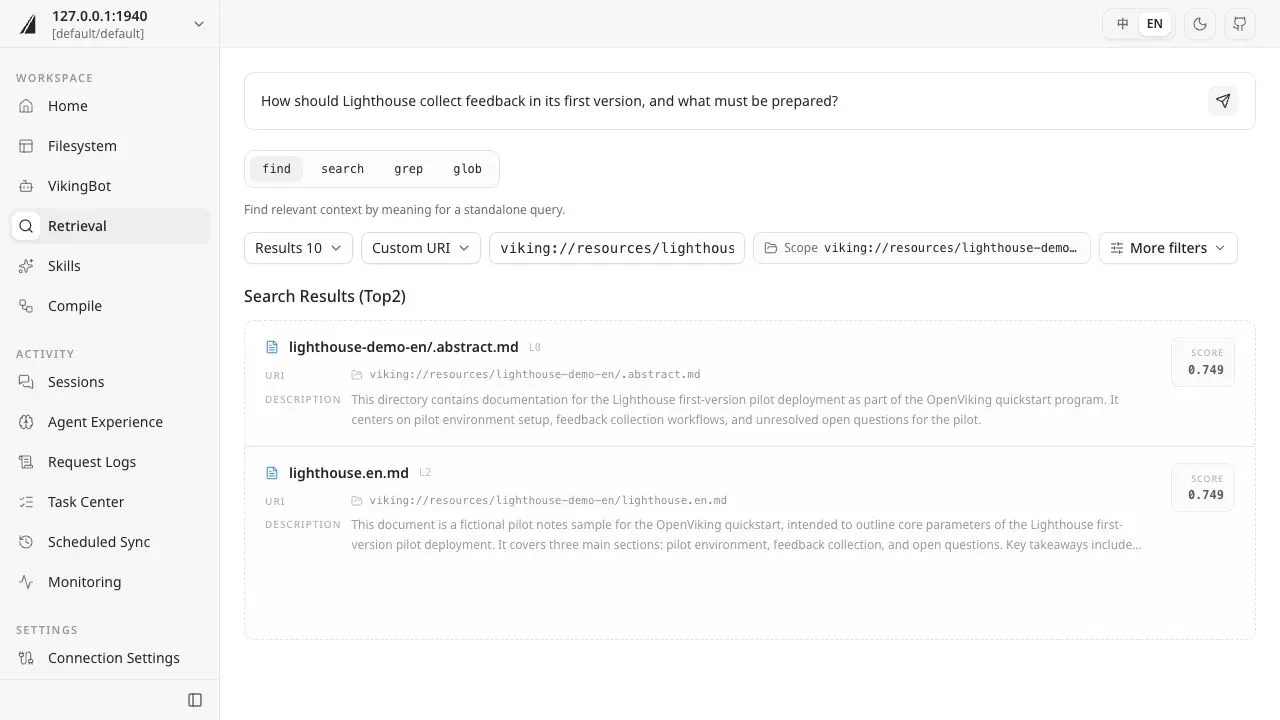
findruns a semantic query directly andsearchfirst runs intent analysis that produces zero to five typed queries from session context; both can be limited to a directory subtree instead of the whole index. An optional rerank pass orders the candidates.grepandglobcover text and path matching (retrieval docs). - Sessions and memory extraction Conversation messages and usage are recorded in sessions. Committing a session archives the history with its own summaries and extracts memories according to the memory policy and MemoryType schemas, merging and deduplicating them with an LLM. Extracted memories are Markdown files that can be read, edited and merged; extraction runs in the background, so new memories are not available immediately.
- Resource import and parsing
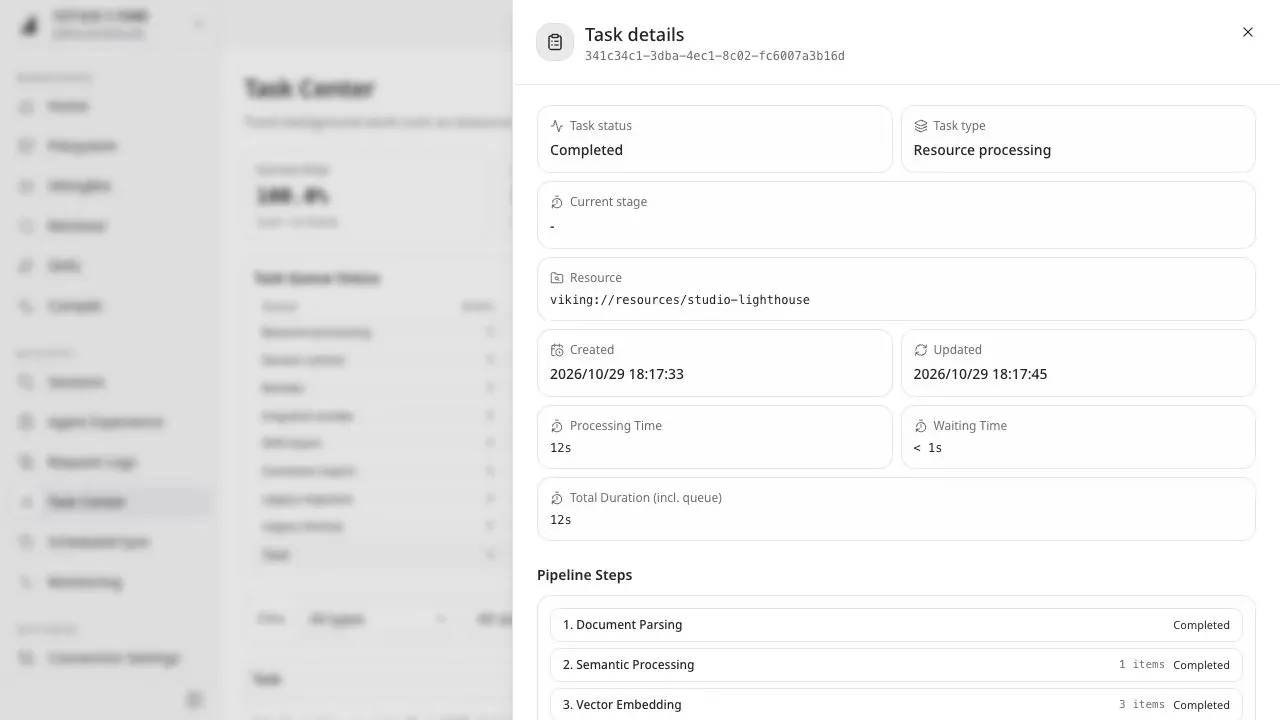
add_resourceimports files, directories, URLs and Git repositories such as a GitHub URL, and creates a background task that runs document parsing, semantic processing and vector embedding. Parsing covers formats such as PDF, Markdown and HTML. Since v0.5.5 a first non-strict import can partially succeed and reports the failed files. - Context compilation With VikingBot or another configured Agent Runtime,
ov compilereads source directories and uses an installed skill to write a wiki, knowledge graph, daily report or other output back into OpenViking. Runs take--from,--toand--skillarguments and return a task ID;ov compile memoryconsolidates the current user's existing memories (context compilation). - Web Studio The Studio web interface is served by the server at
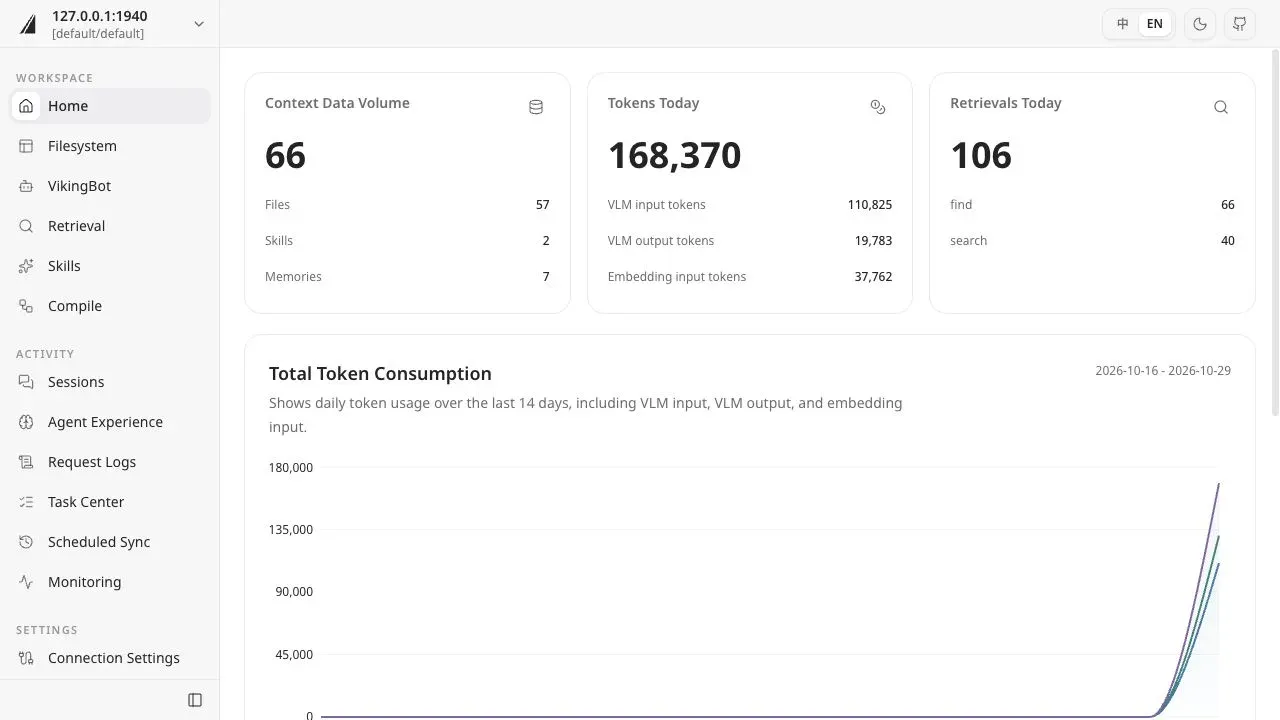
/studio. Its pages include Home (context volume, token and retrieval counts), Filesystem with Markdown preview, Retrieval with find, search, grep and glob, Skills, Compile, Sessions, Agent Experience, Request Logs, Task Center, Scheduled Sync, Monitoring and Gateway management. - Agent integrations The official integration list covers Claude Code, Codex, Cursor, TRAE, CodeBuddy Code, Qoder CLI, DeepSeek Harness, OpenCode and pi through hooks plus MCP or native plugins, OpenClaw as a context engine, Hermes Agent through a memory plugin, and LangChain/LangGraph through a retriever, tools and store. A one-line installer detects installed agents; it needs macOS or Linux, Node.js 18 or later and curl (integration overview).
- MCP endpoint and Agent Plugins package The server exposes a Streamable HTTP MCP endpoint at
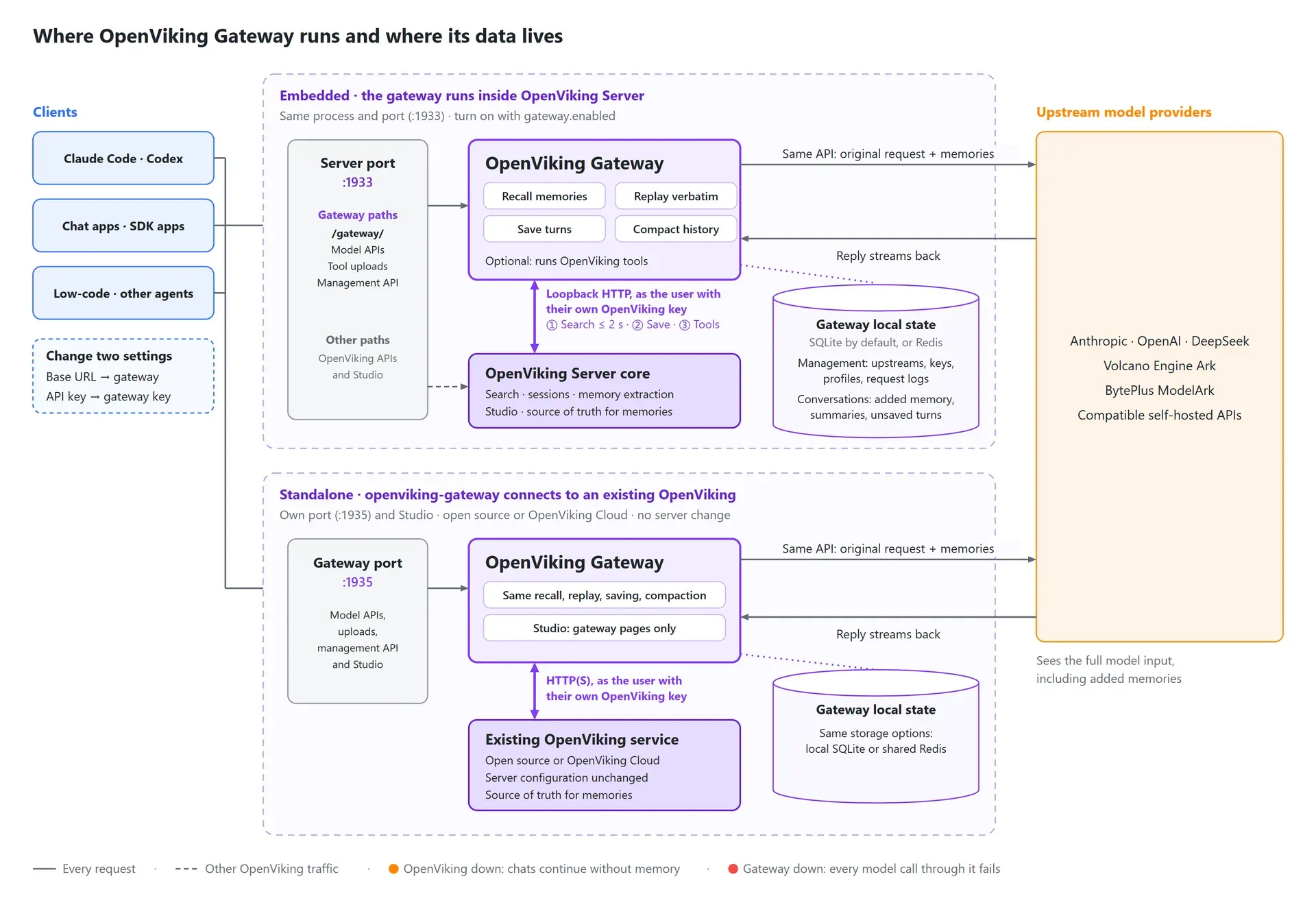
/mcpfor clients such as Claude Desktop and ChatGPT, authenticated with a bearer API key. Stdio-only clients can use the proxy in the Agent Plugins 1.0 package (MCP clients). - OpenViking Gateway (beta) A model API proxy for clients that cannot install a plugin: the client changes its base URL and uses an
ovgw_gateway key. For each new user message the gateway recalls memory and appends it, replays earlier additions byte for byte for prompt caching, saves turns to OpenViking sessions and compacts long conversations. It supports Anthropic Messages, OpenAI Chat Completions and OpenAI Responses and never converts between them (Gateway guide). - Model provider support The
openviking-server initwizard configures an embedding model and a VLM separately, with VLM options including Volcengine, OpenAI, OpenAI Codex OAuth, Kimi, GLM and local Ollama. Embedding providers include OpenAI, Azure, Volcengine, Jina, Ollama, Gemini, Voyage, Cohere and LiteLLM; without configuration the server uses a local 512-dimension GGUF model,bge-small-zh-v1.5-f16. - Storage backends Content and index are stored separately: file content in AGFS/RAGFS on local disk, S3-compatible storage or memory, and vectors in a backend chosen from
local,http,volcengine,vikingdb,cuvs(NVIDIA GPU search on Linux),opengaussandpgvector. Embedded vector backends lock the workspace, so multi-instance setups use a remote backend. - Accounts, roles and access control One server can host several accounts. Resources are shared inside an account, memories and sessions are isolated per user, and ROOT, ADMIN and USER roles manage permissions. Opt-in ACLs grant access per directory or file, and the docs require authentication to be configured before the server is exposed beyond localhost (multi-tenant model).
- Encryption and privacy configs At-rest encryption encrypts files before storage with a separate key for each account while keeping the client API unchanged. Privacy configs detect sensitive values such as API keys and tokens in skills and sessions at write time, store them with version history in the user's privacy space and replace them with placeholders that are restored on read.
- Snapshots, OVPack and WebDAV Snapshots record version history for content, with an indexed path history since v0.5.5. OVPack exports and imports
viking://resourcesor user trees as a checksummed ZIP with sidecars and optional vector snapshots; the docs note that exported packages are plaintext even when storage is encrypted. A WebDAV adapter at/webdav/resourcesexposes resources only, with UTF-8 text writes. - VikingBot VikingBot is an agent framework built on OpenViking, installed with
pip install "openviking[bot]"and started withopenviking-server --with-bot;ov chatopens a terminal chat. The official Docker image starts it by default next to the server and can disable it with--without-bot. - SDKs, CLI and HTTP API The
ovCLI ships with the Python package and as a standalone binary, and covers status, resource import, task status, listing, tree, find, grep, tags and compile. The HTTP API sits under/api/v1withX-API-Keyauthentication, and SDKs exist for Python (openviking-sdk), Go and TypeScript (API overview). - Server installation The documented self-hosted path is
uv tool install openviking --upgradefollowed byopenviking-server init, which writes~/.openviking/ov.conf;openviking-server doctorvalidates configuration, model access and authentication. A self-hosted server needs uv, Python 3.10 or later and a model provider with an embedding model and a VLM. Linux deployments can run it as a systemd service (deployment guide). - Docker and cloud deployment The Docker image maps port 1933 and mounts
~/.openvikingto/app/.openviking; because it binds to 0.0.0.0 inside the container, aroot_api_keyis required. An alternative image is published atopenviking-cn-beijing.cr.volces.com,Docker Compose adds a Caddy entry point on port 1934, and the Railway template provisions a volume and preconfigures OpenAI defaults. - Desktop app (beta) OpenViking Helper is a desktop console for macOS (Apple silicon and Intel) and Windows x64, version 0.0.19 in the README. It configures supported local agent integrations, shows recall and capture events in sessions, and syncs local memories and skills to OpenViking.
Where OpenViking fits
Persistent memory for coding agents
The README describes connecting Claude Code, Codex, Cursor, TRAE, OpenCode and other agents through the memory plugin installer (curl -fsSL https://openviking.ai/install | bash), which asks for the tools, the server and a user key. The plugins recall relevant memories before a turn and capture turns afterwards, so a preference stated in one session can be recalled in a later one once background extraction has run. A root key cannot read or write memories, so the installer uses a user key, stored in ~/.openviking/ovcli.conf.
Searchable knowledge base from repositories and documents
The quick start imports a GitHub repository with ov add-resource, polls ov task status until processing completes, then explores it with ov ls, ov tree, ov find and ov grep. Retrieval can be scoped to one directory, and results point to L0 abstracts or L2 files whose URIs can be passed to an agent or opened in Studio.
Memory for chat apps and SDK clients through the Gateway
For chat applications, scripts and low-code platforms that only allow a base URL and API key, the beta OpenViking Gateway adds recall, tool calls and conversation saving without client changes. It runs embedded in the server under /gateway or as a standalone openviking-gateway process against an existing service, keeps its own state in SQLite or shared Redis, and continues conversations without memory if OpenViking is unavailable (how the Gateway works).
Team deployment with shared resources and private memories
A single server can serve several teams as accounts, with shared resources inside an account, per-user memories and sessions, role-based keys, per-path ACLs and optional per-account encryption. Multi-host setups described in v0.5.5 use pgvector and the PostgreSQL path lock, or other remote vector backends, plus shared temporary uploads and per-instance queue databases.
Compiling sources into wikis and reports
The context compilation feature organizes imported material with a skill: the documented examples build an LLM wiki, a knowledge graph, a daily report and distilled knowledge, and consolidate existing memories. Compilation runs as an asynchronous agent loop under the requesting user's identity and writes its output to a target viking:// directory.
Long-term memory benchmarks
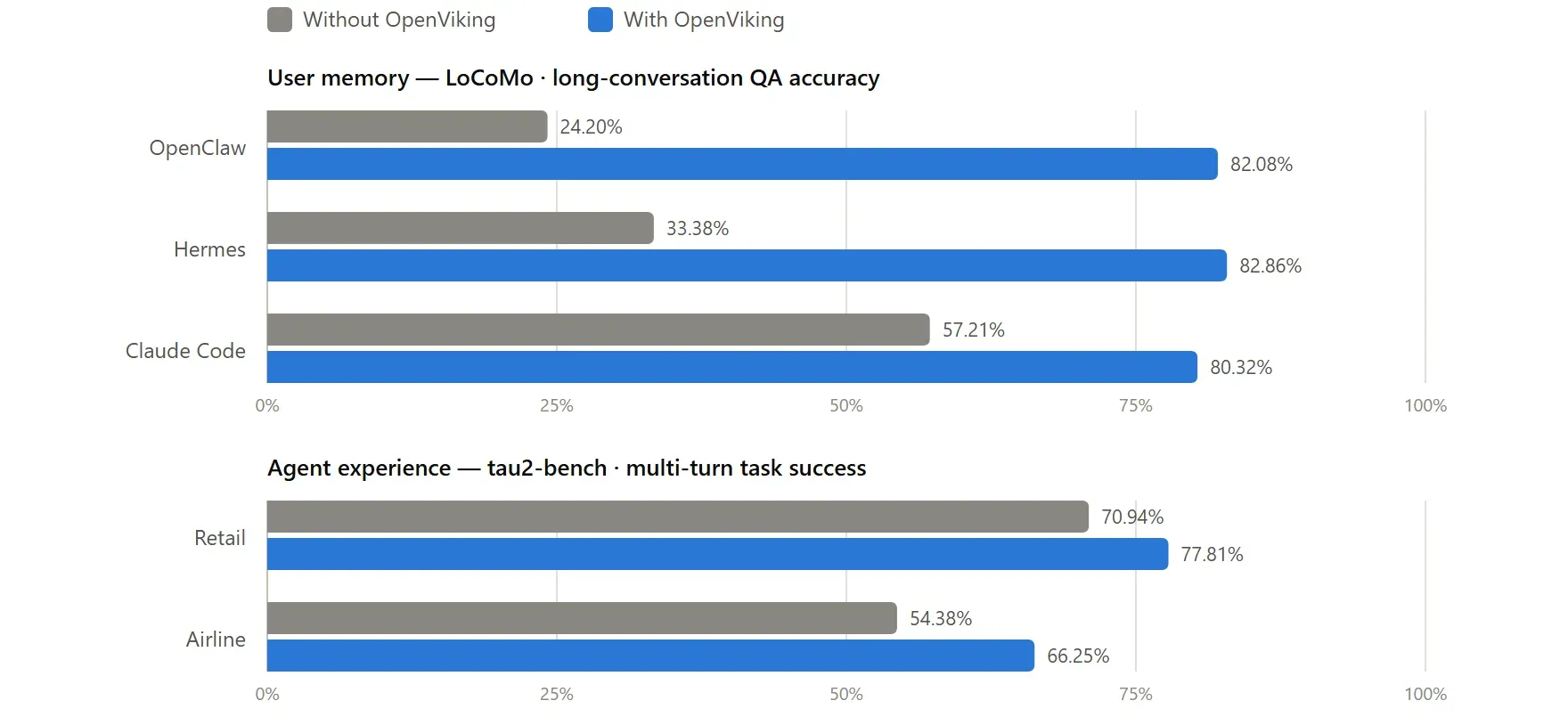
The project reports results for OpenViking 0.3.22 in its benchmark report, using Doubao 2.0 Pro as the VLM and Doubao-embedding-vision-251215 for embeddings. On LoCoMo it lists accuracy of 82.08% for OpenClaw (24.20% with native memory), 82.86% for Hermes (33.38%) and 80.32% for Claude Code (57.21%), with input tokens down 34.3% to 91.0% and query latency down 58.45% to 66.10%. On tau2-bench, experience memory raised task success by 6.87 points in retail and 11.87 points in airline. Reproduction scripts are in the repository's benchmark folder.
Install
uv tool install openviking --upgrade && openviking-server initReviews of OpenViking
Be the first to share your experience with OpenViking.
Write a review
Loading review form…
Found OpenViking useful? Upvote it todayYour vote helps other IT teams find it in the daily ranking.