

What is Mem0?
Mem0 (pronounced mem-zero) is a memory layer for AI assistants and agents. An application sends conversation turns to Mem0, which extracts short factual memories with an LLM, embeds them and stores them under a user, agent or run identifier. On the next request the application searches those memories and adds the relevant ones to its prompt, so preferences, past actions and earlier decisions carry over between sessions without resending the full history.
The project is developed by Mem0, a Y Combinator S24 company that its Y Combinator profile lists as founded in 2023 in San Francisco. The open-source code is licensed under Apache-2.0. The same company runs Mem0 Platform, a managed service at app.mem0.ai with a free tier and custom contracts, described on the pricing page.
There are three ways to run it. The library ships as mem0ai on PyPI (Python 3.10 or newer) and as mem0ai on npm (Node.js 18 or newer). The self-hosted server in the server/ directory is a Docker Compose stack with a FastAPI REST API on port 8888, a web dashboard on port 3000 and Postgres with pgvector, documented in the self-hosted setup guide. The hosted Platform adds graph memory, user profiles, memory consolidation and enterprise controls. The monorepo also carries a CLI for Python and npm, a hosted MCP server, agent skills and plugins for Claude Code, Codex, Cursor, OpenCode, OpenClaw and other agent hosts.
Releases are tagged per package. The latest GitHub release is Node SDK ts-v3.3.1, published on September 25, 2026 together with Python SDK v2.2.1. Both are bug-fix releases: Turbopuffer filters now apply every comparison operator, distance scores no longer invert ranking, the Node config stops injecting OpenAI defaults into other providers, and the Python add() raises VectorStoreError instead of reporting memories the vector store rejected. The previous minor releases added User Profiles methods to the Platform client. The larger change came with the v3 SDK line, which the v2 to v3 migration guide documents: single-pass ADD-only extraction, hybrid retrieval and changed search defaults.
Mem0 is a component, not an agent framework or a chat interface. It does not orchestrate tools, host models or replace a document RAG pipeline; it needs an LLM and an embedding model, with OpenAI gpt-5-mini and text-embedding-3-small as defaults. Benchmark scores on the README (LoCoMo, LongMemEval, BEAM) are measured on the managed Platform, and the project states that open-source results are directionally similar but not identical. The external graph store integration was removed from the open-source SDK in v3, so graph memory is now a Platform feature only.
Mem0 screenshots
Explore the interface. Open a screenshot to view it at full size.
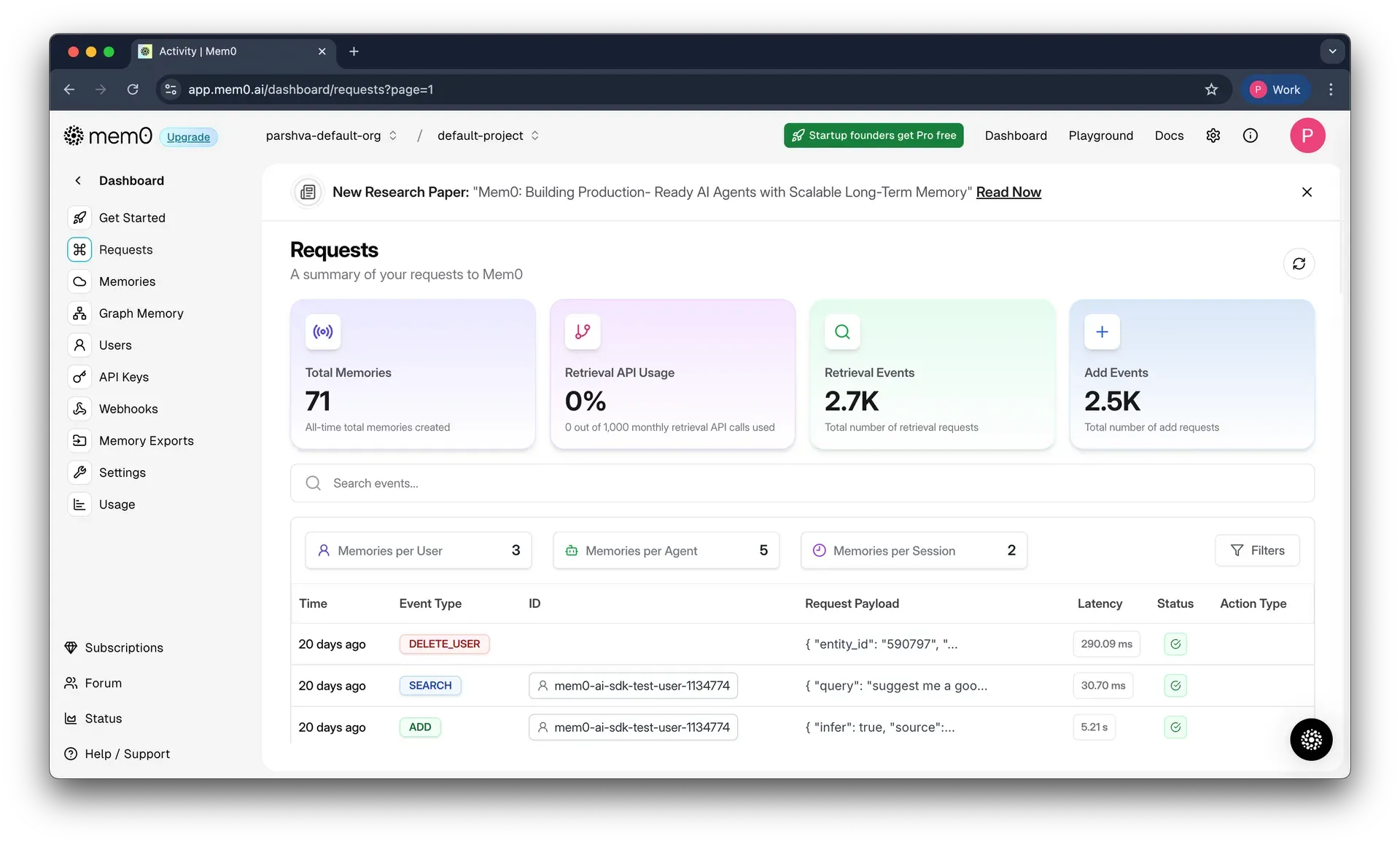
Official documentation screenshot of the hosted dashboard's request log, with memory counts per user, agent and session.
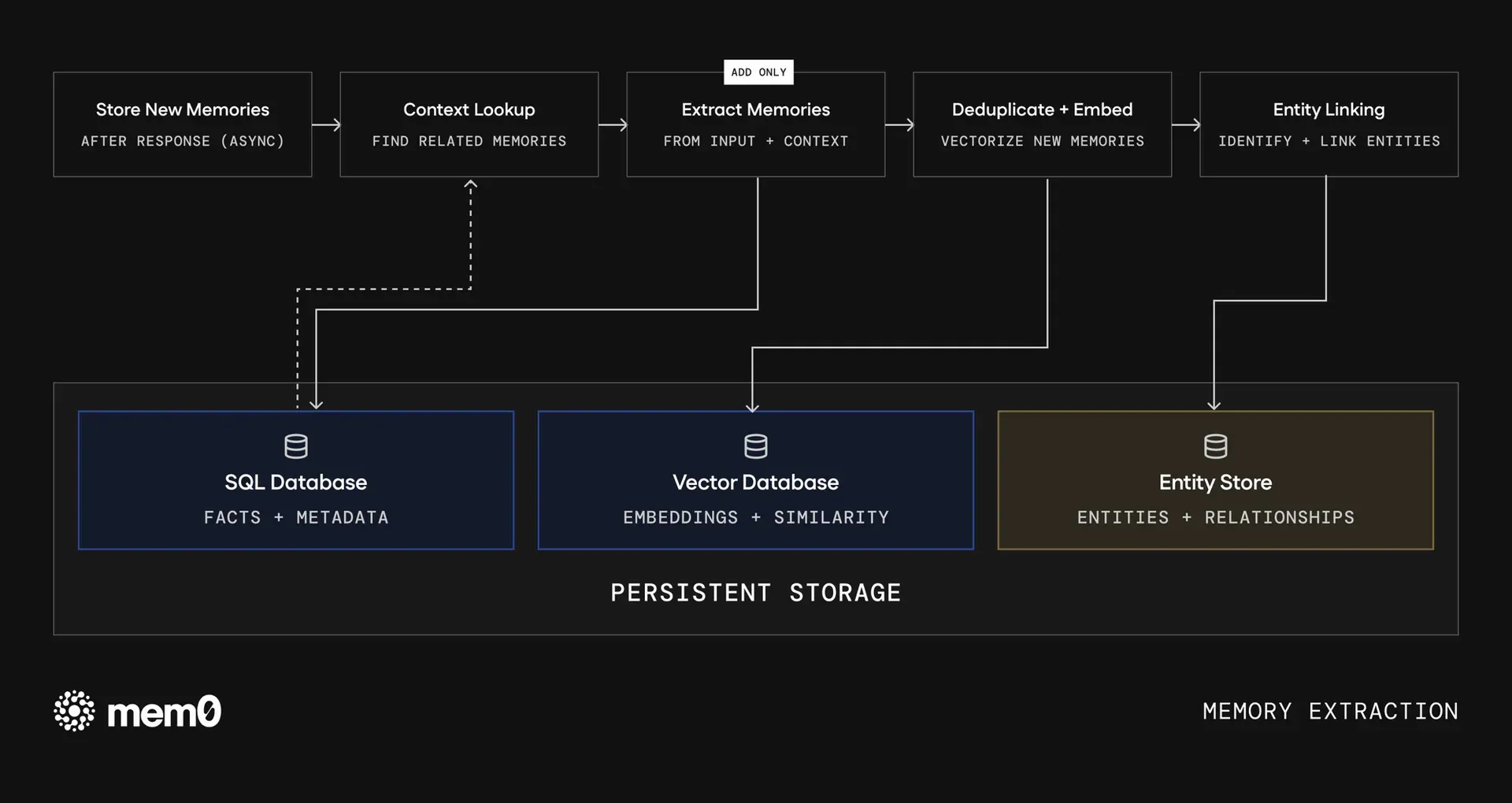
Official diagram of the v3 extraction pipeline and the three persistent stores it writes to.
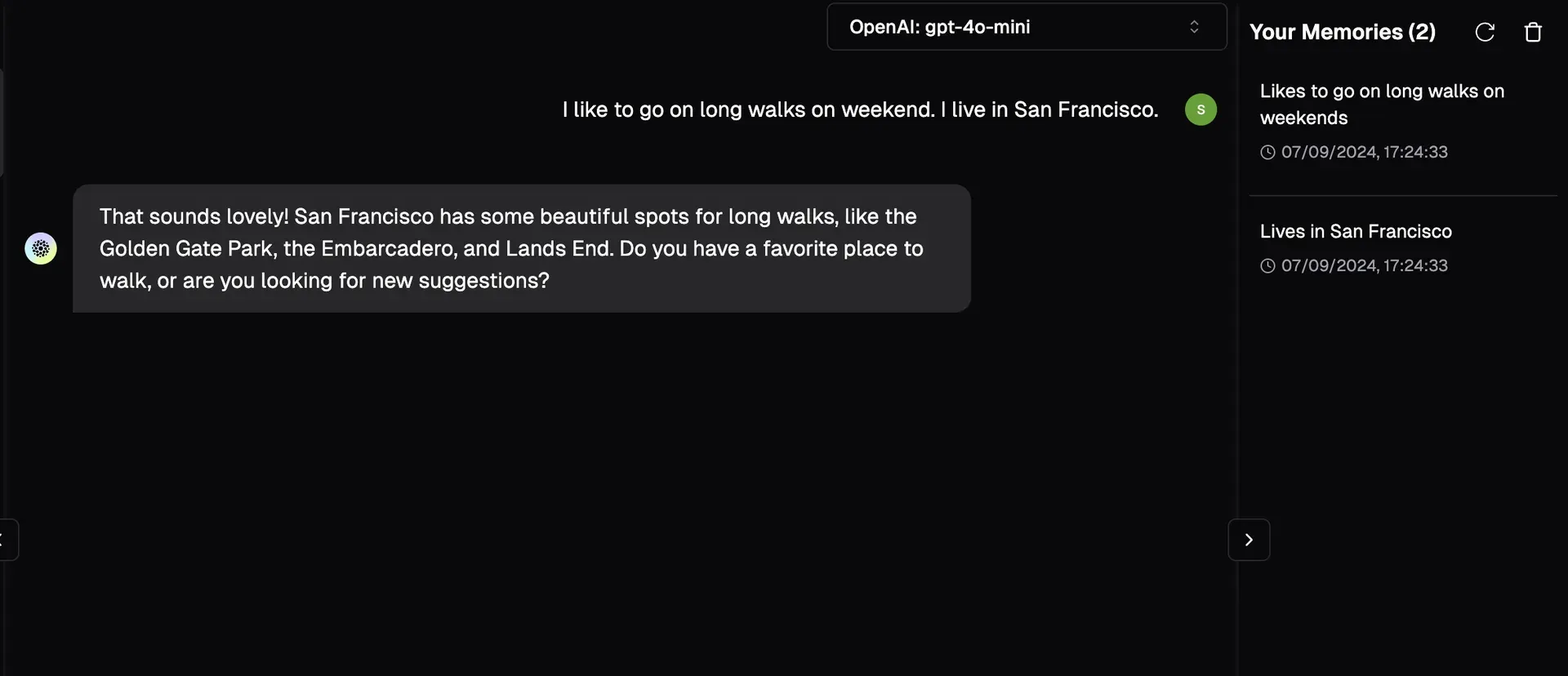
Official playground example showing facts extracted from one chat message into the memory panel.
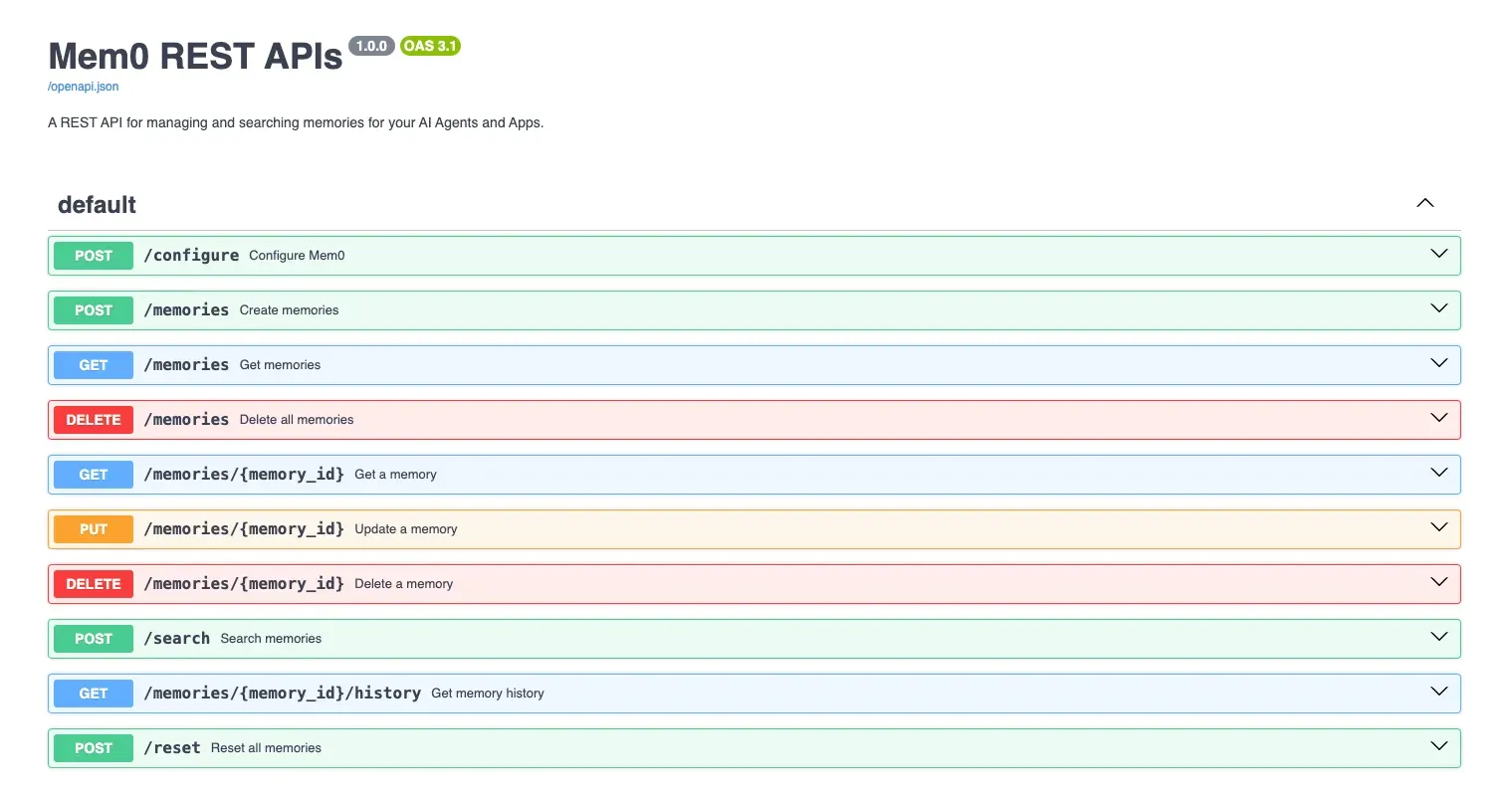
OpenAPI explorer of the self-hosted REST server, as shown in the official documentation.
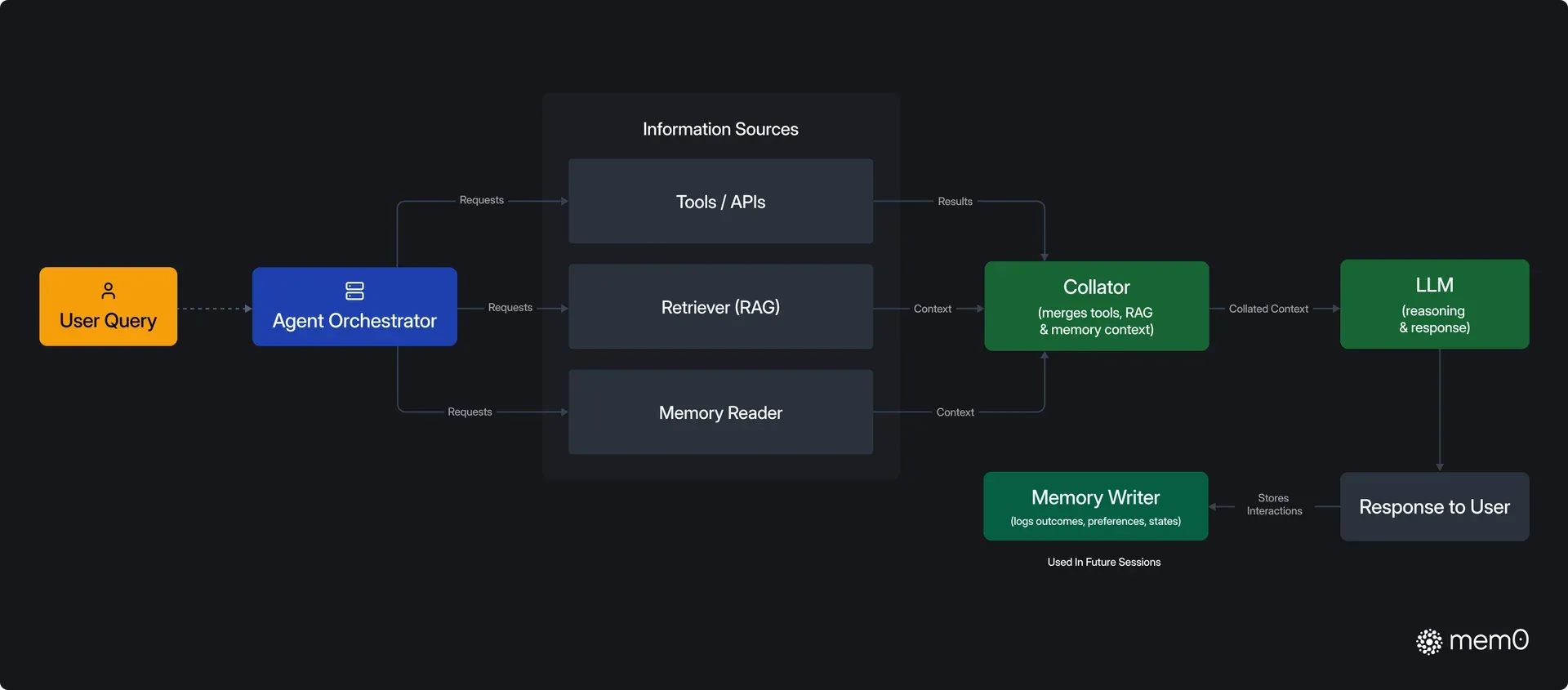
Official architecture figure showing where memory reads and writes sit in an agent request loop.
Source: official Mem0 project page.
Key capabilities
- Memory add and search API The core calls are
add(),search(),get_all(),update(),delete()andhistory(). Messages go in as a string, a dict or a list of chat messages, and the LLM extracts the facts worth keeping. Since v3,search()andget_all()take entity identifiers inside afiltersobject; top-leveluser_idkeyword arguments raise aValueError. - Scoped memory by user, agent and run Every memory belongs to a
user_id,agent_idorrun_id, which separates long-term user preferences from facts an agent recorded about its own actions and from short-lived session context. Empty or whitespace-only identifiers are rejected. The scoping model is the same in the open-source SDK and the Platform, which makes a later migration a matter of changing the client. - Single-pass ADD-only extraction The v3 algorithm makes one LLM call per
add()and only appends memories; it no longer emits UPDATE or DELETE events. Older facts are kept and newer dated facts outrank them through time-aware retrieval. Code written against v2 that expects UPDATE or DELETE events must be adjusted, as listed in the migration guide. - Hybrid retrieval with entity linking Search scores semantic similarity, BM25 keyword matches and shared entities in parallel and fuses the results. Entity extraction and lemmatization need the
mem0ai[nlp]extra with spaCy and theen_core_web_smmodel, which installs on Python 3.10 to 3.12 only. Qdrant users also needfastembedfor BM25; without it search silently falls back to semantic-only and logs a warning. - Search defaults and reranking Since v3 the default
top_kis 20 instead of 100, results below a relevancethresholdof 0.1 are dropped, and reranking is off unlessrerank=Trueis passed and a reranker is configured. These defaults change what an upgraded application sees, so evaluation sets should be rerun after an upgrade. Metadata filters support logical operators and nested conditions. - Pluggable vector stores The Python SDK documents 27 vector store backends, including Qdrant, Chroma, pgvector, Pinecone, Weaviate, Milvus, Elasticsearch, OpenSearch, Redis, Valkey, MongoDB, FAISS, Turbopuffer, Amazon S3 Vectors and Azure AI Search. The TypeScript SDK supports a shorter list of 12, including Qdrant, Redis, pgvector, Supabase, Milvus and an in-memory store. The library default is a local Qdrant collection at
/tmp/qdrantwith a SQLite history file at~/.mem0/history.db. - LLM and embedding providers Documented LLM providers include OpenAI, Anthropic, AWS Bedrock, Azure OpenAI, Google AI, Groq, DeepSeek, Mistral, xAI, Together, LiteLLM, vLLM, LM Studio and Ollama; 11 embedding providers include OpenAI, Hugging Face, FastEmbed, Ollama and Vertex AI. Local models through Ollama or LM Studio keep extraction off third-party APIs. A non-default embedding dimension must be set with
embedding_model_dimson the vector store. - Self-hosted REST server and dashboard The
server/stack runs the API on port 8888, the dashboard on port 3000 and apgvector/pgvector:pg17database.make bootstrapstarts it, creates the admin account and prints the first API key;make upleaves account creation to a browser wizard. The dashboard shows a live request audit log, stored memories, entities with cascade delete, API keys and runtime LLM and embedder configuration. A prebuilt image is published asmem0/mem0-api-server. - Authentication on the self-hosted server Auth is on by default and the server refuses to start without
JWT_SECRET. Programmatic clients send per-userX-API-Keyvalues with anm0sk_prefix, of which the server stores only the prefix and a bcrypt hash. A legacy sharedADMIN_API_KEYremains for older clients, andAUTH_DISABLED=trueis documented for local development only. The bundled image accepts only theopenai,anthropicandgeminiproviders until you rebuild it with more packages. - OpenAI-compatible chat client
mem0.proxy.main.Mem0mirrorsclient.chat.completions.create()and acceptsuser_id,agent_idandrun_idnext to the usualmessagesandmodel. Each call saves relevant facts and injects stored ones, so existing OpenAI-style code gains memory with few changes. It can target the managed Platform or a local configuration such as a Qdrant host. - Async, multimodal and custom instructions
AsyncMemoryoffers non-blocking calls for high-throughput services and, since v2.2.1, works as an async context manager again. Multimodal inputs let images and other media be turned into memories.custom_instructionsreplaces the older custom extraction prompt and tells the extractor what to keep or ignore for a given domain. - Mem0 Platform managed service The hosted service runs extraction, storage and reranking with no vector database to operate and adds webhooks, memory exports, custom categories, usage analytics and a playground. Platform-only features include graph memory with entity relationships, User Profiles (an LLM-maintained JSON summary per user shaped by a JSON Schema) and Dream memory consolidation. Several of these are listed only on the Custom plan.
- Hosted MCP server The Mem0 MCP server runs at
https://mcp.mem0.ai/mcpover HTTPS and exposes tools such asadd_memory,search_memories,update_memory,delete_entitiesandlist_events.npx mcp-add(Node.js 18 or newer) writes the entry for Claude Code, Cursor, Windsurf, VS Code and OpenCode; Claude Desktop and Codex are configured manually. Sign-in uses a browser OAuth flow or an API key, and memories stored this way live in the Mem0 account, not on the local machine. - Command-line interface The
mem0CLI is published as@mem0/clion npm andmem0-clion PyPI with identical commands:init,add,search,list,get,updateanddelete. The--agentflag switches output to JSON for scripts and coding agents. It talks to the Platform API, and an agent can create an account withmem0 init --agentthat a human later claims by email. - Agent plugins and skills The repository ships plugins for Claude Code, Codex, Cursor, OpenCode, OpenClaw, Hermes, Kimi, Antigravity, Pi Agent and DeepSeek, plus a Vercel AI SDK provider, AWS Strands integration, n8n nodes and a Zapier app. Agent skills install with
npx skills add https://github.com/mem0ai/mem0 --skill mem0and include pipelines that wire Mem0 into an existing repository or migrate an OSS project to the Platform. Plugin versions are released separately from the SDKs. - Framework integrations Documented integrations cover LangGraph, LangChain, CrewAI, LlamaIndex, AutoGen, Agno, Mastra, Dify, LiveKit, Pipecat and ElevenLabs among others. Most wrap the same add and search calls. Check whether an integration targets the Platform client or the open-source
Memoryclass before choosing it. - Installation Python:
pip install mem0ai, orpip install mem0ai[nlp]pluspython -m spacy download en_core_web_smfor hybrid search. Node.js:npm install mem0ai; the PGVector store needspginstalled separately since ts-v3.3.1. Server: clone the repository, copyserver/.env.exampletoserver/.env, setOPENAI_API_KEYandJWT_SECRET, then runmake bootstrapwith Docker and Docker Compose installed. - Telemetry setting The Python package depends on PostHog and sends anonymous usage events to
us.i.posthog.comby default, with hot-path events sampled at 10 percent. SetMEM0_TELEMETRY=falseto turn it off, andMEM0_TELEMETRY_SAMPLE_RATEto change sampling. Air-gapped or regulated deployments should set the variable explicitly and confirm the egress with a network capture.
Where Mem0 fits
Giving a support assistant memory of past conversations
Call search() with the customer identifier in filters before each model call, place the returned memories in the system prompt, then call add() with the user and assistant turns after the reply. Keep the customer identifier stable across channels so memories attach to one person. Check that a fact stated in one session is retrieved in a new session, and that one customer never sees another customer's memories when identifiers are close or reused.
Persisting agent state across runs
Store facts an agent learned about its own actions under agent_id, and per-task scratch context under run_id, so long-lived knowledge and temporary context can be listed and deleted separately. Since v3, agent-generated facts carry the same weight as user statements, so confirmed actions are recalled later. Test that a finished run can be cleaned up with delete_all() without removing the agent's long-term memories.
Running memory entirely on your own infrastructure
Deploy the server/ Compose stack, or configure the library with a local vector store and an Ollama or vLLM model for both extraction and embeddings. Disable telemetry with MEM0_TELEMETRY=false, put HTTPS in front of port 8888 and issue per-user API keys from the dashboard. Verify with a packet capture that no request leaves the network, and check that the chosen embedding dimension matches embedding_model_dims on the vector store.
Adding memory to a coding assistant
Point Claude Code, Cursor, Windsurf, VS Code or OpenCode at the hosted MCP server with npx mcp-add, or install the Claude Code or Codex plugin from the repository for skills and lifecycle hooks. The agent then decides when to store and look up project conventions. Remember that these memories sit in the Mem0 cloud account, so review what the agent saves before using it on proprietary code, and use the CLI to list and delete entries.
Upgrading an existing integration to the v3 SDKs
Follow the migration guide: move entity identifiers into filters, rename custom_fact_extraction_prompt to custom_instructions, remove graph_store settings and install the [nlp] extra. Pass top_k=100, threshold=0.0 or rerank=True only where the old behavior is still required. Rerun a fixed evaluation set before and after, because ADD-only extraction keeps older facts that v2 used to overwrite.
Moving from open source to the managed Platform
Teams that outgrow a self-run vector store can switch to MemoryClient with an API key; the agent skill mem0-oss-to-platform automates the code change, and a migration guide covers importing hosted Qdrant vectors. Compare free-tier limits with expected traffic first, and confirm which needed features, such as graph memory or SSO, are only on the Custom plan.
Install
pip install mem0aiReviews of Mem0
Be the first to share your experience with Mem0.
Write a review
Loading review form…
Alternatives to Mem0
 CogneeCognee is a free, open-source AI memory platform that turns documents, code and conversations into a knowledge graph with vector retrieval for agents.
 LettaLetta Code is an open-source stateful agent harness whose agents keep memory and identity over time, used from a CLI, a browser or messaging apps.