What is Safebucket?
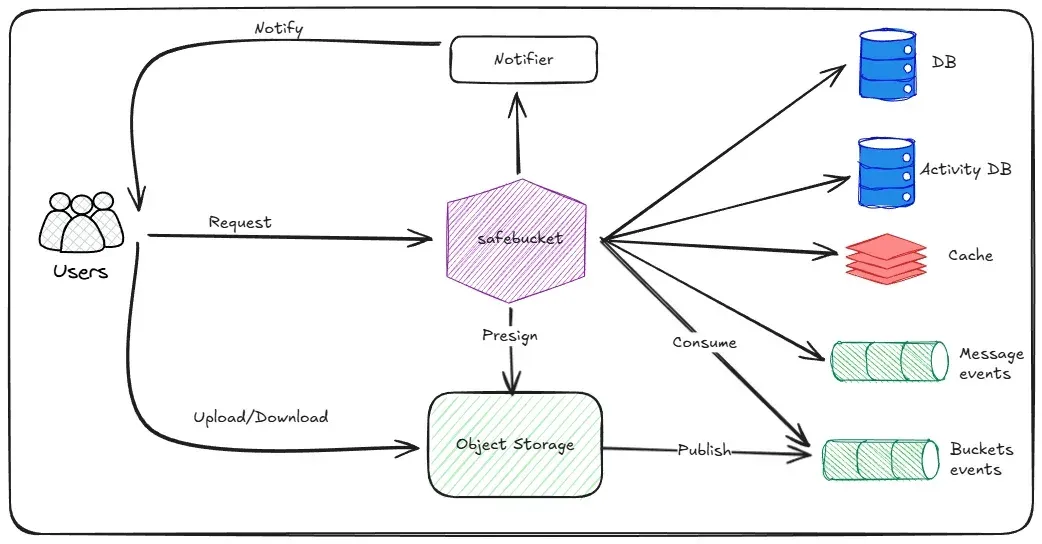
Safebucket is an open-source file sharing platform for self-hosted and on-premises use, developed in the safebucket/safebucket GitHub repository and released under the Apache-2.0 license. Its defining design choice is that file contents never pass through the application server. The Go API issues time-limited presigned URLs, and the browser uploads and downloads directly to and from the configured object storage. Safebucket itself handles metadata, access control and the audit trail. The official documentation covers deployment templates, configuration and each pluggable provider.
The architecture overview lists the components. The backend is a Go REST API for authentication, authorization and file metadata. The web interface is a React single-page application in TypeScript, built with Vite, TanStack Router and TanStack Query, Tailwind CSS, Radix UI and shadcn/ui, and by default it is served from the same binary as the API. Users, buckets, files, permissions and invitations are stored in PostgreSQL or SQLite through the Gorm ORM, with Goose migrations. Asynchronous work such as notifications, storage events and object deletion runs over NATS JetStream, AWS SQS, Google Cloud Pub/Sub, Azure Storage Queues or an in-process memory queue. A cache layer (Redis, Valkey or memory) holds rate limits, distributed locks, MFA attempt counters, notification batches and session state. Activity logs go to Grafana Loki or to a local filesystem index built on Bleve, and notifications are sent by SMTP or written as JSON files.
Storage is also swappable. The storage provider documentation lists dedicated, event-driven integrations for AWS S3, Google Cloud Storage, Azure Blob Storage, MinIO and RustFS, plus a generic S3 type for any provider that supports presigned PUT policies and CORS. The generic S3 page marks Hetzner Object Storage, Storj, Garage, Cloudflare R2, Backblaze B2, OVH Object Storage and Scaleway Object Storage as tested, and states that the generic type is less efficient than a dedicated one because it does not receive real-time upload and deletion events and cannot use lifecycle policies for trash handling.
Container images are published as ghcr.io/safebucket/safebucket and signed with cosign keyless signing through GitHub Actions OIDC; each GitHub release also carries Linux amd64 and arm64 binaries with signatures and a checksum file. The latest GitHub release is v0.8.1, published November 5, 2026, which fixes a trash error with Cloudflare R2 and adds a manual object reconciliator. v0.8.0 (October 17, 2026) redesigned the bucket view, the quick share dialog and the upload dialog, added custom share link paths, bulk trash and drag and drop in the file explorer, and moved to Go 1.27 and RustFS 1.0.1. v0.7.0 (August 1, 2026) added multipart uploads, Azure support, presigned PUT uploads for S3 and GCS, the redirect download endpoint and sandboxed file previews. The project has not yet published a 1.0 release.
The README and documentation describe a web interface only: they do not mention desktop sync clients, mobile apps, a hosted service, a pricing page or a paid edition. The repository does not ship a Helm chart; the documented deployment paths are Docker Compose and Terraform for AWS. Similar self-hosted file platforms on iThub include Nextcloud, Sync-in, Cloudreve and OpenCloud; storage backends it can sit on include RustFS and MinIO.
Key capabilities
- Direct uploads and downloads through presigned URLs Clients transfer files straight to the storage backend with time-limited presigned URLs, and the API only records metadata and checks permissions. Multipart upload was added in v0.7.0. The maximum upload size is set with
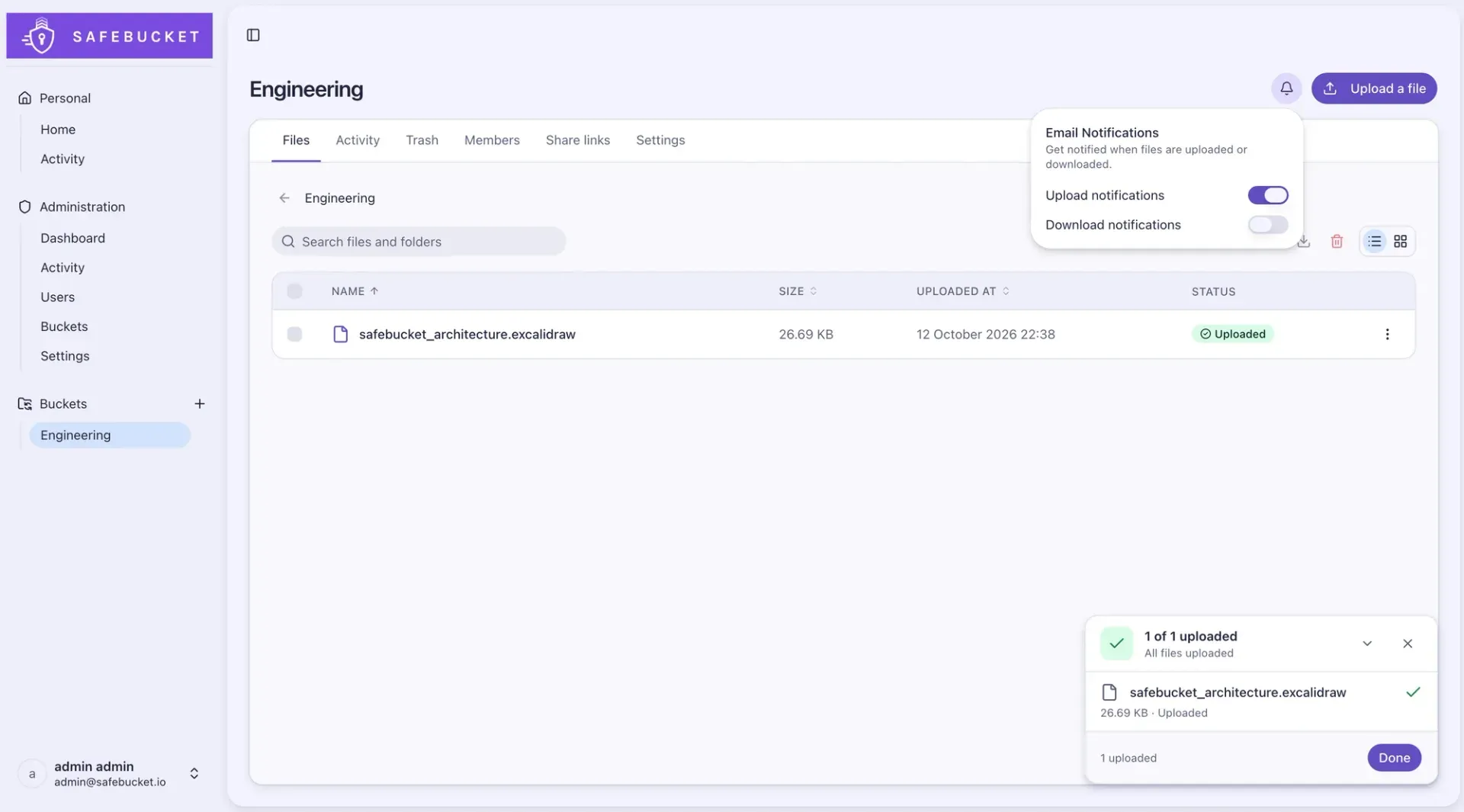
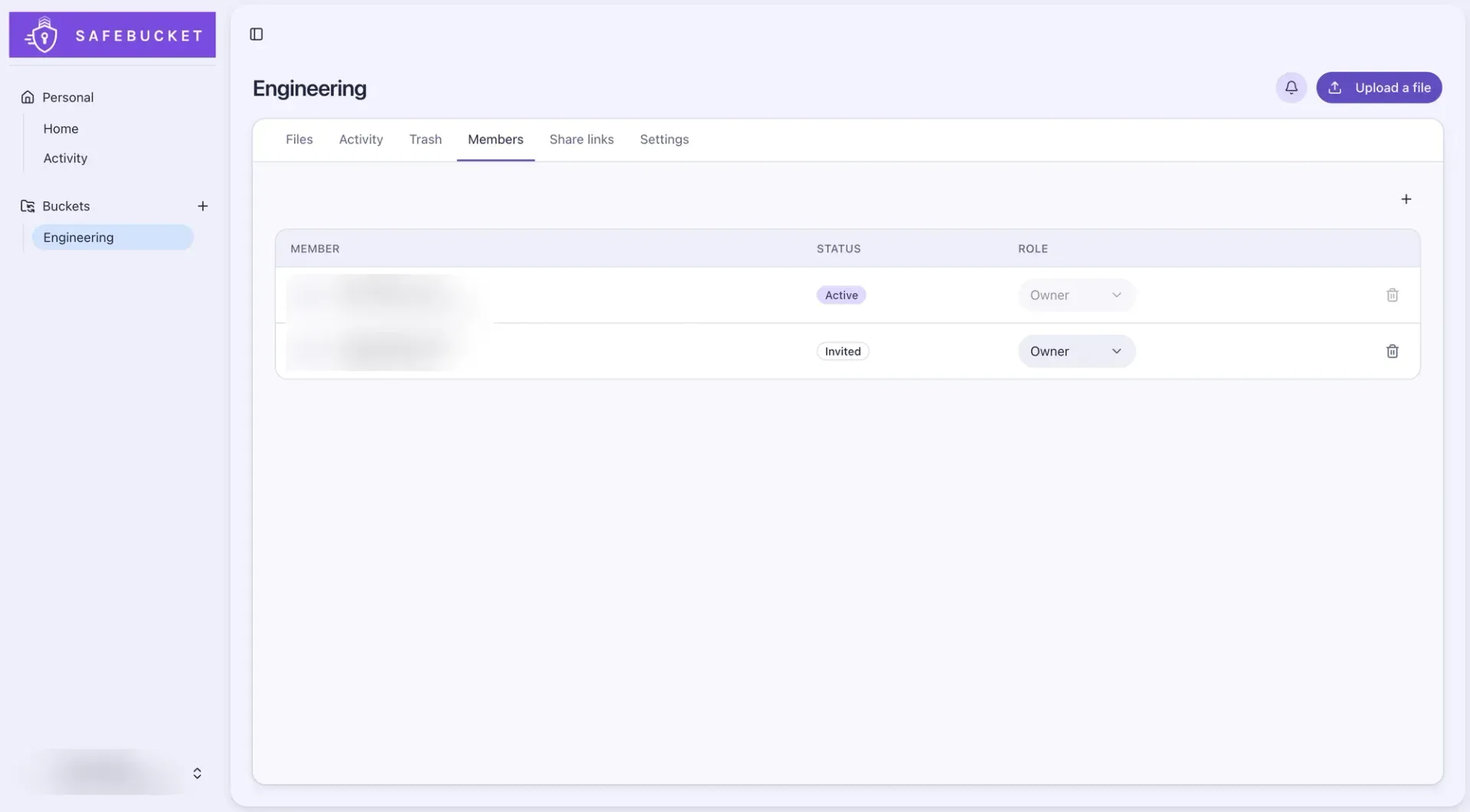
APP__MAX_UPLOAD_SIZE, which defaults to 50 GB; the features page states there is no hard limit beyond that setting. - Buckets and nested folders Buckets are the logical containers for sharing, and each can hold a nested folder hierarchy. Files and folders can be renamed, moved by drag and drop in the file explorer (added in v0.8.0), and shown in a list or grid view. Each bucket has tabs for files, activity, trash, members, share links and settings.
- In-browser preview Images (PNG, JPG, GIF, WebP, SVG and other formats), video, audio, PDF documents and text files open in the browser without a download. Since v0.7.0 previews are rendered inside a sandbox.
- Bulk download as ZIP Several files and whole folders can be selected and downloaded as one timestamped ZIP archive. The archive is assembled in the browser, progress and partial failures are reported, and one archive is limited to 100 files or 1 GB.
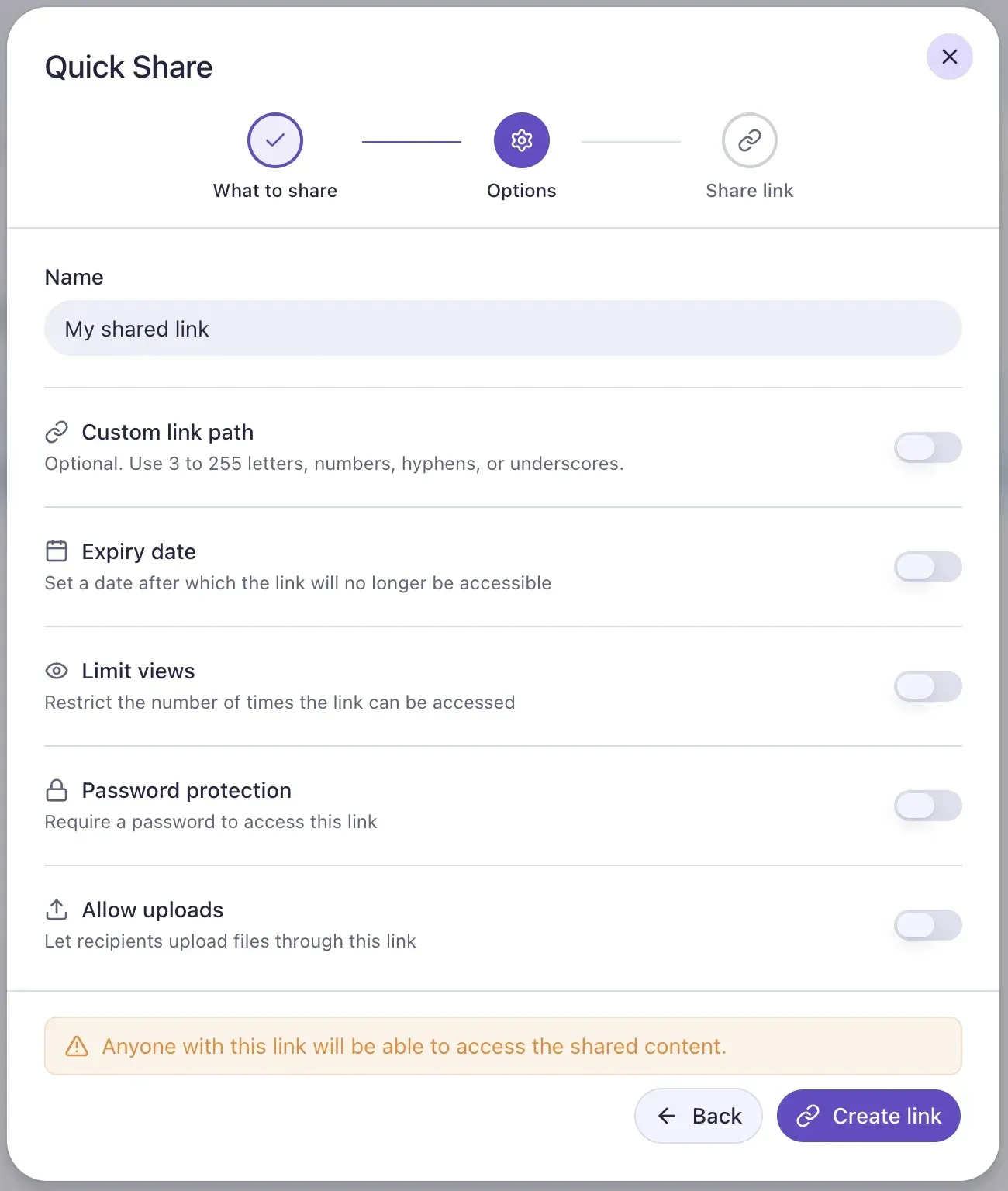
- Quick share links A public link can cover a single file, a folder or an entire bucket, and recipients download without a Safebucket account. Options include an expiration date, a maximum view count, password protection and, since v0.8.0, a custom link path of 3 to 255 letters, numbers, hyphens or underscores. Existing links are listed per bucket under Share links.
- Reverse share for incoming files Folder and bucket shares can also accept uploads from external recipients. The owner can cap the number of uploads and set a per-file size limit on the reverse share.
- Command-line downloads Share download endpoints redirect to a presigned URL that carries the original filename, so
curl -OJLsaves the file under its real name. Password-protected shares first take a POST to the share auth endpoint to obtain a cookie. The behavior is controlled byAPP__ALLOW_REDIRECT_DOWNLOAD(enabled by default); when disabled, the endpoints return HTTP 403. - File expiration An expiration date can be set per file at upload time. Expired files return HTTP 403 on download and update, a background worker removes them from storage and the database, and the expiration is written to the activity trail.
- Trash and retention Deleted files and folders go to a trash where they can be restored until the retention period ends, after which they are purged automatically.
APP__TRASH_RETENTION_DAYSdefaults to 7 and accepts 1 to 365 days. Bulk trash arrived in v0.8.0, and dedicated storage providers use lifecycle policies and events for trash handling. - Platform and bucket roles Platform roles are Admin, User and Guest: guests cannot create buckets and only see buckets they were invited to. Inside a bucket, Owners manage settings and members, Contributors upload, download, rename and delete, and Viewers have read-only access. The documentation states that permissions are enforced in API middleware on every request.
- Email invitations Bucket owners invite users by email, including people outside the organization. Acceptance uses a challenge-based flow with attempt limiting and lockout against brute force, and pending members appear with an Invited status in the member list.
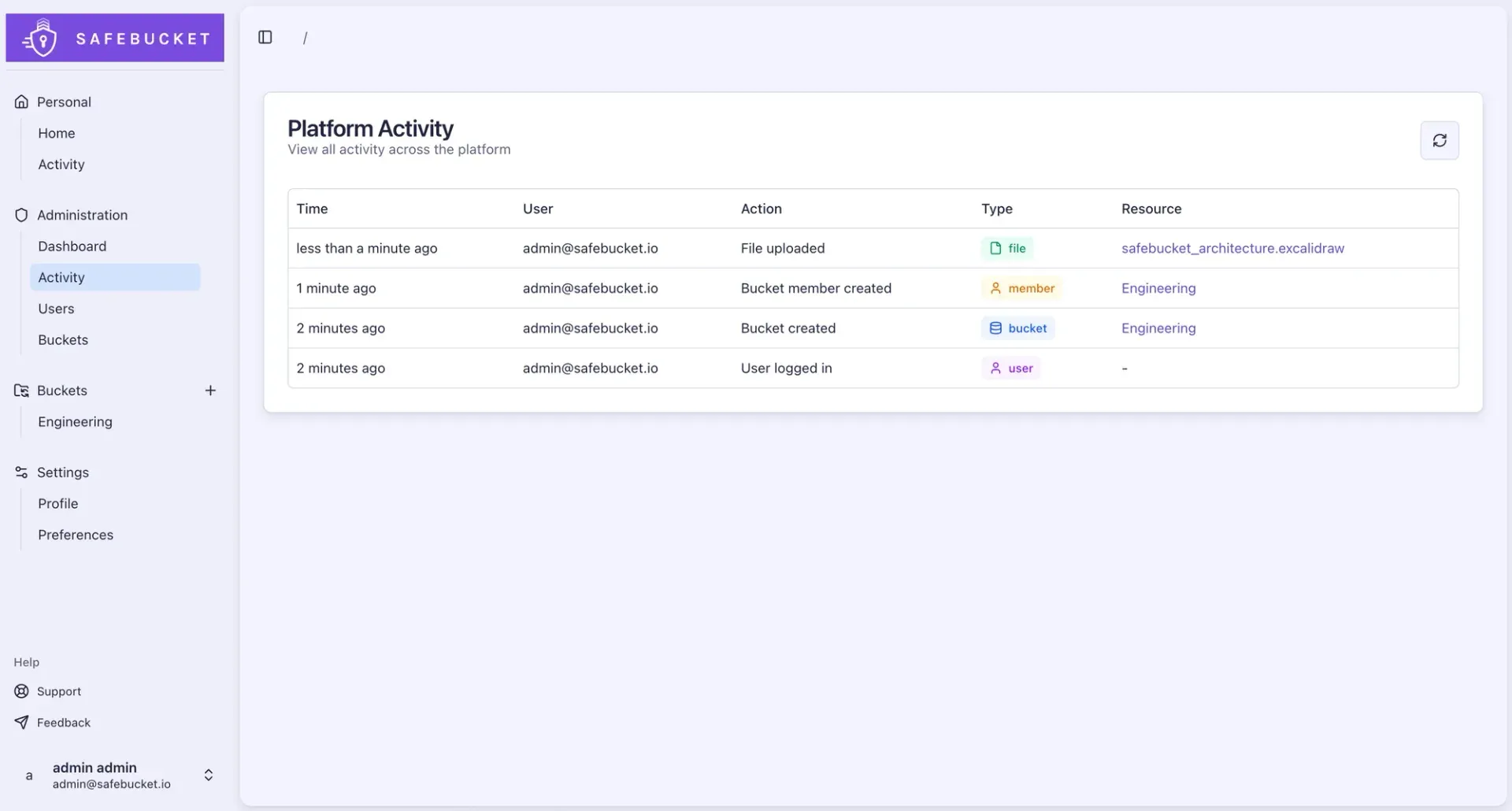
- Activity tracking and audit logs Logins, uploads, downloads, deletions and member changes are recorded and can be searched by action, user and object type, filtered by date range and paginated. Bucket owners see a per-bucket feed, and admins see platform-wide activity. Logs are stored in Grafana Loki or in the filesystem provider, which needs no external service.
- Email notifications Bucket members can opt in or out of notifications for uploads and downloads, and delivery is buffered so bulk operations do not trigger a message per file. The notifier also sends invitations, password resets and MFA enrollment messages, through SMTP or the filesystem provider that writes JSON files to disk.
- SSO with OIDC and LDAP Any OpenID Connect provider can be configured; the authentication guide names Pocket ID, Authelia, Keycloak, Google and GitHub as examples. LDAP and Active Directory authentication binds with a service account, finds the user with a filter and rebinds to verify the password, creating the account on first login. Several providers can be active at once, and sharing can be disabled or limited to specific email domains per provider.
- Local accounts and sessions External users can sign in with local email and password accounts hashed with Argon2id, and password reset uses challenge-based verification. Tokens are HS256-signed JWS wrapped in a JWE, and access tokens carry a session ID checked against the cache on every request, so logout and revocation take effect immediately. An admin account is created at startup from
APP__ADMIN_EMAILandAPP__ADMIN_PASSWORD. - TOTP multi-factor authentication Users enroll any TOTP authenticator app and can register several MFA devices. MFA works with local, OIDC and LDAP providers and can be enforced per provider. The MFA guide requires a 32-character
APP__MFA_ENCRYPTION_KEYand warns that losing it invalidates all enrolled devices. - Admin dashboard Admins get a Dashboard view with totals for users, buckets, files, folders and storage used, plus upload trends, a system-wide Activity log, a Users list with roles and account status, and a Buckets list with member counts and storage usage. An admin settings page was added in v0.7.0.
- Themes and languages The interface offers six color themes (Default, Darkmatter, Quantum Rose, Ocean Breeze, Elegant Luxury and Neo Brutalism), light and dark mode with system detection, English and French, and a configurable timezone for activity and statistics.
- Docker Compose templates The lite template runs two containers, Safebucket and RustFS, with embedded SQLite, in-memory cache and events, and filesystem notifications and activity logs. The full template adds PostgreSQL, Valkey, NATS, Loki and Mailpit and asks for at least 1 GB of RAM. A dev template starts only the infrastructure services for running Safebucket from source.
- AWS deployment with Terraform The AWS guide provides Terraform modules for an S3 bucket with event notifications, RDS PostgreSQL, ElastiCache Redis, SQS queues, IAM roles and CloudWatch logging. An optional ECS Fargate deployment adds an Application Load Balancer, Secrets Manager, service discovery and VPC endpoints, and runs Safebucket, Loki and Mailpit as three services.
Where Safebucket fits
Sending files to people without an account
A bucket member opens Quick Share on a file, a folder or the whole bucket, sets the optional name, custom path, expiry date, view limit or password, and creates the link. The recipient downloads in the browser or with curl -OJL, and the transfer goes directly between the recipient and the object storage. The link then appears under the bucket Share links tab.
Collecting files from external parties
For incoming documents, a folder or bucket share is created with the Allow uploads option, turning it into a reverse share. The owner can cap the number of uploads and the size of each file. Uploaded files land in the shared folder or bucket.
Team buckets behind single sign-on
Staff sign in through an OIDC provider or an LDAP directory, create buckets and add colleagues as Owners, Contributors or Viewers. Partners outside the identity provider are invited by email and sign in with local accounts, and the Guest platform role limits a user to the buckets they were invited to. Per-provider settings can restrict sharing to specific email domains, and MFA can be enforced per provider.
Sharing files from existing object storage
Safebucket is configured against an existing bucket on AWS S3, Google Cloud Storage, Azure Blob Storage, MinIO, RustFS or a generic S3-compatible service such as Hetzner, Storj, Garage, Cloudflare R2, Backblaze B2, OVH or Scaleway. Because browsers talk to the storage endpoint directly, the provider pages document an external endpoint setting and, where needed, a CORS rule that allows the Safebucket web URL; the environment variable reference lists the settings.
Audit trail for file access
Every login, upload, download, deletion and membership change is logged. Bucket owners review their own bucket feed, while admins filter platform-wide activity by action and object type and by date range. The filesystem activity provider needs no external service; the documentation points to Grafana Loki for scalable deployments, and the full Docker Compose and AWS templates include it.
Homelab or evaluation install
The README quick start clones the repository, enters deployments/local/lite and runs docker compose up -d; the interface is then on port 8080 with the documented default admin account. For access from another machine, the README lists four values to change in the .env file: STORAGE__RUSTFS__EXTERNAL_ENDPOINT, APP__ALLOWED_ORIGINS, APP__API_URL and APP__WEB_URL.
Install
git clone https://github.com/safebucket/safebucket.git && cd safebucket/deployments/local/lite && docker compose up -dReviews of Safebucket
Be the first to share your experience with Safebucket.
Write a review
Loading review form…
Found Safebucket useful? Upvote it todayYour vote helps other IT teams find it in the daily ranking.