

What is OpenCloud?
OpenCloud is a self-hosted platform for storing, synchronizing and sharing files, with project spaces, real-time editing and clients for the browser, Windows, macOS, Linux, Android and iOS. It is developed by OpenCloud GmbH in Berlin, a company founded under the umbrella of the Heinlein Group. According to the community page, the code base is a fork of ownCloud Infinite Scale (oCIS), whose components were co-developed by developers from CERN and other contributors. The public repository was created in January 2025.
The server is written in Go and organised as a set of services in a single opencloud binary. It does not use a database: files, metadata and configuration live on the filesystem, by default under $HOME/.opencloud for a binary install or /var/lib/opencloud in containers. Users sign in through OpenID Connect, either with the embedded LibreGraph Connect identity provider or an external one such as Keycloak. The web interface is a separate Vue.js and TypeScript project, and clients talk to the server over WebDAV with TUS resumable uploads, the LibreGraph API and OCS.
The current GitHub release is OpenCloud 9.0.0, published October 27, 2026, with server binaries for Linux (386, amd64, arm, arm64) and macOS (amd64, arm64). It is a rolling release: it adds email-based guest access, tags in search, live share updates, the Apollon UML diagram app, HEIC, HEIF and AVIF previews, a redesigned app store with version-compatibility checks and OpenShift support in the Helm chart. It also moves thumbnail generation into the WebDAV service, which requires the 9.x upgrade steps. Version 8.0.0 introduced collaborative Markdown editing through a Yjs service, 8.1.0 added an Excalidraw whiteboard and a faster web UI, and 7.5.0 added browser-side end-to-end encrypted vaults.
Release types matter for deployment planning. The lifecycle page describes rolling releases every three weeks with community support, production releases about every six months with full QA, and LTS releases with two years of backports for professional and premium subscribers. At the time of checking, the lifecycle table listed 7.2.4 (August 21, 2026) as the most recent production release, so 9.0.0 is the feature-preview line rather than the version the vendor recommends for production.
The server repository is licensed under Apache-2.0, while the web client is AGPL-3.0, the desktop and Android clients are GPL-2.0 and the iOS client is GPL-3.0. Docker Compose is the recommended deployment, with production-grade Kubernetes Helm charts reserved for paying subscribers; the community Helm repository has been archived. Bare-metal installs from the single binary work for evaluation but are not officially supported. Office editing is delegated to Collabora Online over WOPI, and calendars and contacts come from a separate Radicale integration, so OpenCloud alone is not a full office or groupware suite.
OpenCloud screenshots
Explore the interface. Open a screenshot to view it at full size.
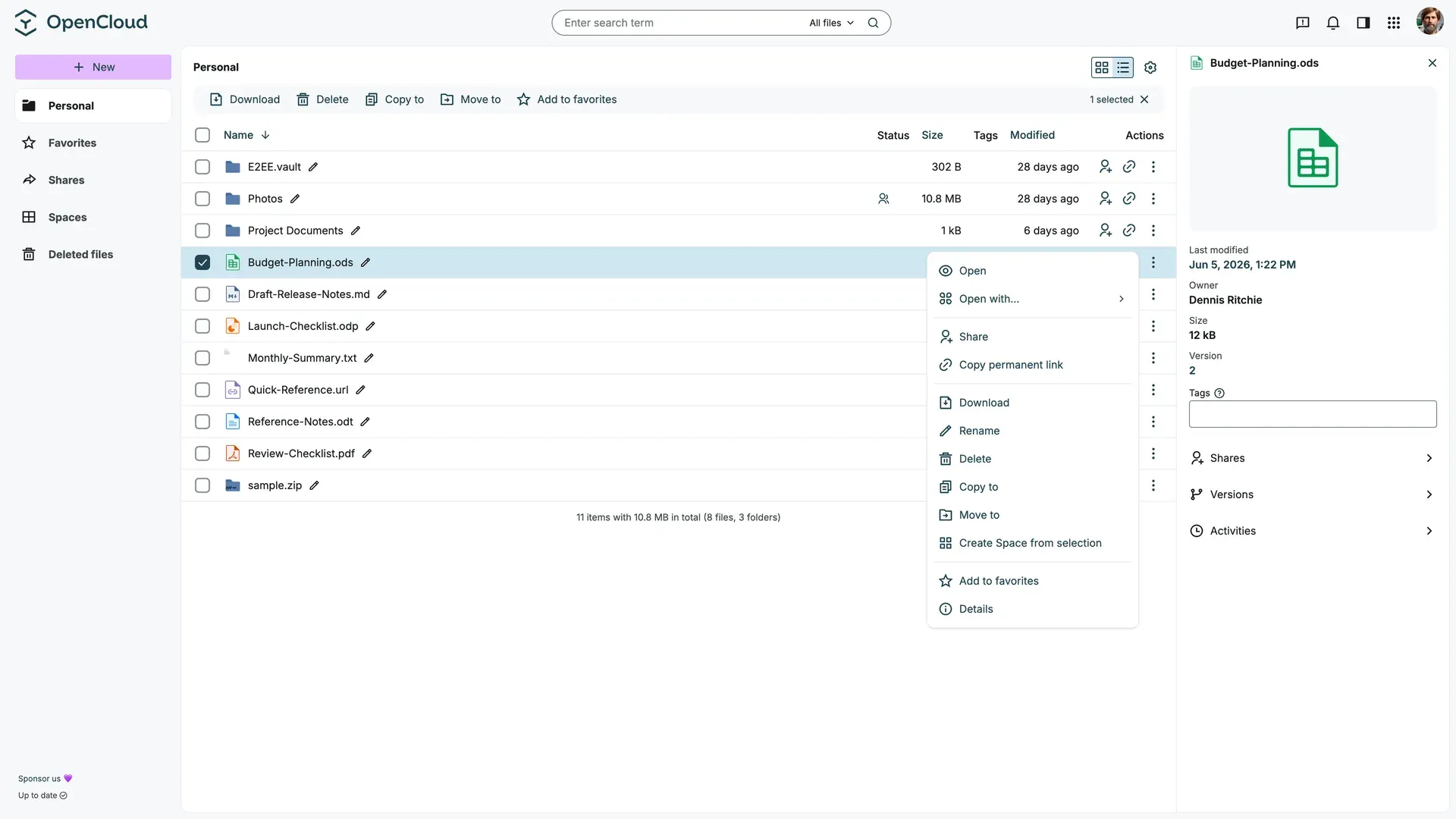
Personal storage in the OpenCloud web client, with file actions and the details sidebar showing owner, version, tags, shares and activities. Official documentation screenshot.
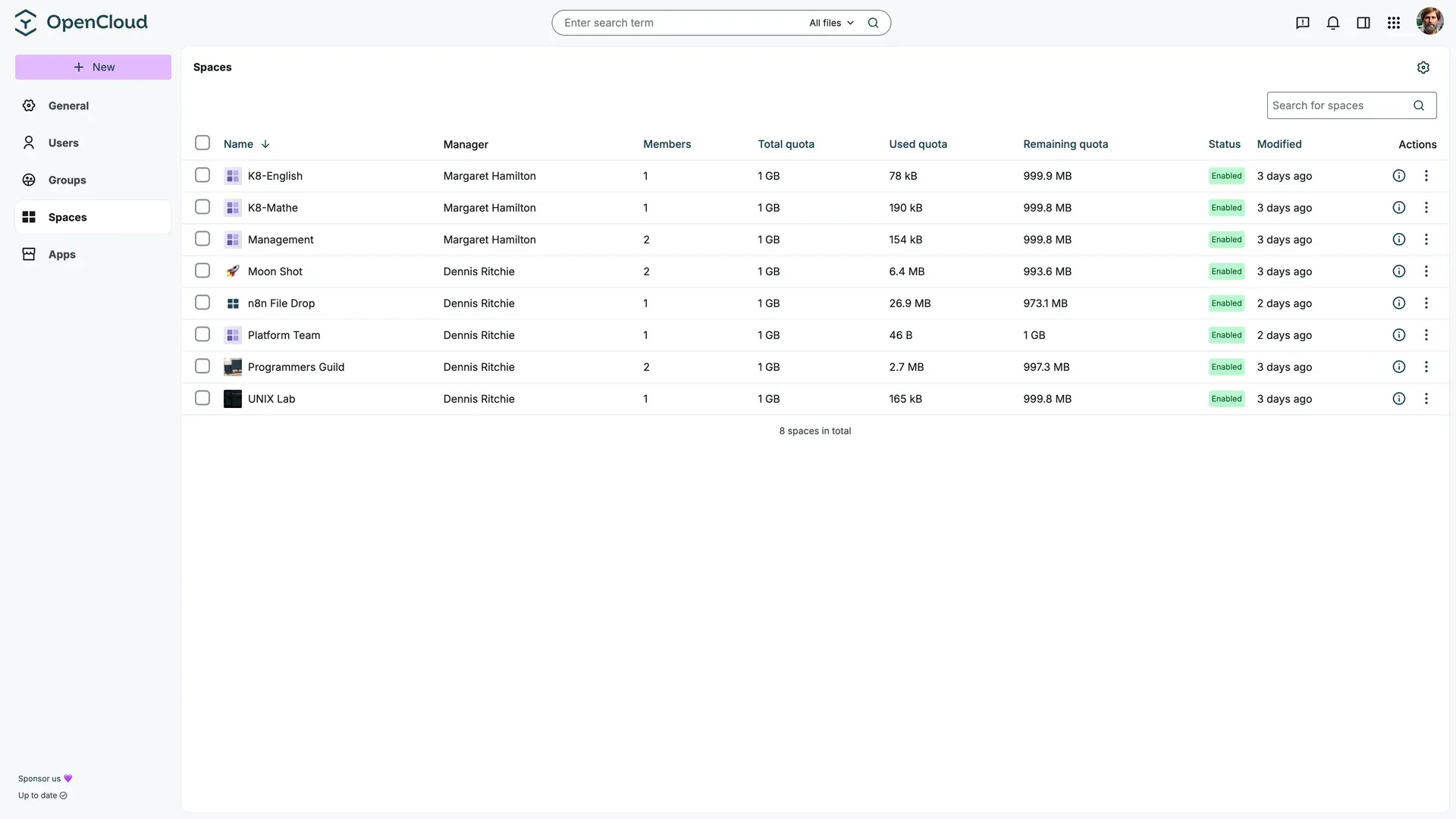
Admin settings view of Spaces with manager, member count, total, used and remaining quota and enabled status.
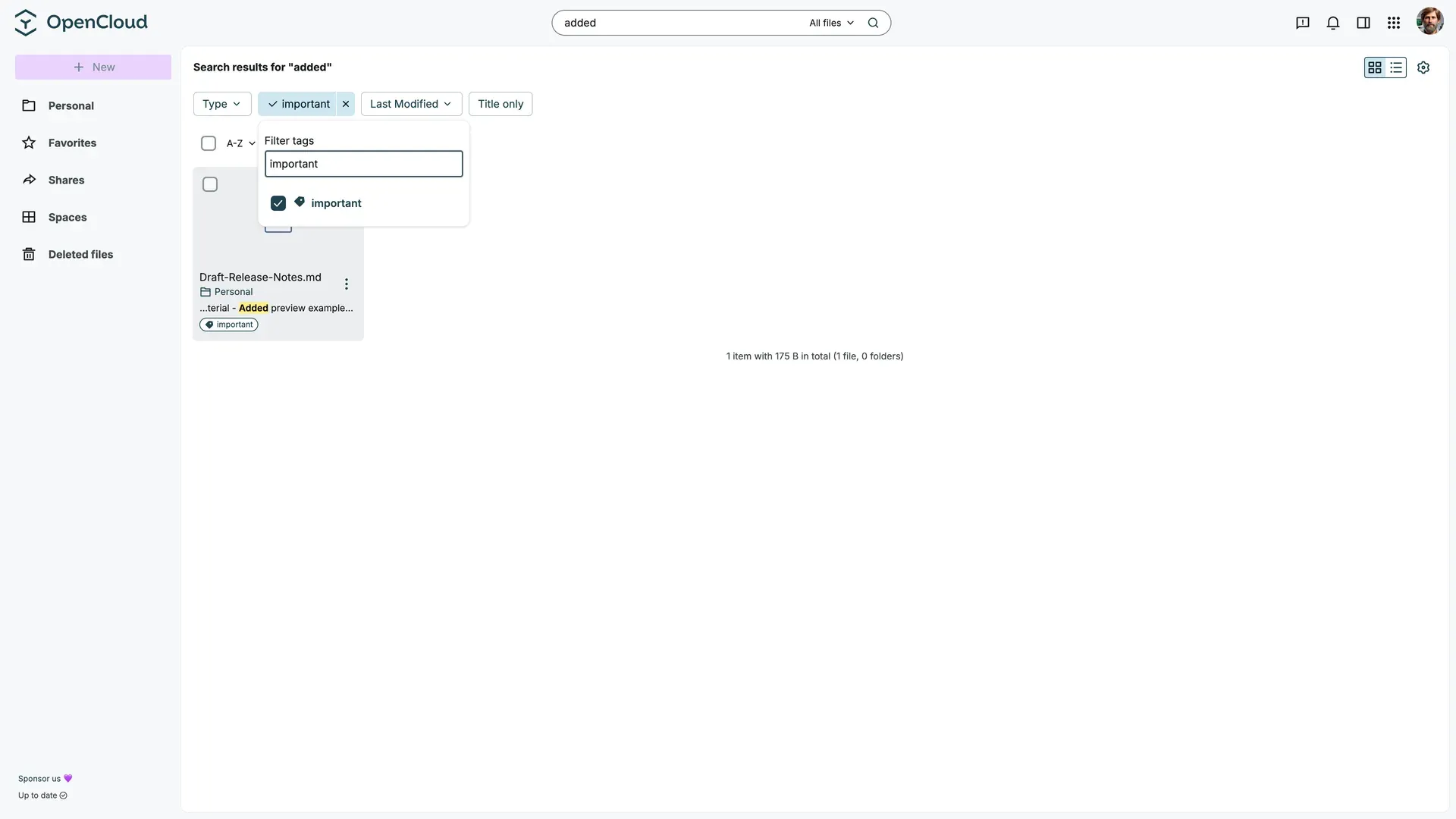
Search results with type, tag and last-modified filters; the matched content snippet and tag appear under the result.
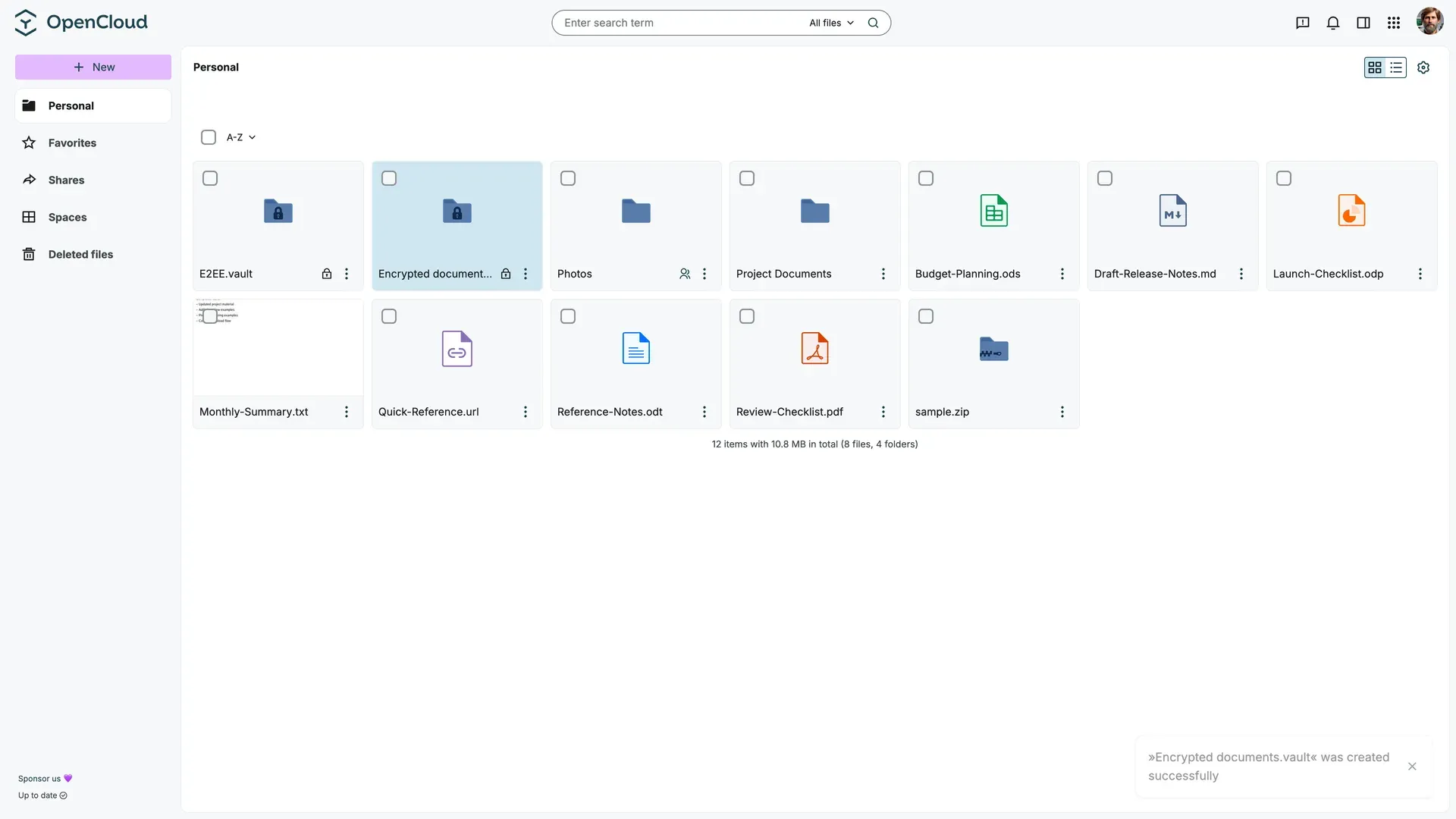
Tile view after creating an end-to-end encrypted vault; vault folders carry a lock icon.
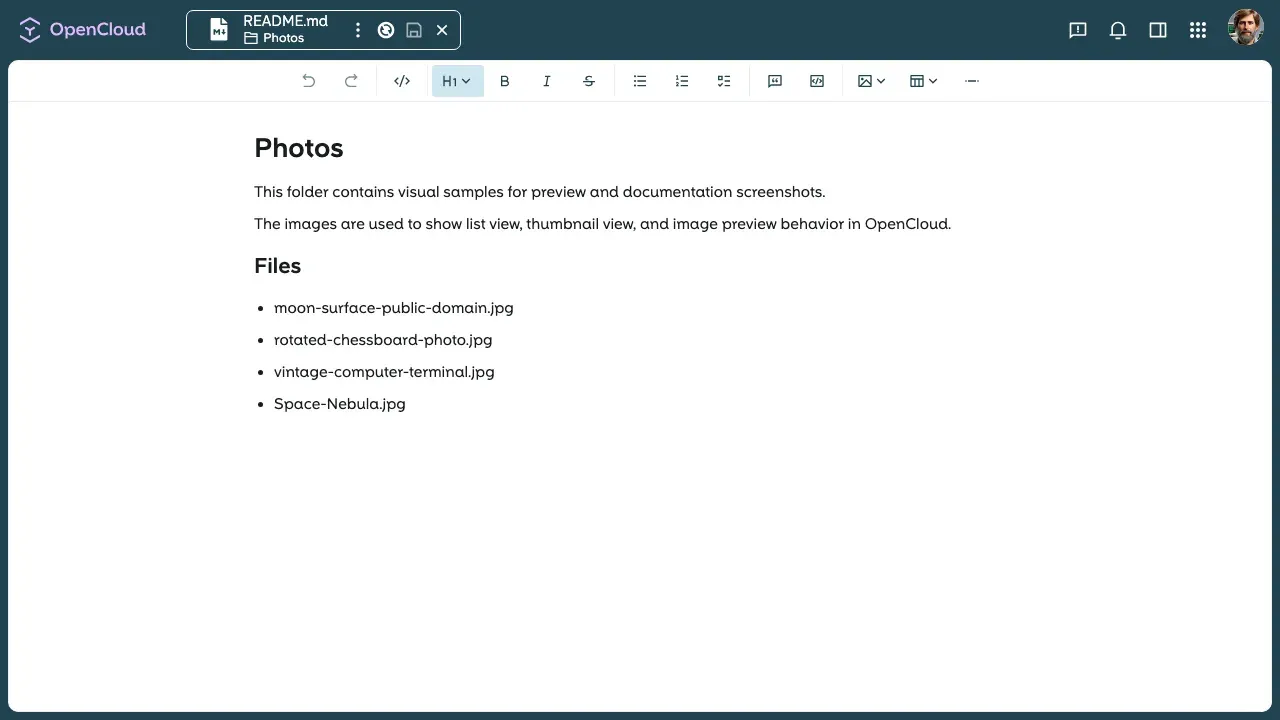
The built-in Markdown editor open on a README.md file, with heading, list, table and code block tools.
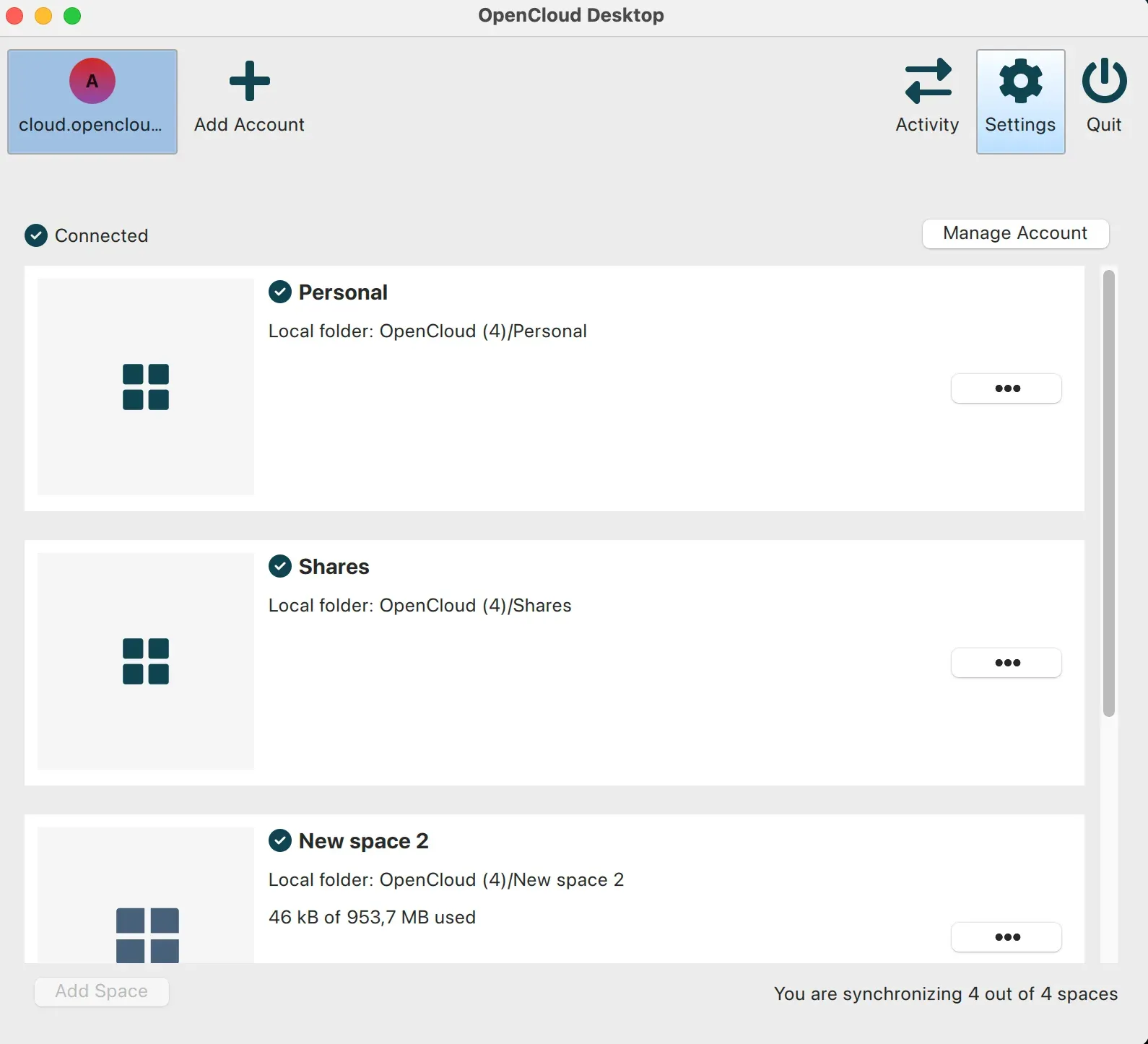
OpenCloud Desktop account view: Personal, Shares and a Space each mapped to a local folder, with 4 of 4 spaces synchronising.
Source: official OpenCloud project page.
Key capabilities
- Server deployment with Docker Compose The opencloud-compose repository combines a base file with optional overlays for Traefik and Let's Encrypt, an external reverse proxy, Keycloak with LDAP, Collabora Online, Apache Tika full-text search, imagor previews, the Yjs collaboration server, Radicale and ClamAV. The container image is
opencloudeu/opencloud-rollingfor rolling releases, selected throughOC_DOCKER_TAG. Docker Compose v2 and DNS names pointing at the server are required for a public deployment. - Single-binary and quick Docker evaluation Each GitHub release ships a static
opencloudbinary for Linux 386, amd64, arm and arm64 and for macOS amd64 and arm64, with SHA256 files.opencloud initcreates the configuration andopencloud serverstarts all services. The Docker quick start runs the same steps in a container on port 9200. Bare-metal installs lack documented integrations such as Collabora, Tika or antivirus. - Low hardware floor and no database The requirements page lists a Raspberry Pi 3 class machine (1 GHz single core, 512 MB RAM) for up to 10 users and a dual-core 2 GHz server with 8 GB RAM for up to 1,000 users. Production servers run Linux; macOS and Windows WSL are for testing. There is no SQL database to install, tune or back up.
- Storage drivers for POSIX and S3 The
posixanddecomposeddrivers need a fully POSIX-compliant filesystem, local (ext4, XFS, ZFS) or networked (CephFS, GPFS, NFS 4.2 or later mounted withnoac).posixalso needs extended attributes.decomposeds3keeps metadata on POSIX storage and file blobs in an S3 bucket, with optional S3 server-side encryption. - Personal storage and Spaces Each user has a private area, and Spaces act as project or department drives with their own members, managers, quota, image and description. Space managers administer membership without global admin rights, and data stays with the Space when a member leaves. Since 8.1.0 a Space can be created in one step with quota and members, and the default quota is set with
OC_SPACES_DEFAULT_QUOTA. - Sharing roles, public links and file drops Files and folders can be shared with users and groups using predefined roles from viewer to editor. Public links can carry passwords and expiry dates, and file-drop links let outsiders upload without seeing content. Since 9.0.0, a share to an email address creates a guest share; public links and guest access are web-only and cannot be synced by desktop or mobile clients.
- Guest access by email Guests receive single-use links valid for 30 minutes and a 24-hour session that can be renewed with a PIN sent by email. Every guest access is logged with the email address, and guests get the same roles as internal users. The feature is disabled by default and needs a configuration patch,
OC_ENABLE_GUEST_LINKS=trueand working SMTP. - End-to-end encrypted vaults A folder or a whole Space can be created as a vault: encryption runs in the browser, file names are encrypted, and the passphrase never reaches the server. Vaults use rclone crypt, so content stays readable with the rclone tool outside OpenCloud. There is no passphrase recovery, and Collabora, collaborative editing, thumbnails and sharing of single files are unavailable inside a vault. See the vault guide.
- Web office through Collabora Office documents open in Collabora Online over WOPI, with simultaneous editing in Microsoft Office and OpenDocument formats. Collabora Secure View can show view-only documents with a watermark. A community-maintained Euro-Office integration is documented separately and is not covered by vendor support.
- Built-in editor, whiteboard and diagrams Markdown and
.ocnotefiles can be edited together in real time through the Yjs service, with participant lists, mentions, a table of contents and syntax-highlighted code blocks. Version 8.1.0 added Excalidraw whiteboards and 9.0.0 added Apollon for 13 UML and modeling diagram types. Collaboration needs sticky websocket sessions and is not available through public links or inside vaults. - Search with KQL, tags and full text Search covers file names, tags and, with Apache Tika, document content. Filters include type, modification date, tags and location. The index runs on Bleve or OpenSearch, and 8.0.0 added a parity test suite so KQL queries return the same results on both backends. The search index is not part of the data store and must be rebuilt if it is not backed up.
- Previews, photos and media The web client previews images, video, audio and EPUB files, plays motion photos and Apple Live Photos, and offers a photo roll with zoom. HEIC, HEIF and AVIF previews require the imagor overlay. Since 9.0.0 the server pushes source images to the thumbnail generator, with a maximum edge length of 2048 px.
- Desktop sync client OpenCloud Desktop 4.0.0 (September 3, 2026) synchronises personal storage, shares and Spaces, with multiple accounts, per-Space local folders and conflict files. Windows builds are installed from the Microsoft Store and use virtual files to download content on demand. Linux is distributed as an x86_64 AppImage and macOS as separate arm64 and x86_64 packages on the desktop releases page.
- Android and iOS apps The Android app is on Google Play and the iOS app on the App Store. Both browse personal files, shares and Spaces, search, create links and invite people. The documentation also covers opening documents in Collabora and scanning paper documents to PDF with the camera.
- Identity and access management The embedded LibreIDM handles users and groups for up to 500 accounts and suits standalone or small installs. Larger deployments connect Keycloak, LDAP, Microsoft Entra ID or ADFS through OpenID Connect. Role-based access control, app tokens for WebDAV clients and MFA through the identity provider are part of the documented model.
- Federation and calendars Open Cloud Mesh shares files with other OpenCloud servers and compatible platforms such as Nextcloud, ownCloud, Seafile and CERNBox without copying data. CalDAV and CardDAV come from a Radicale integration that works with Apple Calendar, Outlook, Thunderbird and Evolution; the features page states it is not covered by the paid support plans.
- APIs for automation The developer documentation covers WebDAV with TUS, the LibreGraph API modelled on Microsoft Graph, OCS sharing, server-sent events, WOPI, gRPC between services and ICAP for content scanning. A web extension SDK and an app store add front-end apps, and since 9.0.0 each app can declare the OpenCloud versions it supports.
- Security controls The datasheet lists TLS in transit, S3 server-side encryption, audit logs, ClamAV or ICAP antivirus, a file firewall based on allow or deny lists, password policies and branding. Several of these, including antivirus, the file firewall, password policies and custom branding, are marked as supported only within the professional or premium subscription.
Where OpenCloud fits
Replacing a public cloud drive for a team
Deploy the base Compose stack with Traefik and a real DNS name, connect the existing directory through Keycloak or Entra ID, and create one Space per department or project. Install the desktop client on a few Windows, macOS and Linux machines and confirm that virtual files, per-Space folders and conflict files behave as users expect. Check the datasheet for which security functions need a subscription before promising them to the team.
Collaborating with external partners
Decide per partner between a public link, a file-drop link and a guest share. Guest access identifies the person by email address and logs each access, while a public link is anonymous. Enable guest links only after applying the 9.x configuration patch and testing SMTP delivery, then review link lifetime, session lifetime and renewal rate limits. Remember that guests and link recipients cannot use the sync clients.
Editing documents in the browser
Add the Collabora overlay for office formats, and the Yjs service for collaborative Markdown, .ocnote notes, Excalidraw whiteboards and Apollon diagrams. Plan sticky sessions and Redis or NATS if several instances serve websockets. Test concurrent saves, read-only sessions and a permission change during an open session, because the 8.0.0 notes describe conflict responses and reload-dependent behaviour in those cases.
Protecting sensitive folders with vaults
Create an end-to-end encrypted vault for material that administrators must not be able to read, such as HR or legal files. Store the passphrase in a password manager, because OpenCloud cannot recover it. Confirm that a synced copy of the vault can be opened with rclone crypt on a workstation, and accept that previews, web office editing and per-file sharing are unavailable inside it.
Running large or research storage
Choose the storage driver before importing data: posix on ext4, XFS, ZFS, CephFS or GPFS, or decomposeds3 with blobs in S3. Verify extended attributes and NFS noac where needed. Follow the backup guide: stop the instance or take a filesystem snapshot, then back up configuration, metadata, blobs and the search index together with the exact image tag in use.
Choosing a release channel and upgrading
Use the rolling image for evaluation and early features, and a production or LTS release for regulated environments. Pin OC_DOCKER_TAG instead of following latest, read the version-specific upgrade page before each major jump and rerun opencloud init --diff to see configuration changes. For 9.0.0, move thumbnail settings to the webdav section and rename GRAPH_SPACES_DEFAULT_QUOTA to OC_SPACES_DEFAULT_QUOTA.
Install
docker run --rm -it -v $HOME/opencloud/opencloud-config:/etc/opencloud -v $HOME/opencloud/opencloud-data:/var/lib/opencloud opencloudeu/opencloud-rolling:latest initReviews of OpenCloud
Be the first to share your experience with OpenCloud.
Write a review
Loading review form…
Alternatives to OpenCloud
 DropboxDropbox is a file storage and sync service with team folders, shared links and apps for Windows, macOS, Linux, Android, iPhone, iPad and the web.
 BoxBox is a cloud content management platform for file collaboration, shared links, AI document tools and workflow automation, with APIs and SDKs.
 SyncthingSyncthing is an open-source continuous file synchronization program that keeps folders in step across your devices without a central server.