

What is MinIO?
MinIO is an S3-compatible object storage server written in Go. The community edition in the minio/minio repository is released under the GNU AGPL v3.0 and stores objects on local drives, with erasure coding for redundancy in multi-drive and multi-node deployments. It is developed by MinIO, Inc., which has published the code since its first commit in October 2014 and describes the current commercial product, AIStor, on min.io.
Current status. The repository is archived on GitHub, which makes it read-only, and the first lines of its README state that it is no longer maintained and point to AIStor Free and AIStor Enterprise as alternatives. A README commit titled maintenance mode dates from December 3, 2025, and the last recorded push is April 24, 2026. The community edition has been distributed as source code only: the README says the project no longer provides pre-compiled community binaries, that older binaries on GitHub Releases and dl.min.io are kept for reference without updates, and that you should build from source with go install github.com/minio/minio@latest (Go 1.24 or newer) or build a Docker image from the included Dockerfile. Related repositories show a mixed picture: the MinIO Client mc and the Kubernetes operator are archived too, while the minio-go SDK (Apache-2.0) and the documentation repository are still being updated.
The latest GitHub release is RELEASE.2025-10-15T17-29-55Z, published October 16, 2025, a security release for a privilege escalation through session policy bypass in service accounts and STS (CVE-2025-62506). Release RELEASE.2025-05-24 changed the product earlier: it deprecated the embedded web console, moved it to a separate object-browser project and removed external LDAP and OIDC logins from it, which the notes describe as part of the AIStor product. The license history shows a change commit on April 23, 2021, and the current README warns that all usage requires validation against AGPLv3 obligations, including release of modified code.
The successor is AIStor. The pricing page lists AIStor Free, a free standalone single-node edition with community Slack and documentation support, plus Enterprise Lite and Enterprise subscriptions with multi-node architecture and commercial support. The documentation at docs.min.io now describes AIStor, which it says is licensed under the MinIO Software License, not the AGPL. This profile covers the AGPL community repository and records AIStor only as the vendor's replacement.
MinIO screenshots
Explore the interface. Open a screenshot to view it at full size.
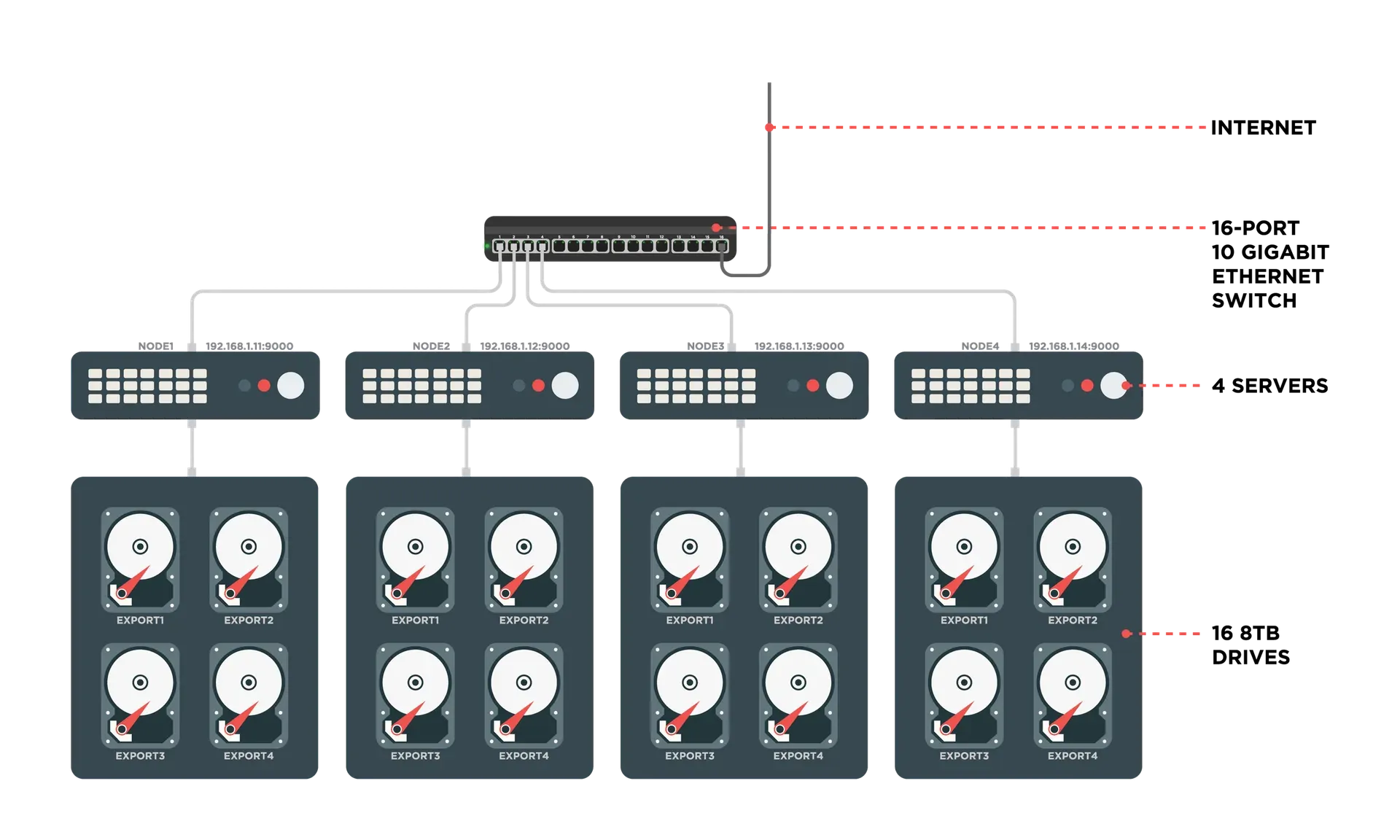
Official project diagram of a distributed deployment: four servers with four drives each behind one 10 gigabit switch, 16 drives in total.
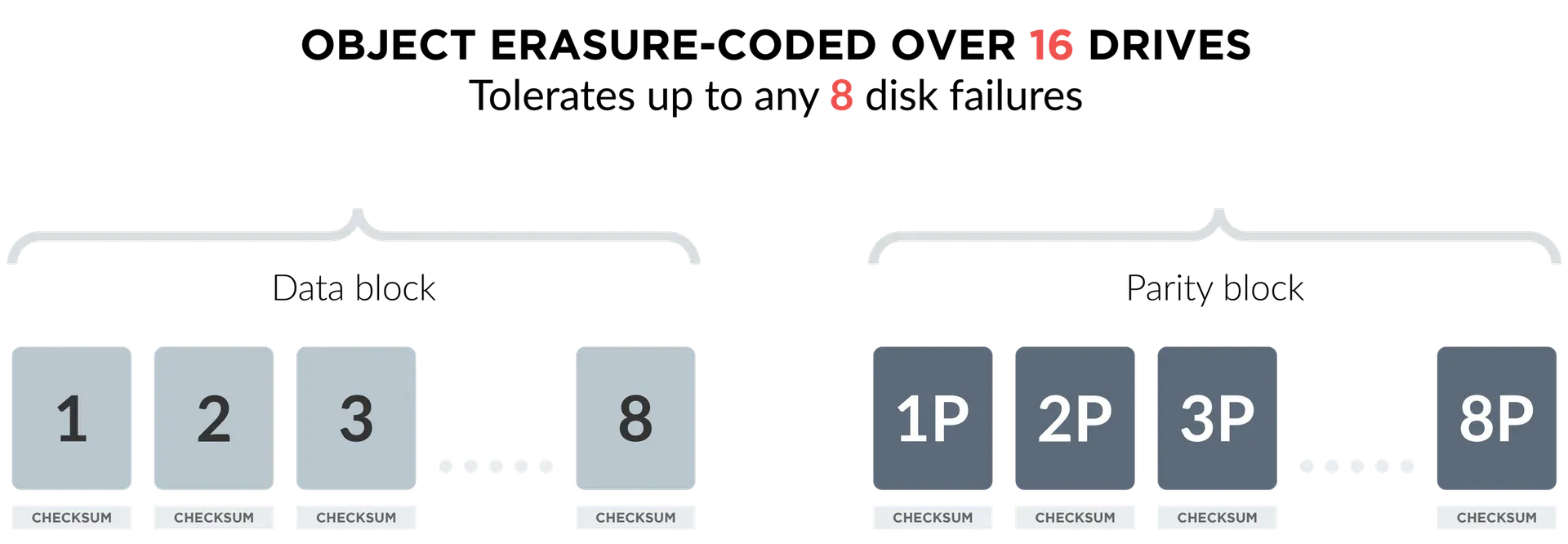
Official project figure of erasure coding: eight data blocks and eight parity blocks, each with a checksum.
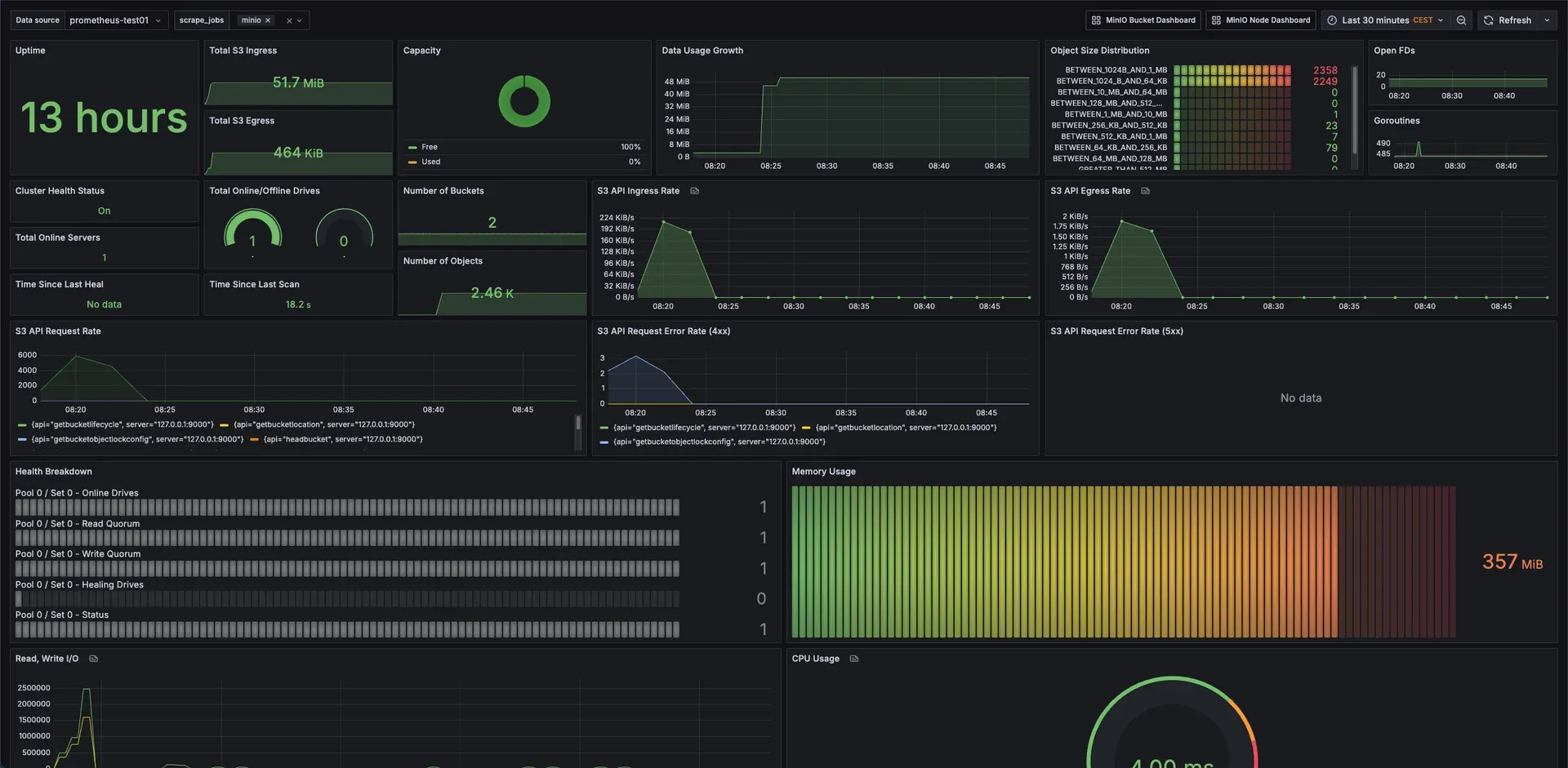
Official Grafana dashboard from the repository's metrics documentation, showing S3 traffic, capacity, health and memory for a MinIO server.
Source: official MinIO project page.
Key capabilities
- Repository status and where updates come from The repository is archived and unmaintained, its newest tagged release is from October 2025 and later changes in the repository are documentation. Anyone running the community code owns patching: the 2026 security advisories on the repository list fixed versions that are not published as community releases, so check the advisories before you deploy.
- Build from source With Go 1.24 or newer,
go install github.com/minio/minio@latestinstalls the server, andgo buildwithGOOSandGOARCHbuilds for other targets. No official community binaries are provided, so pin the commit or tag you built and keep your own artifact. - Container image The README describes building a Docker image from the Dockerfile after building the binary, then running it with ports 9000 and 9001 and
server /tmp/minio --console-address :9001. The README does not offer prebuilt community images, so keep a copy of your own build in a private registry. - S3-compatible API Applications connect with standard S3 SDKs and tools to create buckets and put, get, list and delete objects. The vendor documentation lists SDKs for common languages, and the Apache-licensed
minio-golibrary is still actively developed. - Server modes
minio server PATHstarts a single-node deployment on a folder, and the docs describe multi-drive and multi-node distributed deployments that group drives into erasure sets. A multi-node setup needs identical servers, fast networking and planning of drive counts, since erasure set layout cannot be changed after initialization. - Erasure coding and bitrot protection Objects are split into data and parity shards with checksums, and the project's own diagram of a 16 drive set shows tolerance of up to 8 drive failures. Healing rebuilds missing shards. The usable capacity and tolerance depend on the parity setting you choose.
- Versioning, object locking and retention Buckets can keep several versions of an object, and the docs cover object locking and retention for compliance workloads. Combine versioning with lifecycle rules, because expiration behaves differently on versioned buckets.
- Replication Bucket replication and site replication copy objects to another bucket or cluster, covering active-passive and active-active designs in the documentation. Replication lag and failure handling need monitoring.
- Identity and access management Built-in users and groups, policies, service accounts, STS tokens, and LDAP or OpenID Connect integration at the API level. Since the 2025 console change, the removed LDAP and OIDC console logins mean a separate UI would have to use the STS APIs.
- Encryption Server-side encryption supports SSE-S3 with a key management system through the KES project, SSE-KMS and SSE-C, and TLS for transport with certificates placed in the certs directory. Config and IAM data can be encrypted when a KMS is configured.
- Lifecycle, tiering and batch jobs Lifecycle rules expire or transition objects, and batch jobs run maintenance tasks such as replication or key rotation. Test rules on a small bucket first, since expiry is irreversible without versioning.
- FTP and SFTP access The server can expose buckets over FTP, FTPS and SFTP for tools that cannot use S3. Supported operations are get, put, ls, mkdir, rmdir and delete, while append and rename are not supported.
- Event notifications Bucket events can be sent to targets such as webhooks, message queues and databases, which drives pipelines that react to uploads. Delivery guarantees depend on the target.
- Prometheus metrics and Grafana dashboards The server exposes Prometheus metrics, and the repository includes Grafana dashboards for cluster, node, bucket and replication views. The metrics docs have moved and the community docs dropped the v3 metrics in November 2025.
- S3 Select The server can run SQL-like queries on CSV, JSON and Parquet objects without downloading them. A published advisory describes a memory denial of service in CSV parsing on AIStor, so test with limits.
- MinIO Client mc The
mccommand line tool manages aliases, buckets, objects and admin tasks, for examplemc alias setandmc admin info. The mc repository is archived as of its last push in November 2025. - Kubernetes deployment The README points to the MinIO Operator and a community-maintained Helm chart in the repository. The operator repository is archived, so the Helm chart under
helm/miniois the in-repo option. - Default credentials A new deployment starts with root credentials
minioadmin:minioadminunless you set your own. Change them before the server is reachable from any network.
Where MinIO fits
Run a throwaway S3 endpoint for development
Build the server from source, start it on an empty folder with minio server and point an S3 SDK or mc at port 9000. Set your own root user and password, keep the data on a disposable volume and do not expose the port. This is the simplest use for tests and local CI.
Assess an existing community deployment
Record the exact release or commit you run with mc admin info, compare it with the repository's security advisories and note which fixed versions are not available as community builds. Restrict network access, rotate root and service account keys, and decide whether to build from the archived source, migrate or move to AIStor.
Plan a migration to another S3 store
Inventory buckets, versioning and object lock settings, lifecycle rules, replication, IAM policies and event targets. Test a copy with mc mirror or an S3 sync tool against a candidate such as Garage, SeaweedFS or Ceph, then compare object counts, checksums, metadata and policy behavior before cutover.
Evaluate AIStor Free as the supported path
Read the AIStor license and the pricing page, install the free single-node edition on a test host and check which community features you rely on. Note the single-node limit of the free tier and whether your availability needs call for a paid multi-node subscription.
Back up and monitor a self-managed cluster
Scrape the metrics endpoint with Prometheus, import the Grafana dashboards from the repository and alert on offline drives, healing and quorum. Back up IAM and config with mc admin exports and test a restore on a second cluster.
Use the SDK and documentation independent of the server
The minio-go client talks to any S3 service, so applications that already use it do not depend on this server. Review what your code assumes about MinIO-specific admin APIs before you switch targets.
Install
go install github.com/minio/minio@latestReviews of MinIO
Be the first to share your experience with MinIO.
Write a review
Loading review form…
Alternatives to MinIO
 GarageAGPLv3 object store written in Rust that implements the S3 API, replicates data across zones over ordinary Internet links and runs as a single binary. Built for small to medium self-hosted clusters, not for maximum throughput.
 SeaweedFSApache-licensed distributed storage for S3 objects, POSIX-style files and Iceberg or Lance tables, with O(1) blob access, horizontal scaling and cloud tiering.
 CephOpen-source, software-defined storage on commodity Linux servers: S3 and Swift through RGW, RBD block devices, the CephFS file system, NFS, SMB and NVMe/TCP gateways, deployed with cephadm or Rook and governed by the Ceph Foundation.