

What is Garage?
Garage is an S3-compatible distributed object storage server written in Rust and released under the AGPLv3. It targets small and medium self-hosted clusters whose nodes sit in different physical locations, such as offices, homes or rented servers connected through regular Internet links. Garage keeps copies of each piece of data in separate zones, continues to serve requests when some nodes are unreachable and runs as one binary without external services. The project states its goals and non-goals directly: no erasure coding, no POSIX filesystem layer and no pursuit of peak throughput.
Garage is developed by Deuxfleurs, a non-profit experimental hosting organization that has used it in production since its first release in 2020. The source of truth is the Forgejo repository at git.deuxfleurs.fr; the GitHub repository is a mirror. The governance document names a lead developer and a small group of maintainers who decide by lazy consensus. Development has received public funding from NGI POINTER (2021 to 2022), NLnet NGI0 Entrust (2023 to 2024) and the NLnet NGI0 Commons Fund (2025). The documented production users include the Deuxfleurs cluster of 9 nodes in 3 locations and the Triplebit cluster of 15 storage nodes in 3 locations.
Garage ships as statically linked Linux binaries for x86_64, aarch64, armv6l and i686 on the download page, as the dxflrs/garage Docker image, and as packages for Alpine Linux, Arch Linux, FreeBSD, NixOS and conda-forge. A Helm chart lives in the repository. The stated minimum is an x86_64 CPU from the last ten years or an ARMv7 or ARMv8 CPU, 1 GB of RAM, at least 16 GB of disk, and links of 200 ms or less with 50 Mbps or more between nodes.
The current release, v2.5.0, was published on October 24, 2026. Once a node runs it, that node must not be downgraded, although v2.x nodes can be mixed in one cluster. For security reasons, the lifecycle configuration endpoints are now restricted to keys with owner permission. The release adds a public_endpoint parameter, JSON log output, export of key credentials from the CLI, the resync queue size in garage status and pagination for key and bucket listings in the admin API. v2.4.0 added the garage health command and fixed a reflected XSS on web endpoint errors; v2.4.1 fixed a startup panic with Consul or Kubernetes discovery; v2.3.0 added one-command single-node setup. The full notes are on the v2.5.0 release page.
Internally, Garage uses no Raft or Paxos consensus. Metadata tables are built from CRDTs, data placement follows a Dynamo-style consistent hashing scheme, and node-to-node RPC is always encrypted with the Secret Handshake protocol. Metadata lives in LMDB by default, with SQLite as an alternative and Fjall as experimental. The known issues page lists what this design rules out: conditional writes, object lock and WORM, plus bucket versioning, bucket policies and built-in TLS on the HTTP endpoints. The gallery uses official screenshots and figures from the project documentation and talks, some of them from older releases.
Garage screenshots
Explore the interface. Open a screenshot to view it at full size.
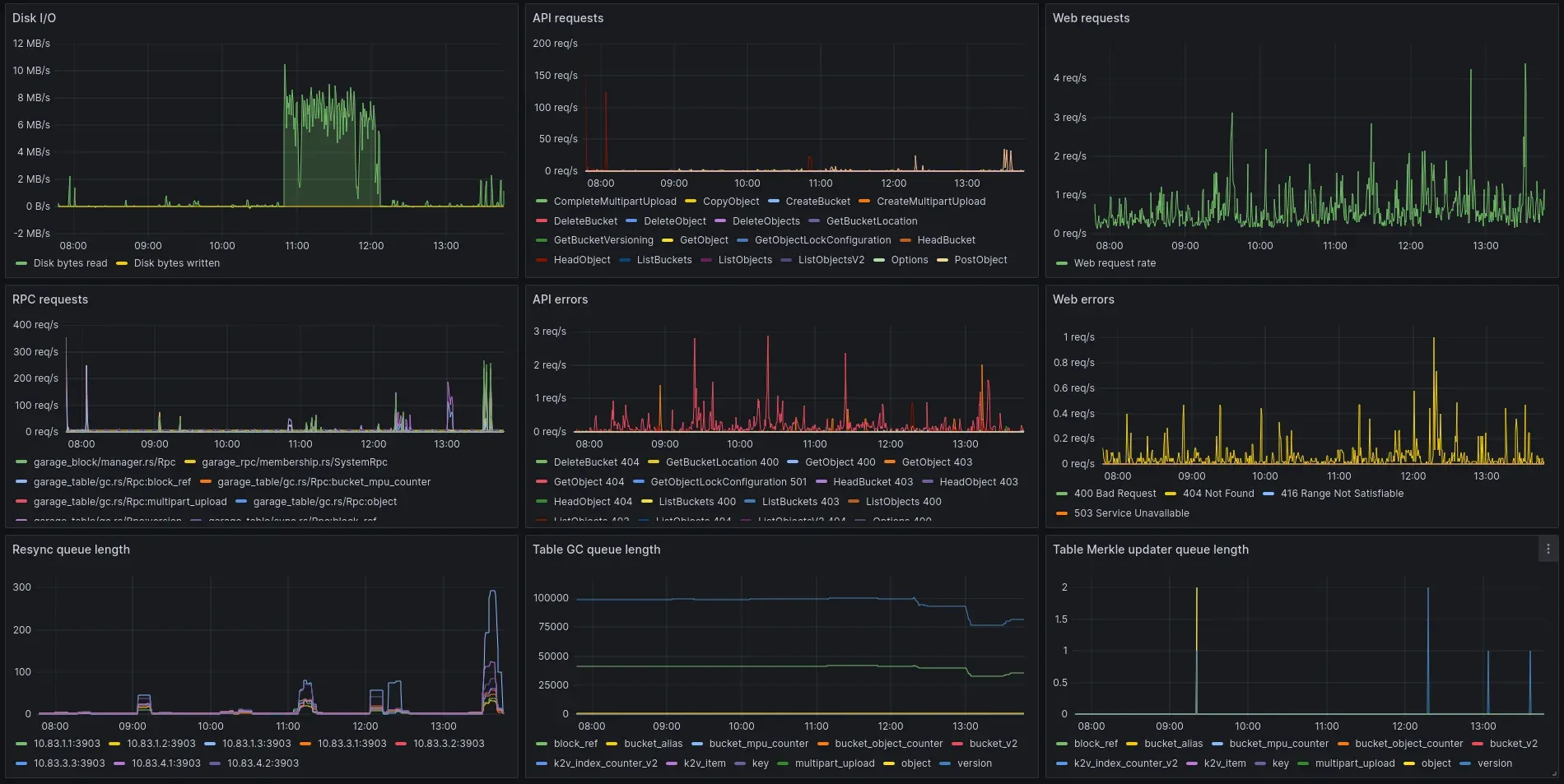
Official screenshot of the Garage Grafana dashboard, from the project's talk materials.

Output of garage status from version 0.10 for a five-node cluster spread across four zones; newer releases add columns such as the version.
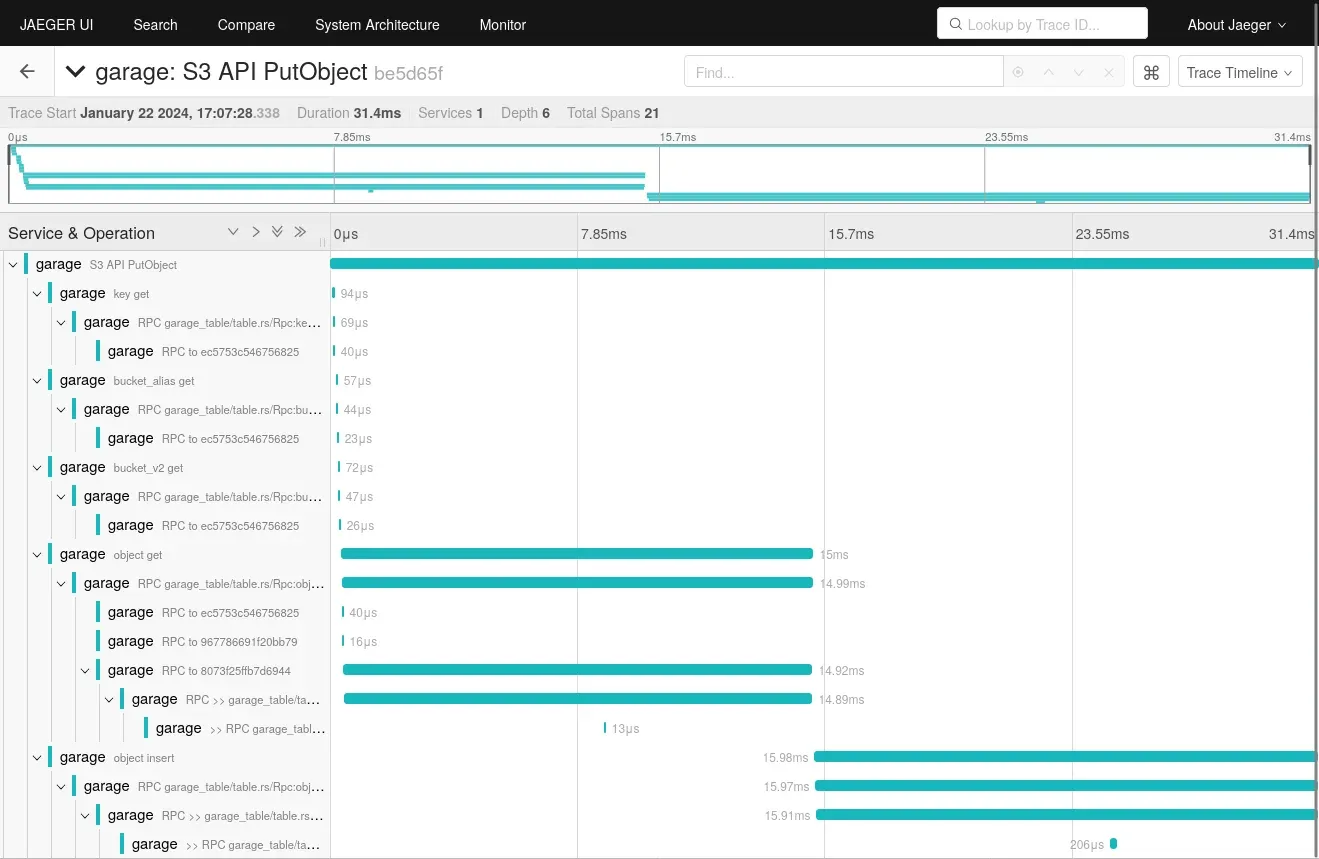
OpenTelemetry trace of one S3 PutObject request viewed in Jaeger, showing the internal metadata lookups and RPCs to other nodes.
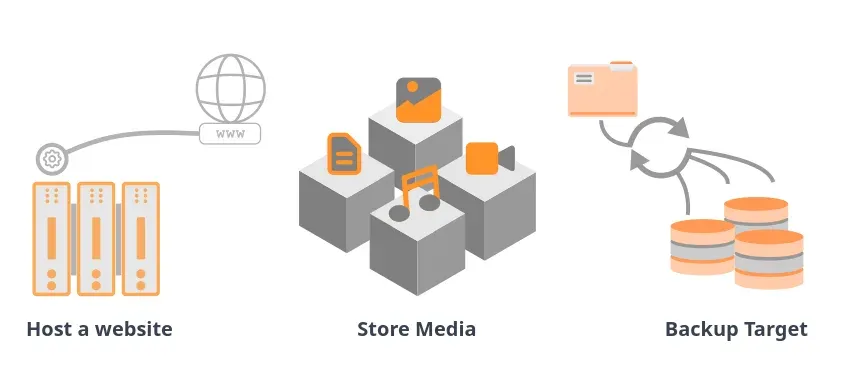
Official illustration of the three main use cases the project describes: website hosting, media storage and backup target.
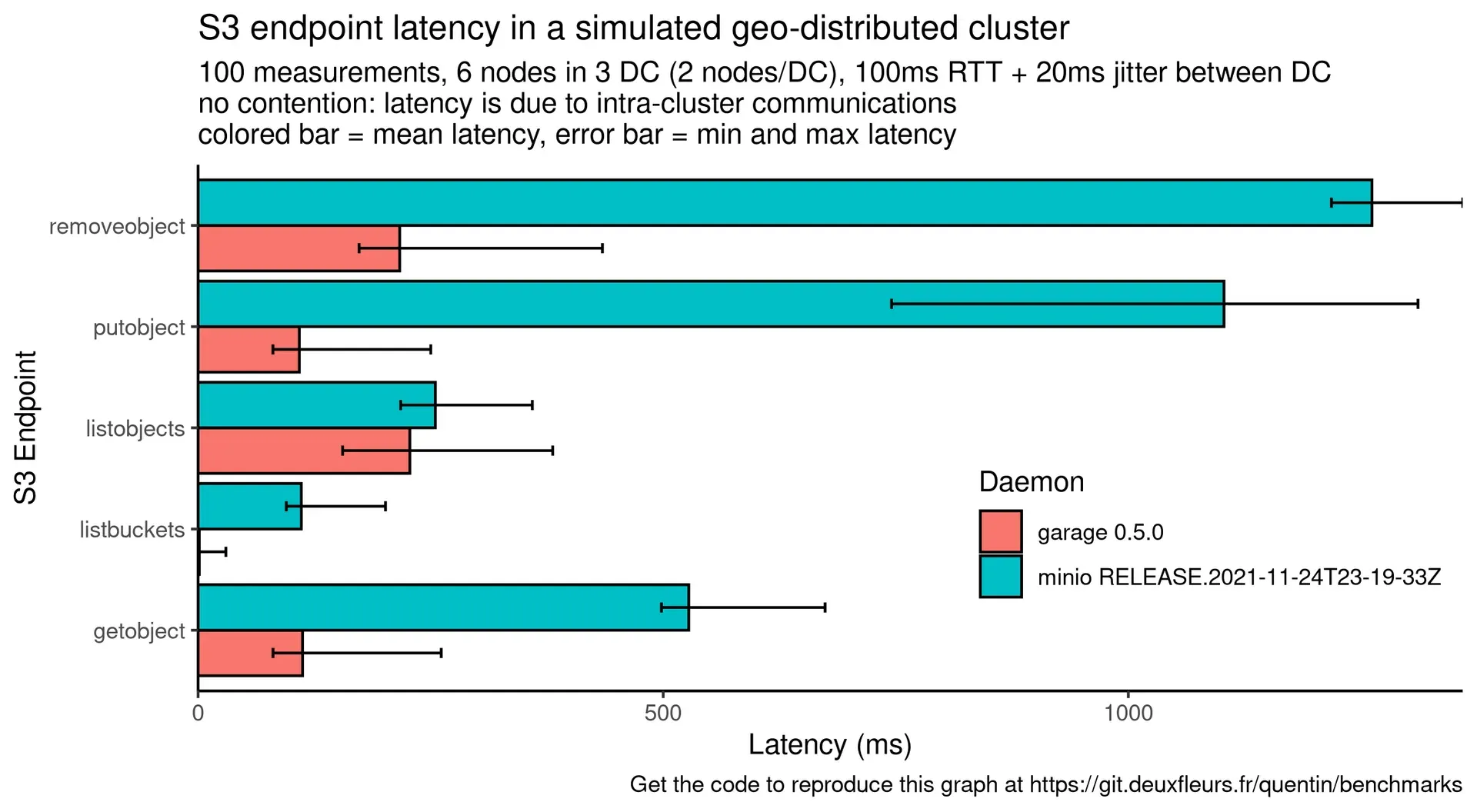
Project benchmark of S3 endpoint latency with 100 ms RTT between datacenters, comparing Garage 0.5.0 with a 2021 MinIO release; both versions are old.
Source: official Garage project page.
Key capabilities
- Download Garage for Linux The download page provides v2.5.0 as static musl binaries for x86_64, aarch64, armv6l and i686, each roughly 65 to 70 MB. Copy the binary into a directory on your
$PATH; the samegarageexecutable runs the daemon and the administration CLI. No official Windows or macOS builds are published, so those systems use Docker or a source build. - Docker image The
dxflrs/garageimage on Docker Hub carries the same builds. The documentation asks for a fixed tag such asv2.5.0rather thanlatest, host networking so nodes can reach each other over IPv6, and explicit volumes for/var/lib/garage/metaand/var/lib/garage/data. Without those volumes the container loses its data when it stops. - Distribution packages The binary packages page lists
apk add garageon Alpine Linux 3.17 and later,pacman -S garagefrom Arch Linux extra,pkg install garageon FreeBSD, the NixOS package and a conda-forge build. The Alpine package omits Consul and Kubernetes discovery, the OpenTelemetry exporter and K2V. Package versions can lag behind the upstream release. - S3 API coverage Garage implements signature v4, path-style and virtual-host-style URLs, presigned URLs, multipart uploads, CORS, website configuration, partial lifecycle rules and SSE-C encryption. It does not implement signature v2, bucket versioning, bucket policies, object ACLs, object lock, retention or bucket replication. The S3 compatibility table lists each endpoint, so check it against the calls your applications make.
- Zone-aware replication The
replication_factorsetting chooses how many copies to keep, and Garage places them in different zones when enough zones exist. Factor 3 tolerates two node failures, or failures confined to two zones, and keeps reads and writes going after one failure. Factor 2 tolerates one failure but becomes read-only while a node is down; factor 1 is only for tests. Usable capacity is limited by the smallest zone, so balance disk space across sites. - Consistency modes The default
consistentmode sets quorums that guarantee read-after-write consistency. Thedegradedmode lowers the read quorum to one so data stays readable when several nodes are down, at the cost of that guarantee. Adangerousmode also lowers the write quorum, and the documentation says it should probably never be used. - Cluster layout management Operators assign each node a zone, a capacity and optional tags with
garage layout assign, review the plan withgarage layout showand apply it as a new layout version. Garage then moves data in the background to reach the target placement. Nodes can also be assigned as gateways, which serve the S3 and web endpoints without storing data and save one or two network round trips for local clients. - Deduplication and compression Objects are split into blocks of a fixed
block_size, and block hashes decide placement and deduplication. Optional Zstd compression is set withcompression_level. For fast networks and mostly large files, the cluster guide suggests raisingblock_sizeto 10 MB. - Metadata engines and snapshots LMDB is the default and the most tested engine, SQLite is the alternative, and Fjall is experimental. LMDB files can become corrupted after an unclean shutdown, cannot move between CPU architectures and are not suited to 32-bit systems.
metadata_auto_snapshot_intervalkeeps consistent rollback copies, which the documentation prefers to filesystem-level snapshots. - Multiple drives per node Since v0.9,
data_dircan list several mount points with a capacity each, and Garage spreads blocks across them in proportion to those capacities. This removes the need for RAID on data drives. Existing blocks are not moved automatically when a drive is added;garage repair rebalancehandles that. - Static website hosting The web endpoint, on port 3902 in the sample configuration, serves buckets as static websites once enabled with
garage bucket website --allow. Domain names map directly to bucket names, so one cluster can host many sites. The website guide covers index documents and reverse proxy placement. - Bucket aliases A bucket can have several global names, and aliases can be added or removed without copying data, which allows renaming. Local aliases are visible to only one access key, so separate users can each have a bucket with the same name. S3 clients see ordinary bucket names.
- Administration API v2 with scoped tokens A REST API on the admin port manages nodes, layouts, access keys, buckets and aliases. Administrators can create bearer tokens limited to specific calls and with an expiry date through
garage admin-token create; the token is shown once and stored hashed. The admin API v2 reference is generated from an OpenAPI description, and breaking changes only arrive with major releases. - Command-line administration The
garageCLI reads the configuration file and metadata directory to reach the local node. It coversstatus,health,layout,key,bucket,worker,repairand shell completions. Version 2.5.0 adds the resync queue size togarage statusand letsgarage keyexport key IDs and secrets. - Metrics, traces and logs The admin endpoint exposes Prometheus metrics at
/metrics, optionally protected by ametrics_token, and the repository ships a Grafana dashboard. OpenTelemetry traces show where time goes inside a request.GARAGE_LOG_FORMAT=jsonwrites JSON log lines to stderr, andRUST_LOGcontrols verbosity. - Encryption boundaries RPC traffic between nodes is always encrypted and requires a shared 32-byte
rpc_secret. The S3, web and admin HTTP endpoints are plain text, and built-in TLS is not planned, so a reverse proxy or local gateway node is expected. Data at rest is stored unencrypted unless clients use SSE-C; the encryption guide recommends LUKS or client-side encryption. - K2V key/value API (experimental) K2V stores many small key/value items that are read and written in bulk, as a companion to S3 objects. It came out of the Aerogramme encrypted e-mail research project and must be enabled explicitly. Treat it as experimental; some distribution packages, such as the Alpine build, ship without it.
- Kubernetes and Nomad integration Nodes can discover each other through Kubernetes or through Consul for Nomad deployments. The Helm chart in
script/helmsupports asingleNodemode and, since v2.5.0, can expose the admin API inside the cluster. Multi-node layouts still have to be assigned by hand after deployment. - Single-node quick start Since v2.3.0,
garage server --single-node --default-bucketcreates a one-node layout plus a default access key and bucket from environment variables. The quick start uses it withawsclito test uploads. This setup has no redundancy and is meant for learning or development, not production.
Where Garage fits
Running a three-site storage cluster
Start with at least three machines in different locations, each reachable by the others, ideally over IPv6 or a mesh VPN such as Nebula or Yggdrasil when NAT is involved. Use the same rpc_secret on all nodes, set replication_factor = 3, put metadata on SSD and data on HDD, and prefer XFS for the data partition. Assign one zone per site with roughly equal capacity, since the smallest zone caps usable space. The cluster deployment guide walks through the configuration, Docker setup and first layout.
Using Garage as a backup target
Create a dedicated access key and bucket per backup tool, then point restic, rclone, Borg, Kopia, Duplicati, Duplicity, Plakar or Synology Hyper Backup at the S3 endpoint as described on the backup integration page. Because Garage lacks object lock and versioning, it cannot provide immutable backups by itself; ransomware protection must come from the backup tool or a separate copy. Run a full restore from the cluster, not only a backup job, before relying on it.
Serving static websites from buckets
Enable website access on a bucket, upload the built site and point DNS at a reverse proxy that terminates TLS and forwards to the web endpoint. A bucket alias can expose the same content under several domain names. Check index and error document behavior, CORS rules if browsers fetch assets from another origin, and that the proxy forwards the Host header Garage uses to pick the bucket.
Storing media for self-hosted applications
The application guide marks Nextcloud (primary and external storage), Mastodon, PeerTube, Matrix Synapse with its S3 storage provider, Ente, Pleroma, Lemmy through pict-rs and ejabberd as supported, while several others are listed as untested. Give each application its own key and bucket with only the permissions it needs. PeerTube relies on the website endpoint, and proxying private videos is not supported, so check that limit before migrating.
Monitoring and maintaining the cluster
Scrape /metrics on every node with Prometheus, import the project Grafana dashboard and watch the resync queue, table GC queue and error rates. A growing resync queue with few errors usually means resync-tranquility and resync-worker-count are too conservative. Schedule metadata snapshots, let the periodic scrub run, and use garage repair after incidents. The upgrade guide explains rolling minor upgrades and the downtime choices for major ones.
Deploying on Kubernetes
Install the Helm chart from the repository, choose persistent volume classes for metadata and data, and enable Kubernetes discovery so pods find each other. For a single-node cluster, set garage.singleNode: true; for several replicas, assign the layout with kubectl exec and the CLI after the pods start. The Kubernetes guide lists the chart values. Check that node placement across failure domains matches the zones you declare in the layout.
Install
docker run -d --name garaged --restart always --network host -v /etc/garage.toml:/etc/garage.toml -v /var/lib/garage/meta:/var/lib/garage/meta -v /var/lib/garage/data:/var/lib/garage/data dxflrs/garage:v2.5.0Reviews of Garage
Be the first to share your experience with Garage.
Write a review
Loading review form…
Alternatives to Garage
 SeaweedFSApache-licensed distributed storage for S3 objects, POSIX-style files and Iceberg or Lance tables, with O(1) blob access, horizontal scaling and cloud tiering.
 SpinifexSpinifex by Mulga runs AWS-compatible compute, storage, networking, IAM, Kubernetes and database APIs on bare metal, edge sites or on-premise clusters, so the AWS CLI, SDKs and Terraform work against your hardware. AGPL-3.0, with a paid enterprise edition.
 KubernetesKubernetes automates deployment, scaling, and management of containerized workloads across clusters of machines, using a declarative, desired-state model.