What is PhoneBox?
PhoneBox is an open-source project that turns an Android phone into a full-screen desk panel and touch control deck for a Windows, Linux or macOS computer. It has two parts: an Android app that renders the panel in a full-screen WebView, and a desktop agent that reads data on the computer, serves the panel and hosts a browser-based settings page with a visual layout editor at 127.0.0.1:8765. The phone reaches the agent over USB through adb reverse or, after pairing, over Wi-Fi or Tailscale. According to the README, it needs no root on the phone, no administrator rights on the computer and no PhoneBox account or cloud service.
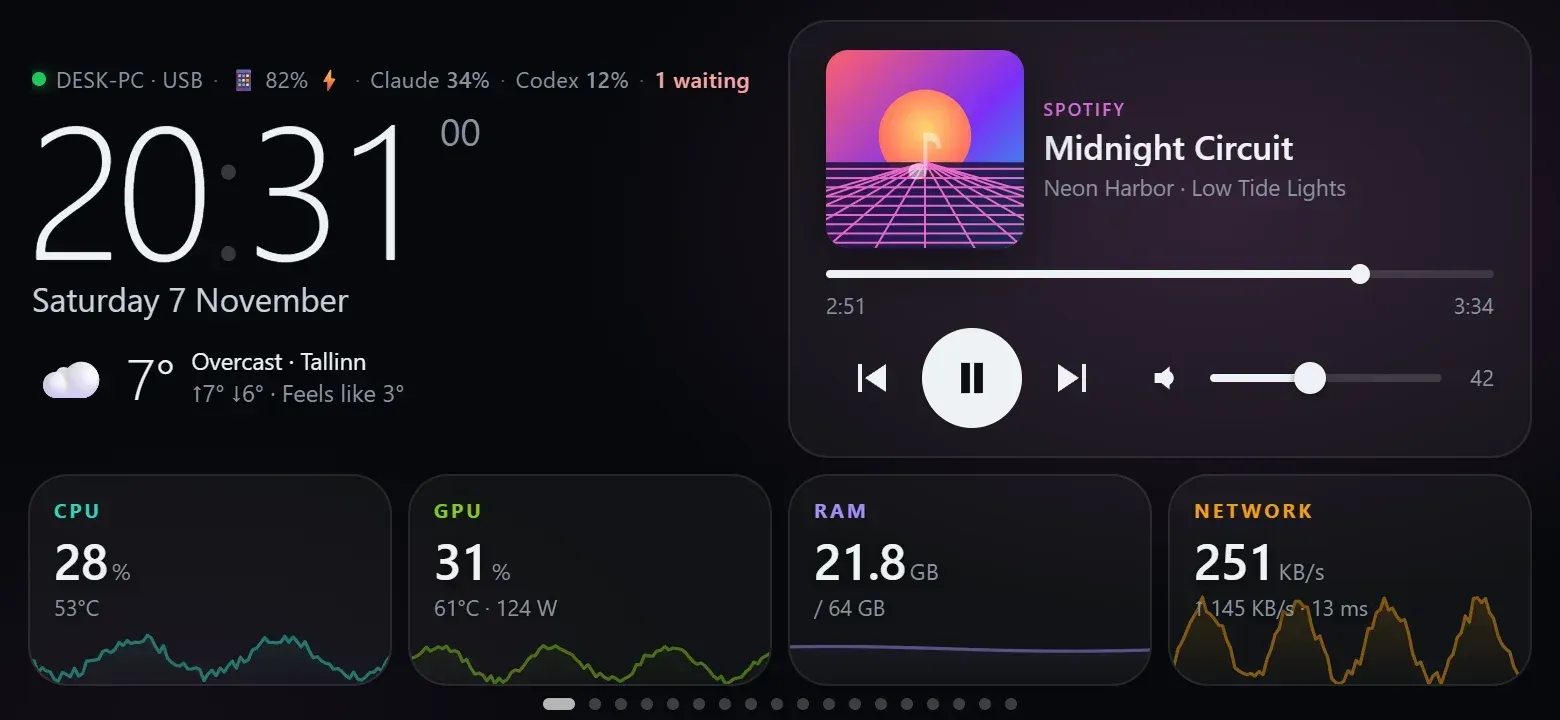
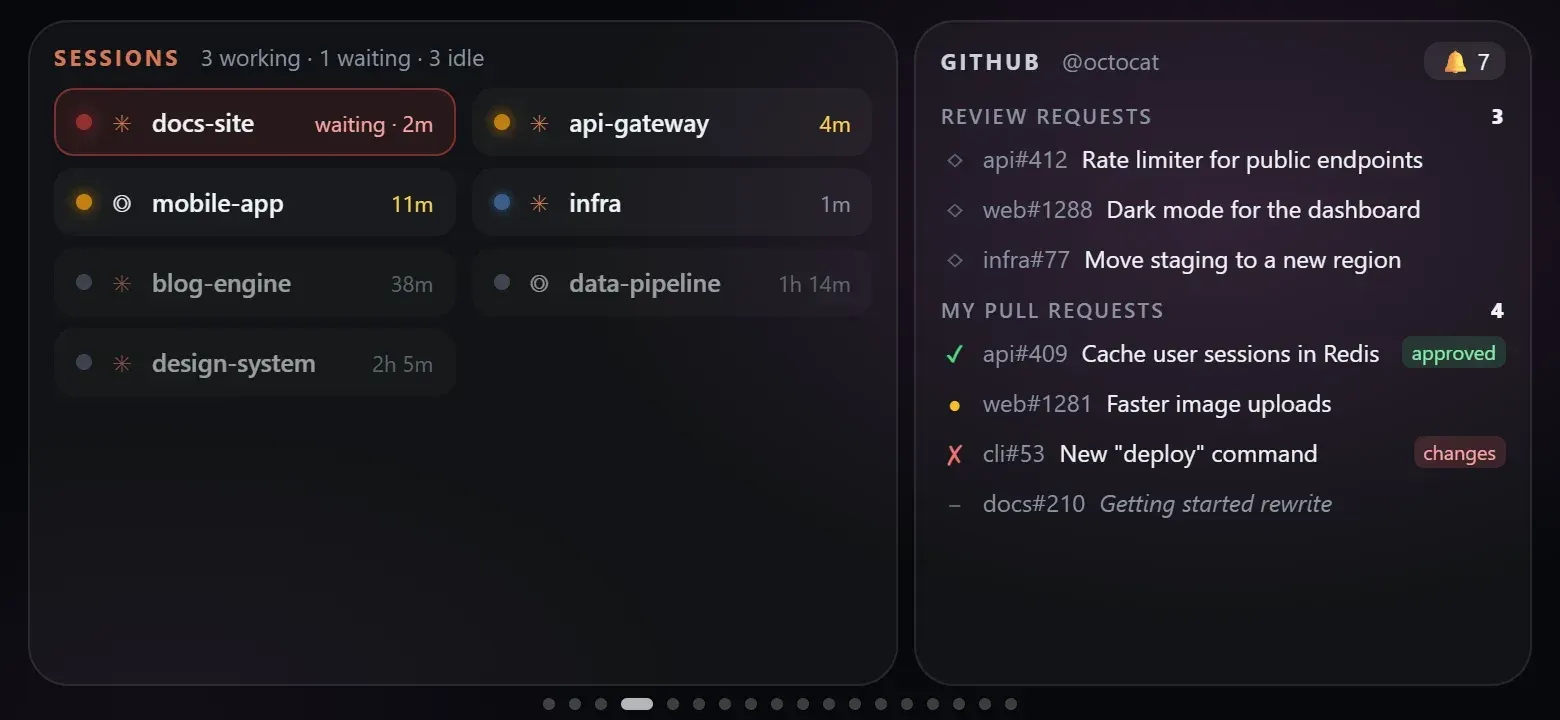
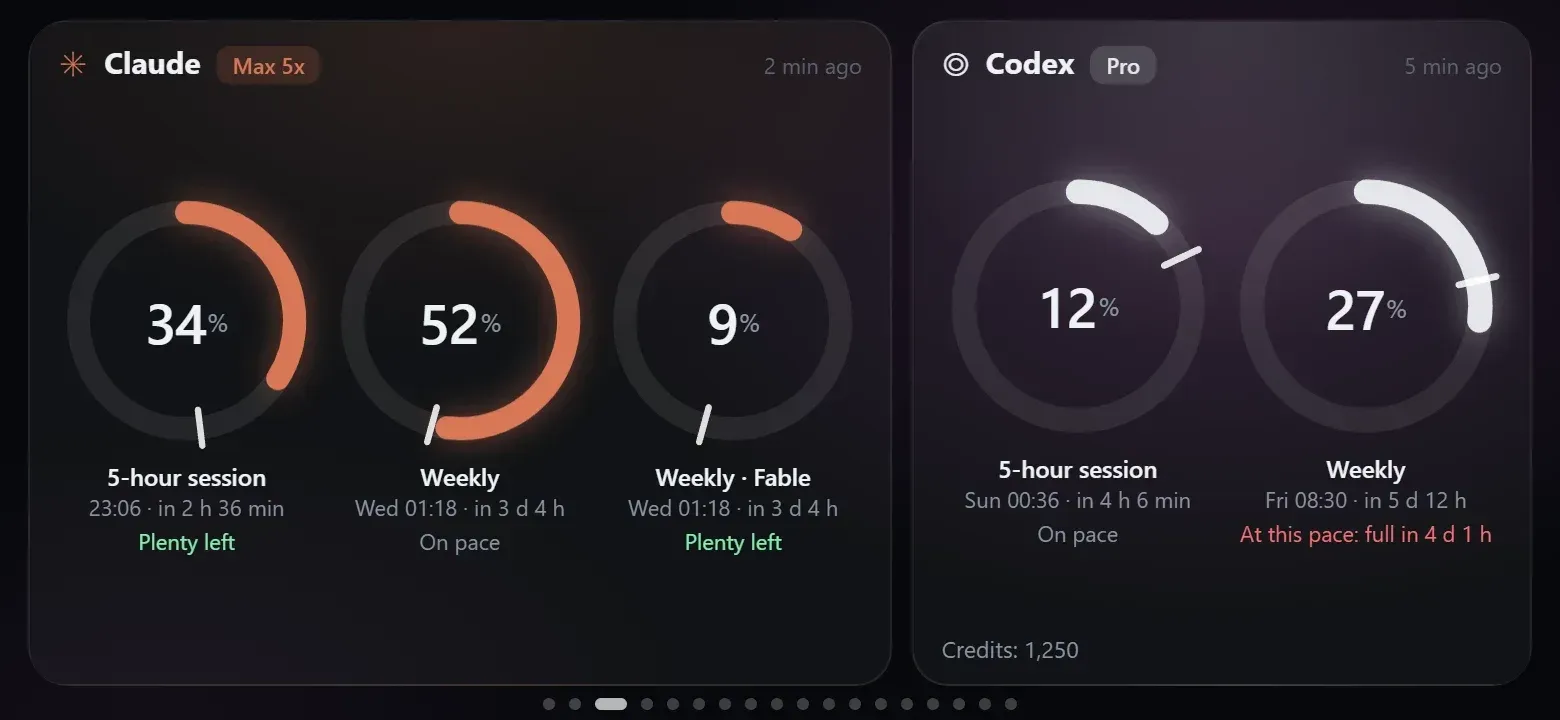
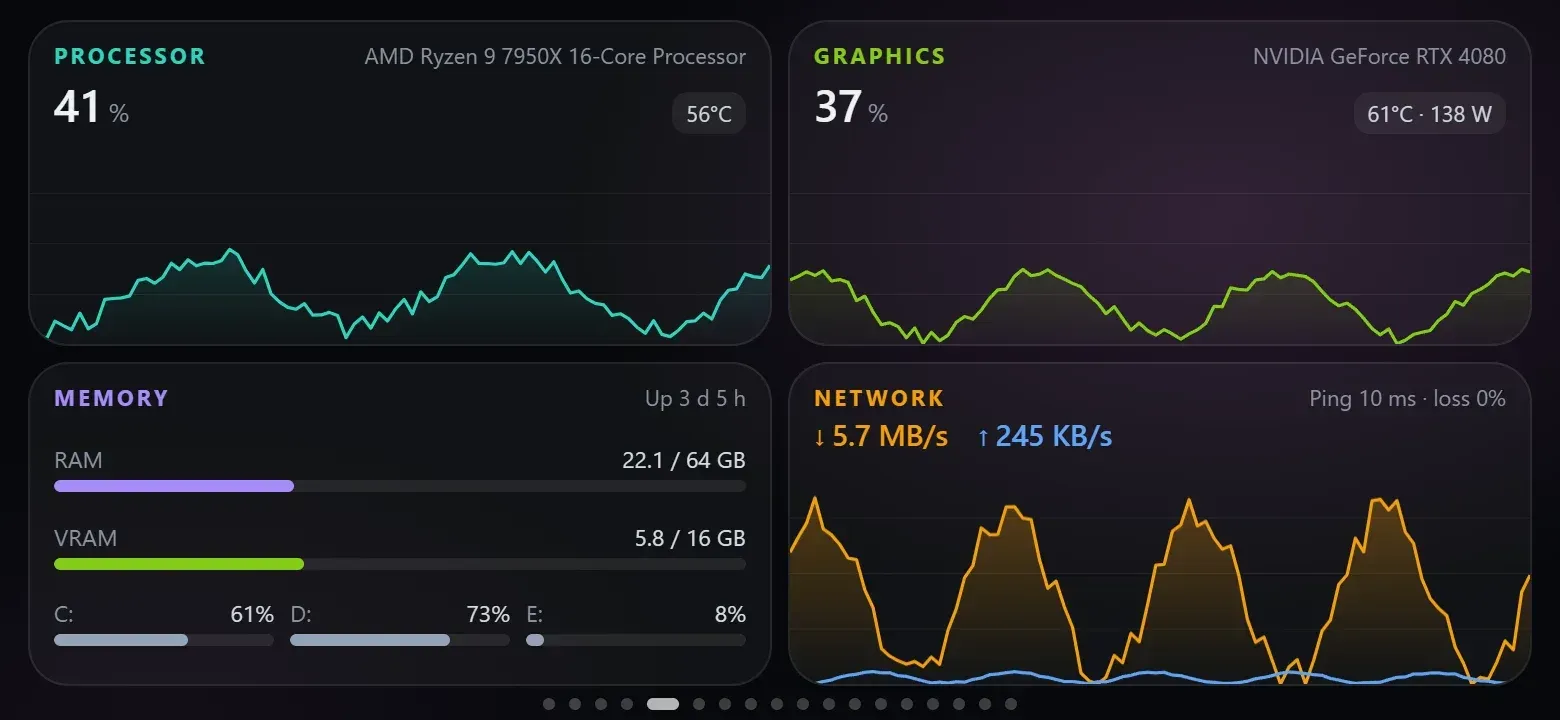
The panel is built from 115 widgets and 30 page templates. Each page is a 12 by 6 grid, and pages can be laid out in portrait or landscape. Widgets cover computer metrics (CPU, GPU, RAM, disks, network, ping, processes), AI coding quotas and local sessions for Claude Code, Codex and Antigravity, GitHub reviews and CI status, media and internet radio, clocks, weather, calendars, notes and timers, plus webhook values, notifications and Home Assistant entities. The Control Deck adds application audio faders, microphone and device controls, OBS, meeting shortcuts, development tasks, MIDI and OSC. Several phones can run their own layouts, and one phone can switch between paired computers.
Releases are published on GitHub Releases with an Android APK signed with the project's own key, self-contained agent archives for Windows x64, Linux x64 and ARM64 (glibc) and macOS on Apple silicon and Intel, SHA-256 checksums and build provenance. The setup scripts setup.ps1 and setup.sh download the latest release, check its checksum, offer missing dependencies such as adb and can install the phone app over USB. A Scoop bucket is available, and a winget manifest is prepared but not yet accepted. The phone needs Android 9 or later. The installation guide states that the Windows agent is unsigned while a SignPath Foundation application is pending, that the macOS agent is signed ad hoc, and that Windows on ARM and musl Linux such as Alpine have no release builds.
The repository was created in November 2026. The changelog records version 0.6.2 on November 7, 2026 as the release that replaced fixed screens with widget grids, then with 41 widget types and 18 templates. The current release, PhoneBox 0.9.10, published on GitHub on November 15, 2026, translates the panel and settings page into 11 languages, checks downloaded updates against the release SHA-256 checksums, limits a stuck adb install to 3 minutes and delivers notifications that the agent queued while it was restarting.
The agent is written in C# on .NET 10; the Android app uses Kotlin and a WebView with plain JavaScript widgets. Building the app requires JDK 17 and Android SDK Platform 35, and a Python 3 demo server previews the panel and editor with simulated data. A live demo runs the panel and layout editor in a browser. The code is under the MIT license. The privacy policy states that PhoneBox has no accounts, servers, telemetry, analytics or crash reporting of its own and lists every outbound connection. OLED burn-in protection exists only in the unreleased source tree. Similar projects on iThub include Coucou for following AI coding agents and scrcpy for mirroring Android devices over adb.
Key capabilities
- Desktop agent with browser settings The agent runs as a single self-contained program for the current user and serves its settings page and layout editor at
http://127.0.0.1:8765. On Windows it also has a tray icon; on Linux and macOS the settings open in a browser. Settings live inconfig.jsonunder%APPDATA%\PhoneBox,~/.config/PhoneBoxor~/Library/Application Support/PhoneBox, and the phone picks up changes within a few seconds. - Android panel app The phone app shows the panel full screen in a WebView and forwards requests under
/agent/*to the computer through a native proxy. It asks for two Android permissions only,INTERNETandVIBRATE, and requires Android 9 or later. Kiosk options include screen pinning, using the panel as the phone's home screen so it starts after a reboot, and keeping the phone awake on the charger, all without root. - USB connection through adb With USB debugging enabled, the agent uses
adb reverseso the phone reaches127.0.0.1:8765over the cable. Over USB the phone wakes and opens the panel on connection, and app updates install withadb install -rwithout a prompt on the phone. On Xiaomi, Redmi and POCO devices the option Install via USB must also be on. - Wi-Fi and Tailscale pairing When enabled, the agent listens on HTTPS port 8766 with a self-signed certificate that the phone pins, plus a paired key. Pairing works by scanning a QR code that holds the computer's addresses, the certificate fingerprint and a one-time code valid for 5 minutes, followed by a check code confirmation. A phone paired only over Wi-Fi has no USB fallback and installs app updates manually; Tailscale covers phones and computers on different networks.
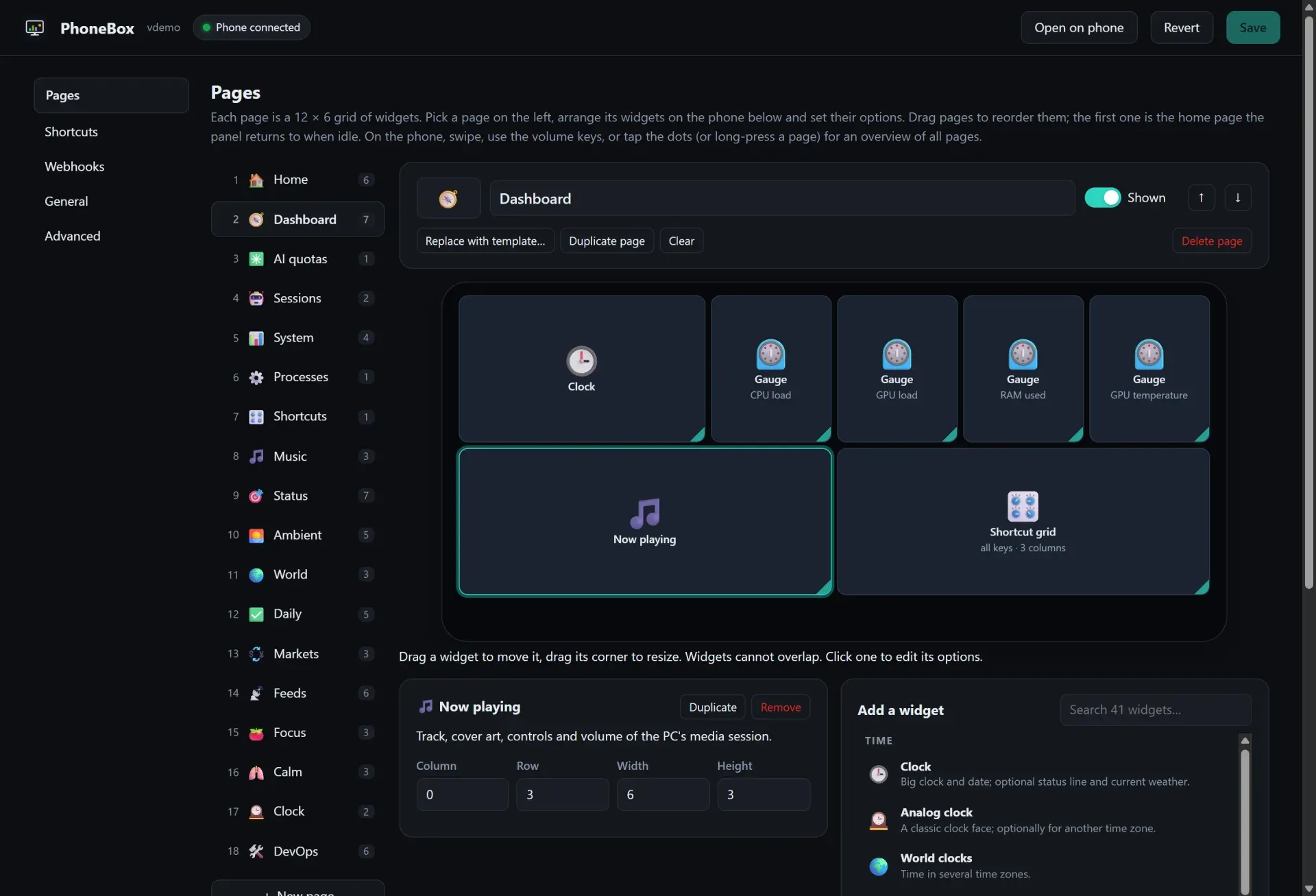
- Visual layout editor Pages are 12 by 6 grids edited on a phone-sized canvas: drag to move, drag the corner to resize, and set options per widget from a searchable palette grouped by category. Pages can be added from 30 templates, reordered, hidden, exported and imported as files. Live preview replaces the canvas with the real panel showing unsaved edits and live data.
- Computer monitoring widgets Widgets show CPU, GPU, RAM, disks, network throughput and ping as tiles, gauges and charts, with a GPU details widget and process lists that can end one instance or all instances of an app. GPU data comes from Windows GPU counters,
nvidia-smi,amdgpusysfs on Linux or IORegistry on Apple silicon; CPU temperature on Windows needs LibreHardwareMonitor with its web server on port 8085. Ending processes is limited to the user's own session and skips a list of Windows-critical processes. - AI coding quotas and sessions The AI quotas, quota ring and AI sessions widgets show Claude, Codex and Antigravity limits, reset times and a burn-rate forecast, plus local Claude Code and Codex sessions with model, timing and token details. The Claude quota is read with the OAuth token Claude Code stores locally and sent only to
api.anthropic.com; the project notes that this endpoint is undocumented and may change. An optional CodexBar CLI source adds more quota providers and a 30-day cost overview that is off by default. - Claude Code permission prompts An opt-in hook installs a
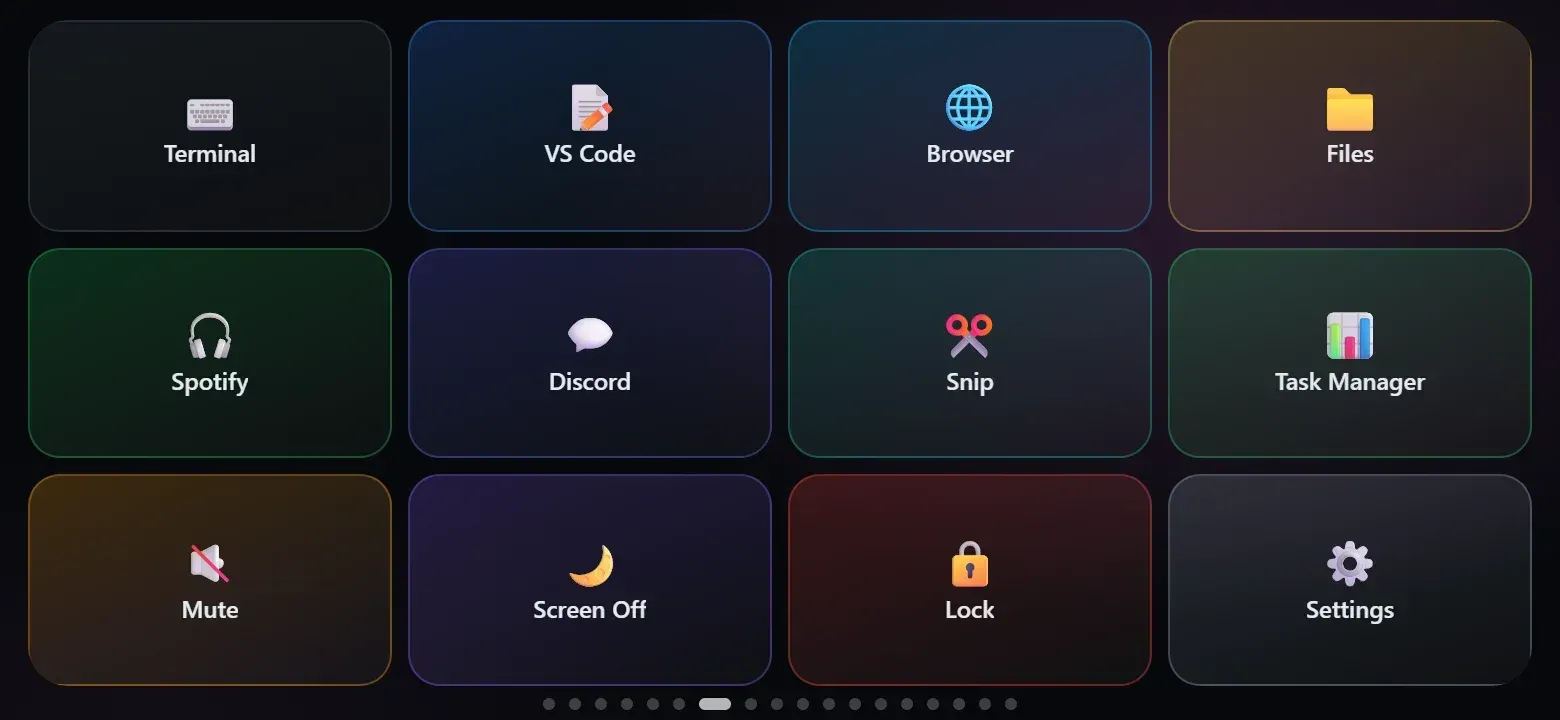
PermissionRequestentry in~/.claude/settings.json, with a backup kept next to it. When Claude Code asks for permission, the phone shows the project, tool and command or file with Allow and Deny buttons. If the phone is not connected or nobody answers in time, the hook returns no decision and Claude Code asks in the terminal. - Shortcuts and Control Deck Shortcut keys run a program, press a key combination, type text or run a macro of keys, text, waits and other shortcuts, and the phone sends only the configured ID. The Control Deck adds per-application audio faders, microphone mute and push-to-talk, audio profiles, Spotify queue and playlist controls, OBS scenes and recording, window and power actions, MIDI and OSC. Several integrations need external components such as obs-websocket, a Spotify Developer Client ID, SoundVolumeView or Voicemeeter, and power actions require a separate opt-in.
- Media, radio and everyday widgets Now Playing shows track, cover art, controls and volume for the computer's media session, using system media sessions on Windows,
playerctlon Linux andnowplaying-clion macOS. Other widgets include internet radio, digital, analog and word clocks, world clocks, weather and forecast from Open-Meteo, air quality, agenda from ICS calendar links, notes, checklists, pomodoro, timers and counters. - Webhook API Anything that can send an HTTP request can post to
/api/push/<key>for Pushed value widgets,/api/notifyfor toasts and vibration,/api/goto/<page>to switch pages and/api/refresh. Payloads accept fields such as value, title, unit, level, progress, items and a ttl. From the same computer no key is needed; other machines on the network or Tailscale use a separate webhook key that cannot open the phone API. - Rules and page switching Rules follow a when and then pattern: triggers include an AI session waiting, media playing, an app running, microphone or camera in use, OBS live, CPU load, idle time, time ranges, pushed values, quota levels, GitHub reviews and CI failures. Actions show a page, a notification, push a value or run a shortcut, with day and hour limits, minimum durations, rest periods and priorities. Page switches count down first and wait while the panel is being touched.
- Smart Stack and Home Assistant Smart Stack places up to 12 widgets in one grid slot, rotated by tapping the dots or swiping vertically. The Home Assistant widget shows entities and switches them on tap, and battery care can keep the phone between two charge levels, 50 to 80 percent by default, by switching a Home Assistant smart plug or a shortcut such as
uhubctl. - Appearance and languages Corner radius, widget spacing, padding, borders, shadows and fonts can be set globally and overridden per page or per widget, with presets such as Original, Rounded cards, Flat and Content only. Since 0.9.10 the panel and settings page are available in English, Turkish, German, French, Spanish, Italian, Portuguese, Dutch, Polish, Russian and Chinese, following the phone or browser language by default.
- Windows installation The documented one-liner
irm https://raw.githubusercontent.com/ersinkoc/phonebox/main/setup.ps1 | iexruns in a normal PowerShell window on Windows 10 or 11 x64. It installs the agent to%LOCALAPPDATA%\PhoneBox\app, offers a Startup-folder shortcut and supports options such as-NoPhone,-Versionand-DryRun. Scoop users can add the project bucket; SmartScreen or antivirus software may warn about the unsigned agent. - Linux and macOS installation The command
curl -fsSL https://raw.githubusercontent.com/ersinkoc/phonebox/main/setup.sh | bashruns as the normal user and installs to~/.local/share/PhoneBox/appon Linux or~/Library/Application Support/PhoneBox/appon macOS. It offers a systemd user service or a launchd agent for start at login and optional helpers such asplayerctl,pactlandnowplaying-cli. Linux USB access may need udev rules for adb. - Updates and uninstall The agent checks the latest GitHub release every 6 hours, verifies downloads against the release SHA-256 checksums and, with automatic updates on, installs the new APK over USB and replaces its own files. Android accepts only an update signed with the same key as the installed app. Uninstall scripts remove the program and keep settings unless
-Purgeor--purgeis passed. - Local data and outbound connections Settings, pushed values and logs stay on the computer, with files readable only by the user on Linux and macOS. Connections made by default are the GitHub update check, a ping to 1.1.1.1 every 5 seconds and Open-Meteo weather requests while a weather widget is shown; the privacy policy lists how to turn each one off and which services optional widgets contact.
Where PhoneBox fits
Monitoring a workstation from a spare phone
The Home and System templates place CPU, GPU, memory, disk and network tiles or charts next to a clock, weather and Now Playing. The agent samples process lists and command widgets only while a phone is showing them. GPU and temperature detail depends on the platform: nvidia-smi for NVIDIA cards, amdgpu sysfs on Linux, IORegistry on Apple silicon and LibreHardwareMonitor for extra Windows sensors, as listed in the compatibility table.
Following AI coding agents
The AI quotas and Sessions templates show Claude, Codex and Antigravity usage windows, reset times and burn-rate forecasts, together with local Claude Code and Codex sessions and GitHub review requests. With the opt-in permission hook, a Claude Code request to run a command or edit a file appears on the phone with Allow and Deny, and a rule can switch the panel to the AI page when a session is waiting. Prompt and response text are not part of the panel data, according to the user guide.
Using the phone as a touch control deck
Shortcut grids work like a Stream Deck style key pad for launching apps, key combinations, typed text and macros. The six Control Deck templates add audio faders per application, microphone mute, push-to-talk, OBS scenes and recording, meeting shortcuts and development tasks. Bindings are defined on the computer under General, Control Deck, and the phone only sends binding IDs.
Pushing build, home and service status to the panel
Scripts, CI jobs and Home Assistant automations can post values and notifications to the agent's webhook endpoints. A Pushed value widget shows a build result or a sensor reading with a colour level and optional expiry, the Notifications widget collects toasts, and /api/goto switches the phone to a page. Senders on other machines use the separate webhook key over HTTPS port 8766.
Reacting to activity on the computer
Rules switch pages, show notifications, push values or run shortcuts when music plays, a meeting app runs, the microphone or camera is in use, OBS goes live, CPU load stays high or the user has been away. Examples in the editor include an on-air indicator during calls, a Calm page in the evening and a CI failure alert. Each rule can be limited by days and hours and tested from the editor.
Running one panel across several computers
Each computer is paired once over USB, after which the page overview on the phone lists the paired computers and switches between them over Wi-Fi or Tailscale. Several phones can connect to one agent with their own pages. The connection guide notes that the phone still needs a charger because the screen stays on, though not necessarily on the same computer.
Install
curl -fsSL https://raw.githubusercontent.com/ersinkoc/phonebox/main/setup.sh | bashReviews of PhoneBox
Be the first to share your experience with PhoneBox.
Write a review
Loading review form…
Found PhoneBox useful? Upvote it todayYour vote helps other IT teams find it in the daily ranking.