

What is scrcpy?
scrcpy displays an Android device's screen on a Linux, Windows, or macOS computer and allows control through the computer's keyboard and mouse. Devices connect over USB or TCP/IP. The application requires no account, no root access, and no app left installed on the Android device. Internet access is not required.
Its features include audio forwarding, recording, bidirectional copy and paste, virtual displays, and configurable video quality. It can mirror a device with its screen off and supports camera capture, gamepads, and physical keyboard and mouse simulation. Device requirements vary by feature, and normal mirroring requires USB debugging to be enabled.
The project lists 30 to 120 fps depending on the device, 35 to 70 ms latency and about one second to display the first image. The current version named in the README is 5.0.1.
scrcpy screenshots
Explore the interface. Open a screenshot to view it at full size.
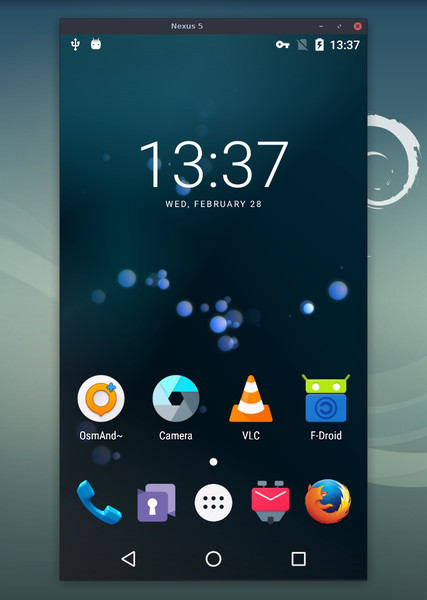
Source: official scrcpy project page.
Key capabilities
- Screen mirroring Display an Android device on a computer over USB or TCP/IP, with configurable video quality.
- Device control Use a computer keyboard, mouse, or connected gamepad to interact with the Android device.
- Audio and recording Forward supported device audio and record screen or camera output.
- Display options Create virtual displays or continue mirroring while the device screen is off.
- Camera output Mirror a supported device camera and expose it as a webcam through V4L2 on Linux.
- OTG input Control a device through simulated physical keyboard and mouse input without mirroring or USB debugging.
Where scrcpy fits
scrcpy can fit into Android development, manual testing, demonstrations, and hands-on device support where a computer needs to display or operate a connected device. Recording and camera capture can also support documentation and demonstration workflows.
Before deployment, verify the Android version, connection method, and debugging permissions on each device. Basic operation requires Android 5.0 or later, audio forwarding requires Android 11 or later, and camera mirroring requires Android 12 or later. Some devices need an additional security setting for input control. The V4L2 webcam feature is Linux-only, and performance depends on the device and video settings.
Reviews of scrcpy
Be the first to share your experience with scrcpy.
Write a review
Loading review form…
Alternatives to scrcpy
 DefiDefi is an open-source window manager for Apple Silicon Macs that arranges windows in scrolling columns, with per-display workspaces and app rules.EEdge-DropEdge-Drop is a free, open-source Windows clipboard shelf that opens at the screen edge and keeps copied text, links, images and files ready to paste or drag.
 Organic MapsFree, Apache-2.0 offline maps app built on OpenStreetMap data. Download regions, then search, route by car, foot, bike or public transport and record tracks without a connection. No ads, no tracking, no account; Linux desktop in beta.