
What is Edge-Drop?
Edge-Drop is a free, open-source clipboard manager for Windows. It captures text, rich text, links, screenshots, images, files and folders in a shelf that opens from the left, right or top edge of a selected display. Clicking a card pastes into the active application without taking keyboard focus, while drag and drop moves content between the shelf and desktop windows.
The shelf provides search across copied text, file names, link titles and notes, alongside content-type filters, pinned cards and file or image stacks. Previews include syntax highlighting for code and alternative representations of copied color values. File cards reference the original files rather than storing separate copies.
Edge-Drop runs locally on 64-bit Windows 10 and 11, with installation through the Microsoft Store or a Windows installer from the official repository. Clipboard history is encrypted at rest using Windows DPAPI through Electron safeStorage. The application has no account, cloud synchronization, telemetry or analytics; the installer edition can check for updates, and selected actions can access the network.
Edge-Drop screenshots
Explore the interface. Open a screenshot to view it at full size.
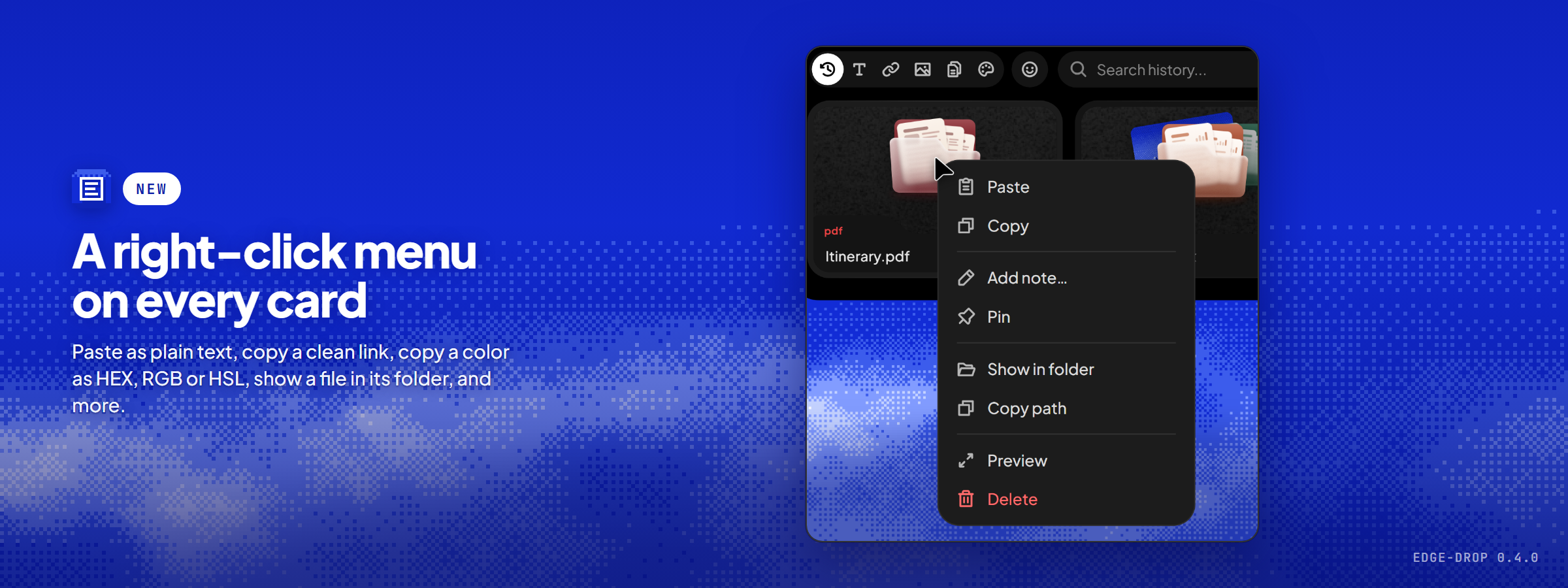
Source: official Edge-Drop project page.
Key capabilities
- Edge access Opens on pointer hover or a configurable keyboard shortcut, with adjustable trigger zones and display selection.
- Clipboard capture Collects text, rich text, links, images, screenshots, files, folders, spreadsheet cells and color codes.
- Content transfer Supports click-to-paste and drag and drop, with grouping and splitting of file or image stacks.
- Search and organization Searches text, file names, link titles and notes, with type filters, pinned cards and full-size previews.
- Retention controls Offers configurable history limits, automatic deletion and scoped clearing while preserving pinned and noted cards.
- Privacy controls Encrypts saved history locally, skips content marked against clipboard monitoring and provides an Incognito mode that pauses capture.
Where Edge-Drop fits
Edge-Drop fits desktop workflows that repeatedly move screenshots, code snippets, reference links, file paths and assets between windows. Developers and people working with visual assets can keep reusable material on the shelf, annotate it for later retrieval and group related files before transferring them into another application.
Before deployment, compatibility with the target applications and clipboard formats should be tested, along with display placement and hover behavior. Retention settings require attention because pinned and noted cards survive automatic deletion and clearing. File cards depend on the original files remaining available. Installation policies should also be checked: the GitHub installer is not code-signed and may trigger Windows SmartScreen, while the Store edition uses Store-managed updates.
Reviews of Edge-Drop
Be the first to share your experience with Edge-Drop.
Write a review
Loading review form…
Alternatives to Edge-Drop
 DefiDefi is an open-source window manager for Apple Silicon Macs that arranges windows in scrolling columns, with per-display workspaces and app rules.
 Organic MapsFree, Apache-2.0 offline maps app built on OpenStreetMap data. Download regions, then search, route by car, foot, bike or public transport and record tracks without a connection. No ads, no tracking, no account; Linux desktop in beta.
 RavenRaven runs Windows applications on Linux x86_64 in a sandbox, using their own installers, with no virtual machine, winetricks or DLL overrides.