What is OpenLogi?
OpenLogi is a native desktop application for configuring Logitech peripherals without running Logi Options+. It talks to mice, keyboards, Litra lights and headsets over Logitech's HID++ protocol and to Logitech webcams over UVC. Devices are reached through Logi Bolt, Unifying and Lightspeed receivers, Bluetooth-direct pairings or USB cables. The project describes itself as local-first: it needs no Logitech account, sends no telemetry, and keeps bindings and profiles in one TOML file on the computer. The official website and the documentation both state that OpenLogi is under active development and not yet stable, and that features and configuration may still change.
The code is written in Rust and the interface uses the GPUI framework. The application is split into a GUI, a background agent that owns the input hook and the menu bar or notification area icon, and an openlogi command-line tool. The CLI lists paired devices, runs hardware diagnostics and exposes a JSON automation API for launchers and scripts. OpenLogi is maintained in the AprilNEA/OpenLogi repository on GitHub. The source code is dual-licensed under Apache License 2.0 and MIT at the user's option. The OpenLogi name, logo and app icon are excluded from those licenses and remain reserved by the project. The README states that the project is not affiliated with Logitech and that Logitech, MX Master and Options+ are trademarks of Logitech International S.A.
Builds are published on the GitHub releases page and linked from openlogi.org: signed .dmg images for Apple silicon and Intel Macs, .deb, .rpm, Arch .pkg.tar.zst and Flatpak packages for Linux on x86_64 and arm64, and .msi installers plus portable .zip archives for Windows on x86_64 and arm64. Every download carries a minisign signature and an entry in a SHA256SUMS file. The README also documents a Homebrew cask, a Linux install script and an AUR package that builds the release from source. Stated requirements are macOS 13 or later, GLIBC 2.35 or newer on Linux, and Windows 11 as the tested Windows version.
The latest stable release at the time of checking is v0.9.0, published on November 3, 2026. It adds Flow, which pairs two computers running OpenLogi so the pointer and keyboard follow the cursor across a screen edge, with host switching handled by the app. The same release reworks the Actions Ring with directional aiming and three ring sizes, adds optional per-device momentum scrolling, headset sidetone on the G535 and support for an additional Spotlight receiver, and brings accessibility fixes such as visible focus rings. The config schema moves to version 11 with this release, and older builds refuse to load a config saved by 0.9.0. Beta builds of the next version are published separately as pre-releases.
Feature coverage depends on what each device reports, and the app shows only the controls a device supports. The project lists a supported-device table with model IDs and capability gates. Only one application can own a receiver at a time, so Logi Options+ and, on Linux, Solaar must be closed first. Pairing new devices over Unifying and Lightspeed and importing Options+ settings are described on the website as work in progress. Related desktop utilities on iThub include Microsoft PowerToys, whose tools include key remapping on Windows, and BetterDisplay for display settings on macOS.
Key capabilities
- Button remapping Each physical button on a supported mouse can be bound to an entry from the built-in action catalog, a custom keyboard shortcut, typed text or a multi-step workflow. Tap and hold can carry separate actions, and hold-to-talk chords release together with the button. On macOS, remapping the side buttons uses an event tap, which requires the Accessibility permission, while HID++ paths such as the gesture button, thumb wheel and DPI do not.
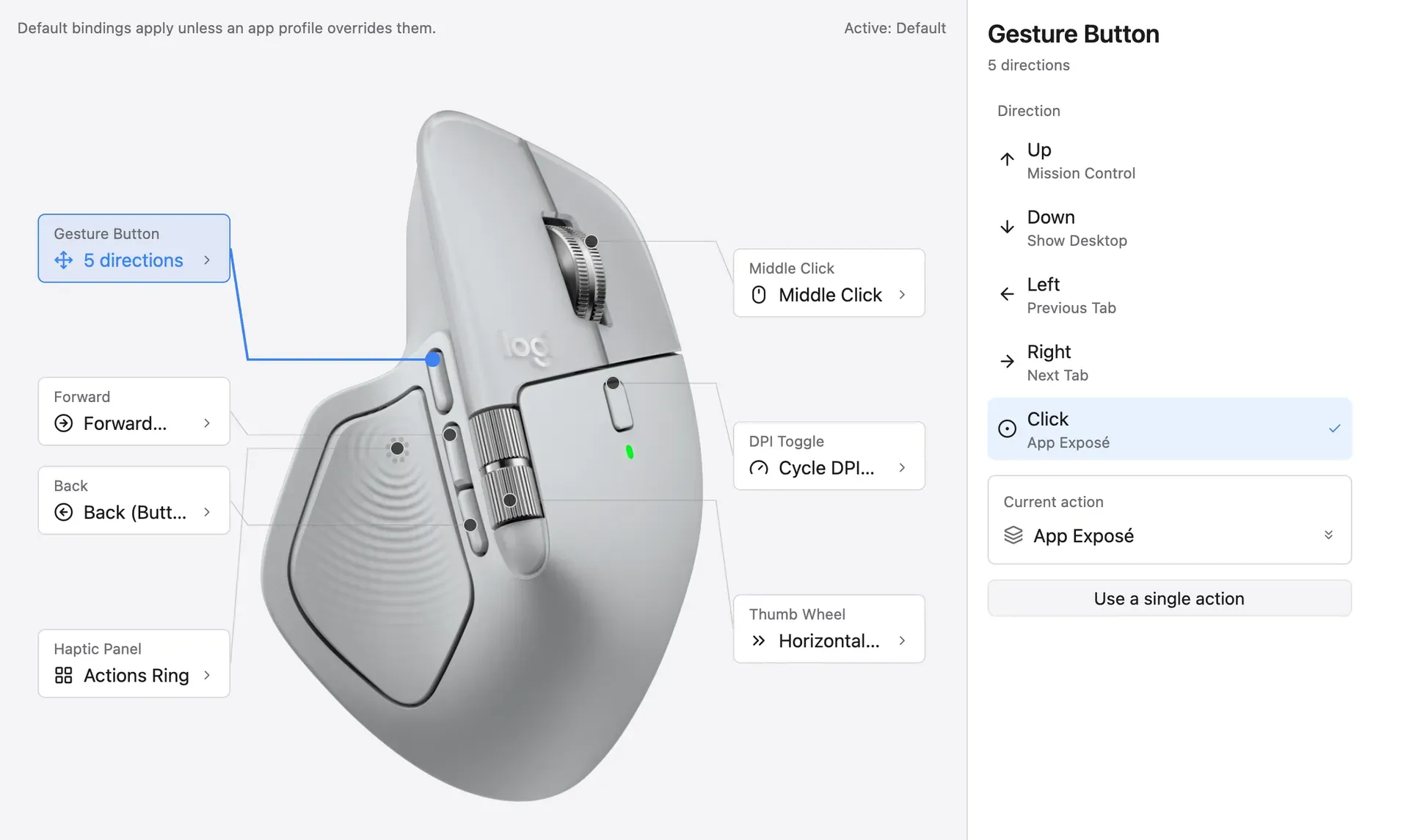
- Gestures on several controls Directional gestures can be assigned to Middle Click, Back, Forward, the dedicated gesture button, the MX Master 4 haptic panel, and a DPI or ModeShift button that reports the needed capabilities. Several gesture buttons can be active at once, and gestures can also be switched off entirely. The remap buttons documentation lists the rules per control.
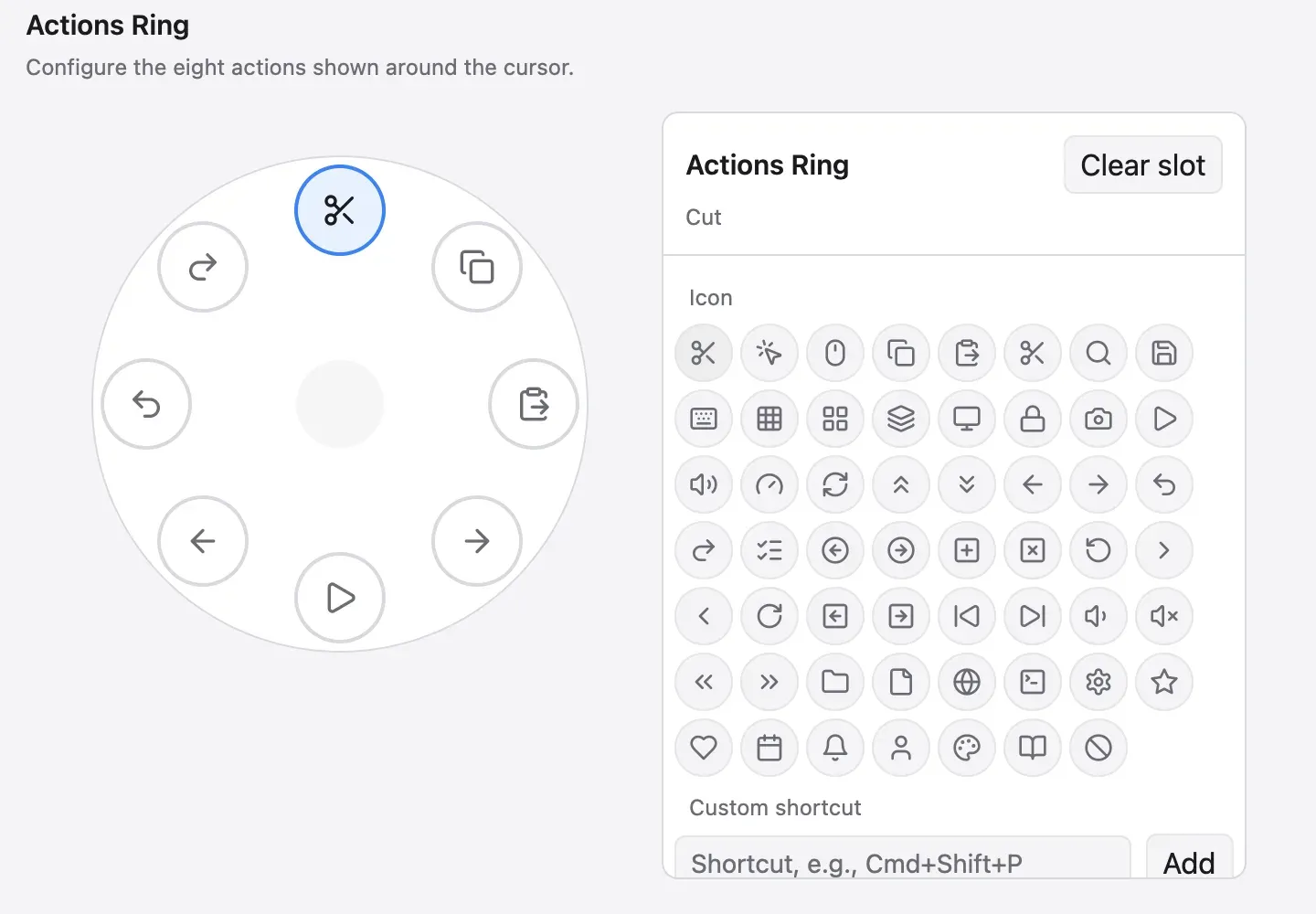
- Actions Ring A ring of eight actions appears around the cursor, with its own layout per application. Release 0.9.0 changed it to directional aiming, a hold-and-release selection model and small, medium or large ring sizes per device. Slots can use icons from a built-in set and custom shortcuts.
- Per-application profiles Profiles switch with the focused application on macOS and Windows. On Linux, switching works on X11, on wlroots compositors such as sway and Hyprland, and on GNOME with a companion shell extension; KDE falls back to XWayland. An
[apps]alias lets one profile follow the same application across platforms, because Linux compositors report different application identifiers. - Pointer and DPI DPI presets can be written to the sensor and cycled with an assigned button, alongside pointer speed and report rate. Precision Mode switches a mouse to its slowest speed and back with one button. These values are set on the device over HID++ rather than through operating system acceleration.
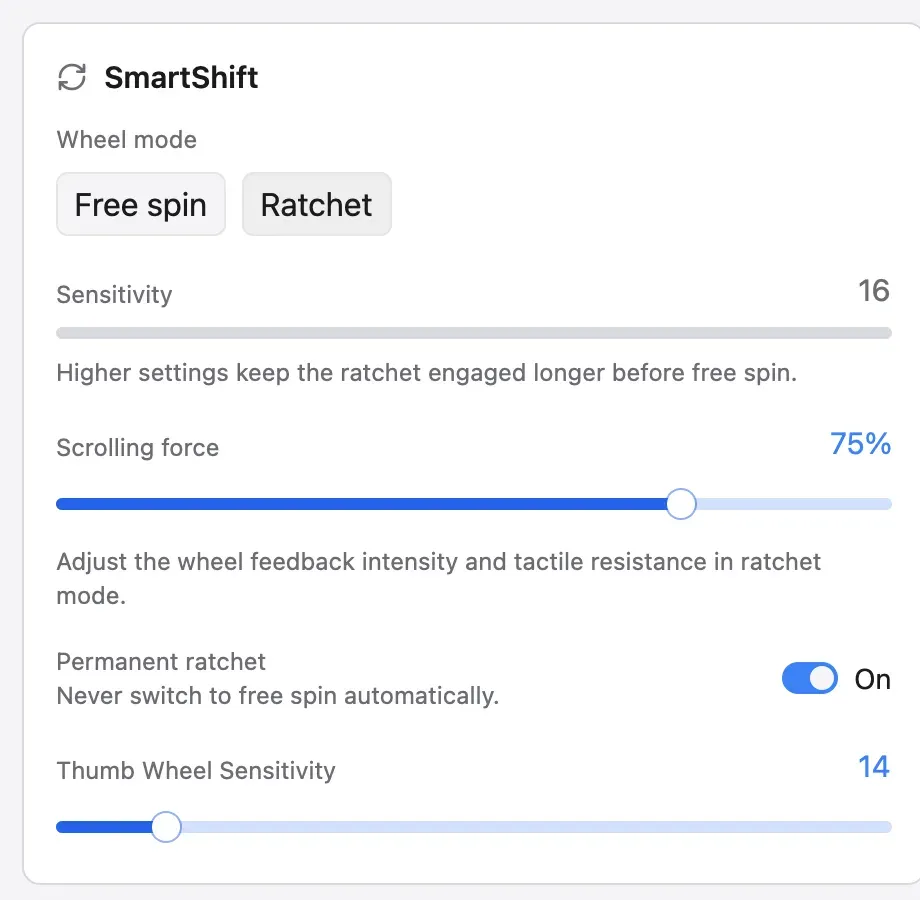
- SmartShift and scrolling The app sets SmartShift wheel mode and sensitivity, scrolling force on SmartShift Enhanced mice, and a permanent-ratchet switch. Scrolling options include per-device inversion, wheel resolution, smooth wheel scrolling and sideways scrolling by holding Back or Forward on mice without a thumb wheel. Version 0.9.0 adds optional momentum scrolling with adjustable glide, distance, maximum speed and repeat speed-up.
- Keyboards and lighting Keyboard support covers Fn Lock, keeping multi-platform keyboards on the host operating system layout, backlight level, automatic brightness, battery saving and backlight timeout. Dedicated keys such as media, emoji and screenshot keys can be bound like mouse buttons and restored individually. Static RGB color is available on supported keyboards, and keyboard F-key remapping is listed for macOS and Windows only.
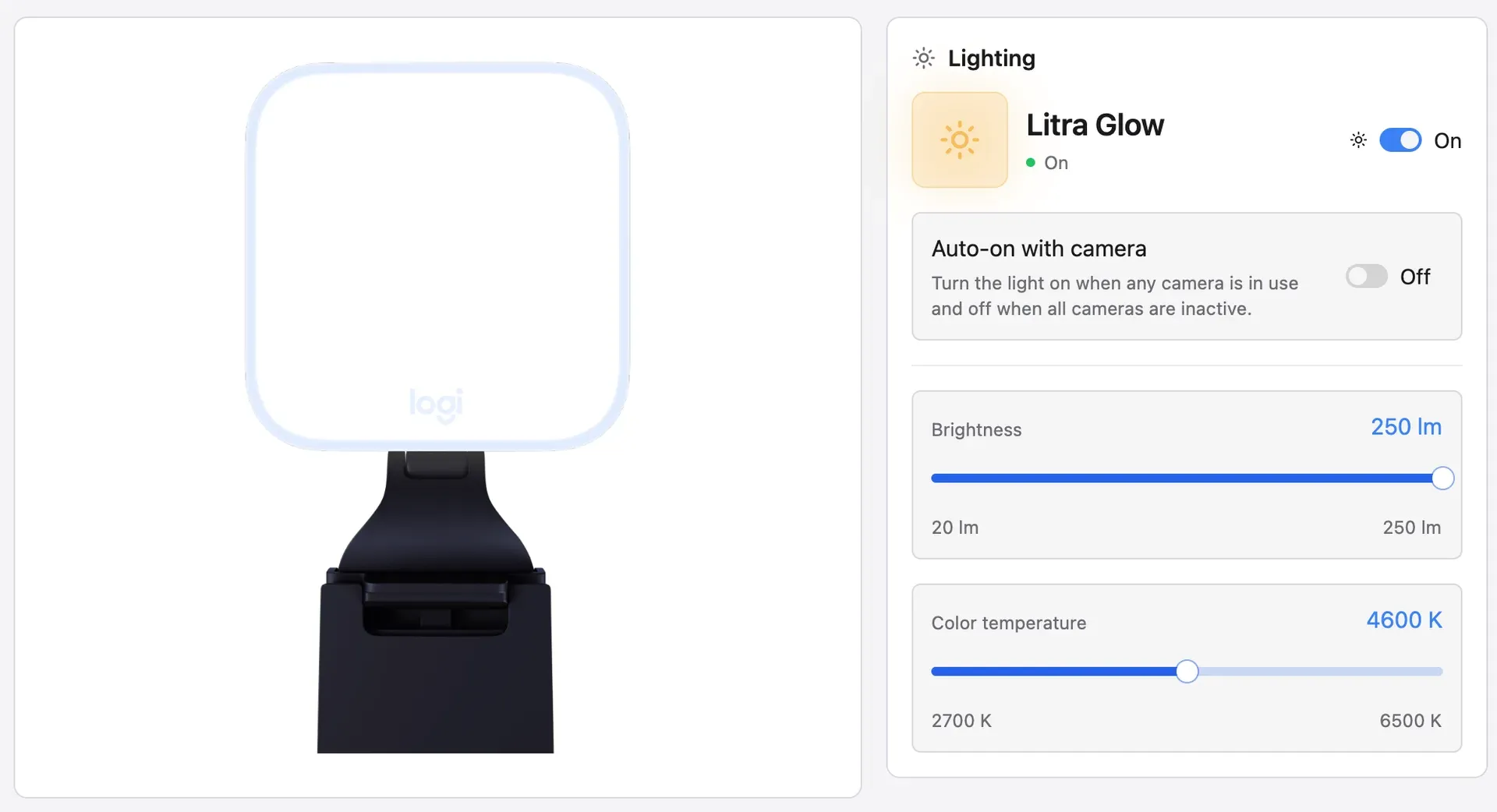
- Litra lights and headsets Litra lights expose power, brightness and color temperature, and can turn on automatically with the camera. A change made on the light itself is kept. Headset support in the documentation covers G733 battery and link state, and v0.9.0 adds sidetone control on the G535.
- Logitech webcams over UVC Any Logitech UVC webcam such as Brio, StreamCam or the C920 series is listed as plug and play. A live preview holds the camera only while it is open, and zoom, pan, tilt, focus, exposure, white balance and other UVC controls are written to the hardware so other video applications see them. Built-in Default, Streaming and Video call profiles and user snapshots are stored per camera.
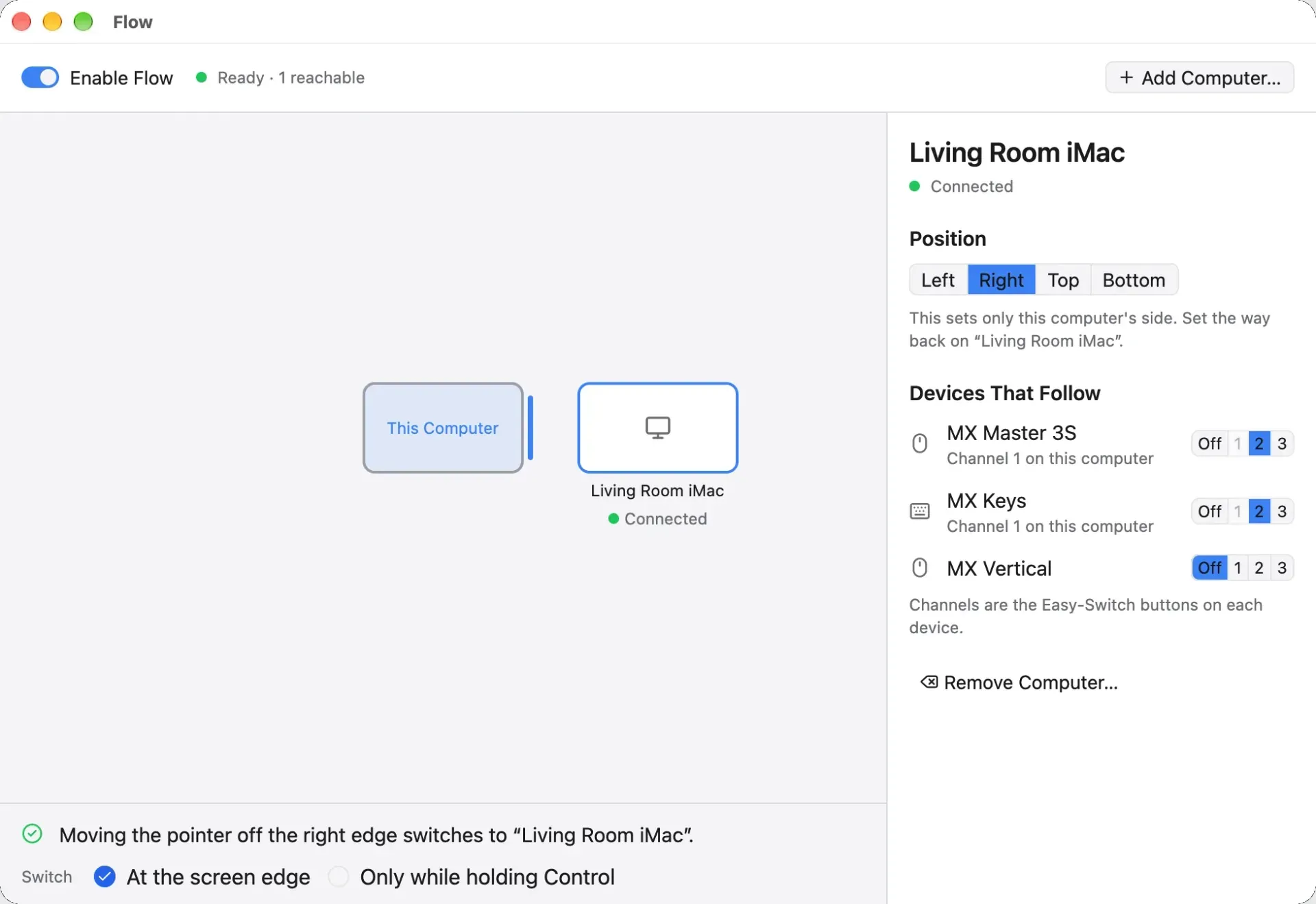
- Easy-Switch and Flow The app shows which computer is paired on each Easy-Switch channel and can rename channels on devices that allow it. A button or Actions Ring slot can move a device to another channel. Flow, added in v0.9.0, pairs two computers that both run OpenLogi 0.9.0, places them relative to each other and moves selected devices when the pointer crosses a screen edge, optionally only while Control is held.
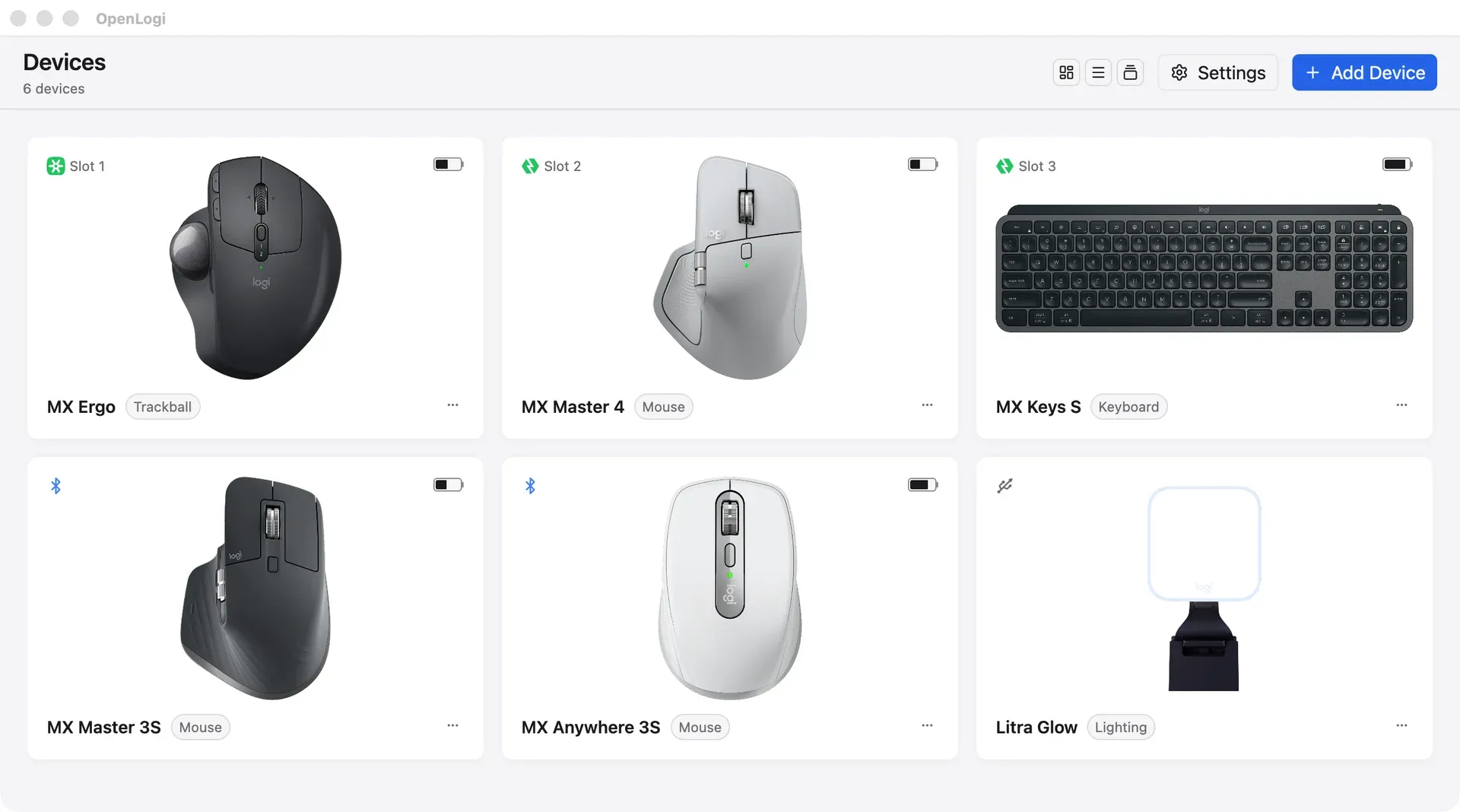
- Device overview and notices A device list shows every connected Logitech device with battery level and charge state. On-screen notices report low battery once per discharge, Caps Lock changes, Num Lock and Scroll Lock changes on Windows and Linux, and backlight level, without requiring operating system notification permission. On macOS, a menu bar menu changes common settings without opening the main window.
- Plain TOML configuration Settings live in
config.tomlunder the user's config directory on every platform. The GUI writes atomically, keeps five backups, preserves comments and symlinked files, and refuses to overwrite a file changed in an editor. The schema is strict: invalid fields open the GUI in read-only mode with the exact error. The configuration reference documents every section. - CLI and diagnostics The
openlogicommand lists paired devices and runs diagnostics that dump HID++ features and reprogrammable controls, test DPI and SmartShift with read-back and restore, set keyboard lighting and call single HID++ functions. Several diagnostic commands refuse to run while the agent is active. The usage guide describes each command and its safeguards. - JSON automation API
openlogi apireturns one JSON object per call for status, devices, DPI, SmartShift, Fn Lock, OS layout, report rate and Easy-Switch, with an optional--saveto persist a value. It requires a running, protocol-compatible agent and never opens hardware directly. The project names launchers such as Raycast and local scripts as intended callers. - macOS package Signed .dmg images are provided for Apple silicon and Intel on macOS 13 or later, and a Homebrew cask is documented. After launch, macOS asks for the Accessibility and Input Monitoring permissions. Updates on macOS use Sparkle, and Karabiner-Elements users need to turn off event modification for a keyboard that OpenLogi should control.
- Linux packages Release packages are built for x86_64 and arm64 as .deb, .rpm, .pkg.tar.zst and Flatpak, and an install script verifies the minisign signature before installing and starting the agent. The Linux install guide covers udev rules, the hidraw and uinput requirements, NixOS, non-systemd systems, autostart and Hyprland. Linux actions include D-Bus MPRIS media keys and native window manager actions on GNOME, KDE and Hyprland.
- Windows packages Windows builds come as .msi installers and portable .zip archives for x86_64 and arm64, and the project states they are tested on Windows 11. The Windows notification area menu offers Show Main Window and Quit, and in-app updates use a built-in updater. Device controls inside the tray menu are listed for macOS only.
- Network behavior The settings documentation lists every outbound request. Update checks are off by default and run only when enabled or requested. Device images are downloaded from an asset mirror when automatic device images are on, and the asset source can be pinned or overridden; bindings and profiles are not sent anywhere.
Where OpenLogi fits
Replacing Logi Options+ on a work computer
The project's stated starting point is quitting Logi Options+, and Solaar on Linux, because only one application can own a receiver. After installing the package for the platform and granting the requested permissions, OpenLogi lists devices paired through Bolt, Unifying, Lightspeed, Bluetooth or USB. Pairing over Unifying and Lightspeed is still in progress according to the website, so such devices may first need to be paired with Logitech's tool or Solaar. The supported devices table shows which controls each model exposes.
Configuring Logitech hardware on Linux
Linux is treated as a first-class platform with an evdev and uinput input hook, udev rules, a systemd user unit and native desktop actions on GNOME, KDE and Hyprland. The documented prerequisites are a kernel with hidraw and uinput, systemd and udev, GLIBC 2.35 or newer for prebuilt packages and minisign for verification. The install guide lists known limitations, including per-application switching that depends on the compositor and side-button-only capture for some controls.
Per-application button layouts
Default bindings apply everywhere until an application profile overrides them, and profiles switch when the focused application changes. A design or development tool can carry its own gesture button directions, Actions Ring slots and DPI presets. Because profiles are keyed by application identifiers that differ between X11, GNOME and wlroots, the configuration supports aliases so one profile covers the same application on several systems.
Moving one mouse and keyboard between two computers
With Flow in v0.9.0, two computers running OpenLogi 0.9.0 are paired from the Flow window by confirming a six-digit code, then placed left, right, above or below each other. Each device that should follow is assigned the Easy-Switch channel it uses on each computer. Peers are stored with pinned public keys in the [flow] section of the config, and an option limits switching to moments when Control is held.
Scripting device settings
Launchers and shell scripts can read and change DPI, SmartShift mode, Fn Lock, report rate and Easy-Switch channels through openlogi api, which returns a single JSON object per call and documents its error codes. Changes are immediate by default and are written to the config only with --save. Hardware diagnostics such as feature dumps and DPI smoke tests are separate commands intended for troubleshooting and adding new models.
Webcam and lighting setup for video calls
Logitech UVC webcams can be adjusted in OpenLogi and the values are written to the camera, so conferencing and streaming applications pick them up. Per-camera profiles hold settings for streaming or calls. A Litra light can be set to turn on with the camera and off when all cameras are inactive. The README notes that a camera on a slower USB link than it supports is flagged on macOS and Windows.
Install
brew install --cask openlogiReviews of OpenLogi
Be the first to share your experience with OpenLogi.
Write a review
Loading review form…
Found OpenLogi useful? Upvote it todayYour vote helps other IT teams find it in the daily ranking.