What is LibrePods?
LibrePods is an open-source app that makes AirPods features normally limited to Apple devices available on Android and Linux. According to the project README, it implements the proprietary protocol that AirPods and Apple devices use to exchange data, which enables listening mode changes, fast ear detection, accurate battery status, head gestures, conversation awareness and further settings on non-Apple platforms. The project was reverse engineered by its maintainer and credits earlier public protocol documentation and a Wireshark dissector for later features. The project's tagline is AirPods liberated from Apple's ecosystem.
The Android app is the main deliverable. Stable builds are published as FOSS APKs on the GitHub releases page and through Google Play. The release notes state that some features in the Play version require an in-app purchase, while battery status, ear detection, listening mode changes and press-and-hold listening mode customization are free on Play, and every build released on GitHub has all features available for free. An optional root module installs LibrePods as a system app with privileged Bluetooth permissions. Nightly builds and alpha builds of a rewritten Android app (v2.0.0) are published separately as pre-releases.
Root requirements depend on the device. The Android README states that on ColorOS and OxygenOS 16, realme UI 7.0 and Pixel devices on Android 16 QPR3 with the latest Google Play system update, LibrePods does not need root for most features. On other devices it needs root and Xposed to work around a bug in the Android Bluetooth stack, which the README attributes to Fluoride or to Apple's non-compliance with Bluetooth standards, and which it expects to be resolved in Android 17. The README warns that this Xposed workaround is not guaranteed to work on all devices. Features that depend on VendorID spoofing always require root, and the feature table marks them as use at your own risk.
The latest stable release at the time of checking is v1.0.4, published on October 16, 2026, with Japanese and Korean translations, updated German and Simplified Chinese translations and wording changes. The Android app is written in Kotlin. A Linux version exists as a pre-release AppImage and binary and as nightly CI builds of a Rust rewrite; the Linux README describes the rewrite as work in progress. The source code is licensed under GPL-3.0 or any later version. The GPL does not grant rights to the LibrePods name, logo or branding.
The README contains several notices. The website librepods.org is not an official website of the project. AirPods, AirPods Pro, AirPods Max and the AirPods logo are trademarks of Apple Inc., and the LibrePods project is not affiliated with or endorsed by Apple Inc. in any way. The SF Pro font used in the Android app is the property of Apple Inc., and the README states it will be replaced with an open alternative. A Use of AI section lists the parts of the Android app and the Linux rewrite that were AI-generated or AI-translated. Similar device tools on iThub include scrcpy and PhoneBox.
Key capabilities
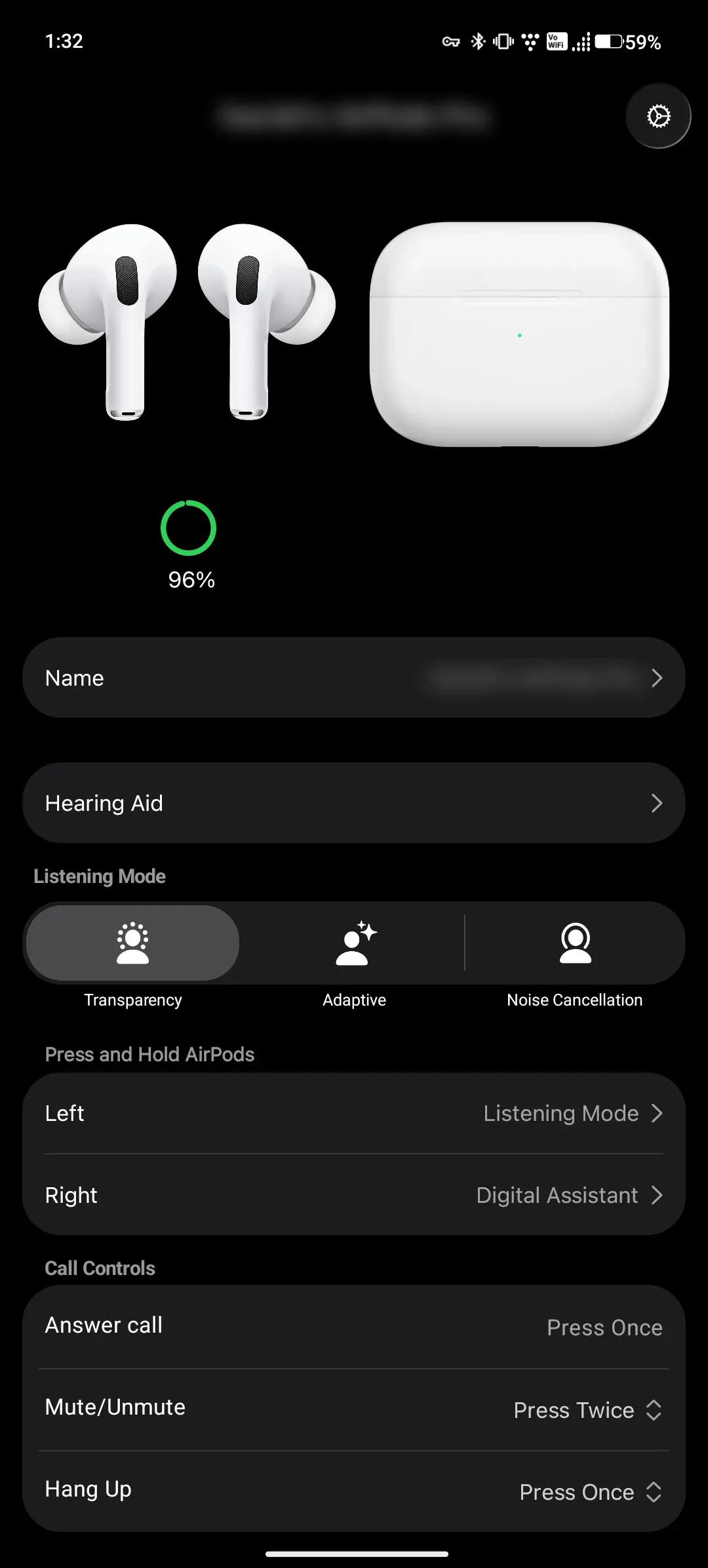
- Listening mode control The app switches AirPods between Transparency, Adaptive and Noise Cancellation, and the feature table marks listening mode changes as implemented on both Android and Linux. Because of recent AirPods firmware, the Off listening mode setting must be enabled to switch to Off, and the app notes that loud sounds are not reduced in that mode. An Android quick settings tile changes the noise control mode from the notification shade.
- Ear detection Automatic ear detection is listed as implemented on Android and Linux. The older Linux README describes it as automatic play and pause on ear detection. On Android, a setting can also switch audio to the phone speakers when the AirPods are not worn, which requires the optional root module.
- Battery status Battery levels for the left and right earbuds and the case appear in the app and in a notification. Showing battery in the Android system settings and in widgets requires installing LibrePods as a system app through the root module. The Linux version shows battery status in a tray icon.
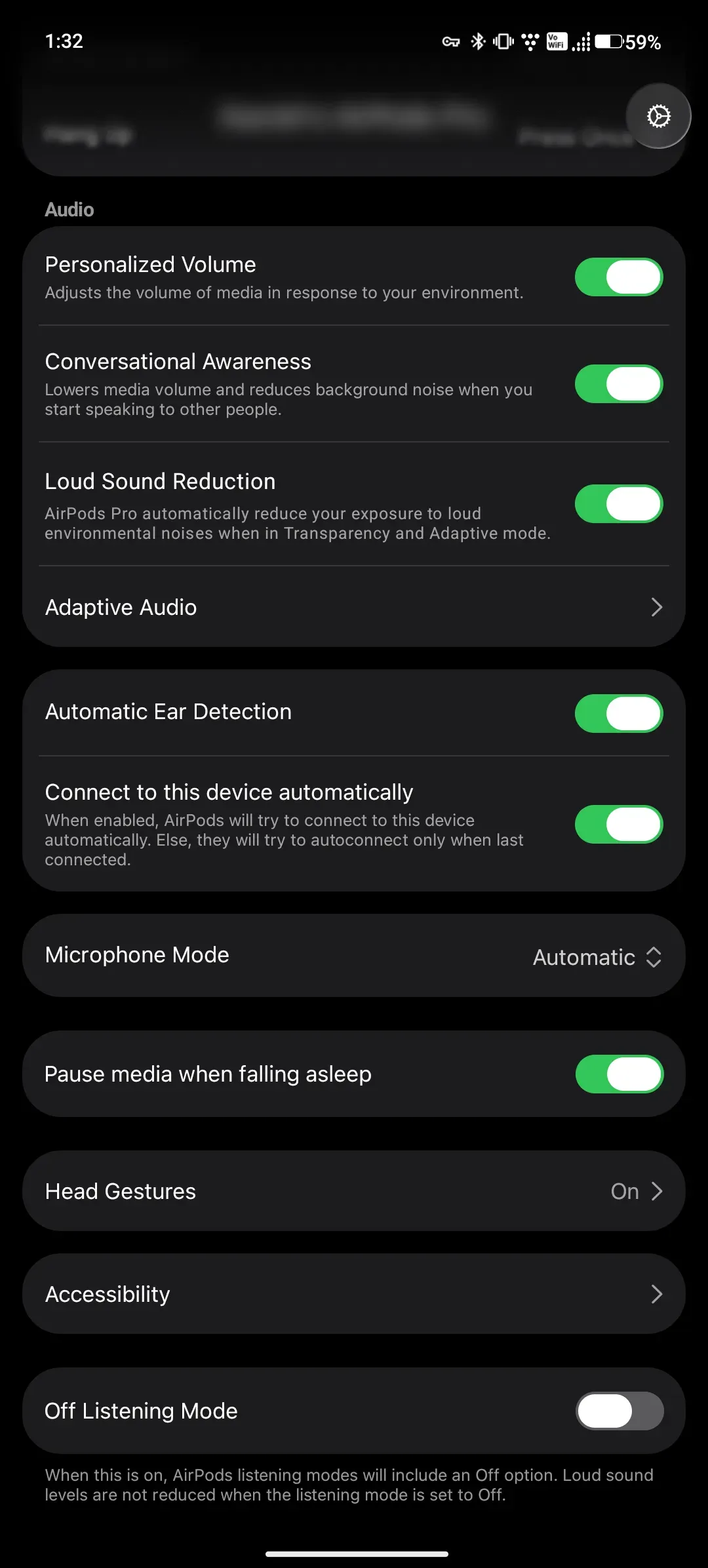
- Conversation awareness and personalized volume Conversation awareness lowers media volume and reduces background noise when the wearer starts speaking, and it is marked as working on Android and Linux. Personalized volume adjusts media volume to the environment. Both are exposed as switches in the app's audio settings.
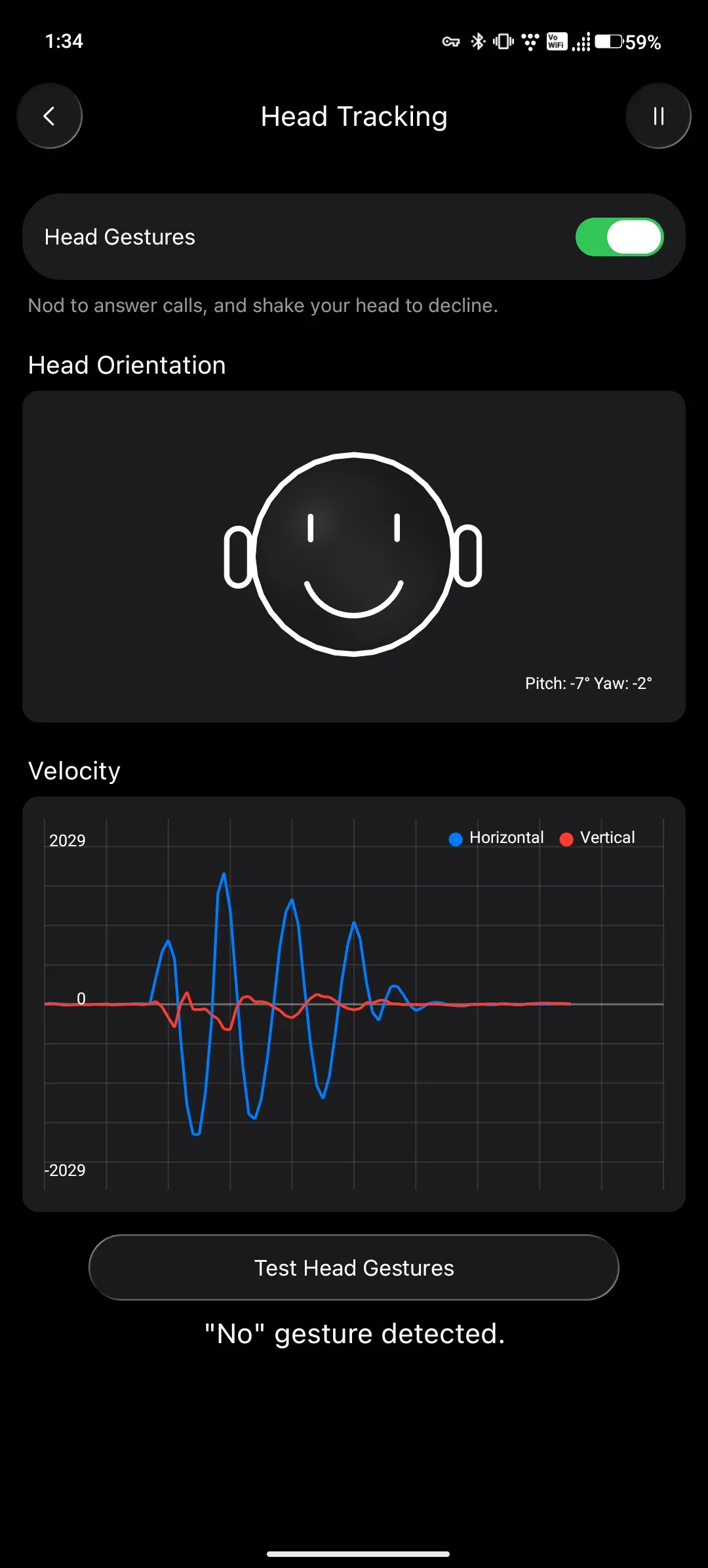
- Head gestures On Android, head gestures let the wearer nod to answer calls and shake the head to decline, with a head orientation view and a velocity graph for testing. The README states that this feature, including its logic and interface, was completely AI-generated. Head gestures are marked as will not be implemented for Linux.
- Press and hold and call controls The Android app configures what press and hold does on each earbud, such as cycling listening modes or invoking the digital assistant, which needs a recent firmware. Call controls map answer, mute and hang up to press patterns. Microphone side and pause media when falling asleep are listed among the other general settings.
- Renaming AirPods AirPods can be renamed from the app on Android and Linux. On Android, the AirPods must be re-paired after renaming because Android might not use the latest name. The README describes this as a limitation of Bluetooth device naming on Android.
- Accessibility settings On Android, accessibility options include press speed, press and hold duration, noise cancellation with a single AirPod, volume control on swipe and volume swipe speed. They are marked as implemented on Android and not yet implemented on Linux.
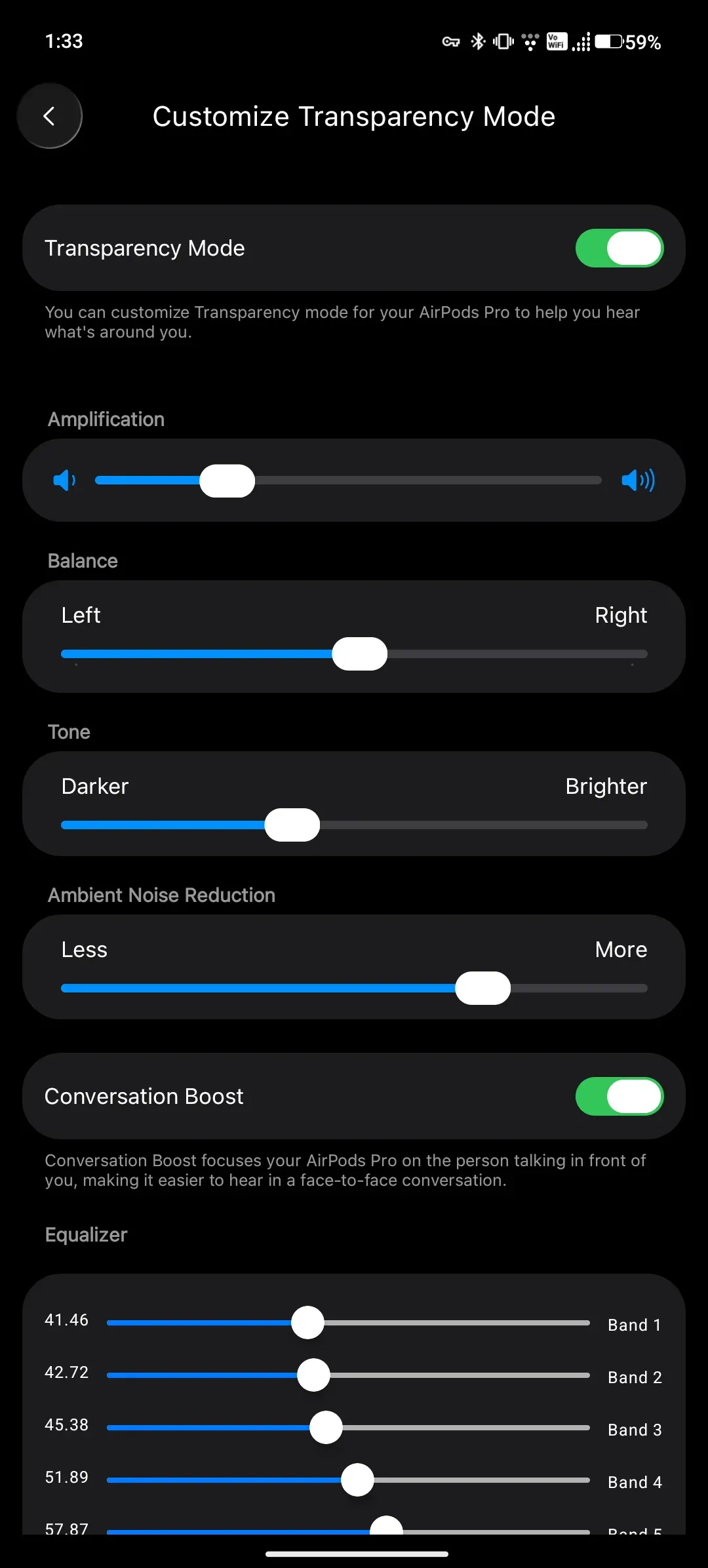
- Transparency mode customization Transparency mode can be customized with amplification, balance, tone, ambient noise reduction, conversation boost and an equalizer. This feature needs VendorID spoofing on Android, which requires root, and the project labels it use at your own risk. It is planned but not yet implemented on Linux.
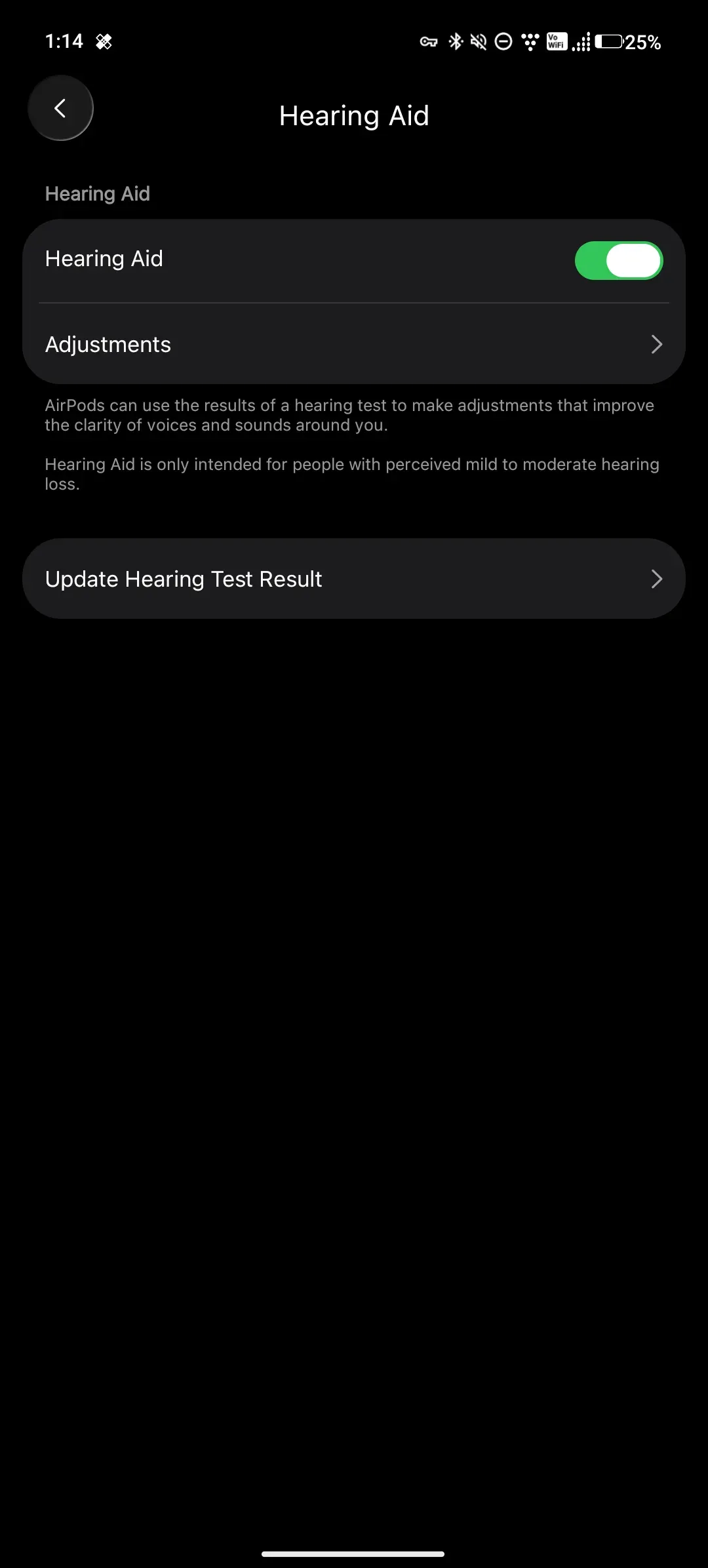
- Hearing aid Hearing aid settings, including entering an audiogram result, can be configured from Android when VendorID spoofing is active. The app does not provide a way to take a hearing test, and the README points to using an existing audiogram instead. The in-app text states that the hearing aid feature is intended for people with perceived mild to moderate hearing loss.
- Loud sound reduction Loud sound reduction is available on Android with VendorID spoofing and is planned for Linux. The README lists it under the general settings that need the spoofed VendorID. It reduces exposure to loud environmental noise in Transparency and Adaptive modes.
- VendorID spoofing When the Bluetooth Device ID profile reports Apple's vendor ID, AirPods unlock additional features. On Android this is the act as Apple device setting, shown only when Xposed is available and the LibrePods module is enabled. On Linux it is set by adding a DeviceID line to
/etc/bluetooth/main.conf. - Multi-device connectivity With VendorID spoofing, up to two devices can be connected to the AirPods at the same time for audio and control. Apple devices show the same takeover notification as they would for another Apple device, and Android shows a popup when the other device takes over. The project marks this as use at your own risk on both platforms.
- Automatic connection A setting makes the AirPods try to connect to the current device automatically; otherwise they reconnect only to the last connected device. Automatic connection is marked as implemented on Android and Linux.
- Experimental features Heart rate monitoring and an in-app recorder that uses the AirPods microphone without switching to the headset profile are available in builds of the
android/rewritebranch. High quality two-way audio for other apps might need root, if it is possible at all. Head-tracked spatial audio and Find My integration are marked as unknown, and stereo spatialization is out of scope. - Android installation options Users on a supported device and OS combination can install from Google Play. Devices that need the Xposed workaround must use the APK or module ZIP from GitHub releases. The README warns not to install the Play Store version together with the root module, because of a signature mismatch.
- Linux builds The Linux app is distributed as an AppImage or executable from a pre-release and from GitHub Actions artifacts of the Rust rewrite. The older Qt version also shipped
librepods-ctlfor switching noise control modes from scripts, and a separate Python script for hearing aid settings. Its README documents AVRCP configuration for PipeWire with WirePlumber and for PulseAudio. - Project channels The project uses GitHub issues and Discussions and a Discord server linked from the README. Support is possible through GitHub Sponsors and Open Collective, and supporters can request a code for the Play in-app purchase by email according to the release notes.
Where LibrePods fits
Using AirPods Pro with an Android phone without root
On ColorOS or OxygenOS 16, realme UI 7.0 or a Pixel on Android 16 QPR3 with the latest Google Play system update, the Android README states that most features work without root. The app is installed from Google Play or as the FOSS APK from GitHub releases, and the AirPods are paired through Android's Bluetooth settings. Listening modes, ear detection, battery status and press-and-hold settings are then available, with some features behind an in-app purchase on the Play version.
Running LibrePods on other Android devices with Xposed
On devices outside that list, LibrePods needs root and Xposed to work around the Bluetooth stack bug tracked in the Android issue tracker. The README asks users to install the APK or ZIP from GitHub releases, set the correct scope in LSPosed or Vector, check that no root-hiding module blocks the hook on the Bluetooth app, and restart the phone. It warns that the workaround is not guaranteed to work on all devices.
Unlocking accessibility and hearing features
Transparency mode customization, loud sound reduction, hearing aid settings and multi-device connectivity need VendorID spoofing, which on Android always requires root and the Xposed module. With the act as Apple device setting enabled, an existing audiogram can be entered and transparency parameters adjusted. The project marks these features as use at your own risk.
Integrating AirPods status into the Android system
The optional root module installs LibrePods as a system app with privileged Bluetooth permissions. This shows AirPods battery status in the system settings and widgets, shows an AirPods icon in the system settings when Xposed is also present, and switches audio to the phone speakers when the AirPods are not worn. The Play Store version should not be installed alongside it.
Controlling AirPods from a Linux desktop
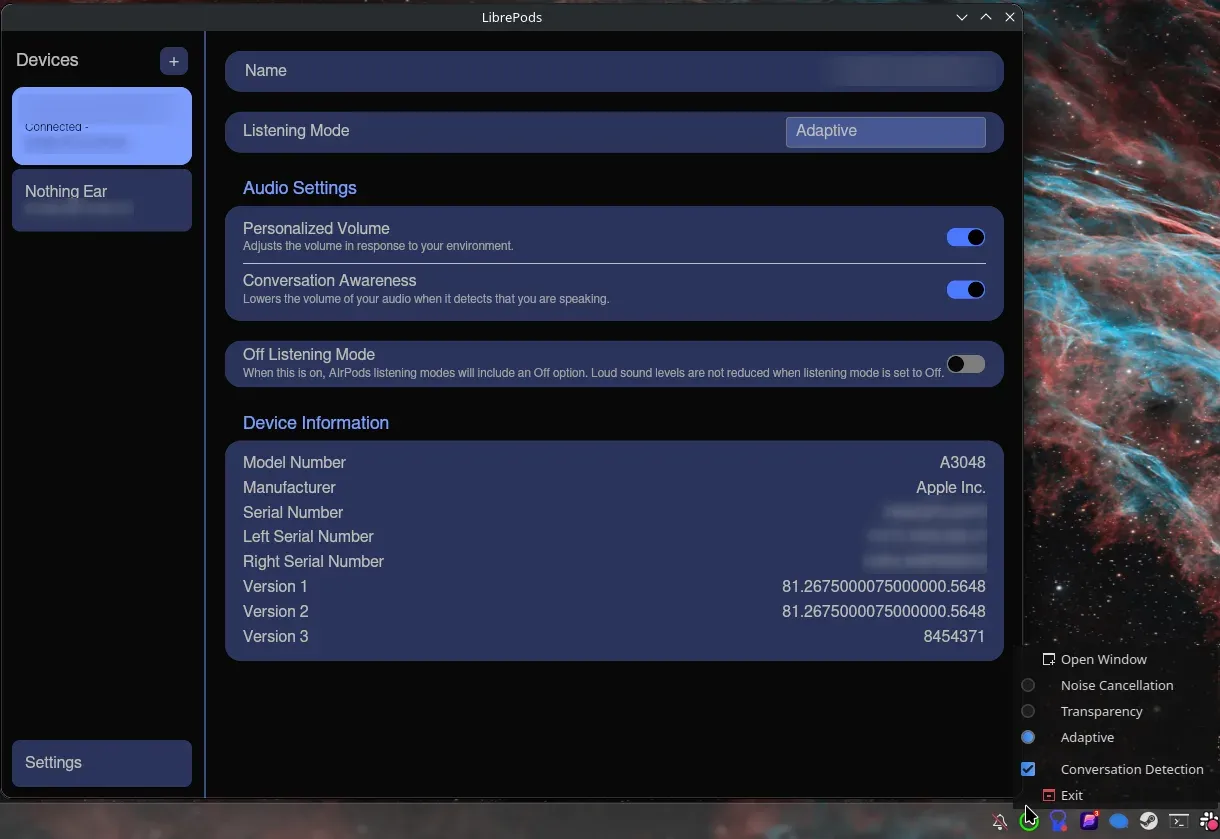
On Linux, the Rust rewrite is downloaded as an AppImage or binary from a pre-release or from CI artifacts. It shows connected AirPods, listening mode, personalized volume, conversation awareness, the Off listening mode and device information, with a tray menu for noise control. For hearing features, the README documents adding DeviceID = bluetooth:004C:0000:0000 to /etc/bluetooth/main.conf and restarting the Bluetooth service, which may require re-pairing.
Switching AirPods between an Android phone and an Apple device
With VendorID spoofing, AirPods can stay connected to two devices for audio and control. When Android takes over, the Apple device shows the same notification it shows for another Apple device, and Android shows a popup when the other device takes the AirPods back. This mode is limited to two devices and is marked as use at your own risk.
Reviews of LibrePods
Be the first to share your experience with LibrePods.
Write a review
Loading review form…
Found LibrePods useful? Upvote it todayYour vote helps other IT teams find it in the daily ranking.