
What is PancakeSlicer?
PancakeSlicer is a slicer for fused-filament 3D printers whose main goal, according to its README, is accessible non-planar slicing: toolpaths in which some or all layers follow curved or tilted surfaces instead of flat horizontal planes. It is developed in the ZimengXiong/PancakeSlicer repository on GitHub, which was created in May 2026, and is published under the GNU Affero General Public License v3. The project site pancake.cooking describes it in one line as a self-hostable, non-planar slicer and links to a public browser demo; the README also links a video explainer and a Discord server.
The slicing engine is built on top of the C++ engine of OrcaSlicer, which the README says makes it possible to merge slicing improvements from upstream. Around it, PancakeSlicer adds a service written in Go that manages projects, 3D models, drafts, printer profiles, preferences and send history, and a user interface built for the web with React, three.js for the 3D viewport and CodeMirror for G-code editing. The Go service starts slicing engines on demand as isolated child processes, each with its own working directory, runs at most two at the same time by default and streams progress to the browser over Server-Sent Events. The README explains that running the engine inside the Go process was dropped because of crash risks, and that the child-process design adds about 0.2 seconds per slice on average.
There are two ways to run it. Desktop builds for Windows, macOS and Linux are attached to each GitHub release and package the same web interface in Electron. For self-hosting, a single container holds the web UI, the Go service and the headless engine; the README recommends the Compose file in the deploy folder, and the image is published as zimengxiong/pancakeslicer on Docker Hub and as ghcr.io/zimengxiong/pancakeslicer, for amd64 and arm64. A self-hosted instance gives a makerspace or home lab one central slicer with one set of profiles that people open from a browser, including on a tablet, and it can send sliced jobs to printers on the local network.
The current release is PancakeSlicer 0.5.4, published on November 17, 2026. Releases are frequent: twelve versions from 0.4.1 to 0.5.4 were published between November 9 and November 17, 2026, and the release entries carry build artifacts but no written release notes. Each release ships Windows x64 installer and zip, macOS dmg and zip for Apple silicon and Intel, Linux deb, AppImage and tar.gz packages for x64 and arm64, a source archive, and matching container tags. The macOS app is not signed yet, so the README gives an xattr command to remove the quarantine attribute before the first launch.
The README is explicit about scope and risk. Non-planar printing is labelled experimental, with a caution that even listed printers could be permanently damaged, and users are asked to review the G-code preview and to print non-planar parts under supervision. Every print uses a single extruder, 3MF project import is deliberately not supported because 3MF files bring their own printer and filament profiles, and multiple plates, 3MF export and preset export are implemented on a best-effort basis. A 5-axis branch shown at Formnext is work in progress outside the release builds. On iThub, modelling tools such as FreeCAD and SolidCraft cover the design step before slicing.
Key capabilities
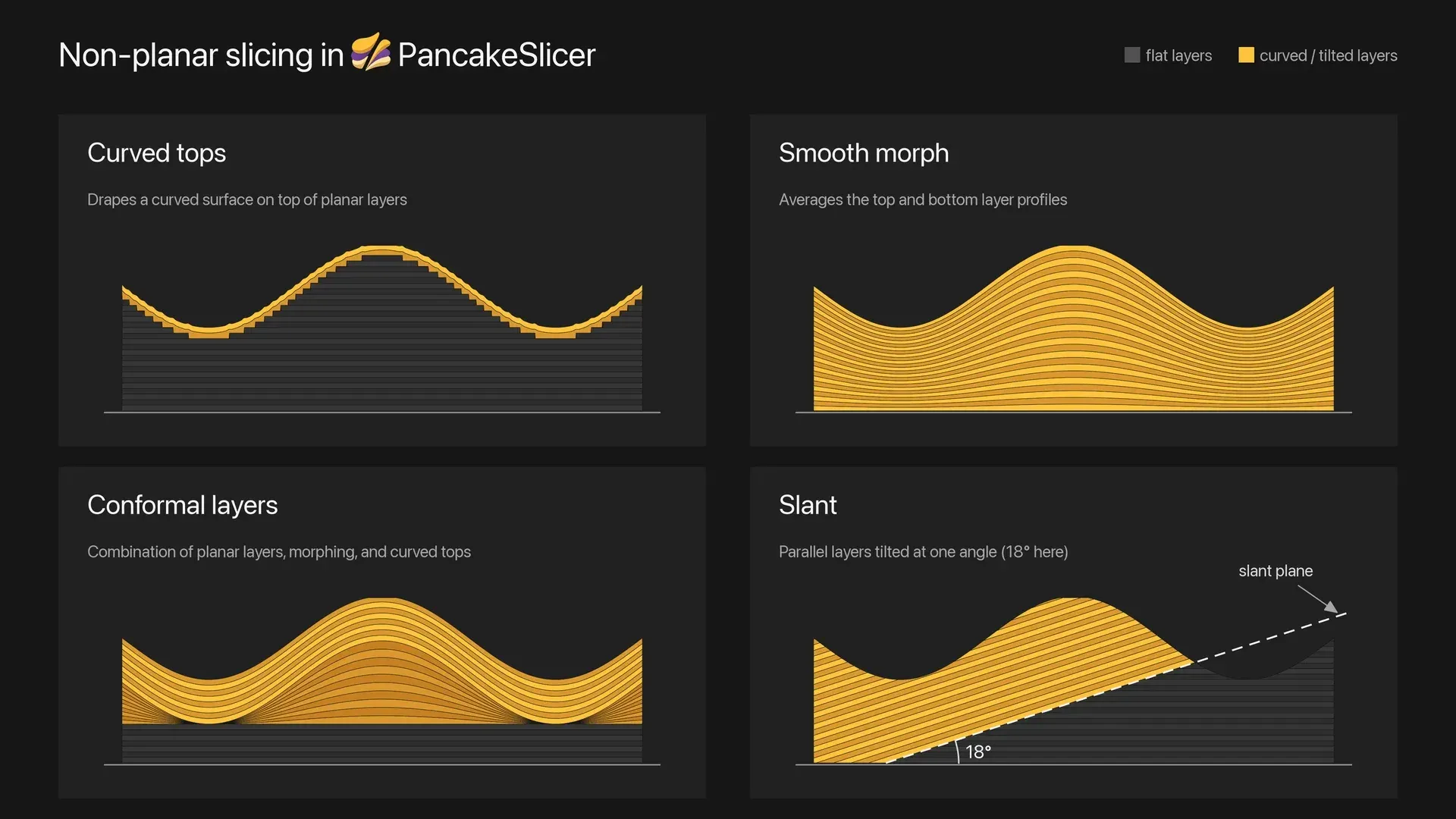
- Four non-planar slicing methods The project diagram lists Curved tops, which drapes a curved surface over planar layers; Smooth morph, which blends the top and bottom layer profiles; Conformal layers, a combination of planar layers, morphing and curved tops; and Slant, which prints parallel layers tilted at one angle, for example 18 degrees. Settings such as maximum curved-top angle, height and shell count appear in the print settings panel. All four methods can be tried in the public demo.
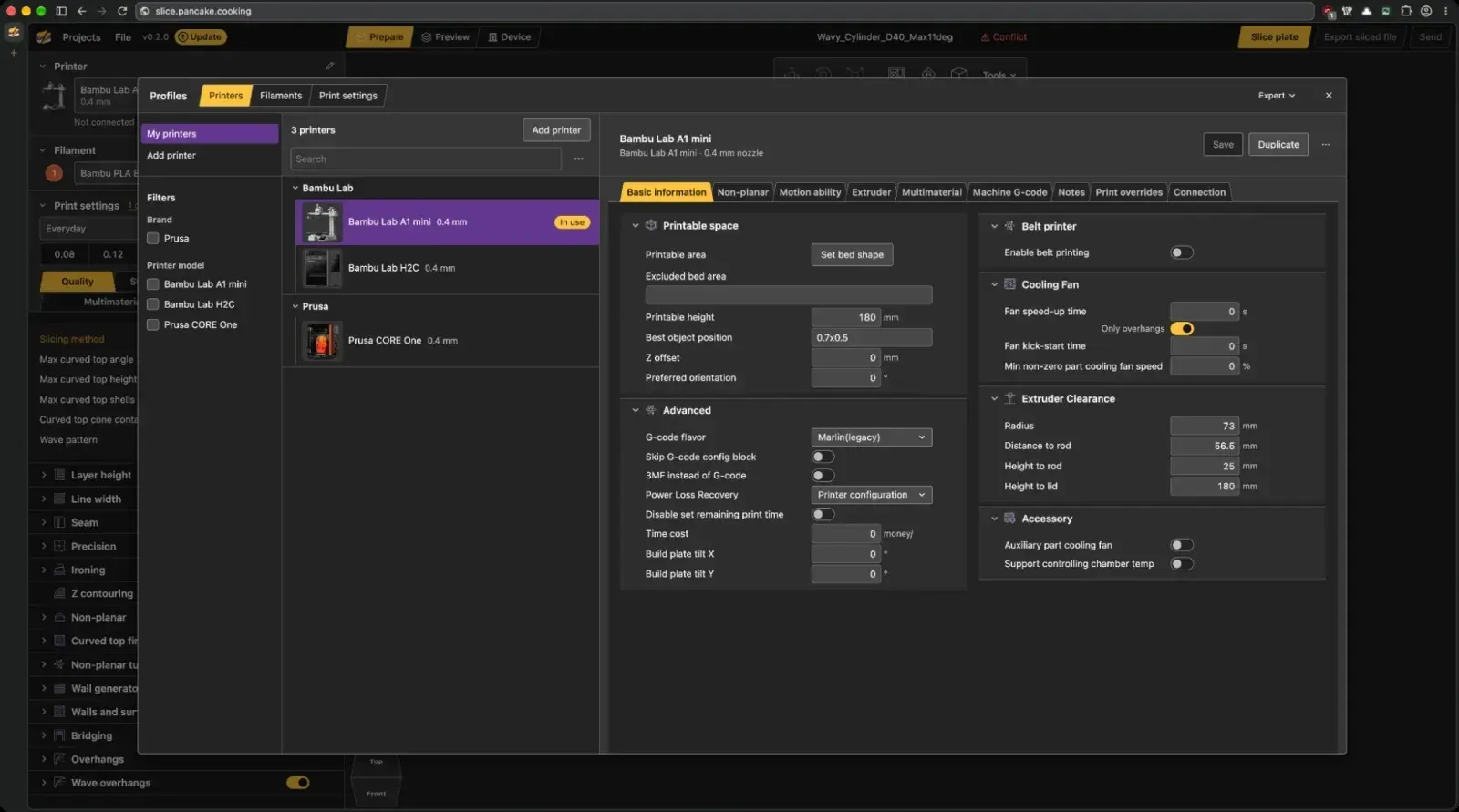
- Collision checks against print-head models For printers in the README compatibility table, non-planar paths are checked for collisions against a model of that printer's print head. Printers outside the table can still be sliced, but they are checked against a generic, oversized head, which the README says may limit how non-planar the result can be and may be inaccurate. Printer settings include extruder clearance values such as radius, distance to rod, height to rod and height to lid.
- Printer compatibility list Listed printers with curved tops include Bambu Lab A1, A1 mini, A2L, P1P, P1S, P2S, X1, X1 Carbon, X1E and H2S; Prusa MK4, MK4S and CORE One; Creality Ender-3 V3 variants, K1 and K2 models; Voron 0.1, 2.4, Trident and Switchwire; RatRig V-Core 3 and 4; Sovol SV06 and SV08 models; Anycubic Kobra 2 and 3 models; Elegoo Neptune 4 models; Flashforge Adventurer 5M, AD5X, Creator 5 and Guider4 models; and Qidi Q1 Pro and X-Max 3. The dual-nozzle Bambu Lab H2D, H2D Pro, H2C and X2D and the Prusa MINI and MK3S are marked very limited and not recommended because of nozzle or probe clearance.
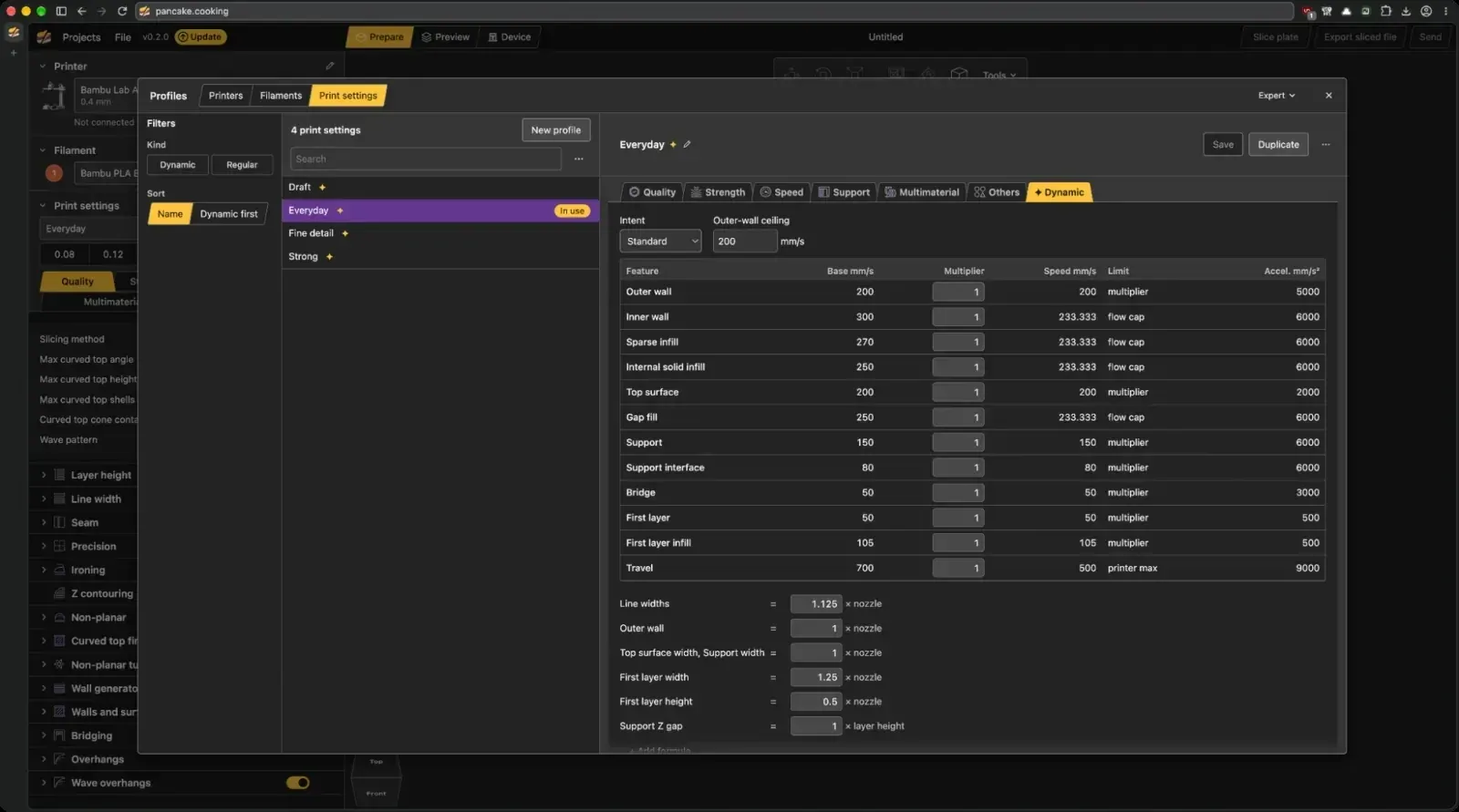
- Dynamic print profiles PancakeSlicer ships four print profiles by default: Draft, Everyday, Fine Detail and Strong. They are not tied to one printer, nozzle or layer height; values such as line widths are calculated from the nozzle size and layer height, and printer-specific overrides cap values such as speed. The profile editor shows per-feature base speeds, multipliers, the resulting speed and its limit, and formulas such as line width as a multiple of the nozzle diameter.
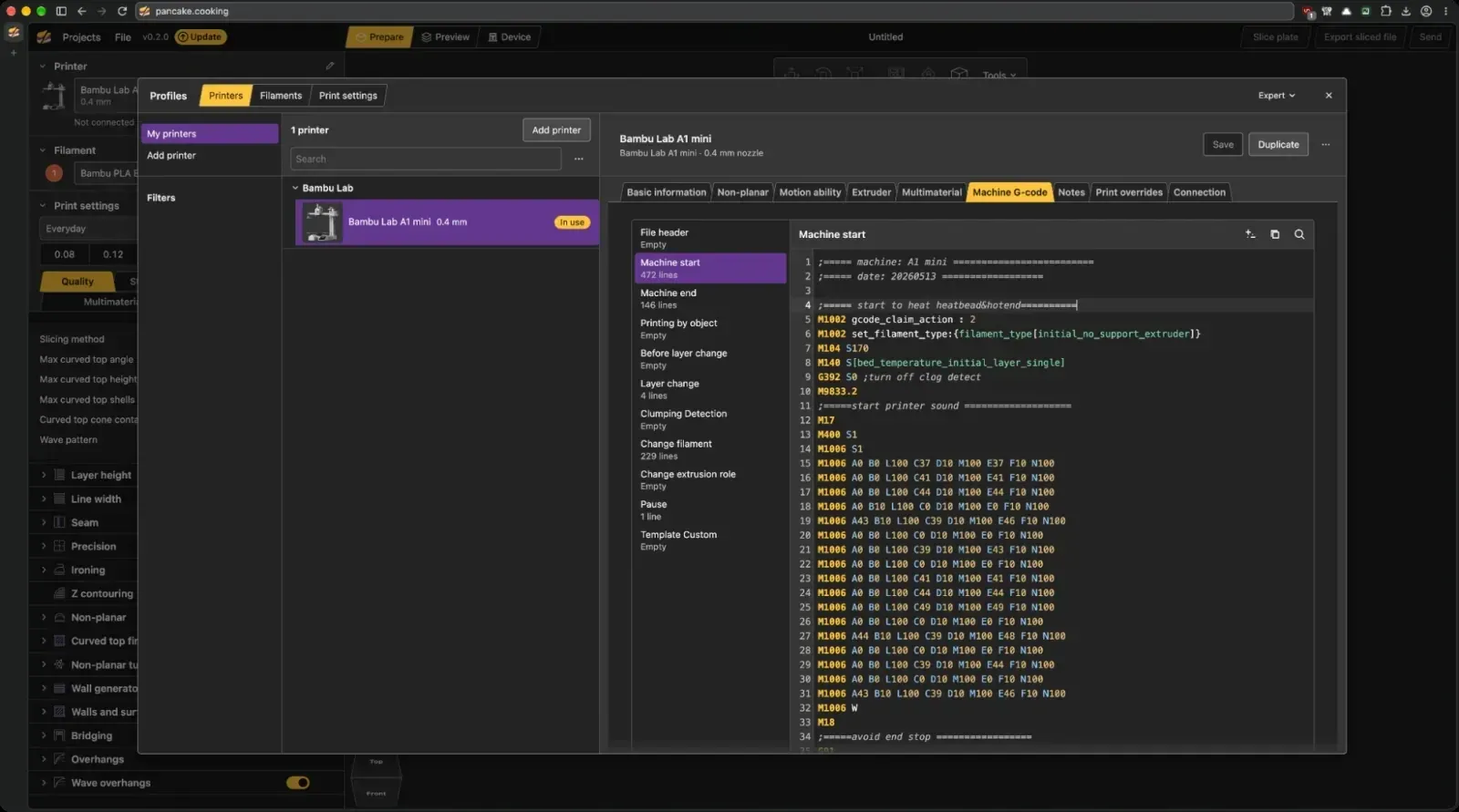
- Central library for printers, filaments and profiles A single Profiles dialog manages printers, filaments and print settings, with filters by brand and printer model. Printer entries have tabs for basic information, non-planar settings, motion ability, extruder, multimaterial, machine G-code, notes, print overrides and connection. On a self-hosted instance this library is shared by everyone who uses that server, so profiles do not need to be synchronised between computers.
- G-code editor Machine start, end, layer-change, filament-change and other custom G-code blocks are edited in a code editor with syntax highlighting, line numbers and search, and the text areas can be resized. The README contrasts this with the fixed-size text boxes of slicers built on wxWidgets and notes that standard web behaviour provides undo and redo, Escape to close dialogs and consistent Tab navigation.
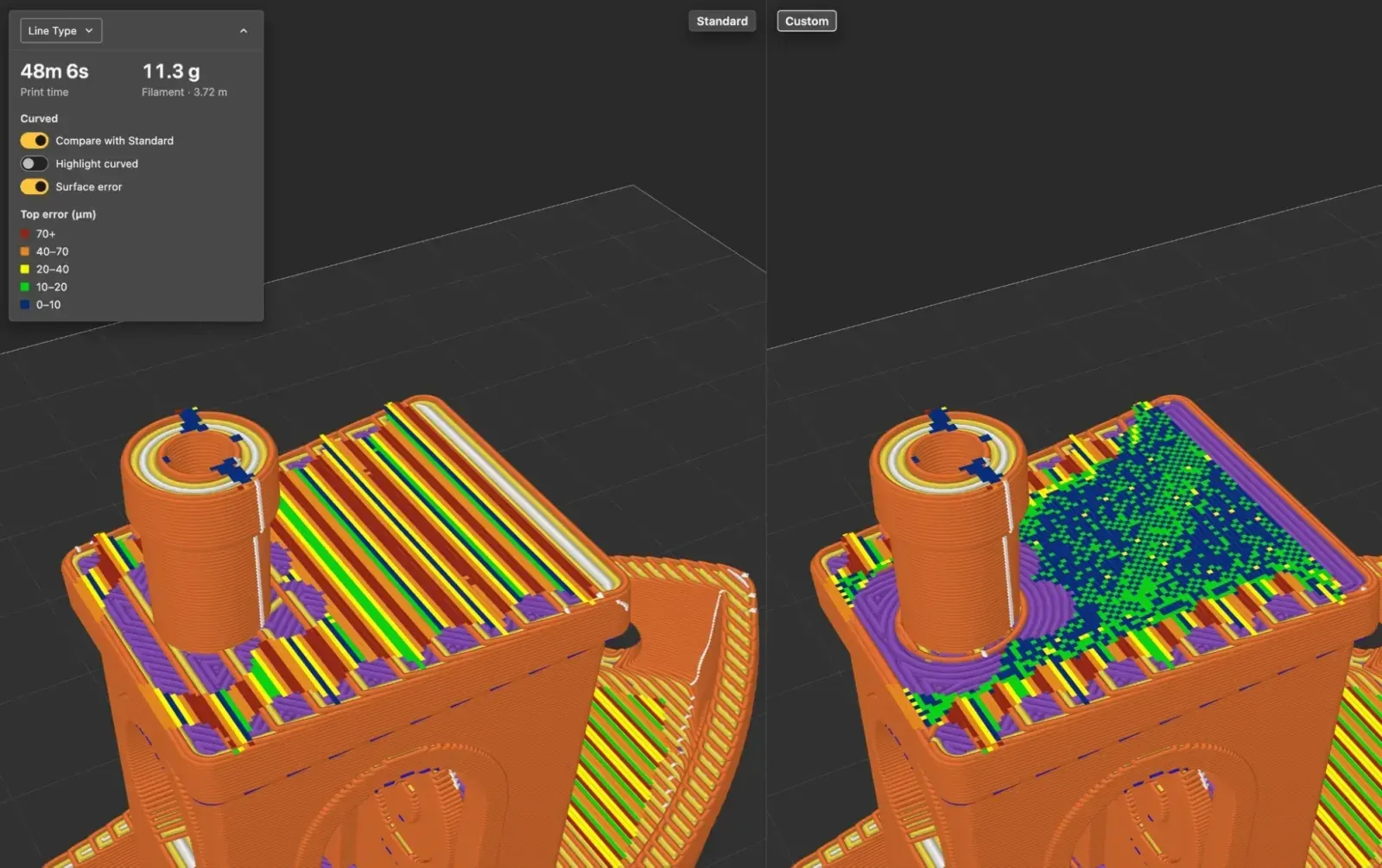
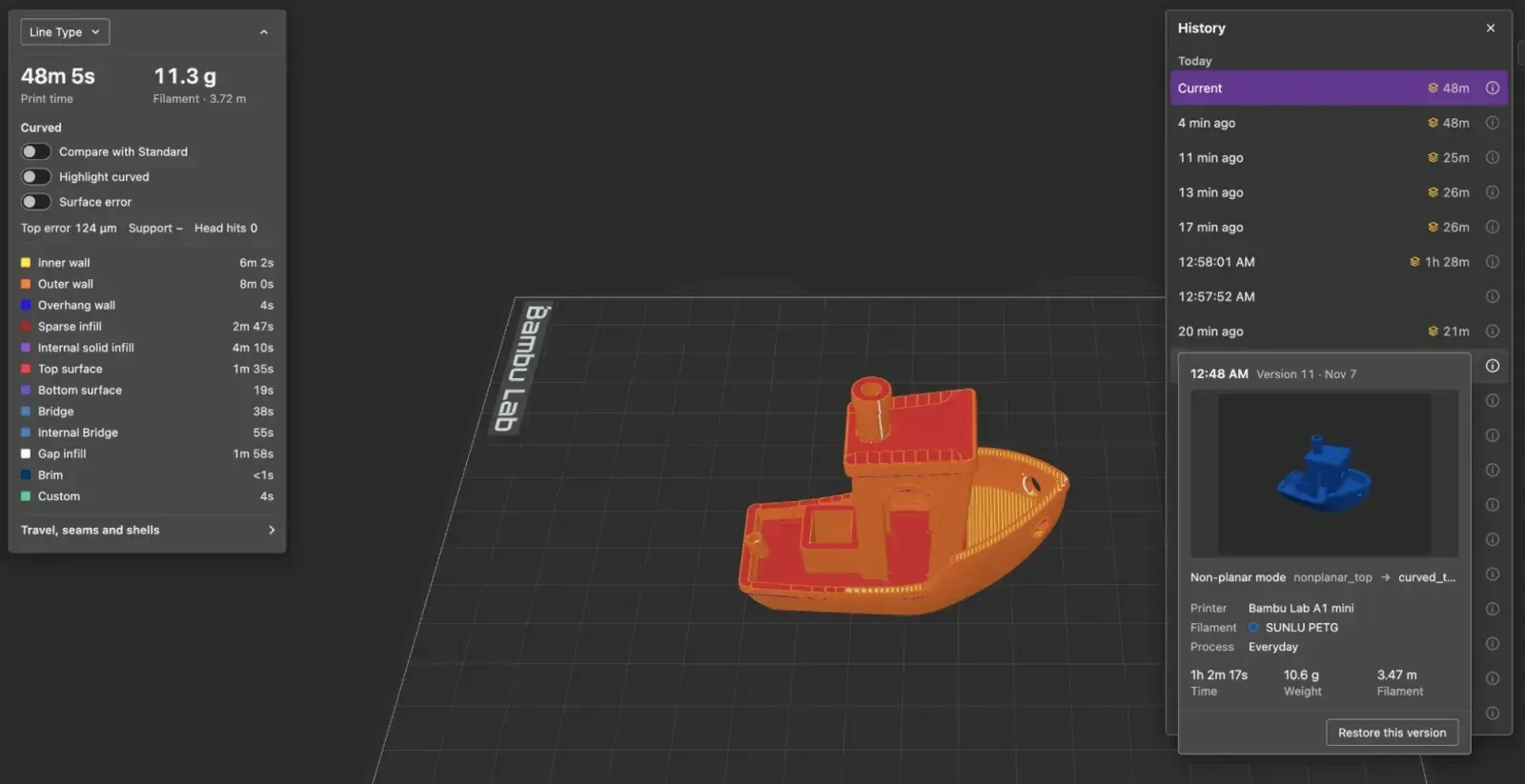
- Side-by-side comparison with surface error A sliced plate can be compared with a standard planar slice in two synchronised viewports. A surface error overlay colours the top surface by estimated error in micrometres, in bands from 0 to 10 up to 70 and above, and the panel shows print time, filament weight and length. A highlight option marks the curved parts of the toolpath.
- Version history Each project keeps a history of slices with timestamps, print time, printer, filament, process profile and non-planar mode. A previous version can be previewed and brought back with a Restore this version button.
- Sending to printers Printers are connected from the Device view and sliced files are sent with a Send button. The source code supports Bambu Lab printers in LAN mode by IP address and serial number, PrusaLink, OctoPrint, Moonraker for Klipper printers, Duet, Elegoo Link for Elegoo Centauri printers and Flashforge. The README author describes running Bambu Lab printers in LAN Only mode with PancakeSlicer instead of Bambu Connect.
- Output files The result of a slice is exported as a G-code file through Export sliced file, with the G-code flavour set per printer. A printer option can produce 3MF instead of G-code, and exporting projects as 3MF is listed in the README as implemented on a best-effort basis. 3MF project import is not supported.
- Model import Models are added from local files or from a link; the URL importer recognises STL, OBJ, STEP and AMF content and has dedicated handling for Printables pages. For some model sites that require a sign-in or block automatic downloads, the importer asks the user to download the file manually and drop it into the window.
- Desktop builds Version 0.5.4 is available as a Windows x64 installer and zip, macOS dmg and zip for arm64 and x64, and Linux deb, AppImage and tar.gz for x64 and arm64, from the release page. The desktop app is built with Electron, which the README says was chosen so the same application code runs everywhere. macOS builds are unsigned for now.
- Docker self-hosting The official docker-compose.yml starts one container on port 6868 with a named volume at
/datafor projects, profiles, printers, preferences and jobs. It runs as an unprivileged user with all capabilities dropped, no-new-privileges and an 8 GB memory limit. A second Compose file adds Caddy with automatic HTTPS for a domain set inPANCAKE_DOMAIN. - Server configuration Environment variables control the service:
ORCA_WEB_MAX_JOBSsets concurrent slices (default 2, further jobs queue),ORCA_WEB_PRINTER_NETWORKlimits printer connections to private LAN ranges, a list of CIDRs and host names, or turns them off,ORCA_WEB_MAX_UPLOAD_MBsets the upload limit (default 512 MB) andPANCAKE_STAGE_CACHE_MAX_MBcaps the engine cache. Optional settings cover a disk quota, trusted proxies and an optional/metricsendpoint. - Access token Setting
ORCA_WEB_BEARER_TOKENrequires a token for changes, which the Compose file marks as recommended when the instance is exposed. The browser stores proof of the token in an HTTP-only, same-site cookie, and API clients can send it as a bearer header. The README author describes placing an instance behind an OIDC-protected reverse proxy on a personal domain; OIDC is not built into PancakeSlicer. - Public demo and source archives A hosted demo runs the web interface for trying the slicing methods and profile tools without installing anything. Each release includes a full source archive, and the container image bundles the source archive that matches its build.
Where PancakeSlicer fits
Curved top surfaces on functional parts
The Curved tops method keeps the body of a part in flat layers and replaces only the top shells with a surface that follows the model, which removes the visible stair-stepping on gently sloped or domed tops. The print settings expose the maximum curved-top angle, height and number of shells, and the comparison view shows the estimated top-surface error against a planar slice before anything is printed.
Fully curved and tilted layers
Smooth morph, Conformal layers and Slant change the layer shape through more of the part, from an average of the top and bottom profiles to parallel layers tilted at a fixed angle. The README describes these modes as experimental and asks users to review the G-code preview, use collision-checked printer models where possible and supervise non-planar prints, noting that Cartesian printers make that easier to watch.
One shared slicer for a makerspace or home lab
A single Docker instance holds the printers, filaments and profiles for a group. Members open it from a browser on a computer or tablet, slice and send jobs to printers on the LAN, without each person installing a slicer or logging in to a printer vendor account. Access can be limited with the bearer token, and the proxy Compose file adds HTTPS through Caddy.
Remote access to LAN-only printers
Because the server talks to printers locally through Bambu Lab LAN mode, PrusaLink, OctoPrint, Moonraker, Duet, Elegoo Link or Flashforge, putting the web interface behind a reverse proxy gives remote access to all connected printers through one address. The ORCA_WEB_PRINTER_NETWORK setting decides which networks the server may contact, and PancakeSlicer refuses to start a new job on a printer that reports it is printing, paused or busy.
Fewer, reusable print profiles
Instead of one profile per printer, nozzle and layer height, the four dynamic profiles carry the intent, such as Draft or Strong, and recalculate line widths and other dependent values for the selected nozzle and layer height. Printer-specific overrides keep speeds within each machine's limits, and new profiles can be created from the same formula-based editor.
Comparing and rolling back slices
Side-by-side slicing shows a standard and a custom slice of the same plate with time, filament use and surface error, and the version history records each slice with its printer, filament, profile and non-planar mode so an earlier result can be restored. This makes it possible to compare non-planar settings on one model without managing separate project files.
Reviews of PancakeSlicer
Be the first to share your experience with PancakeSlicer.
Write a review
Loading review form…
Found PancakeSlicer useful? Upvote it todayYour vote helps other IT teams find it in the daily ranking.