What is CloakBrowser?
CloakBrowser is a custom Chromium build for browser automation, web scraping and AI agents, controlled through thin wrapper libraries that keep the standard Playwright and Puppeteer APIs. It is developed by CloakHQ in the CloakHQ/CloakBrowser repository, with plans and license keys on cloakbrowser.dev. According to the README, browser fingerprint values such as canvas, WebGL, audio, fonts, GPU, screen properties, WebRTC, network timing and automation signals are changed in the Chromium C++ source and compiled into the binary, rather than set through JavaScript injection or launch flags; the README for the current release counts 87 such patches, while the website's feature list names 73. The project describes the result as a drop-in replacement: launch() returns an ordinary Playwright Browser, so existing code changes only in its import and launch call. The repository was created in February 2026.
The repository contains the wrappers, not the browser source. The Python package cloakbrowser on PyPI (Python 3.9 or newer) and the npm package of the same name (Node.js 20.19 or 22.12 and newer) are MIT-licensed, as is a community-maintained .NET client on NuGet built on Microsoft.Playwright. The browser itself is covered by a separate CloakBrowser Binary License (version 1.3, July 2026): it states that the binary is built on Chromium and components of ungoogled-chromium, and that CloakHQ's build configuration, patches and compiled releases are its proprietary property. The license forbids redistributing, modifying or reverse engineering the binary and requires a separate OEM/SaaS license to offer browser functionality to third parties, while internal use, including Docker images and CI runners, is allowed.
Binaries for Linux x86_64 and ARM64, macOS on Apple Silicon and Intel, and Windows x86_64 are downloaded by the wrapper on first launch (about 200 MB, cached in ~/.cloakbrowser) from cloakbrowser.dev after a license key check, and verified against an Ed25519-signed checksum manifest. Since wrapper 0.7.0 (November 1, 2026) every launch needs a key: a free key obtained with an email address gives the latest build with one concurrent session, and paid plans raise the number of sessions. The older keyless v146 build (v145 on macOS) remains available through wrapper versions below 0.7 and is no longer updated. The binary license states that the binary contains no telemetry beyond the communication needed for license validation and for counting concurrent sessions.
The latest wrapper release is 0.7.2, published on PyPI and npm on November 10, 2026; it caps Playwright below 1.65 after Playwright 1.65.0 changed internals the wrapper relies on. The latest GitHub release is chromium-v156.0.8078.47.1-pro, published on November 3, 2026, which moves the Stable build to Chromium 156.0.8078.47.1 on all platforms; it contains the signed checksum manifest, while the archives themselves are served from cloakbrowser.dev. Its notes list license connection retries over different routes, window and viewport sizes matching a maximized Chrome window, WebRTC through SOCKS5 proxies with geoip=True and a new --fingerprint-max-touch-points flag.
The README and website publish the project's own results against public bot-detection and fingerprinting test pages; these are claims by the project, and its FAQ adds that detection services may eventually catch up with any patch set. The README states that CloakBrowser does not solve CAPTCHAs and has no built-in proxy rotation. The binary license prohibits, among other things, unauthorized access to financial, healthcare or government authentication systems, credential stuffing, automated account creation and unauthorized data collection. Users are responsible for complying with the terms of service of the websites they access and with applicable law. Related listings on iThub include Camoufox, an open-source Firefox build for the same kind of work, and the headless browsers Obscura and Lightpanda.
Key capabilities
- Python package
pip install cloakbrowserinstalls the wrapper, andpip install 'cloakbrowser[geoip]'adds the GeoIP lookup. The package requires Python 3.9 or newer and Playwright from 1.53 up to, but not including, 1.65.launch(),launch_async(),launch_context()andlaunch_persistent_context()return standard Playwright objects, and Playwright's ownplaywright install chromiumis not needed. - JavaScript and TypeScript package
npm install cloakbrowser playwright-coresets up the Playwright variant andnpm install cloakbrowser puppeteer-corethe Puppeteer variant, imported fromcloakbrowser/puppeteer. The package ships type definitions and requires Node.js 20.19 or 22.12 and newer. The README notes that the Playwright wrapper is the recommended one, because Puppeteer's CDP usage exposes more automation signals. - .NET client
dotnet add package CloakBrowserinstalls a community-maintained C# client for .NET 8 built on Microsoft.Playwright, with the same launch options and acloakbrowsercommand-line tool. Its .NET README documents the API. - Patched Chromium binary The README lists builds of Chromium 156.0.8078.47.1 for Linux x86_64, Linux ARM64, macOS ARM64 and x86_64, and Windows x86_64, with the same build for free and paid keys. The wrapper downloads the build for the current platform, caches it and checks it against a pinned Ed25519 signature before extraction. The macOS binary is ad-hoc signed, so Gatekeeper asks for confirmation on the first launch.
- License keys
cloakbrowser logineither requests a free key by email or saves an existing one to~/.cloakbrowser/license.key, readable only by the user. In CI, Docker and other runs without a terminal, the key comes fromCLOAKBROWSER_LICENSE_KEYor alicense_keyargument. A license denial, such as a full session limit, is reported asCloakBrowserLicenseError. - Fingerprint seeds Each launch generates a random fingerprint seed from which the binary derives GPU, hardware concurrency, device memory, screen size and the other spoofed values as one set.
--fingerprint=<seed>makes the identity repeatable, and individual flags such as--fingerprint-gpu-vendor,--fingerprint-hardware-concurrencyand--fingerprint-device-memoryoverride single values. The fingerprint management section describes each flag. - Platform personas On Linux and Windows the wrapper presents the browser as a Windows desktop, and on macOS as a Mac.
--fingerprint-platform=macosselects a macOS persona on other hosts, and the README notes that each persona needs the matching fonts installed on Linux. - Proxy, GeoIP and WebRTC settings
proxy=accepts HTTP and SOCKS5 proxies with credentials, as a URL or a Playwright-style dictionary. Withgeoip=Truethe wrapper resolves the proxy's exit IP through ipify.org or checkip.amazonaws.com, sets timezone and locale from it and passes the address to--fingerprint-webrtc-ip. The README notes that Playwright's own request client does not use SOCKS5 or credentialed HTTP proxies set on the browser. - Human-like input with humanize
humanize=Truereplaces Playwright and Puppeteer mouse, keyboard, scroll and element-read calls with versions that use curved mouse paths, per-character typing and scroll patterns, and waits for elements to be visible, enabled and stable.human_preset="careful"slows movements down, andhuman_configchanges settings for a single call. Humanize is a wrapper feature, so frameworks that connect over CDP call the patching functions fromcloakbrowser/human. - Persistent profiles and extensions
launch_persistent_context()keeps cookies, localStorage and cache in a profile folder and stores the fingerprint seed in.cloakbrowser-seed, so the same device identity returns on the next launch. Deleting that file rotates the identity.extension_pathsloads unpacked Chrome extensions. - Docker image
cloakhq/cloakbrowseris published on Docker Hub for amd64 and arm64. Since 0.7.0 it contains no binary and downloads the build on first launch with the key from-e CLOAKBROWSER_LICENSE_KEY.cloaktestruns a quick check, and Python scripts can be passed inline or mounted into the container; images are signed with Cosign. - CDP server mode
cloakservestarts a long-running browser that Playwright, Puppeteer or other tools reach over the Chrome DevTools Protocol, by default on port 9222. Connections can name a fingerprint seed to get a separate browser per seed,--keep-profileskeeps each seed's profile, and--exit-after-idlestops the server after a period without connections. APOST /fingerprint/<seed>/closerequest ends a seed's browser and releases its session. - Command-line tools
login,logout,install,info,updateandclear-cacheare available throughpython -m cloakbrowser,npx cloakbrowserand the .NET CLI.infoshows the build that will launch, the license tier, missing Linux libraries, fonts and GeoIP status, with--jsonfor machine-readable output and--proxyto show the timezone and locale a proxy would produce. - Release channels and version pins Stable is the default channel, and
CLOAKBROWSER_RELEASE_CHANNEL=previeworrelease_channel="preview"selects Preview builds where a platform has one.CLOAKBROWSER_VERSIONpins an exact Chromium build for rollback with a paid key only; a free key always gets the latest build.CLOAKBROWSER_BINARY_PATHuses a local binary andCLOAKBROWSER_AUTO_UPDATE=falseskips update checks. - Framework integration examples The repository includes examples for browser-use, Crawl4AI, Crawlee, Scrapling, Stagehand, LangChain, Selenium, undetected-chromedriver and agent-browser, plus an AWS Lambda container example. Some frameworks launch the binary directly with
ensure_binary()andget_default_stealth_args(), others connect over CDP to a browser that CloakBrowser started. - Release verification Binary release tags are GPG-signed, archives carry GitHub build attestations that
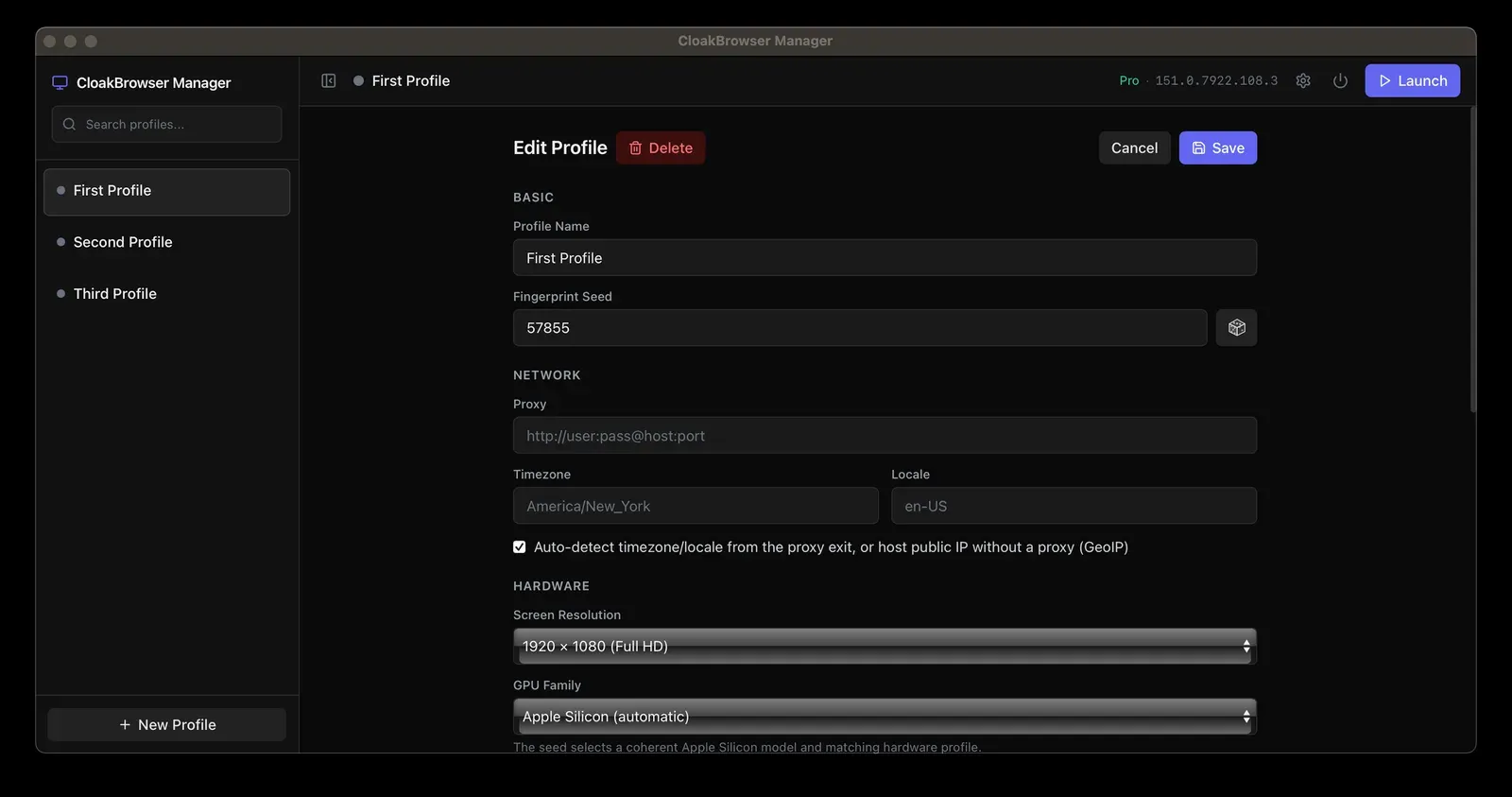
gh attestation verifychecks, and Docker images can be verified withcosign verify. The security section lists the commands and the signing key. - CloakBrowser Manager A separate, MIT-licensed profile manager runs browser profiles on the same binary, each with its own seed, proxy, timezone, locale, screen resolution and cookies. Profiles open as native windows on Windows and macOS and run in Docker with a browser-based viewer on Linux, and each running profile exposes a CDP endpoint. The same license key applies, with one running profile on a free key; the installers are unsigned during early access.
- Plans and pricing The pricing section (checked November 18, 2026) lists a free key with one session and four monthly plans with promotional prices: Solo at $19 for 5 sessions (listed regular price $29), Team at $49 for 20 ($79), Business at $199 for 200 ($249) and Scale at $499 for 2,000 concurrent sessions ($699). VAT is calculated at checkout by country. Larger fleets, a managed CloakBrowser Cloud option and prepaid browser-hour packages are offered as custom deals.
Where CloakBrowser fits
Switching an existing Playwright script to CloakBrowser
The README's migration example replaces sync_playwright().start() and pw.chromium.launch() with from cloakbrowser import launch and browser = launch(); pages, selectors and waits keep their usual calls. In Node.js, launch() from the cloakbrowser package does the same for Playwright, and cloakbrowser/puppeteer for Puppeteer. Projects that keep their own Playwright instance can call build_launch_options() and pass the result to pw.chromium.launch(), then add humanize with humanize_browser().
Running automation in Docker, CI and serverless jobs
Containers and CI runners have no terminal for the key prompt, so the key is passed as CLOAKBROWSER_LICENSE_KEY. ensure_binary() or python -m cloakbrowser install downloads the build in advance, for example during an image build, and CLOAKBROWSER_CACHE_DIR moves the cache. The repository's AWS Lambda example packages a one-shot job as a container image. The binary license permits such internal images and CI runners, but not offering the browser to third parties without an OEM/SaaS license.
Serving a browser to agent frameworks over CDP
Frameworks such as browser-use, Crawl4AI and Scrapling can connect over CDP to a browser started with launch_async(args=["--remote-debugging-port=9242"]), or to the cloakserve container on port 9222. The fingerprint patches apply to every CDP client, while humanize has to be added on the client side with patchBrowser() from cloakbrowser/human. With connect_over_cdp(), closing the client only disconnects it, so the README describes the close endpoint for ending a seed's browser and freeing its session.
Keeping a returning browser profile
For sessions that should come back with the same cookies and device identity, launch_persistent_context("./my-profile") stores the profile and its seed in one folder, and later launches reuse both. Profiles also allow Chrome extensions through extension_paths. launch_context(storage_state="state.json") is the lighter option when only cookies and localStorage need to be restored, without a profile folder.
Managing browser versions and updates
The wrapper downloads the newest Stable build by default and checks for updates unless CLOAKBROWSER_AUTO_UPDATE=false is set. When a new build changes behaviour, the README describes two ways back: pinning an older Chromium build with browser_version or CLOAKBROWSER_VERSION, which requires a paid key, or installing an older wrapper release. cloakbrowser info reports which build will actually launch, including when a Preview request falls back to Stable.
Running profiles by hand with CloakBrowser Manager
The Manager gives each profile a name, fingerprint seed, proxy, timezone, locale, screen resolution and GPU family in a desktop window, and launches it with one click. Each running profile exposes a CDP endpoint, so a Playwright or Puppeteer script can drive a window that stays visible. The use cases page lists the project's own examples, among them public price monitoring, brand verification and QA testing.
Install
pip install cloakbrowserReviews of CloakBrowser
Be the first to share your experience with CloakBrowser.
Write a review
Loading review form…
Found CloakBrowser useful? Upvote it todayYour vote helps other IT teams find it in the daily ranking.