

What is ego lite?
ego lite, styled ego (lite) on its website, is a Chromium-based desktop browser that a person and their AI agents use at the same time. It is made by Citro Labs Pte. Limited, which publishes the ego-browser agent skill, the agent plugin packages and the developer documentation in the citrolabs/ego-lite repository. An agent such as Claude Code, Codex, Cursor or OpenCode runs its browser task in a separate Space inside the browser, while the user keeps working in their own tabs and reuses the same logged-in sessions.
The browser is a free download from the official download page: a DMG for Apple Silicon and Intel Macs, and an x64 installer for Windows, which the project still labels beta. Linux is listed as planned on the public roadmap without a date. No account is required, and the app updates itself. Onboarding scans the computer for agent CLIs and writes the ego-browser skill into their skill directories, such as ~/.agents/skills and ~/.claude/skills. The skill can also be added alone with npx skills add citrolabs/ego-lite, but it still needs the app, because the app provides the ego-browser command.
Two version lines move separately. Repository release v2.2.0, published November 5, 2026, covers the skill, the SDK and the agent plugins: it merges click actionability checks into one injected call, removes fixed settle delays, stops an uncommitted navigation when goto() times out, separates default screenshot paths per run, shares one download folder across Pages and processes, and moves the npm plugin packages to the @ego-lite scope. The browser app follows its own changelog: 0.6.2.7 (November 3, 2026) keeps the source browser's default search engine during import and adds ego-browser import --data-path, while 0.6.2.8 and 0.6.2.9 were staged rollouts, the second one reverting the import changes of the first.
ego lite embeds a Node.js runtime, which the documentation says adds about 10 MB to the install. The ego-browser command talks to the real Chromium session over the Chrome DevTools Protocol and accepts one Node.js script per call, with helpers such as snapshotText(), click(), fill() and openOrReuseTab() already in scope. Each Space is a native BrowserContext with its own cookies and storage inside the same browser process. Snapshots come from the accessibility tree inside the modified engine, not from an injected page script, and ego-browser does not depend on Playwright or Puppeteer.
The repository contents are released under the MIT License. The README describes the browser itself as a separate free download, so the MIT terms apply to the skill, harness, plugins and documentation published in the repository, not automatically to the browser binary. Individuals pay nothing and bring their own model API key; a Business plan with custom pricing adds priority support and deployment terms. Outside the current scope: Linux builds, cloud or headless browser fleets, operating Electron and native desktop applications (planned), and experience accumulation, the feature that would turn successful runs into reusable site tools, which is still marked as coming soon.
ego lite screenshots
Explore the interface. Open a screenshot to view it at full size.
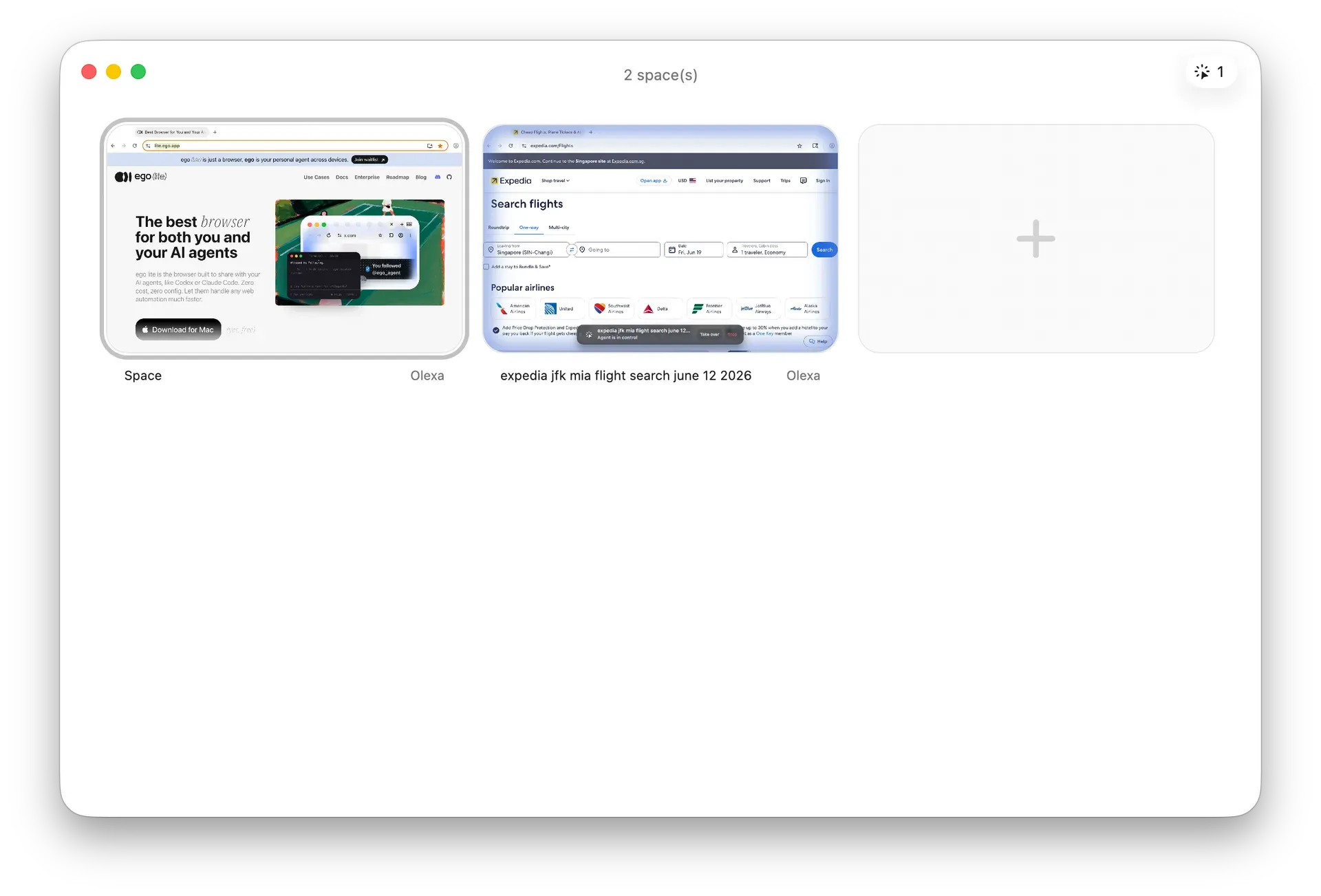
Official documentation screenshot of the Spaces overview: one Space shows the ego lite website, the other an agent searching flights on Expedia.
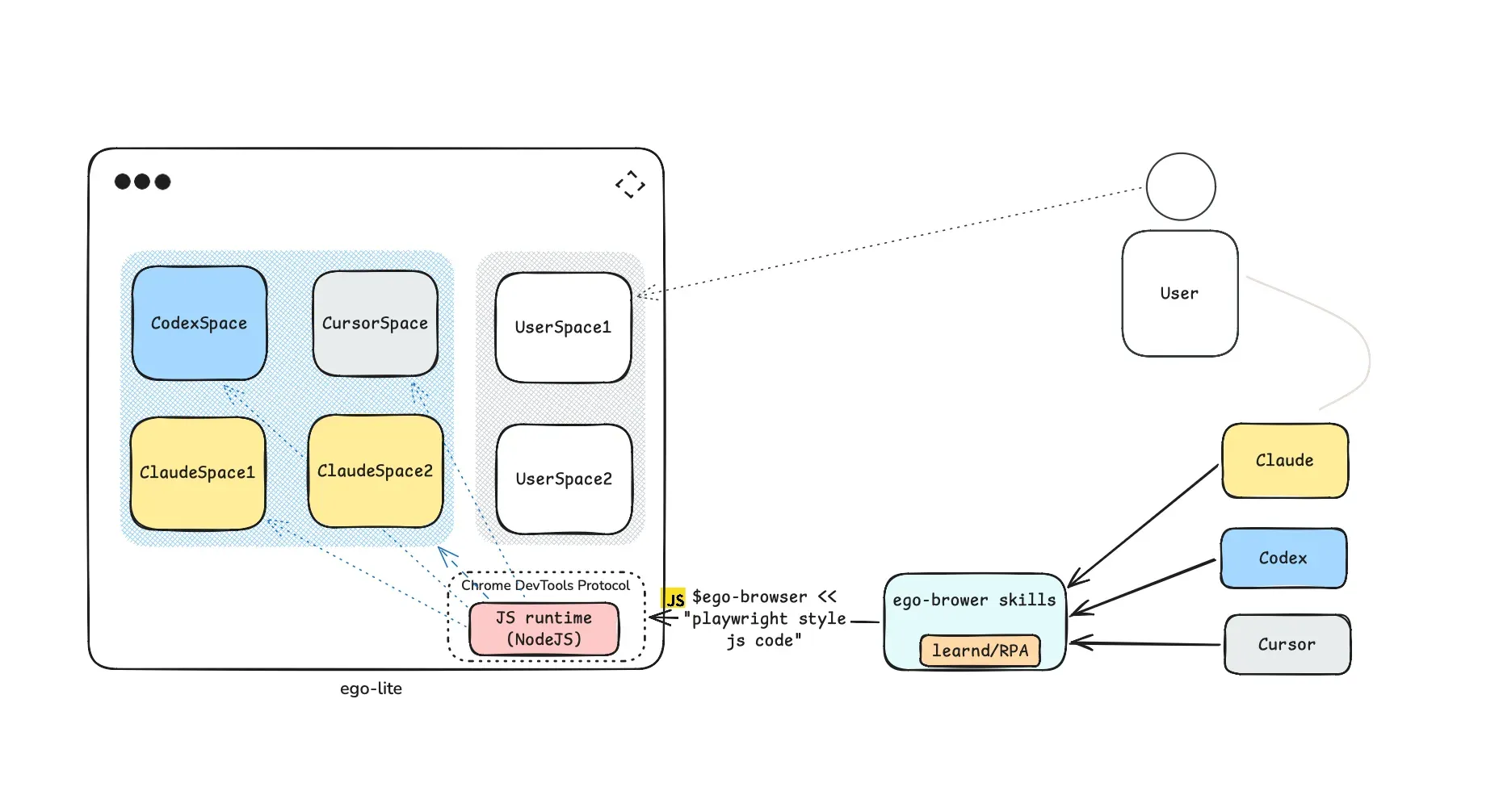
Official architecture diagram from the repository: agents send Playwright-style JavaScript through the ego-browser skill to a Node.js runtime that controls agent Spaces over CDP.
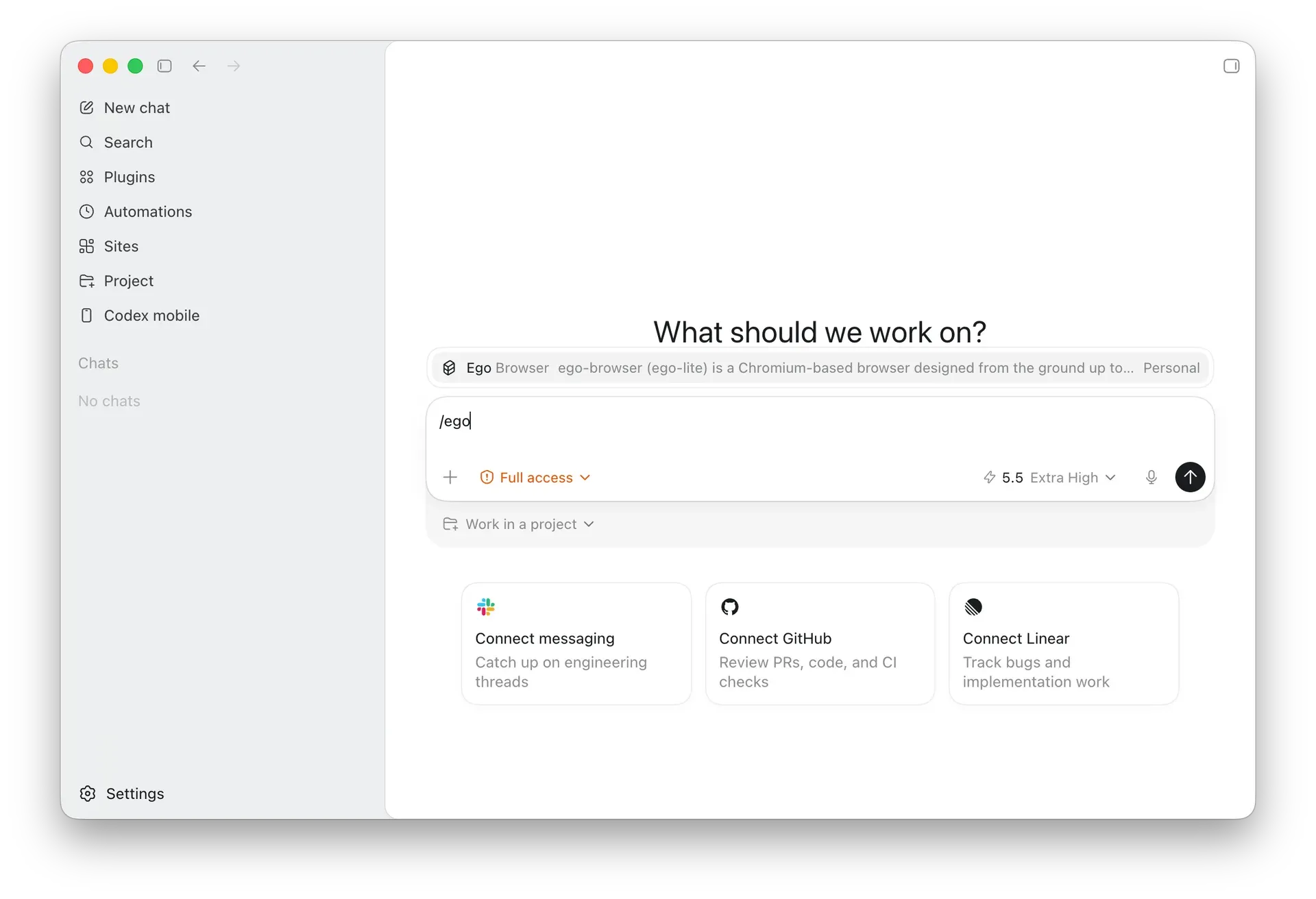
Official quick start screenshot: selecting the Ego Browser skill in Codex with the Full access permission setting.
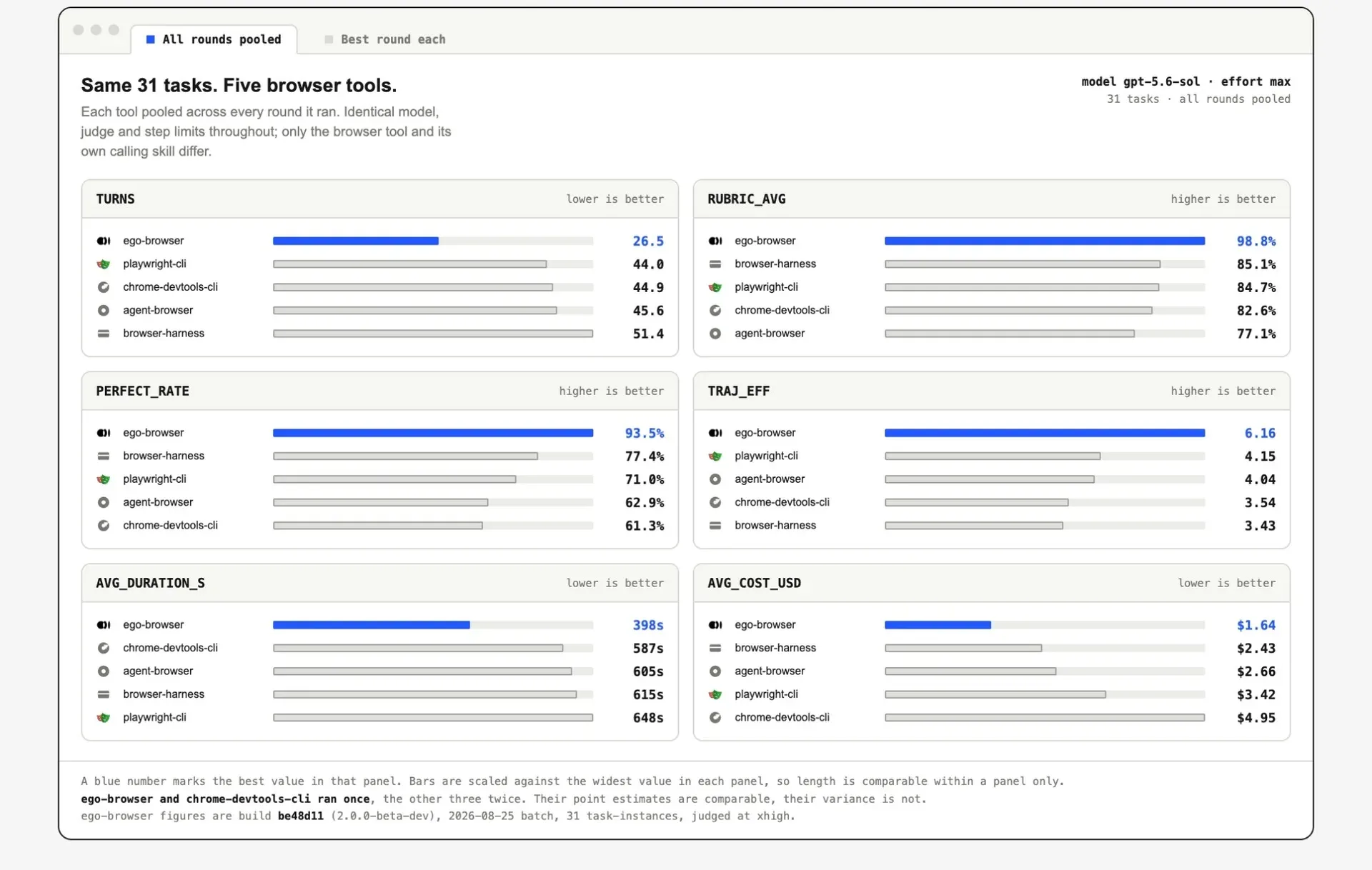
Vendor benchmark from the README: 31 tasks, same model and judge; ego-browser figures come from a 2.0.0 beta build run once.
Source: official ego lite project page.
Key capabilities
- macOS download Ego lite ships as a DMG for Apple Silicon (M1 to M4) and for Intel Macs. The landing page detects the chip and serves the matching build, and it also shows both builds side by side when detection fails behind a VPN or on a shared machine. A wrong DMG installs nothing and can be deleted.
- Windows download (beta) Windows users get an x64 installer from the same download page, marked beta. Both desktop builds update automatically in the background and apply the new version at the next launch; the toolbar update button offers Later and Restart now. Other platforms have no installer, and the install reference tells agents to stop when no build exists.
- Skill-only installation
npx skills add citrolabs/ego-liteadds just the ego-browser skill, and the first browser task then walks the user through installing the app. An agent can also be pointed atskills/ego-browser/references/install.mdin the repository. If an older app reports an unknownskillcommand,ego-browser upgradeupdates it after the user approves. - Agent plugins for ten hosts The repository packages the same skill for Claude Code, Codex, Cursor, GitHub Copilot, Grok Build, WorkBuddy, QwenWork Desktop, OpenCode, DeepSeek Harness and Pi. The OpenCode, DeepSeek Harness and Pi builds are npm packages under the
@ego-litescope. Every host needs macOS or Windows with ego lite installed and open, andego-browseron the agent's PATH. - Spaces for agent tasks Each agent task runs in a Space: an isolated BrowserContext with its own tabs, cookies and storage inside the same browser process. A Space is not a new window, a second Chrome profile, a headless browser or a cloud session. The docs report a six-way test opening blank pages at about 0.9 GB and 6 extra processes, against about 15 GB and 84 processes for separate browser instances with profile copies, and note that real costs depend on pages, extensions and concurrency.
- Watch, take over and audit The Spaces overview shows which Space has an agent running, and the user can open it, stop the task or take over. Agents are expected to pause for captchas, QR-code logins, verification codes, payments and bulk changes that are hard to undo. Tabs stay open in the Space after the task so the pages behind an answer can be reviewed.
- Page Snapshots
snapshotText()turns the page into compact text from the accessibility tree, with a temporary@Nreference on each button, input and link. The vendor gives 200 to 400 tokens for a typical page and says the engine-level approach covers nested cross-origin iframes, shadow DOM and embedded components such as Stripe checkout. References are valid only for the current Snapshot, so agents should re-read after each page change or use theloc=selector for stable targets. - Code-based control through ego-browser The agent sends one Node.js heredoc to
ego-browser nodejsand composes several steps, such as open, read, click and report, in a single call instead of one tool call per action. Code insidejs(...)runs in the page, the rest runs in Node.js. The skills documentation cites 20 to 50 percent faster runs in internal benchmarks. - Helper reference Helpers cover Task Spaces (
listTaskSpaces,useOrCreateTaskSpace,completeTaskSpace,closeTaskSpace), navigation and tabs, Snapshots, screenshots, event draining, keyboard input, mouse actions, scrolling and dragging. Click targets accept a CSS selector, an@Nreference or viewport coordinates, and an optional label triggers a visible highlight. Raw CDP calls and in-page JavaScript are also exposed. - Chrome data migration On first launch, ego lite offers to copy tabs and tab groups, bookmarks, saved passwords, extensions, cookies, login sessions and profiles from Chrome. Chrome is left unchanged and the two browsers do not sync afterwards. On macOS the keychain password prompt can appear several times, and the import can be repeated later from the Import data settings.
- Imports from other browsers Recent releases extend imports to Edge addresses, Opera extensions with manifest checks, more Firefox profile layouts and Firefox password stores using older 3DES encryption. Firefox and Zen extensions are not imported. Damaged databases, malformed cookies and unreadable extensions are skipped item by item, and failures report the data type, stage and file.
- Bring your own agent harness Any harness that can run
ego-browseron the computer where the browser is installed can drive it. Agents in a local sandbox need an official host-execution option, and agents in a container, virtual machine or cloud runtime need a host bridge. The Codex guide recommends Full access so the agent can launch the app outside its sandbox. - Local model setup A documented path combines Ollama, OpenCode and ego lite on one Mac using
qwen3.8:27b, an approximately 18 GB Q4_K_M download. The guide asks for a context length of 64k or more and enough free memory for the model and other applications. - Daily browser features Ego lite is meant for everyday browsing as well: it has vertical tabs, a glass window option, profile-aware Space restore after quitting and crash recovery that restores pinned Spaces first. Experimental settings include QUIC and HTTP/3, Skia Graphite, hardware video decoding and turning off the default download of on-device models.
- Privacy controls Browsing data, cookies and history stay on the device. Usage analytics, automatic crash-report upload, URL collection for browsing improvements and search suggestions are separate choices, managed during setup or under the Citro Labs services settings. According to the privacy policy, connected AI tools cannot read saved passwords, authentication cookies or session tokens through the browser interfaces, but they can open pages with existing sessions.
- Plans The Free plan covers the macOS and Windows apps, parallel Spaces limited only by the machine, the ego-browser skill and Discord community support, with no account and your own model API key. The Business plan has custom pricing and adds priority support with a response SLA, custom integrations, guided onboarding and volume or deployment terms.
- Published benchmark The README reports Real-World Bench: 31 browser tasks on live websites run by the same agent, model and judge against ego-browser, Browser Harness, playwright-cli, chrome-devtools-cli and agent-browser, with ego-browser finishing 47 to 63 percent faster. The chart notes that the ego-browser figures come from a 2.0.0 beta build run once, while three other tools ran twice.
Where ego lite fits
Research on sites you are already signed into
Install the app, accept the Chrome migration and confirm that the agent lists ego-browser as a skill, then describe the task with its limits, for example reading GitHub notifications without marking anything as read. The agent opens a Space, reads Snapshots and returns its result while your tabs stay in place. Check that the answer names the pages visited and contains verifiable details such as titles, URLs, IDs or timestamps. The Snapshot guide lists what a good task description and review should include.
Form filling and back-office data entry
CRM records, applicant tracking, accounting tools and internal admin panels are typical targets because they need a real login. State in the prompt what the agent must not do (submit, delete, pay, send) and when it should pause. Payment, publishing, bulk edits and third-party authorization should return control to the user, as described in the Space documentation. Review the open tabs in the Space before confirming any change the agent prepared.
Parallel data collection
Use one Space per task, for example one agent enriching a list of leads while another scrapes several competitor sites. Each Space keeps its own cookies and storage, so sessions do not collide, but all Spaces share one machine, so watch memory and CPU before adding more. Ask for structured output (a table or a local file path for downloads) and spot-check a sample against the source pages, marking any figure the page does not show instead of letting the agent estimate it.
Connecting a sandboxed or custom agent
Run command -v ego-browser from the same agent session, then find out where that session executes commands. A host session can launch the app directly; a sandboxed agent needs its official host-execution setting; an agent in a container, virtual machine or remote runtime needs a host bridge. Restart the agent app fully after installing so it reloads the skill. The custom harness guide ends with a real connection test.
Running browser tasks with a local model
Install Ollama and OpenCode next to ego lite, pull qwen3.8:27b and set the Ollama context length to at least 64k, then add the OpenCode project configuration and select the local model. Confirm that /ego-browser appears in the skill list before giving the first task. The local model guide covers both a manual path and an assistant-guided path; check available memory first, since the model download alone is about 18 GB.
Writing repeatable browser scripts
Developers building their own agents can call the same helpers directly in an ego-browser nodejs heredoc: create a named Task Space, open the page, read snapshotText(), act on references and print the result with cliLog(). Take a fresh Snapshot after navigation or dialogs, prefer loc= or CSS selectors for steps that span page changes, and close or complete the Task Space at the end. The ego-browser reference documents every helper.
Install
npx skills add citrolabs/ego-liteReviews of ego lite
Be the first to share your experience with ego lite.
Write a review
Loading review form…
Alternatives to ego lite
 Browser UseMIT-licensed Python agent that drives Chromium over CDP with your choice of model: click, type, extract, custom tools and structured output. Includes a CLI and MCP server; Browser Use Cloud adds paid stealth browsers and a hosted agent API.
 camofox-browsercamofox-browser is a self-hosted REST server that gives AI agents a Camoufox browser with fingerprint spoofing, accessibility snapshots and stable element refs.
 WebBrainWebBrain is a GPL-3.0 browser extension that adds an AI agent side panel to Chrome, Firefox and Edge and runs on local, cloud or managed language models.