

What is Browser Use?
Browser Use is an open-source Python library that lets a large language model operate a web browser. Given a task in plain language, the agent opens pages, reads an indexed list of interactive elements, clicks, types, scrolls, extracts content and returns a final result. The project's citation names Magnus Müller and Gregor Žunič as authors, and the company behind it, also called Browser Use, credits Zurich and San Francisco in the README. The repository was created in October 2024 and is published under the MIT license. The same company sells Browser Use Cloud, a hosted service with stealth browsers, residential proxies and a hosted agent API, which the library can call optionally.
The library is distributed on PyPI as browser-use and requires Python 3.11 or later. The README installs it with uv add browser-use, and the quickstart adds uvx browser-use install to download Chromium. The same package installs a command-line tool, also exposed as bu and browser, that can run as a local MCP server or register a skill for coding agents. The repository contains a Dockerfile based on python:3.12-slim. Optional extras add AWS Bedrock, Oracle Cloud models, video recording and the OpenAI browser-tools driver.
The current release is 0.13.14, published October 26, 2026. It adds OpenAI browser tools and a shared Bash helper, improves bounded page observations, form state, file access and browser recovery, keeps screenshots, crops and clicks aligned on scaled displays, and supports Browser Use Cloud SDK V4 imports. Version 0.13.13 delivered the OpenAI driver with 18 default browser tools and six optional actions, and superseded 0.13.12, whose PyPI publication was cancelled before approval. The README also documents a toolset for Claude that implements 31 browser actions through the Anthropic SDK tool runner.
Internally, the agent controls Chromium through the Chrome DevTools Protocol using the cdp-use package, with an event bus and watchdog components for downloads, screenshots and browser state. Model wrappers cover OpenAI, Anthropic, Google Gemini and Vertex AI, Azure OpenAI, AWS Bedrock, Groq, Mistral, DeepSeek, Cerebras, Ollama, OpenRouter, LiteLLM and the company's own hosted models such as bu-2-0. The agent supplies its own system prompt; developers add Python functions as tools, request structured output with a Pydantic model and inspect a step history after each run.
Some capabilities sit outside the open-source package. Maintained stealth browser builds, CAPTCHA solving and residential proxies belong to the paid cloud. Usage telemetry is enabled by default and, according to the telemetry page, can include task instructions, visited URLs and action traces; setting ANONYMIZED_TELEMETRY=false disables it. The output documentation notes that the agent's success flag is its own assessment, so consequential actions need separate verification. The gallery shows official project material, including a frame from the README demo and a vendor benchmark chart.
Browser Use screenshots
Explore the interface. Open a screenshot to view it at full size.
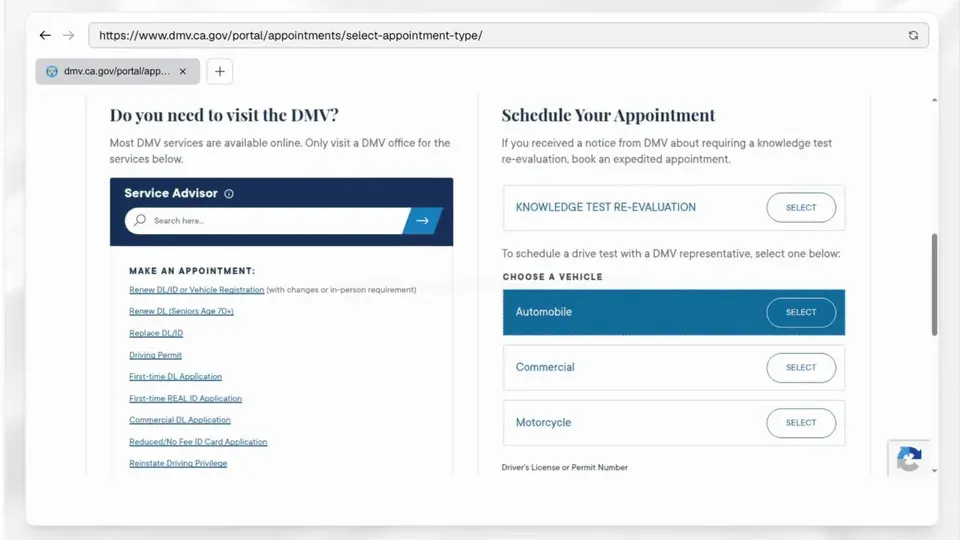
Frame from the official README demo in which the agent books a driving test appointment.
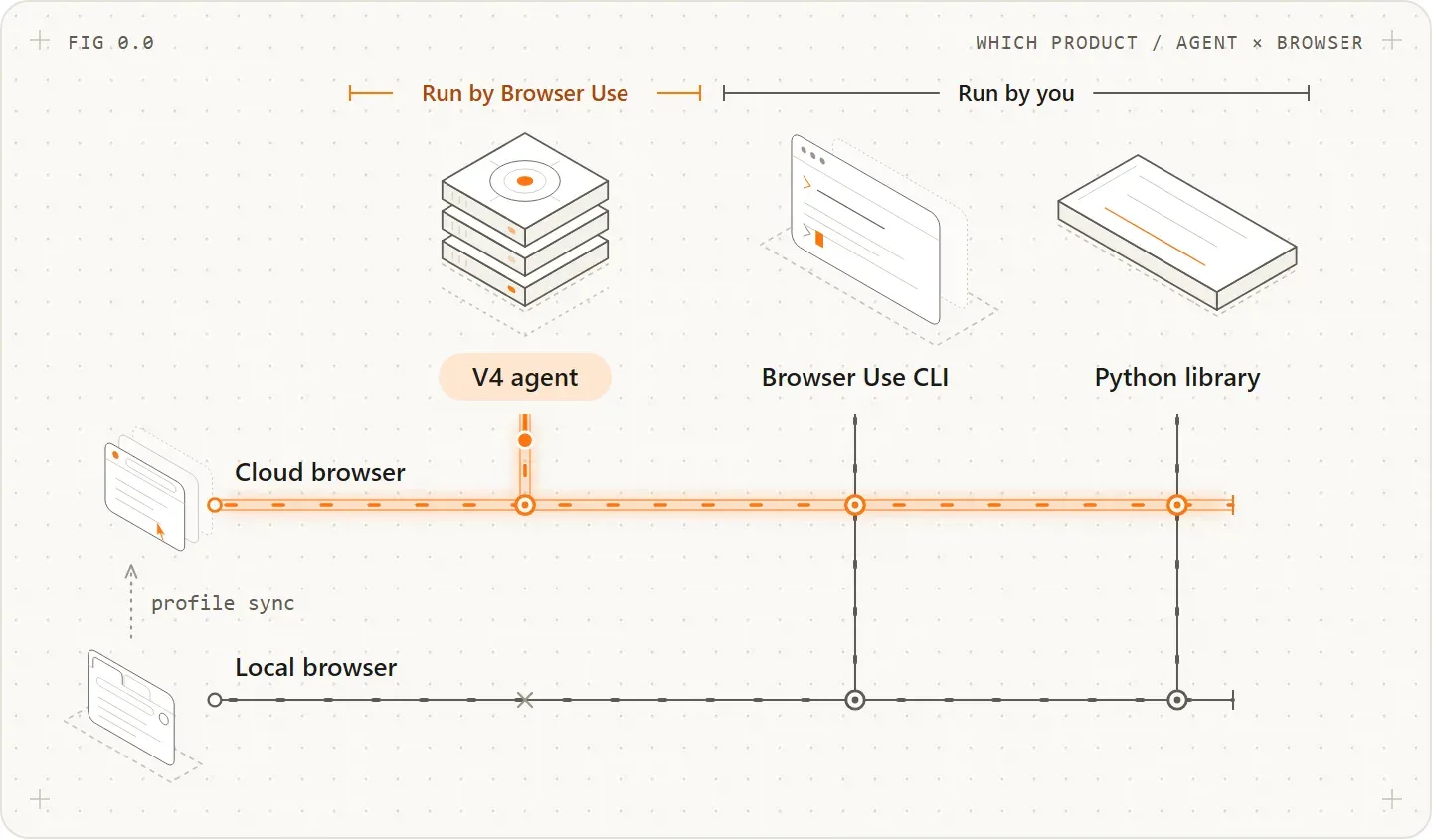
Official README figure: the hosted V4 agent uses cloud browsers only, while the CLI and Python library can drive a cloud or local browser.
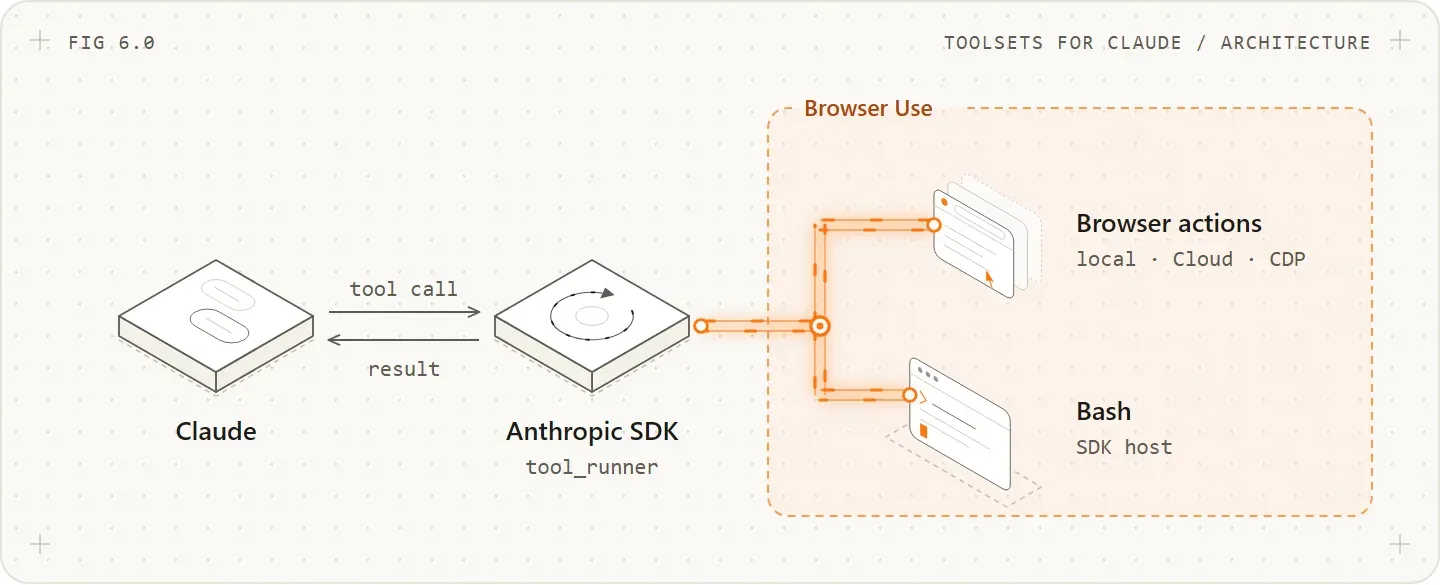
Official figure for the Browser Use toolsets for Claude: browser actions run against a local, Cloud or CDP browser, and Bash runs on the SDK host.
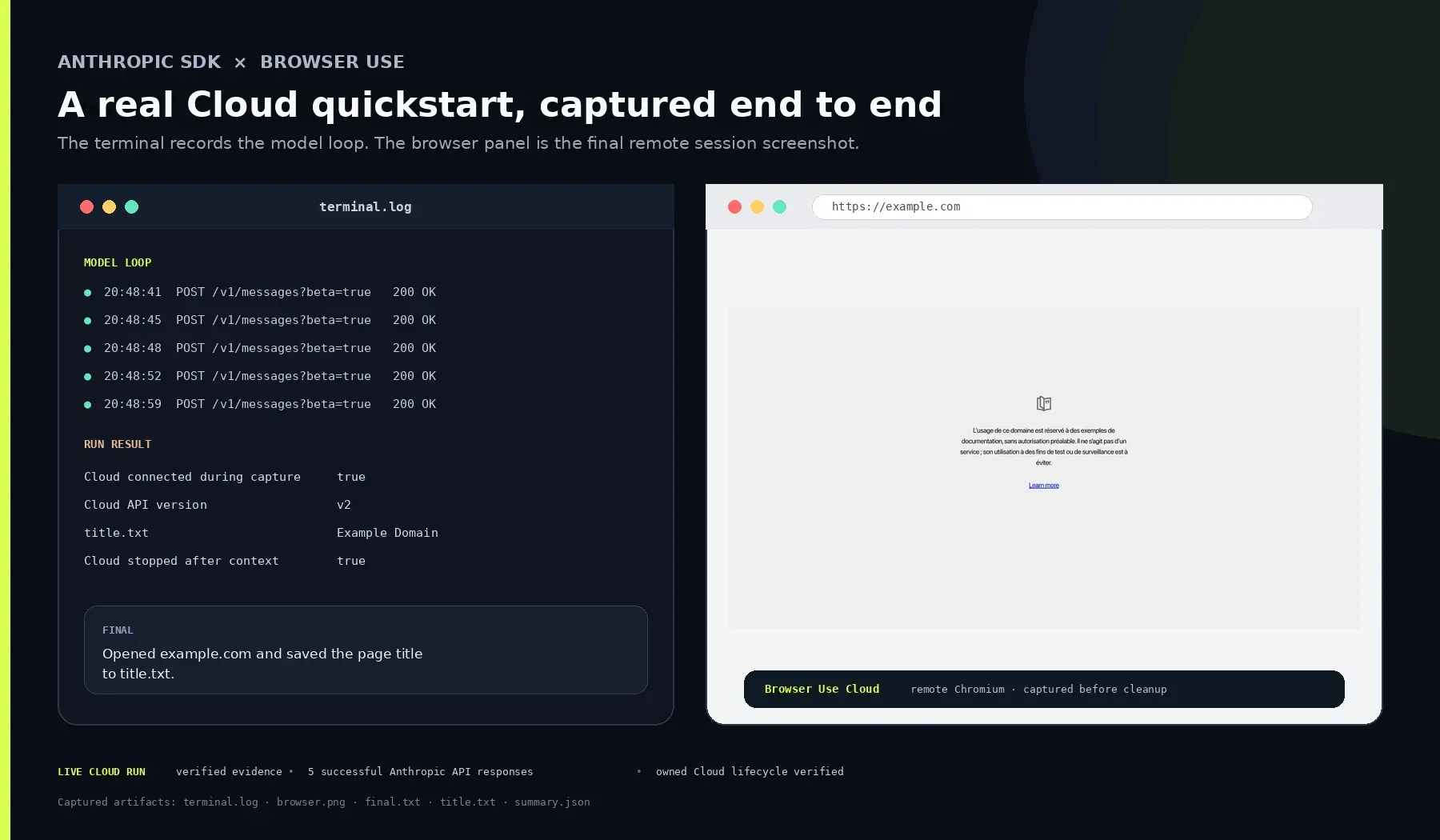
Official capture of the Claude toolset quickstart on a Cloud browser: model loop, run result and final remote page.
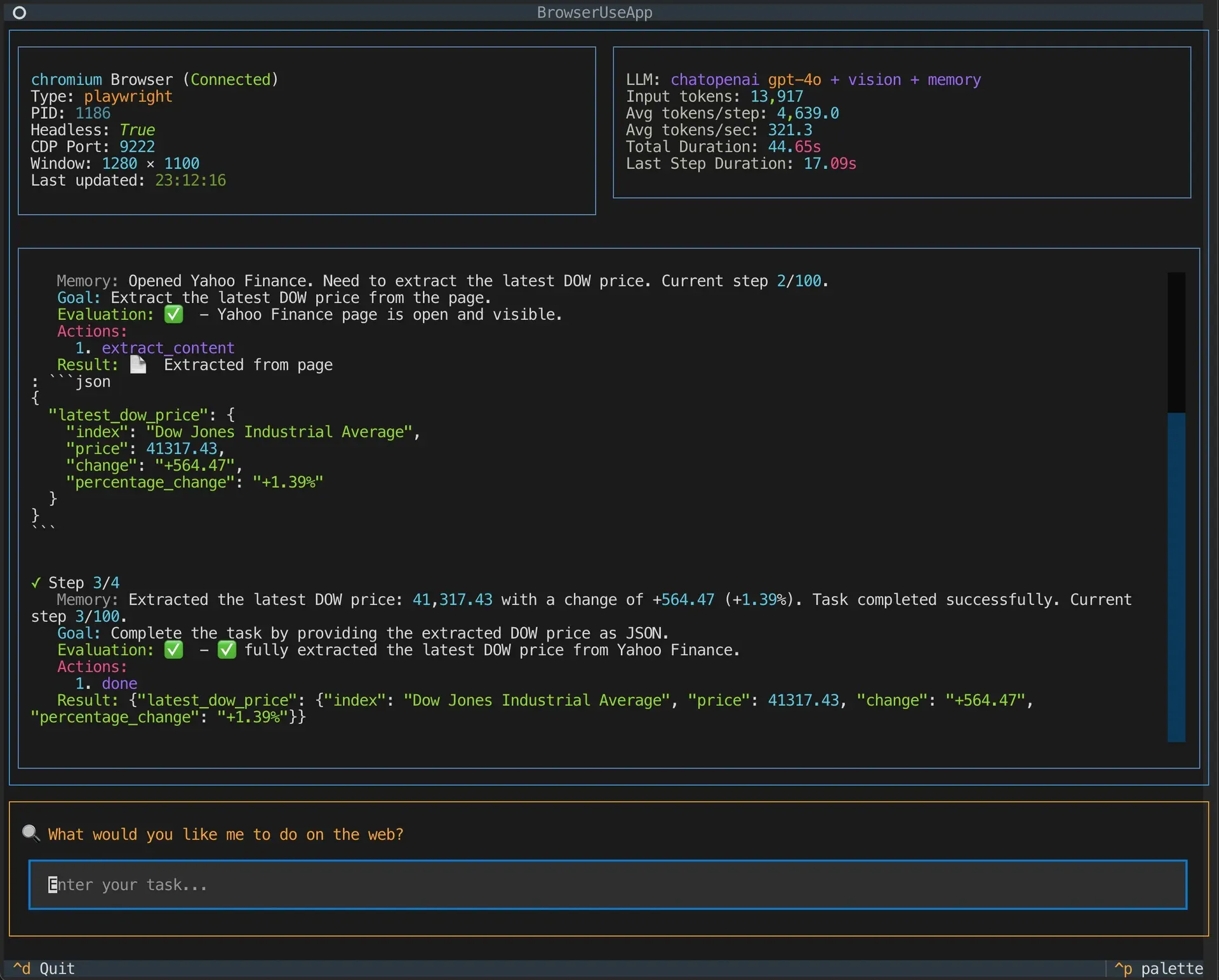
Official screenshot of an earlier Browser Use terminal interface, referenced in the repository Dockerfile; current versions differ.
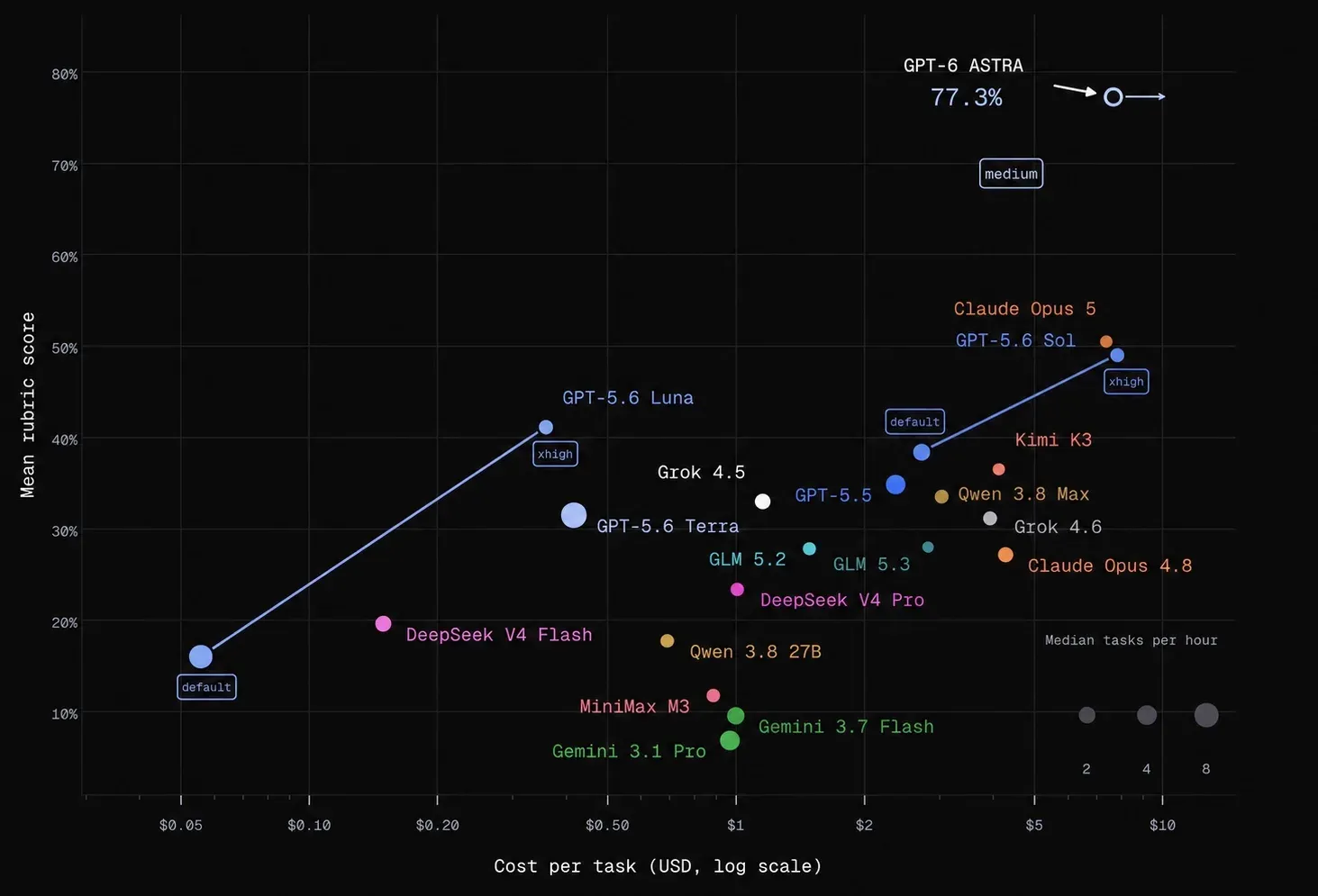
Vendor chart from the README: results on a 60-task subset of the company's own BU Bench V2.
Source: official Browser Use project page.
Key capabilities
- Install the Python library Python 3.11 or later on Windows, macOS or Linux. Add the package with
uv add browser-useorpip install browser-use, then runuvx browser-use installto fetch Chromium. Pin the exact version in production: the package pins most direct dependencies, and release notes list behavior changes. The optionalcoreextra pulls platform-specific browser-use-core wheels for macOS arm64 and x86_64, Linux x86_64 and aarch64, and Windows x64. - Browser Use CLI for coding agents Install the tool with
uv tool install browser-useand register its skill withbrowser-use skill install. By default it attaches to a running Chrome or Chromium over CDP, reusing open tabs, cookies, extensions and logins after Chrome's remote-debugging prompt is approved.BU_CDP_URLorBU_CDP_WSpoints it at another browser, andbrowser-use --doctordiagnoses connection problems. The CLI documentation covers named cloud sessions afterbrowser-use auth login. - Local MCP server
uvx --from 'browser-use[cli]' browser-use --mcpstarts a stdio Model Context Protocol server. It exposes navigation, clicking, typing, page state, scrolling, tab management, content extraction, HTML retrieval, screenshots and session management, plus a tool that hands a whole task to the autonomous agent. It needs your own model API key. This free server is separate from the hosted Browser Use MCP server, which runs tasks on cloud browsers. - Agent loop and default actions Each step sends the page state to the model and executes the actions it chooses. Default actions include search, navigate, go back, click by element index, text input, file upload, scrolling, finding text, sending keys, running page JavaScript, switching and closing tabs, LLM-based extraction, dropdown handling and file read or write. Default tools can be removed to restrict what an agent may do on a given task.
- Model choice Wrappers such as
ChatOpenAI,ChatAnthropic,ChatGoogleandChatOllamause each provider's own key, and the supported models page lists more than 15 providers.ChatBrowserUsecalls the company's bu-2-0 model, listed at $0.60 per million input tokens and $3.50 per million output tokens, and can route provider-prefixed models through the Browser Use gateway. Local models through Ollama avoid a hosted provider, subject to hardware and model capability. - Custom tools Register a Python function with
@tools.actionon aToolsinstance and pass it to the agent; the function returns anActionResult. This is the place to add internal API calls, database lookups or approval steps instead of asking the agent to find the same data through a web interface. The system prompt can be extended or replaced when the default instructions do not fit. - Structured output and run history
output_model_schemaaccepts a Pydantic model and returns parsed output.agent.run()returns a history with visited URLs, screenshots, actions, extracted content, errors, model reasoning, step count and duration.is_done()only reports that the agent emitted a done action, andis_successful()is the agent's self-assessment, not proof that a form was submitted. - Authenticated sessions
Browser.from_system_chrome()reuses a local Chrome profile, andstorage_stateloads saved cookies. The authentication guide also covers two-factor codes. For cloud browsers, profile sync transfers cookies but not local storage, IndexedDB or extensions, so some sites ask for a new sign-in. - Sensitive data placeholders The
sensitive_dataparameter maps placeholder names to real values, optionally per domain pattern. The model sees only the placeholder, and the real value is typed into the form field after the model call. The documentation recommendsuse_vision=Falseso screenshots do not reveal the values, andallowed_domainsto restrict navigation. Saved histories can still contain secrets in page snapshots and results. - Replay without per-step model calls
save_historystores a successful run,detect_variables()lists the form values it typed, andload_and_rerunreplays clicks and typing with new values. Extraction steps and the final summary still call the model. When a page has changed, replay raisesRuntimeErrorat the first step it cannot match, after earlier steps have already run. - Remote and third-party browsers
Browser(cdp_url=...)connects to any browser that exposes a DevTools endpoint, including other cloud-browser providers.Browser(use_cloud=True)provisions a Browser Use Cloud browser with an optional profile, proxy country (us, uk, fr, it, jp, au, de, fi, ca or in) and session timeout of up to 240 minutes. Proxy settings with credentials also work for local browsers. - Toolsets for Claude and OpenAI
browser_use.integrations.toolsets_for_claudelets Claude use 31 browser actions and a Bash tool through the Anthropic SDK tool runner; Bash needs Linux, macOS or WSL. Theopenai-toolsextra, for OpenAI Python 3.31 or later, provides 18 default browser tools and six optional actions for OpenAI models. Both drivers work with a local browser, Browser Use Cloud or an existing browser session. - Browser Use Cloud browsers (paid, optional) Hosted Chromium at $0.02 per browser-hour, billed by the minute, with residential proxy traffic at $5 per GB or $0.20 per GB with your own proxy or a direct connection. CAPTCHA solving, persistent profiles, live view and MP4 recordings are included, and sessions run up to 240 minutes. Eligible signups get a one-time $1 credit and 10 concurrent sessions; concurrency rises with total amount paid, per the pricing page.
- Hosted agent API Browser Use Agents run the whole task on the company's infrastructure through API V4, the
browser-use-sdkpackage for Python and TypeScript, or REST calls authenticated with anX-Browser-Use-API-Keyheader. The SDK has a different interface from the open-source library. An EU deployment in Frankfurt keeps runs, sessions, files and profiles in a separate EU region while account and billing stay shared with the US region. - Observability and cost tracking The development documentation covers tracing agent steps and session recordings, an OpenLIT integration, and token and cost tracking per task. The optional
videoextra adds recording dependencies. These are developer tools for the library; the cloud has its own run events and live view. - Docker and self-hosting The repository ships a Dockerfile and a faster build variant. The README states that the library and browsers can run on your own infrastructure, which keeps the agent, browser and files under your control apart from model calls and telemetry. Headless servers without a display can use a headless local browser or a remote CDP browser.
Where Browser Use fits
Automating a form workflow on an internal portal
Describe the task with the exact fields and the expected end state, pass credentials through sensitive_data and limit navigation with allowed_domains. Run with a visible browser first, then review the history to confirm which elements were clicked and what was typed. Check the destination system itself, because the agent's success flag reports only its own judgment. Disable vision when screens display secrets.
Extracting structured data from sites without an API
Define a Pydantic model for the result and pass it as output_model_schema, so the output is parsed rather than free text. Compare a sample of extracted records against the source pages and watch for pagination, lazy loading and cookie banners. When a site offers an export or API, a custom tool that calls it is cheaper and more reliable than browser steps. Respect the site's terms and rate limits.
Giving a coding agent a browser
Install the CLI as a tool and run browser-use skill install so Claude Code, Codex, Cursor or another agent knows how to call it. Decide whether the agent should use your signed-in Chrome or an isolated browser: attaching to your own profile exposes every logged-in session to that agent. MCP clients can use the local stdio server instead. The MCP server guide lists the exposed tools and environment variables.
Running agents on servers and in CI
Build the provided Dockerfile or install the package on a runner, start the browser headless, or connect to a remote browser over CDP. Set model keys and ANONYMIZED_TELEMETRY through the environment, cap steps and timeouts, and store the run history as a build artifact. Cloud browsers remove the local Chromium dependency; stop them explicitly, because closing the CDP connection does not end the session or its billing.
Re-running a recorded task
After one successful run, save the history and inspect the variables it detected. Replay the same clicks and typing with new values to avoid a model call per step. A changed page stops the replay with an error at the first unmatched step, so check whether earlier steps already submitted data before trying again. Keep saved files private, since snapshots can contain typed values.
Choosing and budgeting the model
Start with a small set of representative tasks and run each candidate model several times, recording success, steps, latency and token cost. The project's benchmark repository describes its own harder task set, but your sites and prompts decide the result. The cost guide in the documentation shows how to read token usage per run. Local models through Ollama remove provider charges but usually need more capable hardware.
Install
uv add browser-useReviews of Browser Use
Be the first to share your experience with Browser Use.
Write a review
Loading review form…
Alternatives to Browser Use
 MCP Playwright ServerPlaywright MCP lets AI clients automate Chrome, Firefox, WebKit and Edge through accessibility snapshots instead of screenshots.
 agent-browseragent-browser is a native CLI with skills for AI agents to navigate pages, fill forms, extract data and take screenshots using accessibility-tree snapshots.
 WebBrainWebBrain is a GPL-3.0 browser extension that adds an AI agent side panel to Chrome, Firefox and Edge and runs on local, cloud or managed language models.