

What is Lightpanda?
Lightpanda is a headless web browser for machines: crawlers, test scripts, data extraction jobs and AI agents. It is developed by Lightpanda, the trading name of Selecy SAS, a company registered in Paris. The founders previously ran a data platform that collected tens of millions of pages a day on fleets of headless Chrome, and the browser grew out of the cost of operating that setup. Rather than patching Chromium, Blink or WebKit, the team wrote a new engine in Zig that loads pages, builds the DOM and runs JavaScript, but never paints anything to a screen.
The engine combines components from other projects: V8 executes page JavaScript, the Rust html5ever parser builds the document, libcurl handles HTTP and cookies, and SQLite backs local storage and the optional HTTP cache. There is no style resolution, paint or compositing, so element geometry is approximated from CSS and HTML attributes. The architecture overview describes the object model from the process-wide App down to the Browser (one V8 isolate), Session (cookie jar and Web Storage), Page and Frame. Everything ships as one binary that exposes several commands: fetch, serve, mcp, agent and run.
Version 1.0 was announced on October 2, 2026 as the first release the team considers ready for production, after a public beta that began in November 2024. The 1.0 announcement reports 1,739,845 passing Web Platform Tests subtests, about 80 percent of Chrome's count, with most of the gap in the CSS, editing and SVG suites that test layout and painting. Release 1.0 enforced CORS by default, built out a classic HTTP WebDriver and moved to V8 15.5. The current tag, 1.0.3 from November 5, 2026, adds CDP file downloads, a completed Accessibility domain, new MCP tools for downloads and page WebMCP tools, an xAI provider for the agent and a Nix package, and changes several behaviors to match Chrome.
Tagged releases provide binaries for Linux x86_64 and aarch64 and macOS x86_64 and aarch64, plus Debian packages for amd64 and arm64. Nightly builds, a Homebrew tap, AUR packages, a Nix flake, official Docker images, a PyPI package and an npm package cover other installation paths. There is no native Windows binary: the documented route is WSL2. The source is licensed under AGPL-3.0, and contributors sign a contributor license agreement with Selecy SAS.
Lightpanda also operates Lightpanda Cloud, a hosted service that accepts the same CDP connections over WebSocket endpoints in West Europe and West US, with a console, managed proxies, an HTTP fetch API and a partial MCP server. Out of scope: visual rendering, pixel-accurate screenshots, video and full layout. The open-source binary sends usage telemetry by default; it can be disabled with an environment variable.
Lightpanda screenshots
Explore the interface. Open a screenshot to view it at full size.
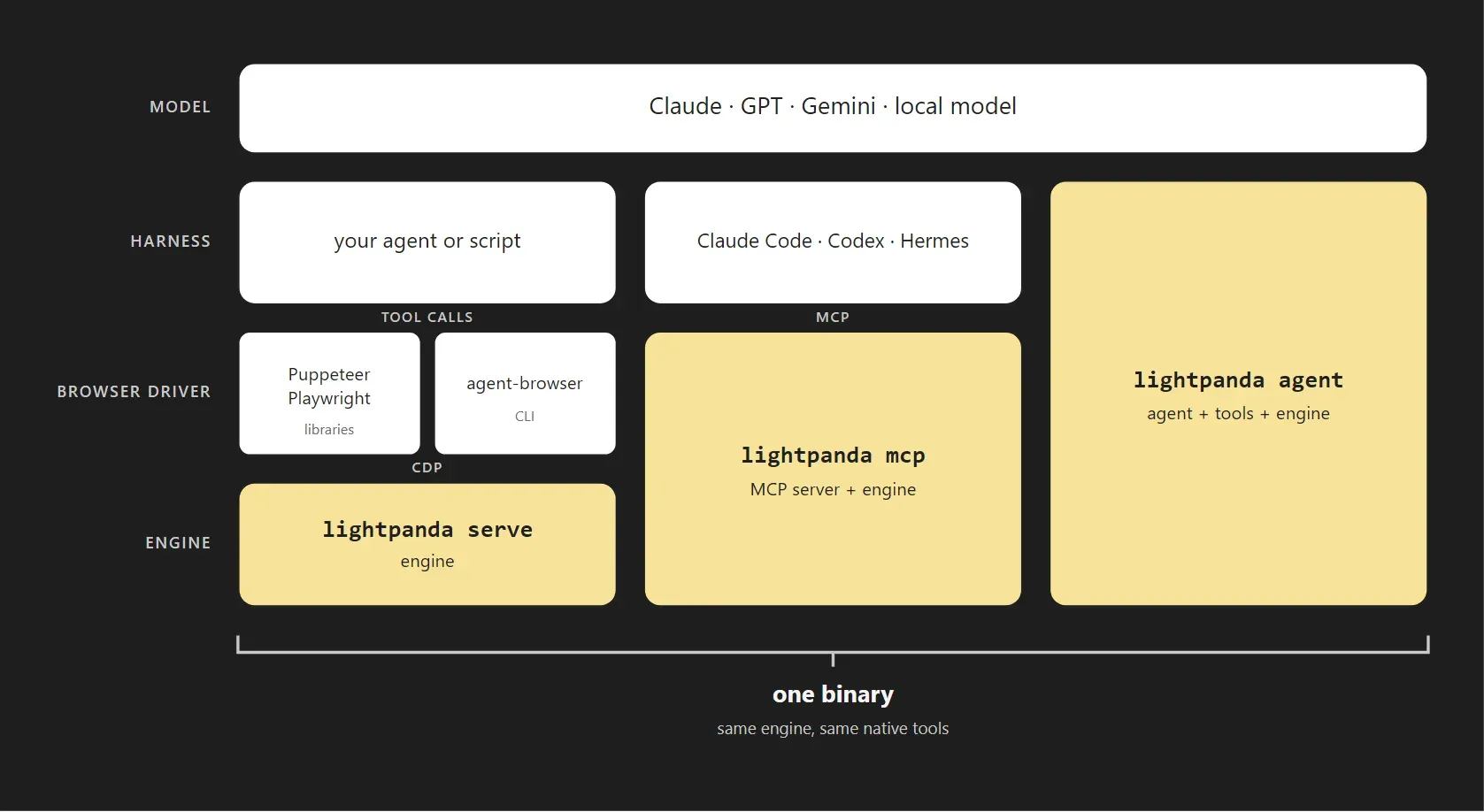
Official documentation diagram showing how lightpanda serve, lightpanda mcp and lightpanda agent sit under Puppeteer, Playwright, agent-browser, Claude Code, Codex or Hermes, all from one binary.
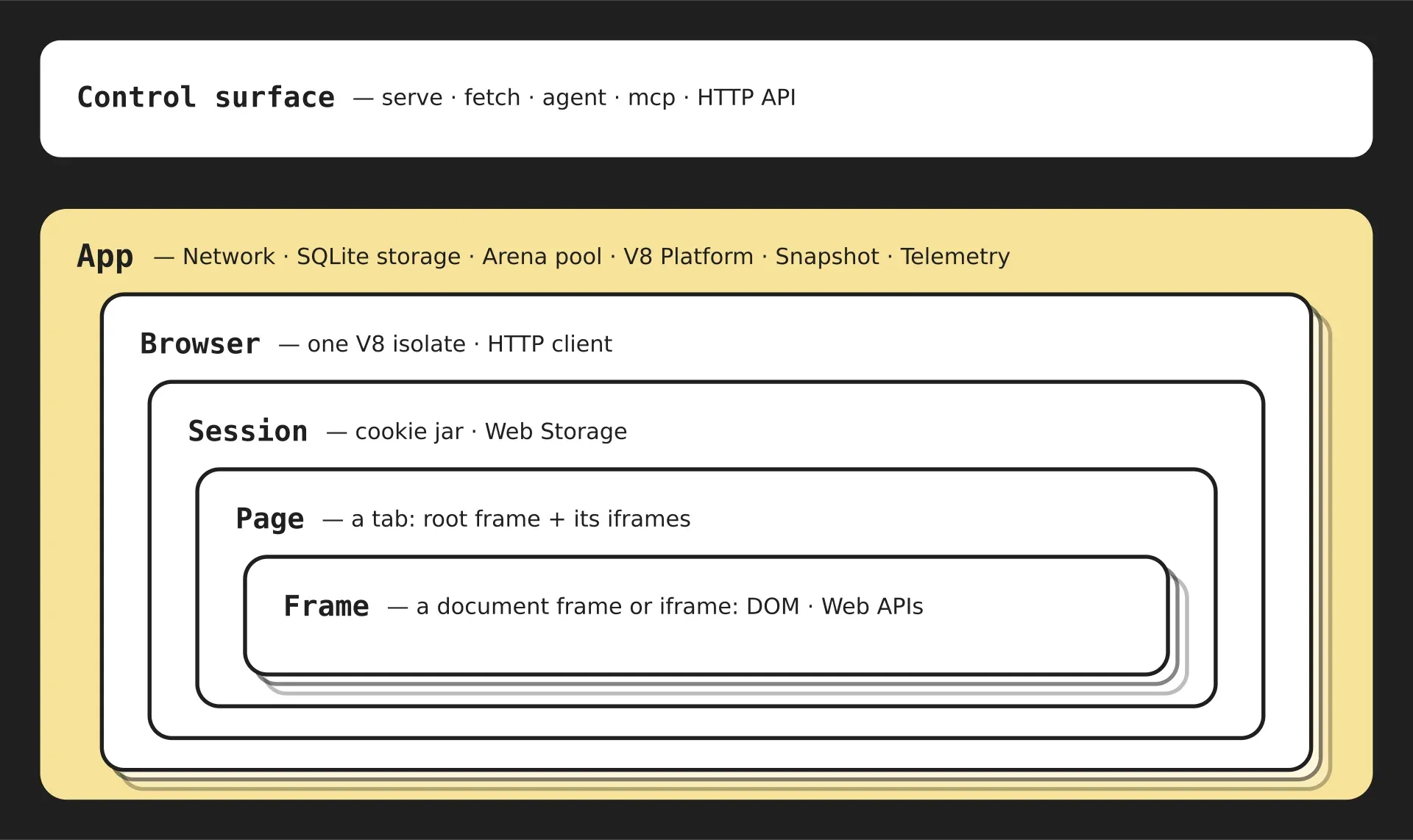
Official architecture diagram: commands on top, then the process-wide App with network, SQLite storage and V8 platform, one Browser per V8 isolate, a Session with cookies and Web Storage, Pages and Frames.
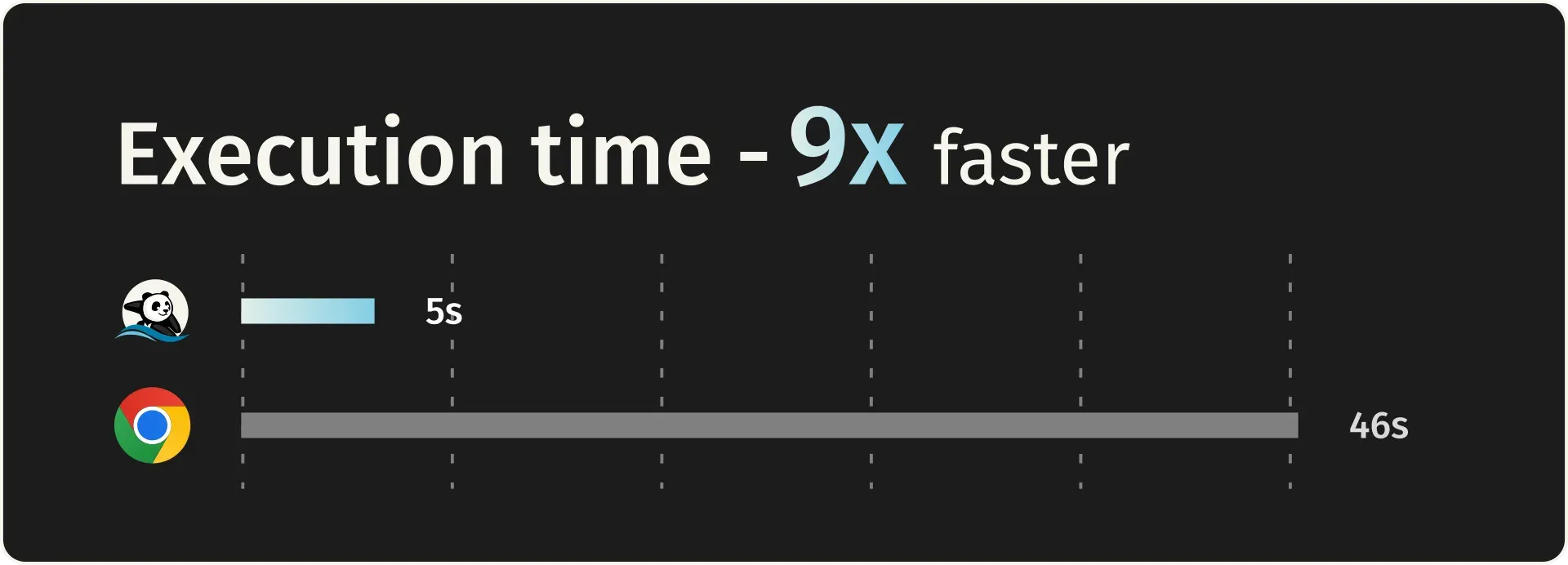
Vendor benchmark chart from the README: execution time for 100 pages of a 933-page crawl on an AWS EC2 m5.large.
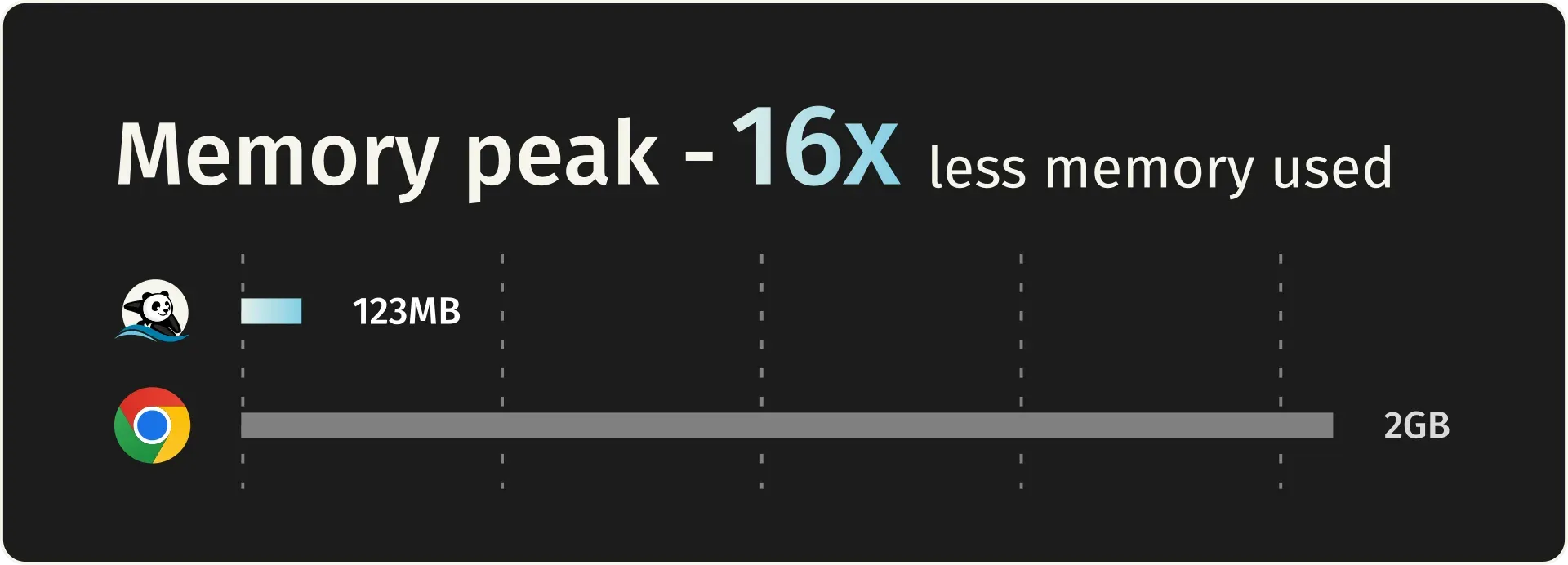
Vendor benchmark chart from the README: peak memory for the same 100-page crawl run.
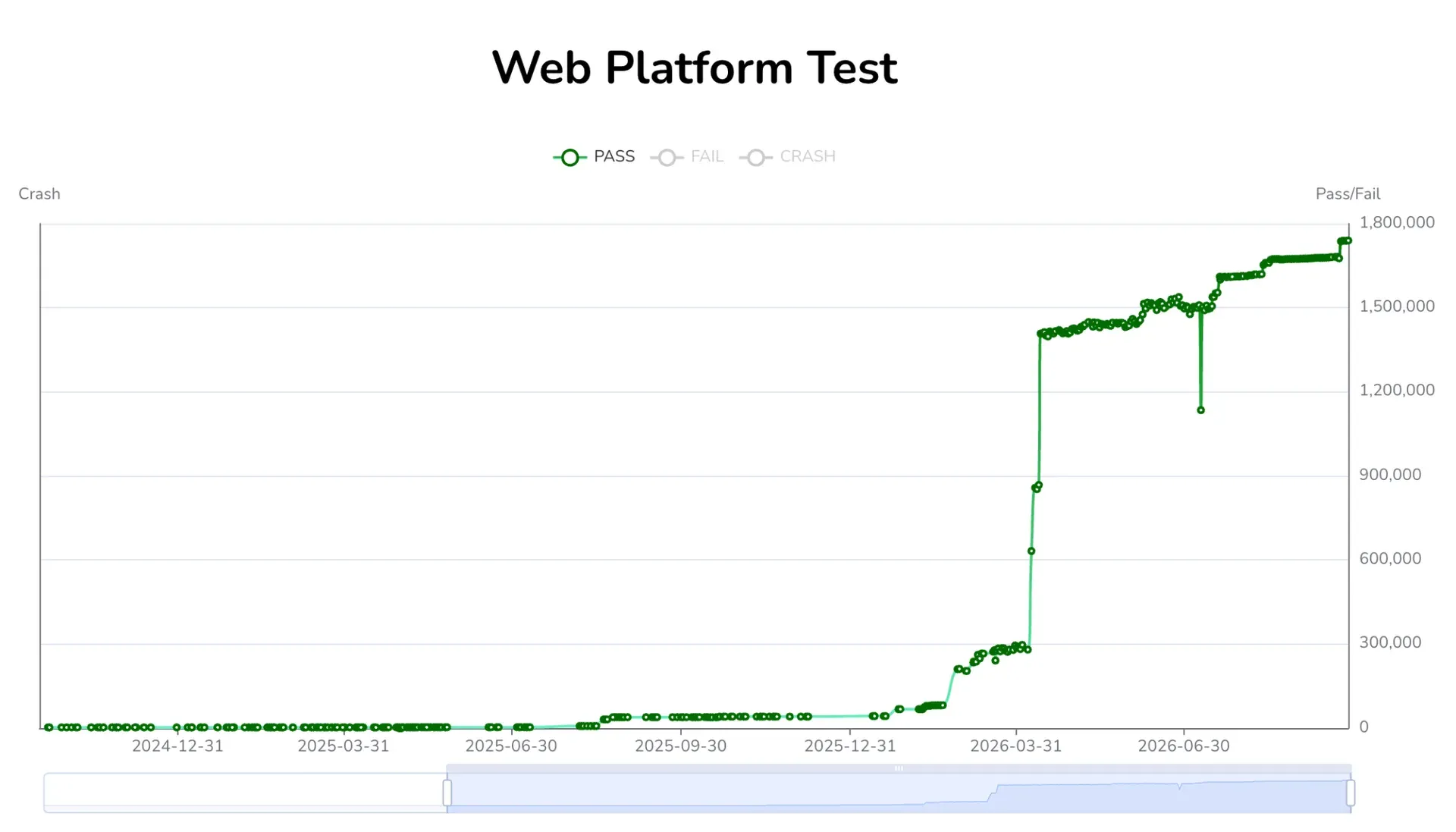
Web Platform Tests pass count over time, from the Lightpanda 1.0 announcement.
Source: official Lightpanda project page.
Key capabilities
- Install on Linux The documented one-liner,
curl -fsSL https://pkg.lightpanda.io/install.sh | bash, places the binary in~/.local/binand verifies it with sha256sum; it needs curl and jq. A specific release can be requested as an argument. Each tagged release also ships.debpackages for amd64 and arm64. Release binaries link against glibc 2.35 on x86_64 and 2.38 on arm64, so Alpine and other musl images do not work; the system requirements list Debian 12 and Ubuntu 22.04 and 24.04. - Install on macOS Binaries exist for Apple Silicon and Intel Macs, and the Homebrew tap installs with
brew install lightpanda-io/browser/lightpanda. The tap tracks the nightly build rather than the tagged release. The documentation names macOS 13 Ventura or later as the minimum. - Windows through WSL2 There is no native Windows build. Install the Linux binary inside WSL2 with Ubuntu; WSL forwards
localhost:9222, so a Puppeteer or Playwright client can run on the Windows host and connect to the browser inside WSL. Android and Termux are not supported because the binary needs the glibc loader. - Docker images Official images on Docker Hub cover linux/amd64 and linux/arm64, with
latest,nightlyand versioned tags. The documented command starts a container that exposes the CDP server on port 9222, bound to 127.0.0.1. Packaging Lightpanda in your own image requires a glibc base such as Ubuntu 24.04 or Debian trixie for arm64. - Python and Node.js packages The lightpanda package on PyPI requires Python 3.10 or later and bundles the binary. Its Browser and Session classes expose goto, click, fill, markdown, tree, extract and evaluate, with asyncio variants and helpers that start a CDP or WebDriver BiDi server. A separate
@lightpanda/browserpackage targets Node.js. - CDP server for existing scripts
lightpanda servestarts a Chrome DevTools Protocol server, by default on port 9222 or on a Unix socket with owner-only permissions. Puppeteer, Playwright and chromedp connect throughconnectinstead oflaunch, and the rest of the script stays the same. Coverage is partial: CDP domains and Web APIs are implemented as needed for automation, so test your own scripts rather than assuming every Chrome feature exists. - WebDriver BiDi and classic WebDriver
--protocol webdriverenables WebDriver BiDi, and both protocols can run at once. Version 1.0 added a classic HTTP WebDriver with session management, navigation, script execution, element input, cookie and viewport endpoints, which lets Selenium drive the browser. Puppeteer can also use the BiDi path. - One-shot fetch and dump
lightpanda fetchloads a URL, runs its JavaScript and prints the result as HTML, Markdown, structured data or a semantic tree. Wait options cover a fixed delay, a selector or a script condition. The PNG and PDF dump modes produce a text-only approximation, because there is no rendering engine. Since 1.0.3, Markdown dumps first ask the server for a text/markdown response. - Native MCP server
lightpanda mcpspeaks MCP JSON-RPC over stdio, or over HTTP with--port. The tool reference lists navigation, search, Markdown and HTML extraction, semantic trees, form detection, clicks, typing, waits, cookies, console logs and download tools. Over HTTP, eachMcp-Session-Idmaps to its own page, cookies and memory, so several agents can share one process without interfering. - Built-in agent
lightpanda agenttakes plain-English tasks or slash commands and runs the tool calls inside the browser process. Providers include Anthropic, OpenAI, Gemini, Vertex AI, Mistral, Hugging Face, xAI, OpenRouter, Vercel AI Gateway, any OpenAI-compatible endpoint and local models through Ollama or llama.cpp. A--no-llmREPL is available, and API keys are read from environment variables. - PandaScript replay An agent session can be saved with
/saveas a PandaScript: plain JavaScript with a few browser primitives such as Page, goto and extract.lightpanda runreplays it without a model, which turns an exploratory LLM session into a deterministic, token-free job. The MCPruntool executes the same scripts with a default 60-second timeout. - Network and egress controls Options include
--block-private-networks(checked after DNS resolution),--block-cidrs,--block-urls, EasyList-format ad-block lists, HTTP proxies with basic or bearer authentication, custom CA certificates and--obey-robots. Sub-resources such as images, stylesheets, iframes and workers are not fetched unless enabled with--load-resources. These controls matter when an agent can be steered to arbitrary URLs. - Identification and caching The default User-Agent identifies the browser as Lightpanda; a suffix can be appended, and replacement strings that contain Mozilla are refused. Web Bot Auth signing with an Ed25519 key is supported for sites that verify automated clients. An optional filesystem HTTP cache, off by default, also stores compiled scripts since 1.0.3.
- Published benchmarks and conformance data The project's crawler benchmark requested 933 real pages from an AWS EC2 m5.large and reports, for 100 pages, 123 MB peak memory and 5 seconds against 2 GB and 46 seconds for headless Chrome. Web Platform Tests results are published daily. These are vendor figures; measure your own target sites.
- Lightpanda Cloud The hosted service accepts CDP connections at regional WebSocket endpoints with a token, and can serve Chrome instead of Lightpanda for debugging. It adds a console with session logs, shared or bring-your-own proxies, a playground and an HTTP API whose fetch endpoint returns HTML or Markdown. The agent and the fetch command are not available in the cloud, and only a subset of MCP tools is.
- Build from source Building requires Zig 0.17.0, a Rust toolchain for html5ever, and clang, make and curl.
make download-v8fetches a prebuilt V8 archive; without it V8 compiles from source, which takes several minutes. A Nix dev shell and flake are provided, andmake testruns the unit tests.
Where Lightpanda fits
Swapping headless Chrome in an existing Puppeteer or Playwright job
Start lightpanda serve or the Docker image, then change puppeteer.launch to puppeteer.connect with browserWSEndpoint pointed at port 9222. Playwright uses connectOverCDP. Run the job against a sample of real target pages and compare extracted fields, not only exit codes. Check anything that depends on layout, screenshots, canvas or uncommon Web APIs, and confirm that CORS enforcement, introduced as a default in 1.0, does not block requests your script relied on.
Crawling and converting pages to Markdown for LLM pipelines
Use lightpanda fetch --dump markdown for one-off pages, or the MCP and Python markdown calls in a pipeline. JavaScript-rendered sites are executed before the dump, and wait options handle content that loads late. Set --obey-robots, a User-Agent suffix that identifies your crawler, and an HTTP cache directory for repeated fetches. Measure memory and pages per minute on your own hardware before resizing a fleet based on the published benchmark.
Giving a coding agent a browser through MCP
Register lightpanda mcp in the MCP configuration of Claude Code, Codex, Hermes Agent or another client; the official MCP quickstart shows the setup. The agent then calls tools for navigation, page trees, form filling and extraction. For several concurrent agents, run the HTTP transport and give each one its own session. Pair it with --block-private-networks so a prompt-injected page cannot steer the agent at internal services.
Prototyping with the agent, shipping a script
Run lightpanda agent with an API key or a local Ollama model, describe the flow, and correct it with slash commands. Save the result as a PandaScript and replay it with lightpanda run in CI or a scheduled job, where no model call is made. Review the saved selectors before relying on the script, because a site redesign breaks a recorded flow just as it breaks hand-written automation.
Running Selenium suites through WebDriver
Start the server with --protocol webdriver and point Selenium at it, following the Selenium guide. This suits functional checks that read DOM state, submit forms and assert on content. Visual regression testing, pixel comparisons and anything that needs a painted page still belong in a full browser.
Choosing between local and hosted execution
Local runs keep target URLs and page content on your machines and expose every interface. Lightpanda Cloud removes process and scaling work, but traffic passes through the vendor's infrastructure and the agent and fetch command are not offered there. The local versus cloud guide lists the differences; decide per workload, not per team.
Install
curl -fsSL https://pkg.lightpanda.io/install.sh | bashReviews of Lightpanda
Be the first to share your experience with Lightpanda.
Write a review
Loading review form…
Alternatives to Lightpanda
 Browser UseMIT-licensed Python agent that drives Chromium over CDP with your choice of model: click, type, extract, custom tools and structured output. Includes a CLI and MCP server; Browser Use Cloud adds paid stealth browsers and a hosted agent API.