

What is Crawl4AI?
Crawl4AI is an open-source Python web crawler and scraper built to turn web pages into input that language models can use: Markdown with headings, tables and code blocks kept intact, cleaned HTML, extracted links and media, screenshots, PDFs and structured JSON. The project is maintained by the developer who publishes as UncleCode (unclecode on GitHub), and the repository at github.com/unclecode/crawl4ai has been public since May 2024. The hosted service is operated by CONTEXT4AI PTE LTD, which trades as Crawl4AI.
There are three ways to run it. The library installs with pip install -U crawl4ai on Python 3.10 to 3.13, followed by crawl4ai-setup to install a Playwright browser and crawl4ai-doctor to check the result; optional extras such as [torch], [transformer] and [all] add the heavier semantic features. A Docker image, unclecode/crawl4ai, packages a FastAPI server with a REST API, MCP endpoints, a playground and a monitoring dashboard for linux/amd64 and linux/arm64. Crawl4AI Cloud is the hosted API at api.crawl4ai.com, where the vendor runs the browsers and proxies and adds web search, SERP and answer endpoints that the open-source code does not include.
The latest GitHub release is v0.9.5, published October 14, 2026. It is a security release that closes six coordinated-disclosure advisories in the Docker server, among them an SSRF path through the cache freshness check, JavaScript injection through css_selector and wait_for, ReDoS through caller-supplied regexes and Chromium starting with certificate checks disabled. It also adds opt-in deep crawling on the Docker server behind CRAWL4AI_ALLOW_DEEP_CRAWL=true. Version 0.9.4 introduced PruningContentFilterLXML, a single-pass pruning filter that the changelog measures at about ten times faster than the previous filter, and 0.9.0 made the Docker server secure by default with mandatory tokens and a loopback bind.
Under the hood, the crawler drives Chromium, Firefox or WebKit through Playwright (with Patchright and a stealth adapter for sites that detect automation), parses pages with lxml and BeautifulSoup, and routes language model calls through a LiteLLM fork so that OpenAI, Anthropic, Gemini, Groq, DeepSeek or a local Ollama model can be used for extraction. Results are cached in a local SQLite database. The code is licensed under Apache-2.0; the README additionally asks users to attribute the project with a badge or a line of text.
Some things are out of scope for the open-source build. It does not run a search engine, does not supply proxies or residential IP addresses, and does not solve bot walls for you: those are handled by your own settings or by the Cloud service. It is a developer library and server, not a point-and-click scraping app, although the separate Crawl4AI Assistant Chrome extension can generate schemas and scripts visually.
Crawl4AI screenshots
Explore the interface. Open a screenshot to view it at full size.
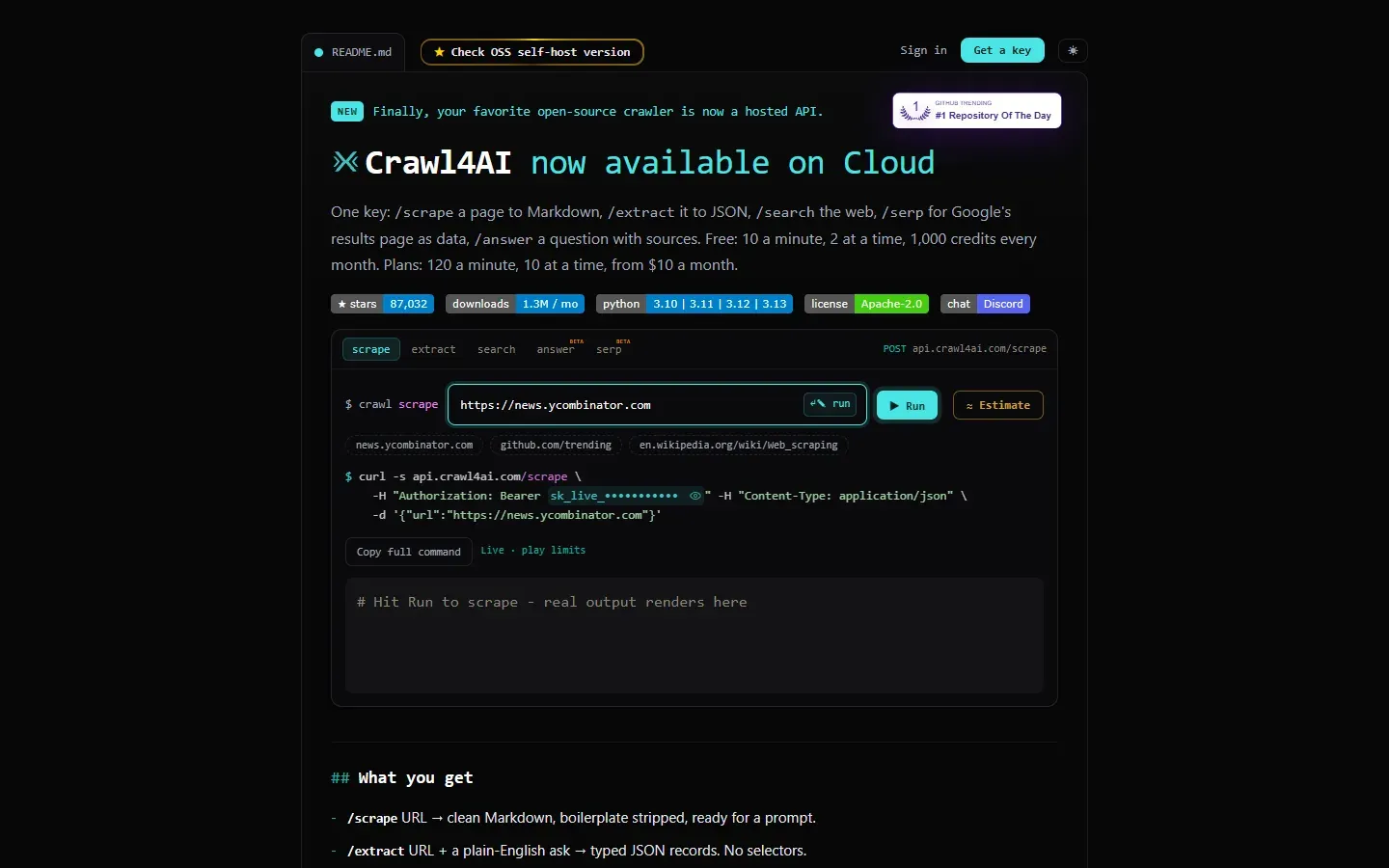
The official Crawl4AI Cloud homepage: a playground for the scrape, extract, search, answer and SERP endpoints with the matching curl request. Captured from crawl4ai.com.
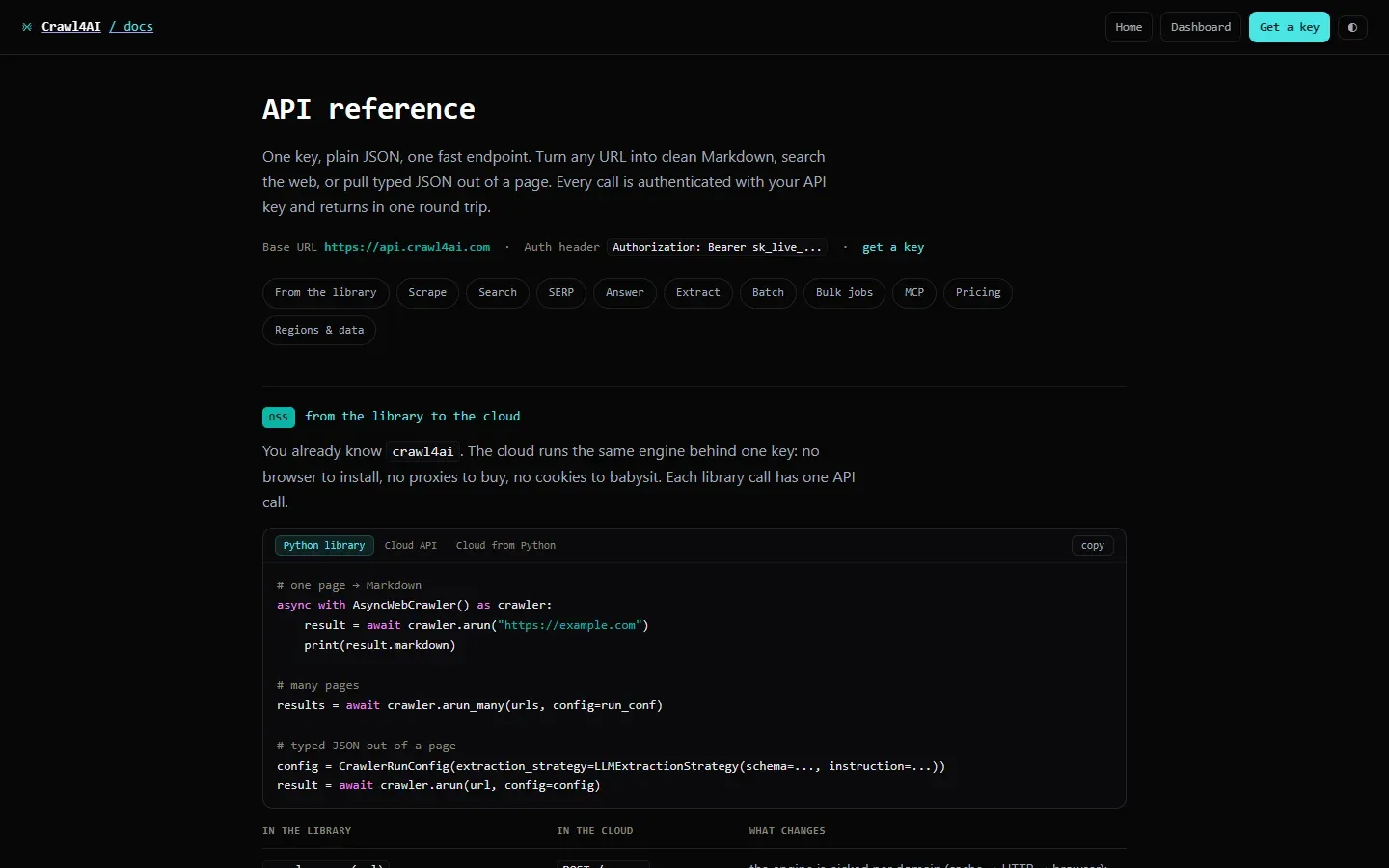
The official Cloud API reference, showing the base URL, authentication header, endpoint sections and the mapping from Python library calls to Cloud requests. Captured from crawl4ai.com/docs.
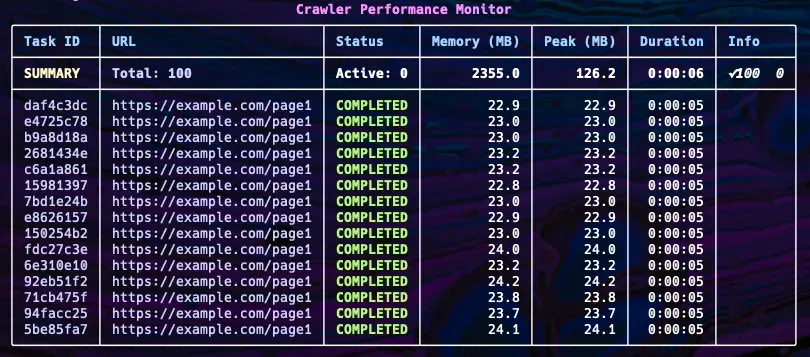
Official documentation figure of the crawler performance monitor used with arun_many: per-task status, memory, peak memory and duration.
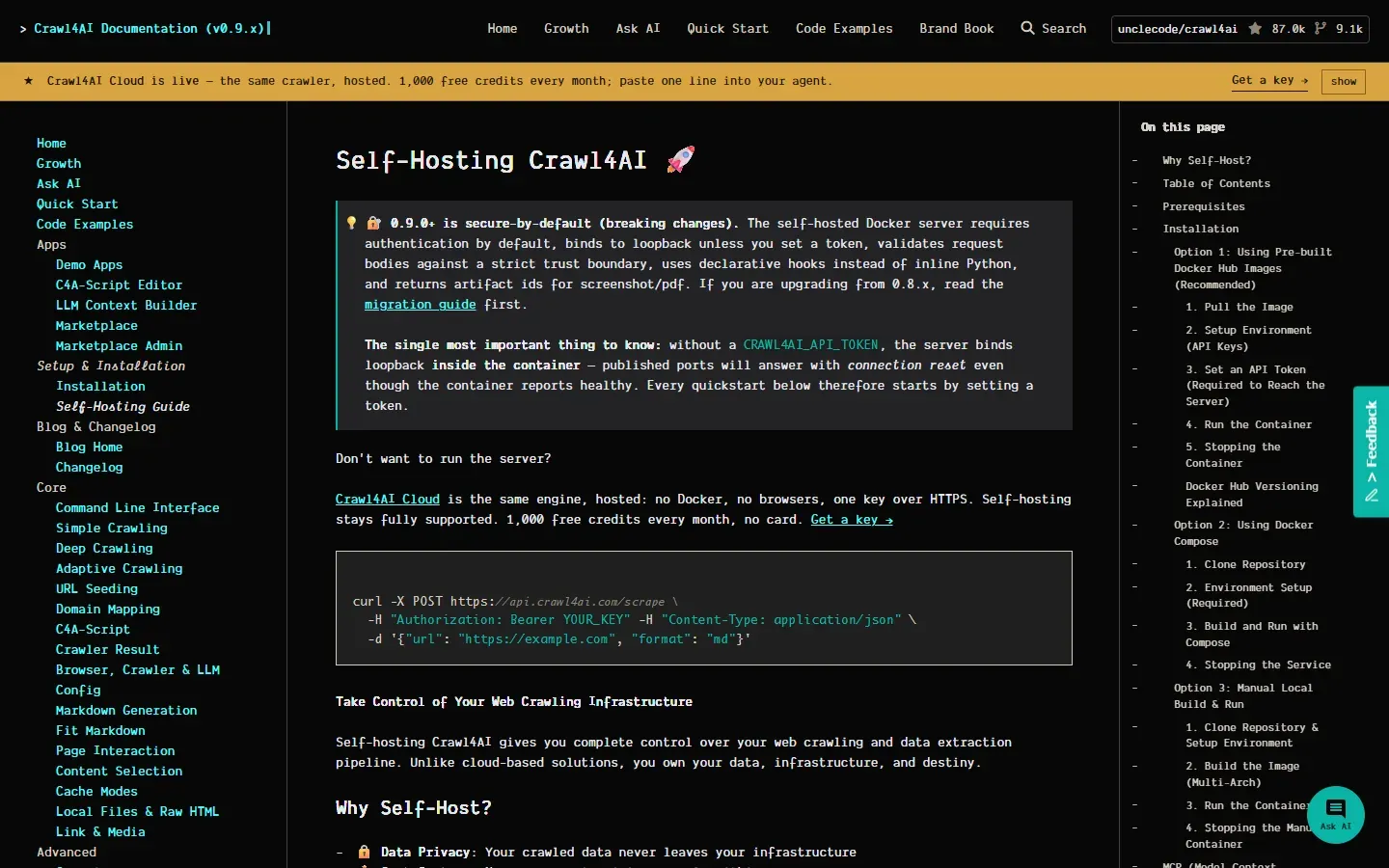
The official self-hosting guide, with the 0.9.0 secure-by-default notice about CRAWL4AI_API_TOKEN and the installation table of contents. Captured from docs.crawl4ai.com.
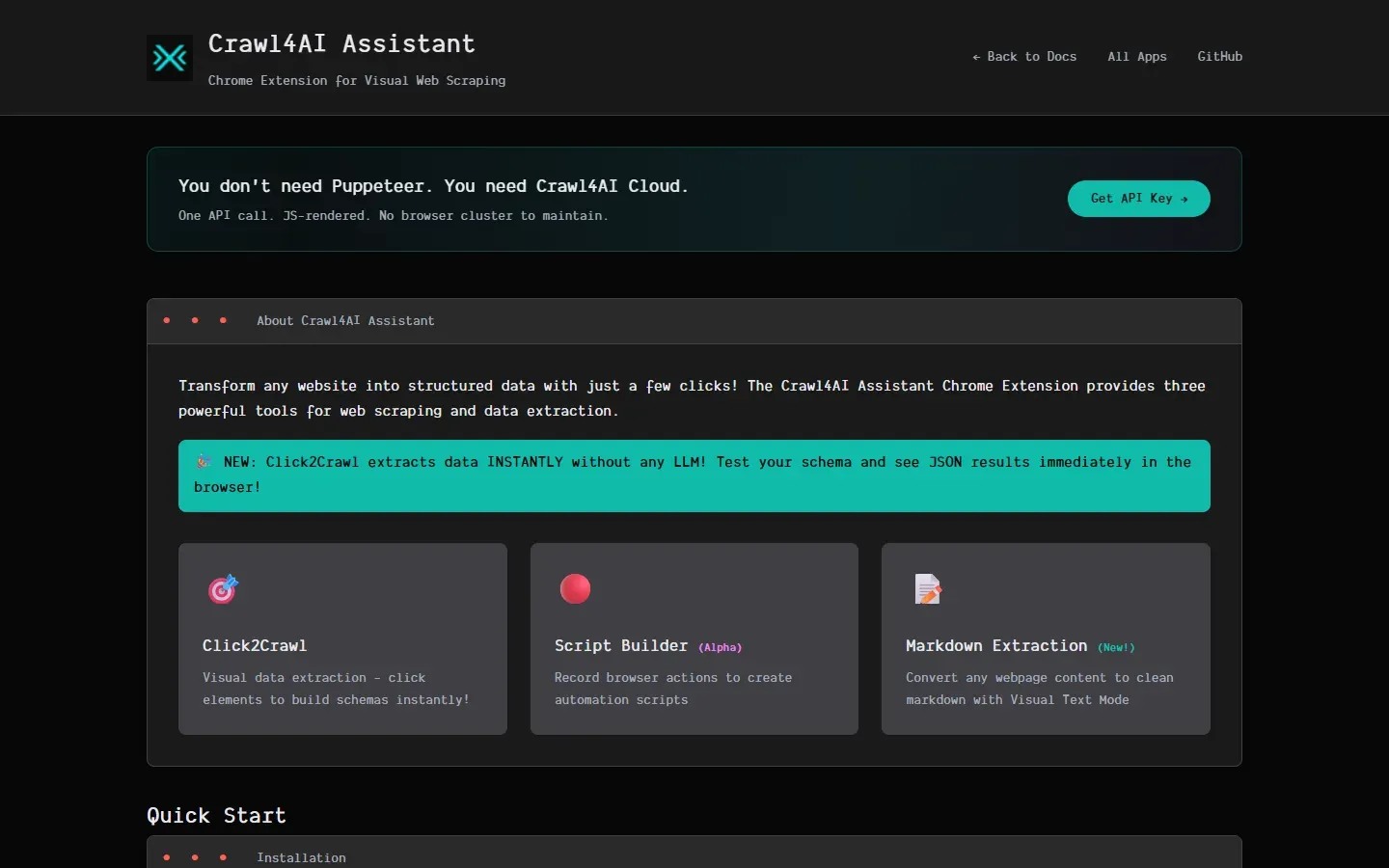
The official page of the Crawl4AI Assistant Chrome extension with its three tools. Captured from docs.crawl4ai.com.
Source: official Crawl4AI project page.
Key capabilities
- Python library install
pip install -U crawl4aiinstalls the core package on Python 3.10 or newer, andcrawl4ai-setupdownloads the Playwright browser once. If the browser install fails,python -m playwright install --with-deps chromiumis the documented manual fallback, andcrawl4ai-doctorruns a test crawl that exits with code 1 on failure. Pre-releases are available with--pre, and an exact version can be pinned withcrawl4ai==0.9.5. - Docker server
docker run -d -p 11235:11235 --shm-size=1g -e CRAWL4AI_API_TOKEN=... unclecode/crawl4ai:lateststarts the API server; every tag is multi-architecture for amd64 and arm64. Without a token the server binds loopback inside the container and published ports refuse connections. The self-hosting guide recommends at least 4 GB of RAM for the container and documents Docker Compose and local builds. - Clean Markdown output Each crawl returns raw Markdown that keeps headings, lists, tables and code blocks, and can turn page links into a numbered citation list. The default generator can be replaced with a custom strategy. Results also carry cleaned HTML, metadata, internal and external links and media references.
- Fit Markdown filters Content filters remove menus, footers and boilerplate before text reaches a model.
PruningContentFilterLXMLscores nodes in one pass,BM25ContentFilterkeeps text relevant to a query, andLLMContentFilterlets a model decide. The filtered output is exposed asfit_markdownnext to the raw version, so both can be compared. - Extraction without an LLM
JsonCssExtractionStrategy,JsonXPathExtractionStrategyandRegexExtractionStrategymap repeating page elements to JSON using selectors you define.generate_schemacan use a model once to draft a reusable schema, after which extraction runs without model calls. This is the cheaper path for catalog, listing and table pages. - LLM-based extraction
LLMExtractionStrategysends page content to any provider supported by LiteLLM, including local models through Ollama, and returns JSON that follows a Pydantic or JSON schema. Topic, regex and sentence chunking split long pages, andCosineStrategyselects chunks by similarity to a query when the[cosine]extras are installed. Token costs and rate limits are those of the provider you configure. - Browser control and sessions
BrowserConfigsets the engine (Chromium, Firefox or WebKit), headless mode, viewport, user agent, headers and cookies. Persistent profiles keep logins between runs, sessions keep one page state across multi-step crawls, and remote browsers can be attached over the Chrome DevTools Protocol. JavaScript snippets,wait_forconditions andscan_full_pagescrolling handle dynamic pages and lazy-loaded content. - Proxies and stealth mode Proxies with authentication and rotation are configured per browser or per run, and
enable_stealthplus an undetected-browser adapter based on Patchright target sites that block automation. The open-source code does not include a proxy pool; addresses come from your own provider. Success against a given bot wall is not guaranteed and should be tested per site. - Deep crawling BFS, DFS and best-first strategies follow links with depth limits, domain and URL-pattern filters and scorers. Long crawls can resume from saved state through
resume_state. Since 0.9.5 BFS counts queued URLs againstmax_pages, so page budgets hold, and the Docker server only accepts deep crawl requests whenCRAWL4AI_ALLOW_DEEP_CRAWL=trueis set. - Adaptive crawling
AdaptiveCrawlerfollows links toward a query and stops when coverage, consistency and saturation indicate it has gathered enough. The default statistical strategy works offline; the embedding strategy adds query expansion and needs an embedding model or provider. Defaults includeconfidence_threshold0.7 andmax_pages20, and the collected pages can be exported to JSONL. - URL seeding and domain mapping
AsyncUrlSeederdiscovers URLs in bulk from sitemaps and Common Crawl before any page is rendered, andDomainMapperbuilds a map of a site. The README states thatprefetch=Truefinds URLs five to ten times faster. Seeding suits large sites where you want to filter a URL list first and crawl only the relevant part. - Batch crawling with resource control
arun_manycrawls many URLs concurrently through a memory-adaptive dispatcher with rate limiting, and a terminal monitor shows each task's status, memory and duration. Caching skips repeated fetches. Concurrency should be set against the RAM available for browser pages, since each page holds a browser context. - Screenshots, PDFs and local content Any crawl can capture a full-page screenshot or export the page as PDF, and PDF documents can be processed into Markdown with the
[pdf]extra. Raw HTML strings (raw:) and local files (file://) go through the same pipeline as live URLs, which helps with archived pages and tests. - Command line tool
crwlcrawls a URL to Markdown or JSON from the terminal, runs deep crawls with--deep-crawl bfs --max-pages 10, and answers a question about a page with-qonce an LLM key is set throughcrwl config. Since 0.9.5 the-c cache_mode=...option is honored. The CLI is useful for quick checks before writing Python code. - REST API and MCP on your server The Docker server exposes
/md,/html,/crawl,/crawl/stream,/screenshot,/pdfand/execute_js, plus MCP over SSE and WebSocket with tools such asmd,screenshot,pdfandcrawl. Request bodies are treated as untrusted: arbitrary hook code, request-chosen models and custom regexes are refused. A browser dashboard and playground run at/dashboardand/playground. - Crawl4AI Cloud API The hosted API at
api.crawl4ai.comoffers/scrape,/extract(no model key of your own needed),/search,/serp(beta) and/answer(experimental), with up to 50 URLs per batch call and 10,000 per background job. The Cloud documentation lists rate limits of 10 requests a minute on Free and 120 a minute on the first paid plan. Regional gateways exist for the EU, Singapore and the United States. - Hosted MCP for agents Claude Code, Codex, Cursor, OpenCode and Windsurf connect to
https://api.crawl4ai.com/mcpwith an API key in the Authorization header, while ChatGPT and Claude Desktop connectors can sign in with a Crawl4AI account. The tools cover scraping, search, SERP, extraction, batch jobs and billing. Calls consume Cloud credits. - Crawl4AI Assistant extension A Chrome extension, installed from a downloaded ZIP with Developer Mode and Load unpacked rather than from the Chrome Web Store, offers Click2Crawl (click elements to build a CSS schema and test it), an alpha Script Builder that records actions as
js_code, and Markdown extraction of selected content. It generates Python code for the library rather than running crawls on its own.
Where Crawl4AI fits
Feeding documentation into a RAG index
Seed URLs from the site's sitemap with AsyncUrlSeeder, filter them to the documentation path, then crawl with arun_many and a DefaultMarkdownGenerator using PruningContentFilterLXML. Store fit_markdown for embedding but keep raw_markdown for spot checks, because aggressive pruning can drop short sections such as parameter tables. Compare the number of successful results with the seeded URL count and inspect failures before indexing.
Extracting product or listing data without model costs
Write a JsonCssExtractionStrategy schema for the repeating card element, or generate one once with generate_schema or the Click2Crawl extension. Enable scan_full_page for infinite scroll and set cache_mode=CacheMode.BYPASS while testing. Check that field counts match what the page shows and re-run the schema after site redesigns, since selector-based extraction fails quietly when class names change.
Turning messy pages into typed records with an LLM
Define a Pydantic model, pass its JSON schema to LLMExtractionStrategy with an LLMConfig for your provider, and give a short instruction. Use a fit Markdown filter first to reduce tokens. Validate every returned record against the model, log token usage, and test a local Ollama model if pages contain data that should not leave your network.
Running a shared crawling service for a team
Deploy the Docker image with a generated CRAWL4AI_API_TOKEN, --shm-size=1g and at least 4 GB of RAM, put it behind TLS, and keep LLM keys in .llm.env. Track browser pool health in /dashboard and tune max_pages_before_recycle for sustained load. Subscribe to the security advisories, because releases 0.9.0 through 0.9.5 fixed several SSRF and injection issues in the server.
Giving a coding agent live web access
For a local setup, run the Docker server and add it to Claude Code with claude mcp add --transport sse c4ai-sse http://localhost:11235/mcp/sse. For no infrastructure at all, connect the hosted MCP endpoint with a Cloud key. In both cases restrict which domains the agent may fetch where your policy requires it, and review what pages and prompts are sent to third-party model providers.
Researching a topic with adaptive crawling
Start AdaptiveCrawler on a relevant entry page with a natural-language query, keep the default statistical strategy for offline runs, and raise max_pages only if confidence stays below the threshold. Save state with save_state=True so long sessions can resume, then export the knowledge base to JSONL. Review print_stats() to see why the crawl stopped before trusting the result as complete.
Install
pip install -U crawl4ai && crawl4ai-setupReviews of Crawl4AI
Be the first to share your experience with Crawl4AI.
Write a review
Loading review form…
Alternatives to Crawl4AI
 FirecrawlFirecrawl turns URLs, search results and documents into Markdown, HTML, screenshots or schema-based JSON. Use the hosted API with SDKs, CLI and MCP, or self-host the AGPL-3.0 core with Docker Compose and a reduced feature set.
 ScraplingScrapling is an open-source Python framework for web scraping that combines HTTP requests, stealth browsers, adaptive parsing and concurrent spiders.
 Browser UseMIT-licensed Python agent that drives Chromium over CDP with your choice of model: click, type, extract, custom tools and structured output. Includes a CLI and MCP server; Browser Use Cloud adds paid stealth browsers and a hosted agent API.