
What is tiny-voca?
tiny-voca is a small English text-to-speech model with two voices, F2 (female) and M2 (male), and 4,537,291 parameters including its waveform generator. It was trained from scratch and, according to the README, runs about 70 times faster than real time on four CPU threads. The project is published by Muhammed Nazeem, named as author in the Hugging Face model card and in pyproject.toml; the code repository n4ze3m/tiny-voca and the model repository were both created on November 14, 2026.
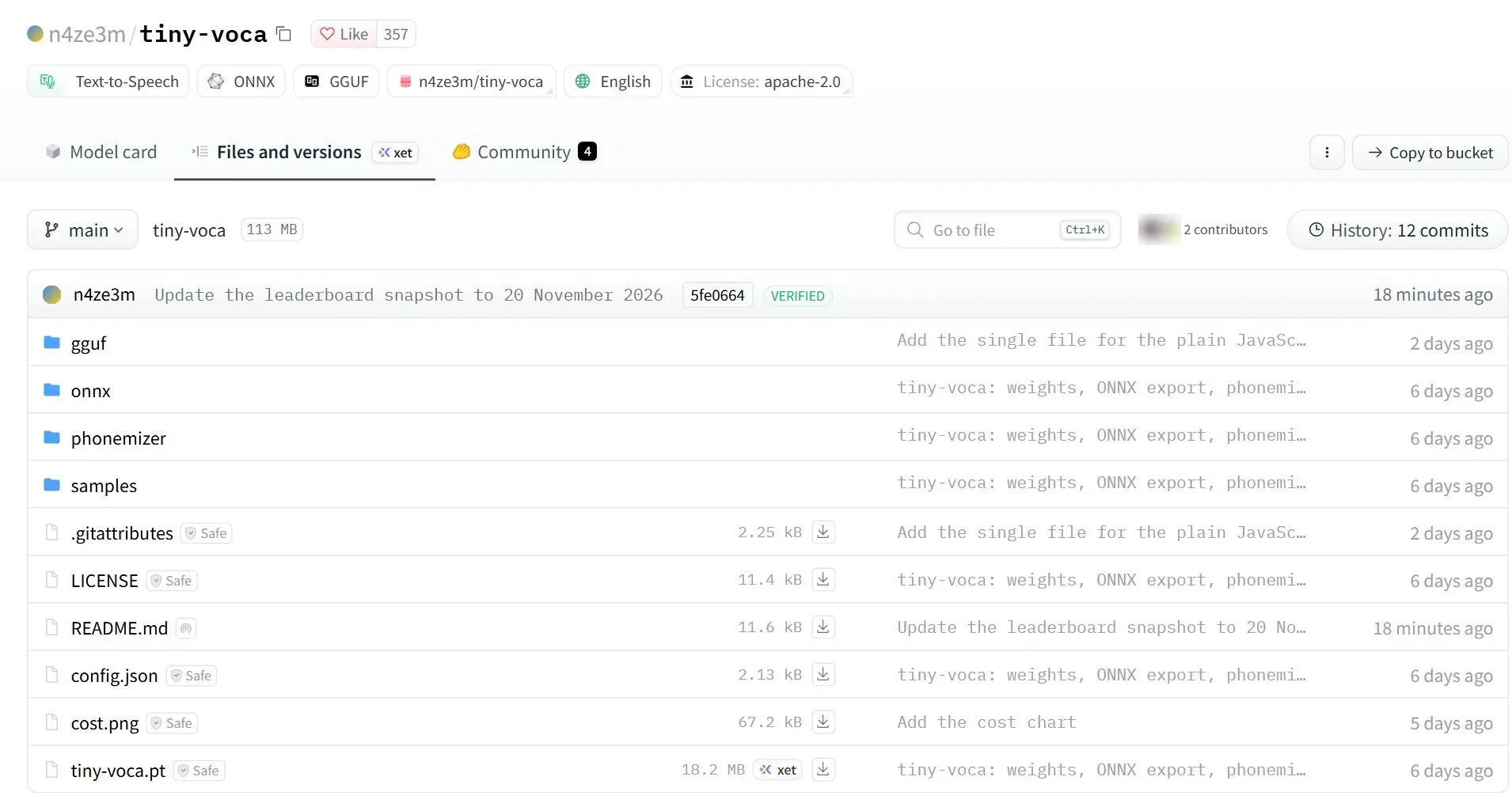
Code and weights live in separate places. GitHub holds the Python package (tiny-voca 0.2.0 in pyproject.toml, Python 3.10 or later, PyTorch 2.4 or later), training and evaluation scripts, the web demo source and a plain JavaScript port. The weights are hosted on Hugging Face: tiny-voca.pt (18.2 MB, float32), onnx/model.onnx (21.4 MB, opset 17), config.json, the phonemizer data and GGUF files in f16, q8_0, q4_0, original and JavaScript variants. The training data is published as the n4ze3m/tiny-voca dataset. There are no GitHub releases or tags; a browser demo and a Hugging Face Space run the model client-side.
Text is converted to phonemes with a stress value for each by dizione, the author's own phonemizer. A four-block transformer text encoder reads the phonemes, a duration predictor gives each one a length in frames, and two frame-level transformers with 2 and 5 blocks predict pitch, voicing and energy and then the parameters of the waveform generator; all blocks use 192 channels, 4 heads and rotary position embeddings. Instead of a neural vocoder, a source-filter synthesizer with 25,862 parameters shapes a band-limited pulse train and a noise signal with filters predicted once per 256-sample frame (10.7 ms). Output is 24 kHz mono.
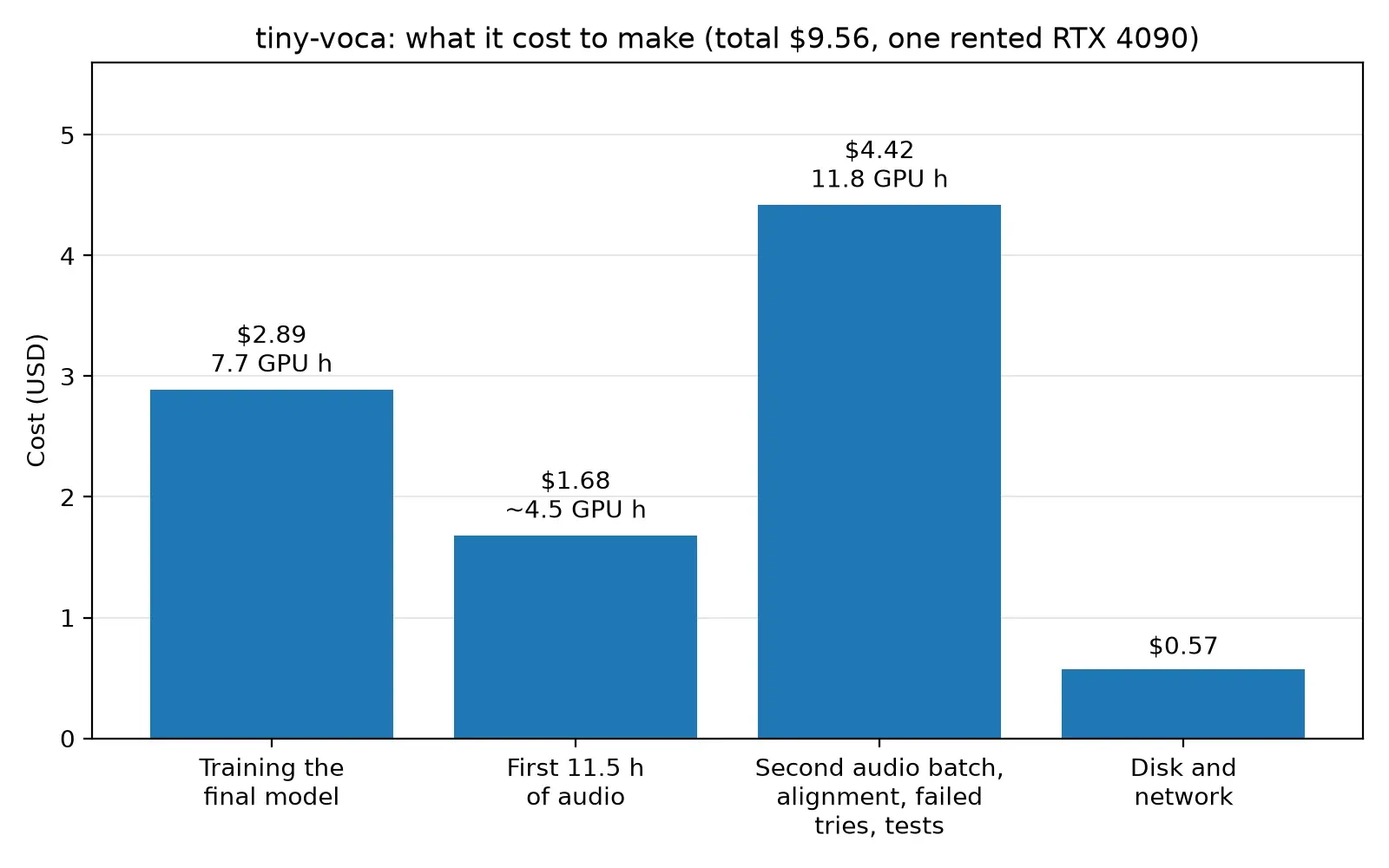
The training audio is synthetic. Both voices were designed from text descriptions with Qwen3-TTS VoiceDesign and the recordings generated with Qwen3-TTS 1.7B Base, so no recording of a real speaker is involved; phoneme durations came from forced alignment with a wav2vec2 model used only for labelling. The released checkpoint was trained for 104,737 steps on one RTX 4090 in 7.7 hours, and the README puts the cost of the whole project at $9.56 of rented GPU time. The project's own word error rate checks use small sentence sets that the model documentation calls a sanity check rather than a benchmark; the model card adds an Open TTS Leaderboard snapshot of November 20, 2026 in which, by the project's account, F2 ranks fifth and M2 seventh by average WER among 45 ranked English models.
The README states Apache-2.0 for code and weights and CC BY 4.0 for the dataset; the model card notes that the files in phonemizer/ derive from the CMU Pronouncing Dictionary and other sources under their own licenses. Checkpoints up to step 66,000 used eSpeak NG (GPL-3.0) as an external program, which the released checkpoint does not. Stated limits are English only, two fixed voices with no voice cloning, no streaming, an F2 voice that sounds younger than intended, frequent mispronunciation of foreign names and unusual spellings, and identical prosody for identical text. Other speech tools on iThub include the hosted ElevenLabs and the local VoiceStudio.
Key capabilities
- Model and voices The complete model has 4,537,291 parameters, of which 1,588,864 are in the text encoder, 1,985,984 in frame transformer B and 25,862 in the source-filter waveform head. It speaks American English in two fixed voices, F2 and M2, at 24 kHz mono. Two modules exist only during training: an auxiliary mel head and the waveform discriminators.
- Installation The README clones the repository, runs
pip install -e ".[own]", downloads the weights withhf download n4ze3m/tiny-voca --local-dir weightsand setsDIZIONE_DATAto the phonemizer folder. The model card gives a shorter route that installs dizione and tiny-voca directly from GitHub with pip. Optional extras add dependencies for data preparation, annotation and evaluation. - Command-line synthesis
python -m tiny_voca.infertakes a checkpoint,--voice,--textor--text-fileand an output WAV path. Long text is read one sentence at a time and joined, a missing final mark is replaced by a full stop so the last word does not break off, and sentences with nothing readable, such as text in another script, are skipped. The saved audio never peaks above 0.99. The package also installstiny-voca-speakand related console scripts. - Voice controls
--speedsets the speaking rate,--pitch-shiftis added to log F0 (0.058 is about one semitone) and--pitch-rangescales pitch movement around the utterance mean. The same controls are inputs of the ONNX graph. The model card notes that the same text is always read the same way, as there is no sampling of prosody. - ONNX model
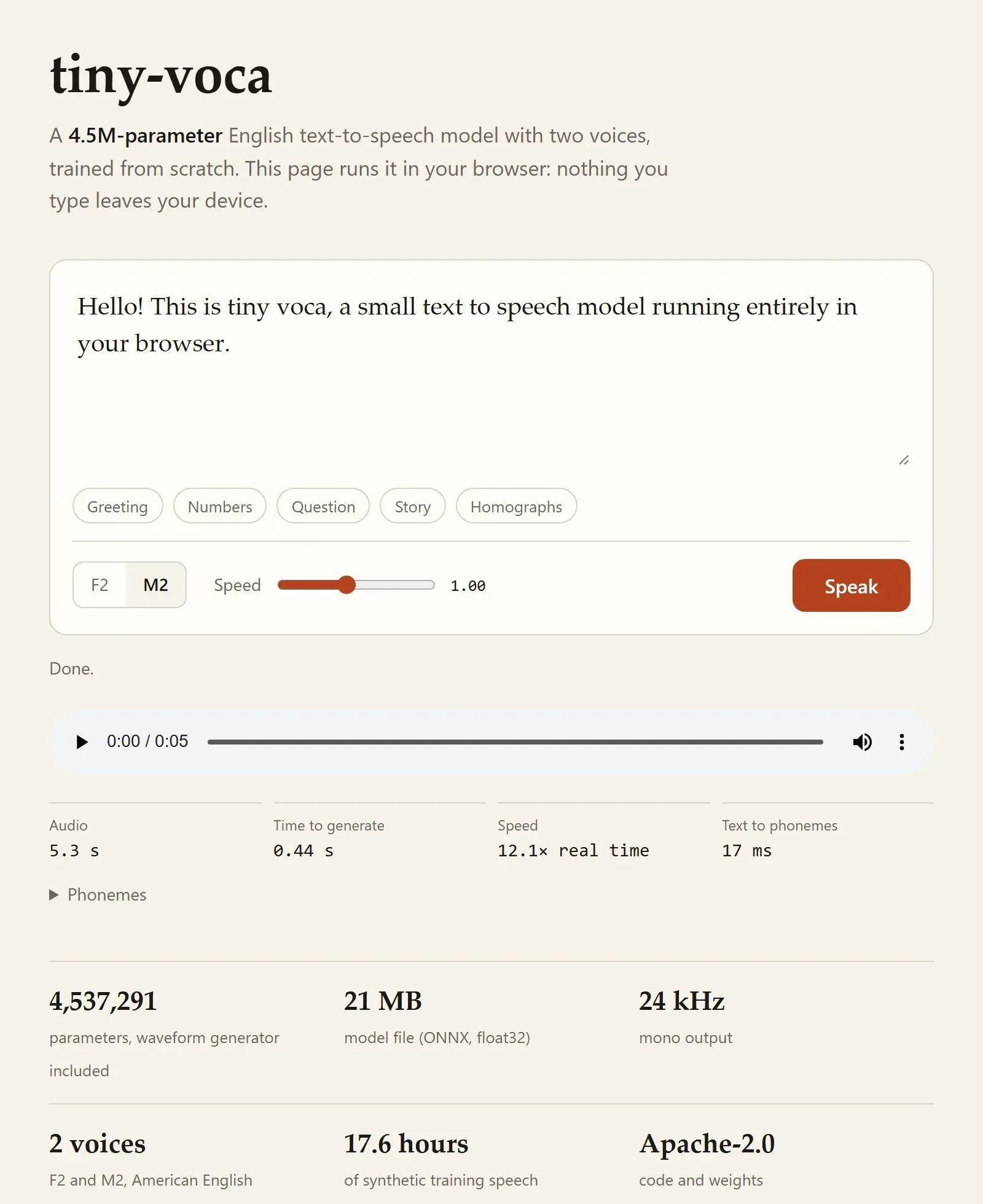
python -m tiny_voca.exportwrites an ONNX file, and a readyonnx/model.onnxis in the weights repository. The graph takes phoneme ids, stress values, a voice index, speed and pitch inputs and returns the waveform plus per-token durations; it reads one utterance per call, up to 512 tokens and 32 seconds. The card states the audio can peak slightly above 1.0 in about one sentence in twenty and shows how to scale it before writing 16-bit samples. - Browser demo The web demo runs the ONNX model in the browser with ONNX Runtime Web and states that nothing typed leaves the device. The first visit downloads about 40 MB: the model, the pronunciation dictionary and a Python runtime for the phonemizer. It plays each sentence as soon as it is generated and shows audio length, generation time and speed. Its source is in
web/and runs locally withnpx wrangler dev. - Plain JavaScript port The js folder is an experiment that implements the model and the phonemizer in plain scripts with no ONNX Runtime, WebAssembly, Pyodide or npm packages. It reads one GGUF file of 8 MB and runs in the browser, in Node and in Bun, with
say.mjsas the command-line entry. Measured on an Apple M5 with one thread, the README reports 9.7 times real time on Node 24 and 13.4 times on Bun 1.3. - GGUF files and llama.cpp The weights repository includes GGUF files at 14.9 MB (f16), 10.9 MB (q8_0) and 8.7 MB (q4_0) besides the original and JavaScript variants. The llama.cpp TTS documentation has a tiny-voca section:
llama-ttsruns it from a model file and an mmproj file,--tts-voiceselects M2 or F2, and the phonemizer is ported into the model's chat template. ggml-org publishes converted GGUF files on Hugging Face. - dizione phonemizer dizione is a separate Apache-2.0 repository that turns text into phoneme ids and stress values without eSpeak, with a dictionary derived from CMUdict. It handles numbers, money, dates, units, abbreviations and homographs, and the JavaScript port must match its Python output exactly. Pronunciation of numbers, abbreviations and homographs depends on this component.
- Training recipe The README lists four commands:
preparebuilds features from parquet files,annotateadds forced-alignment durations,trainruns 104,000 steps with the adversarial loss starting at step 8,000, andevaluatescores a checkpoint. Training uses multi-resolution spectral losses first and then adds multi-period and multi-resolution discriminators. The released weights took 7.7 hours on one RTX 4090. - Dataset The dataset holds 17,371 synthetic clips (19.1 hours) in two batches under CC BY 4.0, with 16,018 training clips (17.6 hours), 714 validation and 594 test clips. The first batch reads LibriTTS-R transcripts and sentences written for the project with an LLM; the second adds Mozilla Common Voice sentences and templates for numbers, dates, money, names and questions. Every clip was screened with Whisper small.en and rejected above 15 percent word error rate.
- Evaluation and tests
tiny_voca.evaluatetranscribes synthesized speech with Whisper and reports word error rate next to the source recordings; the published figures are 0.6 percent on validation, 0.9 percent on test and 0.0 percent on 16 new sentences. Unit tests run withpython -m unittest, and the JavaScript port has checks against PyTorch output and against Python dizione. - Community derivatives The README lists projects built by other people: models for German, Austrian German, Italian, Turkish, Korean, Japanese, Polish, Russian, Spanish, French, Brazilian Portuguese, Arabic, Hebrew, Bengali, Hindi, Roman Urdu, Kurdish Behdini and Sanskrit, plus a Rust rewrite, an ESP32-S3 port, an Apple Neural Engine version with a Swift package, a local dashboard and a Mac app. These are third-party projects under their own terms.
- Licensing The LICENSE file in both the GitHub and Hugging Face repositories is Apache-2.0, and the Hugging Face metadata lists apache-2.0. The dataset is CC BY 4.0. Phonemizer data files carry their own licenses in
LICENSE.cmudictandLICENSE.homograph-data, and the model documentation lists the licenses of Qwen3-TTS, the alignment model, Whisper, LibriTTS-R and Common Voice as third-party components used for data creation.
Where tiny-voca fits
Generating speech files from the command line
After installing the package and downloading the weights, python -m tiny_voca.infer writes a WAV file from a text string or a text file in the chosen voice. Longer documents are split into sentences automatically and joined, so a whole text file can be converted in one call. The speed and pitch options adjust delivery, and the output is normalized below 0.99 so it can be stored as 16-bit audio without clipping.
Running the model in a web page
The demo in web/ loads the ONNX model and a Python phonemizer runtime in the browser and synthesizes speech client-side, deployable with Cloudflare's Wrangler. The plain JavaScript version in js/ takes a different route: a single 8 MB GGUF file and no libraries, served from any static web server. The demo page warns that the first visit downloads about 40 MB.
Calling the ONNX model from another application
Applications that already use ONNX Runtime convert text to phoneme ids and stress values with dizione, then call the session with the voice index and prosody inputs. Each call handles one utterance of up to 512 tokens and 32 seconds, so longer text is split into sentences first, each ending with a mark such as a full stop. The model card's Python example scales the output before saving 16-bit samples.
Running tiny-voca through llama.cpp
The llama.cpp documentation describes running tiny-voca with llama-tts using a GGUF model file and an mmproj file, and setting the voice with --tts-voice; in llama-server the same options are set with --tts-lang and --tts-voice or per request on the /tts endpoint. The text-to-phoneme step is embedded in the model's chat template, so no separate phonemizer install is needed there.
Training a voice or a language
The training commands in the README cover feature preparation, forced-alignment annotation, training and evaluation, and the dataset card documents how the synthetic corpus was produced. The README's community section lists derivatives in more than fifteen languages and accents made by other people, several trained on a CPU or fine-tuned from tiny-voca, and invites authors to open an issue to be listed.
Speech on small or offline devices
The model runs on a CPU without a GPU, and its quantized GGUF files are under 11 MB. The README links third-party ports to an ESP32-S3 microcontroller and to the Apple Neural Engine through Core ML, and the plain JavaScript version runs in Node and Bun without installing packages. The demo page states that typed text stays on the device.
Install
pip install git+https://github.com/n4ze3m/dizione git+https://github.com/n4ze3m/tiny-vocaReviews of tiny-voca
Be the first to share your experience with tiny-voca.
Write a review
Loading review form…
Found tiny-voca useful? Upvote it todayYour vote helps other IT teams find it in the daily ranking.