

What is FluidVoice?
FluidVoice is a native macOS dictation application written in Swift. A global hotkey starts recording, a local speech model transcribes the audio, and the result is typed into the focused text field of any application through the macOS accessibility APIs. The project is published by the GitHub organization altic-dev, whose OG artwork and product family carry the name Altic, and the public repository was created in September 2025. The official website is fluidvoice.com, where the older address altic.dev/fluid now redirects. The README warns that fluidvoice.org is not affiliated with the project and that official downloads come only from the GitHub releases.
The app is free. Signed builds are published as a DMG and a ZIP on the GitHub releases page, about 76 MB for version 1.6.12, and through the Homebrew cask fluidvoice. Updates are delivered inside the app, with an optional beta channel. A Windows build is published separately as a pre-release x64 installer (Windows 0.0.13 on November 2, 2026), an iPhone build is distributed through TestFlight invitations, and Linux and Android are on a waitlist. Development is funded through GitHub Sponsors rather than paid tiers.
Version 1.6.12, released October 22, 2026, concentrates on FluidMeet, the meeting recorder introduced in 1.6.11: transcript export as Markdown, text or JSON, a configurable meeting shortcut, summaries on the Mac or through your own provider, editable speaker names and an integration that lets coding agents such as Claude Code and Codex read meetings. Version 1.6.11 also added Global Search, a redesigned interface, pronunciation training in the custom dictionary, Spoken Send, the smaller English-only Fluid Speech Mini and Pico models, and a local HTTP API. The 1.6.13 beta line, at beta 2 on November 2, 2026, adds a separate Edit Mode model and 25-language support for the Fluid Speech models.
The application code is licensed under GPL-3.0 from February 23, 2026; earlier versions were released under Apache 2.0. Fluid Intelligence, the on-device text cleanup runtime behind the Fluid-1 models, is maintained privately and is not part of the open-source code, which the README explains as a way to keep the core dictation app free. Speech inference relies on FluidAudio and Core ML on Apple Silicon, Whisper models cover Intel Macs, and the Xcode project pulls its dependencies through Swift Package Manager, including swift-transformers and a vendored WebRTC audio processing module used for meeting echo filtering.
FluidVoice requires macOS 15.0 Sequoia or later, microphone access and accessibility permission. All speech models run on Apple Silicon, while Intel Macs are limited to Whisper and Apple Speech. It is a single-user desktop tool: there is no server edition, no shared workspace and no admin console. The README is the main documentation; there is no separate documentation site.
FluidVoice screenshots
Explore the interface. Open a screenshot to view it at full size.
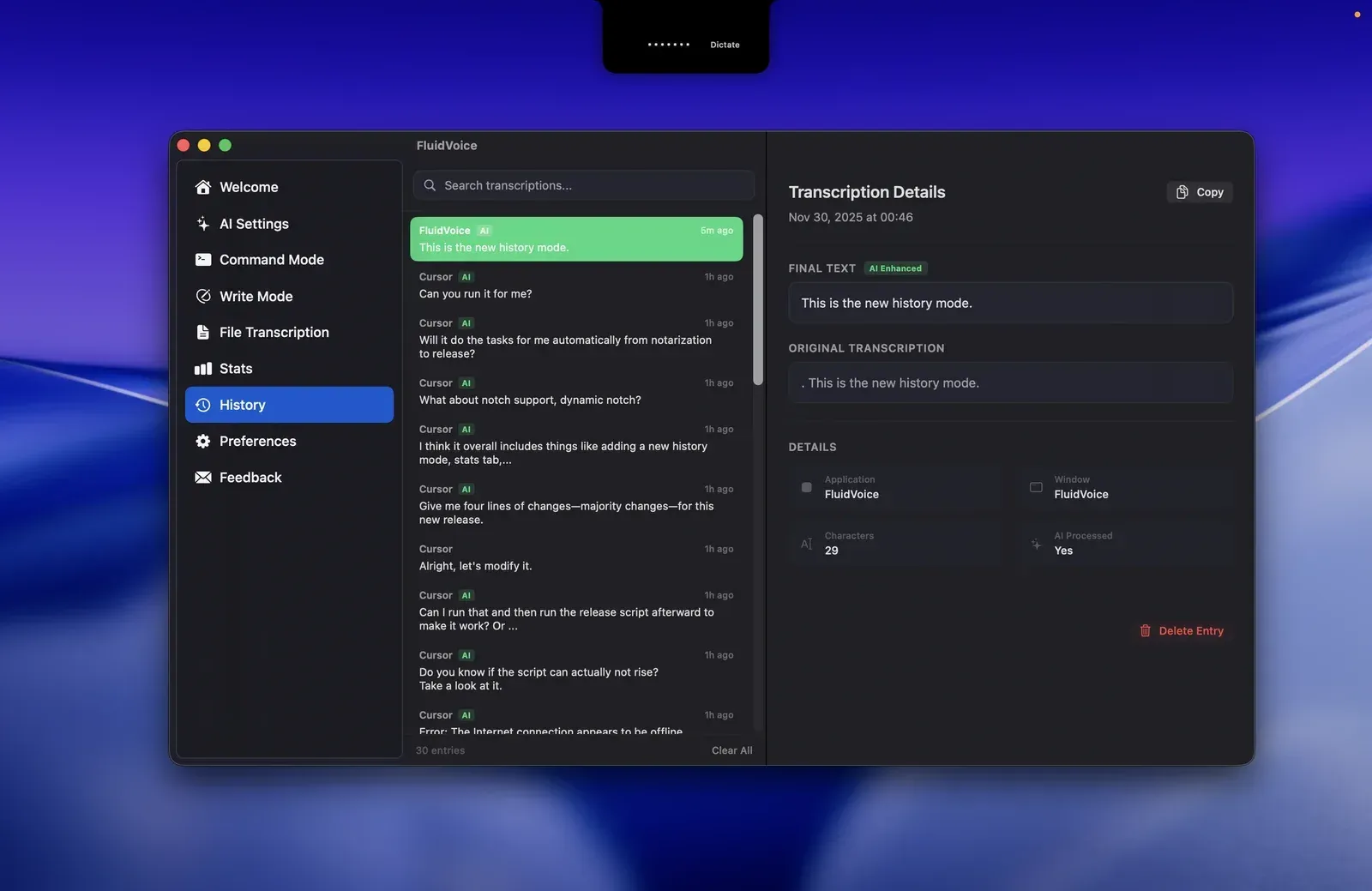
Official repository screenshot of the History view with the notch overlay in Dictate mode; it shows the interface before the 1.6.11 redesign.
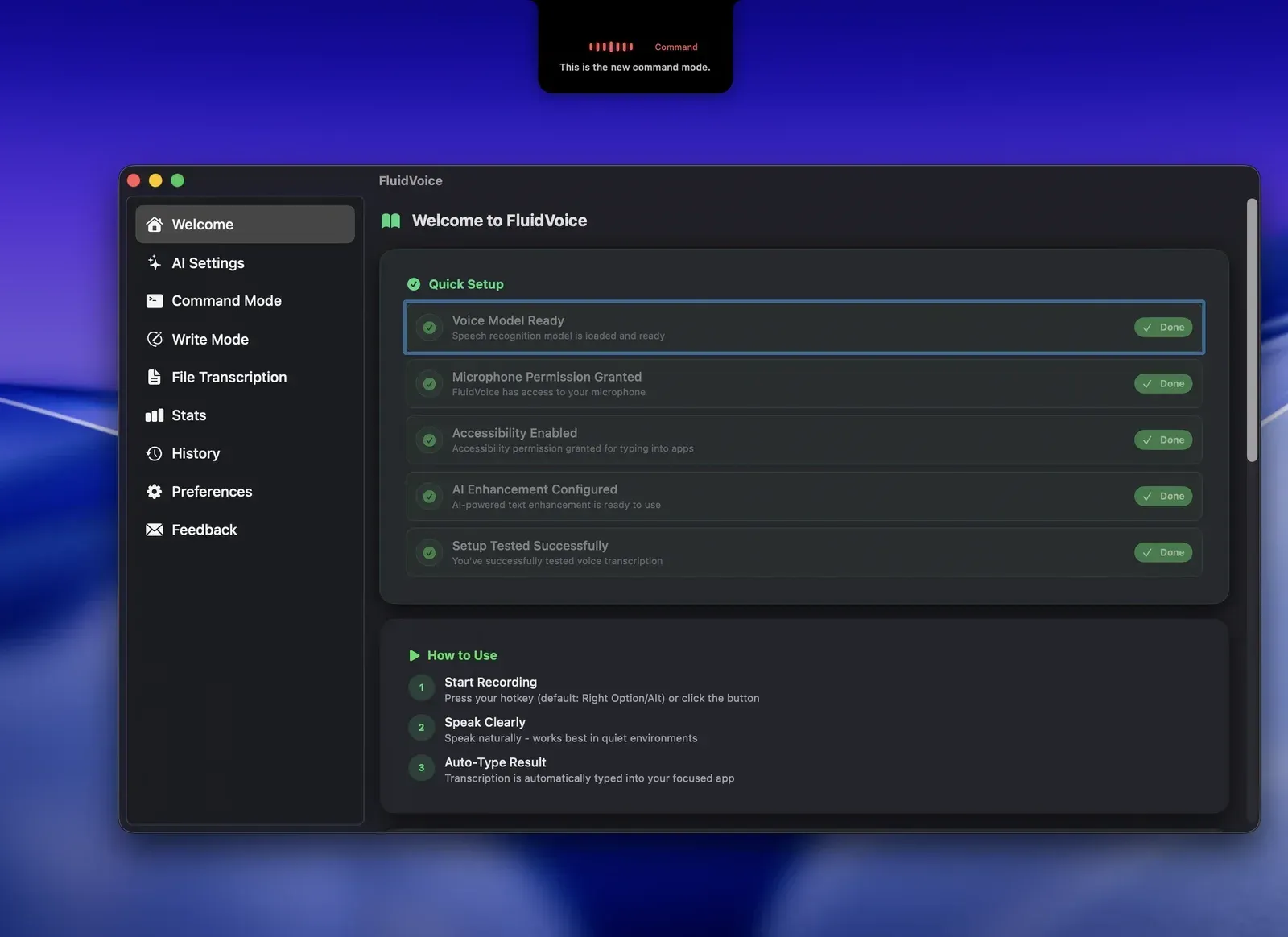
Official repository screenshot of the Welcome page and Quick Setup checklist, with the Command Mode overlay at the top; earlier interface.
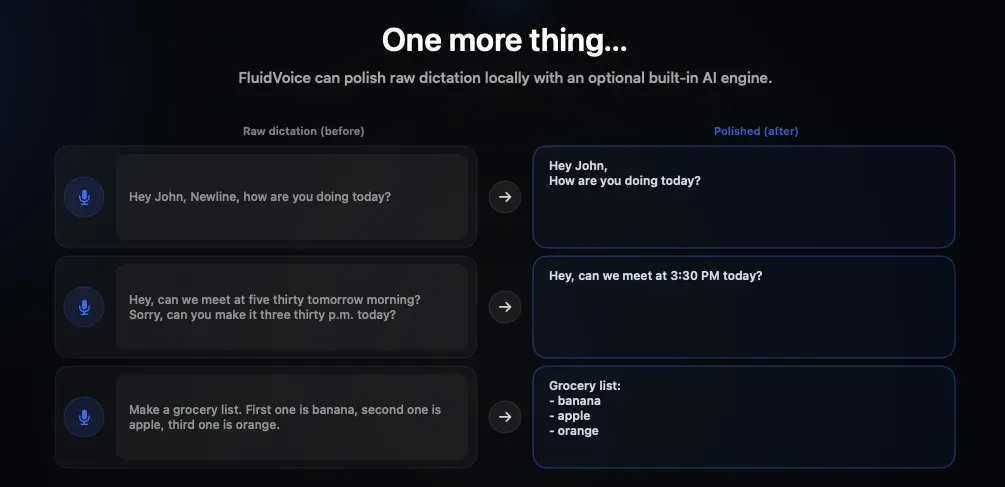
Official repository figure showing raw dictation before and after local cleanup by Fluid Intelligence.
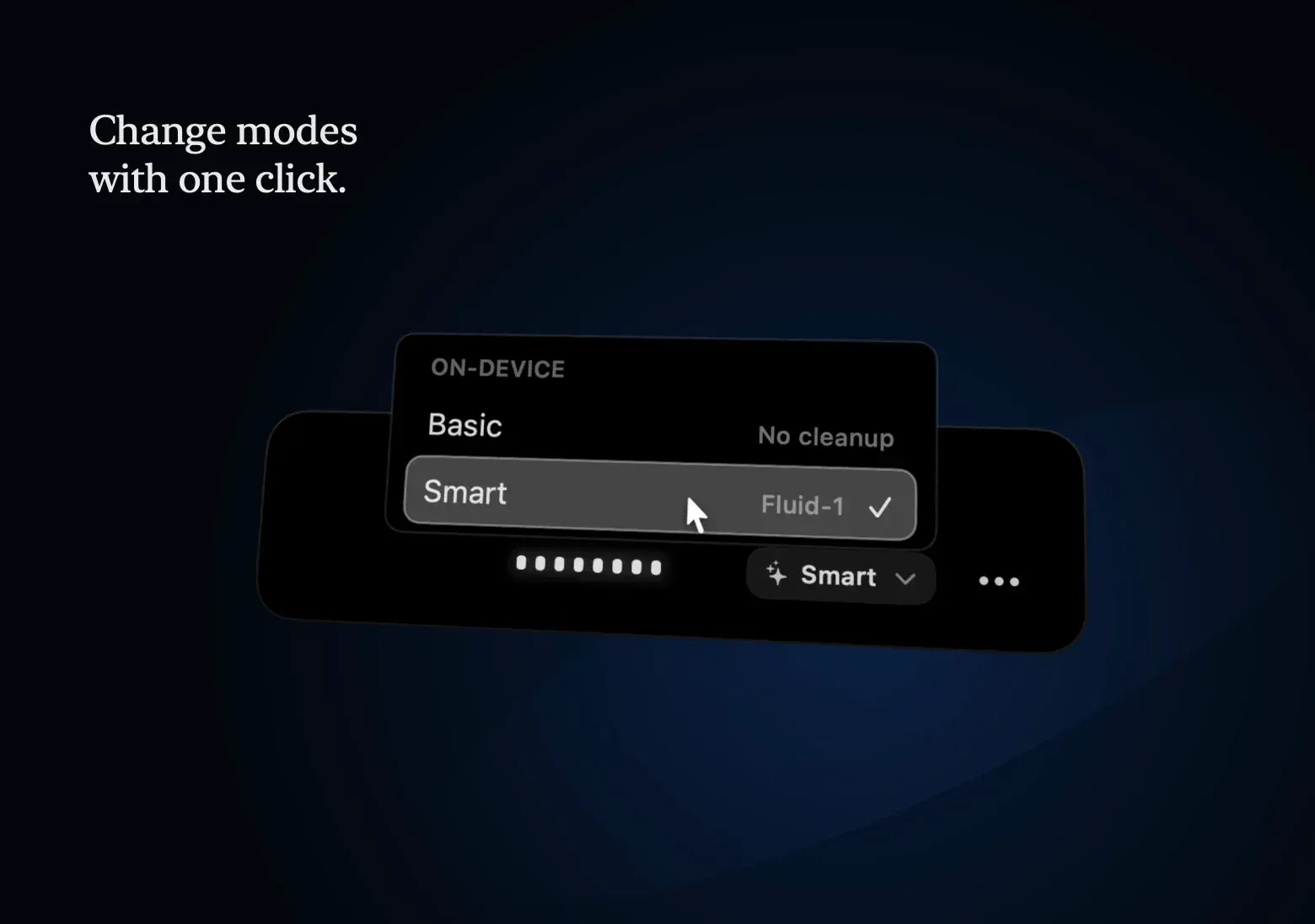
Official onboarding illustration from the app resources: switching the recording overlay between Basic and Smart cleanup.
Source: official FluidVoice project page.
Key capabilities
- Install with Homebrew or the DMG The README documents
brew install --cask fluidvoiceas the main installation path. The alternative is theFluid-ossDMG or ZIP attached to each GitHub release, about 76 MB for 1.6.12. On first launch the app asks for microphone and accessibility access, then runs a language-first onboarding that picks a voice model and offers a real dictation test. - Windows and iPhone previews Windows builds are published on the same releases page as pre-release x64 setup installers with their own version line, currently 0.0.13. The Windows notes describe a recording overlay, automatic insertion into the active app with a clipboard fallback and resumable model downloads. The iPhone page is a TestFlight sign-up form; features and models differ by platform.
- Build from source Clone the repository, open
Fluid.xcodeprojin Xcode and build; Swift Package Manager resolves all dependencies../build.shproduces a signed Debug build, and./build.sh unsignedis the fallback for CI or contributors without a signing identity. Unsigned builds may lose Accessibility, Screen Recording and microphone permissions after each rebuild. Source builds do not include the private Fluid Intelligence runtime. - Local speech models The model catalog lists Nemotron Speech 3.5 (about 40 languages, around 670 MB), Nemotron 3.5 Multilingual, Parakeet Flash for low-latency English, Parakeet TDT v3 (25 European languages) and v2 (English), Cohere Transcribe (14 languages, about 1.4 GB), Apple Speech and Whisper from Tiny to Large. All except Apple Speech and Whisper require Apple Silicon. Compatible model weights can be updated without updating the app.
- Fluid Speech Mini and Pico These smaller first-party models were added in 1.6.11 with support for custom words and pronunciation training. The Fluid Speech Mini page lists a 253 MB Core ML package, about 277 MB of memory in use, English only and a CC BY 4.0 license for the open weights. The 1.6.13 beta extends the Fluid Speech models to the 25-language Parakeet list.
- Fluid Intelligence local cleanup The optional Fluid-1 models fix formatting, capitalization, numbers and lists on the Mac without an API key. The website lists Fluid-1, Fluid-1 Mini (under 1.5 GB) and Fluid-1 Pico (about 600 MB) and recommends Pico with Fluid Speech Mini for a base M1 MacBook Air. The runtime is closed source, and idle unloading frees memory when it is not in use.
- Cloud and self-hosted AI providers Enhancement can instead use OpenAI, Anthropic, xAI, Groq, Cerebras, Google Gemini or OpenRouter with your own key, a local Ollama or LM Studio server, or a custom OpenAI-compatible endpoint. Keys are stored in the macOS Keychain. Cleanup Styles provide Basic (no cleanup), Smart and custom instructions, and different prompt sets can be assigned to different apps.
- Write Mode and Edit Mode Write Mode drafts new text or rewrites selected text in any text field across applications. In the 1.6.13 beta it is presented as Edit Mode with its own Edit 1.1 local model on Apple Silicon, while API providers remain available. Accepted rewrites restore the original field before replacing its text.
- Command Mode Command Mode turns a spoken request into actions on the Mac, such as launching apps, running shortcuts or triggering system actions. It requires a verified AI provider, and the source shows that the model can call a terminal tool that runs commands through
/bin/zshwith a 30-second default timeout. Treat it as an AI agent with shell access, not as a fixed command list. - FluidMeet meeting transcripts FluidMeet records meetings locally with live captions, speaker labels and timestamped transcripts, and detects browser and app calls. The FluidMeet announcement names Parakeet v3 for transcription and NVIDIA Nemotron 3 Diarization on Core ML for up to eight speakers, on M1 or later with macOS 15. Version 1.6.12 adds Markdown, text and JSON export, speaker renaming and merging, and summaries on the Mac or through your own provider.
- File transcription with speaker labels Audio files can be transcribed outside live dictation, including WhatsApp .opus and .oga voice notes since 1.6.11. Optional offline speaker labeling, added in 1.6.8, produces timestamps and text or JSON export. Through the local API, uploads of up to 500 MB are accepted without a fixed duration limit.
- Live preview and notch overlay A real-time overlay shows words while you speak, fitted around the MacBook notch or as a standard floating overlay. Sizes range from a small pill to a large preview, and the overlay finish, colors, transparency and waveform can be customized. Parakeet Flash and the rebuilt Parakeet implementation target near-instant display.
- Custom dictionary and pronunciation training Replacements correct recurring words, and Custom Words Boosting improves recognition of names. Since 1.6.11 the dictionary can also learn how you pronounce a word, and 1.6.12 carries saved pronunciations across Parakeet, Mini and Pico. Spoken Formatting, added in 1.6.9, inserts new lines, paragraphs, tabs and symbols after a configurable start word.
- Hotkeys, Hold Space to Mute and Spoken Send A global hotkey starts capture from any app, and 1.6.13 beta distinguishes left and right modifier keys. Hold Space to Mute pauses a hands-free dictation while Space is held; a tap of up to 250 ms still types a space, and muted audio is excluded from the transcript and history. Spoken Send submits the finished dictation with a configurable phrase, with safeguards for terminal apps.
- History, search and dashboard Optional local audio history keeps past dictations with storage budget controls and ZIP export, and transcripts can be pinned. Global Search covers history, meeting transcripts, chats, dictionary entries, cleanup styles and settings. A dashboard shows recent dictations, daily usage and shareable statistics.
- Local HTTP API A built-in API listens on
http://127.0.0.1:47733when enabled and is off by default. The LocalAPI source registers routes for health, history, meetings and live meeting text, dictionary replacements and custom words, plus/v1/transcribeand/v1/postprocess. It only accepts requests addressed to localhost. - Coding agent integration FluidMeet settings, under Integrations, install a read-only
fluidmeetskill for Claude Code, Codex and other coding agents. The skill calls the bundledfv-servetool with commands such asmeet list,meet showandmeet summary. Nothing else needs to be running for the agent to read saved meetings. - Microphone handling A saved microphone priority list with drag-to-reorder, device history and availability status was added in 1.6.8. Later releases fixed clamshell mode, 3.5 mm headsets and brief AirPods route changes. Media playback can pause during dictation and resume afterwards.
Where FluidVoice fits
Keeping dictation entirely on one Mac
Pick a local voice model during onboarding, for example Parakeet TDT v3 for European languages or Fluid Speech Mini for English, and use Basic or a Fluid-1 model for cleanup. Do not configure a cloud provider, and confirm that no per-app prompt set points to one. Then check the analytics setting: a weekly batch of anonymous daily activity signals is always sent, and detailed analytics stay on until you turn off Share Detailed Anonymous Analytics in Settings. Test once with the network disconnected to confirm dictation still works.
Choosing models for older or smaller Macs
On a base M1 MacBook Air, the website suggests Fluid Speech Mini with Fluid-1 Pico, together under 1 GB of download and memory. Intel Macs can only use Whisper or Apple Speech, so check speed with a Whisper size that fits the machine. Plan disk space for each model: the README estimates about 1 GB for a voice model and up to 3.5 GB for the Fluid Intelligence model, while the website lists smaller Fluid-1 variants.
Writing email and chat in many apps
Assign different prompt sets to the mail client, chat apps and editors, so formal cleanup applies only where it is needed. Use Write Mode to rewrite a selected paragraph in place, and the custom dictionary for names, product terms and spoken formatting. Verify the result in Electron apps and slow editors, where the release notes record several paste and field-detection fixes, and keep the clipboard fallback in mind if insertion fails.
Recording and summarizing meetings locally
Enable FluidMeet, choose the meeting app and microphone in the picker, and record; online meetings no longer fall back silently to microphone-only recording in the 1.6.13 beta. Rename speakers, correct text with a double-click, then export Markdown, text or JSON. Summaries can run on the Mac or through your provider, and the app shows an accuracy reminder: review them before sharing. Confirm that participants have agreed to the recording under your local rules.
Feeding transcripts to coding agents and scripts
Install the fluidmeet skill from FluidMeet settings to let Claude Code or Codex list meetings and read transcripts through fv-serve. For your own scripts, enable the local API and call /v1/history, /v1/meetings/transcript or /v1/transcribe on port 47733. Because the API exposes transcripts and dictionary content to any local process, enable it only on machines where that is acceptable.
Controlling the Mac by voice
Configure a verified AI provider for Command Mode and start with harmless requests such as opening an app or a folder. The model can run shell commands through a terminal tool, so review what it executes, prefer a provider and model you trust with local context, and avoid using it on machines with production credentials loaded in the shell. Disable or unassign the Command shortcut where this capability is not wanted.
Install
brew install --cask fluidvoiceReviews of FluidVoice
Be the first to share your experience with FluidVoice.
Write a review
Loading review form…
Alternatives to FluidVoice
 VoiceInkGPL-3.0 voice-to-text app for macOS that transcribes on-device or through your own provider keys, pastes at the cursor and applies per-app Modes. Prebuilt app is a one-time license from $25; the source can be built for free.
 HandyHandy is a free, MIT-licensed speech-to-text app for Windows, macOS and Linux. Press a shortcut, speak, and a local Whisper, Parakeet or other model transcribes the audio and pastes the text into the focused field, without a cloud service.
 OpenWhisprMIT-licensed dictation app for macOS, Windows and Linux that types speech at the cursor, records meetings with speaker labels and keeps searchable notes. Runs Whisper, Parakeet and other models locally, or uses OpenWhispr Cloud or your own API keys.