



What is FreeVideo?
FreeVideo is an open-source local inference engine for the MiniMax H3 video model. It is built on OpenVDN's 8-step VDN-H3 model, which adds the Video DeltaNet hybrid attention (a frame-wise linear attention branch next to a softmax branch) to MiniMax H3. According to the README, FreeVideo runs the model in as little as 8 GB of VRAM and 16 GB of system RAM by coordinating GPU memory, host memory and disk. It runs as a ComfyUI plugin with its own creative workspace, and ships launchers for Windows, macOS on Apple silicon (preview) and Linux.
The project is published by the FlashML-org GitHub account, which also publishes the FreeToken serving engine and the FlashLib library. The README lists a five-person project team, cites the Video DeltaNet paper and thanks Impossible Research for compute resources; no company is named as the publisher. The repository was created on September 13, 2026, and the README dates the open-source launch to October 2, 2026. Releases come at a fast cadence: the releases page lists more than 80 tagged versions since then.
The current release is v0.6.7 (November 21, 2026). It adds prompt enhancement for the MOSS-Image picture model, upscaling of merged videos, a lossless sound option on export and a reworked Edit view. The 0.6 series (from v0.6.0, November 16) introduced a redesigned interface, privacy changes such as deleting uploaded pictures and prompts together with a work, and MOSS-Image support. v0.5.0 (November 10) added H3 Image for pictures from 4 MP up to 16 MP, and v0.4.0 (October 13) added AI agent connections, videos longer than a minute generated in parts, and a timeline editing view. Earlier releases added the four quality levels Light, Medium, High and Max (v0.2.0), workflow metadata embedded in videos (v0.2.3) and a faster int8 model for GeForce and RTX 30-series cards (v0.3.0).
Technically, an adaptive execution planner measures free VRAM and host memory before every request and decides how many of the 50 transformer blocks stay on the GPU, which are pinned in RAM and which are streamed from disk, plus the int8 or FP8 GEMM path, the attention backend (SageAttention 2, PyTorch flash attention, cuDNN, FlashAttention 2 or 4, whichever passes an on-device probe) and the VAE decoder placement. The text encoder runs in a separate process that exits before the transformer loads. The engine is written in Python and also runs without ComfyUI through a freevideo command line.
Licensing is split. The FreeVideo code is released under the Apache License 2.0. The model weights are not: MiniMax H3 and the derived VDN-H3 weights are distributed under the MiniMax H3 Community License Agreement, which grants rights only outside the European Union, the United Kingdom, South Korea and the United States, includes an Acceptable Use Policy, requires separate written authorization for commercial products and services with more than 20 million US dollars in yearly revenue, and requires commercial products to display "MiniMax H3" in their user interface. Similar local or self-hosted generation tools listed on iThub include LocalAI, which serves image and video models behind an OpenAI-compatible API, and Open Generative AI, which uses a hosted API instead of local weights.
Key capabilities
- Hardware-adaptive weight formats The engine picks the weight format per GPU: int8 on GeForce Ada and Blackwell cards and on every Ampere card, FP8 on other cards, with per-tensor scales on Blackwell workstation cards and per-channel scales on Ada and Hopper. The VDN-H3 Edge model card states that setup downloads only the matching FP8 format, about 22.9 GB, plus the separately installed text encoder and decoders. Users do not choose a quantization format themselves.
- NVIDIA GPU requirement On Windows and Linux, FreeVideo requires an NVIDIA GPU with compute capability 8.0 or newer (RTX 30-series and later); the launcher rejects older architectures before setup. When Windows lists only AMD or Intel graphics, the launcher reports that FreeVideo supports NVIDIA graphics cards. The Linux guide names NVIDIA driver 580 or newer.
- Low-memory inference Weight streaming, asynchronous prefetching and chunked computation keep peak memory low. The README states a floor of 8 GB of VRAM and 16 GB of RAM; release v0.3.3 added a slower low-memory mode that lets 6 GB cards such as a laptop RTX 3060 run the int8 model. Out-of-memory failures are retried in a fresh process with a lighter placement, and a request that cannot fit is refused before the transformer loads, with the shortfall reported.
- Four quality levels and two-pass sampling Each video can be generated at Light, Medium, High or Max; higher levels take longer. Two-pass sampling renders a half-resolution first pass, and since v0.3.2 a half-resolution preview can be reviewed first so only selected takes are finished at full resolution. The project gallery shows the same clips at all four levels side by side.
- Multimodal inputs Videos can start from a text prompt, a first frame, a last frame or both, with still keyframes placed in between since v0.5.0. Image, video and audio references are supported, including an audio clip used as is as the soundtrack, reference videos used only for depth or only for layout, and replacing a person in a source video with a character from a picture. Uploads are limited to 2 GiB per file.
- Community LoRAs MiniMax H3 LoRAs from Hugging Face or Civitai can be added in the creation panel or as nodes in the ComfyUI workflow. The LoRA page shows same-prompt, same-seed comparisons for a VHS style, a looping sketch anime style and a point-of-view LoRA. LoRAs also work for image generation and character creation since v0.4.28.
- ComfyUI workspace and nodes FreeVideo opens as a dedicated workspace inside ComfyUI with batch generation, two-pass sampling and a history of past creations. A Nodes view exposes the underlying workflow for adding LoRAs or customizing nodes, and the FreeVideo-All-in-One template is available under Workflow, Browse Templates. Existing ComfyUI installations can add FreeVideo as a custom node with
git cloneincustom_nodes, or update it through ComfyUI-Manager. - Workflow metadata in videos Since v0.2.3, generated videos carry their workflow: dropping a FreeVideo video onto the ComfyUI canvas restores its prompt, seed and settings. Videos made with earlier versions can have the metadata added. Since v0.6.0, downloads and shares leave out the prompt by default.
- AI agent connections External agents drive FreeVideo through a stdio MCP server (
freevideo mcp) or the same operations from a shell withfreevideo agent, which prints JSON. The MCP server exposes tools to plan, generate, wait for and resume jobs, look at frames, assemble clips, edit timelines and manage a cast library, and the code names Claude Code, Claude Desktop and Cursor as clients. A bundled agent skill has an installer that copies it to~/.claude/skillsand~/.agents/skillsfor Claude Code, Codex, Gemini CLI and Cursor. - Autopilot and built-in director Without an external agent, the Autopilot view hands an idea to a built-in director that splits it into shots, generates them and joins the result, and since v0.5.3 delivers an editing project with one part per shot. The agent tools include a local vision-language model for reviewing shots and rewriting prompts. Settings decide whether an agent asks before starting a film or a long reshoot; both ask by default.
- Long videos and timeline editing The Edit view arranges clips on a timeline with text, subtitles, speed changes, reversing, beat lines on the music track and audio recording. Selecting a range and pressing Generate creates long videos in parts that continue from one another; the agent tool generates up to 60 seconds per call. Automatic subtitles recognize Chinese, English, Japanese, Korean and Cantonese speech, and exports offer 48 or 60 fps, 4K upscaling and lossless sound in a .mov file.
- Picture generation The Images view shares one prompt box between H3 Image, Qwen-Image 2.1 and, since v0.6.3, MOSS-Image. H3 Image makes pictures from 4 MP up to 16 MP on NVIDIA cards from 8 GB of VRAM, downloads about 22 GB when added to a video install, accepts up to 16 reference pictures and is not available on Mac or AMD hardware. Apple silicon Macs with at least 16 GB of memory can generate and edit pictures with the other models.
- Optional prompt enhancement A local model can rewrite a prompt into the sectioned format MiniMax H3 expects, and the user picks the original or the rewrite. It is off by default and asks before downloading its model, which v0.3.0 sized at 8.3 GiB. The workspace also links the MiniMax H3 prompt skill and FreeToken as options for rewriting prompts with an AI model.
- Windows launcher FreeVideo.exe (Windows 10/11, NVIDIA GPU) installs a new ComfyUI or uses an existing one, reuses existing model folders and downloads missing models. The README states that the executable is code-signed and asks users whose security software blocks it to compare its SHA-256 with the value on the release page. The launcher updates itself and offers a Repair button that keeps models and videos.
- macOS preview on Apple silicon FreeVideo-Mac-arm64.dmg runs on Apple silicon with macOS 14 or later and the Xcode Command Line Tools; the Mac guide calls the support experimental. Computation runs through Metal with MLX attention kernels; M5 chips run int8 projections on Metal 4 tensor units, earlier chips decode them to BF16. The app is not notarized yet, so the first launch needs approval in Privacy and Security after a checksum check. The Mac guide lists text prompts, first-frame input and two-pass sampling as supported.
- Linux desktop and server An x86_64 AppImage covers desktops (Ubuntu 22.04, Debian 12, Fedora 36, RHEL 9 or newer), and
./setup.shinstalls everything from a clone for terminals and servers, after whichfreevideo,freevideo statusandfreevideo stopmanage ComfyUI. The Linux guide documents SSH tunnelling, a token-protected LAN link withfreevideo server --listen 0.0.0.0, optional TLS certificates and a systemd user service. Release v0.4.32 notes that two GPUs on Linux can run two tasks at once when memory allows. - Offline installation Offline packages are hosted on Quark and ModelScope and are dragged into the launcher as ZIP files without extracting them. A fully offline install needs four model packs (video model, text encoder, video and audio decoder, sampling caches) plus the environment package for a new ComfyUI; the audio reference cache is optional. Reusing an existing model folder saves a download of about 49 GiB, according to the v0.5.4 notes.
- Command line and planning tools The engine runs without ComfyUI:
./freevideo generate --prompt-file prompt.txt --out video.mp4renders directly,./freevideo plan --vram-gib 8 --ram-gib 16prints an execution plan without loading weights, and./freevideo optimizesearches compute settings for the machine. Each output gets a.request.jsonfile recording the measured hardware, the selected plan, stage timings and memory peaks.
Where FreeVideo fits
Generating short clips on a consumer NVIDIA card
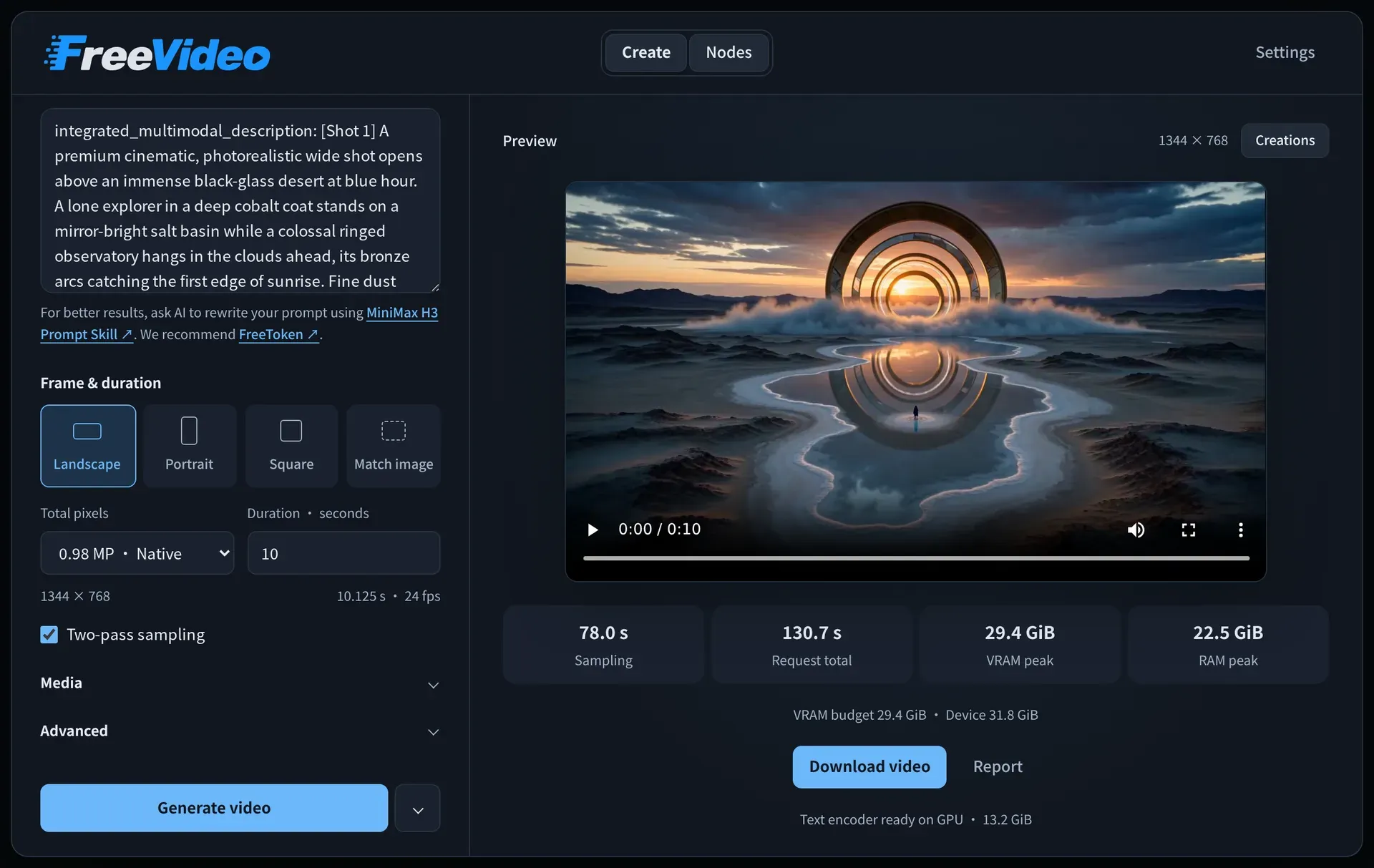
The project's main workflow is text-to-video or image-to-video on a single GeForce or RTX card. Users choose an aspect ratio, total pixels, duration and quality level, then generate. The execution planning page lists project-measured Windows times for a 10-second 1344 × 768 two-pass video: 122 seconds on an RTX 5090 with 64 GB of RAM, 486 seconds on an RTX 5060 Ti 16 GB and 558 seconds on an RTX 4060 Ti 16 GB, plus a community report of 603 seconds on an 8 GB RTX 4060 Ti. A forecast before each request is based on the timings stored from earlier runs on the same machine.
Previewing and finishing selected takes
Since v0.3.2, a half-resolution preview is generated first, and only the takes the user keeps are finished with the second pass. Each saved 10-second 1344 × 768 video takes about 40 MB of disk space according to the release notes, and previews can still be finished later with Run second pass.
Multi-shot films with an AI agent
Claude Code, Codex, Cursor or another MCP client connects to the local FreeVideo instance, checks its status and capabilities, plans a job to get a time estimate, then submits shots and chains them by starting each from the previous shot's last frame. The agent can look at frames, ask the local vision-language model to score a shot, reshoot, and assemble the result. The same work appears in the FreeVideo window, and actions that need confirmation wait for the user.
Long videos and editing
In the Edit view, a range on the timeline is generated in parts that continue from one another, with a first-frame reference switch to reduce drift. Clips can be extended by dragging a new part out of their end, subtitles are created automatically, and music, narration in a chosen voice and recorded audio are added on separate tracks before export at the chosen size, frame rate and sound format.
Restoring and customizing ComfyUI workflows
Users working in ComfyUI drop a FreeVideo video onto the canvas to recover its prompt, seed and settings, switch to the node view, and add LoRAs or other nodes. Existing ComfyUI setups add FreeVideo as a custom node and open the FreeVideo-All-in-One template; the README covers installation and updates through git pull or ComfyUI-Manager.
Running on a Linux GPU server
On a headless machine, ./setup.sh checks GPU, memory and disk, shows the plan and installs after confirmation. Other computers reach the instance through an SSH tunnel to port 8188 or through a token link printed by freevideo server --listen 0.0.0.0, which also shows a QR code for phones. The guide notes that the LAN link is unencrypted unless TLS certificates are supplied.
Install
git clone https://github.com/FlashML-org/FreeVideo.git && cd FreeVideo && ./setup.shReviews of FreeVideo
Be the first to share your experience with FreeVideo.
Write a review
Loading review form…
Found FreeVideo useful? Upvote it todayYour vote helps other IT teams find it in the daily ranking.