
What is Hypit?
Hypit is a TypeScript language and compilation system from Hypit.AI that lets people and coding agents describe, compile and produce complete videos. In place of a timeline, a video is written in SVML (Semantic Video Markup Language): characters, dialogue, segments, captions, B-roll, speech synthesis and effects live in text files, and their timing is anchored to words in the script rather than to seconds. The compiler turns that source into a finished video, and the source stays editable, reusable and suitable for version control. The project overview describes the Script constructs Segment, Speaker, Split and Hook and the production problems each one addresses.
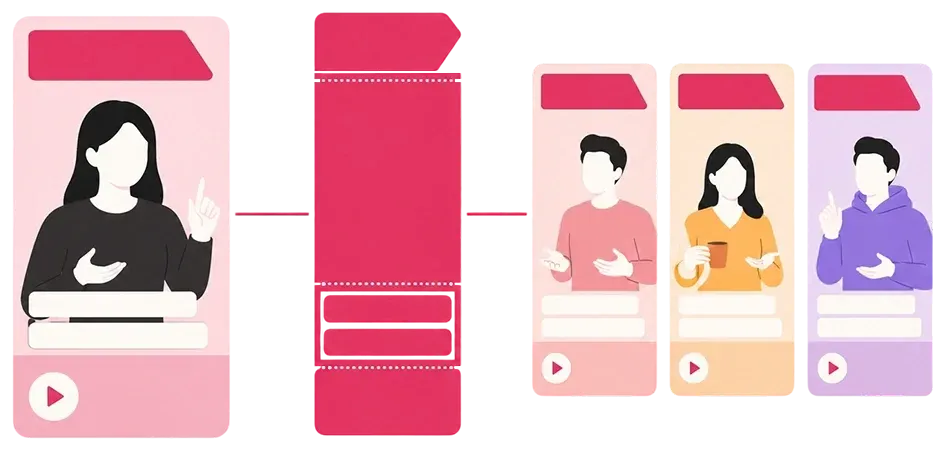
The main entry point is reference video cloning. An agent receives an existing clip, studies its shots, pacing, captions and effects, and rebuilds it as a composition in which the presenter, product, language, aspect ratio or call to action can change. The documentation also covers starting from a template (podcast, street interview, dialogue, video call) or from a written brief. Generation models are optional: a workflow can compile captions, motion graphics and code-rendered visuals into a video without calling a generation service.
Hypit is distributed in two parts. The Agent Skill installs with npx skills add hypit-ai/hypit -g, and the @hypit/hypit npm executable supplies the hypit CLI, which the agent locates or installs on first use. The two have separate update channels. The Development Guide lists Node.js 22.15 or later as the only hard requirement; live builds also use Python 3.10 to 3.13 with uv for local WhisperX and OpenCV programs, ffmpeg and ffprobe, and a Chromium build that hypit runtime up downloads for HTML rasterization. The repository is a pnpm monorepo with packages for the compiler, executor, Studio, captions, media tracks, model contracts and service Providers.
The latest release is v0.3.2, published November 11, 2026. It adds Bach 1.0 Pro as a default dependency with generation through HypiHub, seed and multi-clip parameters for PixVerse V6, embeddable HTML document output, and reuse of video frames that already meet normalization requirements; the notes state that repository checks and package verification passed on Linux and Windows. Version 0.3.1 (October 9, 2026) split the video-domain SDKs into independently versioned npm packages, and 0.3.0 (October 8, 2026) was an architectural release that requires migrating 0.2 Sources, Recipes, Runs and components, as described in the 0.3 migration guide.
The code is released under the Hypit Open Source License, a modified Apache License 2.0. Commercial use for your own organization is allowed, including client work and single-tenant deployments; operating a multi-tenant or hosted service, or selling Hypit or a derivative, requires a commercial license from Hypit.AI, and the name, logo and copyright shown in the CLI, run reports and manifests must not be removed. Videos and other outputs belong to the user. The framework includes no generation credits: model calls go through the hosted HypiHub service, through your own API keys, or through local tools. Similar projects on iThub include HyperFrames and OpenCreator.
Key capabilities
- SVML source language A single
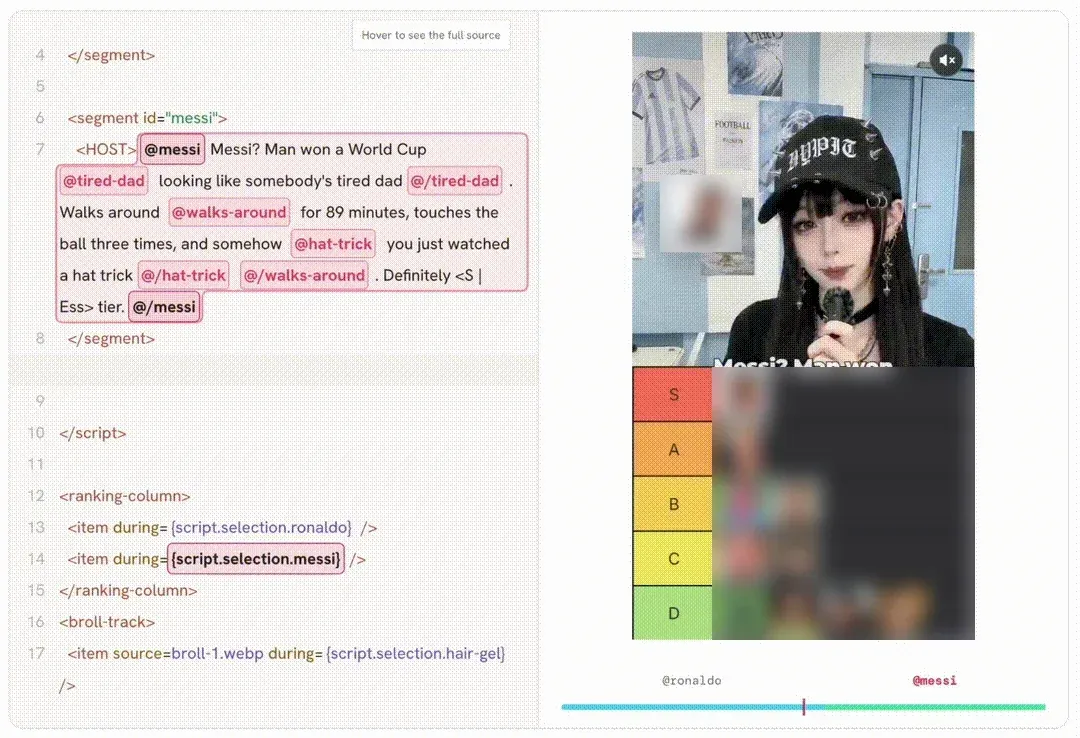
.svmlfile holds component imports, spatial layout, video generation, speech synthesis, caption systems, compositing and rendering settings. The<script>element supplies the narrative, with Segment for independently generated and retried paragraphs, Speaker for line ownership in multi-person videos, Split for separate caption text and spoken text, and Hook for anchoring visuals to words. Recipe Sources (.svs) and Run Sources (.svrun) complete the source family. - Word-anchored timing Graphics, captions and B-roll attach to Selections and Moments in the script instead of fixed timestamps. For spoken material, WhisperX supplies word-level alignment, so rewriting a line lets the timing reflow. Segments are paired with duration estimates so that word count and clip length stay matched per paragraph.
- Reference video cloning The agent analyzes a supplied file or supported platform link and rebuilds its structure, then swaps the face, product, language or aspect ratio on request. The
@hypit/yt-dlppackage addshypit download, which saves a linked video as.mp4,.mkv,.webmor.movafter a one-timehypit download preparestep that needs uv. - Agent Skill for coding agents The
/hypitSkill gives an agent production knowledge and calls the executable tools. The documentation names Claude Code and Codex as common starting points and describes partner entry points such as OpenAgents. The Skill source lives in the repository'sskills/hypit/directory and updates through the Skill installer. - CLI build pipeline
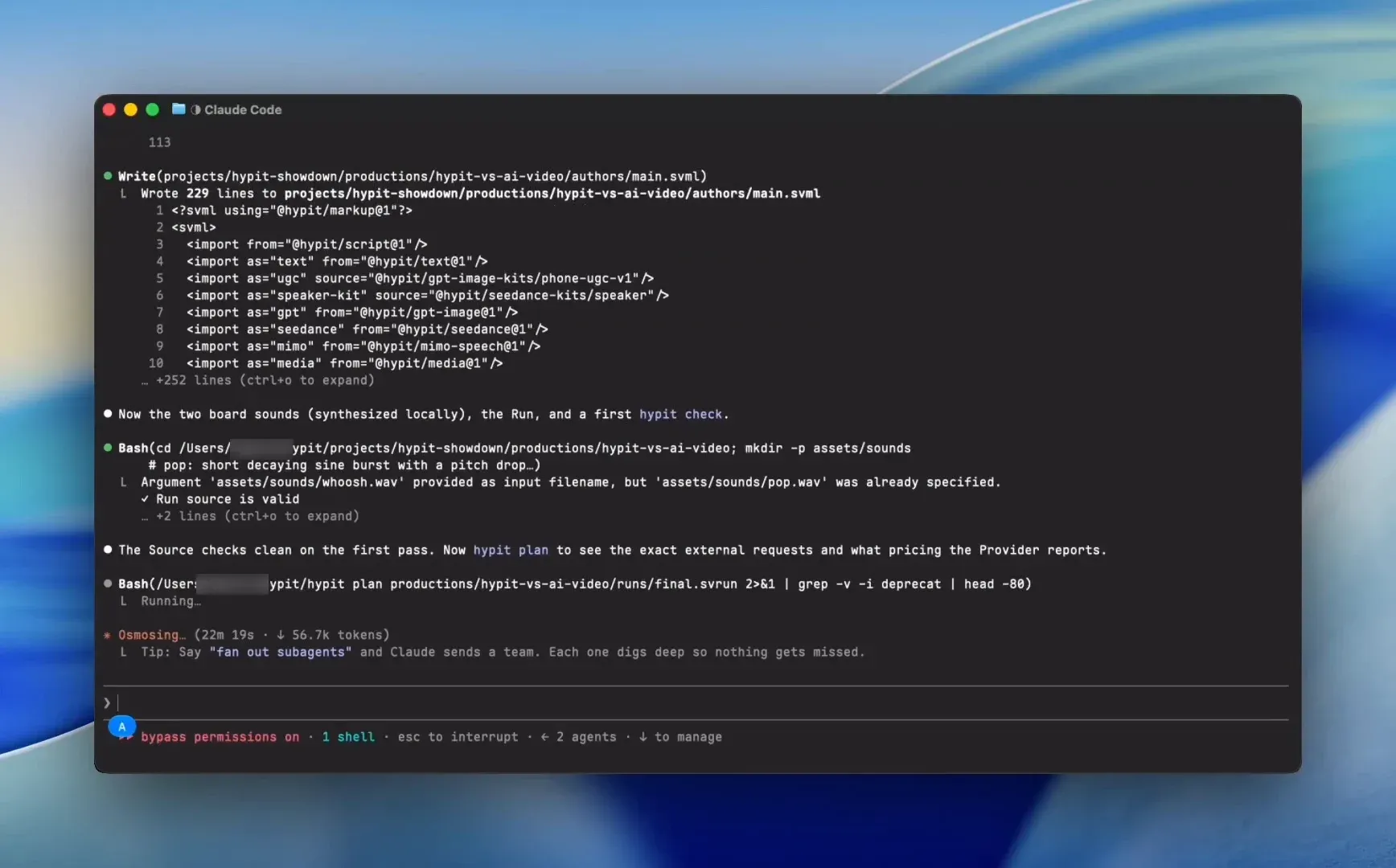
hypit runtime useselects a Runtime Profile,hypit planshows the selected work,hypit build --followsubmits it andhypit getexports an Output such as the final MP4. Onlybuildsubmits work;checkis an editing aid anddoctora deployment diagnostic. Every build receives a fresh id and its own Result directory. - Explicit result reuse Hypit has no implicit cache. A Run Source reuses an approved image or take by naming an earlier Build and Output with
build-recordand connecting it withsatisfy, so accepted material is kept while downstream steps are recomputed.hypit history,hypit buildsandhypit inspectlocate earlier Outputs, and local files can serve as Candidates too. - Pricing before paid work
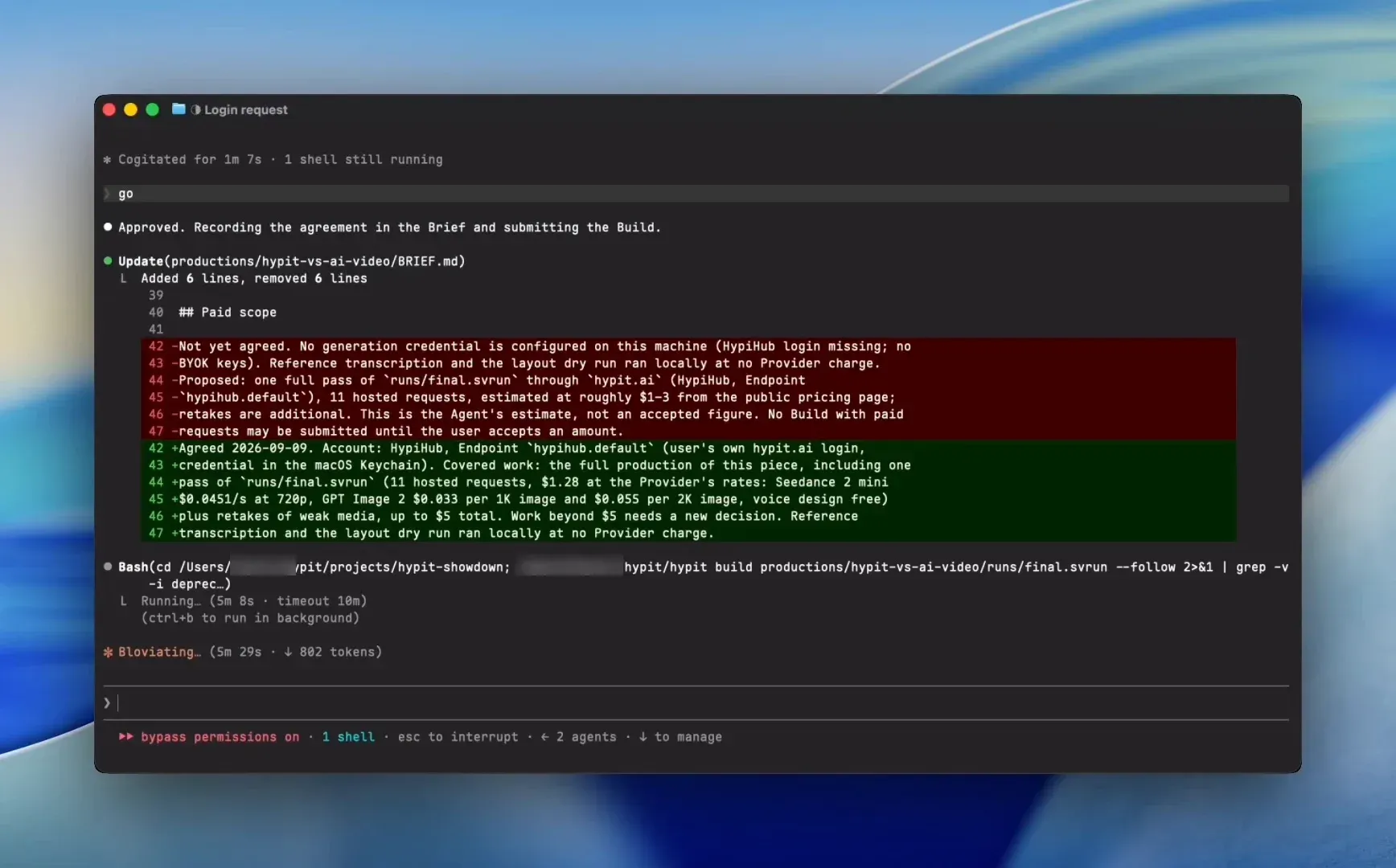
hypit pricingreads each selected Provider's rates and groups the planned requests without submitting anything. The documented agent workflow states the account, planned work and estimated cost before paid calls, and an error on one route does not authorize spending through another account. Release 0.3.1 made pricing report Producer failures completely and exit unsuccessfully when planning fails. - Hypit Studio
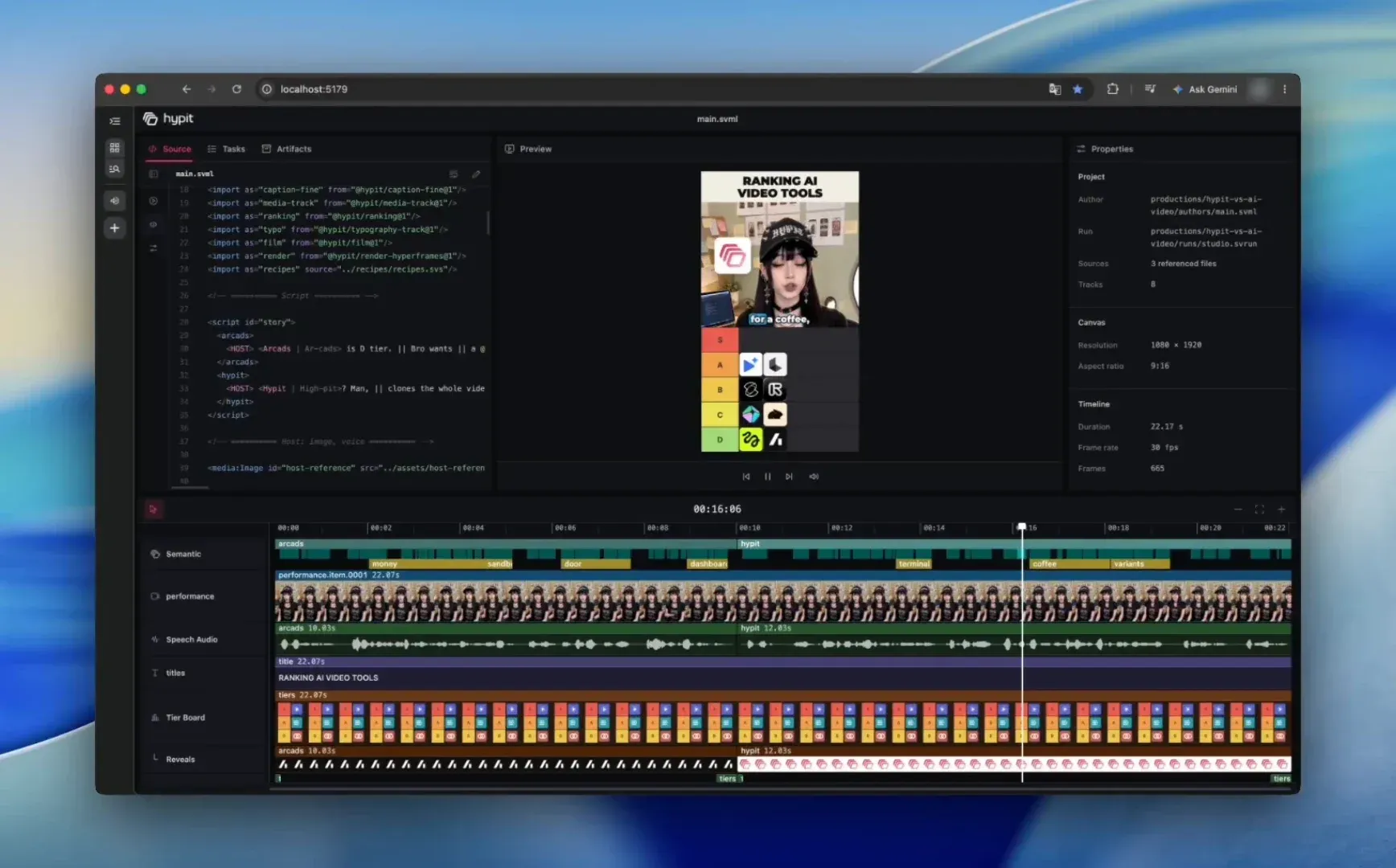
hypit studio --run build.svrunopens the project in a browser, on port 5179 by default. Studio shows Source, Tasks and Artifacts views, a Preview that evaluates the compiled HtmlProgram with the same layout and motion as an encoded render, a shared timeline and an Inspector. Edits write back to the author files and recompile; if recompilation fails, Studio reports the error and restores the previous files. - Comments and interface languages The Comments view adds a notes column with timestamped feedback stored in the project's
FEEDBACK.json, which the agent can read and mark complete. The Studio interface ships in English and Simplified Chinese, and other languages load from a JSON locale pack with--locale-pack. - Pluggable components A ranking board, caption style or animated diagram is a TypeScript package with a declared interface that an SVML Source imports and binds to script words. Components are versioned like npm packages and can stay inside a project, be handed off as a tarball or be published under an npm scope or private registry. A Studio Companion describes which properties and timeline handles Studio can edit.
- Models, Providers and Endpoints A Model defines a generation request, a Provider fulfills it through a particular service, and an Endpoint is a configured Provider instance with address, credential reference and capacity. The repository includes model packages for Seedance, Seedream, PixVerse, Bach, GPT Image, Nano Banana, Grok Imagine, MiniMax H3, Wan, ElevenLabs voice design and other services. New models and Providers can be added as project packages through the public SDK.
- HypiHub hosted service HypiHub is the project's recommended hosted service for WhisperX and image, video and voice models, billed in credits. The pricing page lists Starter at $9.90 per month for 1,800 credits, Pro and Ultra plans with more credits, pay-as-you-go top-up packs from $15 for 2,000 credits and a custom Business plan, with per-model rates such as Seedance 2.0 billed per second of video.
- Bring your own key Optional Provider packages connect TokenDance, HiAPI, Pollo, BeatAPI, Sume and Monid accounts, each installed separately with npm and named in the Runtime Profile. Each Provider lists the models it maps and that service's input limits; Pollo, for example, accepts reference media only by public URL. Self-run model deployments connect through the same Model, Provider and Endpoint path.
- HTTP API The hosted API at
https://hypit.ai/v1puts image, video, audio and chat vendors behind one key and one credit balance. Image, video and music requests return a 202 job that is polled, there is no customer webhook, and results come back as signed MP4 links valid for 15 minutes. An Idempotency-Key header prevents a retried request from being charged twice. - Credentials and diagnostics
hypit auth loginandhypit auth statusmanage the secure input each Endpoint declares, and the documentation keeps keys out of source files, the Runtime Profile and commits.hypit doctorchecks that required credentials and programs are present without printing secrets or installing anything. - Local execution and Result storage Results live with the project under
.hypit/resultson the machine that runs Hypit, whether a workstation, an SSH Linux host or the official WebUI backend. Several Builds can progress together, Managed Programs such as a warm WhisperX model serve multiple Builds, and the README examples render in 64 concurrent headless Chromium processes. - Example projects The repository ships runnable examples for a UGC ranking video, a podcast clip and a street interview, each with a reference, three clones and production notes. The project states total costs of $1.15, $1.07 and $1.09 for these examples, and a minimal author package example shows how to build a component.
Where Hypit fits
Cloning a reference video for a new product or presenter
The Quickstart starts from a reference file or supported link plus any face, product or brand material, given to the agent through a prompt such as /hypit Clone this video. The agent studies how graphics and captions land on particular words, adapts the script and visual direction, keeps its decisions in the project, and delivers an editable composition along with the rendered video.
Producing batches of variants
Hypit describes paid social ads, TikTok Shop and affiliate videos as one composition reused across many versions: the body and structure stay fixed while the hook, product, price or call to action change. Accepted takes are reused through build-record and satisfy, so only the parts that differ are generated again in a new Build.
Localized versions of the same video
Because timing is anchored to words, a script translated into another language reflows its captions and graphics. The street interview example includes a Spanish clone with the same punchlines. Split separates caption text from spoken text, which handles coined product names, pronunciation guidance and numbers that are displayed one way and read another.
Code-rendered videos without generation models
Captions, motion graphics, ranking boards and other visuals drawn by front-end code compile and render locally without calling a generation API. A Timeline with an explicit end can carry an animation with no performance media, and the custom components page describes building such parts as TypeScript packages.
Reviewing and editing in Studio
After a Build, Studio opens the selected Run with its timeline, preview and Inspector, where supported properties and timeline gestures are edited and written back to the source files. The Comments view collects timestamped notes in FEEDBACK.json for the agent to work through. Exporting the encoded video remains a separate hypit build step.
Connecting your own model service or deployment
The BYOK guide covers using a HypiHub account, an existing key from a partner service, a model deployment on your own cloud compute, or local Providers, with a different service per capability in one project. When no Provider exists for a service, the agent can implement one in a project package from that service's API documentation.
Install
npx skills add hypit-ai/hypit -gReviews of Hypit
Be the first to share your experience with Hypit.
Write a review
Loading review form…
Found Hypit useful? Upvote it todayYour vote helps other IT teams find it in the daily ranking.