
What is Sphinx?
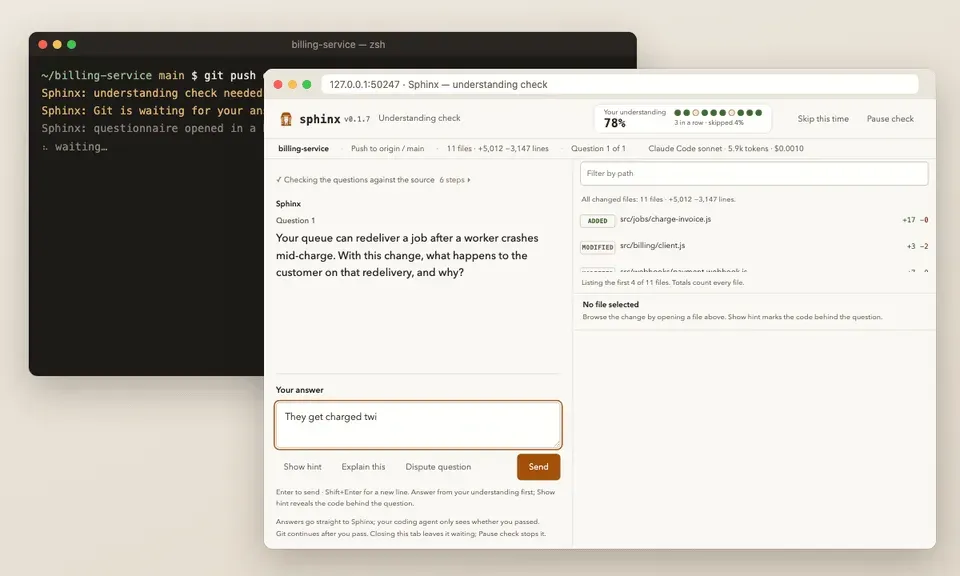
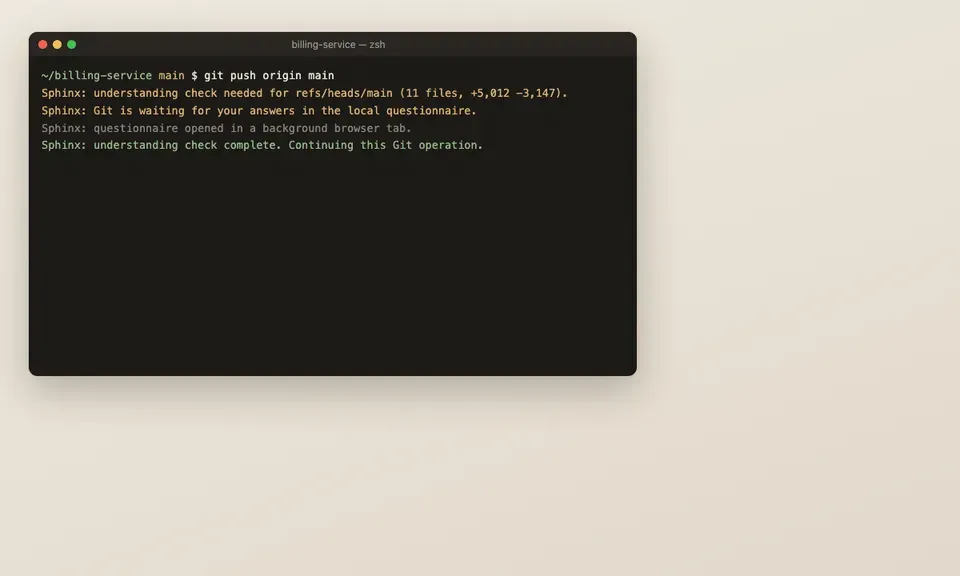
Sphinx is an MIT-licensed command-line tool that adds an understanding check to agent-assisted development. When a push (or, if enabled, a commit) targets a protected branch, a Git hook keeps the operation waiting while Sphinx asks the developer to predict what the change does. A wrong answer gets an explanation and usually a new scenario about the same concept; once the questions are passed, the same Git process continues. The check applies whether a person or a coding agent ran git push. The project repository describes the tool with the line "You can outsource your thinking, but not your understanding."
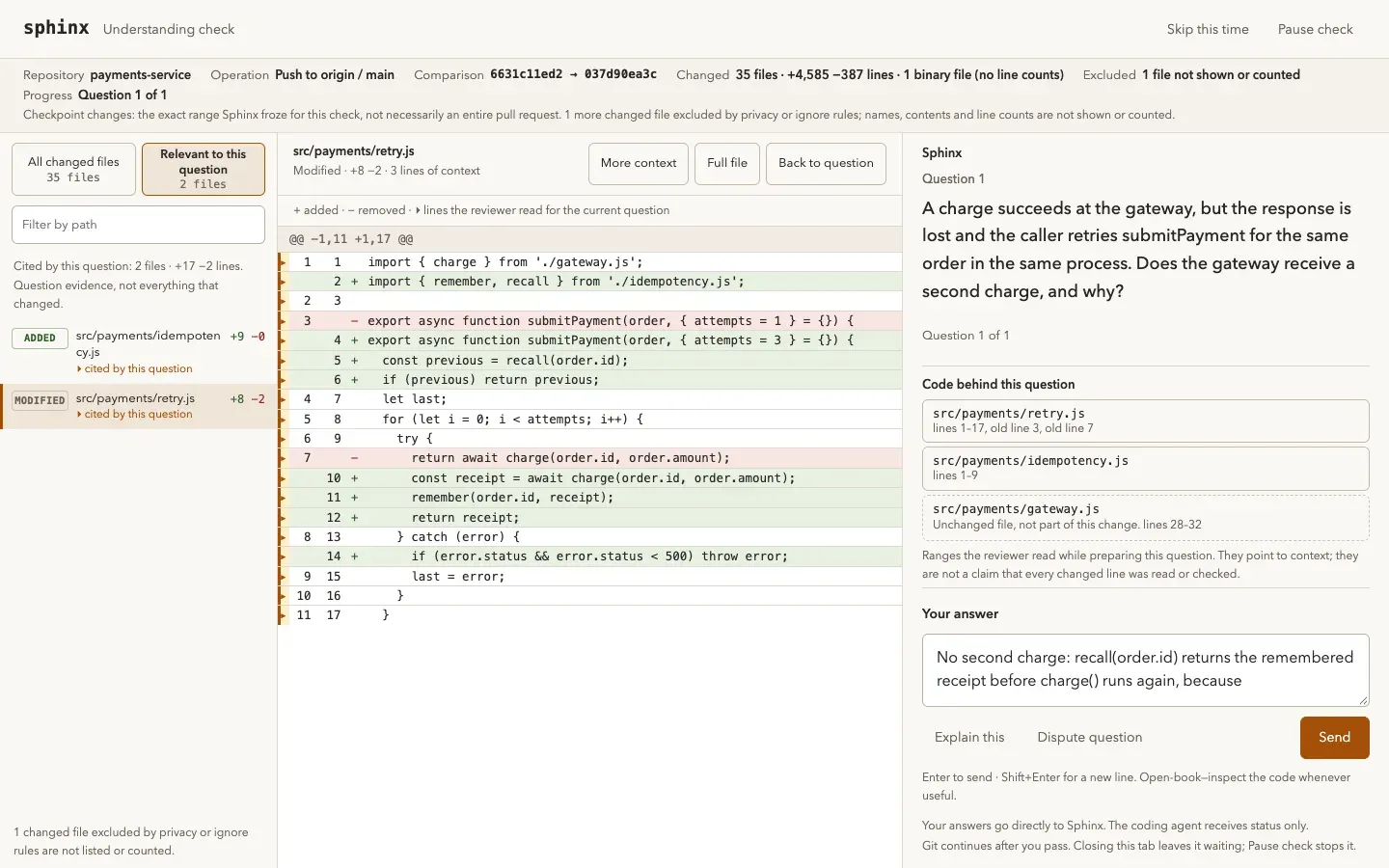
The questions come from a separate reviewer model that reads the committed change through read-only Git tools and does not see the coding conversation that produced it. Questions target behavior, failure modes and invariants rather than file or function names, and the check is open-book: the developer can read the code or ask the agent to show it while answering. Answers go straight from the questionnaire page to Sphinx, and the coding agent receives only status, progress and usage counts. The reviewer runs inside an embedded Pi SDK session, with fresh CLI invocations or API requests as the model transport.
Sphinx is distributed as the npm package sphinx-understand, which installs a sphinx command. It requires Node.js 22.19 or newer and Git, and runs on macOS, Linux and WSL; native Windows is not supported yet. There is no Sphinx account or hosted service. Reviews run on a signed-in Claude Code or Codex CLI plan, an OpenRouter API key, or any OpenAI-compatible endpoint. Agent integrations exist for Claude Code, Codex, Cursor, OpenCode and Pi, and a plain Git setup without any agent is supported. The project website labels it free and FOSS.
The repository was created in October 2026 and has no GitHub releases; versions are published as Git tags and npm packages, with 0.1.24 current on npm in November 2026. The README states that version 0.1 checks local commits and pushes only: it does not cover web merges, CI-required checks or deployments, it cannot read binary file contents, and it tests understanding rather than auditing the code. The project describes the check as practice rather than a security gate, since anyone with local access, including a coding agent, can bypass hooks, and the examiner is an LLM that can be wrong.
Documentation lives in the repository: the README covers installation and daily use, configuration and cost covers reviewer models, limits and repository policy, integrations and troubleshooting covers each coding client, and architecture describes the checkpoint sequence and modules. An evaluation results page records question quality, grading errors and costs on five synthetic repositories, and the project states that these results do not certify arbitrary repositories.
Key capabilities
- Machine-wide Git checkpoint
sphinx installsets the global Gitcore.hooksPathto Sphinx dispatchers, so every repository using that Git configuration is covered. Existing repository hooks still run first with their arguments and input, and their rejections are preserved. Right after installation, pushes tomainormasterin any repository are checked. A repository that sets its own hooks path needssphinx install --repo. - Blocking push and commit gate A matching Git operation waits until the developer passes, stops or skips, for up to 25 minutes. Checks run on
pre-pushby default and can also run onpre-commit. Push policies match the destination branch and commit policies match the current branch. Tag-only pushes and deletions do not trigger checks in version 0.1. - Local browser questionnaire The hook serves a private questionnaire on
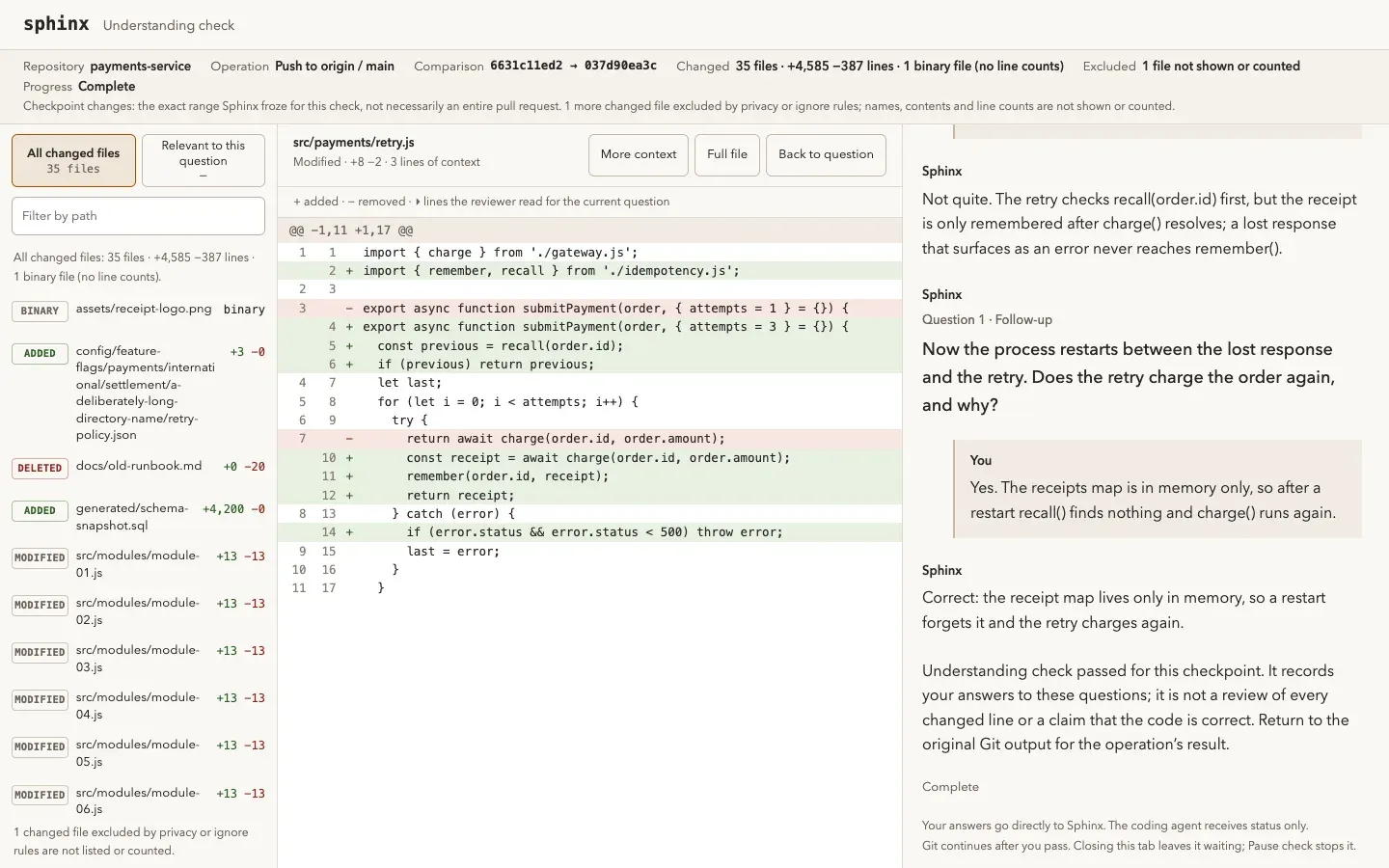
127.0.0.1and prints its URL. On macOS it opens in a background browser tab; on Linux, WSL and over SSH the printed address is opened by hand. Beside each question the page shows changed files, lines added and removed, a browsable diff and the code locations the reviewer read for that question. Calls, tokens and, when reported, cost appear as the check runs. - Terminal mode
sphinx checkruns the same check in a terminal, and over SSH or wherever the browser cannot open in the background the questions appear inline wheregit pushran. Terminal commands include/hint,/learn,/dispute,/skipand/stop. Theinterfacesetting choosesauto,browserorterminal. - Independent reviewer model The reviewer reads the diff and follows related source and tests through filtered, read-only workspace tools before writing questions, private answer keys and supporting evidence. It never sees the coding conversation. Each Claude Code or Codex call is a fresh, isolated CLI invocation underneath the embedded Pi SDK reviewer.
- Question audit An independent model call can audit questions against the code before they are shown, fixing answer keys that do not match and rewriting questions that ask for trivia or reveal their answer. By default only large changes get this extra call;
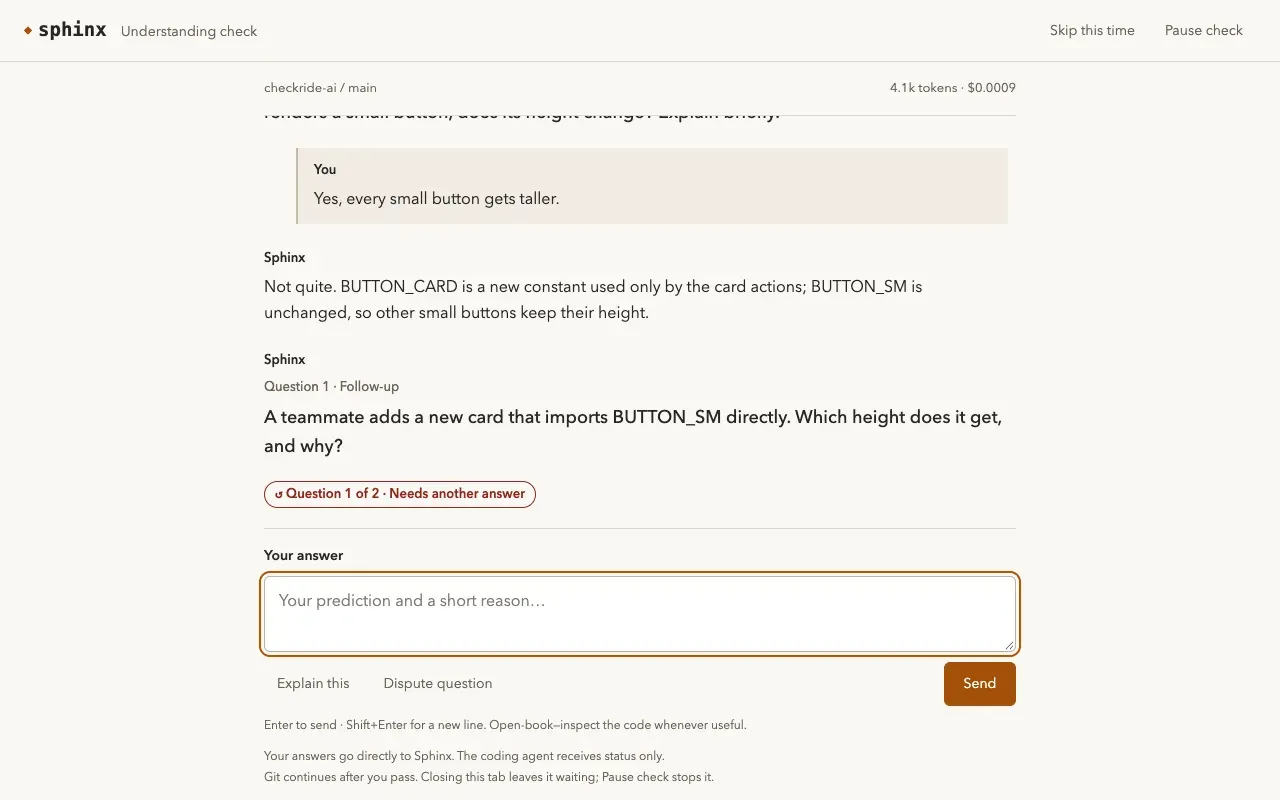
"audit": "all"audits every change. A decision to ask no questions is always audited. - Learning loop after wrong answers A wrong answer receives an explanation and a new transfer scenario about the same concept, or the same question again when no usable scenario comes back. Explain this shows the concept and asks a new question, and Dispute question flags a wrong or ambiguous premise, which must be corrected before that concept can pass. Disputes and errors never count as passing.
- Size-based routing and question counts Routing is deterministic and makes no model request: small changes are at most 80 changed lines and 3 files, large ones at least 400 lines, 12 files or a consequential path such as
auth,billing,migrationorsecurity. Small changes get up to one question, large ones up to 3 at the standard depth and up to 5 at the thorough depth. Documentation-only or trivial edits can pass with no questions. - Depth and understanding distance The
levelsetting choosesrelaxed,standardorthoroughquestions. Thedistancesetting chooseshigh(design, how the change fits the system),low(specific logic, conditions and edge cases) ormixed, the default. A distance chip in the questionnaire saves a new value to the repository policy for the next check. - Reviewer presets Presets fill the small, medium and large routes:
claude-economy(Sonnet through Claude Code),codex-economy(GPT-6 Luna through Codex), and the OpenRouter presetsopenrouter-value(Haiku 5.5, experimental, paid),openrouter-deepseek(experimental, paid) andopenrouter-free. Routes can also be set per size asprovider:model. Unattended installation needs an explicit preset, and paid OpenRouter models need--allow-paid. - OpenAI-compatible endpoints Any chat-completions-compatible endpoint with tool calls and JSON-schema structured output can run reviews; the documentation lists OpenAI, Groq, Together, vLLM, Ollama and LM Studio.
sphinx authstores the key next to its URL and sends it only there. Plainhttp://is allowed only for localhost, where a key is optional. - Plan billing for CLI routes Claude Code and Codex routes bill the signed-in plan by default. Sphinx removes
ANTHROPIC_API_KEY,OPENAI_API_KEY,CODEX_API_KEYand similar variables from the reviewer CLI environment, so a key in the shell does not switch reviews to API credits.sphinx config --cli-billing apiallows API keys instead. - Limits and retries Model calls have no default cap;
sphinx config --max-model-callssets one between 1 and 100. A typical check makes about 5 to 8 requests plus about one per answer. Fixed limits include a 180-second investigation timeout, 100,000 bytes of review context, 16,000 bytes per tool page and 4,096 output tokens by default. Transient provider errors are retried up to three times after 5, 15 and 40 seconds. - File exclusions
.envfiles, private keys and keystores, and credential files such as.netrc,.npmrcandsecrets.jsonare always excluded and cannot be re-included by a repository..sphinxignoreadds gitignore-style patterns. Filtering happens before any content is read, so ignored files are never saved as evidence or sent to a model. The rules match paths only and do not detect a secret pasted into ordinary source. - Repository policy files
sphinx initcreates.sphinxconfig(events, branches, remotes, level, distance, extra exclusions),.sphinxignoreand.sphinxcontext.mdwithout overwriting existing files. Committing them shares the policy with collaborators. Model routes, credentials and usage limits stay machine-wide, so a repository cannot redirect review to another provider or raise limits. - Project context and question preferences
.sphinxcontext.mdhas an "About this project" section and a "What to ask about" section; every reviewer request receives it. Preferences steer questions away from skipped areas, so a change entirely in a skipped area, such as a CSS-only restyle, can pass with no questions unless the audit finds behavioral impact. A personal~/.config/sphinx/context.mdapplies to every repository. Each file is limited to 16 KB. - Background preparation After commits, merges, rewrites and checkouts, Sphinx schedules a detached reviewer for the expected destination so questions are often ready before the push. It uses local remote-tracking refs and never fetches.
sphinx statusshows progress andbackgroundPreparation: falseopts out. - Coding agent integrations For Claude Code and Codex, Sphinx registers a local stdio MCP server and lifecycle hooks; Pi 1.2+ gets a local extension, Cursor 1.7+ gets user hooks and OpenCode 1.x gets a plugin. Integrations tell the agent to wait for a blocked push and provide fallback forms when the browser cannot open. Codex users trust the hooks in
/hooks. Cursor hooks cover local sessions, not Cursor cloud agents. - GitHub stamps and the Sphinx Action With a signed-in GitHub CLI, a pass marks the pushed commit with a
sphinx/understandingstatus, and a skip is marked as a failure. An optional pull request comment lists questions and first-try results.sphinx init --github-checkadds a workflow whose Action writes a Sphinx check on pull requests and never runs pull request code. None of this blocks a push, and the project notes the status is self-reported, not a cryptographic proof. - Skips, pauses and yolo mode Skip this time lets a push through immediately and never counts as a pass.
sphinx yoloturns checks off for the current repository, or globally outside one, with an optional--reason. Every skip and yolo toggle is logged, andsphinx statuslists recent ones. A pass stays valid for 24 hours unless the code, destination or policy changes. - Commands and JSON output The CLI includes
install,init,doctor,status,check,pending,yolo,config,auth,prepare,activateanduninstall.--jsongives machine-readable output for integrations and test harnesses, and it never returns answer keys.sphinx uninstallrestores hook configuration Sphinx still owns and keeps later edits.
Where Sphinx fits
Checking agent-written changes before they reach main
A developer installs the package globally, runs sphinx install and picks a reviewer, then runs sphinx init in each repository. When the developer or a coding agent pushes to a protected branch, Git prints the questionnaire address and waits. After the questions are passed, the page offers Continue push or Stop push; stopping saves the pass, so pushing the same change again only asks whether to continue. sphinx doctor reports whether hooks and integrations are in place.
Working alongside Claude Code, Codex, Cursor, OpenCode or Pi
The installer detects supported clients and adds guidance telling the agent to wait for a blocked Git command without starting a duplicate or answering on the developer's behalf. Claude Code and Codex receive an MCP server and hooks, Pi an extension, Cursor user hooks and OpenCode a plugin, as listed in the integrations guide. If an agent shell times out before the check finishes, the check stays saved and the push is retried once.
Reviewing on an existing subscription or a local model
The claude-economy and codex-economy presets run reviews on the signed-in Claude Code or Codex plan. Teams without those plans can use OpenRouter with an API key, or point sphinx auth at an OpenAI-compatible endpoint such as a local Ollama, LM Studio or vLLM server that supports tool calls and structured output. Pi, Cursor and OpenCode integrations present checkpoints but do not supply a reviewer model themselves.
Tuning questions per repository
The .sphinxconfig file sets which events, branches and remotes trigger checks, how many questions to ask and how close to the code they get. Setting "branches": ["*"] checks pushes to every branch, which the project documents for pull request work. .sphinxcontext.md describes the project and names areas to ask about or skip, and .sphinxignore keeps private or generated paths away from the reviewer.
Showing pull request reviewers that a check happened
With the GitHub CLI signed in, passing a check stamps the pushed commit, and the questionnaire can post a summary comment to the pull request with questions and first-try results; answers are included only when answers is enabled. Repositories that add the Sphinx Action show a Sphinx check that is stamped, failed for skipped checks, or neutral until the author passes, and require: true turns a missing stamp into a failure that branch protection can enforce.
Remote machines and headless sessions
The installation covers the local machine only; remote machines, containers and hosted coding agents need their own installation. Over SSH, questions appear in the terminal, or the loopback port can be forwarded and the printed URL opened unchanged in a local browser. CI never starts a questionnaire: the check stays pending and Git stops. For urgent pushes, sphinx yolo or Skip this time lets pushes through, and both are logged.
Install
npm install -g sphinx-understandReviews of Sphinx
Be the first to share your experience with Sphinx.
Write a review
Loading review form…
Found Sphinx useful? Upvote it todayYour vote helps other IT teams find it in the daily ranking.