

What is Happy?
Happy is an open-source harness for running coding agents from Anthropic, OpenAI, xAI and Google in one place. Claude runs with Claude Code's prompts and tools, GPT models with Codex, Grok with Grok Build and Gemini through Google's Antigravity, while OpenCode and any Agent Client Protocol (ACP) agent can be attached in beta. Happy does not sell model access: it reuses the Claude, Codex and Grok sign-ins already present on the machine and sends model requests directly to each vendor with those credentials. The project is published by Happy Engineering; the website names Steve Korshakov and Kirill Dubovitskiy as the team. The documentation starts with a desktop download and a Chief of Staff bot that can add model accounts, import projects, pair a phone and create a team in conversation.
The product is split across several MIT-licensed repositories. This repository, slopus/happy, holds the native iOS app (Swift and UIKit), the native Android app (Kotlin and Jetpack Compose), the original Happy CLI published on npm as happy, the relay server that synchronises encrypted sessions, a Cloudflare Worker for push notifications and a shared wire-schema package. The desktop app for macOS, Windows and Linux lives in slopus/happy-desktop, and the headless runtime it starts, Happy Agent, lives in slopus/happy-agent. Both are TypeScript projects.
The newest release in this repository is Happy CLI 1.2.5, published on September 22, 2026. It focused on session reliability: recovering resumable sessions after daemon state is lost, preventing duplicate owners during concurrent resumes, keeping closed sessions closed, removing the Codex turn timeout, improving diagnostics for expired Claude logins and forwarding configured Claude plugin directories. Betas of 1.2.6 followed in October. The desktop app moves faster on its own release line: the changelog records the first downloadable macOS build (v0.0.20) on July 29, 2026, update handling that keeps a running turn alive in v0.0.95, an experimental Stem cells sidebar in v0.0.102, and GPT-6.1 Terra support in Happy Agent 0.4.108. Desktop v0.0.103 and Happy Agent v0.4.114 were the stable builds in early November 2026.
Architecturally, Happy Agent is a daemon on the user's computer that runs the agent loop, tools and sandbox and writes every session change to a local SQLite database before applying it, so sessions continue after the desktop window closes and resume from disk after a restart. The desktop app talks to it over a private local socket. Phones attach through a relay that carries only ciphertext; the encryption notes describe AES-256-GCM per-session data keys and an older NaCl secretbox variant. The relay backend is Node.js with Fastify and Socket.IO, Postgres through Prisma, Redis and S3-compatible storage, and a single-machine self-host mode ships as an npm package.
Out of scope: Happy has no hosted copy of projects and no cloud sessions of its own, and its comparison page notes that Claude Desktop offers cloud sessions, computer use and an iOS Simulator pane that Happy does not. Adding a remote machine by name is listed as not yet available on the how it works page. Voice is the only paid feature, sold as an in-app subscription on the phone apps.
Happy screenshots
Explore the interface. Open a screenshot to view it at full size.
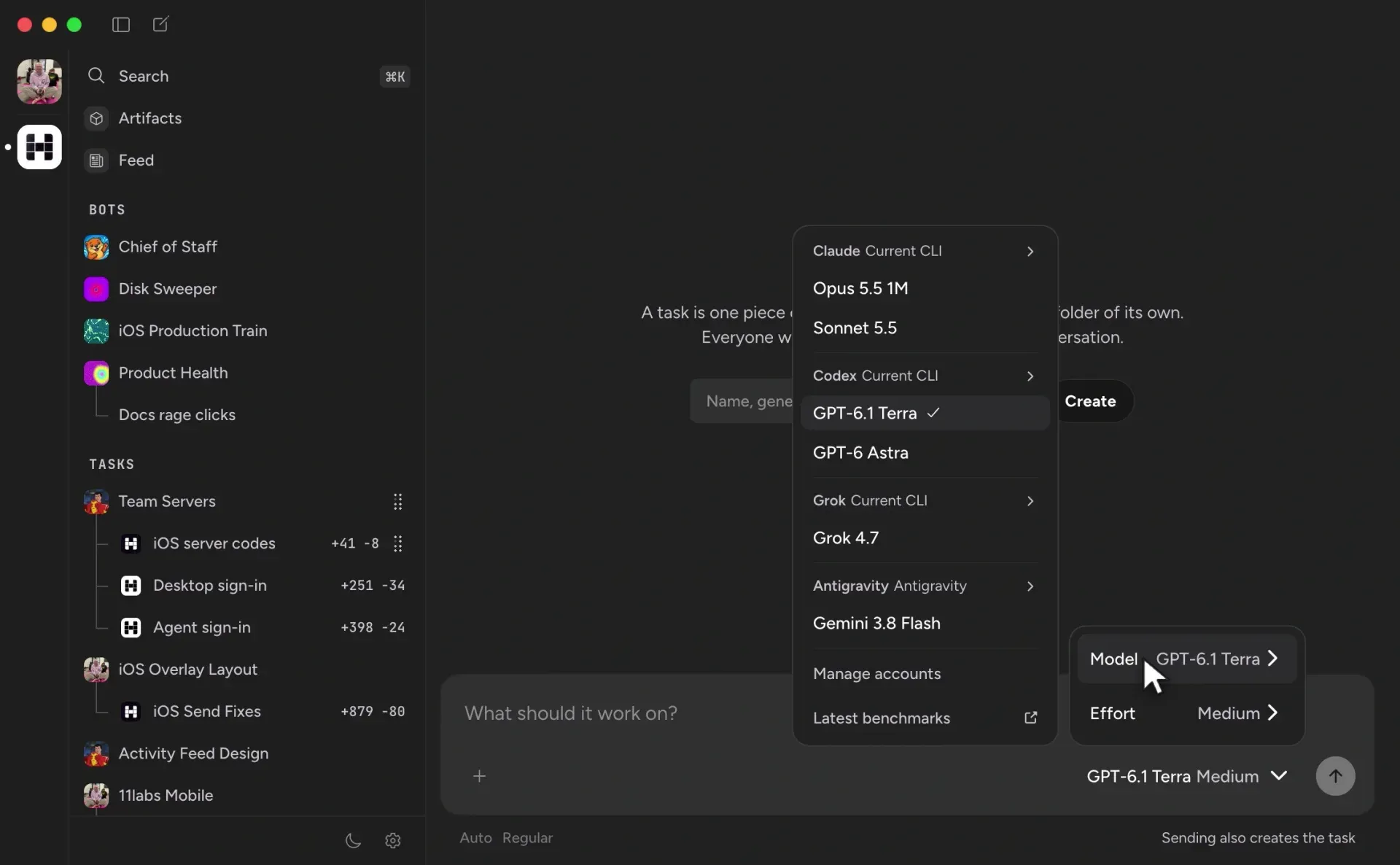
Official website video still of the desktop app: sidebar with bots and tasks, and a model menu grouped by Claude, Codex, Grok and Antigravity.
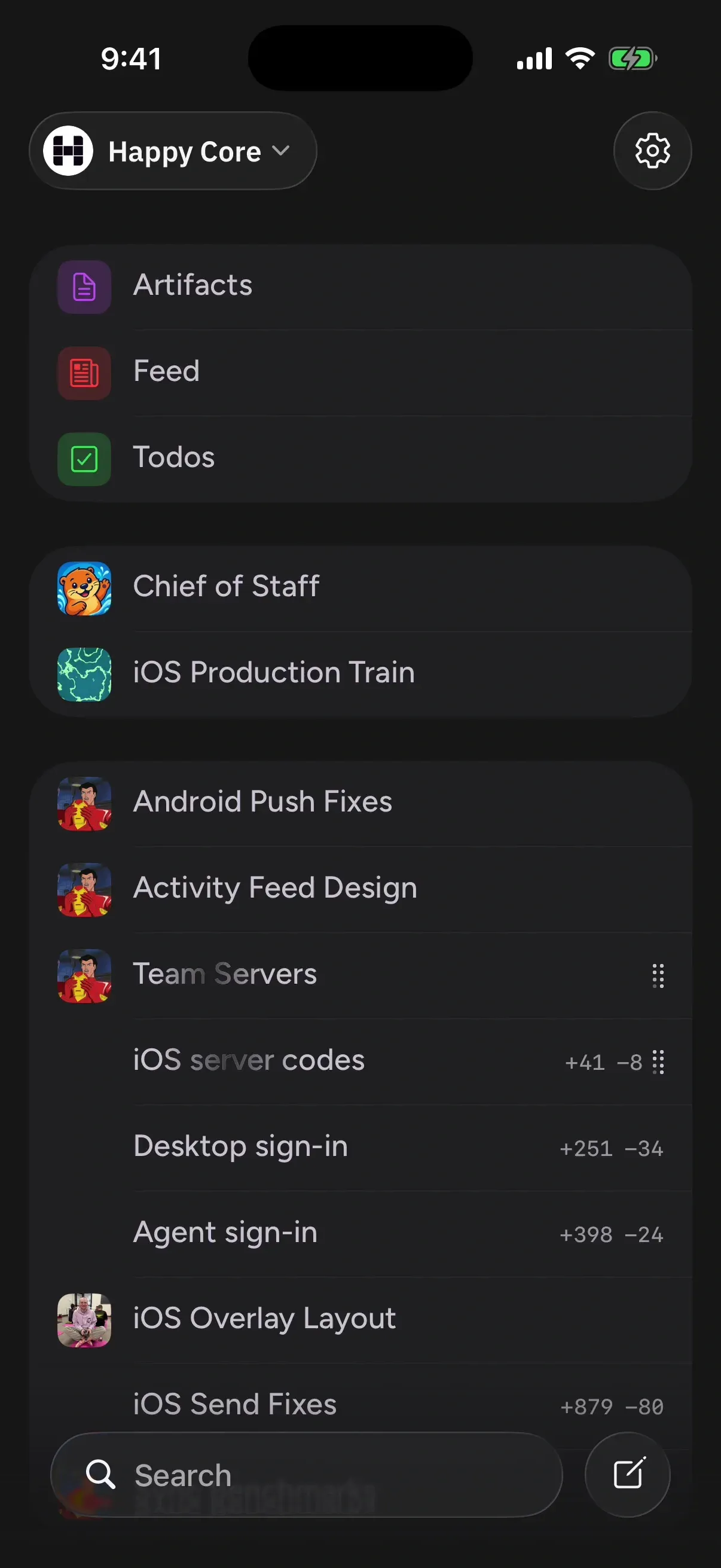
Official website video still of the phone app: shared artifacts, bots and the same task list as the desktop, with diff counts per task.
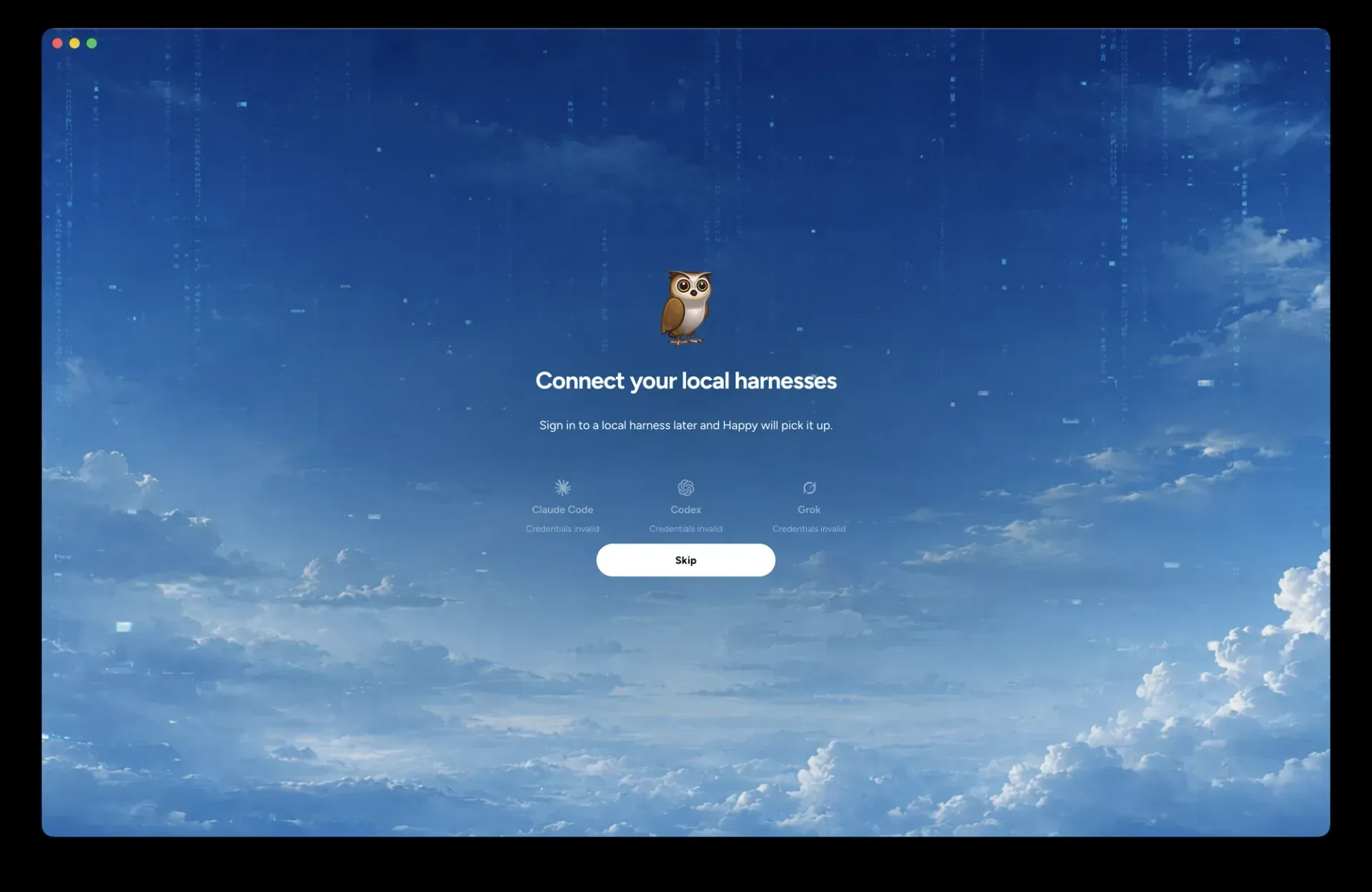
Official screenshot from the happy-desktop repository: first-run screen that detects local Claude Code, Codex and Grok sign-ins.
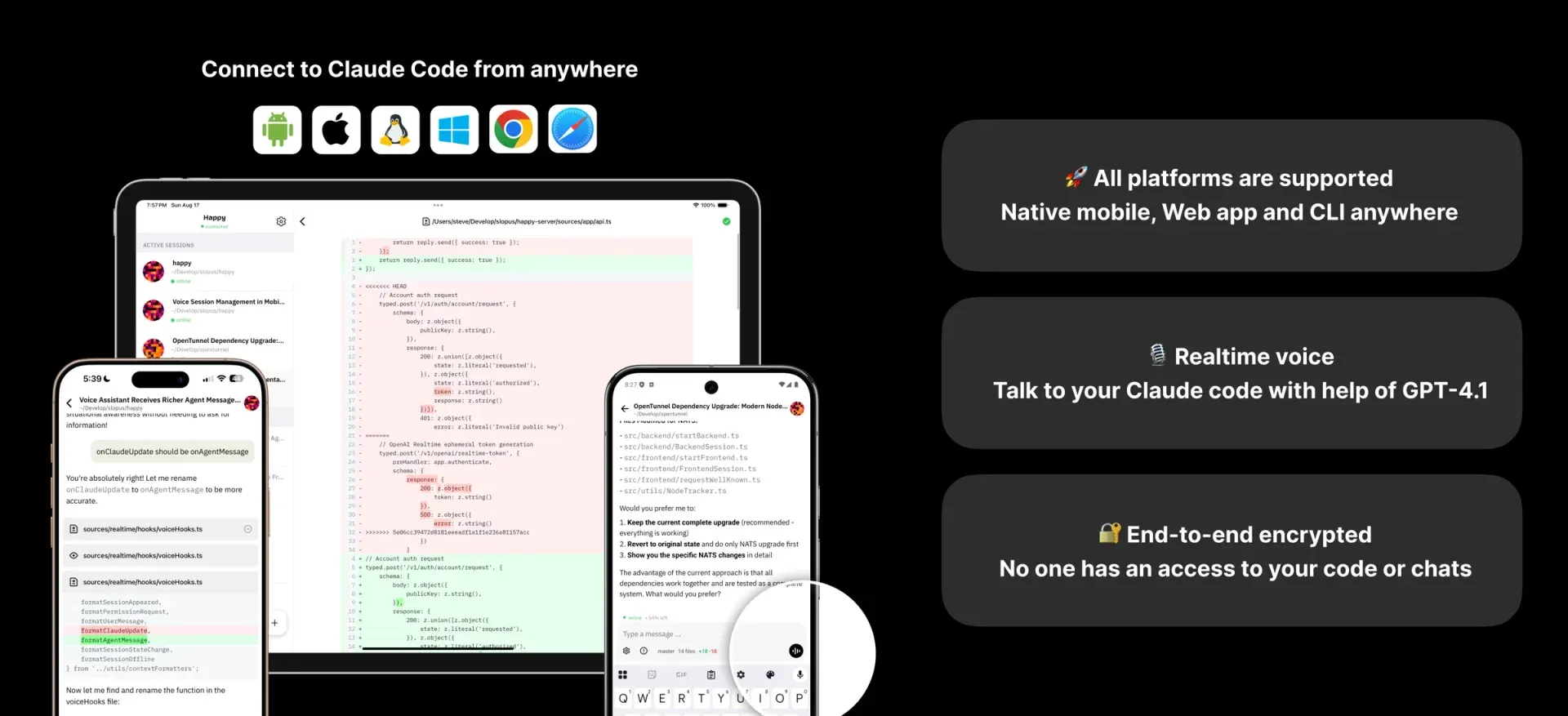
Official repository header image for the original CLI and mobile app: sessions on tablet, iPhone and Android, with platform, voice and encryption notes.
Source: official Happy project page.
Key capabilities
- Desktop app for macOS, Windows and Linux The desktop page lists a signed and notarized
.dmgfor Apple Silicon and Intel Macs, a signed.exefor Windows x64 and an.AppImagefor Linux x64 and arm64. Stable and Preview builds are published on GitHub Releases. The macOS and Windows builds update themselves; Linux updates arrive through Homebrew. - Homebrew install On macOS and Linux the desktop app installs with
brew install --cask slopus/tap/happy. Sign in to Claude Code or Codex on the machine first, since Happy detects existing sign-ins on launch rather than asking for API keys. No minimum operating system versions are published. - One harness for several model vendors Claude, GPT through Codex, Grok through Grok Build and Gemini through Antigravity appear in one model picker, and Claude and GPT models are also reachable through Amazon Bedrock. Gemini, OpenCode and generic ACP agents are marked beta. Model requests go straight to the vendor using your credentials; Happy does not proxy them.
- Subscription reuse Claude, Codex and Grok run on the subscriptions already signed in on the computer, and Antigravity, OpenCode and ACP agents keep their own logins. A provider without credentials is shown as unavailable with a reason. Usage limits and terms remain those of each vendor plan.
- Model switching and mixed subagents The model and reasoning effort can change in the middle of a session without losing the transcript. Subagents can each use a different model, so one provider can plan while another reviews. Beta
happy.tomltables can run Claude Code or the Codex CLI with their own agent loops instead of Happy's shared one. - Durable sessions in Happy Agent Happy Agent stores every session, including subagents, in a SQLite database on the machine and writes changes to disk before applying them. Sessions keep running when the desktop app quits and resume after a daemon restart; waits and scheduled messages also survive restarts.
- Permission modes and OS sandbox The permissions page defines Read only, Workspace write, Auto (the default) and Full access. The sandbox uses Seatbelt on macOS and Happy's own supervisor with kernel namespaces and seccomp on Linux, limits writes to the working and temporary directories and routes network traffic through an allowlisting proxy. The page does not describe a Windows sandbox.
- Automatic review in Auto mode In Auto, reads and workspace edits run without prompts, and any action that crosses the sandbox boundary goes to a separate read-only reviewer agent that allows or denies it. Only the user's own messages count as authorisation; tool output and file contents do not. MCP servers run outside the sandbox, so every MCP call in Auto is reviewed.
- Git worktree workspaces Parallel pieces of work each get their own Git worktree on their own branch, and the desktop app shows changed files, diffs and a terminal next to the conversation. Projects remain ordinary folders on disk, so they can be opened in any editor or Git client.
- Native iOS and Android apps The phone apps show the same sessions as the computer: start a session in a chosen directory, send messages and images, stop a turn, answer permission requests, switch models and review files and Git changes. Nothing runs on the phone. Pairing is one QR scan from the Mobile Access page in desktop settings.
- End-to-end encrypted relay Phone and computer both connect outward to Happy's relay, so no inbound ports are opened. Session content, machine metadata and artifacts are encrypted on the client; the server stores opaque blobs but can see message and session IDs, timestamps, device IDs and push tokens, as the privacy policy lists.
- Original Happy CLI The CLI wraps Claude Code or Codex in your terminal and shows a QR code so the session can continue from the phone or the web app. It installs with
npm install -g happy, needs Node.js 20 or newer, and offershappy claude,happy codex,happy agy,happy acp,happy resumeandhappy doctor. A background daemon lets the phone start new sessions while the computer is online. - Self-hosted sync server The
happy-server-self-hostpackage addshappy serverto the CLI: it runs the sync server with embedded PGlite storage and local file uploads, then writes the local URL into the CLI settings. The design notes say there is no fallback to the public server once a custom URL is set. A production layout with Postgres, Redis, S3 storage, a Dockerfile and Kubernetes manifests is described in the deployment guide. - Happy Agent REST API A standalone Happy Agent serves an HTTP API on a Unix socket at
~/.happy/agent/server.sock, authenticated with a bearer token from~/.happy/agent/token. The REST recipe covers sending messages, aborting runs, managing projects, workspaces, skills, secrets and artifacts, and streaming events. Scheduling, subtasks, agent-to-agent messages and MCP configuration are not exposed over REST. - Bots, scheduling and peer messaging Persistent bots such as Chief of Staff, scheduled messages, agents that message each other and connections between two Happy Agents over one WebSocket are documented as recipes. Bots can be exported to Telegram or another chat service and restricted through bot settings.
- Skills and MCP Skills are Markdown files and MCP servers are TOML entries that agents can write themselves. Since Happy Agent 0.4.108, bots and tasks can configure MCP servers in their own folders. Protected paths such as
happy.tomlandmcp.tomlstay read-only inside the sandbox. - Multiplayer teams A team server is a Happy Agent run as a service with a WorkOS-backed team and a Tailcat endpoint, according to the team recipe. Members sign in as themselves and share projects and sessions, but their messages carry the owner's authority on that node, so invitations should go only to trusted people and a dedicated runner is recommended.
- Voice assistant Voice runs on ElevenLabs and is the only paid feature: 20 free minutes every 30 days, then an in-app subscription of up to 5 hours per 30 days, per the voice post. The subscription price is not published on the website. With your own ElevenLabs agent there is no Happy limit, and ElevenLabs bills you directly. Voice audio and context are not covered by end-to-end encryption.
Where Happy fits
Running several vendors' agents on one task
Install the desktop app, sign in to Claude Code, Codex or the Grok CLI beforehand, and confirm on first launch that each provider shows as available. Create a task, pick a model and effort, and let subagents use other providers for planning or review. Check which harness each provider uses, since the beta Claude Code and Codex CLI harnesses behave differently from Happy's shared loop, and keep an eye on each vendor's own plan limits.
Following a long-running session from a phone
Open Mobile Access in the desktop settings, install the iOS or Android app and scan the device QR code once. Leave the computer awake or move the work to a remote Happy Agent so it continues while a laptop sleeps. From the phone, answer permission requests and review Git changes, then confirm on the computer that the transcript and files match what the phone showed.
Keeping the original CLI workflow
Teams that prefer the terminal can install happy from npm on Node.js 20 or newer and start happy claude or happy codex in a repository. The QR code links the session to the phone or web app. For a machine that should stay reachable, start the daemon from the shell profile as the CLI README suggests; on macOS a LaunchAgent cannot reach the keychain and Claude authentication fails. The migration guide covers moving to Happy Agent later.
Keeping session sync on your own infrastructure
Install happy-server-self-host next to the CLI and run happy server for a single-machine setup with embedded storage, or build Dockerfile.server with Postgres, Redis and S3-compatible storage for a shared deployment. Verify that the CLI settings point at your server and that requests fail when it is down rather than reaching the public relay. Note that this path covers the CLI and mobile sync; the desktop team mode uses a different, WorkOS-based setup.
Scripting an agent from other tools
Run Happy Agent standalone and call its REST API over the Unix socket with curl --unix-socket and the bearer token from the agent folder. Use client message IDs to make sends idempotent and If-Match versions for updates. Keep the token out of logs and command arguments, because it is a full credential, and plan to handle scheduling and MCP configuration through agents or config files instead.
Sharing sessions with a small team
Create a team through the Chief of Staff bot, deploy a team server with happy-agent run under a service manager, and expose it through Tailcat. Before inviting anyone, set up a dedicated runner or Linux user hardening, since every member's agents run on the shared node with the owner's authority. Test that unauthenticated health requests are rejected, as the team recipe advises.
Install
npm install -g happyReviews of Happy
Be the first to share your experience with Happy.
Write a review
Loading review form…
Alternatives to Happy
 PaseoPaseo is an Apache-2.0 agentic development environment. A local daemon runs the agent CLIs you already use, each task in its own Git worktree, with editor, terminals, diffs and a browser, and clients for macOS, Windows, Linux, iOS, Android, web and CLI.TCT3 CodeT3 Code is an MIT-licensed interface for controlling coding agents through desktop, web and mobile apps while execution stays on the workspace host.Oopcodeopcode is an open-source desktop app for Claude Code with session management, custom agents, usage analytics, checkpoints and MCP server configuration.