
What is Plannotator?
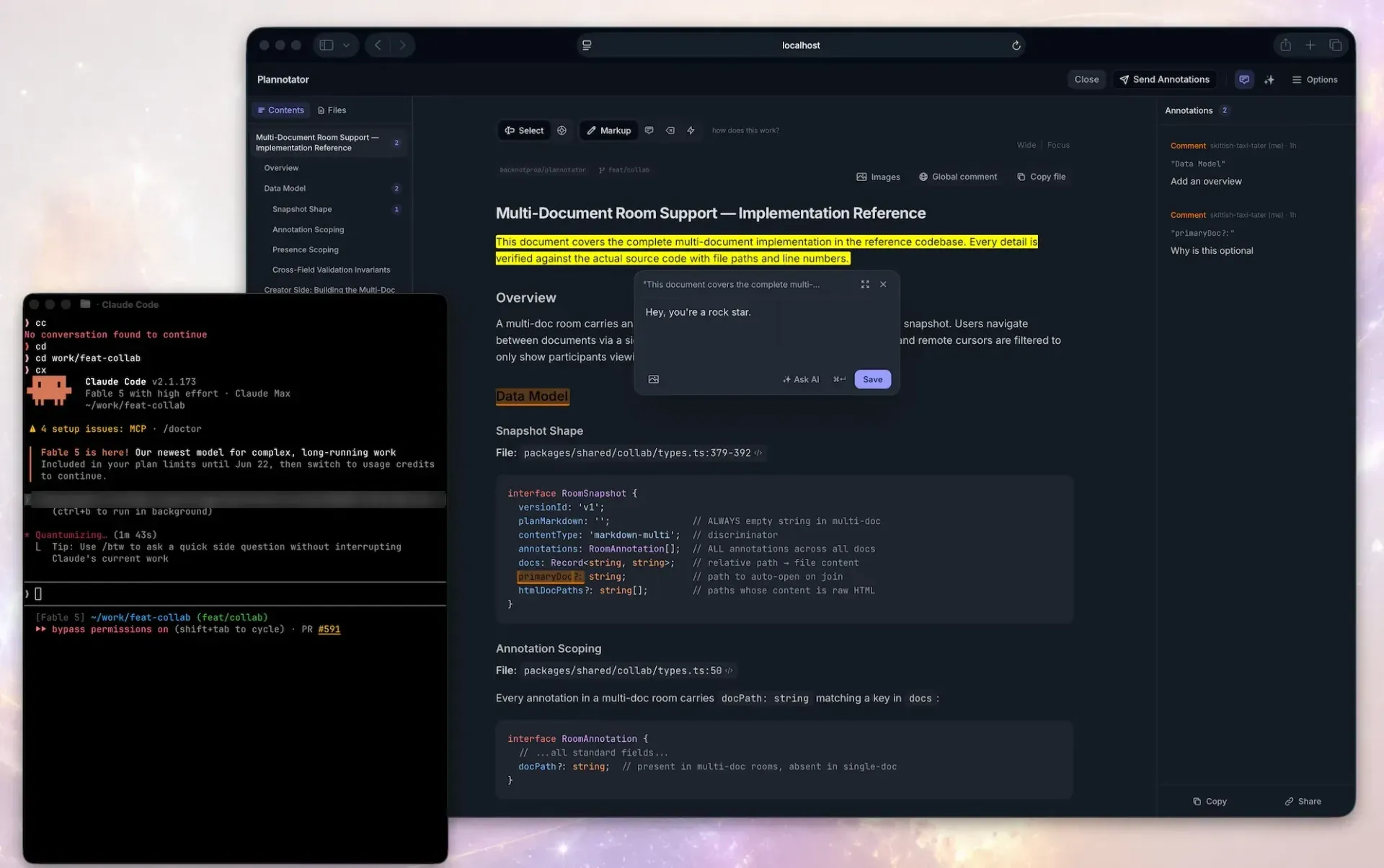
Plannotator is a local, browser-based review surface for AI coding agents. The backnotprop/plannotator repository lists support for Claude Code, Codex, Copilot CLI, Gemini CLI, OpenCode, Kiro, Droid, Amp, DeepSeek Harness and Pi. It connects to each agent through plugins, hooks, skills or slash commands. When an agent proposes a plan, writes a document or finishes a change, Plannotator opens the material in a browser tab, where the user adds annotations and sends structured feedback back to the agent session. The repository was created in December 2025, the README states copyright 2025-2026 backnotprop, and the code is dual-licensed under Apache 2.0 or MIT at the user's option.
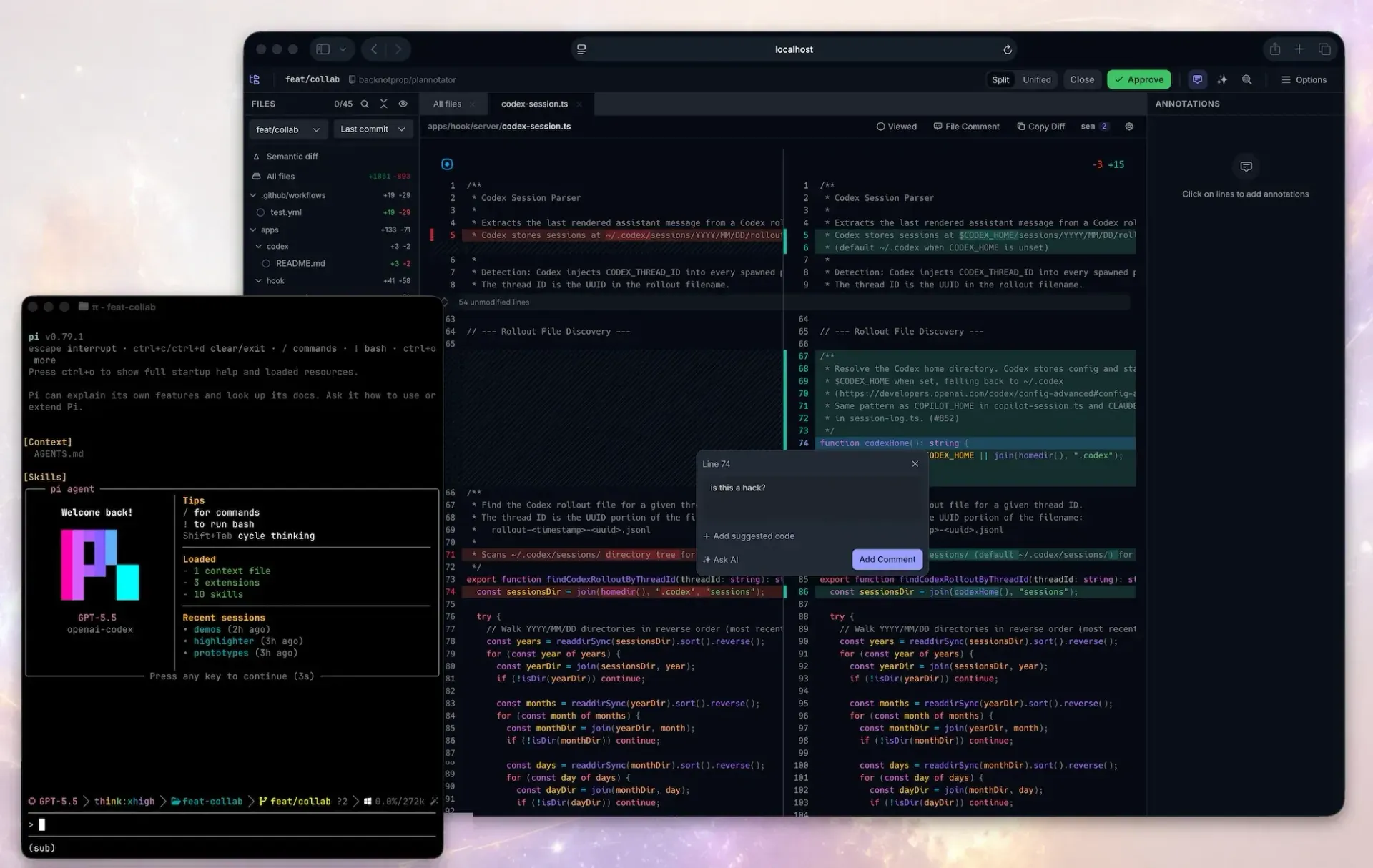
The project covers four review surfaces. Plan review intercepts an agent's plan handoff. Document annotation opens Markdown files, folders, URLs and rendered HTML artifacts. Code review shows local Git, GitButler, Jujutsu and Perforce changes as well as GitHub pull requests and GitLab merge requests in a diff viewer. The Plannotator Inbox is a local window where agents leave messages, questions, files and guided reviews without holding a session open; agents other than Claude Code, Pi and OpenCode reach it over MCP. Terminal review is handled by separate repositories, Herdr Annotate and Plannotator TUI.
Plannotator ships as a single plannotator binary on GitHub Releases for macOS, Linux and Windows, each in x64 and Arm64 builds. The installation guide describes install.sh for macOS, Linux and WSL and install.ps1 or install.cmd for Windows; the full installer detects installed agents and configures hooks, skills and command files, while --minimal installs only the binary. Agent packages such as @plannotator/opencode, @plannotator/pi-extension and @plannotator/dsh are published on npm, and a VS Code extension is listed on the Visual Studio Marketplace. The code base is TypeScript built with Bun, and the binary is compiled with bun build --compile.
The latest release at the time of checking is v0.28.65, published on November 15, 2026. Its notes list a Take back action for Inbox replies that no agent has received yet, a behavior change under which a Tailscale connection opens the Inbox only for the Tailscale account that owns the computer, tags that work across linked machines, Inbox access for T3 Code threads without extra setup, reliable loading of long threads on slow connections, and the removal of the optional SQLite Inbox store added in v0.28.63. Releases v0.28.58 to v0.28.65 were all published between November 10 and November 15, 2026. Each release binary carries a SHA256 sidecar, SLSA provenance attestations are available from v0.17.2, and a CycloneDX SBOM is attached to current releases.
According to the privacy and data flow reference, Plannotator OSS sends no usage telemetry, and plans, diffs, annotations, drafts and configuration stay under the local data directory by default. Each review surface checks GitHub for the latest release when it loads, with no setting to turn that check off. URL annotation, pull request review, Ask AI, agent reviews and link sharing contact the relevant site, forge, AI provider or paste service. The open-source link sharing flow is deprecated with no announced removal date. Workspaces is a separate hosted team product in private beta with a waitlist and no published pricing. Similar projects in this directory: Nimbalyst, Coucou, o8 and OpenCodeReview.
Key capabilities
- Plan review at the agent's handoff point Supported agents open Plannotator when they finish a plan. Claude Code is connected through a marketplace plugin that intercepts
ExitPlanMode, Copilot CLI through a plugin onexit_plan_mode, Gemini CLI through aBeforeToolhook, OpenCode through asubmit_plantool and Pi through its own plan mode. Codex uses an experimentalStophook on macOS, Linux and WSL, while Amp, Droid and Kiro CLI are listed as manual only in the agent overview. The reviewer chooses Send Feedback, Approve with Notes or Approve. - Anchored annotations and structured feedback Selected text can receive a comment, a deletion request, a replacement, a quick label or a looks-good mark, and a global comment covers feedback that belongs to no single passage. Plannotator exports the result as structured Markdown with the selected text, the comment and source line information when available. Direct edits to the Markdown are included as a unified diff. Some agent protocols cannot attach notes to an approval, and the UI warns before an approval would discard unsent feedback.
- Plan diffs and version history Each plan submission is saved before the review opens. When an agent resubmits a plan, a badge shows added and removed lines, and the diff can be read as rendered blocks or as raw Markdown with plus and minus lines. A Version Browser compares the current plan with earlier saved versions. The version history page notes that document history can contain full copies of opened files and explains how to turn it off.
- Document, folder and URL annotation
/plannotator-annotateopens a local Markdown file, browses a folder or fetches a URL; the same feature is available asplannotator annotatein a terminal. URLs are fetched through Jina Reader by default for public pages, which can be disabled withPLANNOTATOR_JINA=0./plannotator-lastannotates the agent's most recent message. The--gateflag adds an Approve button to a document review so a plan file can be reviewed without an automatic hook. - HTML artifact review With
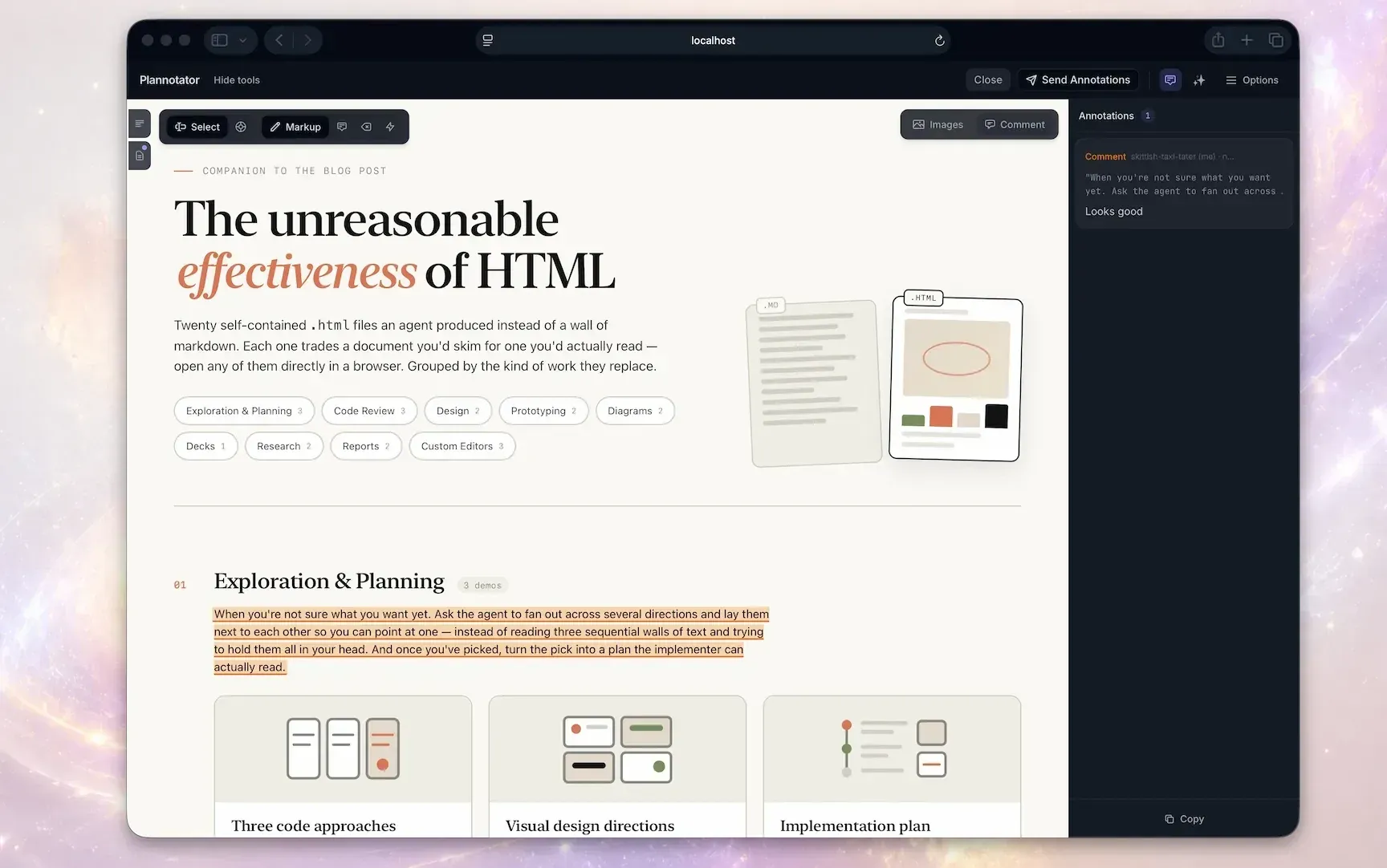
--render-html, an HTML file is rendered as-is instead of being converted, and annotations are placed on the rendered page. Raw local HTML loads supported assets only from the HTML file's own directory; requests for files outside it are refused. The project also links a separate repository of visual HTML skills for agents that produce HTML artifacts. - Question blocks for agent decisions Agents can write questions into a plan or document as
:::question,:::question-multior:::question-textblocks, which Plannotator shows as answer cards. Answers return to the agent in an Answers to your questions section, with open questions listed separately. The installer adds aplannotatorskill that teaches the syntax, and the questions guide includes a prompt for agents without the skill. - Local code review across version control systems
/plannotator-revieworplannotator reviewopens a diff viewer with a file tree, split or unified view and line annotations. In Git the default All changes view compares the merge base with the working tree, including commits, staged and unstaged changes and untracked files; other comparisons cover the last commit, a specific commit or a chosen base. GitButler workspaces, stacks and branch layers, Jujutsu revisions and Perforce changes are supported, and--patch-filereviews a static unified diff. Untracked text files above 5 MiB are shown as binary additions, as described in the local changes guide. - GitHub pull request and GitLab merge request review Passing a pull request or merge request URL to
/plannotator-reviewloads it through the user's authenticatedghorglabCLI and Git remote. When local checkout is enabled, Plannotator uses a temporary worktree or shallow clone and removes it when the session ends. Release v0.28.65 added recognition of self-managed GitLab hosts thatglabis signed in to. - Ask AI inside a review Selected diff lines or a general question can be sent to an AI provider, and the answer streams into a sidebar that stays separate from the review feedback. Supported providers are the local
claude,codex,opencodeandpiCLIs; Plannotator does not create accounts or manage API keys. On Claude Code 2.1.287 or later with the Plannotator mod, on Pi and on OpenCode 2, the question is answered by the agent session that opened the review.PLANNOTATOR_AI=disabledturns off Ask AI, review agents and Guided Review. - Agent reviews, Code Tour and Guided Review The Agents tab runs a separate agent over the current change: Code Review, Code Tour (Claude or Codex), Guided Review or a custom review skill. Detected engines are Claude Code, Codex CLI, Cursor CLI, OpenCode, Pi and GitHub Copilot CLI. Findings appear as annotations and are not posted to GitHub or GitLab or sent to the agent automatically. The agent reviews page states that read-only behavior is requested by prompt and that the actual guardrails differ per provider, for example Codex running in its workspace-write sandbox.
- Plannotator Inbox
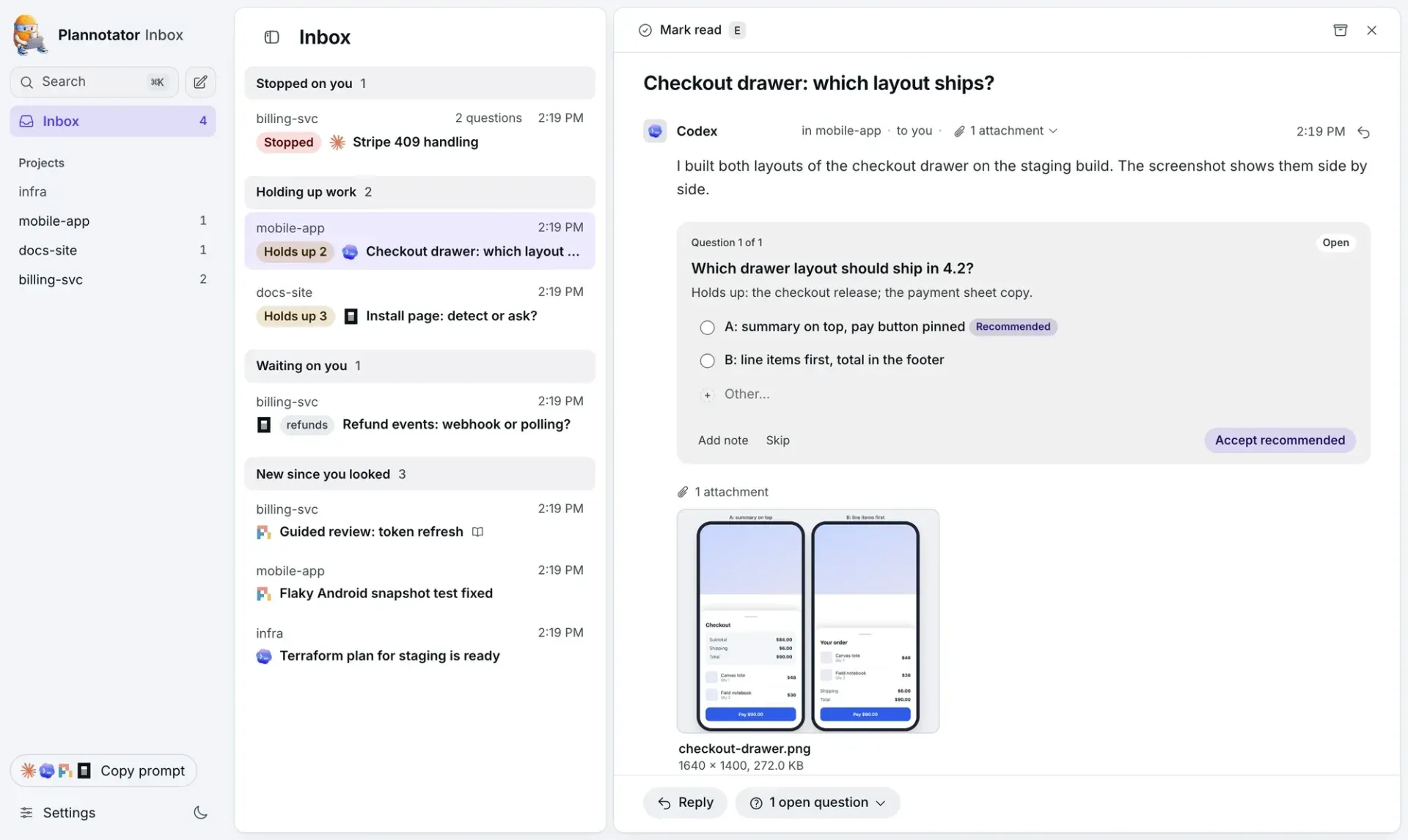
plannotator inboxstarts a local window that collects messages, questions, attachments and guided reviews from several agents, grouped by project and by what each thread needs. Replies go back to the session that asked, and no agent waits on the Inbox. Claude Code connects through the plugin'splannotator_inboxtool, Pi and OpenCode through an opt-in tool (PLANNOTATOR_INBOX_TOOL=1), and Codex, Cursor, VS Code, Gemini CLI, Zed and other MCP clients throughplannotator inbox mcp. The Inbox documentation lists v0.28.9 as the minimum version. - Remote, SSH and devcontainer sessions Plannotator detects SSH sessions and switches to fixed port 19432;
PLANNOTATOR_REMOTEandPLANNOTATOR_PORTconfigure devcontainers and Docker.--tailscale(v0.27.0 or later) keeps the server on 127.0.0.1 and publishes it over HTTPS through Tailscale Serve. The remote access guide states that remote sessions have no login and that remote mode binds to 0.0.0.0, so the port must not be reachable from untrusted networks. - Editor and note app integrations A VS Code extension on the Visual Studio Marketplace opens plans in editor tabs, shows diffs inline and adds annotations from the editor gutter. Zed can open the current local review file. Approved plans can be saved to an Obsidian vault with YAML frontmatter, tags and backlinks, to Bear as notes with nested tags, to Notion as child pages through
NOTION_TOKEN, or to an Octarine workspace. - Link sharing (deprecated) Small Markdown shares are compressed into the URL fragment, which is not encrypted. Large Markdown and raw HTML shares are encrypted with AES-256-GCM before upload to a paste service that stores ciphertext, with the key kept in the URL fragment and hosted pastes expiring after 7 days. The share portal and paste service can be self-hosted according to the self-hosting page, and
PLANNOTATOR_SHARE=disabledturns sharing off. The project describes this flow as deprecated and points team sharing to Workspaces. - Local server and external annotations API Each session runs a temporary HTTP server bound to 127.0.0.1 in local mode. Its routes are session-scoped, unauthenticated and not a versioned public web API, except
/api/external-annotations, which has a tested schema and a server-sent events stream for tools that add annotations from outside. The route families are listed in the local server and API reference. - Installer, updates and uninstall The installer is rerun to update the binary and command files, and it also updates an installed Claude Code plugin when
claudeis on the PATH.--version vX.Y.Zpins a release.plannotator uninstallremoves recognized integrations while keeping plans, history and settings;--purgealso deletes local data after the user types purge,--yescovers automation and--dry-runpreviews the changes. - Release verification Every binary has a SHA256 sidecar that the installers check. SLSA provenance attestations exist from v0.17.2 and can be checked during install with
--verify-attestation, which requires the GitHub CLI but no login. Releases also attach a CycloneDX SBOM that the project labels as a release-wide inventory of build inputs, not an exact per-binary runtime inventory, and the release workflow evaluates it with Grype before publishing. - Configuration and keyboard control Settings come from environment variables,
~/.plannotator/config.jsonand browser cookies, since each session runs on a random port.PLANNOTATOR_DATA_DIRmoves plans, history, drafts and configuration, and an XDG data path is used when it applies. Plan and annotate views have an optional Vim controls profile, off by default, and the environment variable reference lists all options.
Where Plannotator fits
Reviewing an agent's plan before implementation
With the Claude Code plugin installed, the agent's ExitPlanMode call opens the plan in the browser. The reviewer marks passages, adds comments or edits the Markdown, then sends feedback or approves. On Claude Code 2.1.287 or later the agent ends its turn instead of waiting, and the decision arrives as a later message; a revised plan then shows a diff against the previous version. The plan review guide documents each decision button.
Checking local changes before a commit
/plannotator-review opens the working changes in a pull-request style diff viewer. Line comments and file-level comments are collected and returned to the agent session as feedback, while approving sends an LGTM message. Git reviews offer staging controls and a commit history rail, and the comparison picker narrows the view to staged, unstaged or committed changes.
Reviewing pull requests and merge requests with agent findings
A GitHub pull request or GitLab merge request URL opens the remote change with the same diff viewer. From the Agents tab, the reviewer can run Code Review, Code Tour or Guided Review jobs with installed agent CLIs and compare their findings as annotations. Findings are kept local until the reviewer edits, copies or sends them; the code review documentation covers the available jobs and providers.
Answering questions from several agents in one place
The Inbox gathers threads from agents working in different projects and sorts them by state, such as stopped on the user, holding up work or waiting. Questions can carry options, a recommended choice and attachments such as screenshots. Replies are delivered to the session that asked, and since v0.28.65 a reply that no agent has received yet can be taken back. Tags can be shared across linked machines.
Annotating specifications and HTML artifacts
Product requirement documents, technical specifications and other Markdown files can be opened with /plannotator-annotate, and the documentation offers templates for these formats. HTML reports and prototypes produced by an agent can be rendered and annotated directly. Web pages are fetched through Jina Reader and annotated as documents, and the collected feedback is sent back to the agent.
Reviewing from another device
When the agent runs on a remote host or in a container, Plannotator switches to a fixed port that can be forwarded over SSH or exposed by a devcontainer. With --tailscale, it prints an HTTPS URL and a QR code so a phone or tablet on the same tailnet can open the review. The Tailscale setup page describes certificate requirements and access failures.
Install
curl -fsSL https://plannotator.ai/install.sh | bashReviews of Plannotator
Be the first to share your experience with Plannotator.
Write a review
Loading review form…
Found Plannotator useful? Upvote it todayYour vote helps other IT teams find it in the daily ranking.