What is o8?
o8 is a free, MIT-licensed review and merge layer for AI coding agents. Code is written in another tool, such as Claude Code, Codex, T3 Code, Cursor or an ordinary editor; o8 takes the work in, has an independent agent review the actual diff, returns rejected work with its findings to the agent that wrote it, and merges the approved commit with a signed receipt. The project describes the reviewer as ideally a different model from the author, and the agent that wrote a change never approves it. The source and releases are on GitHub, the product site is o8.run, and the copyright and trademarks for the o8 name and logo belong to Rainwater.
The project documents itself as a local control plane. It runs on one machine and serves every tool and machine connected to it: the desktop app, the o8 CLI, any MCP client and a phone all reach the same missions, reviews, approvals and audit trail. Work is organised as missions (goals), packets (scoped units of work), lanes (execution attempts), runtimes (adapters for installed agent CLIs), reviews and approvals, as described in How o8 works. Each dispatched packet gets its own git worktree and a bounded brief. A headless mode, o8 serve, runs the control plane on a machine without a screen.
The repository is mainly TypeScript and Rust. According to the project documentation, a Tauri desktop shell runs a local Next.js API and a separate WebSocket bridge, while SQLite and files under ~/.o8 hold control-plane state; the repository also contains a newer native app (native/o8-next) built on a vendored copy of the GPUI framework, and recent release notes say more of the server now runs natively without the Next.js server. o8 does not include a model of its own for coding work: it launches the agent CLIs already installed on the machine, on the user's own subscriptions or API keys, and the website states that OpenRouter can run the whole app.
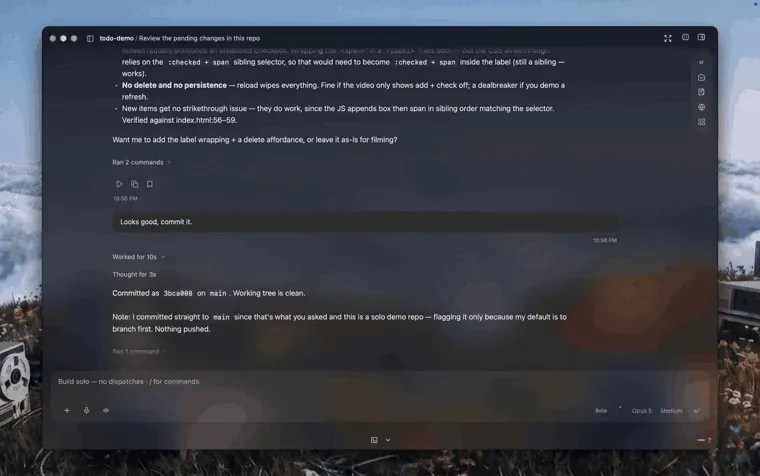
The README separates what is on main from what is still being built. Shipped: findings return to their author, and submitted reviews are shown together with the commit they reviewed. In progress, in this order: re-review of a fix, autonomous merge within a policy the project sets once, intake of pull requests from any tool, and reviewers that learn from past outcomes. The roadmap groups this work under three pillars: the review and merge loop, governance and security, and integration with existing tools.
The latest release is v0.1.818, published November 10, 2026. Versions use a 0.1.x scheme with frequent increments: eleven numbered releases appeared from v0.1.807 (October 24, 2026) to v0.1.818, one of them (v0.1.812) marked as a pre-release, plus a separate beta feed. The v0.1.818 notes list an Inbox in the sidebar, a PR panel that blocks a merge only on required checks and joins a merge queue where the branch has one, and workers that stay inside their own lane's branch so that a merge lands the exact commit that was reviewed. The previous release added GitLab merge requests to the PR panel and a first-launch setup flow that can import existing Codex and Claude threads.
Key capabilities
- Independent review of the real diff A separate reviewer agent reads the diff, and its approval is tied to the exact commit it reviewed. The agent that wrote the code cannot approve its own work. Reviewers keep their tools and can spawn workers in their own git worktrees to reproduce a bug, run tests or try a fix.
- Findings returned to the author One action sends rejected work back to the agent that wrote it, together with the saved findings and a receipt for the handoff. Corrections are capped at two rounds, and a stopped worker is never restarted. Re-review of the fix, with approval moving to the new commit, is listed as in progress (#5835).
- Risk-classified blind second review The Review and approval documentation (written for v0.1.431) describes a mechanical triage pass followed by risk assignment by what a diff touches. Diffs that touch schema, migrations, the lane state machine or the merge gate, or that rewrite whole files, need a second reviewer that sees only the diff and returns agree, disagree or inconclusive.
- Merges tied to the reviewed commit The commit that was reviewed is the commit that merges, and every step leaves evidence. In v0.1.818 the PR panel blocks a merge only on required checks, and on a branch with a merge queue the Merge action joins the queue. A single governed merge operation, and rules under which o8 may merge without a person, are being built (#5817, #5822).
- Five-step recovery ladder for failed merges When a merge fails, for example because
mainmoved, o8 rebases, re-runs the typecheck and then climbs a fixed escalation chain: automatic retry, orchestrator escalation, steering the warm session, a fresh redispatch, and finally a card for a human. The documentation describes a hard cost ceiling on this ladder. - Signed packet receipts Merged and discarded packets get a signed JSON receipt made with a dedicated Ed25519 key stored at
~/.o8/receipt-identity.key. Receipts can be verified offline on another machine witho8 verifyand the published public key, and spectator tokens limited to named repositories can query merged packets and approvals (receipts guide). - Supported agent runtimes The README lists Claude Code, Codex and OpenCode 2 as runtimes that can orchestrate or work, and Gemini, Cursor, Grok Build, Pi, GitHub Copilot CLI, Crush, Aider, Goose, Kimi Code, OpenHands, Qwen Code, Qoder, 3code, Prime Agent and DeepSeek Harness as dispatchable workers. o8 detects the installed CLIs, and the first-run picker shows which ones work on the machine; readiness differs by CLI version and platform.
- Runtime adapter contract All runtimes run behind one adapter contract that normalises each provider's session format, and a test keeps the README table equal to the registry. Adding a runtime is documented as a small patch (adapter contract). Claude Code can also keep its tools while another model supplies inference through model carriers.
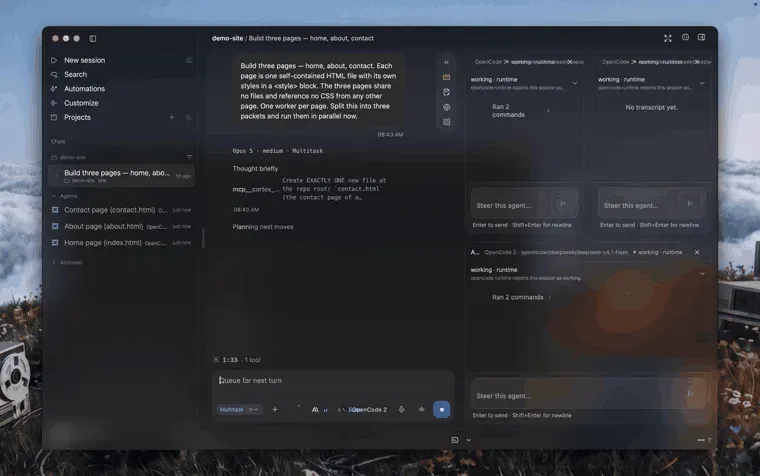
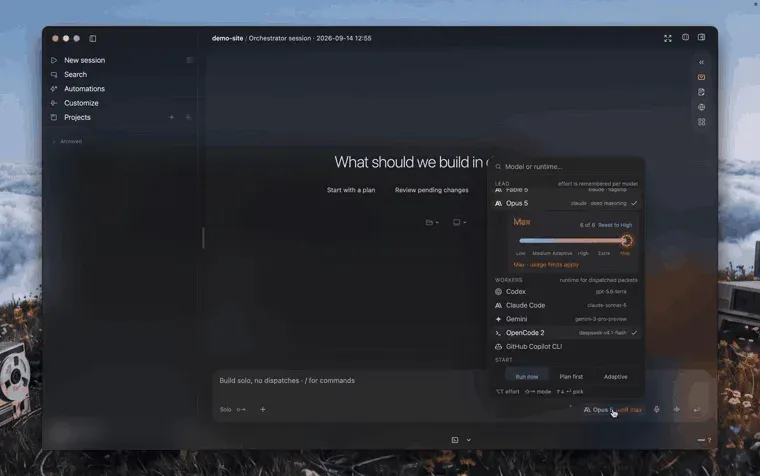
- Work modes and parallel workers Before sending, a Lead chip sets the orchestrating model and its thinking effort, and a mode chip selects Solo, Multitask, Compare plans or Fusion. Multitask splits a request into packets that run in parallel in isolated worktrees, and each worker can be steered from its own pane.
- MCP server for external clients Settings, then MCP, then Install exposes the operator tools to Claude Desktop, Claude Code or any MCP client, including
create_mission,submit_review,approve_and_merge,cortex_askand webview controls. The running app hosts the tool registry at a token-gated endpoint, client configs launch a stdio proxy, and external agents pass through the same review and approval gates as the operator. - The o8 CLI The
o8command covers repositories, missions, packets, reviews, the inbox and receipts, for exampleo8 mission create,packet diffandpacket review --approve. The native app installs the global command after its first run; from source it is built withnpm run build:cli. The full reference is in AGENT_REFERENCE.md. - The Brain (Cortex) A local store of distilled facts built from merged PRs, specs such as
AGENTS.mdandCLAUDE.md, review comments and session outcomes. Each fact has a kind, a confidence and a source; quoted excerpts must match the source exactly, and low-confidence extractions are dropped. Workers and MCP clients query it for cited answers. - Canvas and Control Room The Control Room is the IDE-shaped main window with the orchestrator chat, sessions and panels. Canvas, marked experimental in the docs, lays out terminals, browsers, agents, files and diffs as movable cards on one board, and an orchestrator can place and arrange cards through its API.
- Symon voice layer and dictation Symon answers spoken questions such as what needs attention, approves blocking items and provides system-wide dictation on the Mac. Any action with a side effect goes through a spoken confirmation card. v0.1.817 added a dictation history tab, and on Linux voice provider keys can be stored in the Secret Service.
- iPhone app and phone pairing An iPhone app, in open beta on TestFlight, works as a remote control for the desktop: approve work, steer an agent and watch the fleet. It pairs by scanning a QR code from the desktop status bar. A mobile web surface also ships in the repository for any phone on the same network.
- Download for macOS A signed, notarized universal DMG for macOS 14 or later runs natively on Apple Silicon and Intel and updates itself. It is available from o8.run/download and the GitHub releases page. No o8 account is required to download it or to work with local repositories.
- Linux and Windows previews Linux preview packages (AppImage, DEB, RPM, with checksums) are attached to v0.1.810; the README notes they use the older WebKit shell and that full Linux support for running o8 on a server is in progress. The download page lists a Windows 11 preview with MSI and EXE installers, while the README describes an early x64 preview and a Windows build of the current app as in progress.
- Build from source Requires Node 22.x, Rust stable and, on macOS, the Xcode Command Line Tools.
npm installandnpm run devserve the web loop athttp://localhost:47120with a WebSocket on port 47125, andnpm run tauri:devbuilds the native shell. At least one agent CLI is needed; API keys are optional. - Telemetry and update checks Usage analytics are on by default after a first-run privacy screen that lists all nine allowed events and offers a Turn off button; events never include code, prompts, file paths or repository names. Crash reports and error transmission are off by default and opt-in. Each update check sends a random device identifier, app version, target, architecture, macOS version and release channel.
- Price and license O8 is MIT licensed and free, and the README states there is nothing to buy. Agents run on the user's own subscriptions or API keys. The download page mentions a limited o8-hosted model allowance that becomes available on first use, and sign-in is used for account services such as sync, the web console and mobile relay.
Where o8 fits
Reviewing agent work before it reaches main
Work enters o8 as a mission and packet, either from the app, the CLI or an MCP client. A reviewer agent, preferably on a different model than the author, reads the diff, and its findings are stored with the commit it reviewed. The operator sees the diff and review evidence and approves, rejects or returns the packet. Approval is bound to that commit, so later changes need a new review.
Sending findings back until the change is right
When a review rejects a change, o8 sends the saved findings to the agent that wrote the code with a receipt for the handoff. The author agent fixes the issues in its own worktree, with corrections capped at two rounds. Automatic re-review of the fix against the earlier findings is listed in the README as in progress, tracked in issue #5835.
Running several agents in parallel on one repository
In Multitask mode the orchestrator splits a request into packets and dispatches each to a runtime such as Codex, Claude Code, OpenCode or Gemini. Every packet runs in its own git worktree, streams its output into a lane and can be stopped, steered, retried or rerun. The README example splits a three-page website into three packets that are built side by side and reported back for review.
Driving o8 from Claude Code or another MCP client
After installing the operator tools from Settings, an MCP client can create missions, dispatch them, read status, submit reviews and call approve_and_merge. The MCP documentation states that these calls go through the same internal APIs and gates as the desktop, and that approvals log the identifier of the calling client.
Scripted and headless use with the CLI
The o8 CLI is JSON by default and is available on the PATH in every worktree. A typical sequence is repo add, mission create, mission dispatch, mission wait, packet diff and packet review --approve, with inbox approve for any operator card. o8 serve runs the same control plane on a machine without a display.
Auditing what was merged
Every merged or discarded packet produces a signed receipt. o8 truth merged, o8 truth packet and o8 truth approvals read the receipt ledger, and saved receipts can be checked on another machine with o8 verify and the operator's public key, without contacting the o8 server. Similar projects listed on iThub that run coding agents in parallel worktrees include Orca and Emdash; PR-Agent reviews pull requests with an LLM agent.
Reviews of o8
Be the first to share your experience with o8.
Write a review
Loading review form…
Found o8 useful? Upvote it todayYour vote helps other IT teams find it in the daily ranking.