

What is Beancount.io?
Beancount.io is a double-entry bookkeeping service and open-source code base built on Beancount, the plain-text accounting language and engine. A ledger is a set of standard .bean text files kept in a Git repository, and the same files are reachable from a hosted web dashboard, native iOS and Android apps, a command-line tool named bea, a suite of coding-agent skills and an MCP server. The project describes itself as plain-text accounting for humans and AI agents. The source lives in the bex-co/beancount-io repository, the license file carries copyright notices from 2019, and the App Store and Google Play listings name Stargately, Inc. as the developer of the Beancount app.
The repository is a monorepo without a root package. dashboard/ is the web client (React 19, TanStack Start and Apollo) with ledgers, journal, reports, a Monaco editor, imports, collaboration and an AI assistant. mobile/ is the iOS and Android client built with Expo, React Native and Apollo. cli/ holds the Python bea CLI, published on PyPI as beancount-io and through the bex-co Homebrew tap. skills/ contains sixteen beancount-* agent workflows, and backend-cluster/ contains the GraphQL and REST gateway (Node.js, TypeScript, Koa, PostgreSQL with Drizzle ORM, Redis), a ledger service and the interface definitions. According to the README, the dashboard and the mobile app are clients of the Beancount.io API, whether that API is the hosted service or a self-run copy.
GitHub releases are tagged per package. The release marked Latest is bea 0.5.0 (tag cli-v0.5.0), published on November 20, 2026. It adds bea cloud git setup, which lets plain git clone, pull and push over HTTPS sign in through bea on a self-hosted server using a 90-day personal access token, adds bea add open --meta, and changes the trial balance, capital gains, holdings, budget, cash flow and register reports. Version 0.3.0 of September 2026 introduced managed price includes for local ledgers. The mobile app has its own tags such as mobile-v1.20261002.50 of October 2, 2026, and the store builds are updated separately.
Licensing differs by package. The root LICENSE is MIT and the customer skill suite uses MIT No Attribution. The CLI distribution declares MIT AND GPL-2.0-only: the frontend is MIT, the bundled ledger helper is GPL-2.0-only (LICENSE.engine), and the vendored Fava code keeps its MIT notice. The ledger service runs the GPL-3.0-only @rustledger/wasm engine as a separate HTTP sidecar, which its README presents as GPL containment. Beancount, Fava, beanquery, beangulp and rustledger are credited in ACKNOWLEDGEMENTS.md.
The hosted service at beancount.io has a free plan and paid plans listed on the pricing page; local CLI and skills workflows need no account. The repository also documents self-hosting with Docker Compose or a one-click Blueprint for the bex PaaS. Other double-entry and personal finance tools on iThub include Firefly III, ezBookkeeping and Frappe Books.
Key capabilities
- Plain-text ledger in a Git repository Every ledger is a set of Beancount text files in a Git repository, served by Gitea on the server side. On the managed service a ledger is cloned over SSH or with
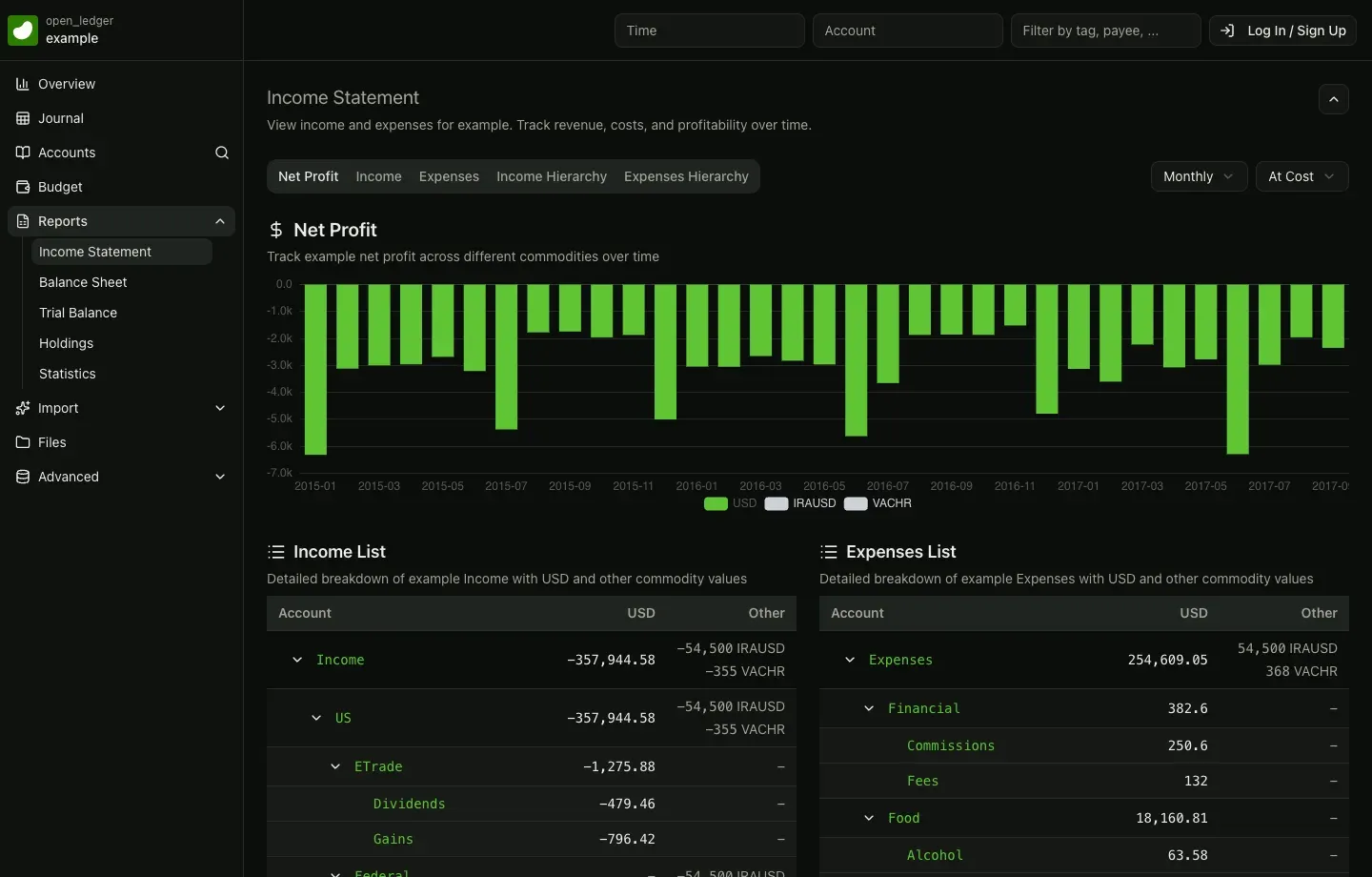
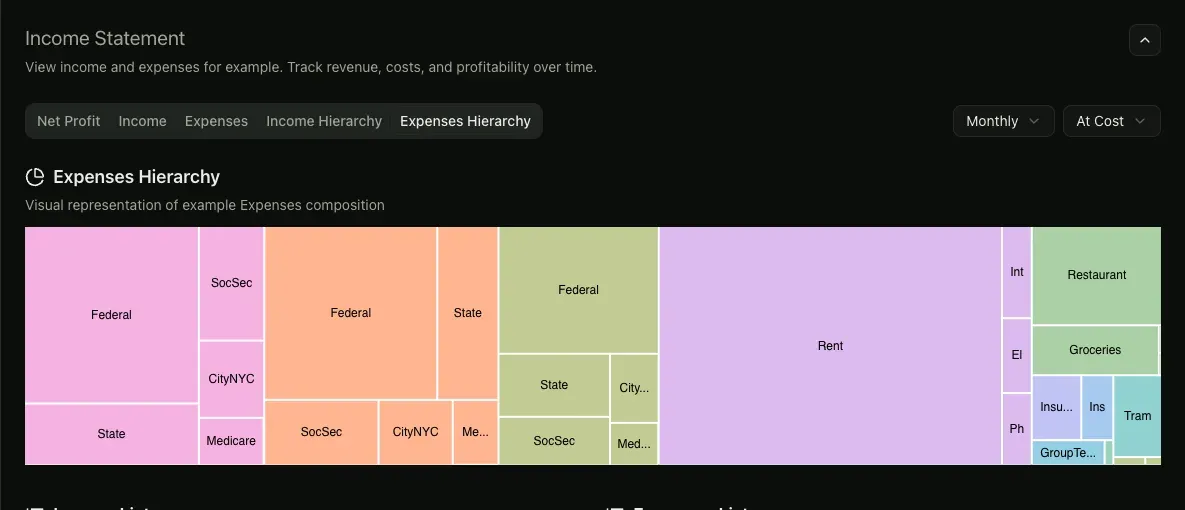
bea cloud ledger clone; on a self-hosted serverbea cloud git setuphandles HTTPS sign-in. Edits made in the apps, by imports or by the MCP server are recorded as commits, so history can be reviewed and reverted with standard Git tools, as described on the Git for Beancount page. - Web dashboard The browser client covers an overview, journal, accounts, budget, files and reports such as income statement, balance sheet, trial balance, holdings and statistics, with period and valuation selectors on the report pages. Ledgers can be edited in a Monaco-based editor, and collaborators can be invited. A public example ledger at
beancount.io/ledger/open_ledger/examplecan be browsed without signing up. - Hosted Fava Beancount.io offers a hosted version of Fava, the web interface for Beancount, as part of the service, with interactive reports and charts on the same ledger files. The Fava page lists self-hosted Fava as the alternative for users who want to run it themselves. A reduced copy of Fava is also vendored inside the
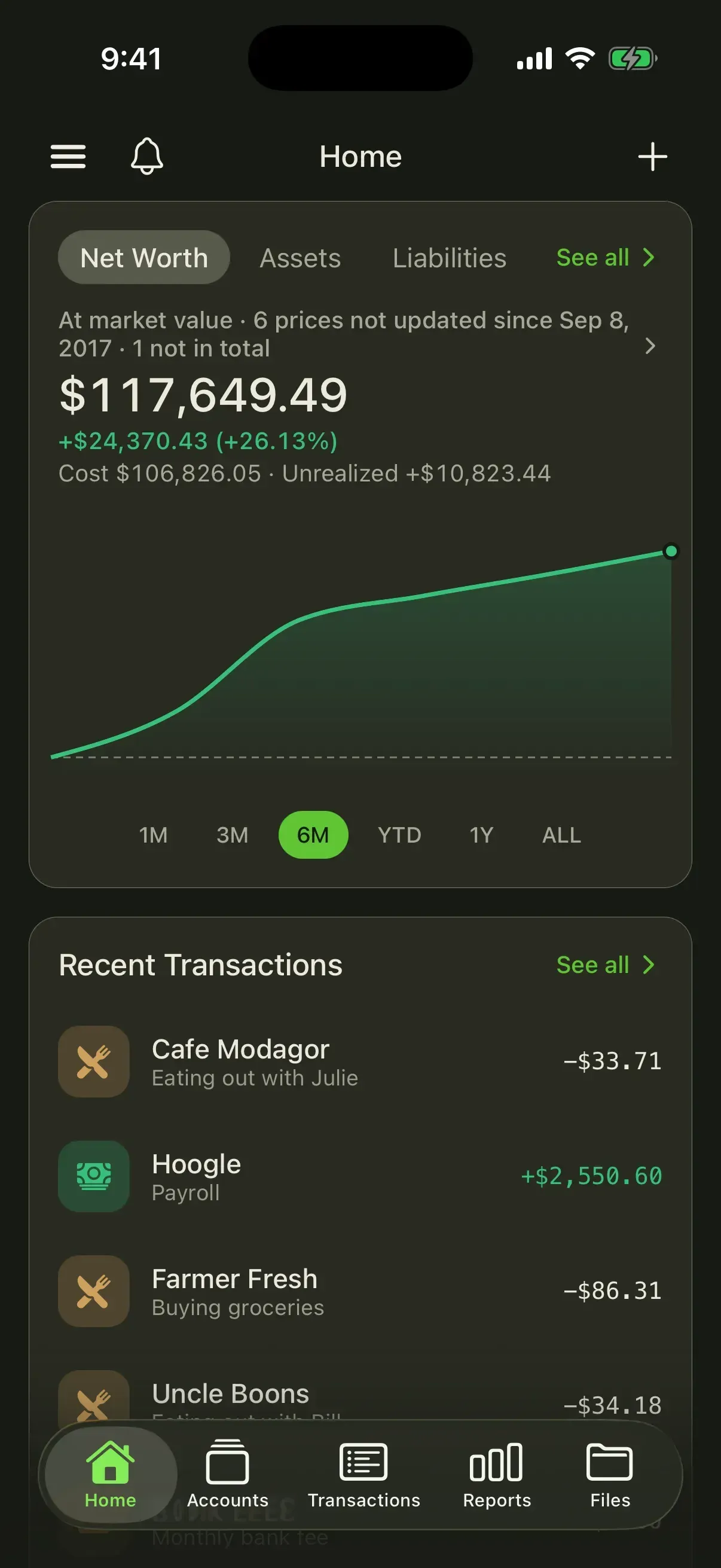
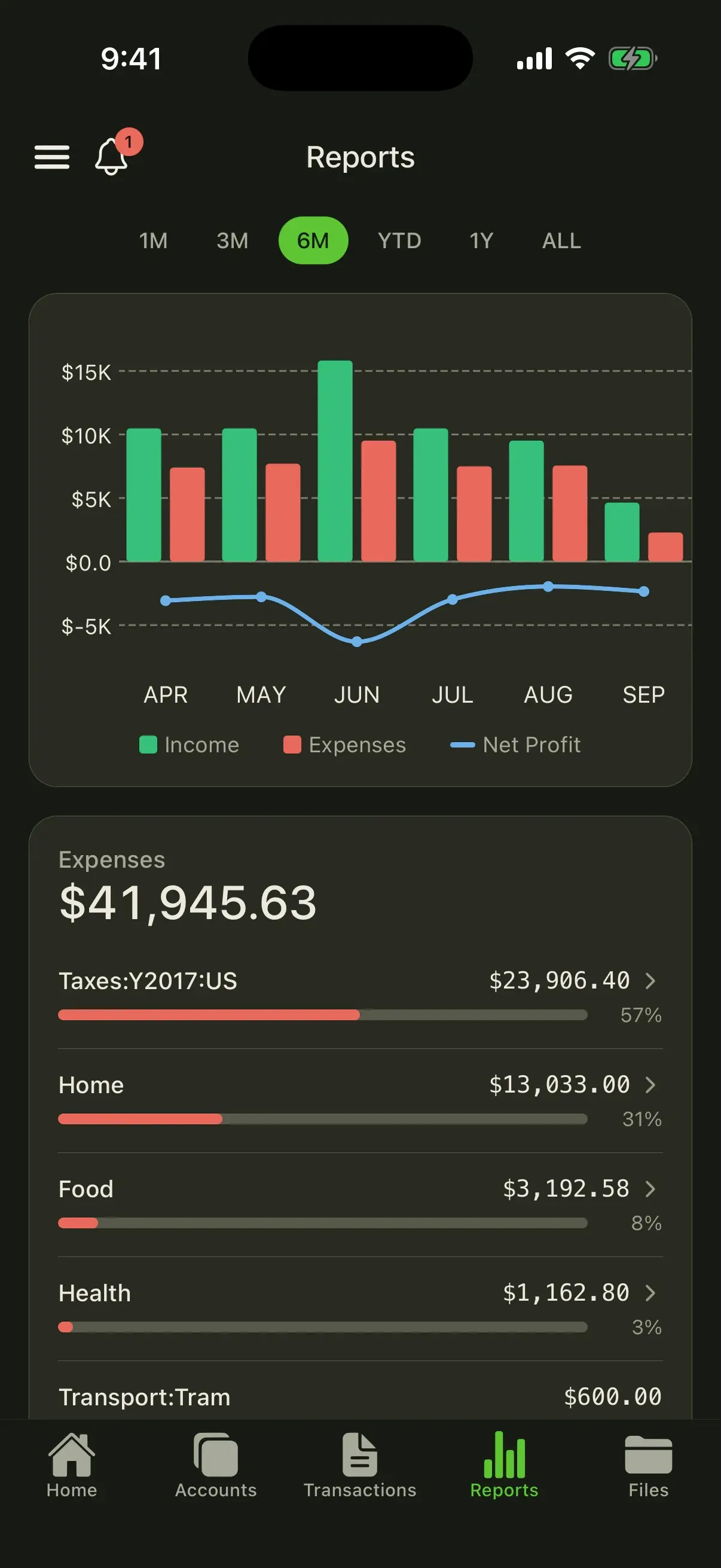
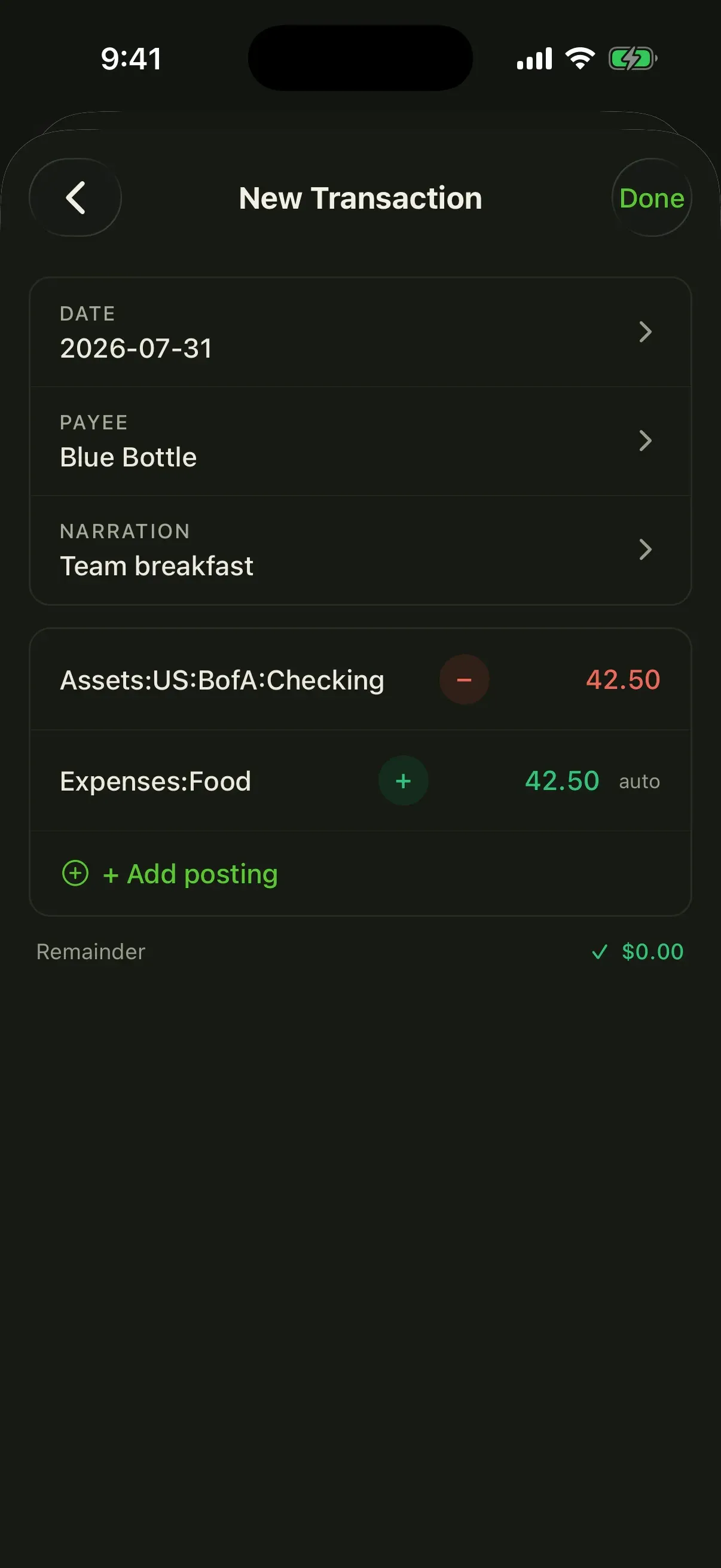
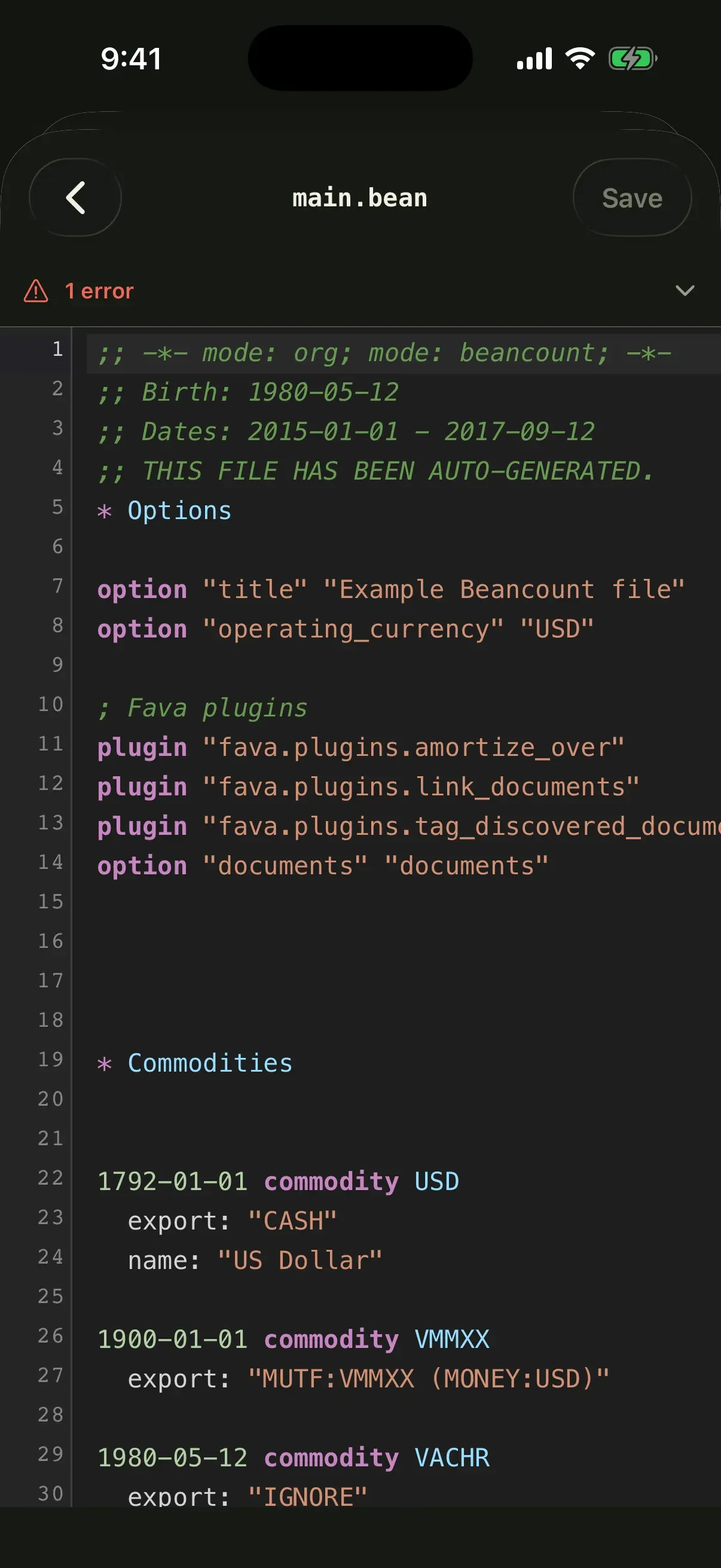
beaCLI. - iOS and Android apps The mobile client shows net worth, assets, liabilities and spending trends, budgets per account, a searchable journal, balanced multi-posting transaction entry and receipt scanning. A syntax-highlighted source editor with checksum-protected saves and a view of Git commit diffs work on the ledger files themselves. The interface ships in 13 languages, and the App Store listing requires iOS 16.4 or later. Builds are published on the App Store and Google Play.
- Mobile sign-in and custom servers The app signs in through the system browser with OAuth, validates RFC 9728 and RFC 8414 metadata and uses S256 PKCE, and keeps tokens in the OS keychain or keystore. A signed-out user can point the standard app at a compatible self-hosted deployment, where release builds require HTTPS.
- bea CLI installation
beainstalls withbrew install bex-co/tap/beaon macOS and Linuxbrew oruv tool install beancount-ioanywhere with uv and Python 3.12 or later. It provisions its own engine environment with Beancount, Beanquery and Fava, so they are not installed separately. Beangulp and Beanprice are optional and enabled withbea engine enable, andbea askneeds thebeancount-io[ask]extra. The CLI README lists all channels. - CLI commands and automation contract Commands include
initwith presets and modules,addfor eleven directive types,importfor CSV, OFX and QFX or importer configs,check,format,querywith an interactive BQL shell,doctorandreport. Reports cover overview, income statement, balance sheet, trial balance, holdings, register, capital gains, cash flow and budget versus actual, with CSV output. A global--jsonflag and documented exit codes from 0 to 4 are intended for scripts and agents. - Managed price includes Since
bea0.3.0, a single line such asinclude "https://beancount.io/prices/BTC-USD"values a holding in every command afterbea cloud login.bea price status,refreshandexportshow freshness, re-resolve sources and write portable local includes for stock Beancount and Fava. In hosted ledgers, the Live Prices page states that prices refresh when a ledger is opened after a five-minute window, without commits. - Bank Sync through Plaid Supported bank, card and investment accounts connect through Plaid, and each bank account is mapped once to a Beancount account, in USD by default or another currency set during mapping. New transactions arrive with an AI-suggested account, wait for approval and are then committed to Git. The Bank Sync page states that Beancount.io does not receive the bank login password.
- Smart Import Smart Import accepts CSV, PDF, OFX and QFX files and PNG or JPG photos of statements up to 10 MB. CSV files are parsed in the browser, while PDFs, OFX files and images are read by an AI model that extracts transactions and suggests accounts from the ledger. Rows can be edited or rejected, and nothing is written until the import is confirmed.
- AI Assistant The hosted AI assistant answers questions about cash flow, runway and trends from the ledger, with a token quota per plan: 20K on Free, 500K on Premium, 2M on Growth, 10M on Organization and unlimited on Enterprise. The security page lists Anthropic and OpenAI as model providers for optional AI features, with requests routed through a bex.co proxy, and states that AI processing starts only when an AI feature is used.
- MCP server An HTTP MCP endpoint at
https://beancount.io/api-gateway/mcpis added in Claude Code withclaude mcp add --transport http beancount https://beancount.io/api-gateway/mcp; the MCP page also covers Claude Desktop, Codex, Cursor, Windsurf and Zed. Scoped OAuth 2.1 limits a connection to one ledger or all ledgers. Tools includerunBqlQuery,listLedgerFiles,readLedgerFiles,updateLedgerFilesandappendLedgerText, file writes support adry_runpreview, and each edit becomes a Git commit. The server is listed on the MCP Registry asio.beancount/beancount. - Coding-agent skills Sixteen
beancount-*skills for Claude Code and Codex cover ledger setup, everyday entries, trades, property, statement import with duplicate review, importer authoring, reconciliation, migration, queries, roll-forwards, accruals, invoices and bills, report packs, burn and runway metrics, options and month-end close. They operate on local ledger files throughbea0.3.1 or later and are installed as thebeancount-ioplugin or from a Git checkout, with documented steps for native Windows PowerShell 5.1. See the skills installation guide. - REST and GraphQL API The backend serves a GraphQL API through Apollo Server and Koa and a REST API whose interactive OpenAPI reference is published at beancount.io/docs/api-reference, alongside a prices API. Personal access tokens with scopes such as
ledger.readandledger.writeare also used as Git passwords over HTTPS. - Self-hosting with Docker Compose The deploy/docker target runs the dashboard, backend API, ledger service, Gitea, two PostgreSQL databases, Redis and Caddy with automatic TLS on one host. It needs Docker Engine with Compose v2, three DNS names, inbound ports 80 and 443, a suggested 4 GB of RAM to start and at least 20 GB of free disk, since the backend image alone is about 4.5 GB. AI features stay off until
ANTHROPIC_API_KEYorOPENAI_API_KEYis set, and the mobile app needs anOAUTH_JWKSsigning key. - One-click deployment on bex A
bex.yamlBlueprint provisions the dashboard, API, ledger service, Gitea with a 10 GB disk, a managed Postgres and a key-value store on the bex PaaS. The deploy/bex guide states a first build of 20 to 40 minutes and an estimate of about 33 USD a month at bex Starter plans, billed by bex. In this self-host mode sign-up needs no email step and no plan limits apply. - Hosted plans and limits As listed on November 20, 2026 in USD: Free at $0 with 1 ledger, 1 collaborator and 1,000 entries; Premium at $14.99 a month or $11.99 a month billed annually ($143.88 a year) with 5 ledgers and 5 collaborators; Growth at $99.99 or $79.99 billed annually with 20 ledgers and 10 collaborators; Organization at $499.99 or $399.99 billed annually with 500 ledgers and 50 collaborators; and Enterprise by contact. Paid plans have unlimited entries and automatic backups; OIDC single sign-on and multi-entity consolidation start at Organization, and payment by invoice is Enterprise only.
- Existing ledgers and migration Existing Beancount books are opened with
bea init --existing, which writes anAGENTS.mddescribing the root file, includes and plugins and changes no ledger file. A migration guide uses the skills to convert exports from apps such as Mint, Monarch or QuickBooks and to keep importing without double-booking transfers.
Where Beancount.io fits
Recording a first transaction
The README quickstart starts with a sign-up at beancount.io, opening or creating a ledger and adding an entry such as Expenses:Dining 12.50 paid from Assets:Checking, either in the web journal or with Add Transaction on mobile. The same step from a terminal is bea init with an opening balance, bea add transaction with two postings, then bea check and bea report balance-sheet. The CLI tutorial continues through a first month to a month-end report.
Bringing existing Beancount books
Users who already keep Beancount files run bea init --existing PATH, which lists plugins and options that Beancount 3 does not load and writes an agent guidance file without editing the ledger. The files can then be pushed to a hosted or self-hosted ledger repository, and they stay readable by Fava and the upstream Beancount tools. Live price includes can be exported as local files with bea price export for tools that cannot fetch them.
Importing bank and card activity
The project documents three import paths. Bank Sync pulls new transactions from accounts connected through Plaid and proposes accounts for approval. Smart Import reads statement files, including PDFs and photos, and previews extracted rows before import. Locally, bea import --csv or --ofx previews and applies bank exports with categorization rules, and the beancount-import skill adds duplicate review for entries recorded by hand.
Agent-assisted bookkeeping and month-end close
With the skills installed, a coding agent such as Claude Code or Codex can import statements, reconcile an account against a statement and run the confirm-gated beancount-close workflow on local files. Against a hosted or self-hosted ledger, an MCP client can use BQL queries, file reads and previewed edits, and prompts such as /mcp__beancount__close-month in Claude Code. Writes return a dry_run preview first and land as Git commits.
Tracking investments and market values
The beancount-trade and beancount-options skills record stock, fund, crypto and options events with lots, and the holdings and capital gains types of bea report show positions and realized gains. Managed price includes keep holdings valued at market prices without maintaining quote scripts, and the 0.5.0 release lists sales without a price under unpriced_reductions instead of dropping them.
Running the stack on your own server
The documented single-server procedure copies .env.example in deploy/docker, sets the three domains and secrets and starts the stack with docker compose up -d --build; two one-shot services initialize Gitea and apply database migrations. The standard mobile app connects to that server by URL, and bea cloud login followed by bea cloud git setup gives Git access over HTTPS. The deployment guide covers backups of the six named volumes and the upgrade procedure.
Install
uv tool install beancount-ioReviews of Beancount.io
Be the first to share your experience with Beancount.io.
Write a review
Loading review form…
Found Beancount.io useful? Upvote it todayYour vote helps other IT teams find it in the daily ranking.


