

What is Sure?
Sure is an open-source personal finance application for tracking accounts, transactions, budgets, bills, loans and investments in a web browser. It is a community-maintained fork of Maybe, the Ruby on Rails finance app that Maybe Finance, Inc. archived at its final v0.6.0 release in July 2025. The fork's repository was created that same month under the we-promise organization, and the project website names Sure Finances, LLC as the operator, with contributors from many countries. Forks may not use the Maybe name or logo, so the project ships under its own name.
Self-hosting is the primary distribution model. The Docker self-hosting guide downloads a sample Compose file that runs the Rails web process on port 3000, a Sidekiq worker, PostgreSQL 16, Redis and an optional backup service, using the image ghcr.io/we-promise/sure. An official Helm chart covers Kubernetes, and the README lists one-click templates for Render, PikaPods and Hostim. Other clients connect to the same server: a macOS desktop shell built with Tauri 2, a Flutter companion app for Android and iOS, the HTTP API and an MCP endpoint for AI agents, as summarized in the Sure clients overview. A demo instance at app.sure.am uses sample data; the pricing page states that a proper hosted version is not offered yet.
The current stable release is v0.7.6, published on October 31, 2026. Version 0.7.6 added a Spending vs normal comparison (a preview feature), loan overviews with repayment schedules, a token-free Bayes classifier for categorization, ordered rules with a Stop processing option, full backup and restore tooling, and a read-only budgets screen in the mobile app. Version 0.7.5 introduced a Bills area with calendar views and an income plan, 0.7.4 added passkey sign-in and a combined Plan area for budgets and goals, and 0.7.3 added an insights feed and the experimental macOS app. From the v0.7.7 alpha train onward, releases move to calendar versions such as v2026.11.3-alpha, as described in the versioning notes.
The stack is Ruby 3.4.9 and Rails 8.1, with Hotwire for the interface, PostgreSQL for data, Redis and Sidekiq for background jobs, and Doorkeeper as the OAuth2 server for API and mobile clients. Bank and brokerage data arrive through optional providers such as Plaid, SimpleFIN or Enable Banking, each configured with the operator's own credentials. AI features are optional: the chat assistant and background categorization use an OpenAI-compatible endpoint, the native Anthropic provider or a local model, as set out in the LLM configuration guide.
Sure is licensed under AGPLv3. It is a personal and household finance tool: it does not produce invoices, run double-entry business accounting or file taxes, and its AI answers are labelled as informational rather than financial advice. Business finance support appears on the public roadmap only as an item under exploration.
Sure screenshots
Explore the interface. Open a screenshot to view it at full size.
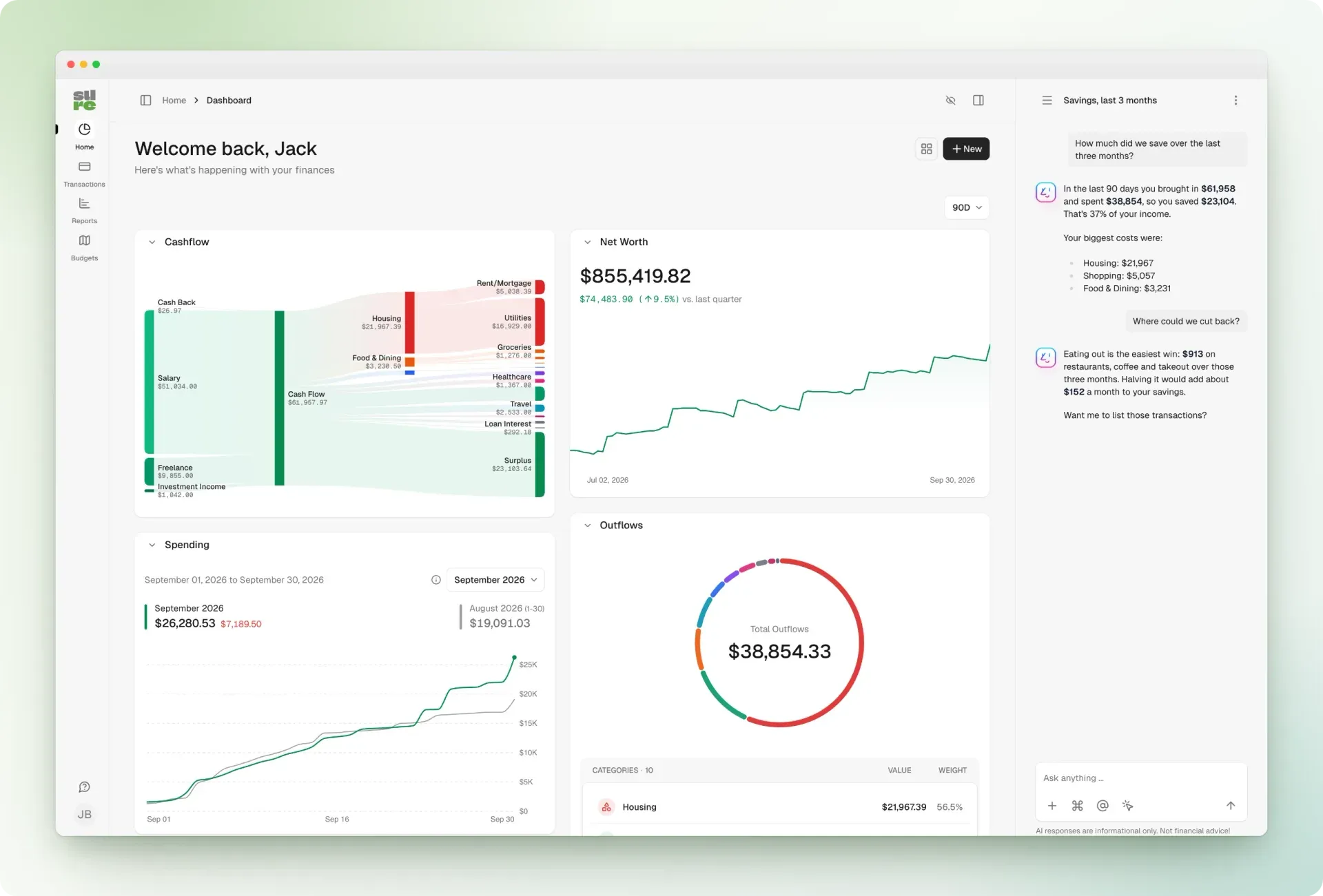
Official README screenshot of the Sure dashboard in the light theme, with demo data and the assistant answering a savings question.
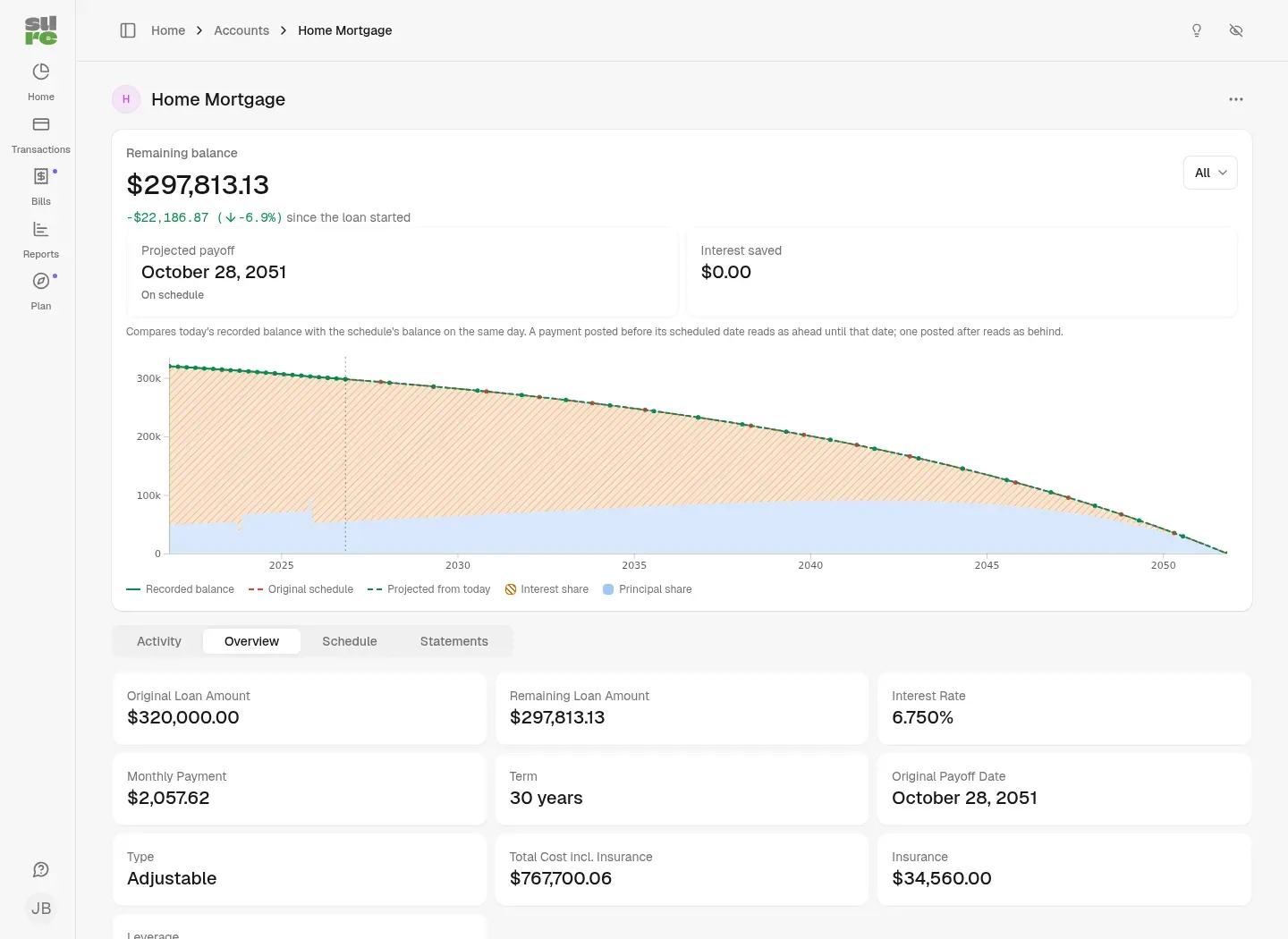
Loan overview from the v0.7.6 release notes: recorded balance against the original schedule, interest and principal shares, and loan details.
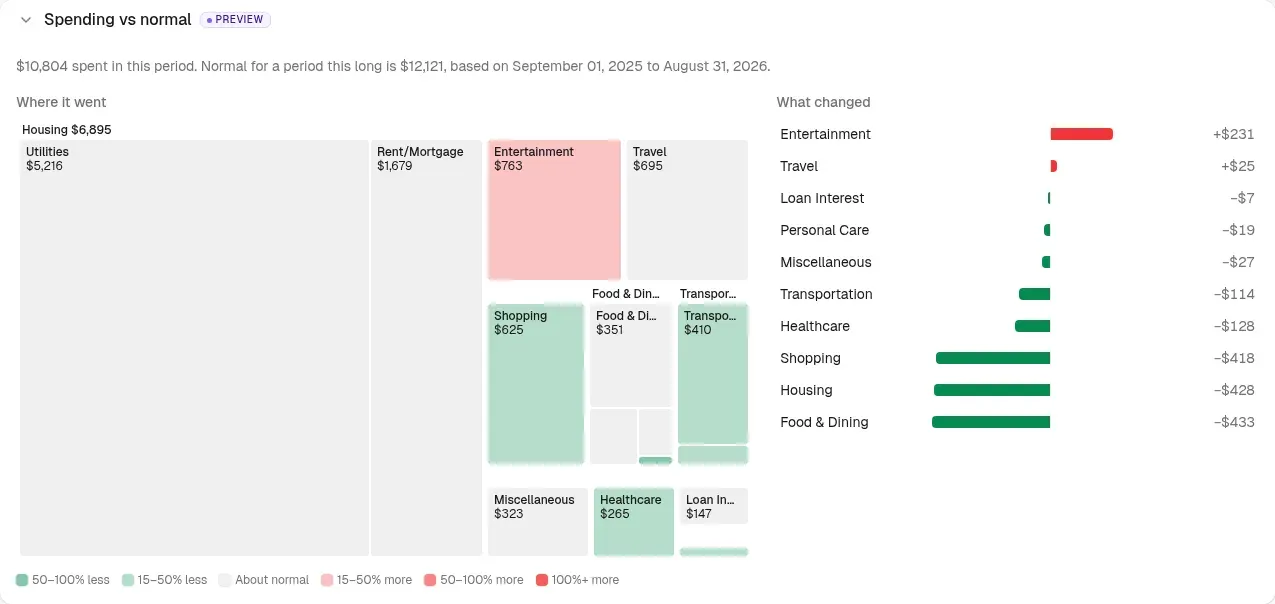
Spending vs normal preview section from the v0.7.6 release notes, comparing a period with the user's own spending history.
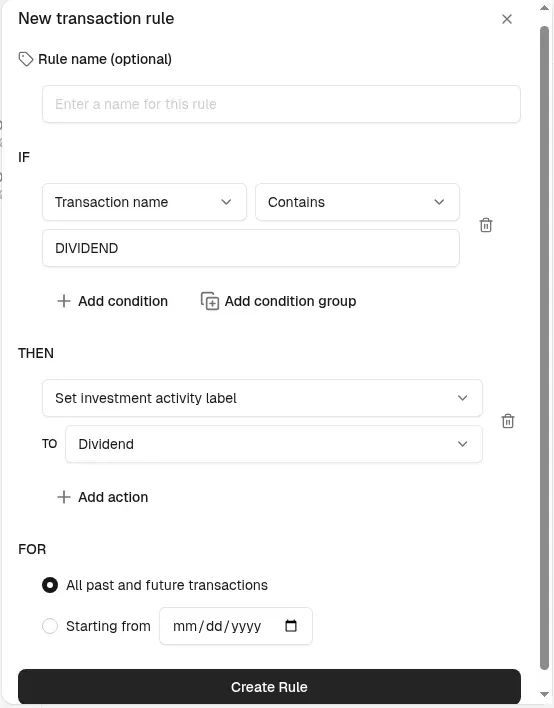
Rule editor from the official onboarding guide, setting an investment activity label for transactions whose name contains DIVIDEND.
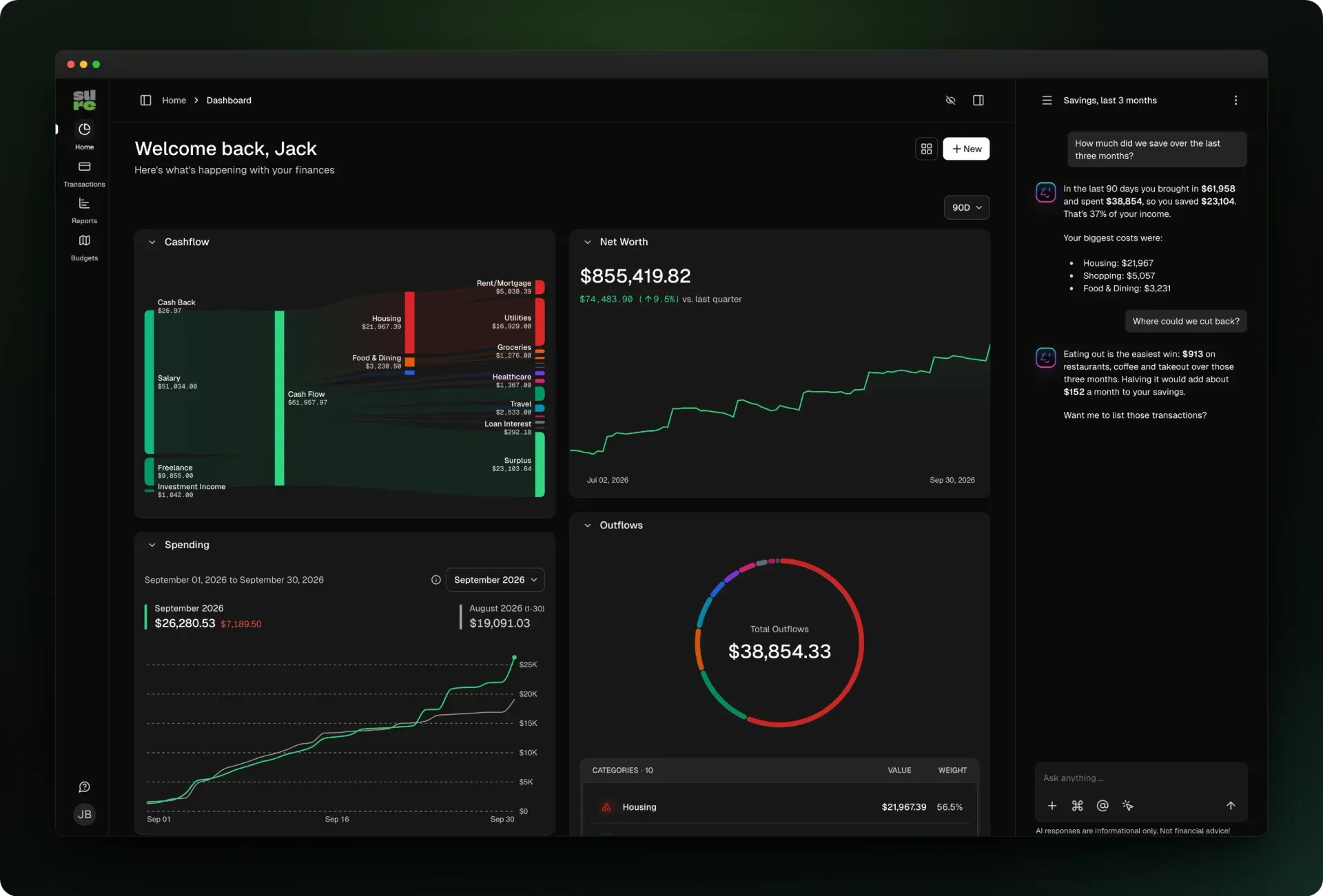
Official README screenshot of the same dashboard in the dark theme.
Source: official Sure project page.
Key capabilities
- Self-host with Docker Compose Download
compose.example.ymland rundocker compose up; the default file starts without extra configuration, but a generatedSECRET_KEY_BASE, changed database credentials and HTTPS are recommended outside a local network. The web and worker services useghcr.io/we-promise/surewith thestabletag by default, andlatestfollows alpha builds. Updates are manual: pull the web and worker images and restart, and database migrations run automatically. The Docker guide also covers SMTP, IPv6 binding and closing signups after the first account. - Kubernetes Helm chart The official Helm chart deploys the Rails web and Sidekiq worker workloads, with optional CloudNativePG and Redis operator subcharts for in-cluster databases. It supports migration jobs before upgrades, horizontal pod autoscalers, non-root containers and existing secrets. Requirements are Kubernetes 1.25 or newer and Helm 3.10 or newer.
- macOS desktop app A Tauri 2 shell renders the full web app in a native Mac window and connects to a Sure server you already run; it has no separate data model. Each release attaches a universal DMG for Apple Silicon and Intel Macs running macOS 12 or later. The DMG is not code-signed, so the first launch has to be approved under Privacy and Security in System Settings.
- Android and iOS companion app The Flutter mobile client signs in with OAuth 2.0 and MFA and shows accounts and balances; version 0.7.6 added a read-only budgets screen with month navigation and rollover amounts. Releases attach an Android APK and an unsigned iOS build that needs your own code signing, and earlier release notes point to a TestFlight beta. The web app remains the complete client, and a Swift-native iOS app was announced as upcoming but is not part of the current distribution.
- Accounts, net worth and the dashboard Track depository, credit card, loan, investment, crypto, property and other asset or debt accounts, entered manually, imported or synced. The dashboard combines a cash-flow Sankey chart, net worth trend, spending and outflow breakdowns, and widgets can be hidden or reordered. A privacy mode hides balances on screen, and accounts can be shared within a household with per-account permissions.
- Transactions, rules and categorization Edit transactions with categories, nested categories, merchants, tags, notes, attachments and splits, and convert eligible entries to trades. Rules run in a fixed, drag-to-order sequence with conditions such as contains, starts with, regex and not equal, and a Stop processing flag for exceptions. Version 0.7.6 adds a Bayes classifier that categorizes from your own history without LLM tokens, and lets you test and tune it before relying on it.
- Bank, brokerage and crypto connections Optional providers include Plaid, SimpleFIN, Enable Banking, TrueLayer, Lunch Flow, Wise, Mercury, Brex and regional connectors such as Akahu, Up, Monobank, Fio banka and Redbark. Investment and crypto sources include SnapTrade, Interactive Brokers, Questrade, Trade Republic, Coinbase, Binance, Kraken, CoinSpot and on-chain wallets, including Polkadot and Cosmos Hub since 0.7.6. Each provider needs its own credentials and agreement, and coverage differs by country and institution.
- Imports and the Statement Vault CSV imports cover accounts, transactions and trades, and 0.7.5 added QIF split imports; imports can be reverted. The Statement Vault, added in 0.7.1, stores uploaded statements and shows statement coverage per account, and PDF statements can be parsed for periods and balances. Document import and search rely on a configured LLM provider and a pgvector-enabled PostgreSQL image.
- Budgets, goals and the Plan area Monthly category budgets support rollover and personal budgets alongside household-wide ones. The Plan area, introduced in 0.7.4 behind preview features, combines budgets with envelope-style goals that link to depository accounts. Since 0.7.6, a goal can be funded across currencies and shows original and converted amounts, with a warning when an exchange rate is missing.
- Bills and recurring cash flow The Bills area from 0.7.5 lists recurring obligations in overview and calendar views with custom repeat intervals, overdue states and payment recording, and an income plan arranges bills around pay periods. Calendar feeds expose bill dates to other apps. A credit-card statement-cycle view shows the last closed statement and the payment due date; it does not create automatic card-payment bills.
- Loans and investments Loan accounts show the remaining balance against the original schedule and a projection from today, with principal and interest shares, insurance costs, payoff date and a payment-by-payment schedule; recorded rate changes are reflected for adjustable-rate loans. Investment accounts track holdings, cost basis, gains and money-weighted returns, apply stock splits and include trade fees. Security prices are imported once a day on weekdays, at 22:00 UTC by default.
- Reports and insights Reports cover income, spending and cash flow over selectable periods, and a family setting can stop counting investment contributions as spending. The Spending vs normal section compares a period with your own history through a category treemap and a ranked list of changes; it is a preview feature in 0.7.6. Insights text is generated from templates without LLM calls, and a Dig in with AI button prepares an editable question for the assistant.
- Optional AI assistant The built-in chat answers questions using Sure's own function tools, while a separate background pipeline handles auto-categorization and merchant detection. Providers include any OpenAI-compatible endpoint, the native Anthropic API, Google Gemini and local models served by Ollama; an external agent mode and an MCP-only mode without in-app chat are also available. Chat requires per-user AI consent, and the AI guide documents timeouts and prompt budgets for slower local models.
- MCP endpoint for external agents Sure exposes a JSON-RPC 2.0 Model Context Protocol endpoint at
/mcp, authenticated through OAuth 2.0 dynamic client registration or a static bearer token tied to one user. Tools read transactions, accounts, holdings, balance sheets, income statements and budgets, and write-capable tools manage categories, tags, transfers, goals and budgets. Rule tools require a preview token before a rule can be applied, as described in the MCP guide. - REST API with OpenAPI specification Scripts and integrations call the HTTP API with a user-generated
X-Api-Keyheader or with OAuth2 bearer tokens from Doorkeeper. The OpenAPI specification and endpoint guides cover transactions, splits, categories, tags, merchants, imports, insights and a server-calculated cash-flow endpoint. - Sign-in, SSO and passkeys Local accounts support two-factor authentication, and passkeys or hardware keys can be used as a second factor or for passwordless sign-in since 0.7.4. Operators can add OpenID Connect, SAML and other SSO providers, run SSO-only with an emergency admin override, and create users just in time; see the SSO configuration guide.
- Backups, restore and rollback The backup service runs the same image and writes a folder with a PostgreSQL dump, uploaded files, the Compose and environment files, a manifest, a restore script and SHA256 checksums. Run
docker compose run --rm backup createbefore each upgrade, or enable the daily 02:00 UTC schedule that keeps seven backups, with optional off-site copies through rclone. Files held in external object storage are not included, and backup folders contain secrets such asSECRET_KEY_BASE. - Multi-currency and localization Accounts keep their native currency and roll up into a household currency using exchange-rate providers such as Frankfurter, and confirmed cross-currency transfer routes can be auto-matched. Amount fields accept calculator expressions and comma decimals. The interface ships locale files for 16 languages, including English, German, French, Spanish, Italian, Polish, Ukrainian and Chinese.
Where Sure fits
Moving off Maybe or a spreadsheet
Start a fresh Sure instance from the Docker guide, create the first account and close signups if the server is reachable from the internet. Import a few months of CSV history per account, set opening balances, then reconcile each balance against a real statement before importing older data. Check that transfers between your own accounts are matched rather than counted as income and spending, and review pending matches when auto-matching is uncertain. Very large historical imports can exceed a 512 MB container, so import in batches or raise the memory limit temporarily.
Running a shared household budget
Invite household members and decide per account who can see or edit it, then set monthly category budgets, with rollover where unspent money should carry forward. Use goals in the Plan area for savings targets tied to specific depository accounts. Confirm that a member sees only the accounts shared with them in lists, sparklines and insights, since recent releases tightened those boundaries. Turn on preview features in preferences only for users who want the Plan, Bills and Spending vs normal views while they mature.
Keeping categorization under control
Create rules for recurring payees first, order them so specific rules run before general ones and use Stop processing for exceptions. Preview the match count of a rule before activating it. Try the Bayes classifier against your own history and inspect its results before enabling it, or configure an LLM provider for categorization and merchant detection if you accept sending transaction data to it. Lock categories or amounts that a provider sync must not overwrite.
Tracking loans, property and investments
Enter loan terms, interest rate and insurance to get a repayment schedule and payoff projection, and record rate changes on adjustable loans. Link investment accounts through a supported broker or record trades manually, then check cost basis, fees and splits on the holdings view. US and UK property values can come from valuation providers such as RentCast, Realie or Chimnie. Verify that the daily market-data import is running after upgrades by checking the cron entry in the Sidekiq dashboard.
Connecting an AI agent safely
Decide whether you want the built-in chat, an external agent, or MCP only. For local inference, run the AI Compose profile with Ollama and size timeouts as the AI guide describes. For external agents, prefer OAuth client registration over a static token, route traffic through Pipelock's MCP proxy and remember that write-capable tools can change categories, budgets and transactions. The assistant can only see the household data of the authenticated user, so use a dedicated user if you want a narrower scope.
Operating and upgrading a production instance
Pin an explicit image tag in SURE_IMAGE_TAG rather than a floating channel, especially while the calendar-version transition pauses promotion of latest and stable. Take a backup, pull the web and worker images, restart and check the System Health page and worker logs. Practise a restore with restore.sh on a second host, because dumps are written with PostgreSQL 17 tools from the Sure image. Set POSTHOG_FEEDBACK_ENABLED=false if you do not want the anonymous product-improvement monitoring added in 0.7.6.
Install
curl -o compose.yml https://raw.githubusercontent.com/we-promise/sure/main/compose.example.yml && docker compose up -dReviews of Sure
Be the first to share your experience with Sure.
Write a review
Loading review form…
Alternatives to Sure
 Maybe FinanceSelf-hosted Ruby on Rails app for tracking net worth, accounts, budgets, investments and transactions, with CSV imports, rules, an API and optional AI chat. AGPLv3; archived at the final v0.6.0 release in July 2025.
 Actual BudgetActual Budget is a free, MIT-licensed personal finance app built on envelope budgeting. Data lives in a local SQLite database, and an optional self-hosted server adds multi-device sync, end-to-end encryption and bank sync.WWallosWallos is an open-source, self-hosted web app that tracks recurring subscriptions with categories, statistics, multi-currency support and payment reminders.