

What is Actual Budget?
Actual Budget is an open-source personal finance application for envelope budgeting, transaction management and reporting. It was originally written by James Long as a commercial product with a managed subscription; the code was released under the MIT license in 2022, and the hosted subscription service was shut down in 2024, according to the project FAQ. A community of contributors and maintainers now develops it in the actualbudget/actual repository, funded by donations through Open Collective and a share of PikaPods hosting fees.
The project is local-first. The budget database lives on the device, and the optional sync server stores change messages plus an archival copy of each budget file rather than serving as the primary database. Without a server, the desktop app still provides all budgeting features, file imports and exports. A server is required for browser and mobile access, multi-device sync, bank sync and the API. The installation guide includes a table of which features need which part.
Actual is distributed in several forms. Desktop builds for Windows (x64, ARM64 and 32-bit installers plus APPX packages, also through the Microsoft Store), macOS (Intel and Apple Silicon DMG) and Linux (x86_64 and ARM64 AppImage, plus Flathub) are attached to each GitHub release. The server ships as the actualbudget/actual-server Docker image, as ghcr.io/actualbudget/actual, and as the @actual-app/sync-server npm package. The documentation also covers one-click hosting on PikaPods and a guide for Fly.io.
Releases follow a monthly year.month numbering. Version 26.11.0, published in early November 2026, adds automatic bank sync at a chosen interval while the app is open, custom reports grouped by tags, a sidebar whose pages and start page can be configured, per-budget SimpleFIN credentials and faster loading of large budgets. It also requires administrators to allowlist private SimpleFIN bridge addresses, as protection against server-side request forgery, and stops publishing standalone Flatpak files. Version 26.10.0 added an in-app Notifications page and better tolerance of devices running different versions, while 26.9.0 added a transaction column manager, an in-app tour and moved container images to Node 24, dropping 32-bit ARM from the Ubuntu-based images.
The codebase is a TypeScript monorepo managed with Yarn workspaces and Vite. The loot-core package holds the shared engine, desktop-client the React interface and desktop-electron the desktop wrapper. In the browser, the engine runs in a web worker on SQLite compiled to WebAssembly; in Electron it runs as a Node.js child process. Out of scope: there is no REST API, no official Android app, and native multi-currency accounting is not supported. An official iOS app is in TestFlight beta only.
Actual Budget screenshots
Explore the interface. Open a screenshot to view it at full size.
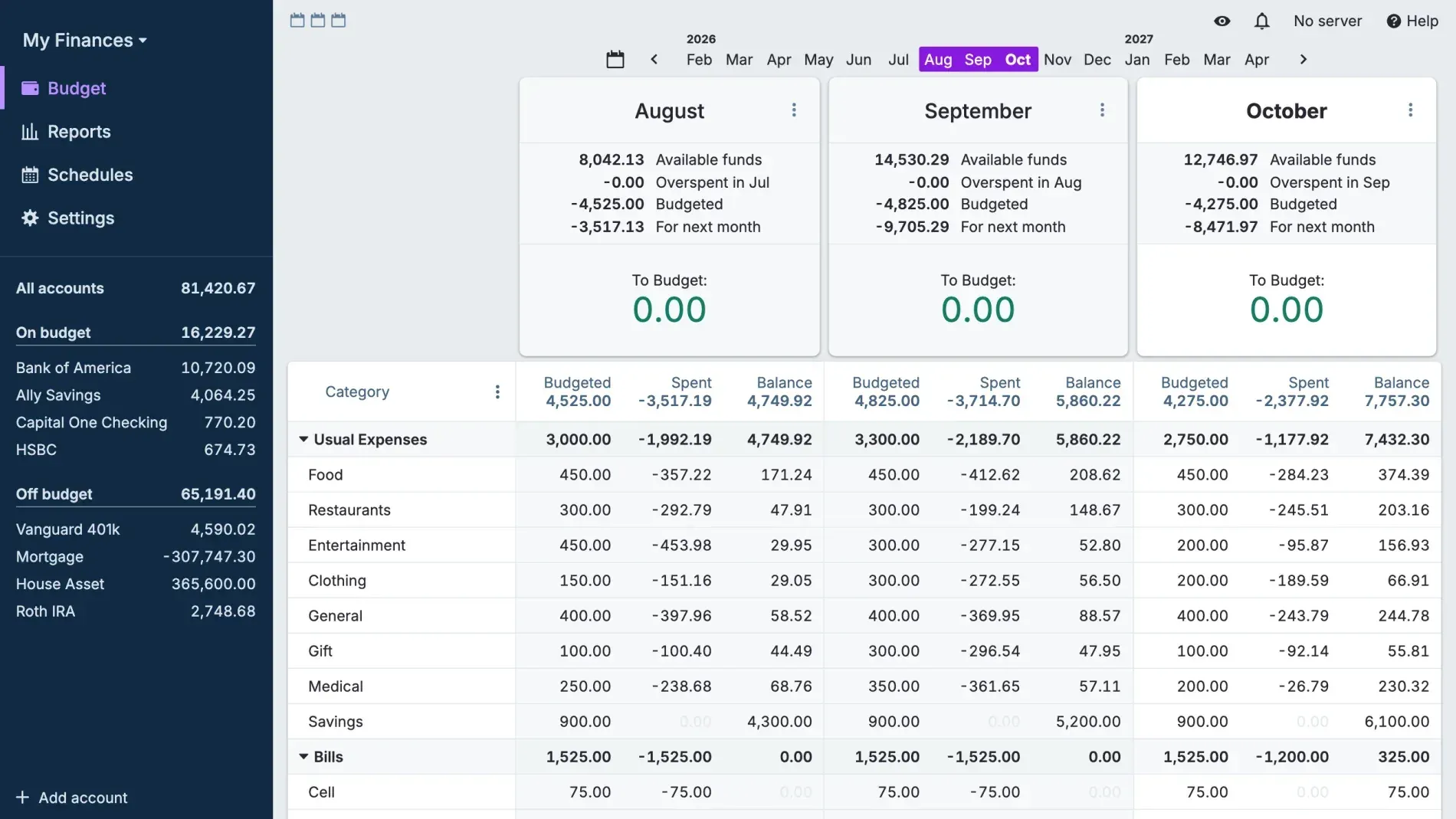
Official screenshot of the budget page with three months side by side and the account list in the sidebar, using sample data.
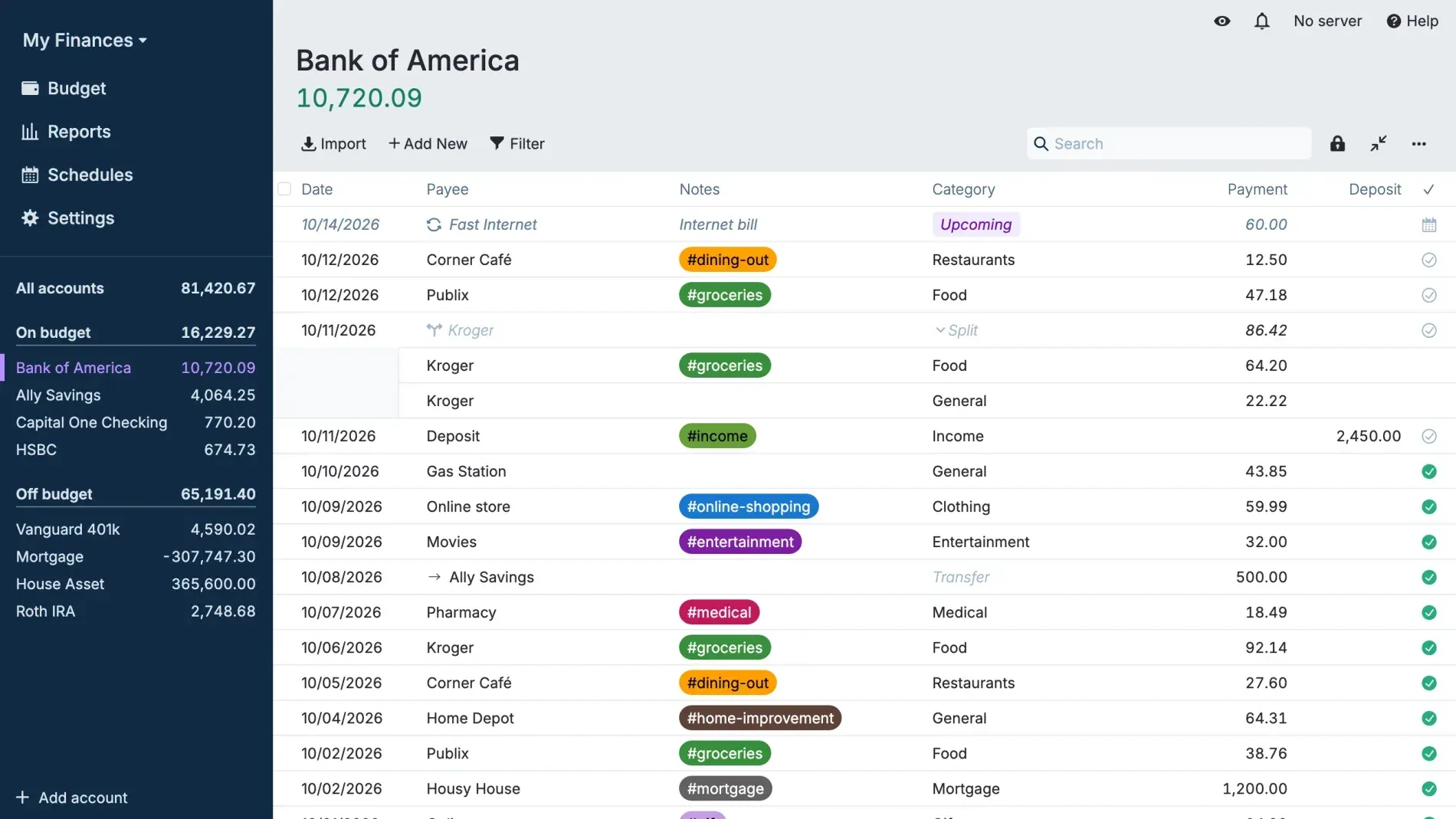
Account register with an upcoming scheduled payment, a split transaction, a transfer and hashtag tags in notes.
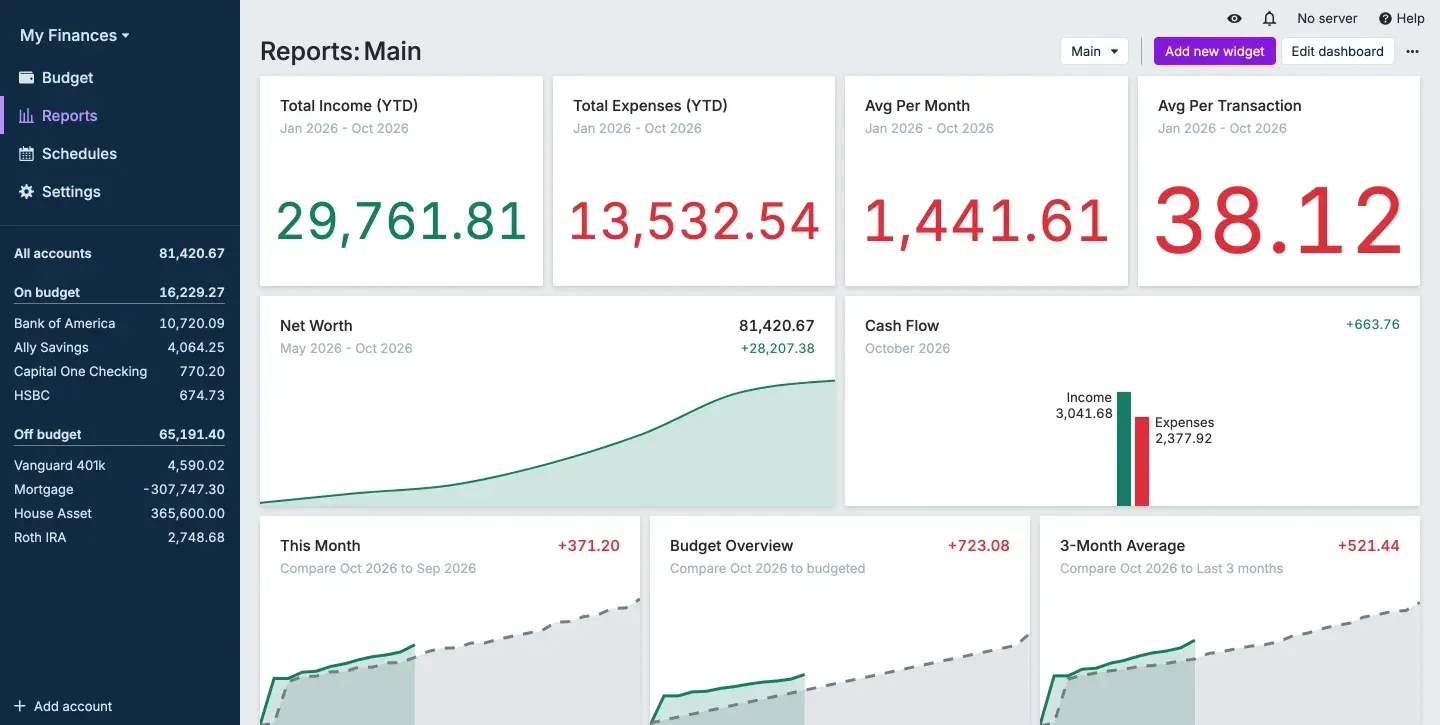
Reports dashboard with year-to-date totals, a net worth trend, a cash flow card and month comparison widgets.
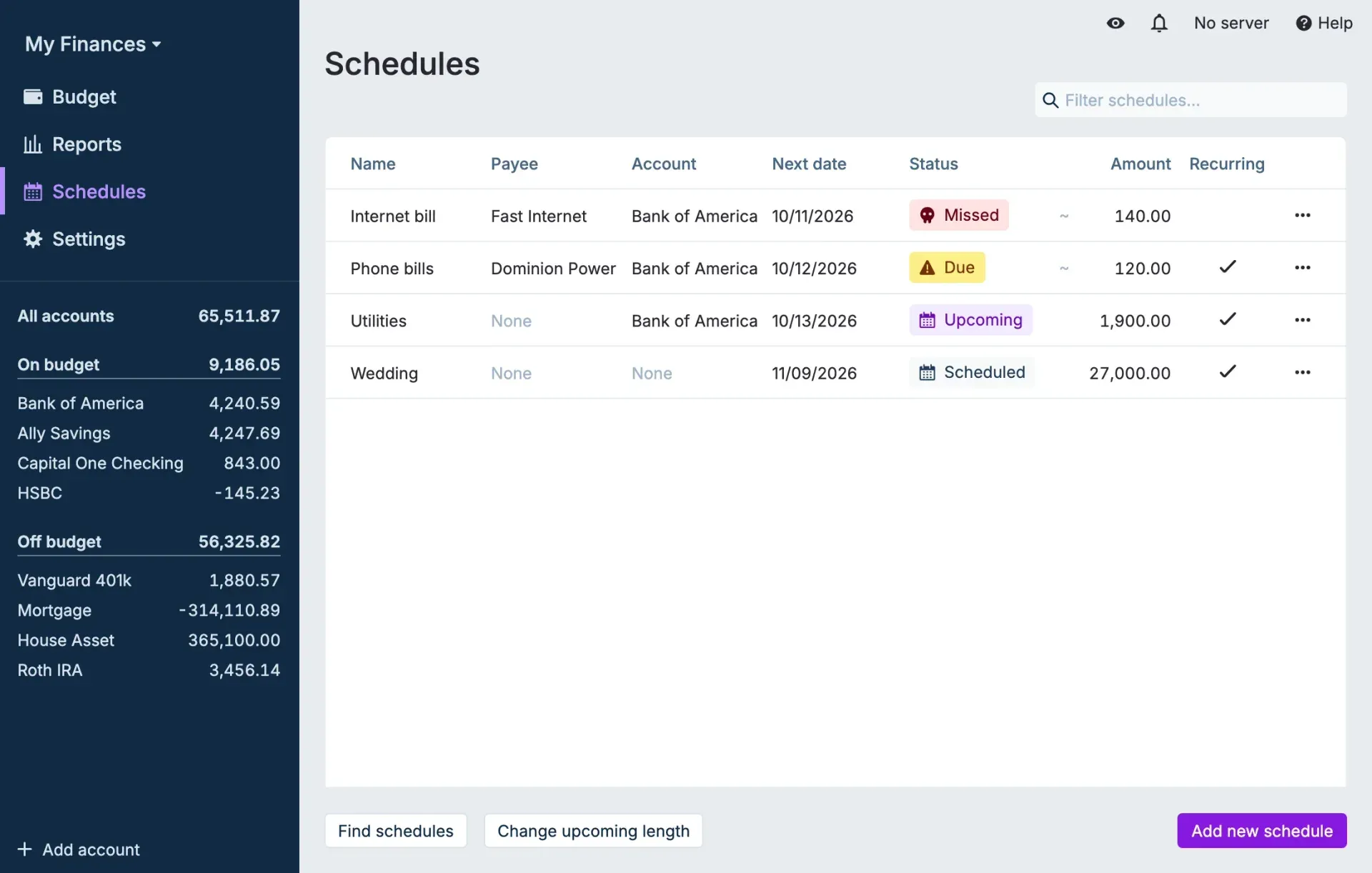
Schedules page with recurring bills, an approximate amount marker and missed, due, upcoming and scheduled statuses.
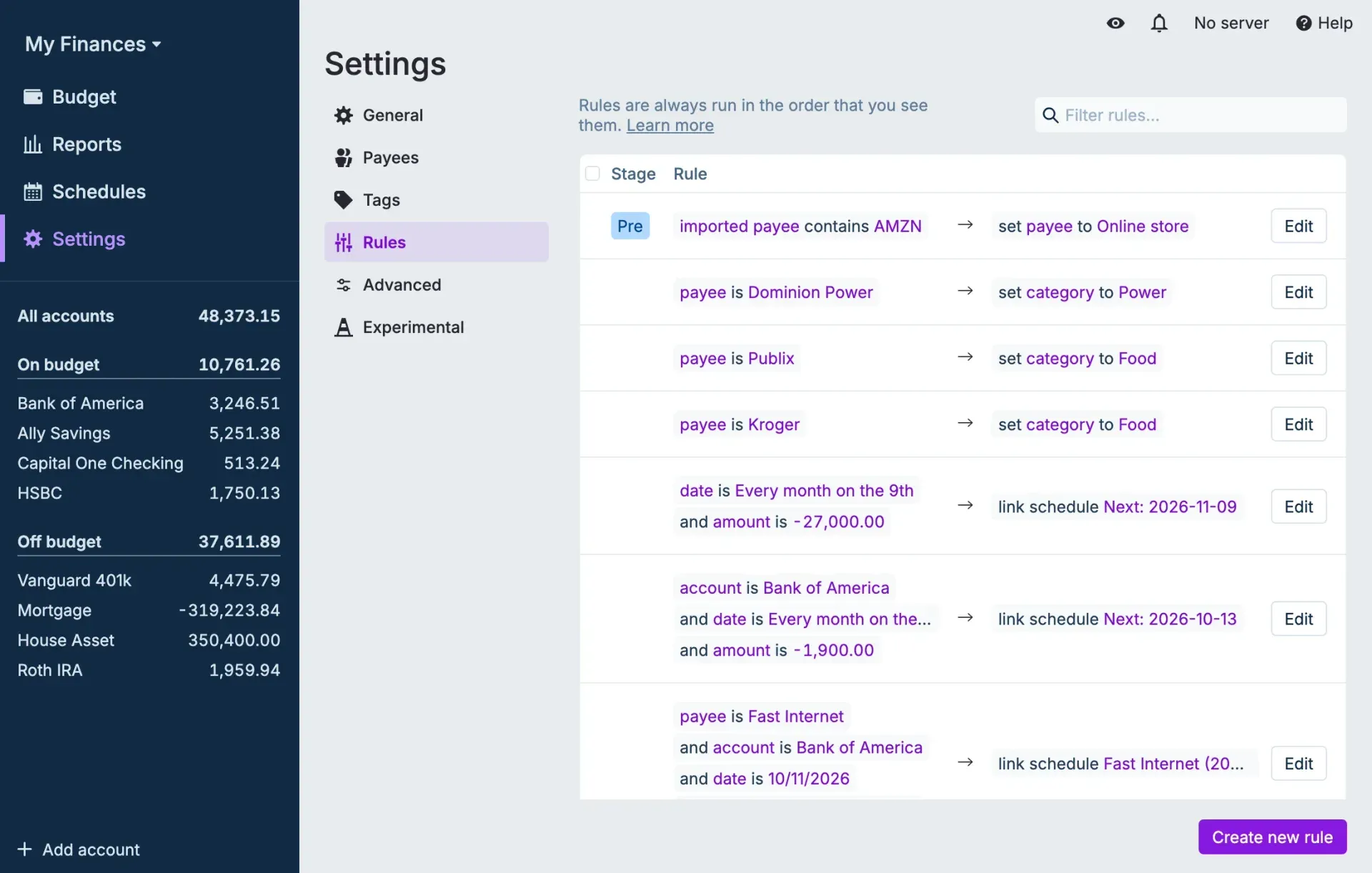
Rules page in Settings showing a pre-stage payee rule, category rules and rules that link transactions to schedules.
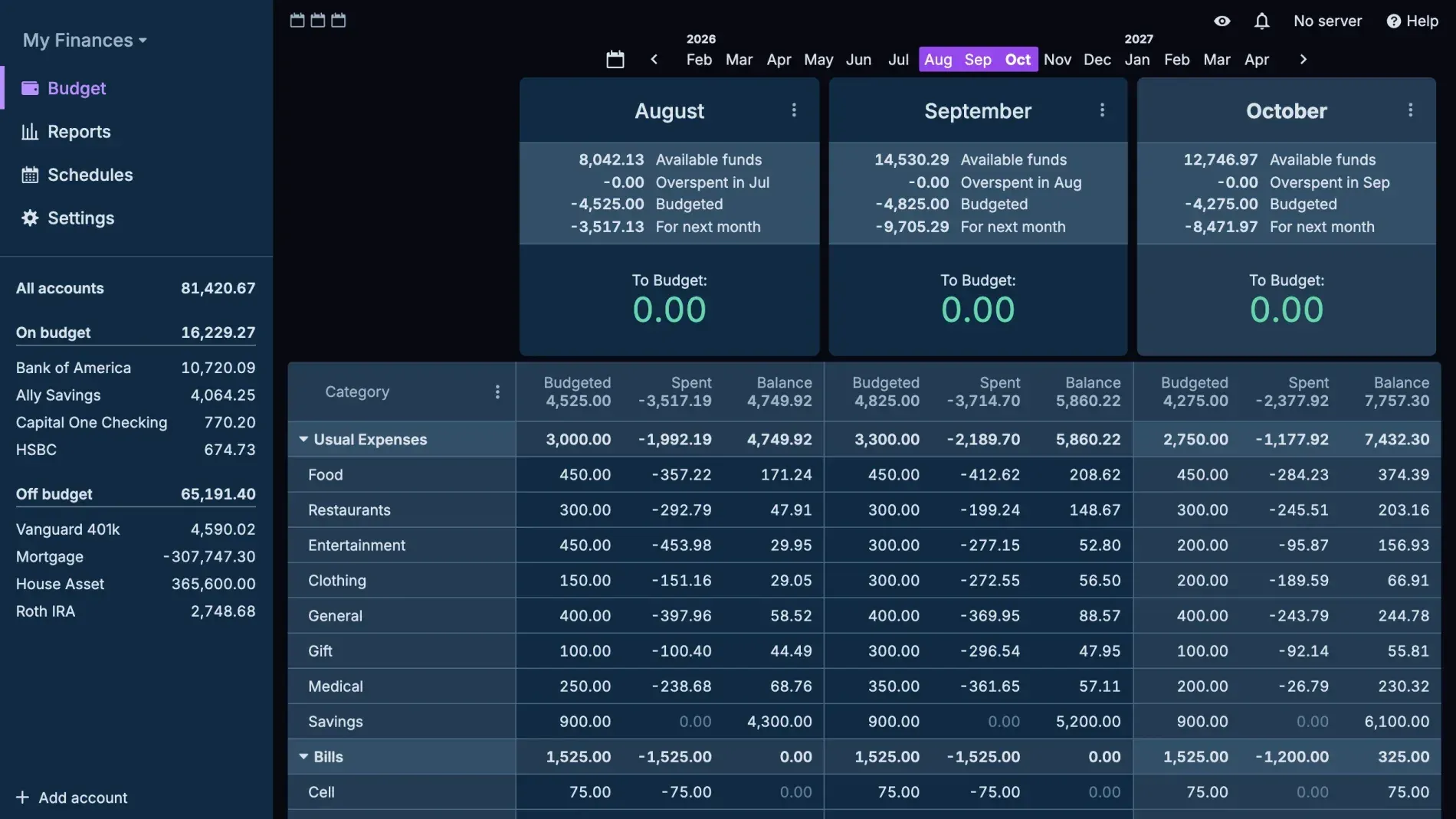
The same budget page in the built-in dark theme.
Source: official Actual Budget project page.
Key capabilities
- Download Actual for Windows The download page links the Microsoft Store listing and manual installers for x64 and ARM64. Each GitHub release also carries a 32-bit (ia32) installer and APPX packages for all three architectures. Store updates can lag the GitHub release by a few days while Microsoft verifies the package.
- Download Actual for macOS Separate DMG images are published for Intel (x64) and Apple Silicon (arm64). The desktop app works offline, creates automatic backups and can start an embedded local server for bank sync. Running the desktop app against a separately hosted server of a different version can cause mismatches, so the docs recommend the web client in that case.
- Download Actual for Linux AppImage files are published for x86_64 and ARM64, and the app is listed on Flathub as
com.actualbudget.actual. Since 26.11.0 standalone.flatpakfiles are no longer attached to releases. Community-maintained AUR packages exist but are not maintained by the project. - Self-hosted server with Docker The official image runs with one
docker runcommand or the bundled Compose file, listens on port 5006 and stores data under/datainserver-filesanduser-filessubfolders. Tags includelatest,latest-alpine,nightlyandnightly-alpine. Since 26.9.0 the Ubuntu-based images use Node 24 and no longer support 32-bit ARM; the Alpine images remain available there. - Server CLI from npm The
@actual-app/sync-serverpackage installs anactual-servercommand and needs Node.js 22 or later. It readsconfig.jsonfrom the working directory or a path passed with--config, and includes a--reset-passwordoption. Updates and removal use standard npm global commands. - Envelope and tracking budgets The default envelope budget assigns only money already on hand to categories, rolls balances from month to month and shows a To Budget amount. A tracking budget can be enabled in settings for a forecast-style approach without automatic rollover. Credit cards are treated as accounts with negative balances rather than through separate payment categories.
- Accounts, transfers and reconciliation On-budget and off-budget accounts appear together, so net worth includes assets such as mortgages or retirement accounts. Transfers link both sides and update them together. Split transactions, tags in notes, bulk editing, merging duplicates and reconciliation against a statement balance are documented features.
- File import and migration Transactions can be imported from CSV, QIF, OFX, QFX and CAMT.053 files, with CSV field mapping, date formats, inflow/outflow columns and an amount multiplier. Built-in importers bring over YNAB4 and nYNAB budgets with history. Other sources depend on community tools or custom scripts against the API.
- Bank sync through third-party providers Bank sync requires a server and your own credentials from a provider: SimpleFIN Bridge (North America), Enable Banking (Europe), GoCardless Bank Account Data (Europe, not accepting new accounts), Akahu (New Zealand) and Pluggy.ai (Brazil). Since 26.11.0, automatic syncing can run every 12 hours, daily, weekly or at a custom interval of at least 15 minutes, but only while Actual is open.
- Rules and payee cleanup Imported and synced transactions run through an ordered list of rules with pre and post stages. Rules can rename payees, set categories and notes, link schedules or create transfers. Actual creates rules automatically when you repeatedly rename or categorize the same payee, and you can edit those rules later.
- Schedules for recurring transactions Schedules track upcoming, due and missed bills with fixed or approximate amounts and recurrence patterns. They can be linked to rules so matching imported transactions are recognized. Release 26.9.0 added a Schedule button for future-dated transactions and drag-and-drop ordering of upcoming items.
- Reports and dashboards The reports page holds customizable dashboards with cash flow, net worth, spending analysis, summary, calendar, text and crossover point widgets. Custom reports offer table, bar, line, area and donut views split by category, group, payee, account, month or, since 26.11.0, tags. Budget analysis, balance forecast, Sankey and Monte Carlo retirement reports are experimental.
- Budget templates and goals Category notes can contain
#templateor#goallines that fill the monthly budget in one action, for example a fixed amount, a refill target, a percentage of income or a savings target spread over months. The template engine is documented as an experimental feature, so behavior can change between releases. - Multi-device sync and end-to-end encryption When connected to a server, changes sync in the background and each device keeps a full local copy. Optional end-to-end encryption uses a second password, cannot be turned off once enabled and makes data unrecoverable if that password and the local copy are lost. Bank sync tokens stored on the server are not covered by this encryption. See the sync documentation.
- Authentication and multiple users The server supports password login, HTTP header authentication from trusted proxies and OpenID Connect or OAuth2 providers. With OpenID enabled, a user directory assigns Basic or Admin roles, and budget owners can grant access to other users or transfer ownership. HTTPS can be configured directly or through a reverse proxy.
- Node.js API and command-line tool The
@actual-app/apipackage runs the budget engine headless against a local copy of a budget downloaded from your server; there are no HTTP endpoints. Recent releases addedmergeTransactions,getScheduleDatesand arunBankSyncresult. The separate@actual-app/clipackage queries and edits budgets from a terminal with JSON, table or CSV output. Details are in the API documentation. - Web app, mobile access and offline use The server serves a responsive web client that can be installed as a Progressive Web App and works offline on mobile. A browser-only app at app.actualbudget.org keeps data in browser storage without sync or backups and is described as a quick start, not for long-term use. An iOS app is in TestFlight beta; there is no official Android app.
- Interface, themes and translations The interface offers light and dark modes, a catalog of community themes and custom CSS overrides. Translations are crowdsourced through Weblate. Undo and redo cover changes across the app, and experimental features are opt-in from the settings page.
Where Actual Budget fits
Replacing a subscription budgeting app
Export the existing budget and use the built-in YNAB4 or nYNAB importer, or import account histories from OFX, QFX or CSV files. Check that account balances, category balances and the To Budget amount match the source for the last closed month before relying on the new budget. The migration guide lists the supported paths; for other apps, plan a CSV import or a script against the API.
Running a household server
Start the Docker image or the npm server on a home server or small VPS, mount a persistent data folder and place it behind HTTPS. Set a server password, or connect an OpenID provider when several people need separate logins and Basic or Admin roles. Confirm that the browser client, installed mobile PWA and desktop app all open the same budget, and that the server version matches the clients after each monthly release.
Automating transaction intake
Choose a bank sync provider that covers your banks and region, create credentials with that provider and add them on the server. Set an opening balance on a recent date before linking, so only newer transactions are pulled. Turn on automatic syncing if the app stays open, then review the rules that clean payees and set categories. The bank sync guide explains provider limits and refresh allowances.
Planning recurring bills and goals
Create schedules for rent, utilities and subscriptions, using approximate amounts where bills vary, and link them to rules so imports match. If you enable budget templates, add #template lines to category notes and apply them at the start of each month. Check the upcoming list and the category balances after each run, since templates are still marked experimental.
Building reports and custom exports
Use dashboards for net worth and cash flow, and custom reports split by category, payee or tag for deeper analysis. For data that leaves Actual, the API and CLI read a local copy of the budget and can feed spreadsheets or other tools. Keep credentials out of scripts by reading them from environment variables or _FILE secrets, as the CLI documentation recommends.
Protecting budget data
Export budget files regularly from the settings page, keep the server data folder in your backup routine and test a restore on a spare instance. Decide before enabling end-to-end encryption whether you can store its password safely, because it cannot be recovered or disabled. The backup guide also explains why a sync reset shrinks large files.
Install
docker run --pull=always --restart=unless-stopped -d -p 5006:5006 -v YOUR/PATH/TO/DATA:/data --name my_actual_budget actualbudget/actual-server:latestReviews of Actual Budget
Be the first to share your experience with Actual Budget.
Write a review
Loading review form…
Alternatives to Actual Budget
 Fly.ioFly.io runs applications on Fly Machines, fast-launching VMs you control through a REST API or flyctl, with pay-as-you-go pricing from $2.19 a month.