

What is Maybe Finance?
Maybe is an open-source personal finance application for tracking net worth, accounts, transactions, budgets and investments in a web browser. It was built by Maybe Finance, Inc., which first developed Maybe as a subscription wealth-management app during 2021 and 2022, shut that service down in mid-2023 and published the code in January 2024. The original React, Next.js and Express codebase now lives in the separate maybe-archive repository; the current repository is a rewrite in Ruby on Rails.
The project is no longer maintained. The v0.6.0 release, published on July 24, 2025, is described by the company as a final, working, as-is version: Maybe Finance moved to B2B financial forecasting and scenario planning and stopped accepting contributions. The GitHub repository is archived and read-only. There will be no further security fixes, dependency updates or data-provider changes from the original team, which is the most important fact for anyone considering a new installation.
Distribution is self-hosted only. The Docker self-hosting guide uses a Docker Compose file with four services: the Rails web process on port 3000, a Sidekiq worker, PostgreSQL 16 and Redis. Official images are published to the GitHub Container Registry as ghcr.io/maybe-finance/maybe:latest (latest commit) and :stable (latest release) for linux/amd64 and linux/arm64. There is no desktop or mobile package, and the managed hosted version that earlier releases referred to is not offered as a sign-up path in the final repository.
The last releases shaped the final feature set. Version 0.3.0 added monthly budgeting, nested categories and automatic transfer matching. Version 0.4.0 introduced a redesigned interface, Tailwind CSS v4, two-factor authentication, household member invitations and revertible CSV imports. Version 0.5.0 moved background jobs to Sidekiq and Redis, which is a breaking change for older installations, and added dark mode and an optional OpenAI-backed chat. Version 0.6.0 documents the complete self-hosted scope, including rules, an API with key management and CSV imports for accounts, transactions and trades.
The stack is Ruby 3.4.4, Rails 7.2, PostgreSQL, Redis and Sidekiq, with Hotwire (Turbo and Stimulus) for the interface and Doorkeeper for OAuth2. The code is licensed under AGPLv3. Forks are permitted, but the README states that "Maybe" is a trademark of Maybe Finance, Inc., so forks must not use the name or logo and must state that they are not affiliated with or endorsed by the company. Automatic bank synchronization is outside the supported self-hosted scope.
Maybe Finance screenshots
Explore the interface. Open a screenshot to view it at full size.
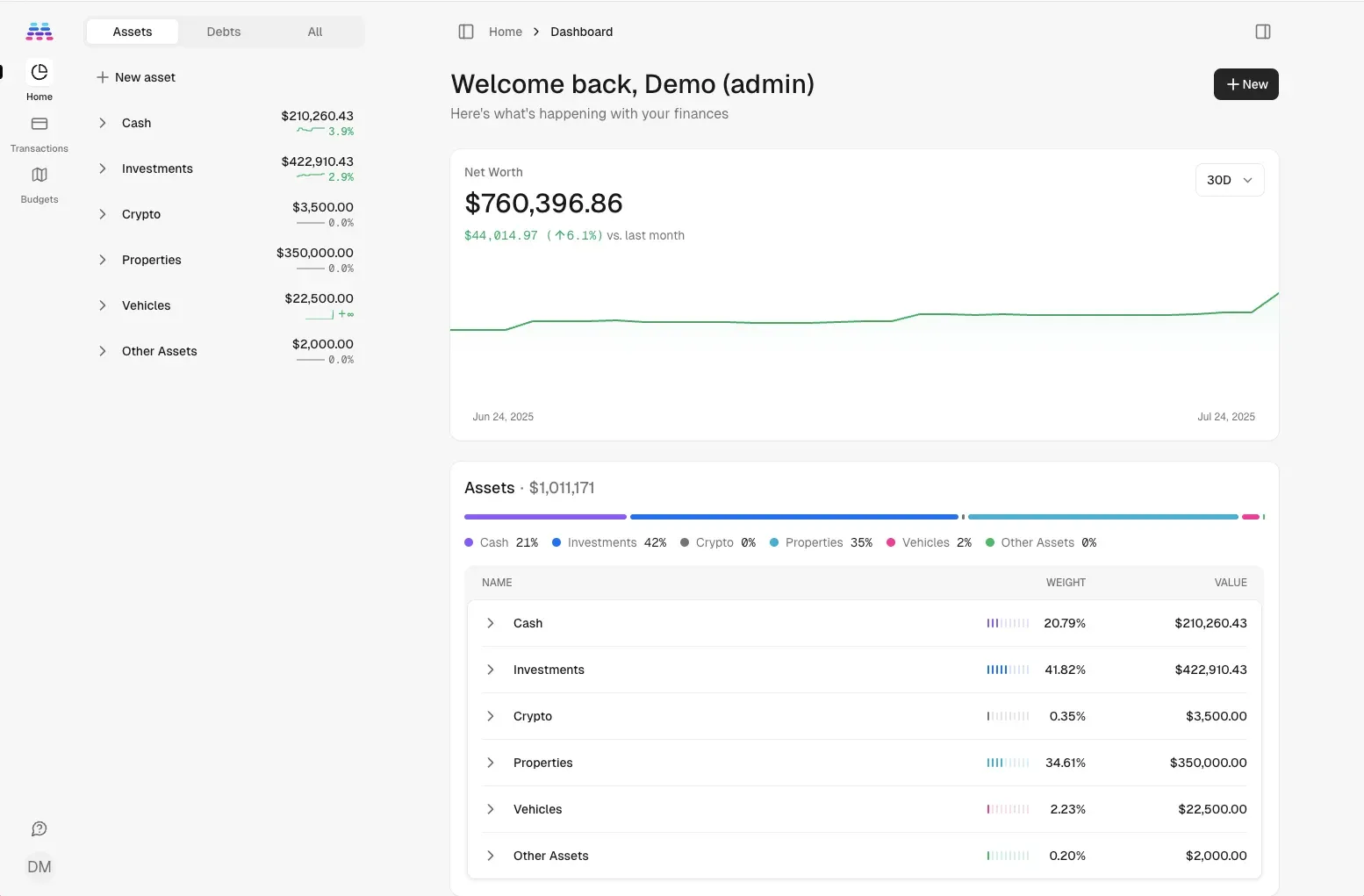
Dashboard from the v0.6.0 release notes and README, showing demo data with net worth trend and asset allocation.
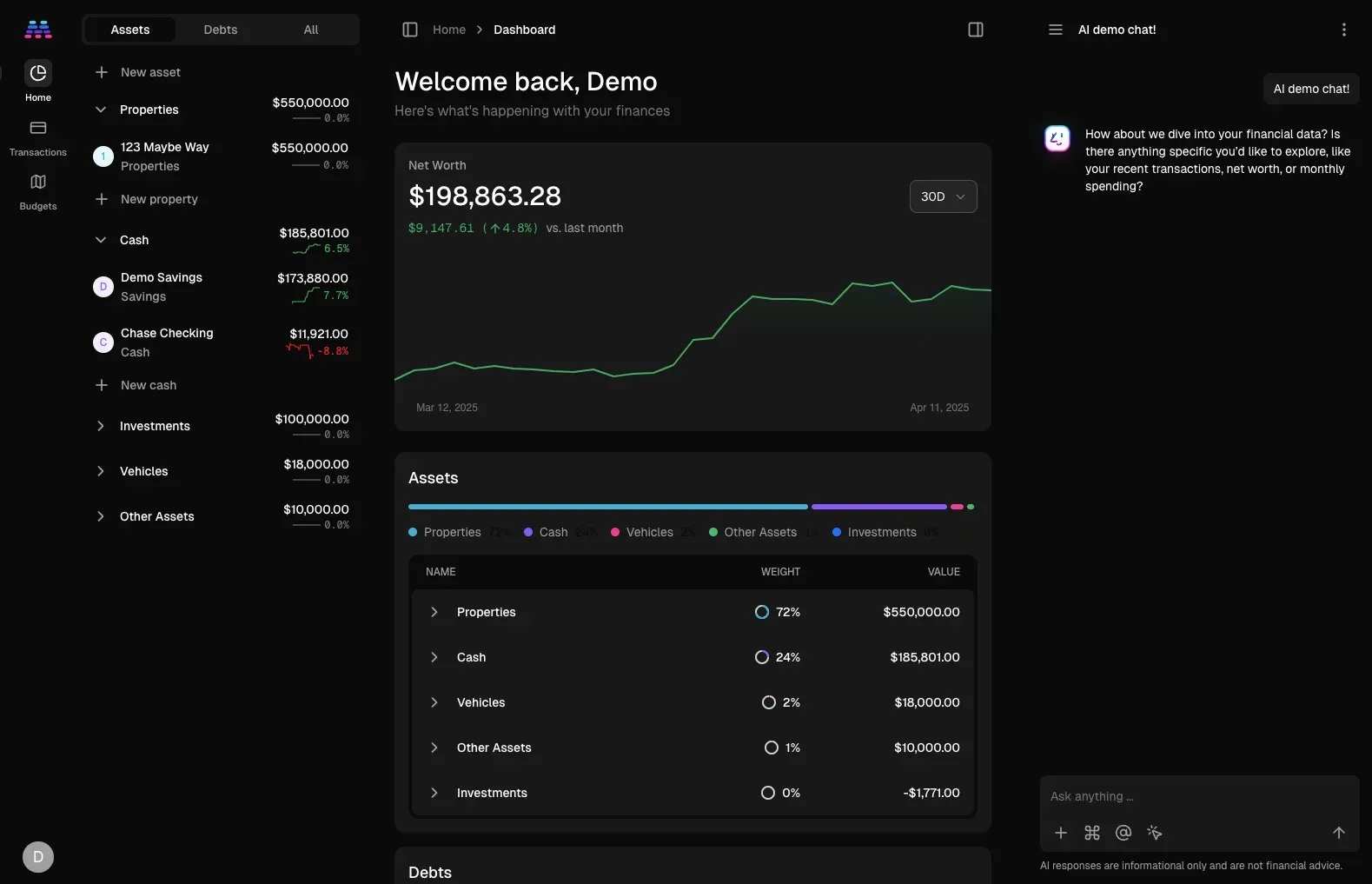
Official v0.5.0 release screenshot of dark mode and the optional AI chat sidebar, using demo accounts.
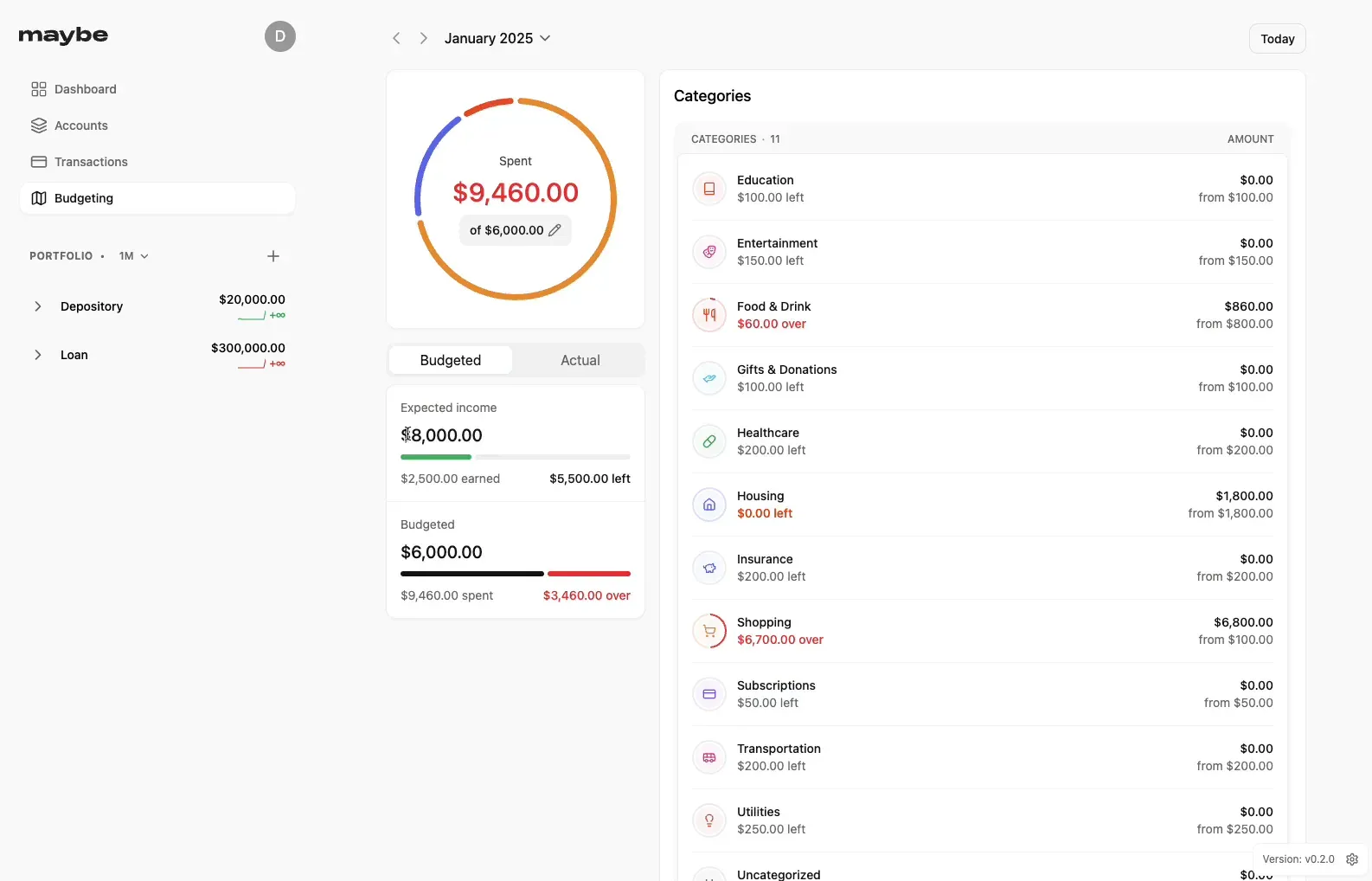
Frame from the official v0.3.0 budgeting demo video; the build shown is a development version labelled v0.2.0.
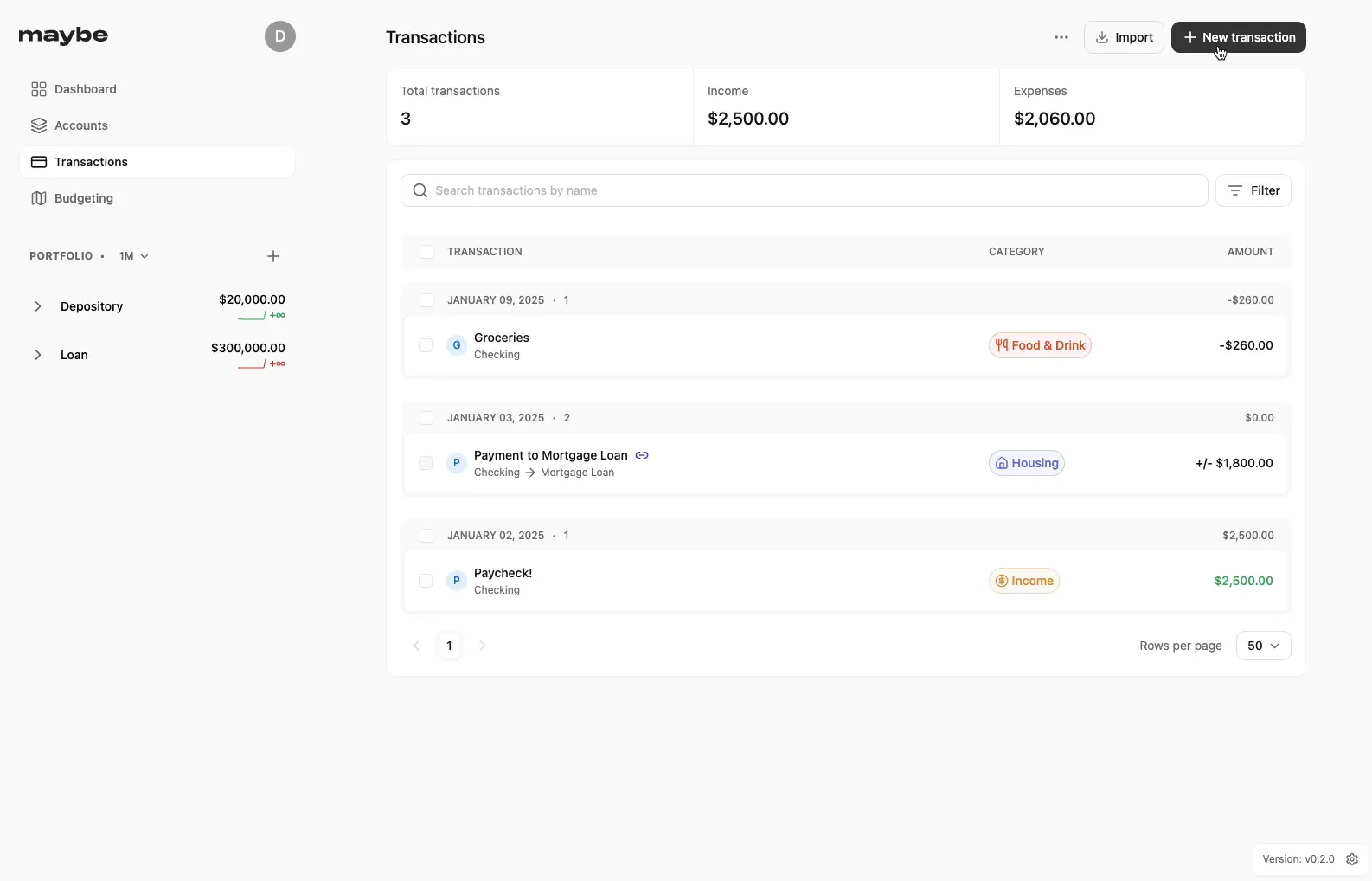
Frame from the official v0.3.0 budgeting demo video showing categorized transactions and a linked transfer.
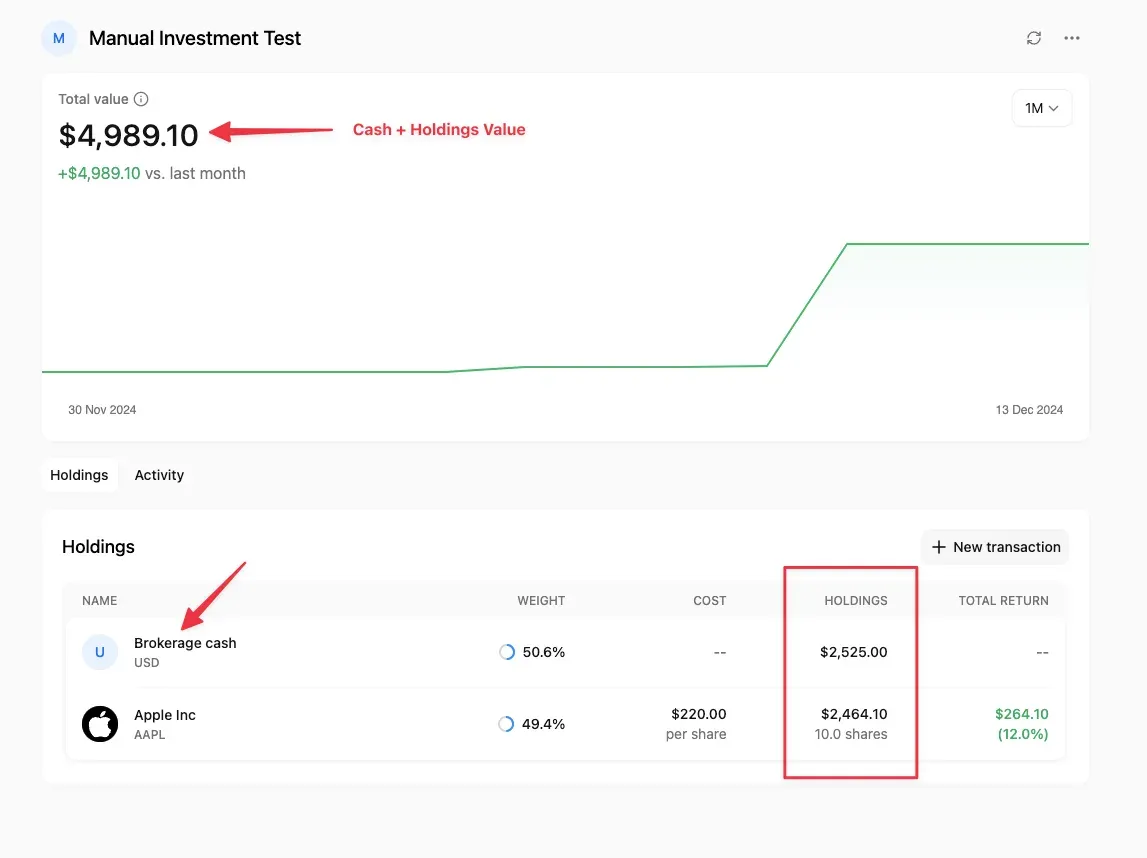
Annotated screenshot from the v0.2.0 release notes explaining cash plus holdings value in investment accounts.
Source: official Maybe Finance project page.
Key capabilities
- Net worth dashboard The home screen shows a net worth line chart with selectable periods and a balance sheet that splits assets and debts by account group, with each group's weight and value. Every view reads from the same balances, so a corrected historical transaction changes the chart, the sidebar trends and the budget totals. The final release notes describe a hybrid event-sourced design with cache tables for balances and holdings, which improves speed at some cost in data consistency.
- Account types for assets and debts Accounts can be created as cash (depository), investment, crypto, property, vehicle and other asset, or as credit card, loan and other liability. Reconciliation sets a new balance without creating an uncategorized adjustment transaction that would distort spending figures.
- Transaction ledger with search and bulk edits Transactions are grouped by date with totals for income and expenses, a name search, filters and bulk updates. Each entry carries a category, tags, a merchant and notes. Filters and the focused transaction persist across page visits since 0.4.0, and the list is paginated with a configurable number of rows per page.
- Transfers and one-time expenses as first-class types The app detects pairs of opposite transactions between accounts and treats them as transfers, which cannot be categorized and are excluded from budgets and spending metrics. Loan payments are handled differently from credit card payments, which would otherwise be counted twice. Expenses marked as one-time, such as moving costs, are excluded from average spending and budget totals.
- Monthly budgets Introduced in 0.3.0, the budget flow asks for planned spending and expected income, then allocates amounts to categories and subcategories with their recent averages. The monthly view compares budgeted and actual figures in a donut chart and lists each category as left or over. Categories allow one level of nesting, and unallocated spending is shown separately.
- Rules for categorization and cleanup Rules match transactions on name, amount or merchant and can set a category, tags, merchant or name. Two actions call the optional AI provider to auto-categorize transactions or detect merchants, so they only work when an OpenAI key is configured and they send transaction data to that provider. A rule can also be applied to matching existing transactions after a confirmation step that shows how many records it affects.
- CSV imports with mapping and revert Imports cover transactions, trades, accounts and Mint exports. Each import maps columns, accounts, account types, categories and tags, supports inflow sign conventions and several number formats, and is limited to 10,000 rows. An import can be reverted after it is published, and 0.5.0 added account-level import templates and single or multi-account modes.
- Investment and multi-currency tracking Investment accounts separate brokerage cash from holdings value and calculate cost basis and total return per security. Accounts and transactions can use different currencies, and net worth rolls up after exchange-rate conversion. Historical prices and rates require an external market-data key; securities without provider data can be added as manual or offline tickers.
- Optional market data through Synth Exchange rates and security prices are fetched through the Synth provider when a
SYNTH_API_KEYis set in the environment or the self-hosting settings page. Without a key the app still runs, but multi-currency conversion and investment price history are limited. When this profile was checked in November 2026, the synthfinance.com address named in the configuration example redirected to a domain marketplace, so this dependency should be treated as unavailable unless proven otherwise. - Opt-in AI chat Added in 0.5.0, the chat panel answers questions about balances, spending and net worth by letting the model call internal functions. It is disabled by default and needs an OpenAI access token; the final code targets the
gpt-4.1model. The project wiki states that names, emails and account numbers are not sent, but transaction names, categories, amounts and balances may be, and that usage incurs OpenAI charges. - REST API with OAuth2 and API keys The
/api/v1namespace exposes accounts (list), transactions (list, show, create, update, delete), usage and AI chats with messages. Clients authenticate with Doorkeeper OAuth2 tokens or API keys; each key carries exactly one permission level and can be revoked or set to expire. On self-hosted instances Rack::Attack allows 10,000 requests per hour per token and 20,000 per hour per IP address. - Households, invitations and two-factor authentication Data belongs to a family (household), and admins can invite members and generate invite codes. Users can change their email address and enable TOTP-based multi-factor authentication. Password reset and other outgoing emails need SMTP settings in the environment.
- Data export A household export produces a ZIP file containing accounts.csv, transactions.csv, trades.csv, categories.csv and an all.ndjson file with the complete record set. This is the practical exit path from an unmaintained application. Check that the export contains every account type and the full date range before relying on it as a backup.
- Docker Compose self-hosting The guide downloads
compose.example.yml, optionally adds a.envfile withSECRET_KEY_BASEandPOSTGRES_PASSWORD, and starts the stack withdocker compose up -d. The first visit tohttp://localhost:3000asks you to create an account. Updates are manual: pull the image, then restart the web and worker services. - Container images for amd64 and arm64 The publish workflow builds multi-architecture images for linux/amd64 and linux/arm64, which covers typical x86 servers and ARM boards or Apple Silicon hosts running Docker. Images remain in the GitHub Container Registry, but no new tags will appear. Pin
:stableor the v0.6.0 tag so a later registry change cannot alter what you run. - Configurable storage and email File uploads use local disk by default through Active Storage, with optional Amazon S3 or Cloudflare R2 settings. Sensitive values such as stored API keys are encrypted with Active Record encryption keys derived from
SECRET_KEY_BASEunless dedicated keys are provided. SMTP, sender address and the public application domain are set with environment variables. - Optional Plaid configuration The code reads Plaid US and Plaid EU credentials from the environment, and bank syncing was built for the hosted service. The 0.2.0 release notes state that self-hosters may configure and pay for their own Plaid account, but that this setup is not officially supported. With the project archived, any Plaid integration change would have to be maintained by the operator.
- Interface, themes and installable web app The interface is server-rendered Rails with Turbo and Stimulus, includes light, dark and system themes since 0.5.0, and ships a web app manifest and service worker so browsers can install it as a progressive web app. There is no native mobile application. A demo data task can populate a development instance for evaluation.
Where Maybe Finance fits
Evaluating the final release on a test host
Download compose.example.yml from the self-hosting guide, create a .env file with a newly generated SECRET_KEY_BASE and database password, and start the stack. Pin the image to :stable instead of :latest so the version matches the v0.6.0 release notes. Create an account, load a few months of anonymised transactions and check that the dashboard, budgets and account sidebar agree on totals before entering real data.
Migrating from Mint or spreadsheets
Use the Mint import type for a Mint CSV export, or the transaction, account and trade imports for other sources. Map columns, choose the sign convention and number format, and keep each file below 10,000 rows. Review the categorized result, then use revert if the mapping was wrong. Compare opening and closing balances per account with your bank statements, because imported history drives every chart.
Running a household budget
Set expected income and planned spending for the month, allocate category amounts and invite other household members. Mark transfers between your own accounts and one-time costs so they do not inflate averages. At month end, compare budgeted and actual values and check the uncategorized segment. Rules for recurring merchants reduce manual categorization, but review rule matches on names and amounts before applying them to old data.
Tracking investments and foreign-currency accounts
Create investment accounts, record trades or import them by CSV, and confirm that brokerage cash and holdings add up to the statement value. Multi-currency net worth and price history depend on an external market-data key. If none is available, use manual tickers and periodic valuations, and accept that historical performance charts will be approximate.
Automating with the API
Generate an API key with the narrowest permission level you need, then call /api/v1/transactions to create or update entries from a script, or /api/v1/accounts to list balances. The chat API documentation describes authentication, scopes and pagination for the AI endpoints. Keep keys out of shell history, set an expiry where possible and revoke keys that are no longer used.
Planning an exit or fork
Because the repository is archived, schedule regular household exports (CSV files plus NDJSON) and PostgreSQL dumps of the postgres-data volume. If you need fixes, a fork under AGPLv3 is permitted, but the forking and attribution notes require a different name and logo and a clear statement that the fork is not affiliated with Maybe Finance, Inc.
Install
curl -o compose.yml https://raw.githubusercontent.com/maybe-finance/maybe/main/compose.example.yml && docker compose up -dReviews of Maybe Finance
Be the first to share your experience with Maybe Finance.
Write a review
Loading review form…