

What is Bigcapital?
Bigcapital is an open-source accounting and inventory application for small and medium businesses. It keeps a double-entry general ledger and builds sales invoicing, bills, expenses, inventory, banking and financial reports on top of it. The code is published by the bigcapitalhq organization under the AGPL-3.0 license, and the product site at bigcapital.app is operated by Bigcapital Technology, Inc. The README presents it as an alternative to hosted bookkeeping tools such as QuickBooks, Xero and Wave.
The supported way to run it today is self-hosting. The Docker guide uses a docker-compose.prod.yml file that pulls prebuilt images, and a setup script automates configuration and container control. The documentation recommends at least 2 CPU cores and 4 GB of RAM for up to 10 organizations, and MariaDB 10.2 or newer with 5 to 10 GB of storage. The website states that a managed Bigcapital Cloud is coming soon, so no hosted plan or price was available when we checked.
Architecturally, Bigcapital is multi-tenant. Every organization has its own MariaDB tenant database, and a shared system database tracks the tenants. A Node.js server exposes an API, a React single-page application is served behind an Nginx proxy, Redis holds cached data and MongoDB stores job metadata for the scheduler. This is described in the architecture page. Bank feeds use Plaid, which you configure with your own credentials in a self-hosted instance, as the Plaid setup guide explains.
The latest release is v0.25.45, published October 23, 2026. Its headline change is cash and accrual basis accounting end to end: journal entries, bills, bill payments, credit notes, vendor credits, refunds, write-offs and cost entries record their basis, and reports such as the journal and trial balance can switch between the two views. It also moves sorting of the trial balance, balance sheet and profit and loss sheet to the backend and adds bulk deletion of warehouse transfers. The version number is below 1.0, so expect change between releases. Payroll, a mobile app and tax filing are not described in the sources we reviewed.
Bigcapital screenshots
Explore the interface. Open a screenshot to view it at full size.
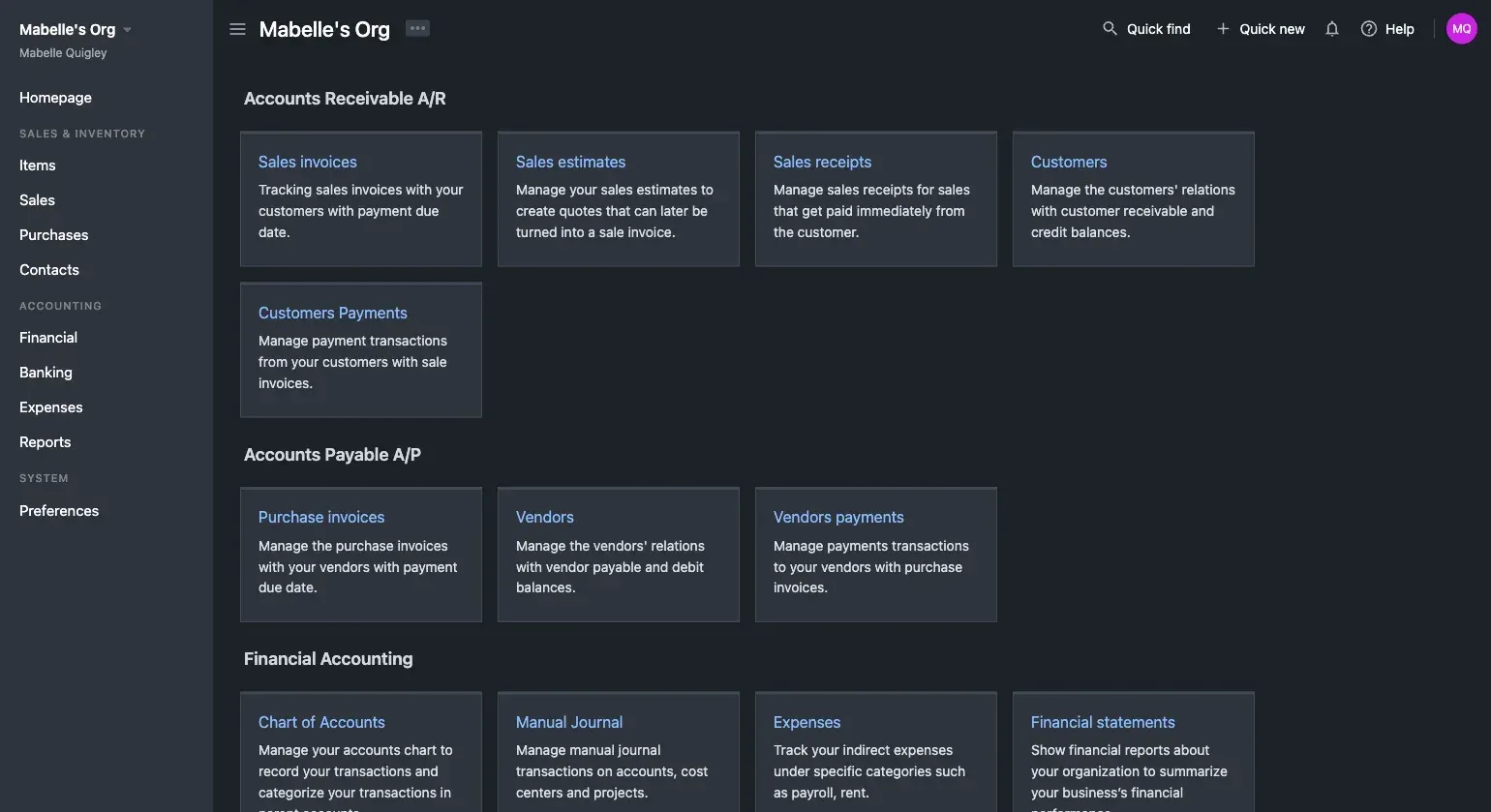
Official Bigcapital screenshot of the home page grouping sales invoices, customers, purchases, vendors, chart of accounts and statements.
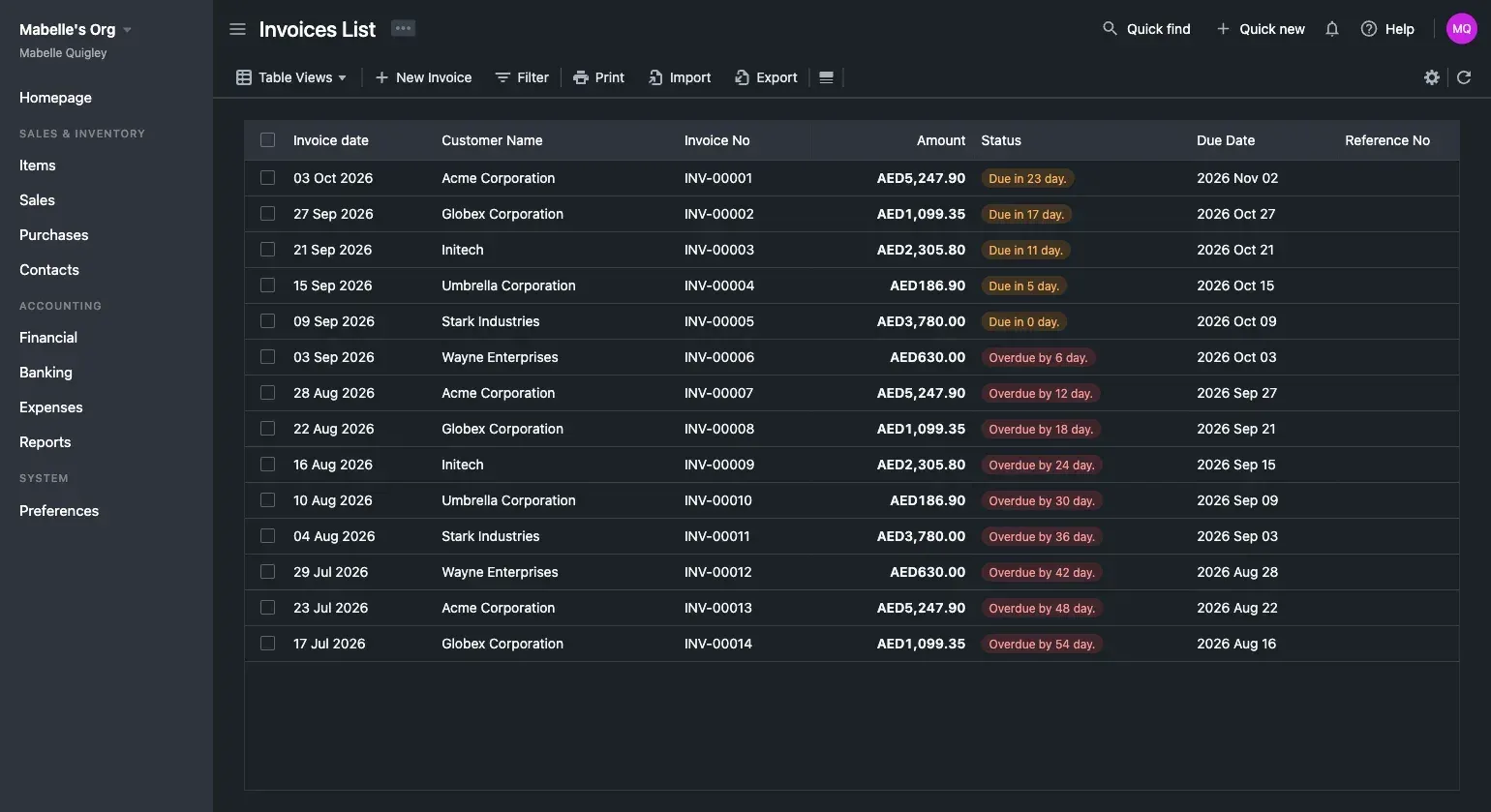
Official screenshot of the invoices list with customer names, amounts, status badges and due dates. Sample data.
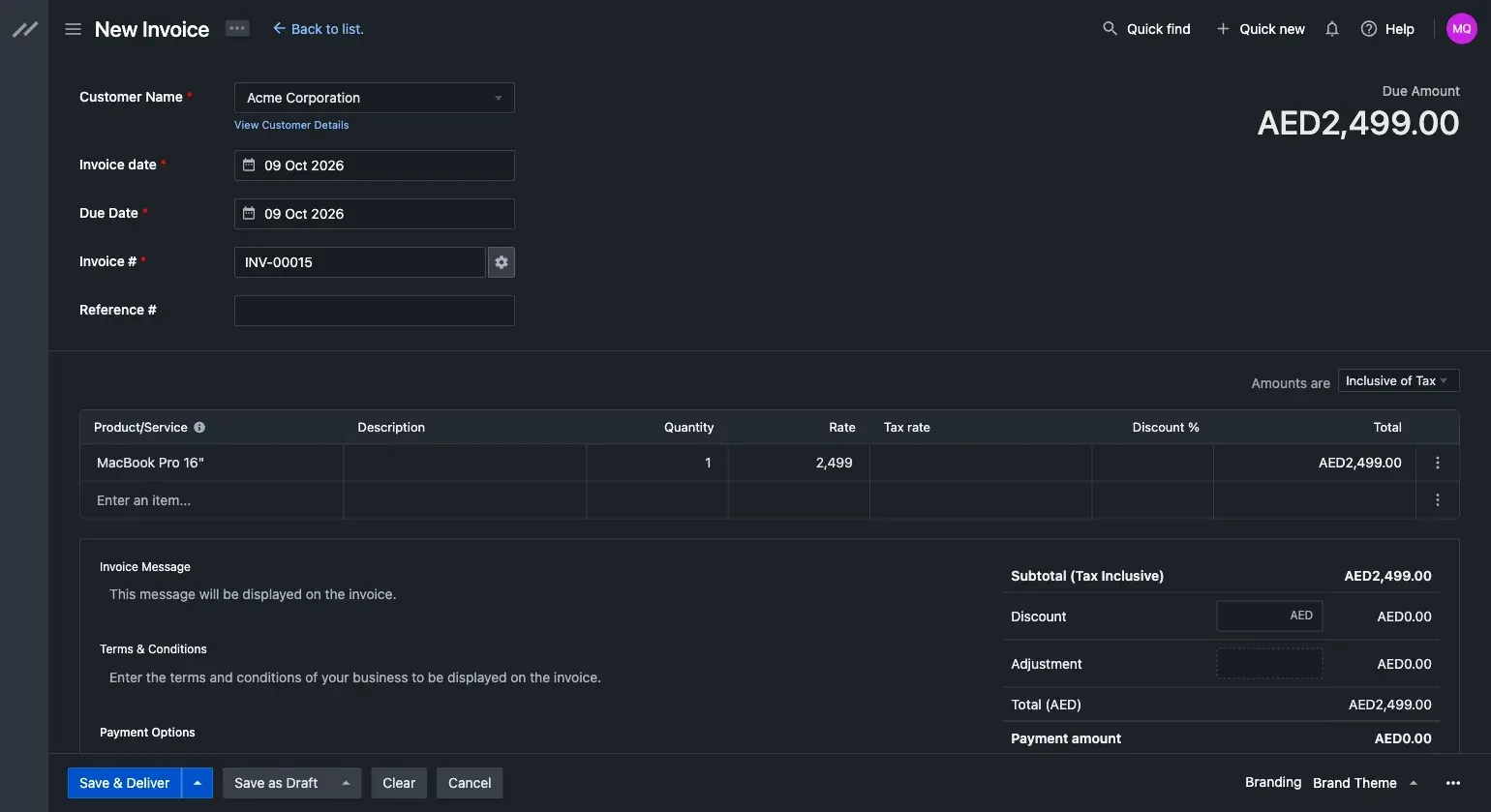
Official screenshot of the new invoice form with customer, dates, line items, totals and Save and Deliver actions.
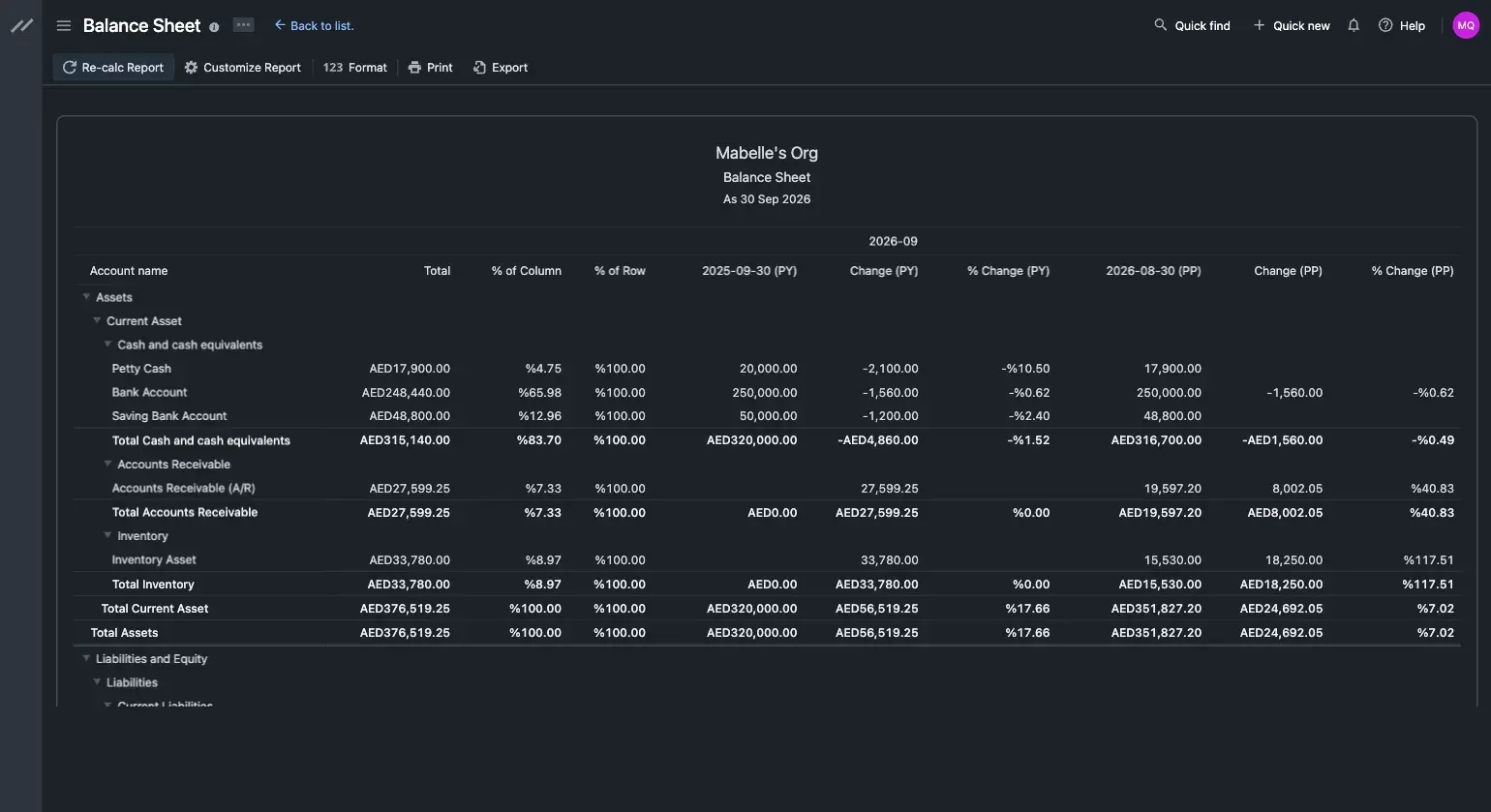
Official screenshot of the balance sheet report with comparison columns, recalculation, format and export actions. Sample data.
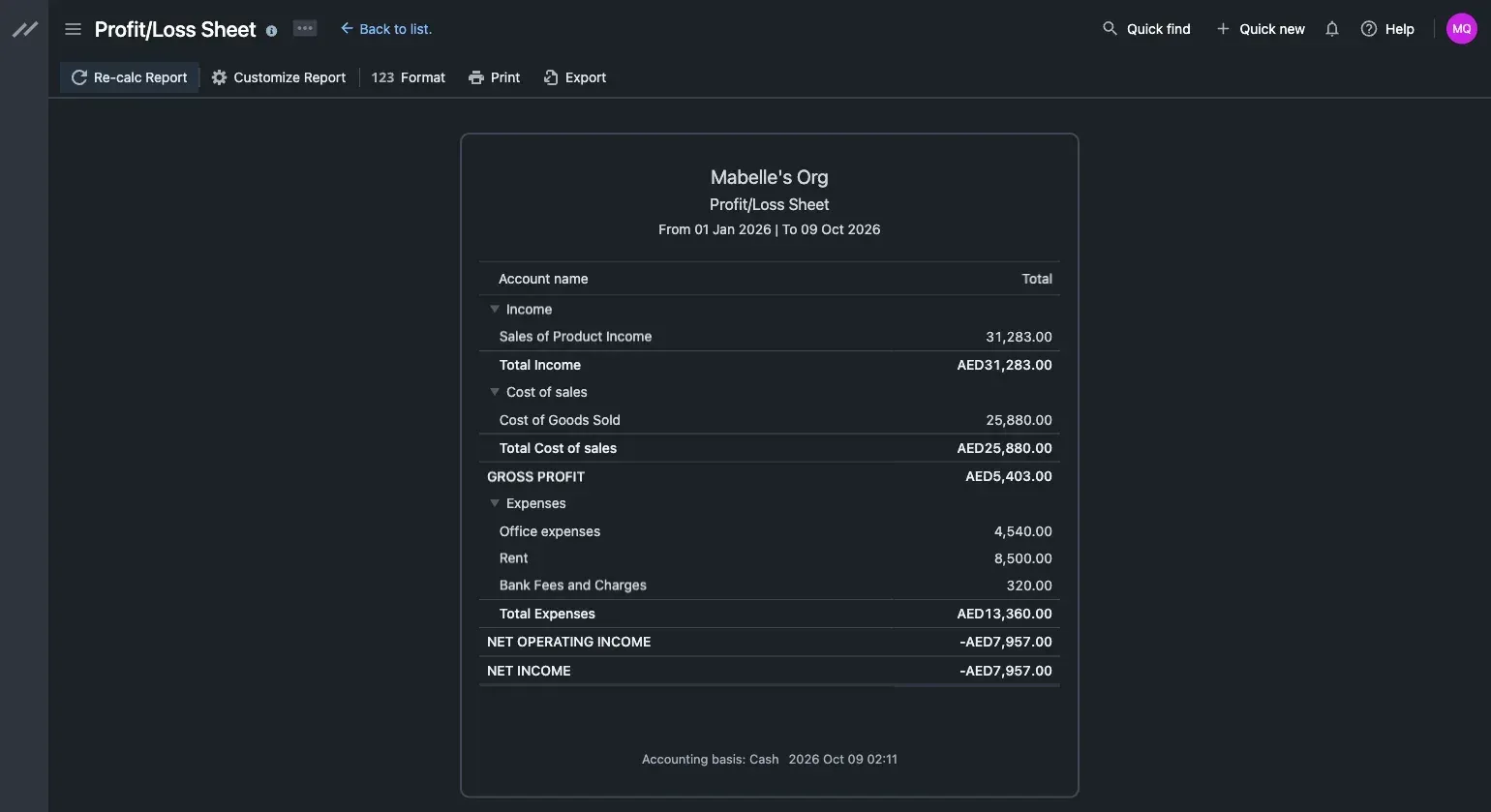
Official screenshot of the profit and loss report with income, cost of sales and expenses, shown on cash basis. Sample data.
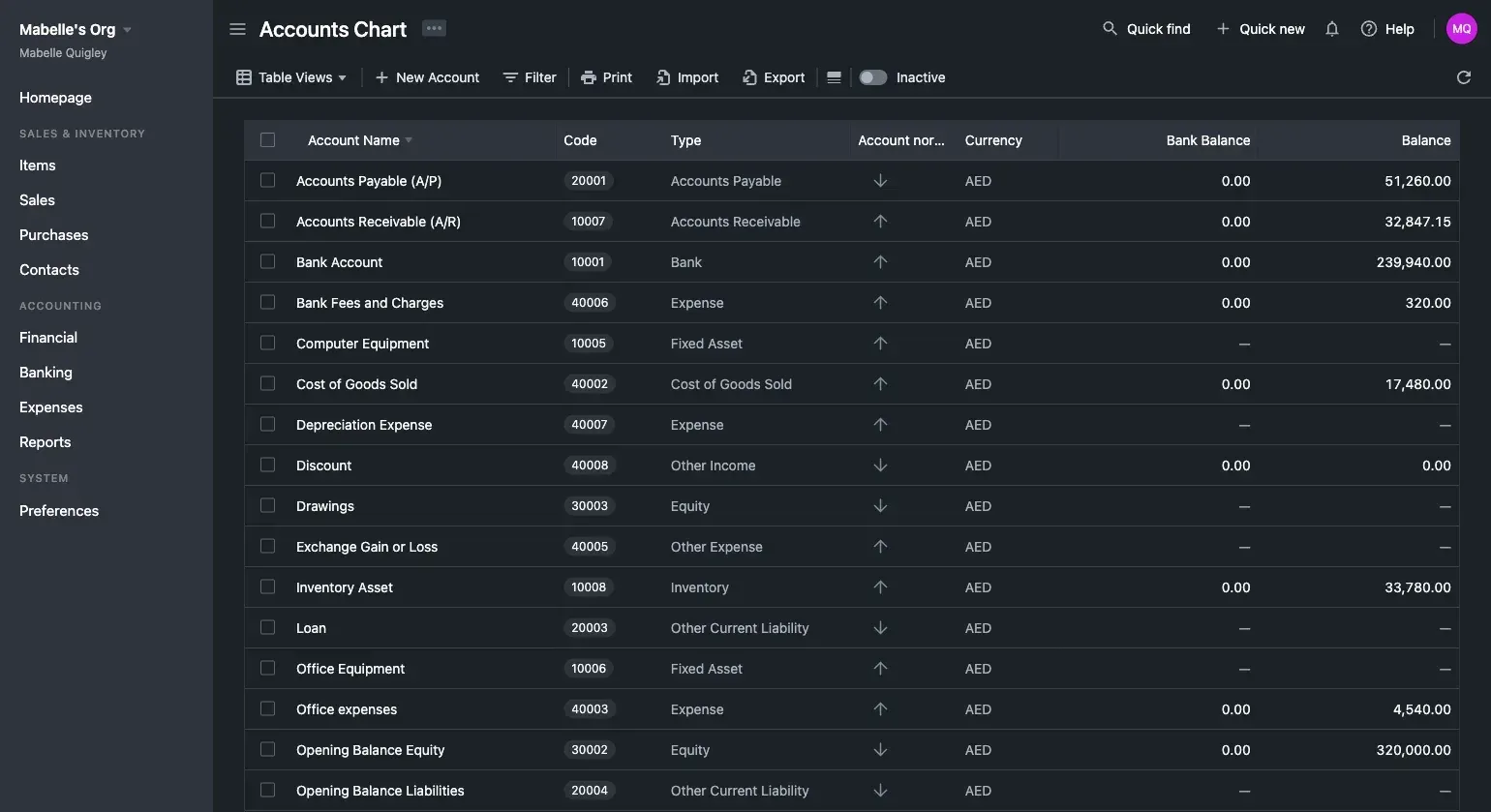
Official screenshot of the chart of accounts list with account codes, types, currency and balances. Sample data.
Source: official Bigcapital project page.
Key capabilities
- Self-host with Docker Download the repository files or follow the Docker deployment guide, edit the .env file for mail and database passwords, and bring the stack up with Docker Compose. The guide lists the latest Docker and Docker Compose as prerequisites and explains how to verify migrations and upgrade.
- Setup script The documented setup script is interactive. It downloads configuration files, manages environment variables and starts or stops the containers. It requires Docker, Docker Compose, Git and curl on the server, and the documentation calls it the recommended route for most people.
- System requirements The recommendations page gives a floor of 2 CPU cores and 4 GB of RAM for up to 10 organizations, and notes that large transaction volumes and big financial reports need more. MariaDB 10.2 or newer is required, with several gigabytes of storage.
- General ledger and chart of accounts A chart of accounts with codes, types, currencies and balances sits under the ledger, and manual journals let you post entries directly. Opening balances can be set for accounts, customers and vendors.
- Sales invoicing and receivables Create sales invoices, estimates and receipts, record customer payments and track due and overdue amounts in a filterable list. The invoice form shows the due amount, taxes, discounts, adjustment and payment options, and you can save as draft or save and deliver.
- Customizable invoice branding Invoices can use brand themes, according to the website's feature list. Check the output in print and PDF export before sending documents to customers.
- Purchases and payables Record purchase bills, vendor payments, vendor credits and refunds. Release 0.25.45 added accounting-basis entries for bills and bill payments.
- Expenses Track indirect expenses such as payroll or rent against expense accounts. The documentation does not describe a payroll module, so use this for recording costs rather than running payroll.
- Inventory and items Maintain products and services, adjust inventory and, since the release notes mention them, move stock between warehouses. The balance sheet sample in the project's screenshots shows an inventory asset line.
- Multiple branches and warehouses The API reference includes branches and warehouses with primary markers and activation endpoints, so one ledger can report across locations. The website describes consolidated reporting for teams.
- Multi-currency accounting Record transactions and manual journals in different currencies, with exchange-rate conversion. Release 0.25.45 localizes currency account names.
- Cash and accrual basis The 0.25.45 release records both bases and lets reports switch views, which matters when a tax authority expects cash-basis figures but management wants accrual. Test your own scenarios, since this is a new feature.
- Financial reports Balance sheet, profit and loss, trial balance, journal and cash flow reports are available, with comparison columns for prior year and prior period in the balance sheet sample. Reports can be recalculated, customized, printed and exported.
- Bank feeds and reconciliation The website lists bank feed syncing and bank reconciliation. Bank feeds go through Plaid, which needs your own Plaid credentials and webhook configuration on a self-hosted install.
- Roles and invitations Invite an accountant, bookkeeper or colleague and control what they can view and edit with role-based permissions, as the site's FAQ describes.
- REST API and API keys The API reference documents authentication, API keys per tenant, items, inventory adjustments, branches and warehouses, among others. The README also links a Postman workspace and calls the approach headless accounting.
- Signup restriction The documentation explains how to restrict sign-up on a self-hosted instance through environment variables, which prevents strangers from creating organizations on a public server.
- Import and export lists Lists such as invoices and accounts have Import, Export, Print and Filter actions in the toolbar, visible in the official screenshots.
- Multiple languages The interface uses translation keys, and release 0.25.45 aligned them across page titles and added missing drawer translations. Verify your language before choosing it for staff.
Where Bigcapital fits
Replacing spreadsheet bookkeeping
Set up a chart of accounts, enter opening balances for accounts, customers and vendors, and import or enter the past period's transactions. Compare the trial balance with your last spreadsheet or accountant's figures before switching, and keep the old file until a month-end has closed cleanly.
Invoicing customers and collecting payments
Create an invoice from the new invoice form, save and deliver it, then record customer payments against it. Use the invoice list's due and overdue statuses to chase late payments, and check that tax and discount lines match what your accountant expects.
Handling purchases and vendor credits
Enter bills, record payments and post vendor credits or refunds. Check the accounts payable balance against a vendor statement, and decide whether you keep books on a cash or accrual basis before the first report is run.
Tracking inventory across locations
Define items, enable warehouses and branches, then record purchases, sales and adjustments. After a stock count, post an inventory adjustment and confirm that the inventory asset account moves as expected in the balance sheet.
Working with an accountant
Invite the accountant with a role limited to what they need, export reports for review and use manual journals for corrections they request. Keep a record of who changed what, and test the permissions with a trial login before sharing real data.
Closing a month
Review the invoices list for overdue items, reconcile the bank account against statements, post accruals through manual journals and print the trial balance, balance sheet and profit and loss sheet. Switch between cash and accrual views to see which entries differ, and archive the exported reports with the date and version used.
Integrating accounting with your own system
Use API keys to post items, invoices or journal entries from another application. Start from the API reference and Postman workspace, work in a test organization and confirm that error responses for invalid data are handled by your code.
Install
curl -o setup.sh https://raw.githubusercontent.com/bigcapitalhq/bigcapital/develop/setup.sh && chmod +x setup.sh && ./setup.shReviews of Bigcapital
Be the first to share your experience with Bigcapital.
Write a review
Loading review form…
Alternatives to Bigcapital
 Invoice NinjaSource-available invoicing app for freelancers and small businesses: invoices, quotes, recurring billing, expenses, projects and time tracking, a client portal, REST API and apps, hosted or self-hosted.
 Frappe BooksFrappe Books is AGPL accounting software from Frappe Technologies with invoicing, inventory, POS and financial reports. The Electron desktop app is archived; the supported version runs on a self-hosted Frappe site in the browser.