

What is ezBookkeeping?
ezBookkeeping is a self-hosted personal finance application for recording income, expenses and transfers across accounts and currencies, then analyzing that history with charts and an advanced query tool. It is developed on GitHub by the maintainer mayswind, and is published under the MIT License. The software is a single server program that serves a web interface to desktop and mobile browsers. There is no native desktop application and no app-store mobile client; on a phone the interface can be added to the home screen as a Progressive Web App. According to the project FAQ, there is no official hosted service, no paid feature and no donation or sponsorship program.
The current release is v2.1.1, published on GitHub with prebuilt archives for Linux amd64, arm64, armv6 and armv7, macOS arm64, Windows x64 and FreeBSD amd64. The Docker image mayswind/ezbookkeeping is published on Docker Hub for linux/amd64, linux/arm64, linux/arm/v6 and linux/arm/v7. The installation guide also covers binary installs, Kubernetes manifests and a community-supported 1Panel app. A public live demo shows the interface before deployment.
The 2.x series changed a lot in a short time. Version 2.0.0 redesigned the desktop interface on Vuetify 4, added customizable overview layouts with widgets, user-supplied icons and colors for accounts and categories, credit limits for credit card accounts, JavaScript custom charts in Insights Explorer and S3 object storage through the official AWS SDK. Version 2.1.0 renamed the llm configuration section to ai, added AI-generated custom charts, three new central-bank exchange rate sources and a FreeBSD package, and stopped rolling back a whole import when only some rows fail. Version 2.1.1 fixes the current-week range of overview widgets after a first login.
The backend is written in Go and the frontend in Vue with TypeScript, using Vuetify for the desktop pages and Framework7 for the mobile pages. Data lives in SQLite, MySQL or PostgreSQL; the project recommends SQLite only for testing. Avatars and transaction pictures go to object storage: the local file system, S3, MinIO or WebDAV. Settings come from ezbookkeeping.ini or from EBK_SECTION_OPTION environment variables, and the same binary is a command-line tool for database updates, user management and data import or export. The FAQ cites roughly 80 MiB of disk space and about 40 MiB of memory for a single user on Linux amd64. Since 2.0.0 the server needs Linux kernel 3.2, Windows 10 or Windows Server 2016, or macOS 13 Ventura, and a recent browser, as listed in the system requirements.
Some things are deliberately outside the product. The project's own feature comparison with Firefly III and Actual Budget lists no budgeting module, no split transactions, no rules that automatically update transactions, no IBAN or account-number fields, no direct bank connections and no end-to-end encryption. Transactions arrive through manual entry, file import, AI text or receipt recognition, the HTTP API or the MCP server.
ezBookkeeping screenshots
Explore the interface. Open a screenshot to view it at full size.
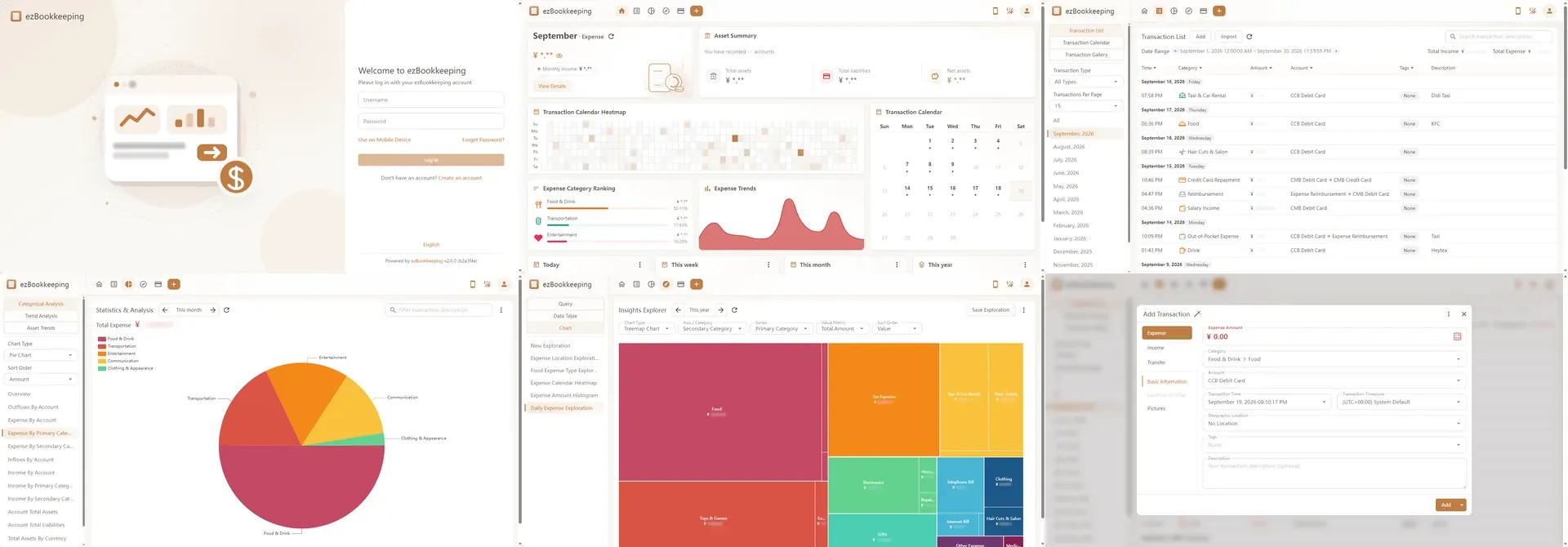
Official composite of the v2.0 desktop interface in light theme, with amounts masked by the project.
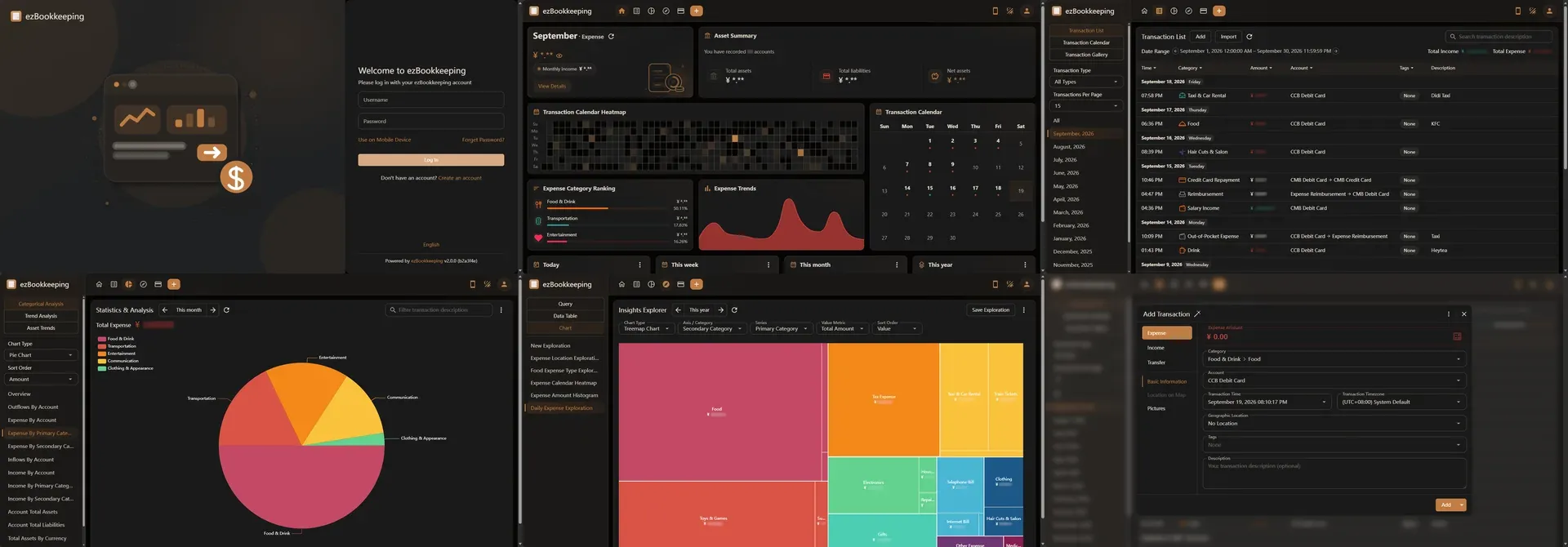
Official composite of the same desktop screens in dark theme.
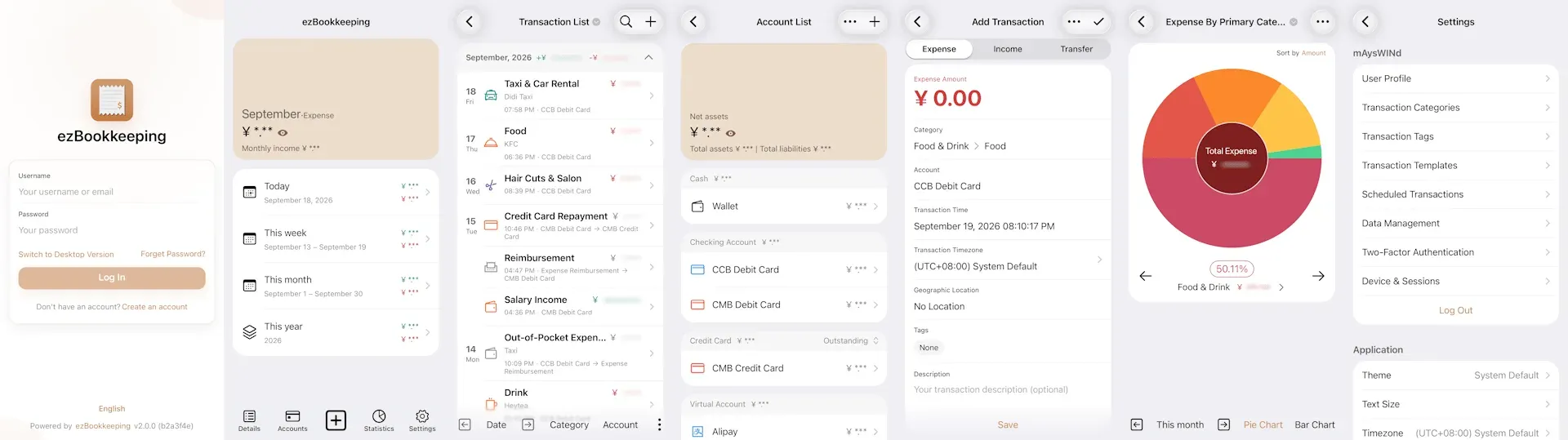
Official composite of the mobile web interface in light theme, as used from the home screen PWA.
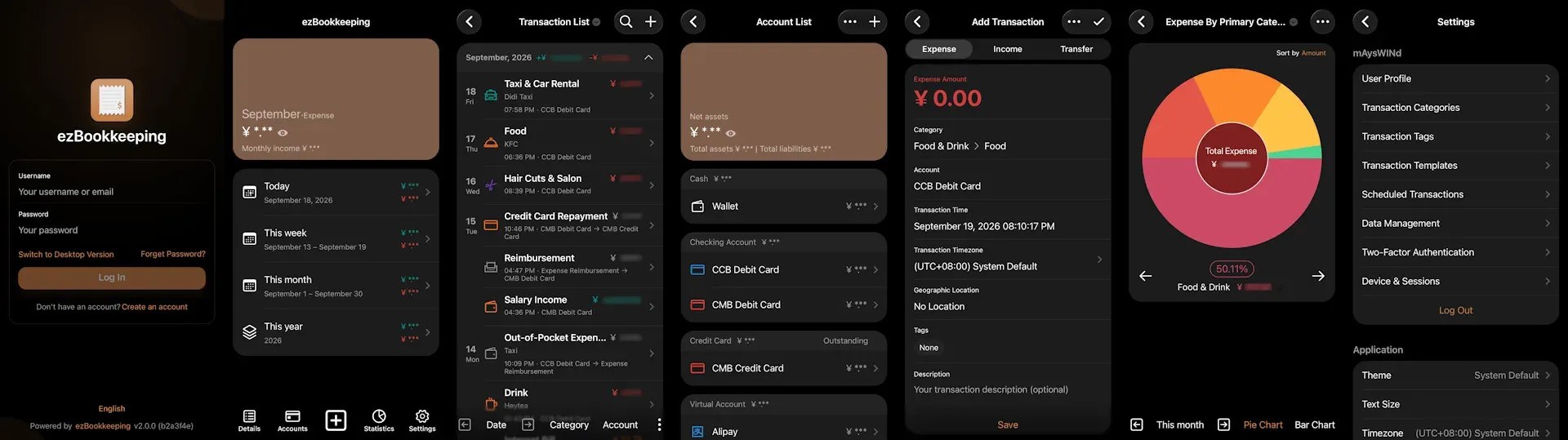
Official composite of the mobile web interface in dark theme.
Source: official ezBookkeeping project page.
Key capabilities
- Docker deployment on Linux hosts, NAS and Raspberry Pi Run
mayswind/ezbookkeepingfrom Docker Hub; the container listens on port 8080 and runs as UID and GID 1000. The database file sits at/ezbookkeeping/data/ezbookkeeping.dband uploads at/ezbookkeeping/storage/, so both need a named volume or a host path, or data is lost when the container is recreated. The Docker guide includes a docker-compose example with MySQL. Images exist for amd64, arm64, armv6 and armv7. - Binary packages for Linux, macOS, Windows and FreeBSD The v2.1.1 release ships archives for Linux amd64, arm64, armv6 and armv7, macOS arm64, Windows x64 and FreeBSD amd64. Extract the archive and start the server with
ezbookkeeping server run, orezbookkeeping.exe server runon Windows. A sample systemd unit is provided for Linux. Double-clicking the Windows executable does not open a desktop window: it starts a web server you reach in a browser. - Kubernetes and 1Panel installs The documentation provides Kubernetes manifests with a Secret for the secret key, persistent volume claims for data and storage, and an Ingress with cert-manager TLS. The example uses SQLite for brevity, while the guide recommends MySQL or PostgreSQL in production. A community-supported 1Panel app installs a SQLite-based instance from the 1Panel App Store.
- Desktop and mobile web interfaces Two separate interfaces are served: a desktop layout and a mobile layout with app-style navigation, both with light and dark themes. The mobile pages can be installed as a Progressive Web App from the browser, which caches static files and opens from the home screen. Since 2.0.0 the overview page uses configurable widgets such as net income and savings rate, monthly expense progress, account balances, expense category ranking, a transaction calendar and a calendar heatmap.
- Accounts, sub-accounts and multi-currency balances Account types include cash, checking, savings, credit card, virtual, debt, receivables, certificate of deposit and investment. Credit card and debt accounts count as liabilities; the rest count as assets. Accounts can have sub-accounts, a currency from a preset global list, custom icons and colors, a statement date, a credit limit since 2.0.0 and a last reconciled time. Hidden accounts serve as an archive.
- Transactions with time zones, tags, locations and pictures Each transaction records a date and time to the second, a time zone, a secondary category, an account, up to 10 tags, an optional map location and up to nine images. Merchants, payees and projects are recorded as tags, which can be organized in tag groups. Templates, scheduled transactions and auto-saved drafts reduce repeated entry. Refunds are entered as negative expenses and transfer fees as separate expenses.
- Two-level categories for income, expense and transfer Categories are split by transaction type and organized in two levels, and every transaction needs a secondary category. A default category set can be created at first use. Since 2.0.0, categories accept user-uploaded icons in addition to the built-in icon set, and custom colors.
- Statistics, trends and reconciliation statements Built-in charts show income and expense proportions by category or account, asset proportions, and trends aggregated by month, quarter, year or fiscal year, with year-over-year and period-over-period comparison. Account reconciliation statements show balance changes and can be exported as CSV or TSV. Chart data exports to CSV, TSV, Markdown or Mermaid.
- Insights Explorer for advanced queries Insights Explorer combines filter conditions with AND, OR and sub-conditions, then shows the result as a table or as one of about 19 chart types, including treemap, sunburst, heatmap and calendar heatmap. Axes can use dimensions such as fiscal year, day of week, account currency or amount range, and value metrics range from totals and medians to percentiles, outlier ratio and Gini coefficient. Explorations can be saved, exported and imported. Custom charts written in JavaScript run in a browser sandbox.
- File import with review before saving The desktop import tool reads CSV, TSV and Excel files with column mapping, custom JavaScript parsing scripts and automatic encoding detection, plus OFX, QFX, QIF, IIF, Camt.052, Camt.053, MT940, GnuCash XML, Firefly III exports, Beancount and several Chinese payment-app statements. Imported rows are previewed, invalid values are highlighted, and batch rules can replace categories, accounts or tags before import. The import matrix lists which fields each format carries; split transactions are not imported, except IIF splits, which become separate transactions.
- Data export All transactions, or only the filtered list, export to CSV or TSV from the interface, and the command line offers
transaction-exportandtransaction-importfor ezBookkeeping's own files. Saving as CSV is blocked when the user's decimal separator is a comma, to avoid ambiguous files. - AI text and receipt recognition When an LLM provider is configured, users can paste text or upload receipt images, individually or in batches, and receive prefilled transactions. Supported providers are OpenAI, OpenAI-compatible Chat Completions and Responses APIs, Anthropic and compatible APIs, OpenRouter, Ollama, LM Studio and Google AI. The features are off by default; image recognition needs a vision-capable model, and uploads are capped by a configurable size limit of 10 MiB by default.
- MCP server for AI clients An optional MCP server exposes streamable HTTP at
/mcp, authenticated with a bearer token generated in the desktop security settings or with the CLI. Tools includeadd_transactionwith a dry-run flag,query_transactionswith paging, account names and balances, category and tag names and exchange rates. It is disabled untilenable_mcpis set, and access can be limited to an IP allowlist. - HTTP API, API tools script and agent skill The HTTP API used by the frontend accepts bearer tokens under
/api/v1/onceenable_api_tokenis set, with an IP allowlist option. Some endpoints needX-Timezone-NameorX-Timezone-Offsetheaders. The repository shipsebktools.shandebktools.ps1wrappers, which need curl and jq on Linux or macOS, and an Agent Skill that lets coding agents call them. - Exchange rates and localization Exchange rates update automatically from one of 20 configurable central-bank sources, including the European Central Bank, or are entered manually. The feature list shows 22 interface languages in released versions, with Hindi and Slovak marked for 2.2.0. Users can set time zone, first day of week, fiscal year start, digit grouping, decimal separator, numeral system and calendar type, including Gregorian with Chinese or Persian calendars. Right-to-left layouts are supported.
- Maps and object storage providers Transaction locations display on OpenStreetMap variants, OpenTopoMap, CyclOSM, CartoDB, TomTom, TianDiTu, Google Maps, Baidu Map, AMap or a custom tile source. Pictures and avatars are stored on the local file system, S3, MinIO or WebDAV. With MySQL or PostgreSQL and remote object storage, the server process itself holds no state.
- Accounts security and sign-in options Users can enable TOTP two-factor authentication, and since 2.0.0 each passcode works only once. Sign-in can use local credentials or OIDC, Nextcloud, Gitea and GitHub OAuth providers. The interface can be locked with a PIN or WebAuthn, sessions are listed per device, and login rate limiting, email verification, password recovery and per-user feature restrictions are configurable.
- Multi-user server with settings sync One server hosts several independent users, each with their own accounts, categories and data. There is no default account: the first visitor registers a user, and administrators can add, disable or restrict users from the CLI. Application settings can sync across a user's devices.
Where ezBookkeeping fits
Deploying a household finance server
Start with Docker or a binary on a home server, NAS or small VPS, and choose MySQL or PostgreSQL from day one, because moving away from SQLite later needs a third-party tool such as DBeaver. Set secret_key, generated with ezbookkeeping security gen-secret-key, set domain, and set root_url when a reverse proxy changes the scheme or port. Mount data, storage and log directories writable by UID 1000. Then register the first user and confirm that pictures and avatars load through the public address. The configuration reference lists every option and its environment variable.
Migrating history from another finance tool
Export from the old tool in a supported format: GnuCash XML, a Firefly III export, Beancount, QIF, OFX or a CSV file. Create accounts and secondary categories first, since every imported row must map to both. In the import dialog, review the rows highlighted as invalid, apply batch rules to map categories, accounts and tags, and import in batches by year or account. Since 2.1.0 a partial failure no longer rolls back the batch, so compare account balances against the source after each run and note which rows failed. Split transactions from GnuCash, QIF or Beancount are not carried over.
Recording daily spending from a phone
Open the instance in the phone's browser and add it to the home screen as a Progressive Web App. Use templates for recurring purchases, the Add Transaction Button widget on the mobile overview for quick entry, and scheduled transactions for rent or subscriptions. If an LLM provider is configured, pasted text such as a payment notification, or a receipt photo, can prefill a transaction, which the user still confirms. After 2.1.0, existing scheduled transactions in time zones with daylight saving time must be saved once more for the date fix to apply.
Reconciling accounts and credit cards
Set a statement date on each credit card account so the transaction list can filter the current or previous billing cycle. Open the reconciliation statement for an account, compare its closing balance with the bank statement, and then set the account's last reconciled time to the statement end date. With the editable transaction range set to the last reconciled time or later, earlier transactions become read-only. The Account Unreconciled Transactions widget added in 2.1.0 shows what still needs checking.
Analyzing spending patterns
Use the built-in statistics for category and account proportions and trends, then move to Insights Explorer for questions such as spending by hour of day, by merchant tag or by amount range. Save each exploration and export the result as CSV, TSV or Markdown for a spreadsheet or a report. AI custom chart generation sends only the prompt and the current chart code to the configured model, not transaction data, but the generated JavaScript should be read before it runs. The feature list records which release introduced each chart type and metric.
Connecting AI assistants and scripts
Enable enable_mcp or enable_api_token, generate a token for a dedicated user session and restrict the allowed IP addresses where the client has a fixed address. Point an MCP client at /mcp with the bearer token, or install the Agent Skill and its ebktools script for coding agents. Test add_transaction with dry_run before allowing writes. Remember that query results sent to a third-party model leave the server, and revoke tokens from the session list when a client is retired.
Install
docker run -d -p8080:8080 --name ezbookkeeping -v ezbookkeeping-data:/ezbookkeeping/data -v ezbookkeeping-storage:/ezbookkeeping/storage mayswind/ezbookkeepingReviews of ezBookkeeping
Be the first to share your experience with ezBookkeeping.
Write a review
Loading review form…
Alternatives to ezBookkeeping
 Actual BudgetActual Budget is a free, MIT-licensed personal finance app built on envelope budgeting. Data lives in a local SQLite database, and an optional self-hosted server adds multi-device sync, end-to-end encryption and bank sync.
 SureSure is a community-maintained AGPLv3 fork of Maybe Finance: a Ruby on Rails app for accounts, budgets, bills, loans and investments, self-hosted with Docker or Helm, with optional bank sync, AI chat, an API and an MCP endpoint.
 1Panel1Panel is a GPL-3.0 Linux server management panel with a web GUI for containers, databases, files, websites, an app store, backups and AI tools.