What is Psono?
Psono is an open-source password manager for companies, developed by esaqa GmbH in Vorra, Germany, which is registered at the Nuremberg registry court under HRB 37978 according to the legal notice. The canonical source is hosted on GitLab under esaqa/psono, where the server project was created in September 2016; the README of the server states that GitLab is the canonical location, and the psono organisation on GitHub carries mirrors such as psono/psono-server that point issues back to GitLab. The server, the web client and the desktop and mobile app are each licensed under Apache-2.0.
The system consists of a Python server on Django that exposes a REST API, a PostgreSQL database, a web client and admin portal that run entirely in the browser, browser extensions, desktop and mobile apps, and optional components such as a fileserver, a gateway, a local breach-check service and a favicon server. Encryption is built on NaCl: the security page names Curve25519 and Salsa20, PyNaCl on the server and ecma-nacl in the browser. Each secret is encrypted in the client with its own random key, those keys live in the user's datastore, and the datastore is encrypted with a key derived from the user's password using scrypt. A separate transport encryption layer runs inside TLS, and the server encrypts private data such as email addresses before writing them to the database.
The current server release is Psono Server 7.5.11, published on GitLab on November 16, 2026, which makes the password breach-check API URL configurable and upgrades vulnerable libraries. Web client 4.9.7 was released the same day, and the desktop and mobile app reached 3.4.4 on November 20, 2026. Releases in the 7.x series added delegation of administrative capabilities (7.4.0, August 30, 2026), Docker image signing (7.2.3, July 23, 2026), fileserver management through the API (7.3.0) and a finalized upgrade of the password hashing parameters (7.5.0, October 8, 2026).
The pricing section on psono.com, checked on November 21, 2026, lists three on-premises editions: the Community Edition (CE), free and open source with unlimited users; Enterprise Edition (EE) limited, free for up to 10 users with the complete feature set; and the Enterprise Edition at EUR 2.5 per user per month, billed annually, with a minimum of 25 users. As SaaS, the community version is hosted free of charge at psono.pw, and the hosted Enterprise Edition costs EUR 3 per user per month, billed annually, with a minimum of 25 users. Professional support and SLAs are quoted on request. According to the admin FAQ, an EE server requests a 10-user licence from license01.psono.com at startup, and offline licence codes are issued by email for servers without internet access.
esaqa GmbH announced an ISO 27001 certification on September 2, 2025 and publishes a Trust Center. Since September 9, 2026 the company has been a CVE Numbering Authority under the ENISA Root, which lets it assign CVE identifiers for vulnerabilities in its own products. Similar team password managers on iThub include Passbolt, Bitwarden, Vaultwarden and Teampass.
Key capabilities
- Client-side NaCl encryption Vault data such as passwords and notes is encrypted in the client with NaCl authenticated encryption before it is stored on the server as a secret object. The per-secret keys are kept in the user's datastore, which is itself encrypted with a key derived from the password through scrypt. The security page explains the choice of scrypt over PBKDF2 with its higher memory cost.
- Layered transport and storage encryption Between client and server, Psono adds its own transport encryption layer inside TLS, and both layers are configured for perfect forward secrecy. The server encrypts private data such as email addresses at rest with Salsa20 and Poly1305. The feature list also mentions pinning of the server key in the client.
- Entry types Besides website and application passwords, the vault holds secure notes, bookmarks, GPG keys, files, TOTP codes, credit cards, SSH keys and passkeys, as the user documentation and app screenshots show. Old versions of secrets are kept in a history. Callbacks can notify a URL when a secret changes, for example to restart a service.
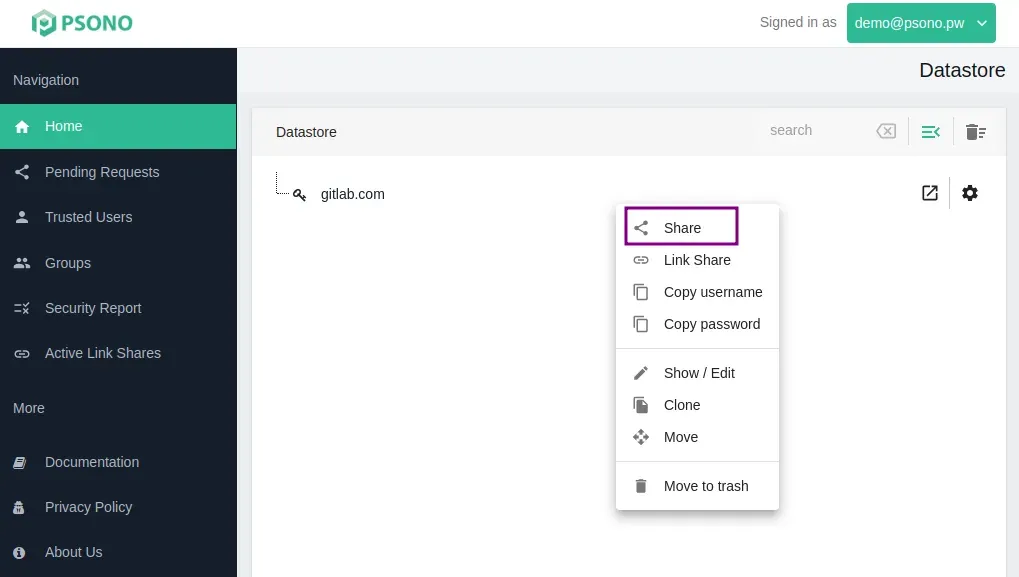
- Sharing, groups and link shares Entries and folders are shared with users or groups with Read, Write or Admin rights, and the share dialog shows the recipient's public key for verification. Groups map users and shares for role-based access. Link shares make a secret or file available via a link to people without an account, and active link shares are listed in the web client.
- Browser extensions Official store listings exist for Chrome (also used by Brave, Opera, Vivaldi and Chromium), Firefox and Edge; Safari uses the separate Psono for Safari app from the App Store. The extensions add autofill of login forms, password capture, quick search and passkey support, and administrators can configure them centrally, for example through Microsoft Intune or Active Directory Group Policy.
- Desktop apps The desktop app is built from the psono-app project and is offered as a Windows installer, through the Mac App Store, and for Linux as an AppImage or from signed APT and RPM repositories on package.psono.com. The download page lists the signing key fingerprint for the Linux repositories. Version 3.4.4 was released on November 20, 2026.
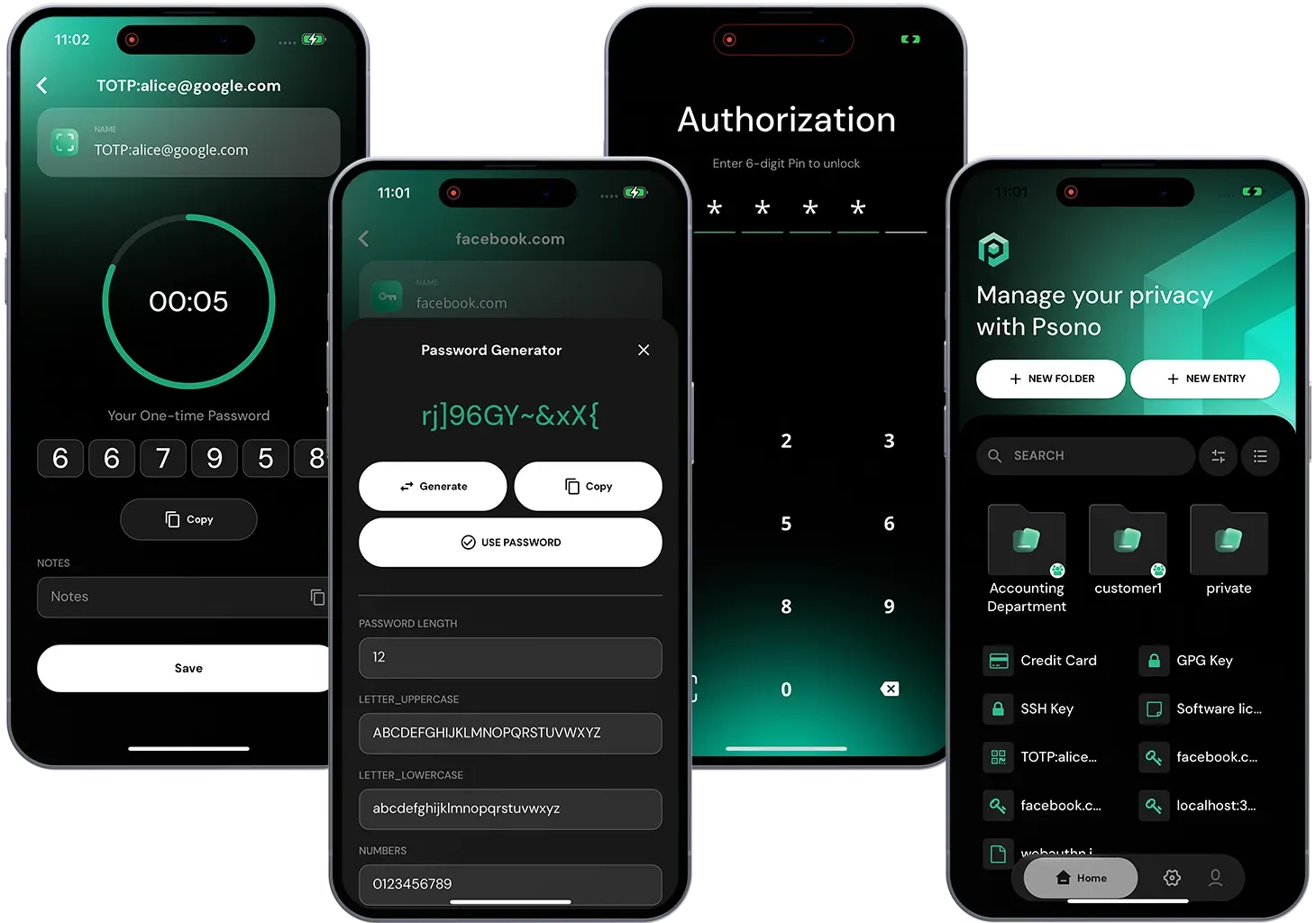
- iOS and Android apps Native apps are available on the App Store and on Google Play, with a direct APK download as an alternative. The app screenshots show TOTP codes, a password generator, PIN unlock and folder navigation. Administrators can configure the mobile app centrally to preset the server URL and block manual server changes on managed devices.
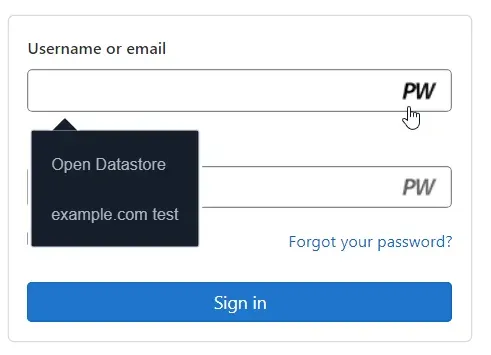
- Web client and free hosted instance The web client is plain HTML and JavaScript with no backend logic and works without installation. A hosted community instance is available free of charge at psono.pw, which esaqa backs up nightly according to the security page. Self-hosted installations ship the web client in the same Docker image as the server.
- Multi-factor authentication and recovery Second factors include TOTP apps such as Google Authenticator, YubiKey OTP, Duo, FIDO2 WebAuthn and passkeys, and iVALT. Recovery codes and emergency codes give access after a lost password or in an emergency, and both can be disabled by policy in the Enterprise Edition. Administrators can restrict which second-factor methods are allowed.
- Security reports and breach checks The security report rates the strength, age, complexity and duplicates of a user's passwords and flags passwords found in known breaches. Central security reports let administrators see these results without access to the passwords themselves, and the Enterprise Edition can enforce and schedule them. A locally hosted Pwned Passwords service can replace the external breach-check API.
- Encrypted file storage Files are encrypted on the client and stored either through a self-hosted Psono fileserver or in a file repository on AWS S3, Google Cloud Storage, Azure Blob Storage, DigitalOcean Spaces, Wasabi or another S3-compatible service. The fileserver supports site-affine storage for remote offices through IP-based routing. A fileserver can be added to a self-hosted installation as an optional component.
- API keys, psonoci and infrastructure tooling API keys give scripts and build pipelines access to selected secrets, with or without a session and with local or remote decryption. The psonoci command line tool is distributed as binaries for x86_64, ARMv7 and AArch64 Linux. A Terraform provider in beta (August 22, 2026), a Kubernetes operator and an integration with Remote Desktop Manager are documented as well.
- Enterprise SSO: LDAP, SAML and OIDC The Enterprise Edition authenticates against LDAP (Active Directory, FreeIPA, OpenLDAP), SAML identity providers (AD FS, Authentik, AWS, Microsoft Entra ID, Google Workspace, Keycloak, Okta, Univention) and OIDC providers (cidaas, Google Identity, Keycloak, WSO2 Identity Server, Zitadel), with group mapping for each. The supported features page states that LDAP requires the client to send the plaintext password to the server and that LDAP, SAML and OIDC require the server to store the user's secrets encrypted so that it can re-encrypt them. The hosted Enterprise SaaS lists SAML and OIDC SSO.
- SCIM provisioning The Enterprise server supports user and group management with SCIM in combination with SAML. The SCIM guide states that Psono implements the subset of the specification required by Microsoft Entra ID (Azure AD) rather than the full standard. Groups and folders can be created automatically for new SCIM groups.
- Audit logging and policies Enterprise audit logging records every REST call, with whitelists and blacklists, and can forward events to Splunk, S3, Logstash, syslog or Microsoft Sentinel. Compliance settings enforce two-factor authentication and can disable exports, API keys, emergency codes, recovery codes, file repositories and link shares. The configuration guide also covers custom branding and throttle rates.
- Psono Gateway Introduced on August 11, 2026, the Psono Gateway launches browser-based SSH, RDP and VNC sessions from connection entries in the web client or app, without copying credentials to the user's device. It is based on Apache Guacamole and organised in Gateway clusters. It requires a valid Enterprise Edition licence and does not work with the Community Edition server.
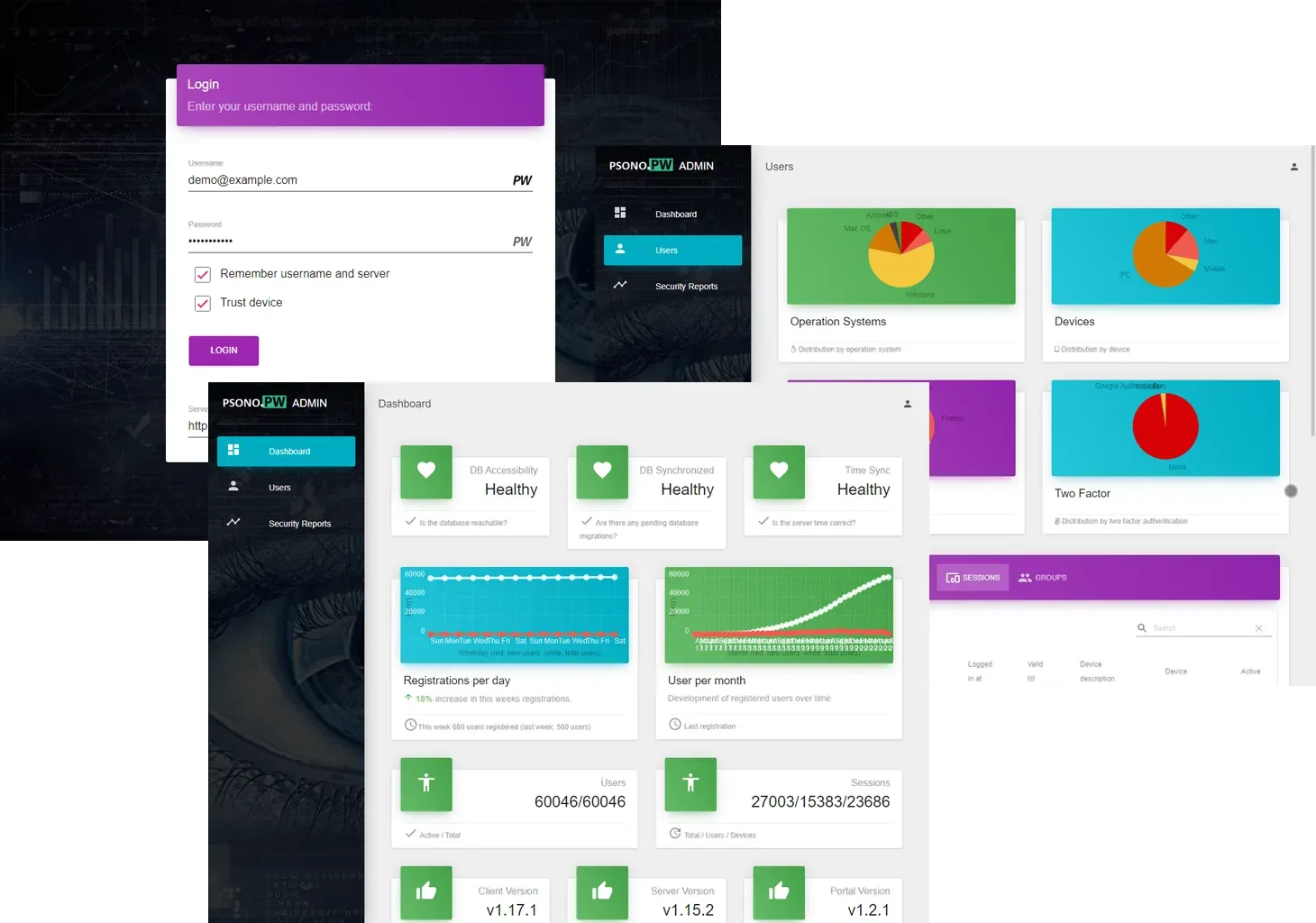
- Administration portal and tenants The admin portal shows server health, users, sessions, devices and security reports, and lets promoted users reset second factors or manage accounts. The documentation describes tenants that group users and groups into administrative scopes, and release 7.4.0 added delegation of administrative capabilities. A health check endpoint reports database connectivity, time synchronisation and pending migrations.
- Self-hosting with Docker The documented installation uses the psono/psono-combo image (psono/psono-combo-enterprise for EE), which bundles server, web client and admin portal, together with PostgreSQL 16 or later and an nginx reverse proxy. The installation preparation guide requires a domain and a publicly trusted TLS certificate and gives sizing from one 1-CPU VM for under 100 users to high-availability setups with Redis for more than 1,000 users. Docker images are signed and can be verified with cosign, and a Helm chart and a quickstart repository are published on GitLab.
- Published security audits Psono publishes third-party reports on its blog: Linkspirit (announced February 20, 2022), Trovent Security (March 6, 2023, a web application penetration test with one finding rated medium and one rated none), X41 D-Sec (a cryptography-focused source code review in June 2024 with one high and three medium findings), Cure53 (report of March 2025 on the Chrome, Firefox and Edge add-ons and the backend API, with one high, three medium and four low or miscellaneous findings, all fixed) and Cure53 (report of March 2026 on the Psono Console UI, API and admin components, with no finding above Low). The documentation also maps the system against the OWASP Application Security Verification Standard.
Where Psono fits
Running a company password vault on premises
An administrator prepares PostgreSQL, generates server keys with the generateserverkeys command, writes a settings.yaml with the web client URL, allowed domains and SMTP settings, and starts the combo image behind nginx with a trusted certificate, as the Community Edition install guide describes. The admin recovery private key generated in that step is meant to be printed and stored offline rather than kept on the server. Browser extensions and apps are then pointed at the server URL, or preconfigured centrally.
Connecting an identity provider
With the Enterprise Edition, the server is configured with LDAP, SAML or OIDC settings, and group mapping assigns users to Psono groups based on directory or identity provider groups. SCIM, used together with SAML, lets Microsoft Entra ID create, update and remove users and groups. The documentation describes the trade-off of each method: LDAP sends the plaintext password to the server, while SAML and OIDC let the server hold encrypted user secrets in order to unlock the vault after an external login.
Sharing credentials with groups and outside parties
Users share entries or whole folders with colleagues or groups and choose Read, Write or Admin rights, verifying the recipient through the displayed public key. For people without an account, a link share makes a single secret or file available through a link, and active link shares can be reviewed and revoked in the web client. Administrators can disable link shares and file repositories by policy in the Enterprise Edition.
Feeding secrets into pipelines and infrastructure
API keys restrict a script or CI job to selected secrets, and psonoci reads them on Linux build agents for x86_64, ARMv7 or AArch64. The Terraform provider manages keys inside Psono Environment Variables entries without storing the secret values in Terraform state, according to its announcement. Callbacks can notify a URL when a secret changes, for example to trigger a service restart.
Opening remote sessions from the vault
Enterprise customers deploy one or more Psono Gateway clusters, store SSH, RDP or VNC connection entries in Psono and use Launch to open a session in the browser. Psono resolves the permitted credentials, selects an available gateway and passes the credentials in a one-time launch handoff in which they remain encrypted, according to the feature list. The gateway installation guide covers deployment next to the Enterprise server.
Reviewing password hygiene across the company
Users generate security reports that rate their passwords by strength, age, duplication and breach status. With central reporting, the results are sent to the server so that administrators can review them in the admin portal without seeing the passwords, and the Enterprise Edition can require reports at a set interval. Breach checks can use the external API or a locally hosted Pwned Passwords service, whose URL became configurable in server 7.5.11.
Reviews of Psono
Be the first to share your experience with Psono.
Write a review
Loading review form…
Found Psono useful? Upvote it todayYour vote helps other IT teams find it in the daily ranking.