
What is Oh My PPT?
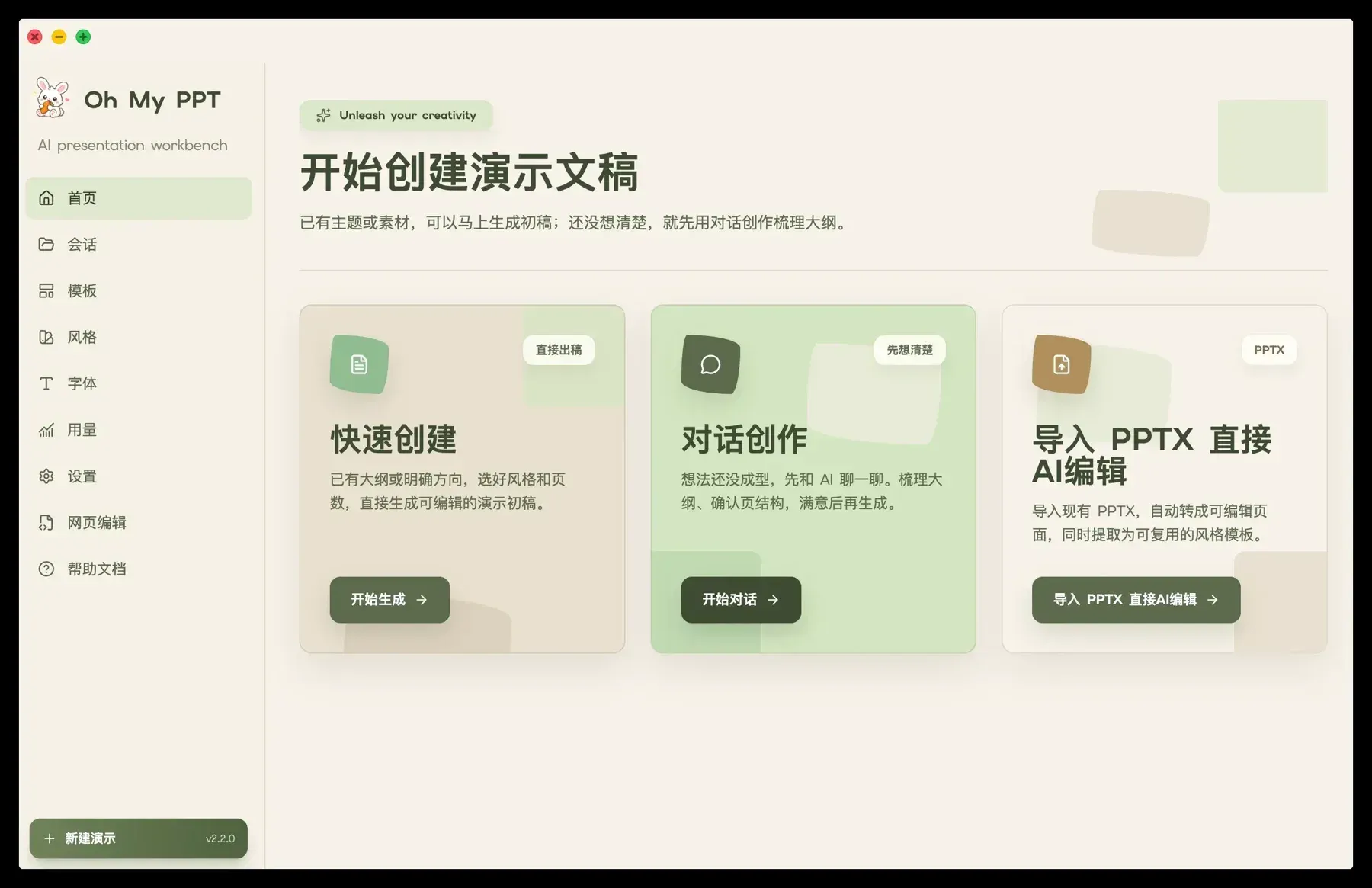
Oh My PPT is an open-source desktop application that generates, edits, presents and exports slide decks with AI. The project describes itself as a local-first workbench for slide decks, image generation and editing: the user describes a topic, uploads a document or imports an existing PowerPoint file, and a configured language model plans the outline, palette and layout and writes each slide as editable HTML. The app is developed under the GitHub account arcsin1 at github.com/arcsin1/oh-my-ppt, with a product site at ohmyppt.cc. The README is published in Chinese and English, and the interface shown in the official screenshots is in Chinese.
The README explains the HTML approach: many AI presentation tools produce fixed-format files, while HTML slides can be previewed in a browser without extra software, restyled, animated and given embedded code, then exported to PDF, PNG, MP4 or editable PPTX. PPTX import and export are built on two packages from the same author, @arcsin1/pptx2json for parsing PowerPoint files into structured data and @arcsin1/html2pptx for writing editable PPTX. The project states that typical imports and exports keep close to 100% of the visual and structural result, and that support for complex shapes, charts, tables and animations is still being improved; fidelity depends on the source file's features, fonts and assets.
Builds are distributed through GitHub Releases as a Windows installer and macOS disk images for Apple Silicon and Intel. The README notes that release builds may not be code-signed yet, so Windows SmartScreen or macOS Gatekeeper can warn on first launch, and it documents how to open the app on both systems. A Linux packaging configuration was added in v2.0.17 so users can build Linux packages themselves; no Linux binary is attached to the current release. The app is built with Electron 39 and React 19, with LangChain for model access and libSQL for local data.
The latest release is v2.10.0, published November 4, 2026. It adds an Assets workbench where drafts started from documents or templates are saved automatically, one-click layout switching for a single slide that keeps its text, a new outline editor, a unified model picker before layout, beautify and illustration actions, and an AI agent that generates custom layouts through chat. Whole-deck beautification and style switching now process several slides in parallel, and PPTX import and export fidelity was improved. The full history is in the changelog, which begins with the first release on April 26, 2026.
Oh My PPT is released under the Apache License 2.0 and is free to download. It does not include a model: the user configures a text model, and optionally an image model, from a provider of their choice, including OpenAI-compatible endpoints and a local Ollama server. According to the README, sessions, source documents, assets and generated results stay on the user's computer, no Oh My PPT account or platform cloud is required, and requests go only to the AI or image service the user configures. Similar projects on iThub include Presenton, PPT Master and Guizang PPT Skill.
Key capabilities
- Topic-based creation The user sets a topic, a detailed brief, a page count and a canvas format, and the configured model plans the outline, palette and layout before generating the full deck. Several generation tasks can run in parallel, with a notification when each one finishes. Since v2.8.0 the user can add requests while a deck is still generating, and later slides follow them.
- Chat to Create A multi-turn conversation clarifies the topic, materials, audience, structure and key points of each slide before generation starts. The README positions this entry for unclear requirements or complex source material. Since v2.9.0 the AI can ask clarifying questions with selectable options, and a chat outline can be turned into a deck through either style generation or template generation.
- Document and PDF input Uploaded txt, md, csv and docx files are parsed to prepare the topic, page count and brief, and generation keeps referencing the source document. Word documents have their heading hierarchy restored from font sizes. Version 2.8.0 added PDF to presentation conversion with a choice of local parsing or MinerU cloud parsing, which the changelog describes as having a free daily quota for personal use.
- PPTX import Existing PowerPoint templates, past reports or client files can be imported from the home page and become editable pages that can be dragged, adjusted, changed with AI and tracked in version history. Imported files can also yield reusable styles. The project describes typical imports as close to 100% fidelity and states that complex shapes, charts, tables and animations are still being improved.
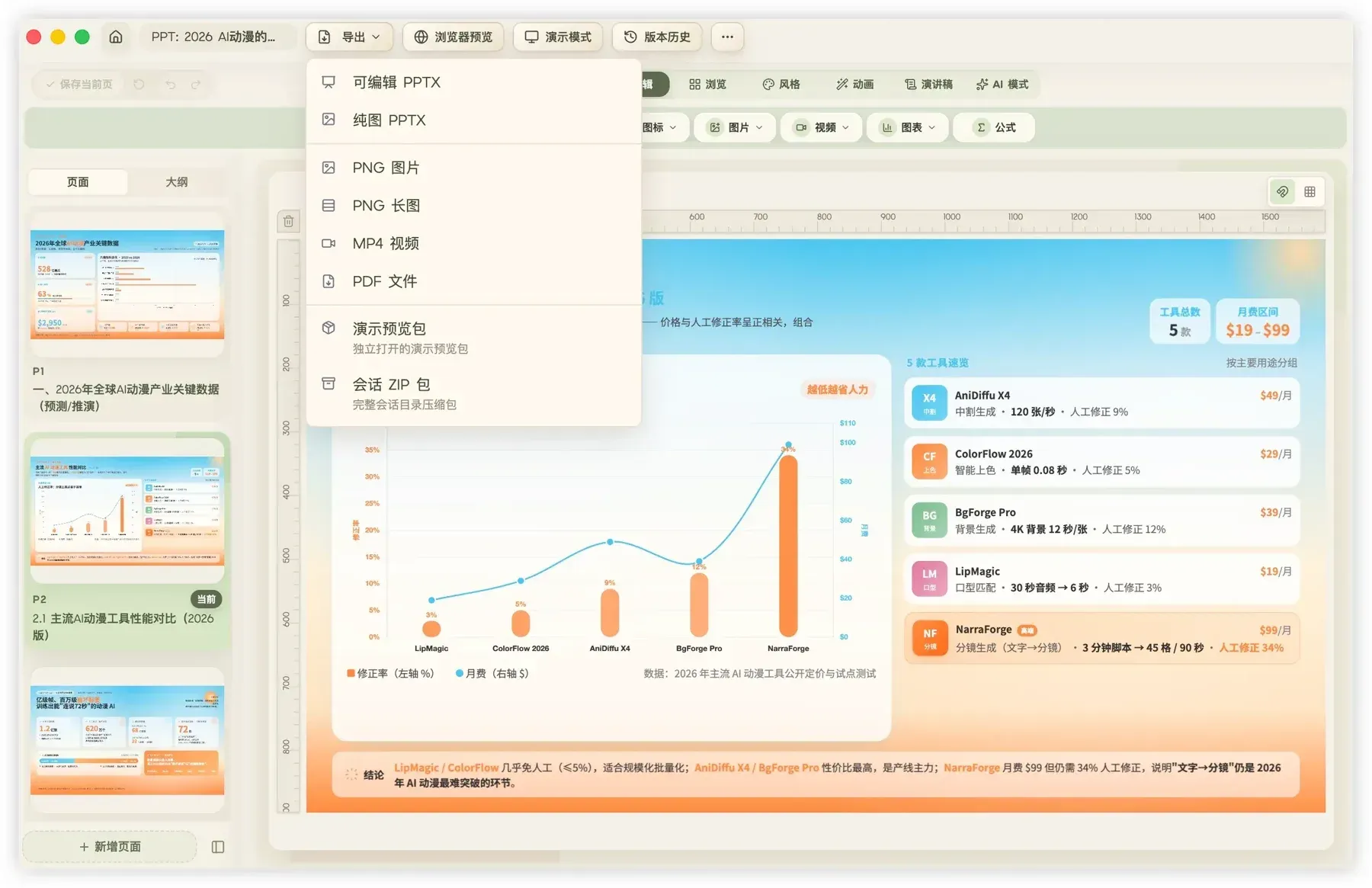
- Editable PPTX export Decks created or edited in the desktop app can be exported as PPTX files that remain editable in PowerPoint or Keynote, keeping text, images, colors, formulas and basic layout where possible. Fonts used in the deck are embedded on export. The export menu also offers an image-only PPTX, and slide notes added in the app carry into the exported file.
- Other export formats Decks can be exported as PDF, as one PNG per slide, as a single long PNG that stacks all pages vertically, or as an MP4 video. A packaged HTML option bundles the deck and its runtime into a file that opens and presents in a browser with a double click. A session ZIP export moves the full session directory to another computer for further editing.
- Canvas formats Supported canvases include 16:9, 4:3, vertical 9:16, portrait 3:4, square 1:1 and Xiaohongshu social-note formats. The README states that the real aspect ratio is preserved from generation to export, and that generation follows the selected canvas size and a content-height budget to reduce overflow.
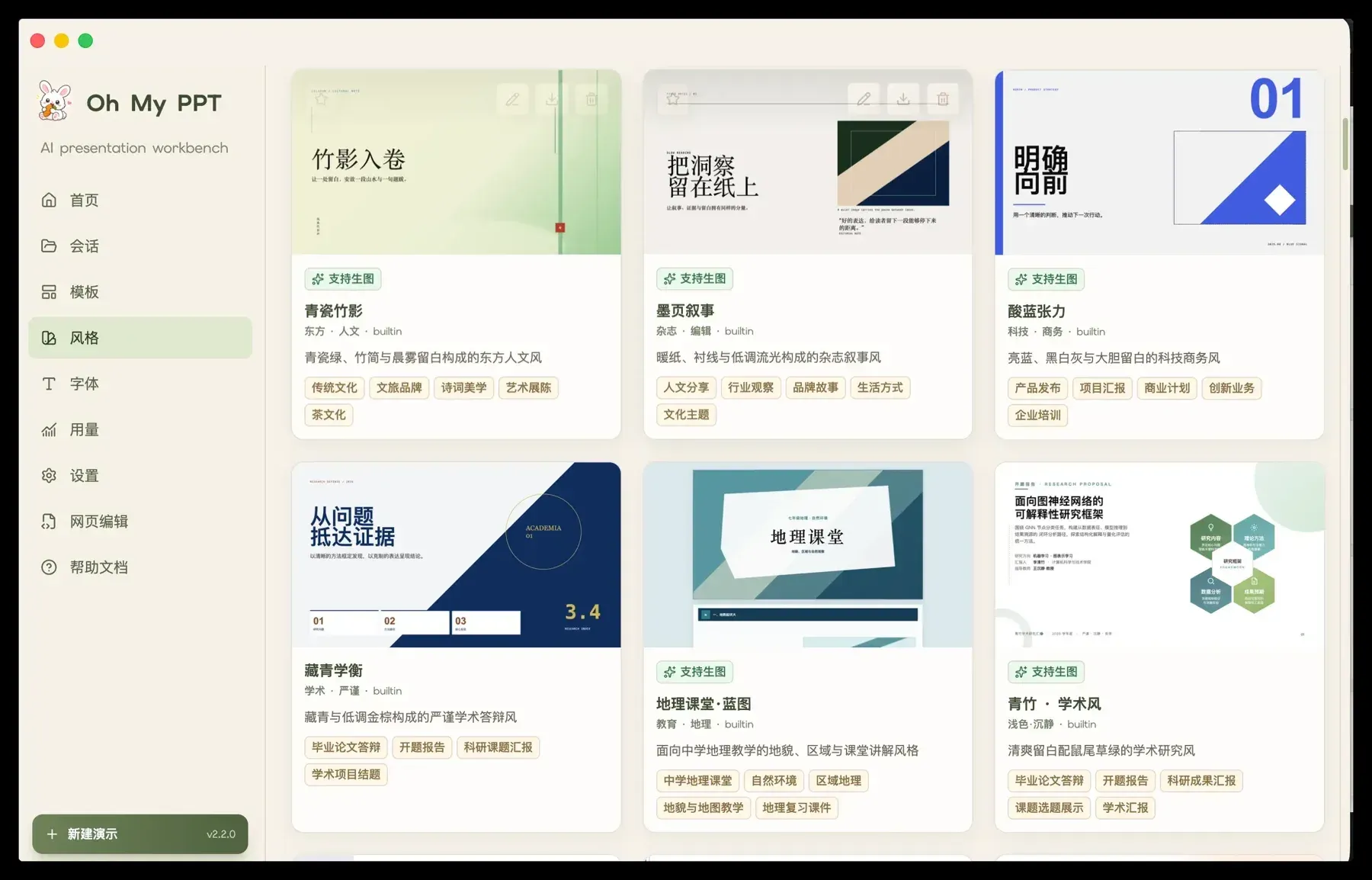
- Style library More than 90 built-in style skills are included, among them Minimal White, Cyber Neon, Bauhaus, Japanese Minimal and Xiaohongshu White, and users can add custom styles. Style cards mark which styles support image generation and the library is searchable. Custom style packages can be created with the official style-generate-skill, and since v2.9.0 the app can also generate a style from a text description with a live preview.
- Layouts and templates Generated or edited decks can be saved as templates, PPTX files can be imported as templates, and a template can be reused for a new session or regenerated with a new topic or document while keeping its layout, palette and visual rhythm. Version 2.9.0 added a library of more than 80 layouts, 50 infographic compositions and 8 infographic style packs. Version 2.10.0 added one-click layout switching for a single slide and an AI agent that creates custom layouts through chat.
- AI image generation With an image model configured and verified under Settings, the deck generator can add illustrations, backgrounds and visual assets only where the layout and chosen style call for them, without replacing uploaded images. An in-editor image studio builds a prompt from the current slide, previews the result and places it on the canvas or as the background. Built-in presets cover Jimeng 3.0 and 4.0, Agnes AI, Seedream, SiliconFlow, Gemini and OpenAI-compatible image APIs, and results are archived in the session's local asset directory.
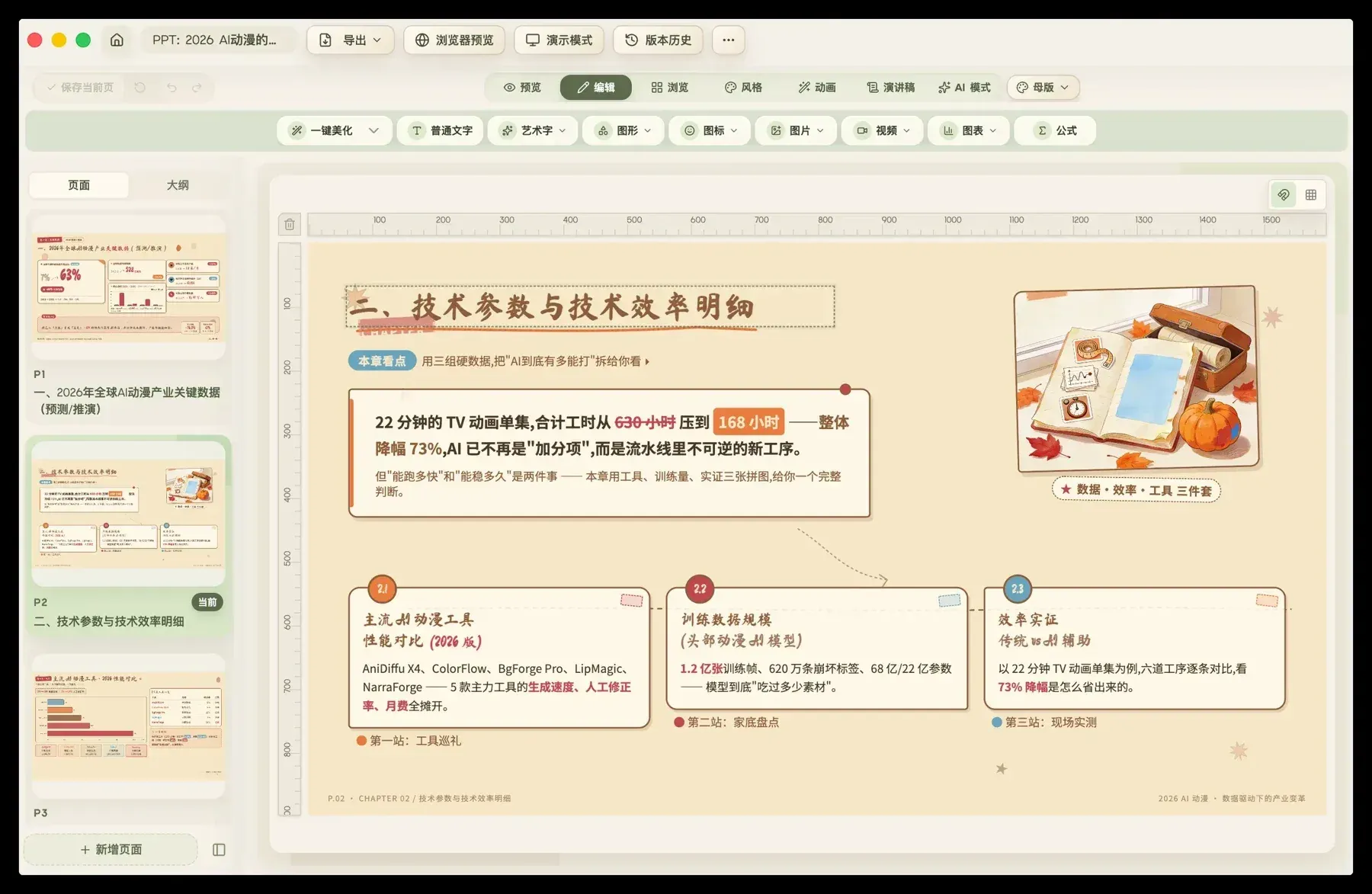
- Chat and visual editing Chat instructions such as changing a title color or adding a data chart apply to a specific page without regenerating the deck. Every visible element can be dragged and resized, picked for an AI edit, duplicated or deleted, and images and videos can be inserted from the asset library or local files. Undo and redo work before committing, and every saved edit becomes a version history entry that can be restored.
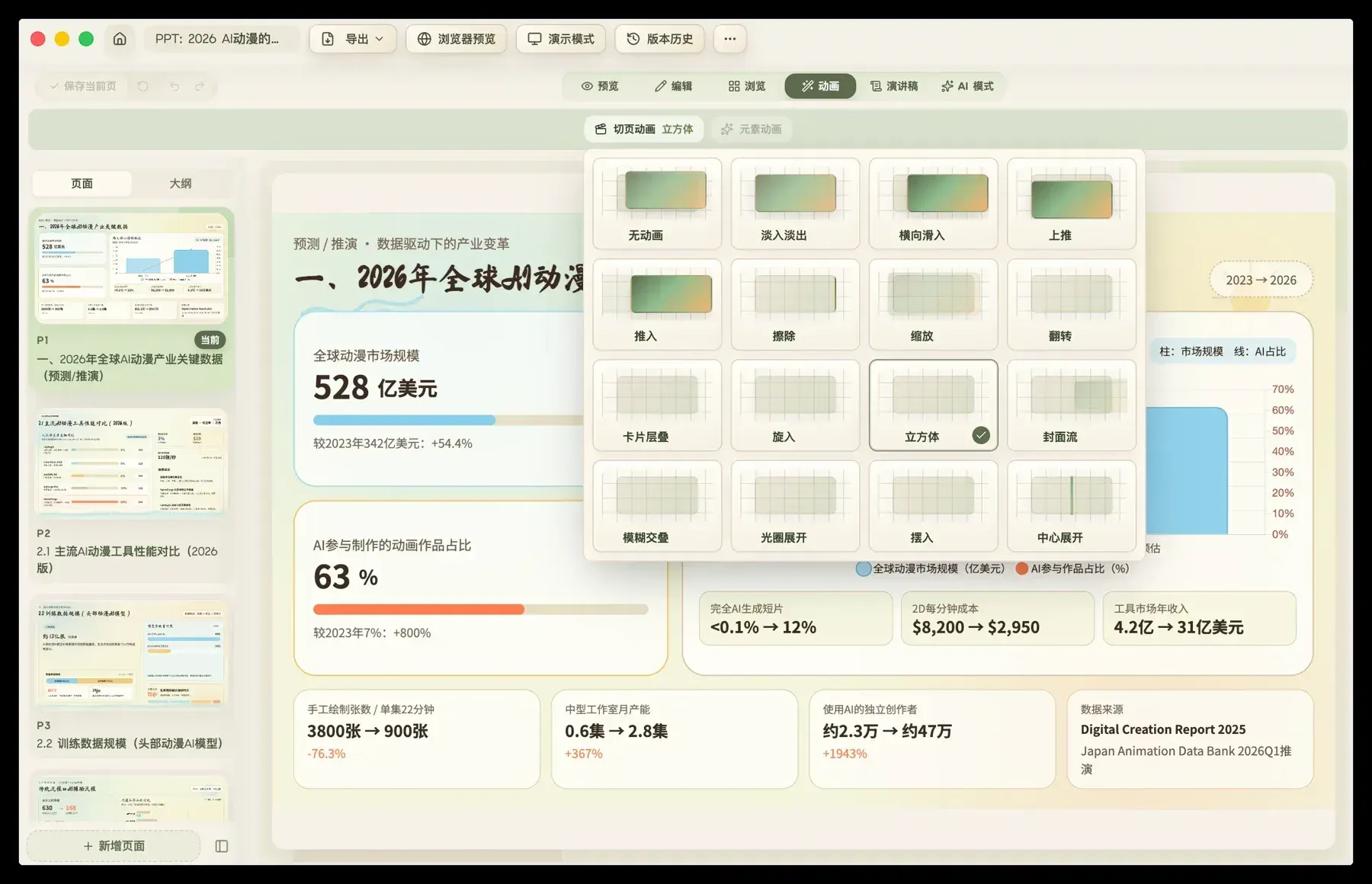
- Animations Slides support more than 16 transition effects and whole-element motion through a local Anime.js v4 runtime, added by the AI during generation or chat editing. In edit mode, individual text, image or chart elements can receive entrance, emphasis or exit effects with automatic or click triggers, duration and direction. The README states that complex timelines, flashing and infinite loops are not recommended.
- Presentation and speaker support Presentation mode opens fullscreen with arrow-key or click navigation, and ESC exits. Since v2.7.0 a Presenter View opens a companion window on a second screen with the current slide and notes. Speaker scripts can be generated for the whole deck or the current slide in formal, conversational, storytelling or custom styles.
- Fonts and formulas Fourteen curated Google Fonts are built in, including CJK families, and local .woff2 fonts can be uploaded with a name, category, role and script type. Title and body fonts can be chosen separately or matched by the AI. Common LaTeX formulas render on slides for classes, teaching decks and technical talks.
- Model configuration A text model under Settings, Text Models is required before any deck can be generated; the README lists DeepSeek, Kimi, Doubao, Qwen, GLM, MiMo, MiniMax, GPT and Claude among suitable models. Provider presets fill in endpoints and recommended models, context windows can be set, and proxies with authentication are supported. Image models are configured separately as JSON and are saved only after a real test image succeeds.
- Local Ollama support A local Ollama server can be used through its OpenAI-compatible API by setting the provider to openai, the base URL to http://127.0.0.1:11434/v1, a local model tag and any non-empty API key. The README advises models of 14B parameters or more for stable output. Ollama covers text generation, document parsing and chat editing; image generation still needs a separate image provider.
- Desktop downloads Release v2.10.0 provides oh-my-ppt-2.10.0-win.exe for Windows and oh-my-ppt-2.10.0-mac_arm64.dmg and oh-my-ppt-2.10.0-mac_x64.dmg for macOS on Apple Silicon and Intel. Builds may be unsigned; the README documents right-click Open or clearing the quarantine attribute with xattr on macOS, and More info then Run anyway on Windows. Linux users can build packages from source with the included configuration.
Where Oh My PPT fits
Generating a deck from a topic
From the home page, Quick Create takes a topic, a detailed brief, a page count, a canvas format, a style and fonts, then generates the outline and every slide. Each slide appears in a progress card as soon as it is written, and once 80% of the slides are done the editor can be opened while the rest finish. The changelog describes per-slide quality checks that use multimodal vision to spot layout problems, apply an in-place fix and roll back if the fix fails.
Turning documents and PDFs into slides
Uploading a txt, md, csv, docx or PDF file lets the app derive the topic, page count and brief from the content and keep referring to the source while generating. PDF parsing can run locally or through the MinerU cloud service, selected in settings. Numbered sources are cross-checked against the outline, and documents that cannot be parsed fall back to an AI-drafted outline rather than failing.
Continuing work on existing PowerPoint files
The Import PPTX entry on the home page converts an existing template, report or client deck into editable HTML pages. The user can then move elements, change them with chat instructions, switch styles or layouts and track changes in version history, and the session list marks imported decks separately from AI-created ones. Edited decks can be exported again as editable PPTX for PowerPoint or Keynote.
Building a reusable visual identity
Decks can be saved to the template library, and imported PPTX files can serve as templates or as a source for extracted styles. A screenshot or design mockup can be uploaded to extract a visual style and outline, which requires a multimodal model. Custom styles can be written with the official style-generate-skill package or generated in the app from a description, and custom layouts can be produced through the layout agent added in v2.10.0.
Presenting with notes and motion
Teaching decks, reports and pitches can be presented from the app in fullscreen, with Presenter View showing the current slide and notes on a second display. Element animations with click triggers let content appear step by step, and speaker scripts can be generated per slide or for the whole deck. LaTeX formulas and code can be embedded for classes and technical talks.
Sharing outside PowerPoint
Besides PPTX, finished decks can be shared as a PDF for printing and archiving, as PNG images for documents or social posts, as one long PNG for mobile reading, or as an MP4 video. The packaged HTML option produces a single file that presents in any browser without installing Oh My PPT, and a session ZIP lets another computer continue editing the same deck.
Reviews of Oh My PPT
Be the first to share your experience with Oh My PPT.
Write a review
Loading review form…
Found Oh My PPT useful? Upvote it todayYour vote helps other IT teams find it in the daily ranking.