What is GoAccess?
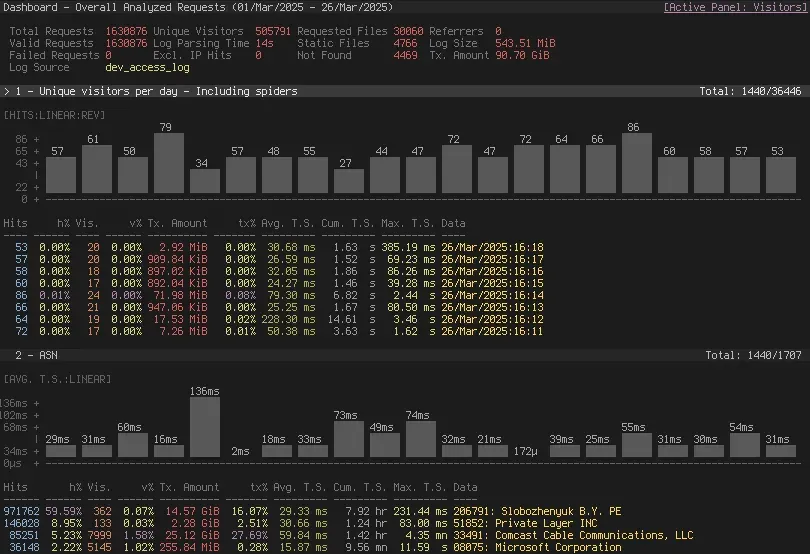
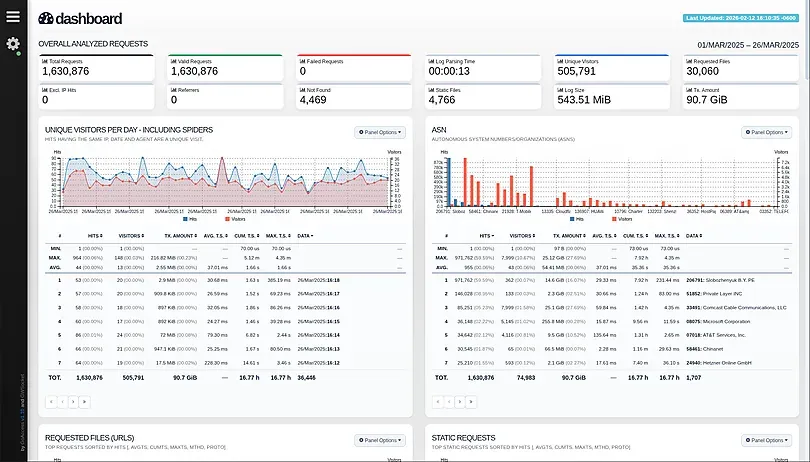
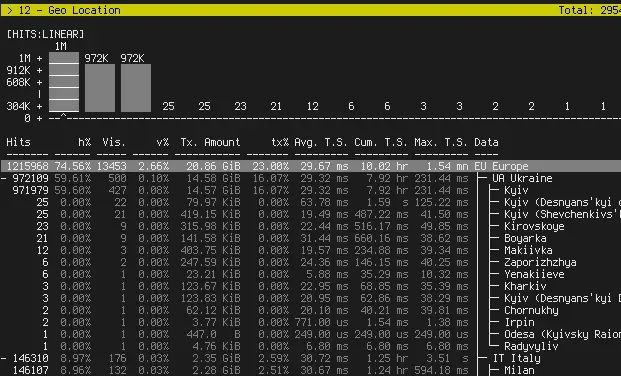
GoAccess is an open-source, real-time web log analyzer and interactive viewer. It reads the access logs that web servers, load balancers and CDNs already write and turns them into HTTP statistics such as requests, unique visitors, requested files, 404 errors, hosts, browsers, referrers, status codes, geolocation, response times and bandwidth. The default output is an ncurses dashboard in the terminal; the same data can be written as a self-contained HTML report, as JSON or as CSV. GoAccess is developed by Gerardo Orellana, named as author in the man page and as copyright holder in the MIT license file. The code is published at github.com/allinurl/goaccess, and the ChangeLog records version 0.1 on July 6, 2010.
GoAccess is written in C with ncurses as its only required dependency. Optional build features add geolocation through GeoIP or GeoIP2 databases, TLS for the built-in WebSocket server through OpenSSL, and direct parsing of .gz logs through zlib. Parsed data is kept in in-memory hash tables, limited by available physical memory according to the man page, with optional on-disk persistence. For the live HTML report, GoAccess runs its own WebSocket server, by default on port 7890; it does not serve the HTML file itself, which the getting started guide places under an existing web server's document root.
The download page provides the source tarball and an official Debian and Ubuntu APT repository at deb.goaccess.io, and lists distribution packages for Fedora, Arch Linux, Gentoo, openSUSE, Slackware, FreeBSD, OpenBSD, pkgsrc and Homebrew on macOS, which may lag behind the current version. For Windows, the documentation describes use through Cygwin, with build packages listed in the FAQ, or through the Windows Subsystem for Linux. An upstream Docker image, allinurl/goaccess, and docker-compose examples are also provided. GoAccess is licensed under the MIT License.
The latest stable release on goaccess.io is GoAccess 1.12, dated September 16, 2026; the GitHub repository carries the v1.12 tag but no GitHub Releases entries. Version 1.12 replaced the keyphrases panel with UTM campaigns, added a live requests-per-second rate, --exclude-asn, TLS key exchange group reporting, AI Crawlers and Fediverse categories and updated Caddy and CloudFront presets. Version 1.11 (July 19, 2026) moved persisted databases to storage format 3 and, according to its notes, cut storage memory by about 20% and parsing time by about 35%.
GoAccess only sees what the log contains. Every line needs a client address (%h), a date (%d) and a request (%r); response time metrics and the virtual host, TLS, cache status and MIME type panels appear only when the matching fields are logged. A unique visitor is defined as requests sharing the same IP address, date and user agent. Other log and web analytics tools listed on iThub include Logdy, Grafana Loki, Umami and Rybbit.
Key capabilities
- Interactive terminal dashboard
goaccess access.logopens an ncurses dashboard with a summary header and scrollable report panels. Keys jump to panels by number, expand items, sort with s, reorder panels with p, search with a regular expression after / and switch charts to a logarithmic scale with l. Version 1.10 added terminal bar charts; the full key list is in the man page. - Self-contained HTML report
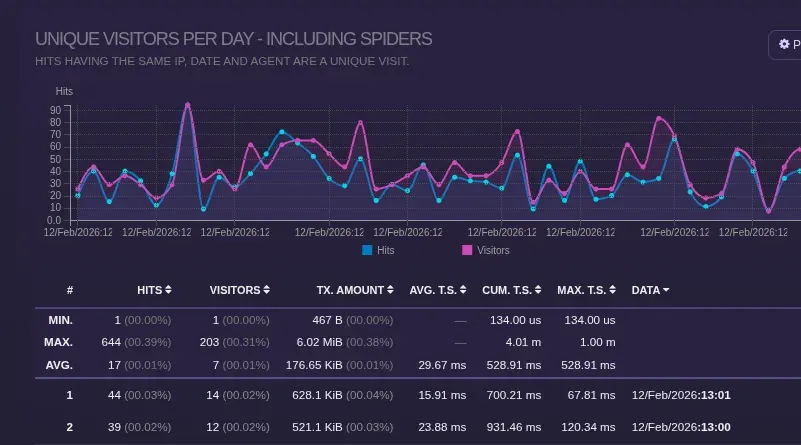
-o report.htmlwrites one HTML file with no external file dependencies, with charts, sortable tables, light and dark themes and a geolocation map with a globe projection since 1.9.4.--html-report-title,--html-custom-css,--html-custom-jsand--html-prefsadjust it, and--external-assetswrites JavaScript and CSS to separate files for Content Security Policy setups. - Real-time HTML over WebSocket
--real-time-htmlkeeps GoAccess running and pushes updates to the open report through its own WebSocket server on 0.0.0.0:7890 by default.--addr,--port,--unix-socket,--ws-urland--origincontrol binding, the browser URL and the handshake check; TLS needs an OpenSSL build plus--ssl-certand--ssl-key, and--daemonizeruns it in the background. - JWT authentication for the WebSocket Since 1.9.4,
--ws-auth=jwt:verify:with a secret from a file, environment variable or HS256 string requires JSON Web Tokens. The report gets its token from--ws-auth-urlusing the browser session and refreshes it 60 seconds before expiry, with a CSRF check for stateful setups. Version 1.12 closes the connection when the verified token expires. - JSON and CSV output The same analysis can be written as JSON or CSV, and repeated
--outputoptions produce several formats in one run. Static HTML, JSON and CSV can exceed the default 366 items per panel through--max-items, while the real-time report shows up to 50. A sample JSON report is published on the website. - Predefined and custom log formats Presets cover Combined and Common Log Formats with or without virtual hosts, W3C (IIS), Squid, CloudFront, Google Cloud Storage, AWS ELB and ALB, Amazon S3, Caddy JSON and Traefik CLF. Other layouts are described with specifiers such as
%h,%d,%r,%sand%u, plus~hfor X-Forwarded-For fields, as documented in the custom log format section. - Report panels Panels include general statistics, unique visitors, requested and static files, 404s, hosts, operating systems, browsers, visit times, virtual hosts, referrers, referring sites, UTM campaigns, geolocation, status codes, ASN, remote users, cache status, MIME types and TLS settings. Some need matching log fields, referrer URLs are off by default, and
--enable-panel,--ignore-paneland--sort-panelcontrol them. - Response time tracking When the server logs the time taken per request (Nginx
$request_time, Apache%D), panels show average, cumulative and maximum time served. GoAccess reads microseconds, seconds, milliseconds and nanoseconds through%D,%T,%Land%n. - Geolocation and ASN data GeoIP builds read legacy
.datfiles or GeoIP2.mmdbdatabases such as DB-IP Lite or MaxMind GeoLite2, loaded with a repeatable--geoip-database. The geolocation panel groups traffic by continent and country, with city entries since 1.10, and the ASN panel groups it by network. Databases are downloaded separately. - Crawler and network filtering User agents are classified as browsers or crawlers, with AI Crawlers and Fediverse categories since 1.12.
--ignore-crawlers,--crawlers-onlyand--unknowns-as-crawlerscontrol bot traffic,--exclude-ipaccepts addresses and ranges, and--exclude-asnor--include-asndrop or keep networks when an ASN database is loaded. - IP anonymization
--anonymize-ipzeroes the end of each client address, such as the last octet of an IPv4 address.--anonymize-levelselects levels 1 to 3, which hide 8, 16 or 24 bits of IPv4 and 64, 80 or 96 bits of IPv6 according to the man page table, and--no-ip-validationaccepts logs whose addresses were obfuscated before logging. - Persistence and incremental processing
--persistwrites the dataset to disk (default/tmp, or--db-path) and--restorereloads it so new data is appended. GoAccess tracks each file's inode, last line and last timestamp,--keep-lastkeeps a set number of days, and restores are rejected when--http-methodor--http-protocoldiffer from the original settings. - Multi-threaded parsing Since 1.9,
--jobsparses with up to six threads, and--chunk-sizesets 256 to 32768 lines per chunk (default 1024). The FAQ reports about 100,000 lines per second for version 1.4 on an Intel Core i7-8700K and about 134.1 MiB for 3,397,814 lines with all features enabled. - Multiple logs, pipes and compressed files Several files can be passed at once, and a single dash also reads standard input, so
tail -f,zcat,greporawkcan feed filtered data. zlib builds parse.gzfiles directly, and--fname-as-vhostderives virtual hosts from file names. - Configuration and color schemes Options can be stored as long options in
~/.goaccessrcor a systemgoaccess.conf;--dcfshows which file is read. The terminal offers monochrome, green and Monokai schemes plus per-panel colors through--color, and the interface is translated into 13 languages. - Installation from source and APT The tarball builds with
./configure,makeandmake install. The official repository at deb.goaccess.io supplies current Debian and Ubuntu packages; 1.11 added Ubuntu 26.04 and more architectures, and 1.10 added Debian Trixie while dropping Buster and i386. Other systems use the packages listed on the download page. - Docker image and docker-compose The
allinurl/goaccessimage reads a log on standard input and publishes port 7890 in real-time mode. DOCKER.md notes ARM builds and geolocation with a mounted GeoLite2 database, and the docker-compose folder has Nginx setups with user-supplied TLS certificates or with Traefik.
Where GoAccess fits
Checking a server's traffic from the terminal over SSH
The README describes GoAccess as a terminal tool for quick analysis of an access log over SSH. goaccess access.log -c opens a dialog for choosing a predefined log format, and --log-format=COMBINED or a configuration file sets it permanently. GoAccess can also run on a local machine against a remote log: the README pipes ssh -n root@server 'tail -f /var/log/apache2/access.log' into goaccess - --log-format=COMBINED, with the note that SSH needs -n and key-based authentication. nice -n 19 runs the analysis at a lower CPU priority.
Publishing a live HTML dashboard
The documented setup writes the report into a web server's document root, for example goaccess access.log -o /usr/share/nginx/html/site/report.html --real-time-html, and the browser then connects to the GoAccess WebSocket server on port 7890. Behind a reverse proxy, --ws-url includes the proxy host, path and port, and --ssl-cert with --ssl-key enables TLS. The getting started guide states that GoAccess does not serve the report and that restricting access is a web server task. The docker-compose examples combine a static Nginx site with a real-time report, either with self-managed certificates or with Traefik giving the WebSocket its own subdomain. The live demo at rt.goaccess.io shows the resulting report.
Generating static reports for sharing or archiving
A one-off report needs only goaccess access.log -a -o report.html; -a adds a list of user agents per host. Rotated logs can be combined with zcat -f /var/log/apache2/access.log* piped into GoAccess, or read directly as .gz files in a zlib-enabled build. The same run can produce HTML, JSON and CSV with several --output options, -d resolves IP addresses in HTML and JSON output, and --tz converts report times into a named time zone such as Europe/Berlin.
Spotting aggressive hosts, crawlers and scanners
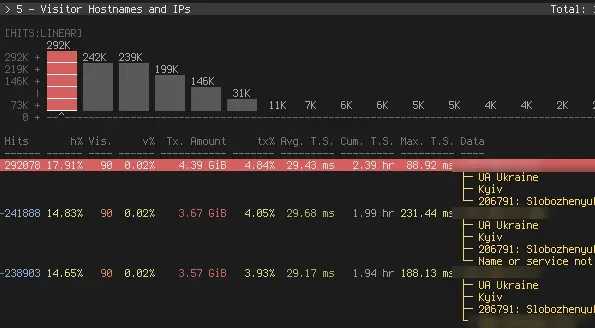
The website describes GoAccess as a practical tool for security monitoring that helps spot suspicious activity, brute-force attempts, scanners and bots in logs. The hosts panel ranks clients by hits, bandwidth and time served, and with -a it lists the user agents of a selected host; expanding a host can show the reverse DNS result, country, city and ASN when GeoIP databases are loaded. The ASN panel groups traffic by network, and --exclude-asn or --include-asn remove or isolate networks. The README also pipes grep -i 'bot' output into GoAccess for an estimate of crawler traffic and uses awk '$9~/500/' to analyze only server errors.
Keeping a running dataset across log rotations
For rotated logs, the man page example parses last month's file with goaccess access.log.1 --persist, then adds the current file with goaccess access.log --restore --persist; goaccess --restore alone shows stored data without parsing. --process-and-exit only updates the on-disk database, and --keep-last=7 limits the stored data to the last seven days. The man page notes that piped input is matched only by timestamp and can therefore produce duplicate entries.
Analyzing a subset of requests
GoAccess relies on standard Unix tools for ad hoc filters. The README uses sed to select a date range, awk to keep only HTML or PHP requests or specific status codes, grep -v to drop listed virtual hosts and tail -f | grep --line-buffered to filter a live stream while keeping the real-time HTML report open. Built-in options cover recurring cases: --ignore-status, --ignore-referrer, --hide-referrer, --ignore-statics, --static-file and --enable-panel. All options are listed on the man page.
Install
cat access.log | docker run --rm -i -e LANG=$LANG allinurl/goaccess -a -o html --log-format COMBINED - > report.htmlReviews of GoAccess
Be the first to share your experience with GoAccess.
Write a review
Loading review form…
Found GoAccess useful? Upvote it todayYour vote helps other IT teams find it in the daily ranking.