

What is Rybbit?
Rybbit is an open-source web and product analytics platform published by the Rybbit project on GitHub. The README calls it an open source and privacy friendly alternative to Google Analytics, and the official website describes it as open-source, cookieless analytics for which no consent banner is needed. It collects pageviews, sessions and events through a JavaScript tracking script or the @rybbit/js npm package, and presents them in one dashboard with web analytics, product analytics and behavior sections.
There are two ways to run it. Rybbit Cloud is the hosted service at app.rybbit.io, which the website labels an EU-hosted cloud, with paid Standard, Pro and Enterprise plans and a 7-day free trial. The self-hosting quick start installs the same application on a VPS with Docker Compose. The self-hosted vs cloud comparison lists the differences: the Pages view, Web Vitals, email reports, the Google Search Console integration, the Bots page, custom SQL dashboards, Google and GitHub sign-in and outgoing emails are marked as Cloud features, while session replay is included in self-hosted installs and on the Cloud Pro tier.
The latest GitHub release is v2.9.2, published on October 24, 2026; its notes state that it updates Node.js to patch a CVE. Version 2.9.0 (September 2026) added timeline annotations on the overview chart, saved filter segments, a reworked date selector with comparison windows, per-site flood detection for bots, an organization API usage endpoint and Better Auth 1.7.3 with OAuth provider support. Version 2.8.0 (July 2026) introduced the MCP server, keyed sessions per identified user, ASN and query-parameter exclusions, organization-scoped API keys, and bound Docker Compose service ports to localhost by default. Version 2.7.0 added a React Native SDK, a second generation of bot blocking and Redis-based session tracking.
The code base is written in TypeScript. The Docker Compose file starts a backend and a client image from ghcr.io, ClickHouse for event data, PostgreSQL 17, Redis and, optionally, Caddy as web server with automatic TLS certificates. Rybbit is licensed under AGPL-3.0. The project runs a live demo on its own production site and a Discord community; documentation is at rybbit.com/docs.
Similar open-source analytics listings on iThub include Umami, OpenPanel and PostHog; for session recording only, see Replayowl.
Rybbit screenshots
Explore the interface. Open a screenshot to view it at full size.
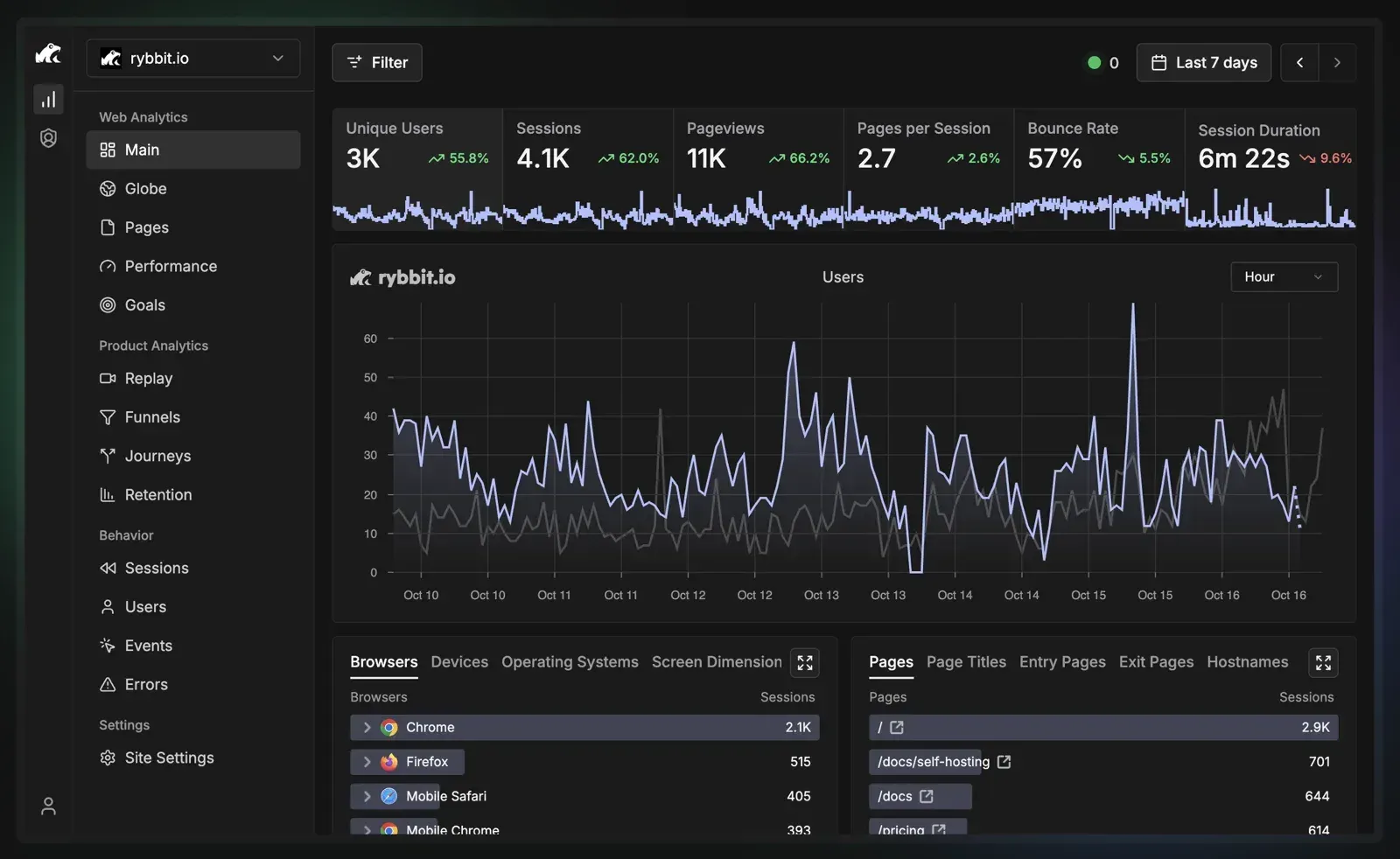
Main web analytics dashboard with key metrics, an hourly chart and browser and page breakdowns. Screenshot from the Rybbit README.
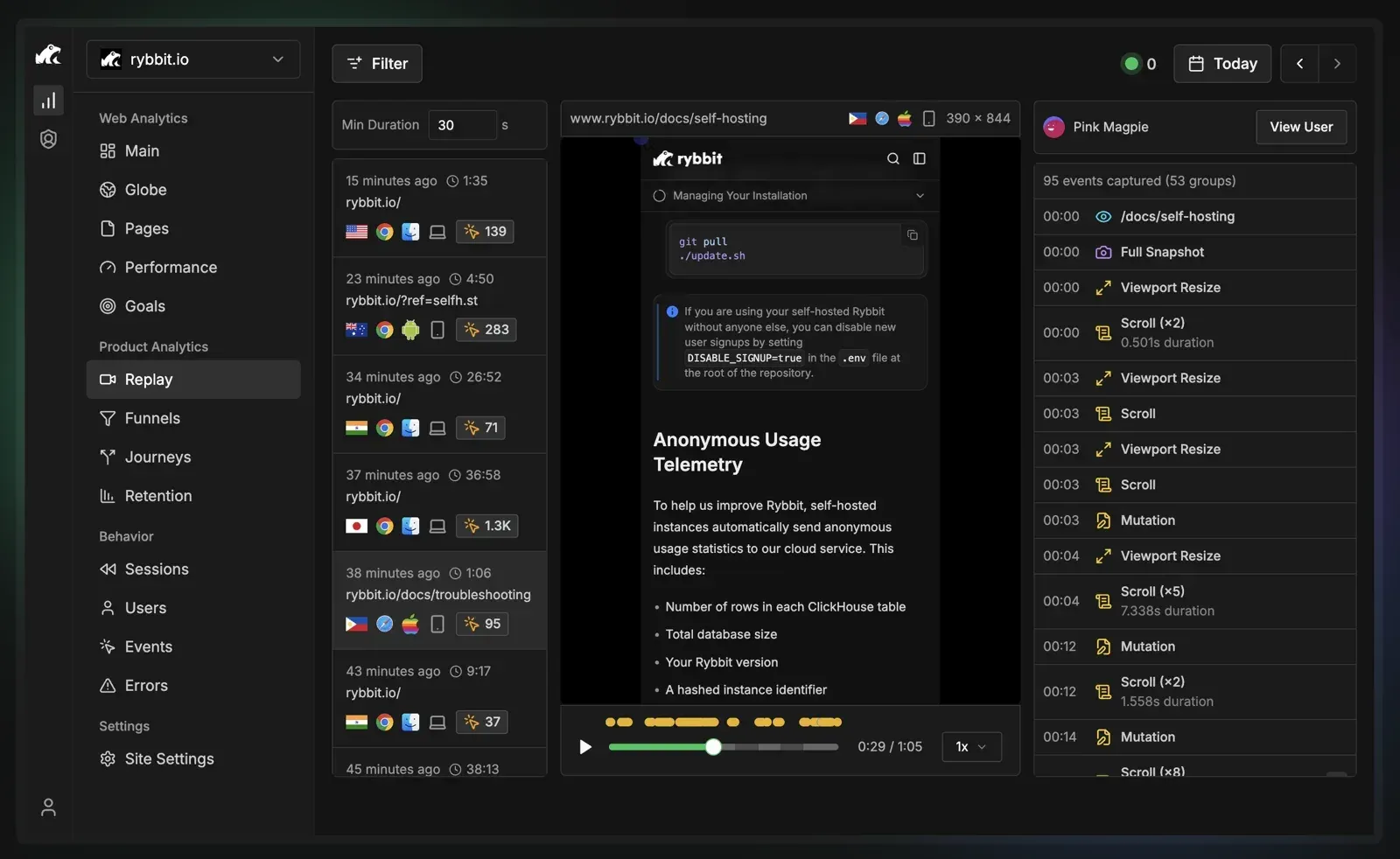
Session replay: recorded sessions on the left, playback in the middle and the captured event timeline on the right. Screenshot from the Rybbit README.
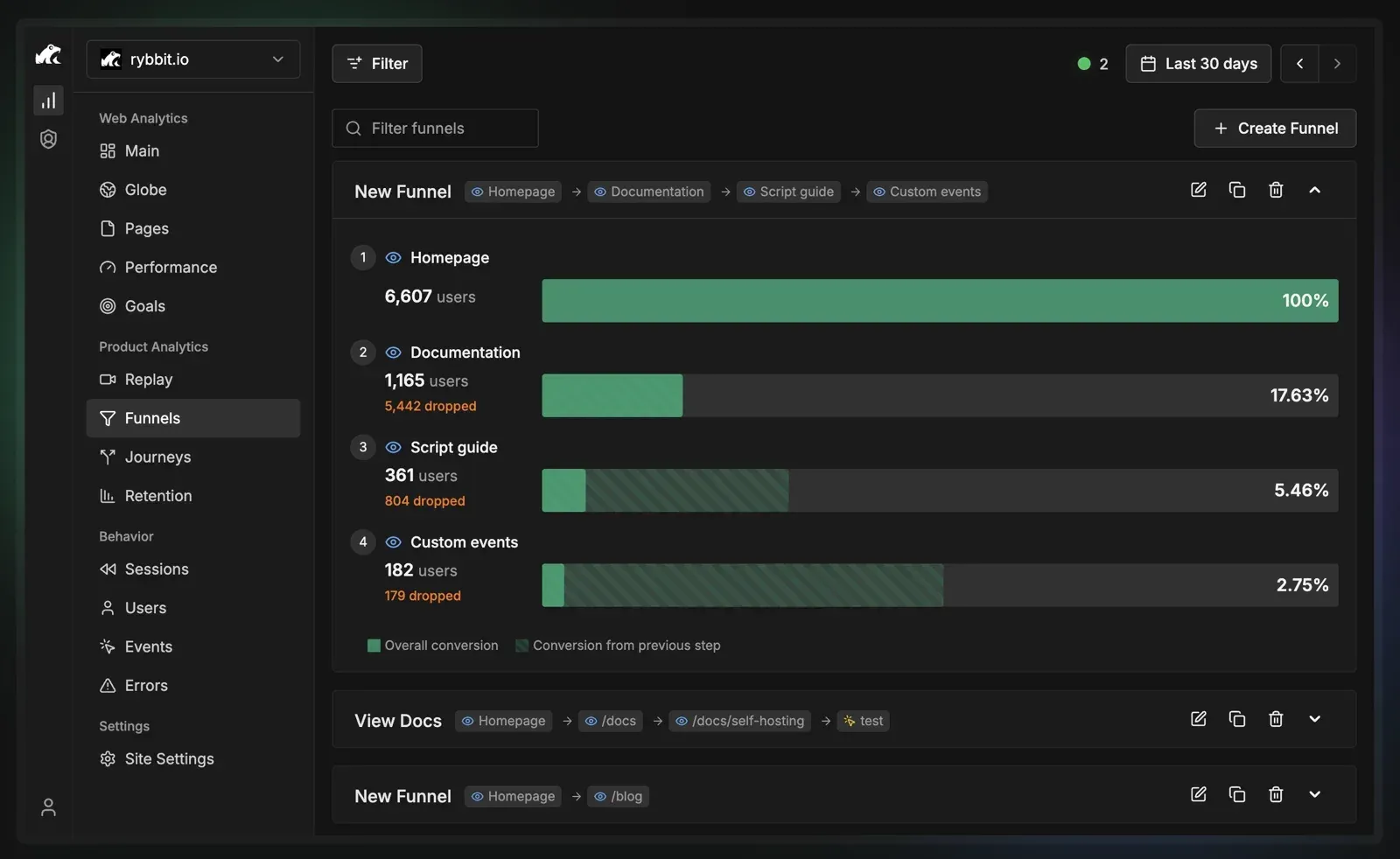
Funnel view with per-step users, dropped users and overall conversion. Screenshot from the Rybbit README.
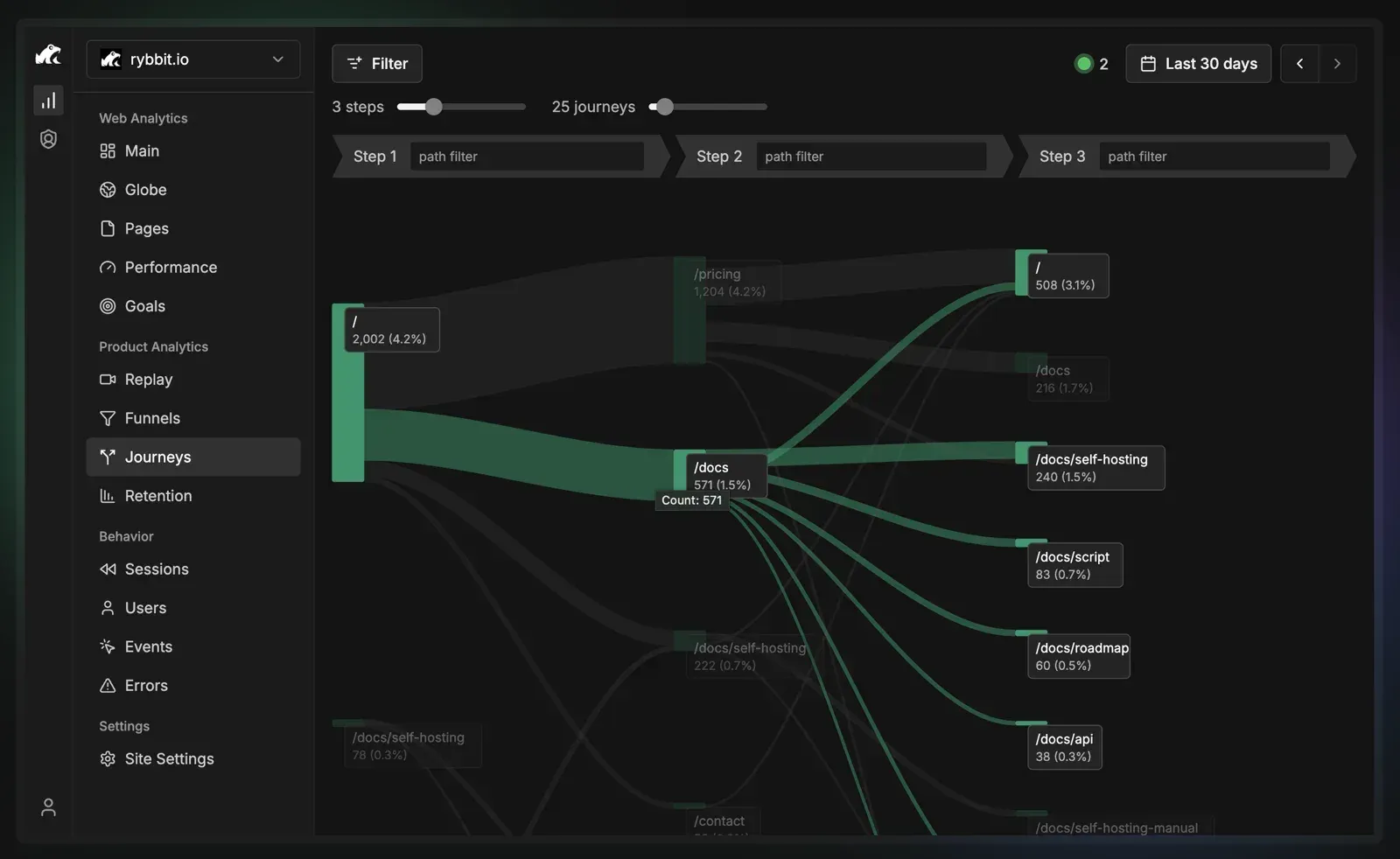
Journeys view showing the paths visitors take over three steps. Screenshot from the Rybbit README.
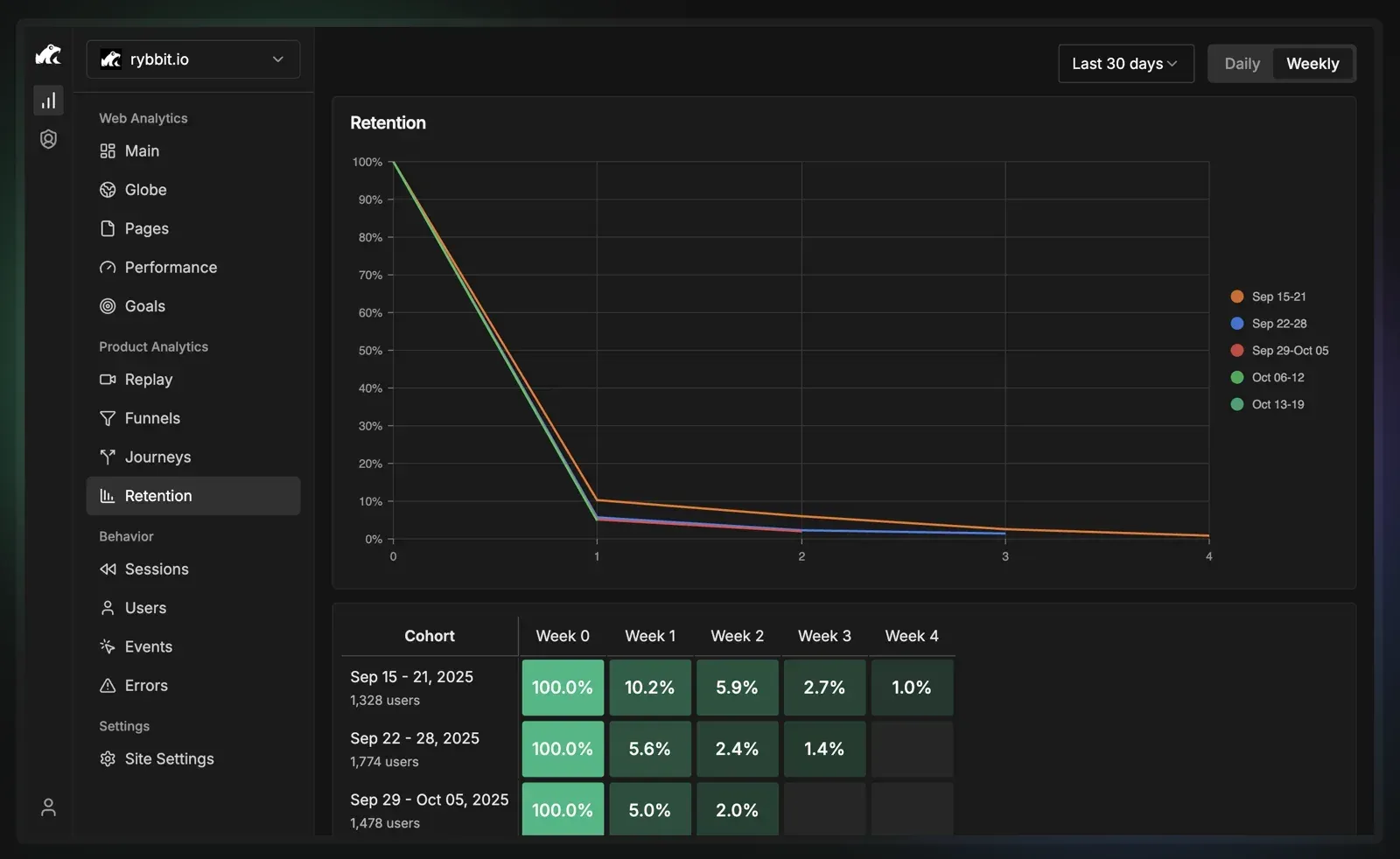
Weekly retention curves and cohort table. Screenshot from the Rybbit README.
Source: official Rybbit project page.
Key capabilities
- Core web analytics The main dashboard shows unique users, sessions, pageviews, pages per session, bounce rate and session duration with a time-series chart, plus breakdowns by browser, device, operating system, screen dimension, pages, page titles, entry and exit pages and hostnames. A real-time counter shows current visitors, and since v2.8.0 it counts people rather than active sessions.
- Cookieless tracking as stated by the project The website FAQ states that Rybbit does not use cookies or collect personal data that could identify users, that user IDs are salted daily, and that a cookie consent banner is not required. The privacy policy says IP addresses are used only temporarily to derive country and region with a locally hosted MaxMind GeoLite2 database and are never stored.
- Tracking script and npm package A site is added with one script tag that carries its site ID in the URL, or with the @rybbit/js package. Settings such as SPA navigation, query strings, URL fragments, outbound links, button clicks, copy events, form interactions, error tracking, session replay and Web Vitals are fetched from site settings. The script documentation also covers skip and mask patterns for URL paths and a namespace attribute for two scripts on one page.
- Autocapture and custom events The script can capture button clicks, form submits, input changes, copied text, outbound links and JavaScript errors without extra instrumentation. Custom events accept JSON properties. Since v2.8.0, autocaptured events can be used in goals and funnels.
- Session replay Replays record interactions on tracked pages and show a timeline with key events or all events, viewport changes, scrolls and DOM mutations. The script documentation notes that skip and mask patterns apply to events only, and that replay has separate block and mask attributes to keep page content out of recordings. On Rybbit Cloud, replay is part of the Pro plan.
- Funnels, goals and journeys Funnels define ordered page or event steps and show overall conversion and drop-off per step. Goals count page visits or events as conversions, and v2.7.0 added mini conversion charts to goal cards. The Journeys view draws the paths visitors take across a configurable number of steps.
- Retention and user profiles Retention shows weekly or daily cohort tables and curves. The Users view lists visitors with country, channel, browser, OS, device and pageviews; users can be identified from code or from the dashboard, and v2.9.0 added editing of user traits.
- Filtering, segments and annotations The README lists advanced filtering across more than 15 dimensions. Saved segments store named filter sets, and annotations pin notes such as deploys or launches to the overview chart. A rollup page shows every site of an organization together.
- Location and globe views Location tracking works on three levels: country, region and city. The Globe view places sessions on a map with timeline, coordinates, countries and subdivisions modes; a Mapbox token can be passed to the self-hosting setup script to enable 3D map visualizations.
- Errors and Web Vitals Error tracking captures JavaScript errors and unhandled promise rejections and groups them by name. Core Web Vitals (LCP, INP, CLS, FCP, TTFB) are collected from real visits, but the README marks Web Vitals as Cloud only, on paid tiers.
- Bot detection and traffic exclusions Every tracking request passes several detection layers, including user-agent patterns, header heuristics and ASN data, described in the bot detection guide. With Block Bot Traffic on (the default for new sites), detected bots are stored as bot events and do not count toward billable usage. Traffic can also be excluded by path, hostname, user agent, ASN or query parameter.
- Feature flags and experiments The documentation describes boolean, multivariate and remote-config feature flags evaluated in the browser, on a server or both, with flag values attached to analytics events. Experiments build A/B tests on a multivariate flag and a goal, and report conversion rate and lift per variant.
- Stats API A REST API, documented in the API reference and marked as beta, exposes analytics, goals, funnels, errors, bots, annotations and API key management. Credentials are personal or organization API keys; public sites and private link keys can be read without one. An API Playground in the dashboard generates request snippets.
- Hosted MCP server The MCP endpoint at app.rybbit.io/api/mcp, or /api/mcp on a self-hosted BASE_URL, gives an AI assistant read and write access through the same API and permission checks as the dashboard. Clients authenticate with an API key, which can be scoped per resource, or with OAuth in clients that support it, such as Claude Code, Codex, Claude Desktop and opencode.
- Data import The import feature loads history from Umami and Simple Analytics CSV exports and from Plausible ZIP exports. Cloud Standard imports reach back 24 months and Pro 60 months, each subject to monthly event limits; self-hosted installations have no window, quota or concurrency limit.
- Organizations, teams and embeds The README lists support for organizations and an unlimited number of sites; organizations have members, teams and per-site access, and v2.7.0 added moving a site between organizations. Dashboards can be made public or shared through a revocable private link, and embed widgets load under a /widget path.
- Self-hosting with Docker The quick start requires a VPS with at least 2 GB of RAM and a domain with HTTPS; it was tested by the project on Ubuntu 24 LTS x86_64, and ARM servers must be ARMv8.2-A or newer for ClickHouse. After cloning the repository, ./setup.sh with the domain writes a .env file and starts the stack with Caddy. Manual Docker Compose and Nginx guides cover existing reverse proxies, and update.sh pulls new images; IMAGE_TAG pins a release.
- Self-hosted limits and telemetry Self-hosted instances do not send email, so admins create user accounts directly and there is no password reset link. They send anonymous usage statistics (row counts of core ClickHouse tables, database size, version and a hashed instance ID) to the Rybbit cloud unless DISABLE_TELEMETRY=true is set; DISABLE_SIGNUP=true closes public sign-up.
- Rybbit Cloud plans The pricing page starts Standard at 13 USD per month and Pro at 26 USD per month, both billed annually for 100,000 monthly pageviews, with higher pageview tiers priced separately. Standard covers up to 5 websites and 3 team members with 3-year retention; Pro adds unlimited sites and members, session replays, 5-year retention and a 5x API rate limit. Enterprise is priced on request and lists SSO, unlimited retention, a dedicated isolated instance, on-premise installation and whitelabeling.
Where Rybbit fits
Replacing Google Analytics on a website
A site owner creates a site in Rybbit Cloud or on a self-hosted instance, then adds the script tag with the site ID to every page or installs @rybbit/js. The website lists setup guides for WordPress, Shopify, Next.js, Astro, Webflow, Google Tag Manager and other platforms. Pageviews, referrers, UTM campaigns, devices and locations then appear on the main dashboard, and earlier history can be imported from Umami, Simple Analytics or Plausible.
Measuring conversion paths
Product teams define goals for a signup page or a custom event, build funnels from page and event steps, and inspect journeys to see which routes reach the goal. Since v2.8.0 autocaptured clicks and form events can be used as goal and funnel steps, and goal cards show conversions over time. Retention cohorts show how many users come back in the following days or weeks.
Investigating user behavior and errors
The Sessions and Users views list individual visits with their event timeline, and session replay shows the recorded interaction for a session. Error tracking lists JavaScript errors by name with their occurrences over time. The live demo on demo.rybbit.com shows these views on the project's own site.
Running analytics on your own server
An operator points a domain at a VPS, installs Docker Engine, clones the repository and runs ./setup.sh, which starts ClickHouse, PostgreSQL, Redis, the backend, the client and Caddy. Updates are applied with ./update.sh, and the image tag can pin a specific release such as v2.9.2. The installation management guide documents the helper scripts, sign-up and telemetry switches.
Filtering bots and unwanted traffic
Each site has a Block Bot Traffic setting that keeps detected crawlers, AI agents and headless browsers out of normal analytics and stores them as bot events instead. Additional exclusions remove traffic by path, hostname, user agent, ASN or query parameter, and v2.9.0 added detection of paced distributed crawlers and per-site traffic floods.
Querying analytics from scripts and AI assistants
Developers create personal or organization API keys and call the Stats API for reports such as weekly digests or funnel drop-off, as shown in the API guides. The hosted MCP server exposes the same data and management actions to AI clients, with scoped keys limiting which resources a client can read or change.
Reviews of Rybbit
Be the first to share your experience with Rybbit.
Write a review
Loading review form…
Alternatives to Rybbit
 UmamiUmami is an MIT-licensed web and product analytics platform: a small cookieless tracker feeds traffic, events, funnels, retention, revenue, session replay and heatmap reports. Self-host it with Node.js and PostgreSQL or use Umami Cloud.
 OpenPanelOpenPanel combines web traffic metrics with product analytics: funnels, retention, profiles, session replay, revenue and AI call tracking. It is AGPL-3.0, cookieless by default and runs in an EU cloud or on your own Docker server.
 PostHogProduct analytics platform with session replay, feature flags, experiments, surveys, error tracking, logs, a data warehouse, AI observability and an MCP server. Use PostHog Cloud in the US or EU, or self-host with Docker.