

What is Replayowl?
Replayowl is an open-source session recording and replay tool for websites. A small recorder script runs in the visitor's browser, a collector stores what it sends, and a dashboard lets a signed-in administrator search sessions and play them back so they look like what the visitor saw. The project lives in the replayowl/replayowl repository and is published under the GNU Affero General Public License v3.0 (AGPL-3.0-only); the README names oss@replayowl.com for commercial licensing without the AGPL terms.
There are two ways to run it. The same code is offered as a hosted service at app.replayowl.com, with a free plan, and as software you deploy yourself. Self-hosting targets one Cloudflare Worker with static assets, an S3-compatible bucket for recordings (Cloudflare R2, AWS S3, MinIO, RustFS, Aliyun OSS and others) and a Cloudflare D1 or Postgres database for session summaries and search. It also runs as a Node 24 process or as the replayowl/replayowl Docker image against Postgres. The documentation walks through each deployment.
The stack is TypeScript. The recorder is described as about 21 KB minified and about 8 KB gzipped, with no runtime dependencies; the website quotes 7.8 KB gzipped. The server depends on aws4fetch and, for Postgres, on pg. Replay is rebuilt in the viewer's browser: the dashboard downloads the stored batches directly from the bucket and reconstructs the page, so the server does little work per replay.
The current release is v0.1.0, published on October 15, 2026 as the first public release. It covers the recorder, the player, search, admin password and OAuth 2.0 / OpenID Connect sign-in, Cloudflare Workers and Node deployments, and masking controls. The repository has had further commits since that tag, so check the repository for unreleased changes. The project is young: it has one tagged release and a short public history.
Replayowl records a website's pages. It does not record native mobile apps, the contents of iframes or canvas elements, or closed shadow roots, and it does not capture network request bodies, cookies or local storage. It is session replay rather than a general web analytics suite, so funnels, dashboards and event analytics are outside its scope. The documented limitations list the remaining gaps.
Replayowl screenshots
Explore the interface. Open a screenshot to view it at full size.
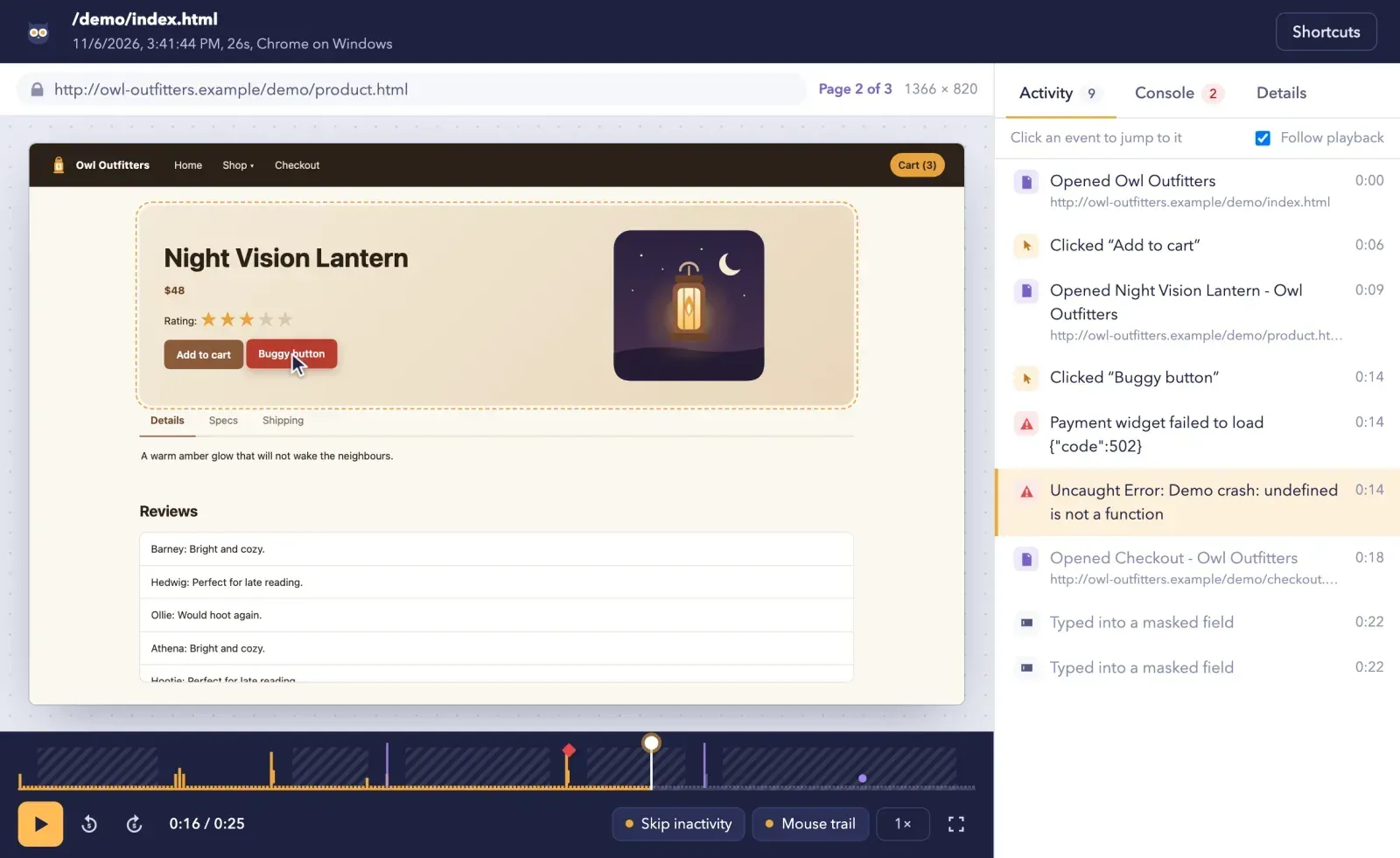
Official project screenshot of the replay view for a recorded demo shop session, with the activity list, console count and timeline markers.
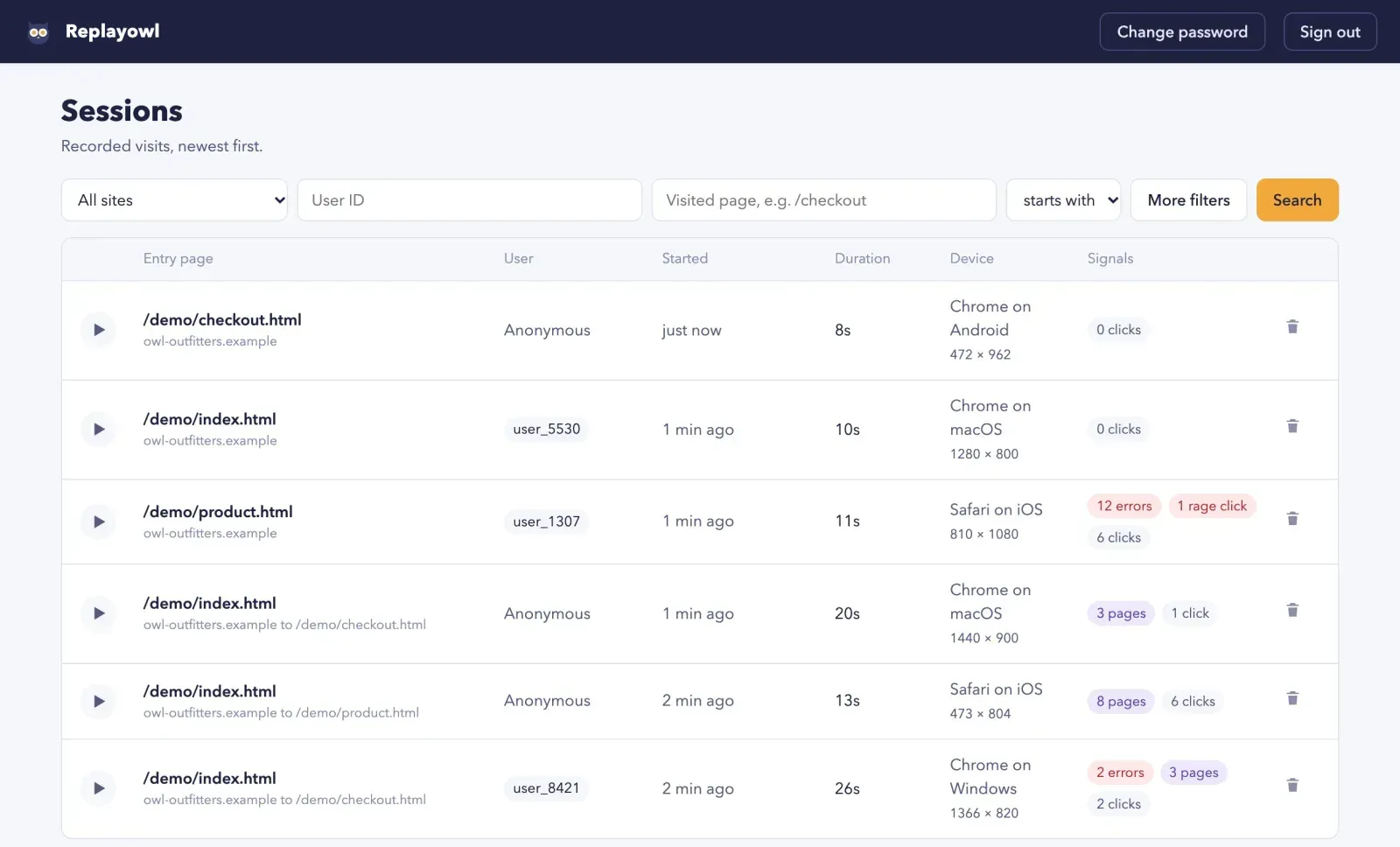
Official project screenshot of the session list showing demo data with search filters and signal badges.
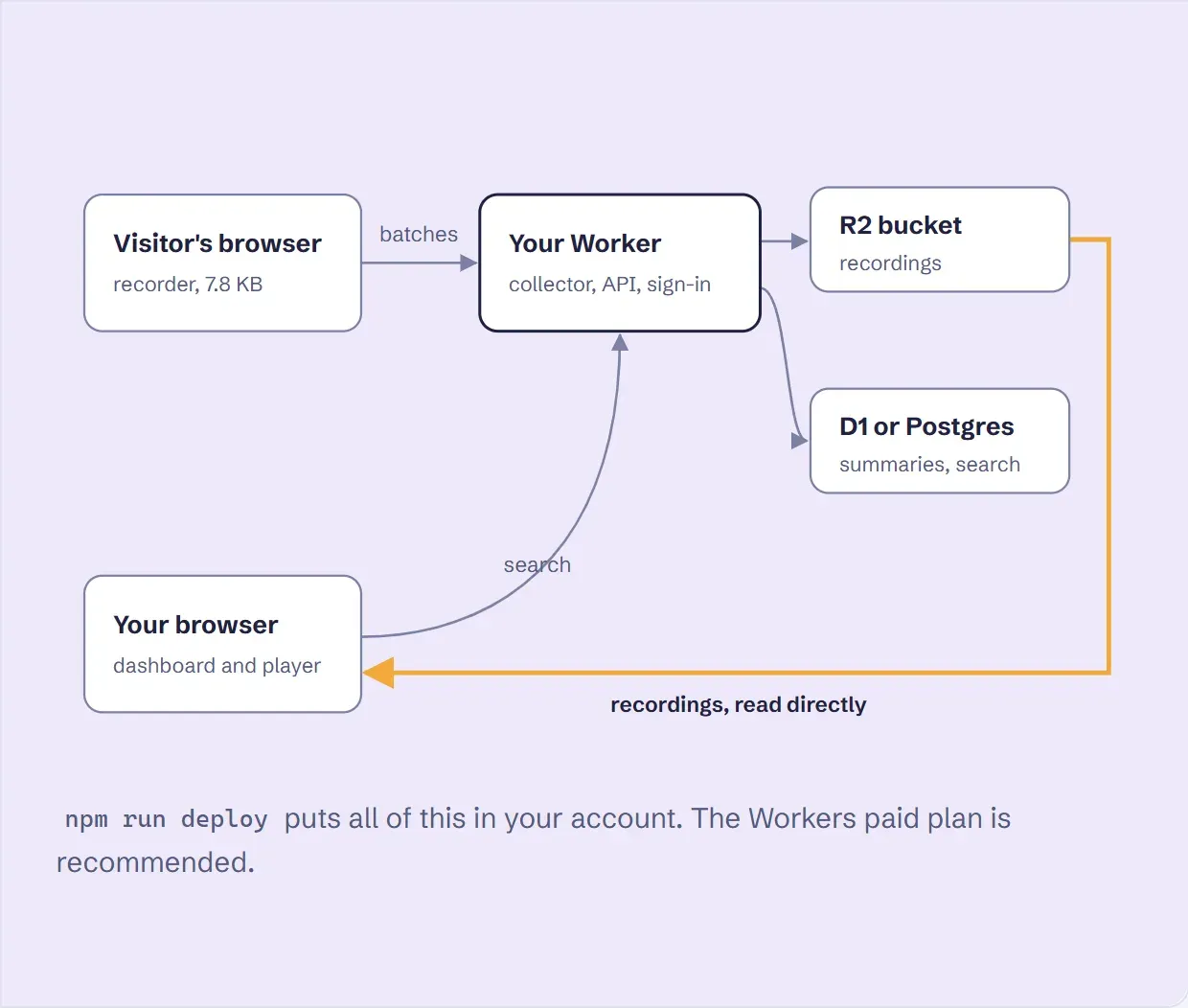
Official architecture figure from the Replayowl website: batches go to the Worker, recordings to R2 and summaries to D1 or Postgres, and the player reads recordings directly.
Source: official Replayowl project page.
Key capabilities
- Recorder script for any site Add one script tag with a data-endpoint attribute, or call ReplayOwl.start with an endpoint option. The recorder has no dependencies and works with any framework or none. It uploads an initial snapshot immediately, then a batch every 4 seconds, gzipped above 2 KB, and flushes the rest with keepalive when the page is hidden or closed. See Add the recorder.
- Faithful DOM replay Recording starts with a full DOM snapshot and continues with incremental mutations that use stable numeric node ids instead of CSS selectors. Same-origin and CORS-enabled stylesheets are inlined, CSS-in-JS rules written only to the CSSOM are read, and adoptedStyleSheets and open shadow roots are captured. Images, fonts and non-CORS stylesheets still load from the original site, so they can change or disappear later.
- Hover, focus and active states The player rewrites :hover, :focus, :focus-visible, :focus-within and :active rules into attribute selectors driven by the replay cursor. Pure CSS dropdown menus and button hover effects therefore reproduce during playback instead of showing the page in a static state.
- Smooth, flicker-free playback The cursor is sampled every 40 ms and interpolated with Catmull-Rom curves, scrolling is interpolated between samples, and two iframes are double-buffered for seeking. The project reports 3 to 7 ms per seek on a 5,700-node page, and an optional amber trail shows the last 0.6 seconds of movement.
- Idle skipping and timeline Stretches of 3 seconds or more without user activity are hatched on the timeline and fast-forwarded in about one second. The timeline marks clicks, rage clicks, inputs, errors and page changes, and hovering shows the event time and description. Keyboard shortcuts cover play, seek, event stepping, speed from 0.5x to 8x, idle skipping, trail and fullscreen.
- Console errors with stack traces Console errors and warnings, uncaught exceptions and unhandled promise rejections are recorded with stack traces and appear in a Console panel and as markers on the timeline. The captureLogs option turns this off. Network requests and their bodies are not recorded.
- Rage click detection Bursts of clicks on the same spot are flagged and can be searched with the rage filter. The README notes that a burst split across keepalive uploads at page unload may be missed, so treat counts as a triage signal rather than an exact metric.
- Session search and shareable filters The dashboard and the GET /api/sessions endpoint filter by site, user ID, visited URL (prefix, exact or contains), start time range, duration, minimum page views, errors, rage clicks and device. Filters combine with AND, use keyset pagination (default 30, maximum 100) and live in the query string, so a search can be bookmarked. See Finding sessions.
- User identification Pass your own account id with the data-user-id attribute, ReplayOwl.start({ userId }) or ReplayOwl.identify(userId). An id is 1 to 128 characters, a session keeps at most five distinct ids, and the whole session is attributed to the user, including the part recorded before identify was called.
- Multi-page sessions Page loads in the same tab within 30 minutes are merged into one session with no length limit, and the address bar in the player shows the page being replayed and its number. The sessionTimeoutMin option changes the idle timeout. A sidebar activity list follows playback and jumps to a clicked event.
- Masking in the browser Text inputs, email addresses and runs of 12 to 19 digits are masked before upload. Attributes data-ro-mask, data-ro-unmask and data-ro-block give per-element control, and password fields, autocomplete cc-* fields and fields named like password, cvv or iban are never unmasked. Masking keeps word lengths so the layout holds. See Masking and privacy.
- Admin password and OAuth sign-in The dashboard has one admin account. It is protected by a PBKDF2-SHA256 password (100,000 iterations) or by OAuth 2.0 / OpenID Connect with PKCE, using providers such as Google, Microsoft Entra ID, Okta, Auth0, Keycloak or GitHub. OAuth requires an OAUTH_ALLOW list of emails, domains or account ids; when OAuth is configured, password sign-in is refused. A SETUP_TOKEN variable stops a stranger from claiming a fresh deployment.
- Deploy to Cloudflare Workers Create an S3-compatible bucket, edit wrangler.jsonc vars, add a D1 or Hyperdrive binding, store secrets with wrangler and run npm run deploy. The Workers paid plan is recommended because the free plan's 10 ms CPU limit can be too tight for large first snapshots and password hashing. Details are in the Cloudflare guide.
- Docker and Node deployment Docker compose up -d builds the image and starts it with Postgres at http://127.0.0.1:8790, and the image can run alone against an existing Postgres. The Node server needs Node 24 or later and a Postgres database; recordings go to local files under DATA_DIR or to S3. A public domain is required for real traffic because browsers block public pages from posting to local addresses. See Run with Docker.
- Storage layout and HTTP API Each uploaded batch is one gzipped object under sessions/<session>/parts in the bucket, while sessions, pages, users and batches are rows in D1 or Postgres. Documented endpoints include POST /api/ingest, the session list and detail routes, and sign-in routes. The player can be embedded on its own with createPlayer. See the HTTP API reference.
- Hosted plans The hosted service lists a Free plan with 1,000 sessions a month kept for 30 days, Pro at 29 USD a month with 10,000 sessions kept for 90 days, and Business at 149 USD a month with 100,000 sessions kept for 365 days. Pro and Business projects can record into your own S3 bucket. The pricing page states that every plan has the full replay feature set.
- Multiple projects and sites A self-hosted instance records one project named default, and a site dropdown in the dashboard lists the hosts it has recorded so one deployment can watch several sites one at a time. The server building blocks also support hosts with many projects, each with its own storage prefix. The README documents this for people embedding Replayowl in a larger service.
Where Replayowl fits
Reproducing a customer bug report
Ask for the account id, search for it in the dashboard, and open the visit the report refers to. Use the Console tab and the error markers on the timeline to see what failed and the activity list to see which click preceded it. This works only if the site passes user ids with identify or data-user-id, so add that call at sign-in before you need it.
Finding friction on a checkout or sign-up flow
Filter by visited page such as /checkout together with the rage click or errors filters and sort through the newest sessions. Watch a handful in full before deciding on a change. Check that the replay shows the step users abandoned, and remember that masked fields hide what people typed.
Running session replay without sending visitor data to a vendor
Deploy the Worker or the Docker image in your own account, point the recorder at your own domain and keep recordings in a bucket you control. Confirm in your browser network panel that batches go only to your collector. Decide the bucket retention policy yourself: self-hosted recordings are kept until you delete them.
Tuning masking for a site with sensitive data
Start from the defaults, then add data-ro-mask to account pages, data-ro-block to signature or canvas widgets and review several replays for leaked text. Turn on the maskAllText option for pages that show personal records. If consent is required, leave out data-endpoint and call ReplayOwl.start only after the visitor agrees.
Trying the hosted free plan before committing to self-hosting
The hosted service offers 1,000 sessions a month on a free plan with no card, and the documentation says the same open source code runs in both places. Use it to judge whether the replay quality fits your site, then move to a self-hosted deployment if recordings must never reach a third party.
Operating a production deployment
Set SETUP_TOKEN before the first visit, restrict the S3 access key to the one bucket, configure OAUTH_ALLOW if you use SSO and plan storage growth, since a long session produces hundreds of small objects. Read the upgrade notes before each update and test on a copy, because the README warns that an earlier upgrade moved the admin password into the database.
Install
docker run -d -p 8790:8790 -v replayowl-data:/data -e DATABASE_URL=postgres://user:pass@host:5432/replayowl replayowl/replayowl:latestReviews of Replayowl
Be the first to share your experience with Replayowl.
Write a review
Loading review form…
Alternatives to Replayowl
 PostHogProduct analytics platform with session replay, feature flags, experiments, surveys, error tracking, logs, a data warehouse, AI observability and an MCP server. Use PostHog Cloud in the US or EU, or self-host with Docker.
 OpenPanelOpenPanel combines web traffic metrics with product analytics: funnels, retention, profiles, session replay, revenue and AI call tracking. It is AGPL-3.0, cookieless by default and runs in an EU cloud or on your own Docker server.
 UmamiUmami is an MIT-licensed web and product analytics platform: a small cookieless tracker feeds traffic, events, funnels, retention, revenue, session replay and heatmap reports. Self-host it with Node.js and PostgreSQL or use Umami Cloud.