

What is Kaliko CMS?
Kaliko CMS is an open-source content management system for the ASP.NET platform, published by Kaliko on kaliko.com, the same site that hosts the Kaliko .NET Image Library and Smart Include projects. It is a framework that is added to an ASP.NET web application, not a standalone hosted product. Developers declare page types as C# classes, render them with ASP.NET MVC or WebForms templates, and editors maintain the content in a browser-based administration interface that is served under /Admin/ by default. The project site describes the range of intended uses as anything from a complete website to a single campaign page whose content needs to be editable.
The CMS is distributed as a set of NuGet packages. KalikoCMS.Core is combined with either the WebForms or the MVC provider and with a data provider for SQLite or Microsoft SQL Server. Optional packages add Lucene.Net based search (KalikoCMS.Search), ASP.NET Identity based user and role management (KalikoCMS.Identity) and a JSON content API (KalikoCMS.Headless). The README lists ASP.NET 4.5 or later and a supported database as requirements. The data layer is built on Telerik Data Access, which is why the supported databases page names SQL Server, SQL Azure, Oracle, MySQL, MariaDB, PostgreSQL, Firebird and others, with the note that not all of them have been fully tested.
The latest GitHub release is Version 1.2.5, published on May 29, 2019. It fixed the file option in link properties, the content type of MVC action results, relative image paths in the HTML editor, sort settings for the site root and the reopening of image and link dialogs in the administration interface. It also updated jsTree, added password validation when an administrator edits a user and introduced an optional enableSessions setting for session state in MVC. Version 1.2.4 (October 8, 2018) added the headless content API, an option to name the connection string and the removal of the client-side upload size limit.
Activity status as of November 16, 2026: the KalikoCMS.Core repository is not archived, but its master branch has had no commits since the 1.2.5 release on May 29, 2019. A 1.2.6-dev branch received its last commit on January 18, 2020, the same day a 1.2.6-beta1 prerelease appeared on NuGet; later activity consists of automated dependency update branches from December 2022. The kaliko.com website is still online, and its newest Kaliko CMS news item is the 1.2.5 announcement. The roadmap page describes a rewritten next generation with .NET Core support, content blocks, multi-language and multi-site support and on-page editing; the separate KalikoCMS.NextGen repository describes itself as work in progress and has had no commits since April 3, 2018.
Kaliko CMS is licensed under the GNU Lesser General Public License version 3. Bundled third-party components keep their own licenses, among them MySQL Connector (GPLv2), Telerik Data Access (Telerik license), TinyMCE (LGPL 2.1), Lucene.Net (Apache 2.0) and several MIT-licensed JavaScript libraries. There is no hosted edition and no paid plan. The concept documentation states that multi-language content is not implemented in the 1.2 line, and the packages target the classic ASP.NET stack on .NET Framework rather than ASP.NET Core. Other content management systems listed on iThub include Strapi, Payload CMS and Directus.
Key capabilities
- Page types defined in C# A page type is a class that inherits
CmsPageand carries aPageTypeattribute with an internal name, a display name and a template path. The core installation ships without any page types, so the site structure is defined entirely in code. The documentation notes that the internal name must not change once the type is in use, and theAllowedTypesparameter limits which page types editors can create below a given page. - Built-in property types Content fields are virtual properties decorated with a
Propertyattribute. The core includes BooleanProperty, DateTimeProperty, FileProperty, HtmlProperty, ImageProperty (with optional width and height restrictions), LinkProperty, MarkdownProperty, NumericProperty, PageLinkProperty, StringProperty, TagProperty, TextProperty and UniversalDateTime. Storage is handled by the CMS, so adding properties does not require database schema changes. Since 1.2.0 properties recognise the standard[Required]attribute and can be grouped into tabs. - Collection and composite properties CollectionProperty holds an unlimited number of instances of another property type, such as a list of quotes, links or images. A composite property type combines existing types, for example a heading, an HTML block and a link, and the CMS assembles the matching editor automatically. Used together, they cover repeating structures such as start page sliders without writing a custom editor.
- Selector property Added in 1.2.0,
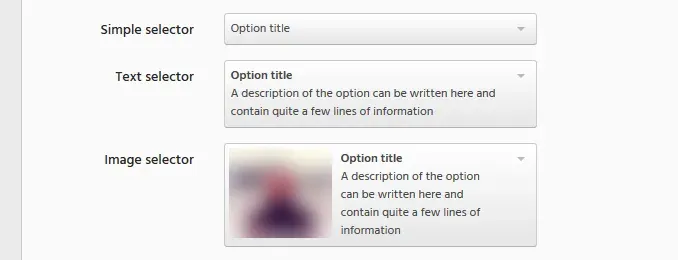
SelectorProperty<T>lets editors pick from options supplied in code by aSelectorFactory<T>. Options can be shown with a title, a title and description, or a title, description and image, and the value type can be a string, an integer, an enum or another compatible type. The selected value is available typed through theValueproperty. - Custom property types When the built-in types are not enough, developers can write a completely custom property type with its own editor control, registered with a
PropertyTypeattribute and a fixed GUID. The knowledge base walks through both the composite and the fully custom variant. - ASP.NET MVC provider The KalikoCMS.Mvc package maps each page type to a controller that inherits
PageController<T>and implementsIndex(T currentPage). Additional controller actions are routed below the page URL as/url/to/page/action/and receive the current page automatically. Release 1.2.1 added IoC support for MVC controllers, 1.2.3 added HtmlHelper extensions for start page and page URLs, and 1.2.5 added the optionalenableSessionssetting. - WebForms provider The KalikoCMS.WebForms package provides typed page templates (
PageTemplate<T>), master pages (PageMaster) and user control base classes. Templated server controls under thecms:prefix, such as MenuList, handle common tasks like menus and page lists while leaving the HTML output to the developer. The suggested folder layout separates Masters, Pages and Units, but the documentation states it is a guideline, not a requirement. - Browser-based administration interface Editors work in an administration interface built on Bootstrap, jsTree and TinyMCE, reachable at the path set by
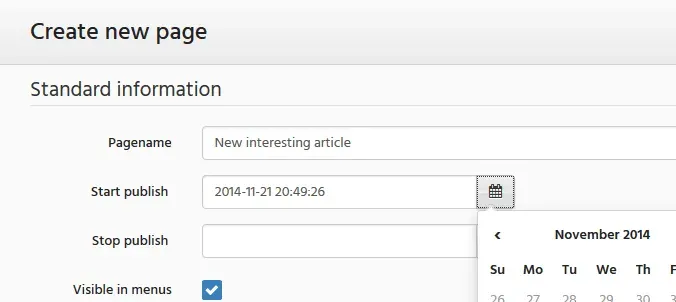
adminPath(default/Admin/). It shows the page tree, standard fields such as page name, start and stop publish dates and menu visibility, and the page type properties. Release 1.2.0 updated TinyMCE to 4.3.8, improved the Markdown editor and added drag and drop image embedding in the HTML editor. - Site settings Site-wide values that do not belong to a single page are declared in a class that inherits
CmsSiteand carries theSiteSettingsattribute, which also sets sort order and allowed page types at root level. Code reads them throughSiteFactory.CurrentSite<T>(). Only one site settings class is allowed per project. - PageFactory API
KalikoCMS.PageFactoryis the central class for reading content: it fetches single pages, children, ancestors and descendants with optional predicates, and exposes events such as page saved and, since 1.2.1, PageMoved. Deleting a page through the API only flags it as deleted in the database, and the documentation describes how a flagged page can be restored. - Page extenders for external data A page type that implements
IPageExtendertakes over every URL below its own path, so a page at/products/can resolve/products/my-product-id-1234/against an external product database. The page type decides whether the extra path is valid; invalid paths are treated as missing pages. - Data store for serializable objects Besides structured page properties, any serializable object can be stored in a data store. Each page has its own PageDataStore, and shared stores are obtained with
DataStoreManager.GetStoreusing a string key or a GUID. The project site mentions that a NoSQL provider can be used instead of the standard database store. - Database providers NuGet data providers exist for SQLite (KalikoCMS.Data.SQLite) and Microsoft SQL Server (KalikoCMS.Data.SqlServer). Other databases supported by Telerik Data Access, such as MySQL, Oracle, PostgreSQL or Firebird, require adding the driver manually and a connection string named
KalikoCMS; since 1.2.4 the connection string name can be configured. - Search provider model Search is pluggable. The core ships a null provider and KalikoSearch, a Lucene.Net based provider in the KalikoCMS.Search package. Instead of crawling, the CMS notifies the provider whenever a page is saved, and page types opt in by implementing
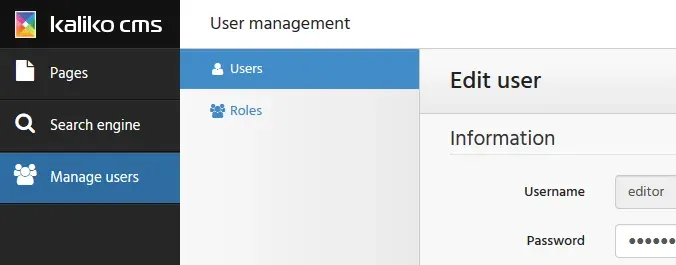
IIndexableand building an index item from selected fields. Existing pages can be indexed in bulk from/Admin/Search/, and extra metadata fields can be added to the index and returned with results. - User and role management The optional KalikoCMS.Identity package implements ASP.NET Identity on the same database as the CMS, whichever supported database is used, and adds user and role screens to the administration interface. Release 1.2.5 added password validation when editing users. A knowledge base article covers authentication with OWIN and Active Directory instead.
- Headless content API Since 1.2.4 the KalikoCMS.Headless package adds a JSON content API under
/contentapi/v1.0/with endpoints for page types, the start page, single pages, children, descendants, parents, ancestors, URL resolution and site properties. Only published pages are returned. The API needs Web API attribute routing, optional CORS configuration, and an installed MVC or WebForms provider so that the CMS can start, even if no server-side rendering is used. - Installation through NuGet The installation guide starts from an empty ASP.NET Web Application project in Visual Studio with WebForms or MVC references, then adds the core, a provider and a data package through the NuGet package manager. Installation updates
web.configwith thesiteSettings,loggersandsiteHostssections, plussearchSettingswhen the search package is installed. - Demo projects The KalikoCMS organization on GitHub publishes DemoSite.Mvc and DemoSite.WebForms, both running on SQLite, and DemoSite.Headless, which pairs a CMS installation with a small React application that reads content through the content API. The README also links two step-by-step articles on CodeProject for the MVC and WebForms variants.
Where Kaliko CMS fits
Building an ASP.NET MVC website with editable pages
The documented MVC path starts with the KalikoCMS.Core, KalikoCMS.Mvc and a data provider package, followed by page type classes for each kind of page. Each page type gets a controller inheriting PageController<T> whose Index action returns a view with the typed page as model, so properties such as headings, preambles and HTML bodies are available with IntelliSense in Razor. Custom actions on the same controller handle forms or other requests below the page URL. The Implement with MVC guide and the DemoSite.Mvc repository show the complete setup.
Building a WebForms website with templated controls
For WebForms, page templates inherit PageTemplate<T> and expose the typed CurrentPage object, while master pages and user controls use their own base classes. Navigation and listings are built with the templated cms: controls, for example a MenuList whose item template writes each page name and URL. The documentation names these provided web controls as one of the main benefits of the WebForms track.
Delivering content to a single-page or mobile application
With KalikoCMS.Headless installed next to an MVC or WebForms provider, editors keep using the normal administration interface while a decoupled client reads published pages over the JSON content API. A client can fetch the start page, walk the page tree through children and ancestors endpoints, or resolve a relative URL with a POST request. The headless guide lists every endpoint, and DemoSite.Headless contains a React client against a sample installation. Traditional rendering and headless delivery can run side by side in the same site.
Adding site search
Search is added by installing KalikoCMS.Search and implementing IIndexable on the page types whose content belongs in the index, typically title, summary, body and a category. Because indexing happens on save, menus and lists are not indexed unless a page type includes them. Queries run through SearchManager.Instance.Search, and other engines such as Solr can be connected by writing a custom search provider.
Publishing data from an external system
Product catalogs or other records that live outside the CMS can be presented under a CMS page by implementing IPageExtender: the page owns its URL path and resolves the extended segments against the external source. Data that changes often or does not fit page properties, such as counters or complex object graphs, can be kept in a page-specific or shared data store instead of the relational tables.
Managing editors and sign-in
Editor accounts and roles are handled by the optional ASP.NET Identity package, which stores users in the CMS database and adds a user management section to the administration interface. Organisations that authenticate against Active Directory can follow the knowledge base guide that configures OWIN cookie authentication with System.DirectoryServices.AccountManagement instead of the Identity package. Other self-hosted CMS listings on iThub include WordPress.
Reviews of Kaliko CMS
Be the first to share your experience with Kaliko CMS.
Write a review
Loading review form…
Found Kaliko CMS useful? Upvote it todayYour vote helps other IT teams find it in the daily ranking.


