

What is PandasAI?
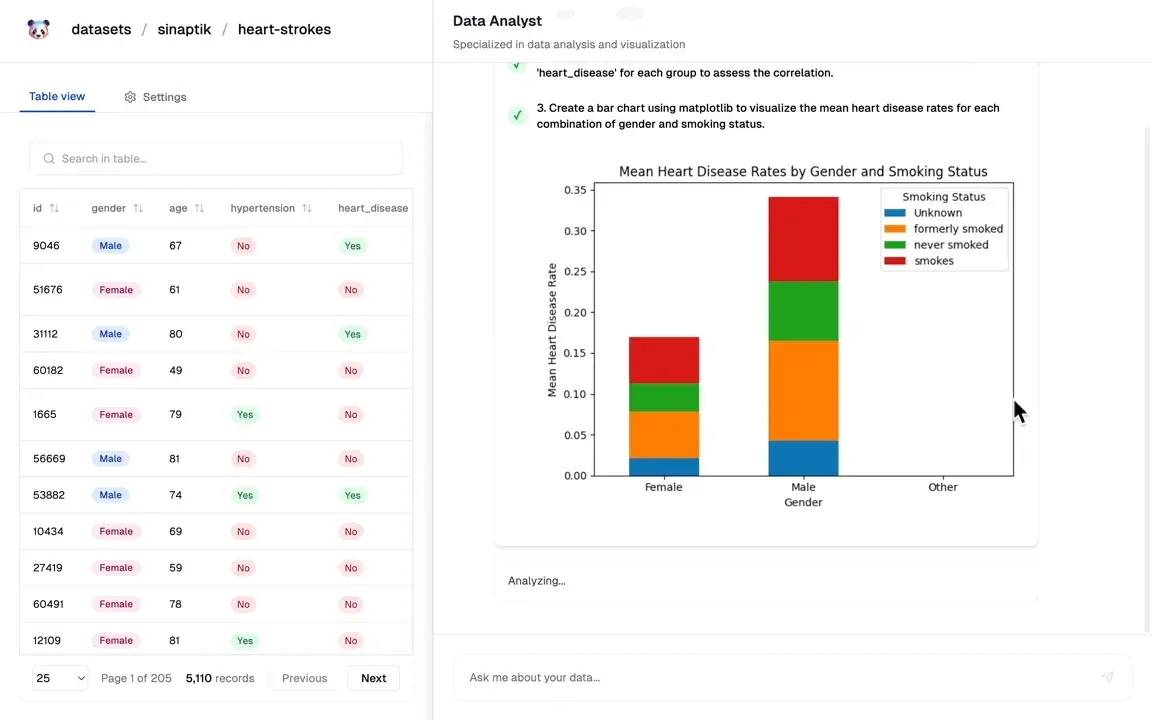
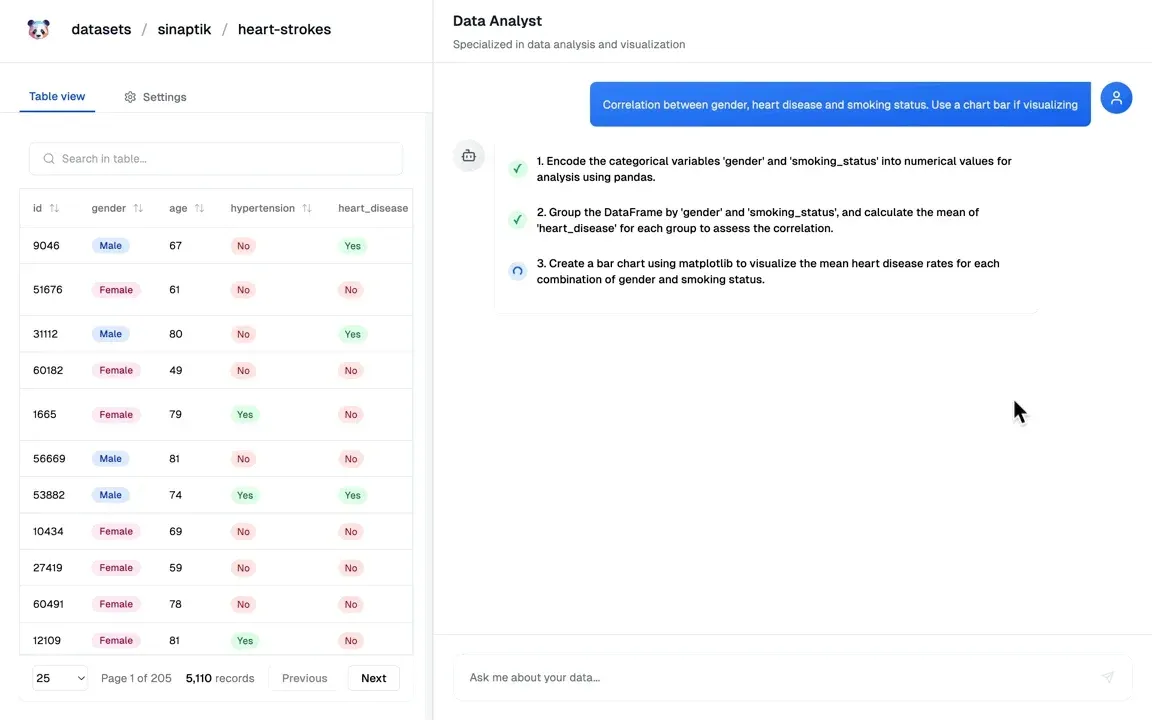
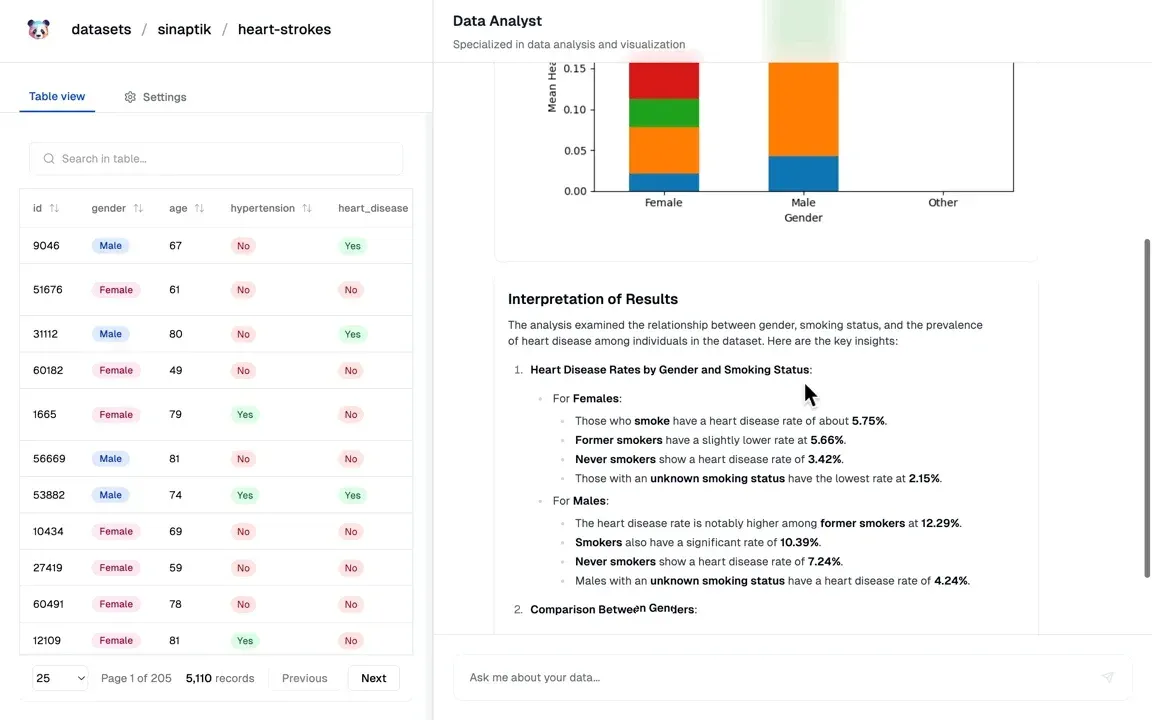
PandasAI is an open-source Python library for asking questions about tabular data in natural language. It is developed by Sinaptik GmbH, a company based in Hohenbrunn near Munich, Germany, according to the imprint linked from pandas-ai.com. A question sent through df.chat() or pai.chat() goes to a configured large language model together with the table headers and 5 to 10 sample rows. The model writes Python or SQL code, PandasAI executes that code locally and returns the result as a string, number, DataFrame or chart. The NL layer documentation describes this flow.
The library is published on PyPI as pandasai and supports Python 3.8 to 3.11 (package metadata: at least 3.8 and below 3.12). Since version 3 the core ships without a built-in model: LLM access comes from separate extension packages, mainly pandasai-litellm and pandasai-openai. The repository contains no server image, desktop app or hosted API; the library runs inside scripts, notebooks and Python applications.
The latest release is PandasAI v3.0.0, published October 7, 2025 and uploaded to PyPI the same day; the last 2.x release is v2.3.2 from July 31, 2025. Version 3 introduces the semantic data layer with YAML schemas, views and transformations, a SQL connector extension, the Docker sandbox, a global configuration and a LiteLLM wrapper. It removes response caching, the BambooLLM backend and remote dataset push and pull; the migration guide lists the breaking changes. The most recent commit on the main branch is dated October 28, 2025.
Licensing is split. The LICENSE file (copyright 2023 Sinaptik GmbH) places all content outside pandasai/ee/ under the MIT (Expat) license and all content under pandasai/ee/ under the PandasAI Enterprise license. The same enterprise text also appears in ee/LICENSE and extensions/ee/LICENSE, which covers the cloud warehouse connectors and vector store extensions. The Enterprise license allows copying and modifying the code for development and testing without a subscription; production use requires agreement to the PandasAI Subscription Terms of Service and a valid Enterprise license for the correct number of user seats, and publishing, distributing or selling the code is not permitted. The Enterprise Features page also lists Skills and vector store training under this license. GitHub reports no single detected license for the repository, while the PyPI metadata of the pandasai package states MIT.
The company website pandas-ai.com now presents Annie, a web-based business intelligence agent that the site FAQ describes as built on top of the PandasAI library. Annie has a free tier with 100 credits, paid plans from €29.99 per month and Enterprise plans from $1,000 per month that include on-premise, private VPC or air-gapped deployment. The library itself collects anonymized usage statistics through Scarf, which the environment variable SCARF_NO_ANALYTICS=true turns off. Other analytics tools with natural-language features in this directory include Hex and Metabase; PandasAI reaches most model providers through LiteLLM, including local models served by Ollama.
Key capabilities
- Install from PyPI The core package installs with
pip install pandasaiorpoetry add pandasai; the installation guide lists Python 3.8 to 3.11 as the supported range. A model extension is needed before the first question, usuallypip install pandasai-litellm. The package also registers apaicommand line entry point. - LLM extensions Pandasai-litellm wraps LiteLLM, which the docs describe as a single interface to more than 100 models from OpenAI, Anthropic, Google, Azure, AWS Bedrock and SageMaker, Mistral, Cohere and Hugging Face. pandasai-openai provides
OpenAIandAzureOpenAIclasses. The chosen model is set once withpai.config.set({"llm": llm})and applies to every dataframe, as described in the LLM setup page. - Chat with a dataframe
pai.read_csv()loads a file into a PandasAI DataFrame anddf.chat("question")answers in natural language.pai.chat()takes several dataframes at once, so a question can combine, for example, an employee table and a salary table. The v3.0.0 release notes also add aread_excelloader for Excel files. - Typed responses Results come back as String, Number, DataFrame, Chart or Error responses, chosen automatically from the analysis. Printing a response shows its
.value;response.last_code_executedreturns the generated code, and chart responses offersave("file.png"). The output formats page documents each type. - Charts Questions such as plotting a histogram per country produce matplotlib charts returned as
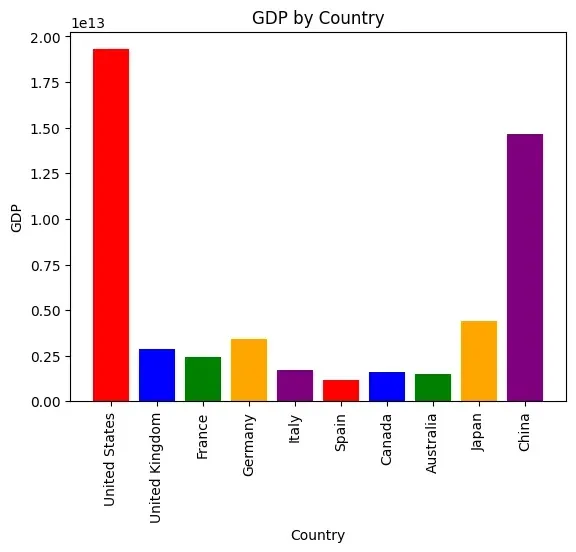
ChartResponseobjects. The migration guide states that version 3 returns charts asChartResponseobjects for manual handling. The README shows a GDP-by-country bar chart as an example result. - Multi-turn Agent
Agentkeeps conversation state across questions, so a second question such as which country has the most deals refers back to the first answer.follow_up()continues a conversation without clearing memory, and the constructor accepts amemory_sizeparameter. The Agent page covers sandboxed use as well. - Configuration and error correction Global settings include
save_logs(default true, written topandasai.log),verbose(default false) andmax_retries(default 3) the maximum number of retries of the error correction framework. Settingtemperatureto 0 and a fixedseedmakes answers more repeatable; the docs state that the seed is not yet supported for Azure OpenAI. - Semantic data layer
pai.create()turns a dataframe or database table into a named dataset with the path formatorganization/dataset, a description and typed, described columns. Aschema.yamlfile is written underdatasets/organization/datasetin the project, andpai.load()reopens it. The documentation labels the semantic layer as experimental and aimed at advanced users. - Transformations Schemas can declare transformations that run when data is loaded: string operations such as lowercase, strip and truncate; numeric ones such as round, scale, clip, normalize and bin; timezone conversion and date formatting; fill_na, replace and remove_duplicates; categorical encoding and value mapping; email and foreign key validation; and
anonymizefor privacy. Transformations can be chained, as listed on the transformations page. - Views Views combine several semantic datasets through declared relations, for example orders to products and orders to customers, and expose a selected set of columns as one queryable dataset. They are defined in YAML or with
pai.create()in Python; columns are mandatory for a view. The views page carries a beta notice. - SQL databases The pandasai-sql extension connects PostgreSQL, MySQL, CockroachDB and Microsoft SQL Server, installed with extras such as
pip install pandasai-sql[postgres]. Connection settings accept environment variable placeholders like${DB_USER}. Version 3 dropped SQLite support from this extension, and the release notes mention validation of generated SQL against malicious queries. - Yahoo Finance connector Pandasai-yfinance loads market data for listed symbols such as GOOG, MSFT and AAPL into a semantic dataset defined in YAML. It is one of the MIT-licensed extensions and does not require an Enterprise license, according to the extension table in the data ingestion docs.
- Enterprise cloud connectors Pandasai-snowflake, pandasai-databricks, pandasai-bigquery and pandasai-oracle read from cloud warehouses into local parquet copies described by a schema with update frequency, ordering and row limits. These packages live under
extensions/eeand require a PandasAI Enterprise license for production use. - Docker sandbox Pandasai-docker runs the generated code in an isolated Docker container instead of the host Python process. The privacy and security page lists isolated execution, offline operation without external network requests, resource limits and file system isolation. Docker must be running;
DockerSandbox()is started and stopped in code and accepts a custom name and Dockerfile. - Skills (Enterprise) Functions decorated with
@pai.skill()are registered globally and become available topai.chat(),SmartDataframeandAgent. The model reads the type hints and docstring to decide when to call a skill, for example a bonus calculation or a currency formatter. Skills sit inpandasai/eeand need an Enterprise license in production. - Agent training with vector stores (Enterprise)
agent.train()stores example questions with the code that answers them, and the agent retrieves them as few-shot examples for later questions. Supported local vector stores include ChromaDB, Qdrant, Pinecone and LanceDB, and the repository also contains a Milvus extension. This feature is listed under the Enterprise license. - Hosted Annie plans Annie on pandas-ai.com is a separate web application from the PandasAI team. The free tier includes 100 credits; Plus (€29.99 per month, 100 credits) adds connectors and SQL databases, Pro (€99.99 per month, 500 credits) adds data lakes such as BigQuery, Databricks and Snowflake. The site marks its list of 30+ integrations as coming soon and states that file support is currently limited to CSV.
- Community and support Questions go to the PandasAI Discord server linked from the README and docs, and the GitHub repository has Discussions enabled. A public roadmap runs on Featurebase. The website names enterprise support options such as a dedicated success manager, custom SLAs and onboarding for Enterprise customers.
Where PandasAI fits
Ad hoc questions about a CSV or Excel file
The quickstart loads a file with pai.read_csv(), configures a model through pandasai-litellm and calls df.chat() with a question such as the average revenue by region. The answer type depends on the question: a count returns a number, a request to show data returns a DataFrame and a plotting request returns a chart. The generated code is available in last_code_executed for review.
Questions across related tables
Several dataframes passed to pai.chat() are sent to the model together, so one question can join them, as in the README example that finds the highest-paid employee from separate employee and salary tables. For longer exchanges the Agent class keeps context, and follow_up() adds questions that refer to earlier answers.
Querying a SQL database through the semantic layer
With pandasai-sql installed for the target engine, pai.create() receives a source block with the database type, host, port, credentials as environment variable placeholders and the table, plus column names, types and descriptions. The resulting dataset is saved under datasets/ and can be reloaded with pai.load(); according to the v3.0.0 release notes, generated SQL is transpiled to the dialect of the source database.
Cleaning and combining data before analysis
A schema file can apply transformations at load time, such as converting timezones, rounding values, filling missing values, standardizing categories or anonymizing email and name columns. Views then join several datasets through declared relations into one dataset that the model can query. The schema reference documents every field of schema.yaml.
Running generated code in an isolated container
For applications where end users type the questions, the PandasAI documentation describes the Docker sandbox as a protection against prompt injection that leads to harmful generated code. The sandbox object is passed to pai.chat(), df.chat() or Agent, and the code then runs offline inside the container. The docs mention additional sandbox options such as custom security policies as part of the Enterprise offering.
Moving a project from version 2 to version 3
The migration guide describes the steps: install pandasai together with an LLM extension, replace per-dataframe LLM settings with a global pai.config.set(), move database access to pandasai-sql and pai.create(), and replace @skill and agent.add_skills() with @pai.skill(). SmartDataframe code from version 2 still works, and separate pages cover backwards compatibility and troubleshooting.
Install
pip install pandasaiReviews of PandasAI
Be the first to share your experience with PandasAI.
Write a review
Loading review form…
Found PandasAI useful? Upvote it todayYour vote helps other IT teams find it in the daily ranking.


