
What is Plandex?
Plandex is an open-source AI coding agent that runs in the terminal. The plandex-ai/plandex repository describes it as a tool that plans and carries out coding tasks spanning many steps and dozens of files, with up to 2M tokens of context handled directly (about 100k per file) and tree-sitter project maps for directories of 20M tokens or more. It is written in Go, published under the MIT license and uses a client-server architecture: a CLI with a REPL on the developer machine, and a server that stores plans, context, version history and model settings. Work on the project started in late 2023; the repository was created in October 2023.
The hosted service has ended. The README hosting table states that Plandex Cloud is winding down as of October 3, 2025 and no longer accepts new users, and the Cloud documentation page carries the same notice. The linked announcement, Plandex Cloud is winding down (October 3, 2025, archived copy), lists the steps: new trials and sign-ups disabled, subscriptions paused without renewal, credit purchases and auto-rebuys disabled, operation for existing customers until November 7, 2025, and shutdown of Plandex Cloud on November 7, 2025. The same post states that Plandex as a company is being wound down because its founder accepted an engineering position at Promptfoo, and that the open-source project remains available on GitHub. The remaining way to run Plandex is the self-hosted or local mode with your own model provider keys.
The latest release is cli/v2.2.1 together with server/v2.2.1, both published on July 16, 2025. Version 2.2.0 (July 1, 2025) added custom models, providers and model packs through a JSON file, more built-in providers and Ollama support; 2.2.1 added the option to use a Claude Pro or Max subscription for Anthropic models and fixed custom model and provider handling. The repository is not archived, but the last commits are dated October 3, 2025 and only update the documentation for the Cloud wind-down; no release has followed 2.2.1.
The CLI ships as tarballs for macOS (amd64, arm64), Linux (amd64, arm64) and FreeBSD (amd64, arm64) on the GitHub releases page, or can be built from source with Go. Windows is supported only inside WSL; the install guide states that it does not work in CMD or PowerShell. The server runs from the Docker image plandexai/plandex-server on Docker Hub, from app/Dockerfile.server or from source, and needs PostgreSQL, a persistent file system and git. Development mode targets a single local user; production mode supports multiple users and orgs and requires SMTP for sign-in pins.
Plandex is a terminal tool with no editor plugin and no desktop or web client, apart from a local browser view for diffs. Model usage is billed by the providers you connect (OpenRouter, OpenAI, Anthropic, Google, Azure, AWS Bedrock, DeepSeek, Perplexity or custom OpenAI-compatible endpoints). Similar terminal agents in this directory: Aider, Codex CLI, OpenCode and Cline.
Key capabilities
- Terminal REPL with chat and tell modes Running
plandexor the aliaspdxin a project directory starts the REPL and creates or resumes the plan for that directory. Chat mode is for questions and discussion without changes; tell mode plans and implements a task. All CLI commands are available inside the REPL with a backslash prefix, files are loaded with@, and\multiswitches to multi-line input. The REPL reference lists flags for mode, autonomy level and model pack at startup. - Five autonomy levels Each plan has an autonomy level: none, basic, plus, semi or full. The levels switch individual behaviours on or off: auto-continue, auto-build, automatic context loading, smart context, automatic context updates, command execution, auto-apply, auto-exec, auto-debug and auto-commit. Basic matches the Plandex v1 behaviour; full applies changes, runs commands and debugs failures without prompting. The level is set with
plandex set-auto, REPL flags such as--semi, or per option withset-config, as described in the autonomy documentation. - Automatic context with project maps Since v2 a new plan generates a tree-sitter project map, and the model uses that map with the prompt to choose which files to load before planning. The README states that map generation and syntax validation cover 30+ languages. Files, directories, directory layouts, URLs, images, notes and piped data can also be loaded manually with
plandex load, and manual context is always included alongside the automatic selection. The context guide notes that URLs, notes and piped data can only be loaded manually. - Smart context window During multi-step implementation, smart context loads only the files relevant to each step, so the context grows and shrinks as the plan proceeds. It is enabled at the plus level and above and can be toggled with
plandex set-config smart-context. Files you change outside Plandex are refreshed automatically before the plan continues at the plus level and above..gitignoreis respected, and a.plandexignorefile adds further exclusions. - Diff review sandbox Changes are not written to project files by default. They accumulate in a version-controlled sandbox, where
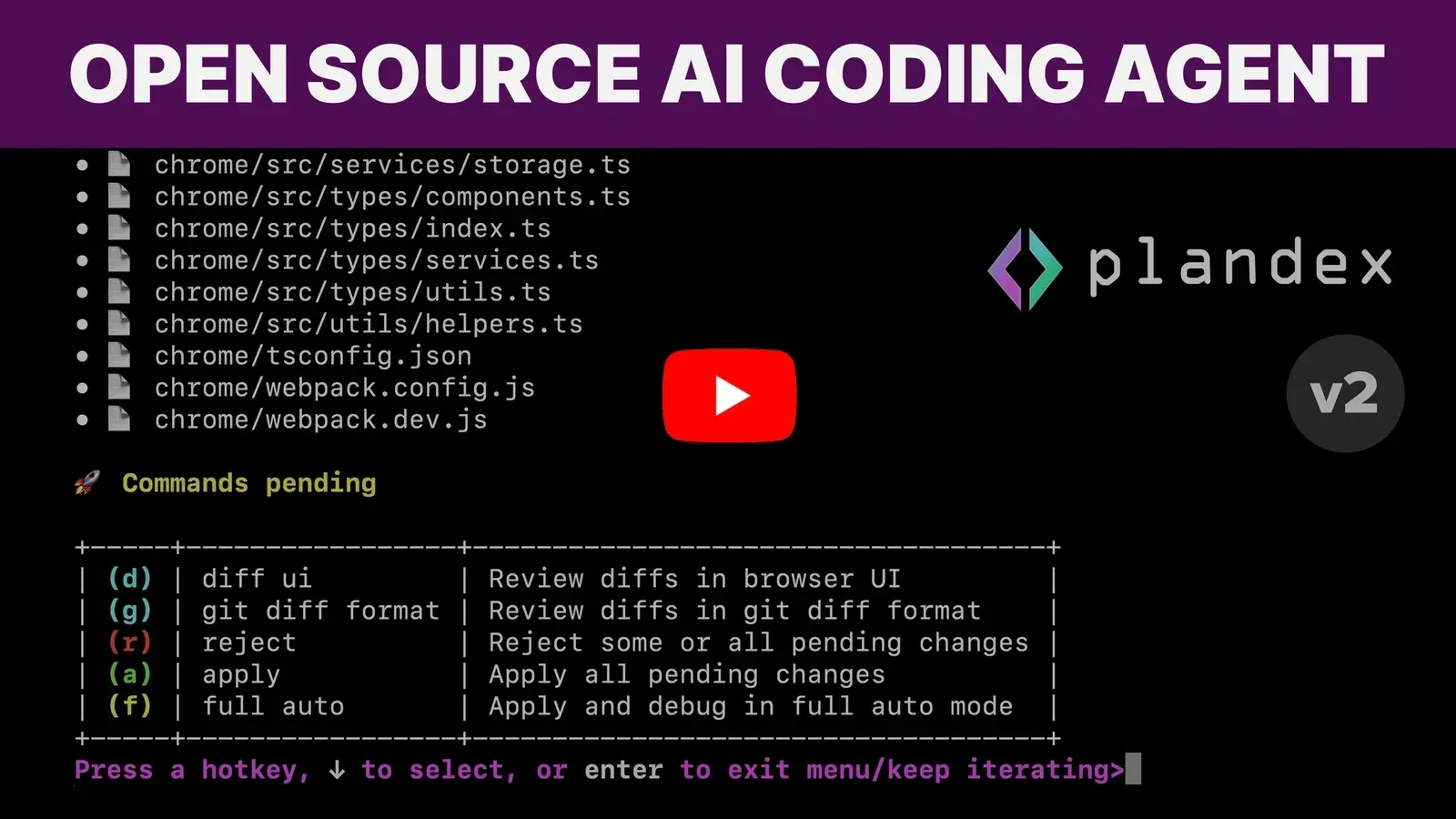
plandex diffshows them in git diff format andplandex diff --uiopens a local browser view with side-by-side or line-by-line layout.plandex rejectdrops changes for selected files or all files, andplandex applywrites the rest to the project. The pending changes page documents the review menu hotkeys. - Command execution with rollback A plan can write commands such as dependency installs, builds, tests or server starts to a special
_apply.shpath; these accumulate in the sandbox like file changes. After apply, commands run with approval or automatically at the full level, and if they fail the applied changes are rolled back. Settingcan-execto false stops Plandex from writing commands at all. Details are in the execution and debugging documentation. - Automated debugging
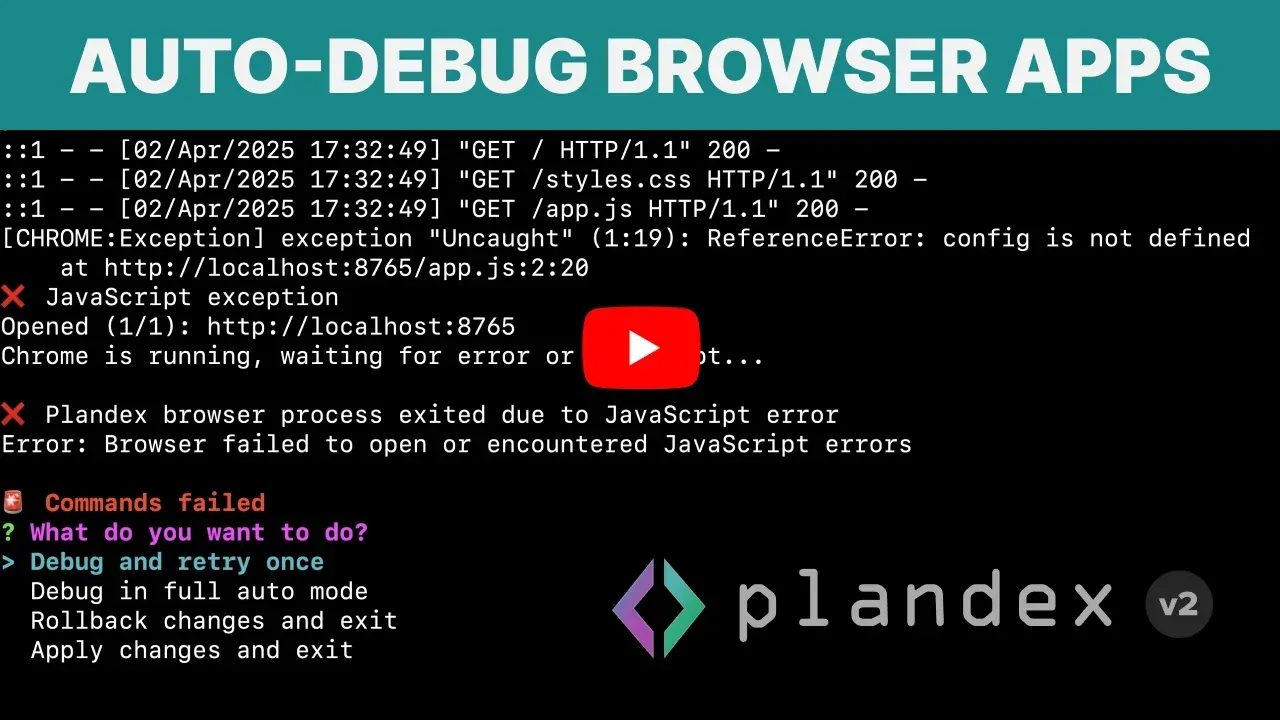
plandex debug 'npm test'runs a command, sends failing output to the model, applies fixes tentatively and repeats until the command succeeds or the retry limit is reached (5 by default, configurable withauto-debug-tries). Successful fixes are committed when auto-commit is on, failed attempts are rolled back. Command output can also be piped intoplandex tellorplandex chatfor a manual loop. When Chrome is installed, Plandex can start it, catch JavaScript errors and read console logs to debug browser applications. - Version history, rewind and branches Prompts, responses, context changes, builds, rejections, applies and model setting changes each create a version in the plan history.
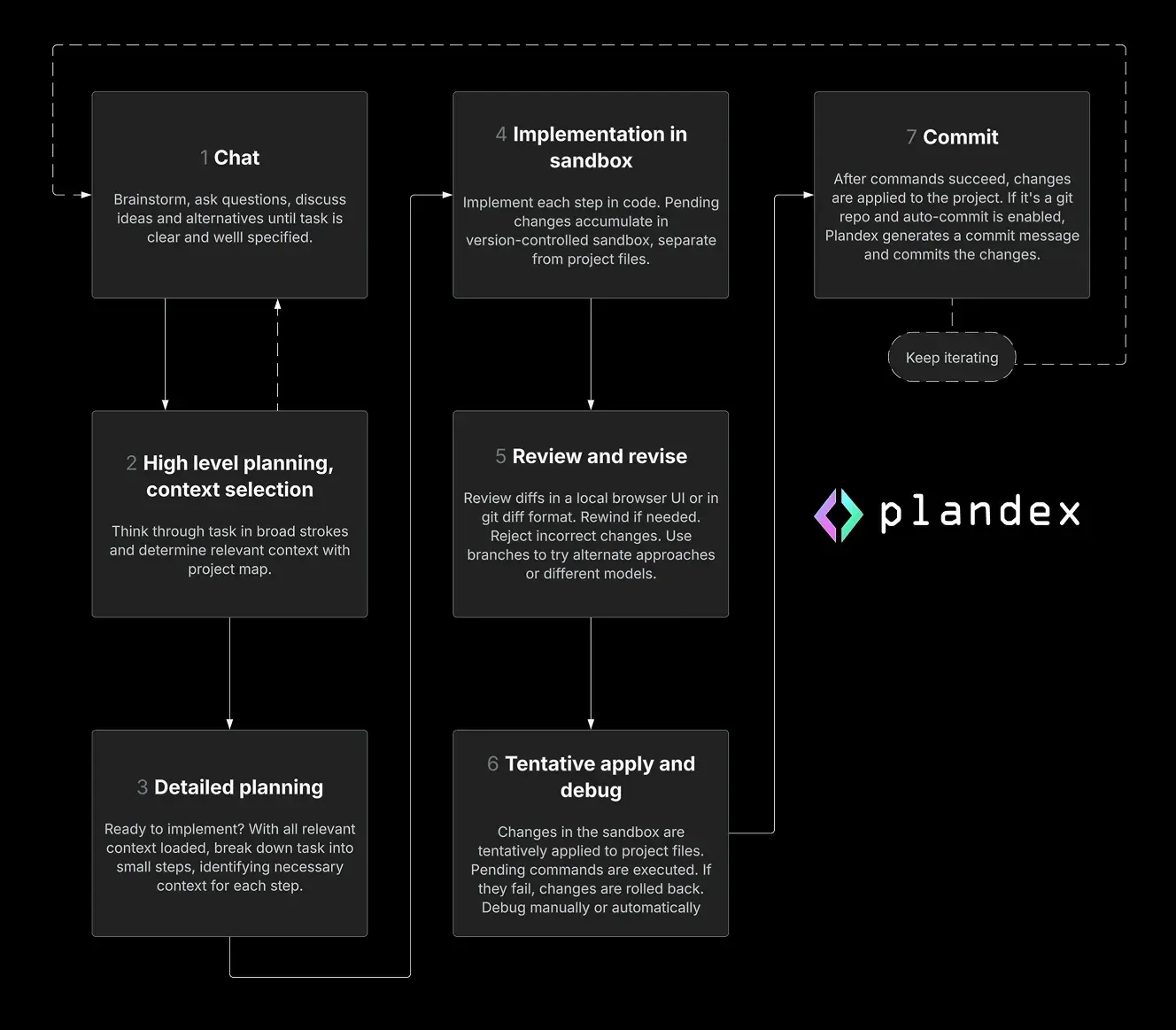
plandex logshows the history,plandex rewindreturns to an earlier state and, since v2.0.0, also reverts applied changes in project files unlessauto-revert-on-rewindis off.plandex checkoutcreates and switches branches for trying different prompts, context or models; the version control page notes that a rewind cannot be undone except through a branch created beforehand. - Git integration Plandex works without git but integrates with it: at the plus level and above, applied changes are committed automatically with a generated commit message. The auto-commit behaviour can be switched per plan or as a default. The project workflow figure shows commit as the last step after commands succeed.
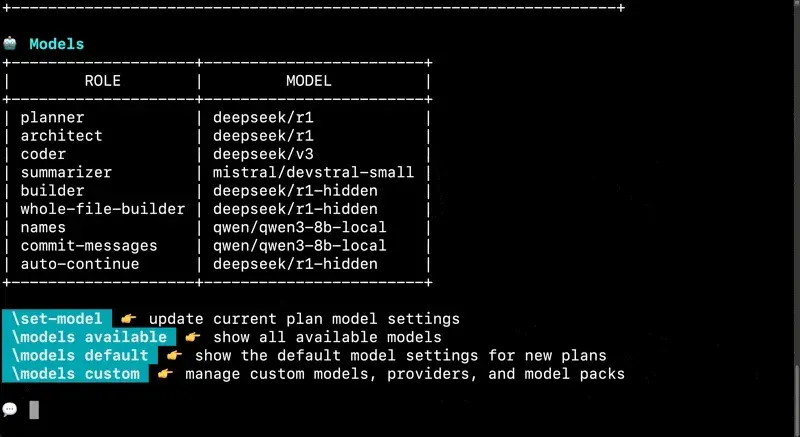
- Model roles and built-in packs Plandex splits work across model roles (planner, architect, coder, summarizer, builder, whole-file builder, names, commit messages, auto-continue) and maps them to models through packs. Built-in packs include
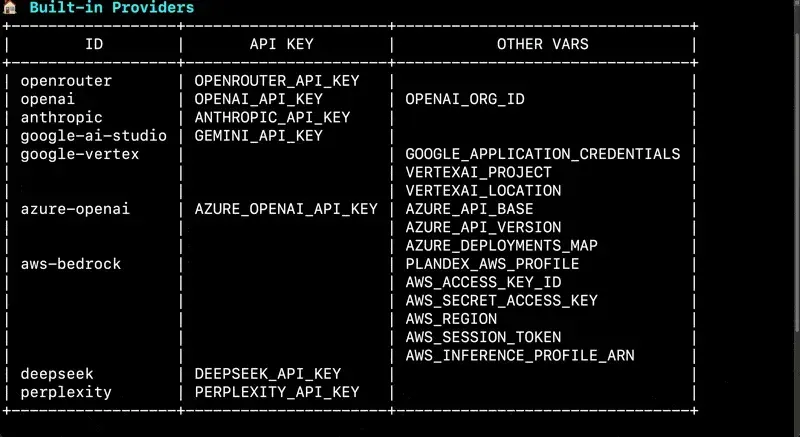
daily-driver(Anthropic, OpenAI and Google mix, up to 2M context),reasoning,strong,cheap,oss(DeepSeek and Qwen) and provider packs for OpenAI, Anthropic and Google, with fallbacks for large context and errors. The model pack list names the model per role as of v2.2. - Model providers and keys Provider credentials are read from environment variables when the CLI runs: OpenRouter, OpenAI, Anthropic, Google AI Studio, Google Vertex AI, Azure OpenAI, AWS Bedrock, DeepSeek and Perplexity are built in. When several keys are set, the direct provider takes precedence and OpenRouter acts as a failover. The providers page lists the variables;
plandex providersprints the same table in the terminal. - Custom models, providers and packs Since v2.2.0,
plandex models customopens a JSON file with a schema for adding OpenAI-compatible providers (withbaseUrl, an API key variable orskipAuthfor local servers), custom models with token limits and output format, and custom model packs. On a self-hosted server all three are supported. The custom models guide includes a Together.ai example. - Ollama and local models With a self-hosted server Plandex can call Ollama models. The
ollamapack runs every role locally (qwen3 up to 32b, devstral 24b; at least 32GB RAM stated as a minimum), whileollama-dailyandollama-ossuse local models for lighter roles and remote models for planning and coding (at least 16GB RAM). The Ollama quickstart calls the all-local pack experimental. - Claude Pro or Max subscription Release 2.2.1 lets Plandex use a Claude Pro or Max subscription for Anthropic models through
plandex connect-claude, withclaude-statusanddisconnect-claude. When the subscription quota is exhausted, calls switch to another configured Anthropic provider (Anthropic API, Vertex AI, Bedrock or OpenRouter) or return a rate limit error until the quota resets, per the subscription page. - Local mode server The local mode quickstart clones the repository and runs
app/start_local.sh, which requires git, Docker and docker-compose. The compose file starts PostgreSQL and theplandexai/plandex-server:latestimage on port 8099 with data in Docker volumes. The CLI connects withplandex sign-inand the Local mode host option; rerunning the script pulls the latest image. - Advanced self-hosting For remote or multi-user servers, the advanced self-hosting guide covers PostgreSQL (ideally v14), the
DATABASE_URL,GOENV,PLANDEX_BASE_DIRand SMTP variables, the Dockerfile and running from source with Go. Production mode sends sign-in pins by email; a/healthendpoint returns 200 when the server is up. Orgs, invitations and domain-based access exist for multiple users of one server. - API key handling The security page states that on a self-hosted server API keys are held in RAM only while a plan stream is active and are not written to disk, logged or stored in a database. Keys are passed from the CLI environment rather than stored on the server.
- Background tasks A plan can be sent to the background with
--bgontellorcontinue, or thebhotkey in the stream view, and managed withplandex ps,connectandstop. In v2 this is disabled by default because it is not compatible with automatic context loading; it is available at lower autonomy levels. - CLI installation The README documents a one-line install script hosted on plandex.ai; the same script is in the repository at
app/cli/install.shand downloads release tarballs from GitHub. A manual install places the binary from the latest release in thePATH, and a source build usesgo buildinapp/cli. The README states the CLI install has no dependencies.
Where Plandex fits
Multi-file features in a large codebase
The README describes Plandex as built for tasks that touch dozens of files in large projects. In tell mode, the model selects context from the project map, writes a high-level plan, breaks it into steps and implements each step with smart context, while changes collect in the sandbox. The workflow figure shows the sequence: chat, planning and context selection, detailed planning, implementation in the sandbox, review, tentative apply with commands, and commit.
Reviewing and correcting agent changes before they land
When a task finishes, the review menu offers the browser diff view, git diff output, reject, apply and full auto. Files with wrong edits can be rejected individually, and a plan can be rewound to any earlier version. Branches keep alternative attempts side by side, for example the same task with a different model pack, without losing the original history.
Fixing failing builds, tests and linters
The documentation lists debug loops such as plandex debug 'go test ./...', plandex debug 'npm run build', plandex debug 'cargo build' and plandex debug 'tsc --noEmit'. Each failed run is sent to the model, fixes are applied tentatively, and failed attempts are rolled back. Browser applications can be included when Chrome is available, with JavaScript exceptions fed back into the loop.
Exploring and discussing a codebase
Chat mode answers questions about a project with the same automatic context selection, without producing changes. The REPL can be started with --chat, and conversations can later switch to tell mode for implementation. plandex convo prints the full conversation of a plan.
Running Plandex after the Cloud shutdown
With Plandex Cloud shut down on November 7, 2025 according to the wind-down announcement, plans live on a server you run. The local mode quickstart covers a single developer machine with Docker; the advanced guide covers a shared server with PostgreSQL, SMTP and orgs. Model access then comes from your own keys, for example a single OpenRouter key, direct provider keys, a Claude subscription or Ollama.
Mixing hosted and local models
Model packs assign different models to planning, coding, building and naming roles. The oss pack uses DeepSeek and Qwen models, the Ollama packs move lighter roles to local models, and custom packs in the JSON file can point roles at any OpenAI-compatible endpoint. Packs are switched per plan with plandex set-model or at REPL start with flags such as --cheap or --strong.
Reviews of Plandex
Be the first to share your experience with Plandex.
Write a review
Loading review form…
Found Plandex useful? Upvote it todayYour vote helps other IT teams find it in the daily ranking.