What is OpenBot by CopilotKit?
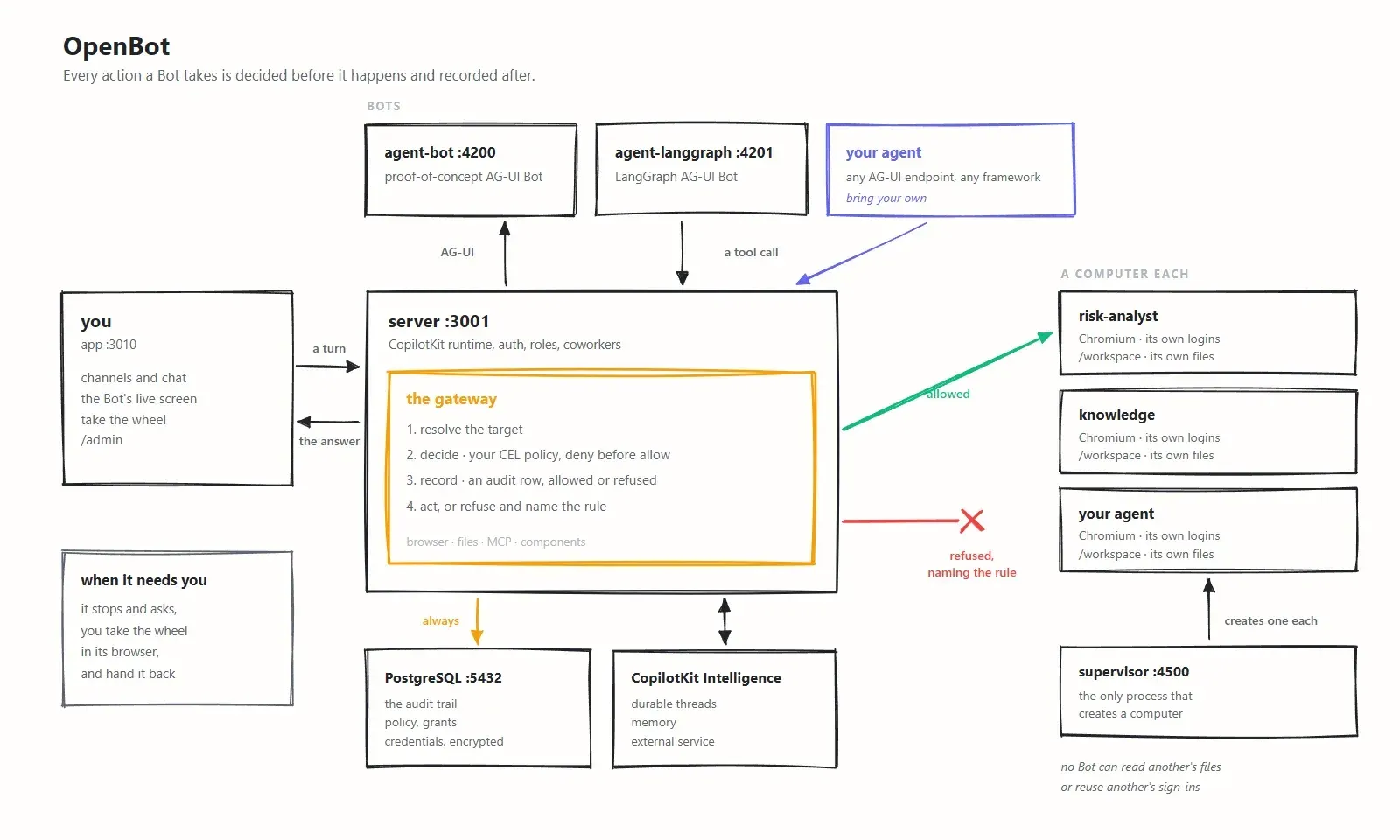
OpenBot is an open-source workspace for AI coworkers, published by CopilotKit, the company behind the AG-UI agent protocol. The project calls its agents Bots. Each Bot works through a computer of its own, a container with a Chromium browser, a /workspace folder, browser logins and a shell, and every browser, file, shell or tool action passes a policy gateway that decides it before it happens and writes an audit row. The desktop installer labels the product "OpenBot by CopilotKit"; it is unrelated to other projects that use the OpenBot name. Source, issues and releases are on GitHub and the product site is open.bot.
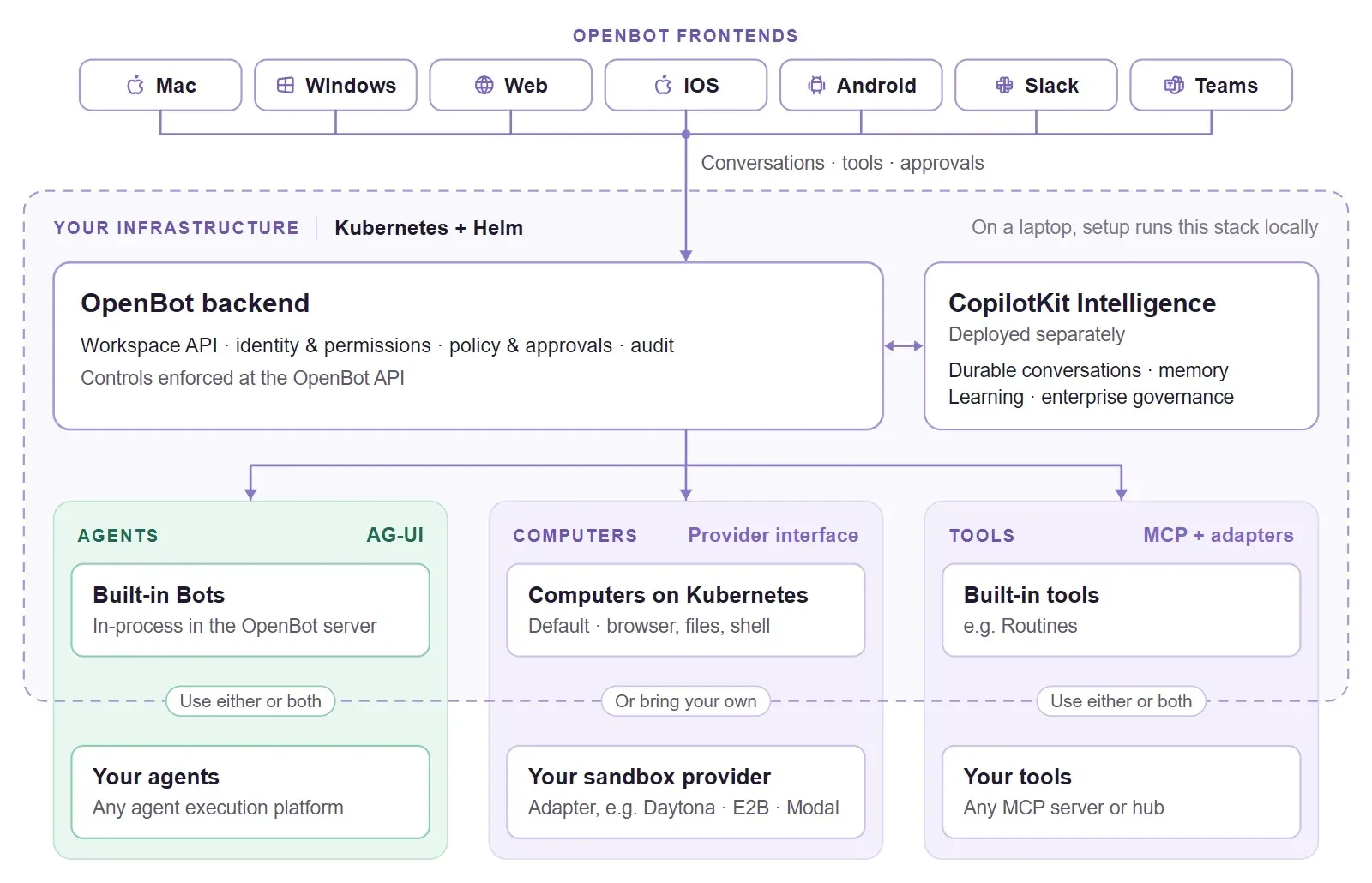
The project has three parts. OpenBot frontends (Mac, Windows, web, iOS, Android, Slack and Microsoft Teams) connect people to one workspace; according to the site, the desktop apps are available now, iOS, Android, Slack and Teams are in early access and the web client is listed as coming soon. The OpenBot backend runs the workspace API and built-in Bots, connects external agents and MCP tools, manages Bot computers and enforces identity, permissions, action policies and audit, with PostgreSQL for product data. CopilotKit Intelligence supplies durable conversation threads, memory and Automatic Learning. The stack is TypeScript: a React and Vite app, a Hono API server with the CopilotKit runtime, Bun for development and tests, Docker or Podman for containers and a Helm chart for Kubernetes.
Distribution covers an OpenBot Desktop installer (notarized DMG for Apple silicon and Intel Macs, signed installer for Windows x64), a single published container image at ghcr.io/copilotkit/openbot, the Helm chart for AWS EKS, Azure AKS, Google GKE or any Kubernetes cluster, and the source template. The latest release is v1.0.2, published November 11, 2026. It runs no database migrations; on Windows the desktop app now runs in its own Podman machine named openbot, setup updates a Docker Desktop or Podman that is too old, installing over an older version on Windows no longer offers to delete application data, and the desktop back end and Helm chart move to CopilotKit Intelligence 0.16.0-rc.11. Version 1.0.0 was released on November 9, 2026, and 1.0.1 on November 10 added conversation renaming, per-conversation approval of repeated sends and a model setting in Settings > General, among other changes listed in the changelog.
Licensing is split. The OpenBot application template is released under the MIT license and can be forked, modified and white-labelled. CopilotKit Intelligence is separately licensed: a free local license for personal use on a laptop (set up by the desktop app, valid 30 days and renewable), a free trial license for Kubernetes evaluation, and a production license beyond evaluation, which OpenBot for Business includes. The README states that OpenBot, Intelligence and a compatible model can all run locally, while a cloud model or connected online app still receives requests, and initial downloads, account sign-in and local license renewal need internet access.
On the pricing page, the personal OpenBot workspace is free, with model usage billed by the model provider. OpenBot for Business is listed at up to $29 per user per month on a pay-as-you-go plan with access by request, self-hosted by default or hosted by CopilotKit in early access, and as custom pricing on an annual plan with SSO, role-based access control, offline and air-gapped deployment and 24/7 support. Both business plans list a 5% model usage charge on monthly model spend above $5,000 per organization. Similar projects on iThub include Kortix CompanyOS, LobeHub and Agent Zero.
Key capabilities
- OpenBot Desktop for macOS and Windows Installers are published for Apple silicon Macs, Intel Macs and Windows x64; the README describes them as needing no terminal or developer tools. The app installs the personal edition with CopilotKit Intelligence on the same computer and walks through Account, Install, AI and Start steps. On an Intel Mac it cannot install Podman itself, so Docker Desktop or Podman Desktop is needed first, according to the desktop install guide.
- A computer per Bot A supervisor process creates containers on demand: in the team setup each person gets a container with a folder and browser profile for each of their Bots, and a Bot marked Isolated gets a container of its own. Each computer has Chromium, its own logins and a /workspace folder. Setting COMPUTER_RUNTIME=runsc runs computers under gVisor where the host supports it, and computers bind to 127.0.0.1 with a per-container token.
- Shell access through the same gate A Bot can run commands in its workspace, install software and process files it saved. Shell commands pass the same policy gateway as browser actions, so a rule can refuse a shell entirely or refuse specific commands, and each command is recorded. The command inherits PATH, locale, terminal and proxy variables but not the rest of the deployment environment.
- Policy gateway with CEL rules The gateway resolves the target, evaluates the policy, writes the audit row and only then calls the computer. Rules written in CEL can inspect fields such as tool.name, intent, bot.id, actor.id, page.host, command, file.*, mcp.* and initiator.*. Deny rules are evaluated before allow rules, a missing policy permits nothing and a broken rule refuses rather than opens.
- Approvals and take-over Actions that need a person wait for approval; the README describes a Bot that waits for approval before it sends. When a Bot hits a login wall or a two-factor prompt it asks for help, and a person can take control of its browser in the same panel. While a person is driving, Bot actions are refused rather than queued, and the hand-over events are recorded in the audit trail.
- Audit trail The /admin/audit page lists what was permitted, refused or failed, and each refusal names the rule that caused it. Secrets requested by a Bot are logged by length only, not by value. Credentials stored through /admin/credentials are encrypted at rest, never returned by an API and redacted from audit events.
- Models The README lists OpenAI, Claude, Gemini and open models behind an OpenAI-compatible endpoint, hosted by a provider or on the user's own infrastructure. The site also lists Grok, Kimi, DeepSeek, Qwen, Nemotron and Mistral, used with the customer's own subscriptions or API keys. OPENAI_BASE_URL, ANTHROPIC_BASE_URL and GOOGLE_GENERATIVE_AI_BASE_URL route calls through a gateway or proxy.
- Bring your own agent over AG-UI Any AG-UI endpoint can be registered as a Bot from /bots, with a name, instructions, visibility and an optional write-only authorization header. The README names integrations for the Claude Agent SDK, Microsoft Agent Framework, Google ADK, AWS Strands, LangChain, Mastra, Pydantic AI, Agno and CrewAI. Endpoints are validated with the same target checks as browser navigation, and private addresses must be listed in AGENT_ENDPOINT_ALLOWED_HOSTS.
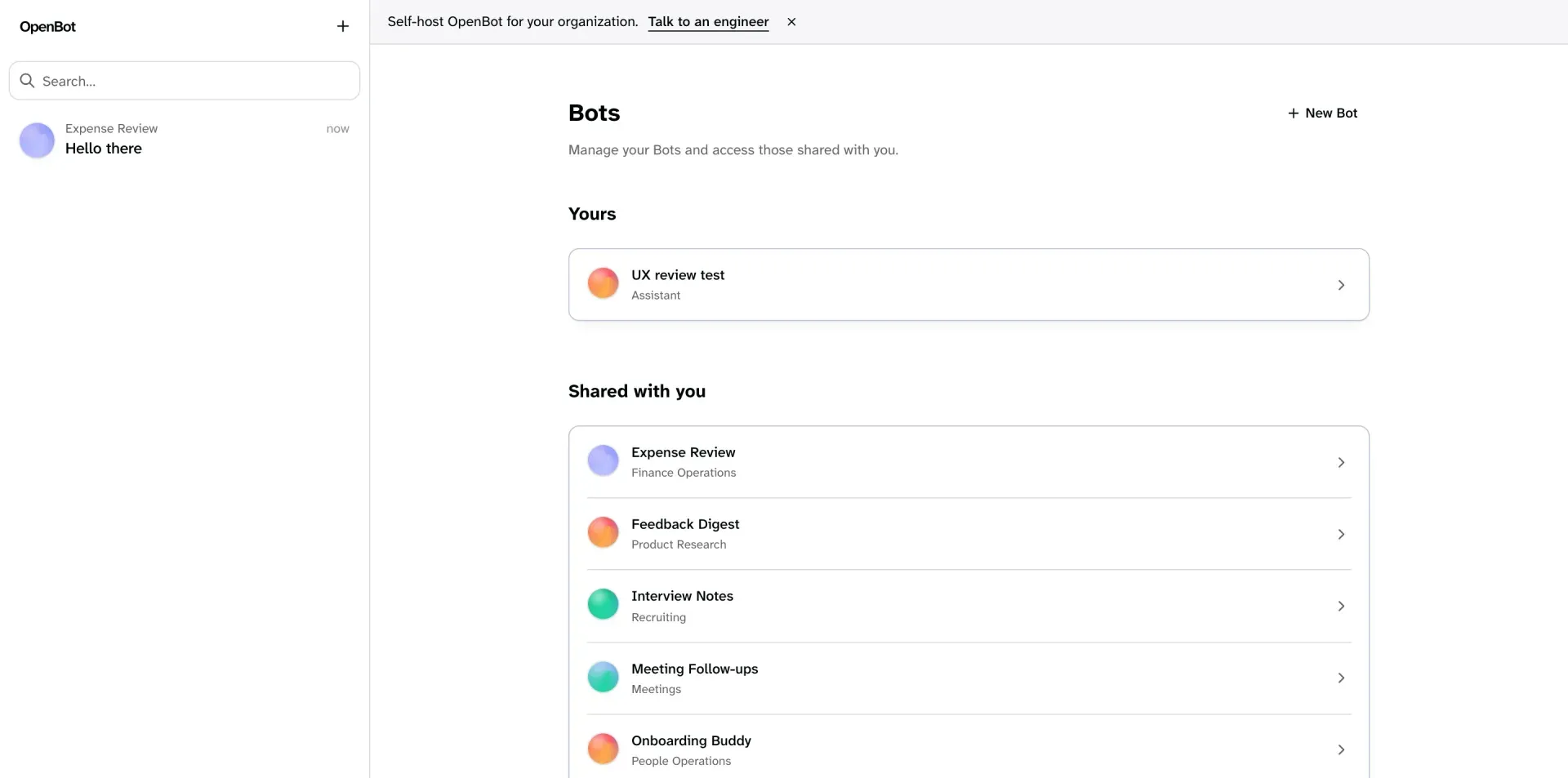
- Built-in Bots The team template ships General Assistant for everyday work and Knowledge, which answers from connected company documents with citations; the personal edition starts with one Personal Assistant. More Bots can be created from YAML examples such as Meeting Follow-ups. Tool access is granted separately, so a Bot can read a document without permission to edit it.
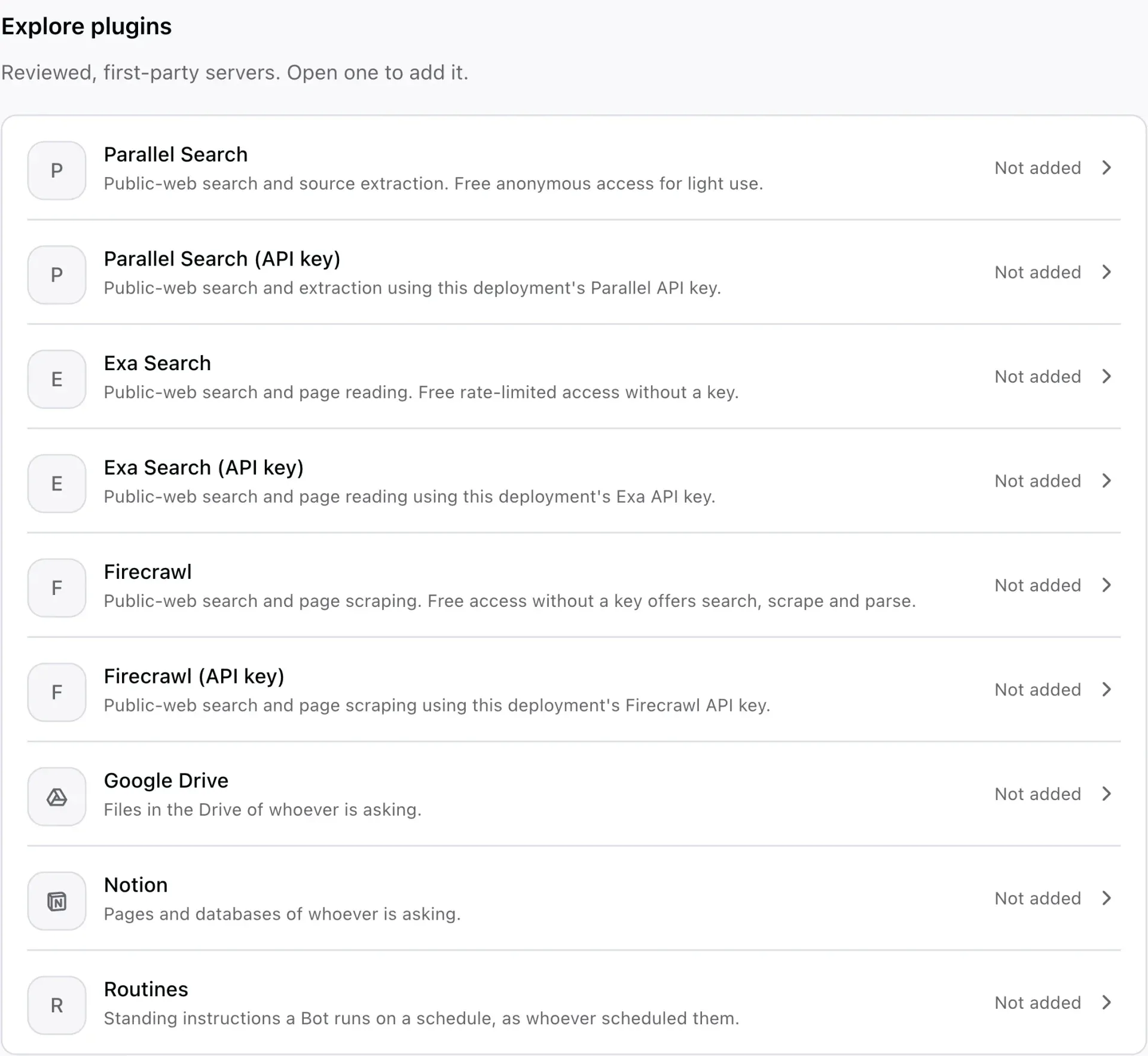
- Governed MCP tools and apps Google Drive, Notion and the public-web research providers Parallel, Exa and Firecrawl ship in the catalogue, and Composio (or Arcade) brokers a few hundred more apps, each used as the person asking. Custom MCP servers must pass URL checks, and unknown or custom-server tools are treated as writes. Plugin setup is documented in the MCP by URL guide and related pages.
- Skills, memory and Automatic Learning Skills are instructions invoked with / in the composer; personal skills attach to Bots their author owns and deployment skills are admin-owned. A Bot with the shipped skill-creator skill can draft a skill in conversation. Automatic Learning sends completed conversations to a CopilotKit Intelligence Learning container and returns published skills, configured under Admin, as described in the Automatic Learning guide.
- Routines A Bot can run work on a schedule as the person who asked, in the channel where it was asked. Limits are a 15-minute minimum interval and 20 enabled routines, and ten consecutive failures switch a routine off. A worker process fires due routines; scripts/start.sh starts it locally.
- Interactive components Bots can answer with compiled React components or sandboxed components authored in /admin/playground and published without a deployment. Each call checks that the component exists, is published and is not withheld from that Bot, and data functions are granted per component.
- Sign-in and people management Sign-in uses Google, Microsoft or Okta from the environment, or a company SAML or OpenID Connect provider registered at runtime and routed by email domain. /admin/people lists everyone who has signed in, changes roles and removes access, ending the active session. Without an identity provider, OPENBOT_SINGLE_USER admits every request as one administrator.
- Kubernetes deployment with Helm The chart deploys OpenBot and CopilotKit Intelligence together on AWS EKS, Azure AKS, Google GKE or another cluster. A first evaluation needs amd64 nodes, a default StorageClass, kubectl, Helm, a trial or production license and a model key. The Helm guide covers authentication, TLS, databases, secrets, storage and network policies.
- Single-container and source setups The published image carries the app, the API, the browser the Bots drive and optionally an embedded PostgreSQL, served on port 3001; a version tag such as :v1.0.1 pins a release. Running from source needs Docker, Bun 1.4 or later, a CopilotKit Intelligence project and a model key; scripts/start.sh starts the services, applies migrations and serves the app on port 3010. On Windows the source setup runs inside WSL 2 with Ubuntu.
Where OpenBot by CopilotKit fits
Personal assistant on one computer
OpenBot Desktop installs the personal edition for one person: nobody signs in, there is one computer and the workspace starts with a Personal Assistant. During setup the user picks an AI provider and key, and the assistant runs either inside the server or on a selected agent framework. In the source version, the personal edition can also open the user's installed Chrome or Edge with the OpenBot Recorder extension, used by the Teach a Bot feature to record steps, as described in the personal edition guide.
Browser tasks with review before sending
The README shows Bots opening sites, filling web forms and returning interactive results, with the action waiting for approval before it sends. Its example tasks include asking a Bot to read the top story on a news site, filling a test form and then inspecting /admin/audit, and adding a deny rule under /admin/boundaries before retrying the same browser action to see the refusal.
Team workspace with governed access
In the team edition, administrators connect company sign-in, set roles under /admin/permissions, choose model providers and register credentials that Bots use without seeing them. Bots can be shared, reached in Slack, Microsoft Teams or by text, and given standing roles in channels. The approvals documentation describes how approval requests work.
Connecting agents built on other frameworks
Teams that already run agents on LangGraph, Mastra, CrewAI, Pydantic AI, Google ADK or an execution platform such as Amazon Bedrock AgentCore can register their AG-UI endpoint as a Bot. Those agents then use OpenBot's computers, tools and policies, and appear beside built-in Bots in the same workspace. Tenant packages can also declare agents in YAML as built-in, remote-ag-ui or remote-mastra, as documented in the coworkers guide.
Scheduled work and document questions
Routines let a Bot repeat a task such as a digest or follow-up on a schedule, and the Knowledge Bot answers questions from connected company documents with citations. The README example describes checking a hotel receipt stored in Drive against a travel policy, with room rate and tax shown separately, then using Teach a Bot to record the steps for the next claim.
Self-hosted deployment on Kubernetes
For an organization, the Helm chart installs OpenBot, CopilotKit Intelligence, the databases, the Learning container and scheduled jobs in the cluster. The default evaluation is single-user and reached through a local port-forward; the guide states that sign-in and TLS are configured before a deployment is shared. Computer execution uses Kubernetes by default, or a compatible external sandbox provider through an adapter, as shown in the architecture documentation.
Install
docker run -p 3001:3001 --env-file .env -e EMBEDDED_POSTGRES=on -v openbot-data:/var/lib/postgresql ghcr.io/copilotkit/openbot:latestReviews of OpenBot by CopilotKit
Be the first to share your experience with OpenBot by CopilotKit.
Write a review
Loading review form…
Found OpenBot by CopilotKit useful? Upvote it todayYour vote helps other IT teams find it in the daily ranking.