

What is Sugabots?
Sugabots is an open-source workspace where people and AI agents, called bots, work in the same group chats. Each bot has a job, its own instructions, a model to think with and a set of tools it may use. Bots live in shared spaces called pods, where every member sees the same chats, results and approvals. The README states that Sugabots is a product of Nitric Group Inc., and the website footer carries the Nitric Group Inc. copyright. The project is documented at sugabots.ai/docs.
Sugabots is distributed as a single Docker image, ghcr.io/nitrictech/sugabots, that serves both the web app and the API, and it stores its data in PostgreSQL 18. The Quickstart uses an install script for macOS and Linux or a PowerShell command for Windows that writes a Docker Compose file and an .env file with two generated secret keys, then starts the app on port 3000. For shared use, the Deploy with Docker guide covers a Linux server behind a reverse proxy, or a hosting platform such as Suga, Railway or Render. The website describes a hosted version as coming soon, with a waitlist; the self-hosted edition is free and runs with the operator's own model keys.
The latest release at the time of writing is v0.5.0, published on November 6, 2026. Its changes include chat summaries rendered as Markdown, renaming a workspace in settings, a per-pod view of how full each sandbox computer's disk is, an OpenAPI document generated from the API, thread create, read and delete tools for bots, copying from a bot's desktop to the local clipboard, and bots that reply in a channel when they are named there. The first tagged release, v0.0.1, appeared on September 30, 2026, followed by v0.1.0 in early October and v0.3.0 and v0.4.0 in late October and early November.
According to the contributing guide, the application is a React web app, a Hono API and PostgreSQL, written in TypeScript; running from source requires Node.js 26 or newer, Bun 1.4.2 or newer and Docker Compose. Bots reach model providers such as Anthropic, OpenAI, OpenRouter and local servers like Ollama, connect to apps through the Model Context Protocol, search the web through a configurable provider and can run code in isolated sandboxes. The repository contains sandbox implementations for OpenSandbox and E2B.
The source code is licensed under the MIT License. The README states that the Sugabots name, logo, brand identity, illustrations and avatars are not covered by that license, and that forks may use the software but should use their own name and branding. Third-party materials such as provider logos keep their own licenses. Similar self-hosted projects listed on iThub include Buzz and LobeHub.
Sugabots screenshots
Explore the interface. Open a screenshot to view it at full size.
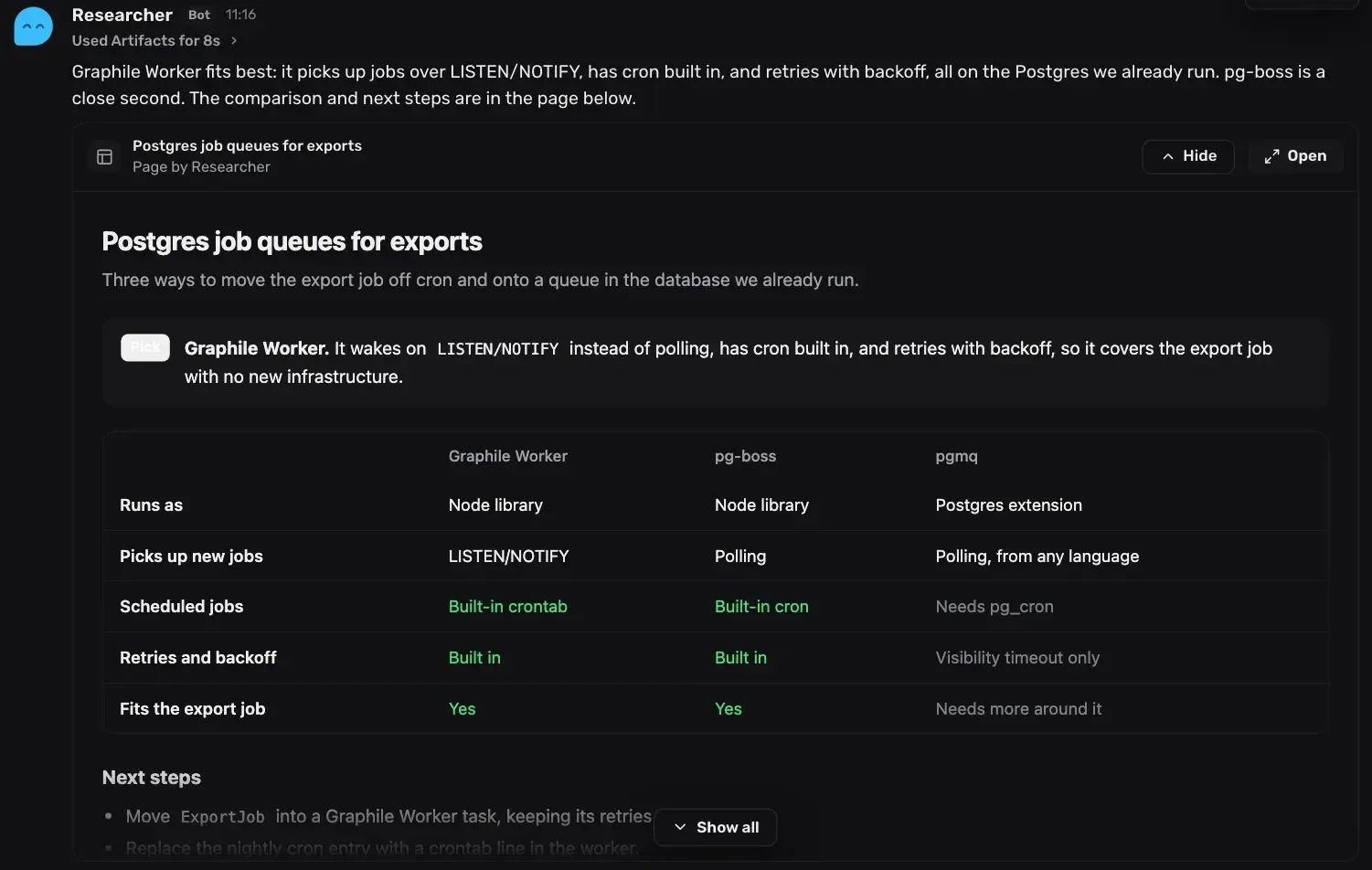
Official Sugabots screenshot, cropped: a bot reply with an artifact page containing a comparison table.
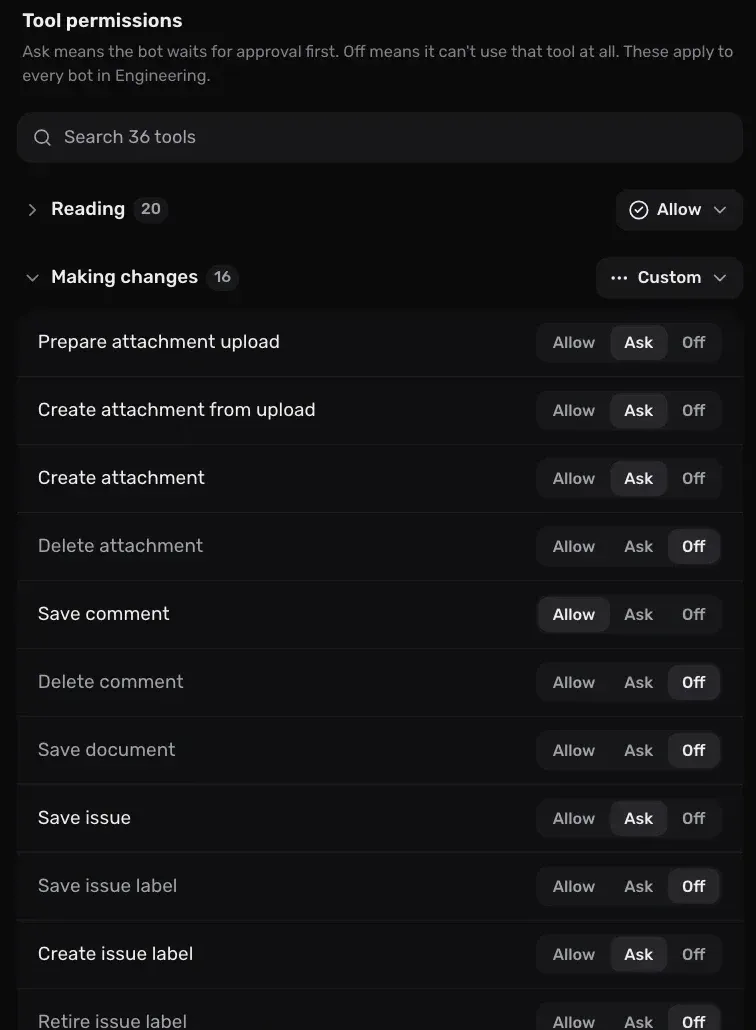
Per-tool approvals for a connection, grouped into reading and making changes (official screenshot, cropped).
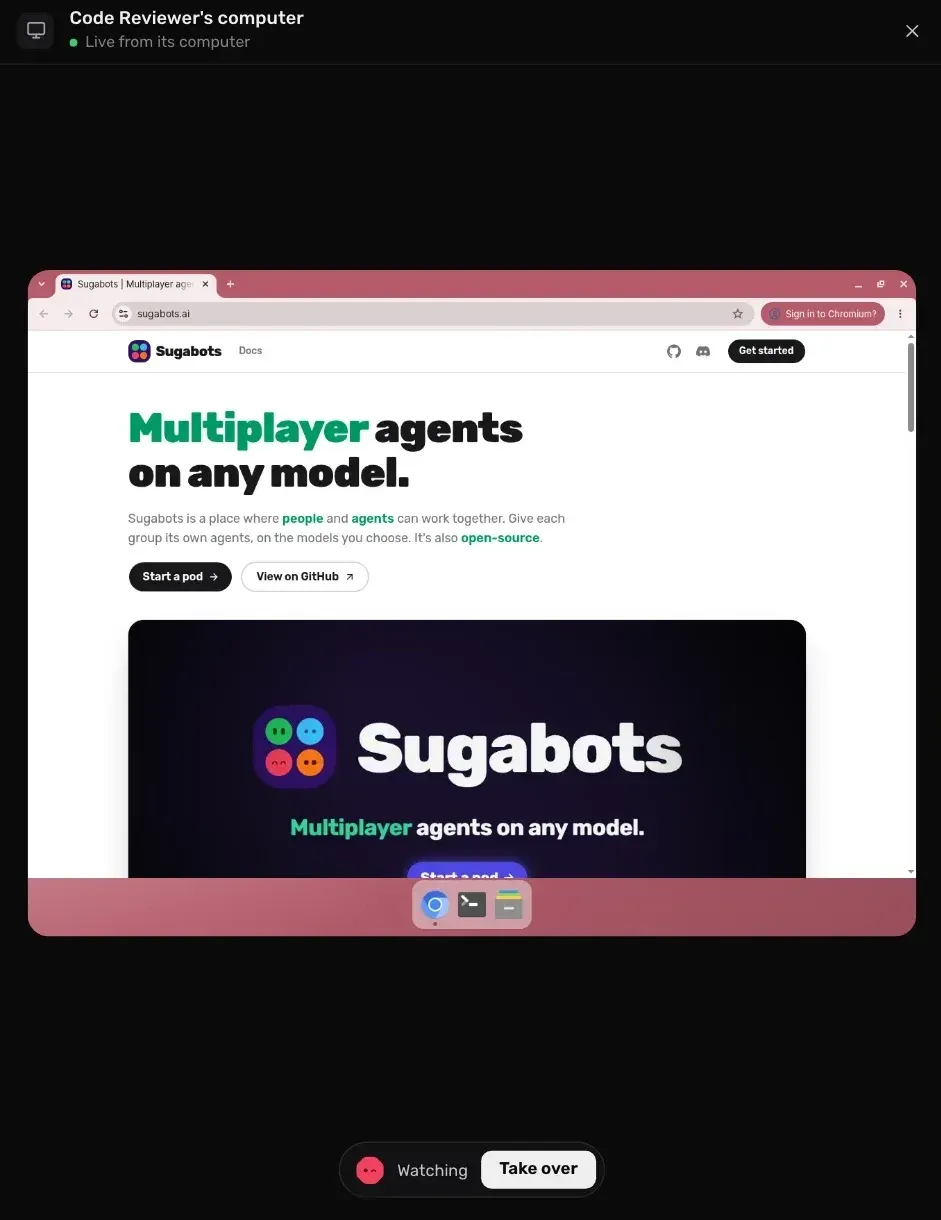
A bot's sandbox computer shown live, with a Take over control (official screenshot, cropped).
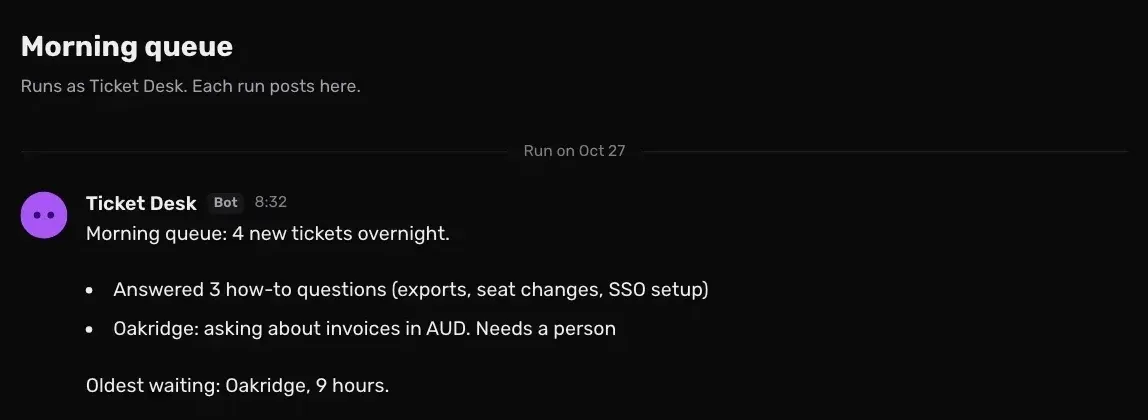
A scheduled routine run posted by a bot (official screenshot, cropped).
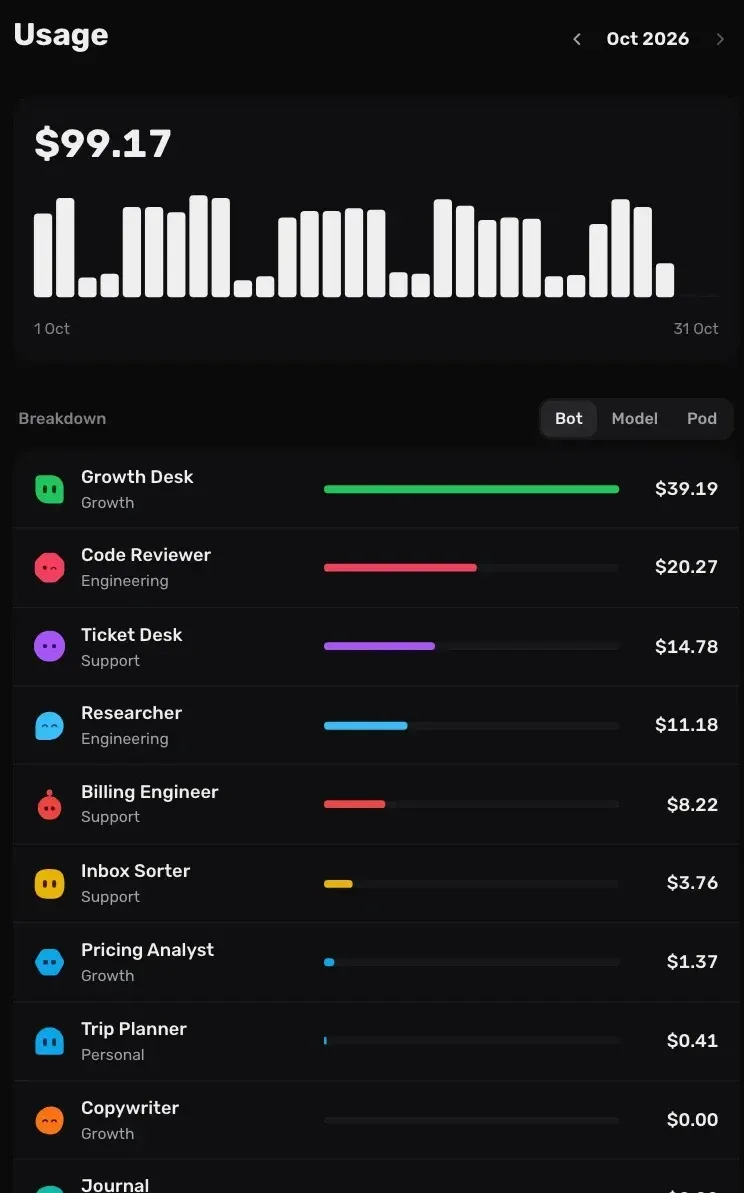
Monthly usage estimates broken down by bot (official screenshot, cropped).
Source: official Sugabots project page.
Key capabilities
- Shared pods A pod is a shared space for a group of people and their bots, such as a team or a family. Each bot lives in exactly one pod and has one chat that everyone in the pod shares, and each pod has its own bots and connections. Admins create pods and add people; members and viewers only see the pods they have been added to. The pods documentation describes the model.
- Personal pod Every person gets a private pod called Personal when they join, with one bot, the Personal Assistant, named and styled during onboarding. The documentation states that nobody else can see into a Personal pod, workspace admins included. Removing a person deletes their Personal pod and its conversations, while shared pods they created remain.
- Configurable bots A bot has a colour, a pair of eyes, a name with a matching handle such as
@trip-planner, a description, a model, instructions of up to 20,000 characters and a list of allowed built-in tools. Members can create and edit bots, and only admins can delete them. Deleting a bot removes its chat, routines and settings. - Bots asking bots A bot can ask another bot in the same pod for help; the exchange appears as a collaboration thread under its message. Documented limits: one other bot per turn, never itself, at most one further level of delegation, a two-minute wait before the asking bot moves on, and a pause after twelve consecutive bot replies with no person in between.
- Model providers per bot Each bot can use a different model. The provider catalog includes presets for Anthropic, OpenAI, ChatGPT, OpenRouter, Google Gemini, Groq, xAI, SuperGrok, Mistral, DeepSeek, Together AI, Fireworks AI, Cerebras, Ollama, LM Studio, llama.cpp and vLLM. A custom provider connects any service that speaks the OpenAI or Anthropic format, with optional custom headers. See the models documentation.
- Default and system models New bots start on a workspace default model, and a separate system model handles summarising, titling and compacting conversations. Admins choose which models from each provider are switched on, refresh model lists or add a model ID by hand. Local providers at private or plain-HTTP addresses require
ALLOW_UNSAFE_WORKSPACE_URLS=truein production. - MCP connections A connection links a pod to an app through the Model Context Protocol, and every bot in the pod can then use its tools. One-click sign-in is offered for Linear, Stripe, Notion, Sentry and Jira. Other servers connect by URL over Streamable HTTP with a bearer token, the server's own OAuth sign-in or a custom header; servers that only offer the older SSE transport are not supported, and Sugabots does not run MCP servers itself. Details are in the connections documentation.
- HTTP endpoint connections A plain web API can be added as an HTTP endpoint with one tool per method: get, post, put, patch and delete. Responses return the status, selected headers and up to 5 MB of body, and redirects are not followed. The secret is added after the bot writes the request, is replaced with a placeholder if the API echoes it back, and cannot be sent to another address.
- Tool approvals Every connection tool has an approval of Off, Ask or Allow. Until someone chooses, tools the app marks as read-only start on Allow, tools that delete or overwrite start on Off and the rest start on Ask. Each allowed call runs once with no permanent allow option, and only admins can answer approvals raised by a routine run. See tools and approvals.
- Routines A routine is a job for one bot with instructions and one or more triggers: a schedule (every day, weekdays or weekly at a chosen time), a webhook, or a GitHub event when the pod is connected to GitHub. Results can be posted to the bot's chat or kept inside the run. After downtime, a routine does one catch-up run and never runs twice at the same time. Admins can also ask a bot in chat to set up or change its own schedule.
- Signed webhooks Webhook triggers verify calls from GitHub, Stripe, Slack and Linear with their signing secrets, or from any sender with HMAC (SHA-1, SHA-256 or SHA-512), bearer, API key or basic auth. Bodies are JSON up to 64 KiB. Filters allow up to 10 conditions with up to 20 accepted values each, and delivery IDs deduplicate retries. The routines documentation lists the response codes.
- Sandboxes Bots can run code, use software and browse the web in their own isolated environment with a desktop that people can watch or take over. Running sandboxes with Docker on one's own server requires Linux 5.9 or later. The deployment guide explains that OpenSandbox injects connection credentials by decrypting and re-encrypting a sandbox's HTTPS traffic, so whoever runs OpenSandbox can see what passes through it.
- Web search One workspace switch enables the built-in web search and page reading tools. Exa is the default and works on its free, rate-limited tier without a key; Brave Search and Tavily need a key, and SearXNG uses the operator's own server URL. Page reading only reaches public pages unless
ALLOW_PRIVATE_WEB_FETCH_NETWORKis set. - Artifacts and GitHub Files and outputs that bots make are saved for the team to open and review, including HTML pages that can be served from a separate content origin. According to the README, bots can read a pod's GitHub repositories, push branches and open pull requests once someone allows it.
- Roles and sign-up control Workspaces have four roles: owner, admin, member and viewer. Invitations are sent by email and expire after two days. The
SIGNUP_MODEsetting is closed by default, with referral and open modes available, and email verification can be required. - Usage and costs Owners and admins see monthly cost estimates in Settings, with daily bars and breakdowns by bot, model and pod. The amounts are estimated from each provider's published prices and token counts; requests that Sugabots cannot price are counted but excluded from the total.
- Notifications Browser notifications can be enabled per device for mentions and replies, for everything, or for nothing. Pods and bots can have their own level or be muted for a while, and quiet hours can be set each day.
- Install on macOS, Linux or Windows With Docker and Docker Compose installed,
curl -fsSL https://sugabots.ai/install.sh | shon macOS or Linux, orirm https://sugabots.ai/install.ps1 | iexin PowerShell on Windows, creates asugabotsfolder and starts the app and its database. The first account created on a new installation owns it.
Where Sugabots fits
Trying Sugabots on a single computer
The Quickstart runs Sugabots and PostgreSQL in Docker with one command. The script writes compose.yml and an .env file containing BETTER_AUTH_SECRET and CREDENTIALS_ENCRYPTION_KEY, starts both containers and waits until the app answers at http://localhost:3000. Without an email provider, verification links are printed to the container logs. Data is kept in the sugabots_postgres_data Docker volume, and the documentation notes that losing the encryption key makes every saved API key unreadable.
Hosting a workspace for a team
The deployment guide describes a Linux server with Docker Compose, a domain name and an email provider. Resend is the built-in provider, and other services can receive emails through a webhook. Sugabots serves plain HTTP on port 3000, so the guide places Caddy or nginx in front for HTTPS; the proxy must pass WebSocket connections for bot desktops and accept 30 MB uploads. Files are stored in PostgreSQL by default, up to 100 MiB each, or on a mounted volume with BLOB_STORE_PROVIDER=filesystem. Updates are docker compose pull and docker compose up -d, with migrations applied on start.
Running bots on local models
Ollama, LM Studio, llama.cpp and vLLM are listed as providers that run on the operator's own hardware, so messages stay on that machine. A local server needs a server URL rather than an API key. In production mode, the installation must set ALLOW_UNSAFE_WORKSPACE_URLS=true before workspaces can reach private or plain-HTTP addresses, as described in the configuration reference.
Connecting a pod to work apps
A pod admin adds a connection from the pod's settings, either one of the one-click apps (Linear, Stripe, Notion, Sentry, Jira) or any MCP server reachable over Streamable HTTP. Once Sugabots has listed a connection's tools, each starts at a default approval, and the pod settings set Allow, Ask or Off per tool or per group. Tool names are prefixed with the connection name, such as linear__list_issues. A server that cannot be reached is left out of that turn rather than stopping the bot.
Scheduled and event-driven bot work
Routines let a bot post a morning check-in, sort an inbox on weekdays or react to an incoming order. A webhook trigger has its own address and secret, and a call is answered with 202 and an execution ID once the run is queued. Filters on JSON paths restrict which calls start a run, for example only Linear issues created with a given label. Each run appears in the bot's chat as a line that opens into a thread with everything the bot did.
Backing up and restoring an installation
The documented backup covers two items kept together: a pg_dump of the database and the .env file holding the keys. Restoring stops Sugabots, recreates the database, loads the dump and starts the app again, which applies newer migrations if the backup came from an older version. Installations that keep files on a volume archive that volume after the database. The edge image tag tracks the main branch, and each build is also tagged by commit.
Install
curl -fsSL https://sugabots.ai/install.sh | shReviews of Sugabots
Be the first to share your experience with Sugabots.
Write a review
Loading review form…
Alternatives to Sugabots
 BuzzBuzz is an Apache 2.0 workspace from Block in which humans and coding agents such as goose, Codex and Claude Code join the same channels with their own keys. A Rust Nostr relay stores signed events in Postgres; desktop apps cover macOS, Linux and Windows.
 LobeHubLobeHub is a TypeScript agent workspace with tasks, memory, pages and MCP tools. Agents answer in Slack, Discord or Telegram, can drive Claude Code or Codex on your devices, and run in LobeHub Cloud, desktop apps or a Docker Compose stack.ODOpen DuetOpen Duet is an open-source workspace for named AI agents with memory, scheduled routines and approval controls, on desktop or self-hosted with your engines.